VSI ACMS for OpenVMS Concepts and Design Guidelines
- Software Version:
- ACMS for OpenVMS Version 5.3-3
- Operating System and Version:
- VSI OpenVMS Alpha Version 8.4-2L1 or higher
VSI OpenVMS IA-64 Version 8.4-1H1 or higher
Preface
1. About VSI
VMS Software, Inc. (VSI) is an independent software company licensed by Hewlett Packard Enterprise to develop and support the OpenVMS operating system.
2. Intended Audience
This manual is intended for those who:
Define the business requirements to be addressed by the application
Determine the design of the application
Program the application
This manual describes the concepts necessary to understand transaction processing in general, and the VSI ACMS for OpenVMS (ACMS) system specifically. This manual also offers guidelines for the design of an ACMS application, including how to:
Analyze business requirements
Determine transaction processing functionality
Choose design options for specific ACMS functionality
Create design documents to guide the application development
You need not be an experienced ACMS programmer to use this manual. However, less experienced persons may benefit by first reviewing VSI ACMS for OpenVMS Getting Started.
3. Document Structure
This manual contains the following chapters and appendixes:
|
Provides an overview of transaction processing (TP) concepts, ACMS application development concepts, and the ACMS run-time system. | |
|
Explains how to design a transaction processing application using ACMS. It describes the role of the design process in the overall application development life cycle. | |
|
Offers guidelines for describing the business problem that your ACMS application is going to solve. | |
|
Provides guidelines for determining transaction processing functionality needed to meet the business requirements detailed in your Requirements Specification. | |
|
Chapter 5, "Mapping Business Functions and Transactions to ACMS Tasks" |
Provides guidelines for mapping business functions and transactions to ACMS tasks. |
|
Provides guidelines for the detailed design of the tasks outlined for your application. | |
|
Provides guidelines for mapping your defined transactions to step procedure implementations. | |
|
Provides guidelines for designing VSI DECforms menus and forms. This chapter also provides guidelines for designing non-standard ACMS user interfaces, such as customer-written interfaces created using the ACMS Systems Interface (SI) or Request Interface (RI). | |
|
Chapter 9, "Designing Task Group and Application Definitions" |
Provides guidelines for grouping tasks into task groups. |
|
Presents a Requirements Specification template. | |
|
Presents a Functional Specification template. | |
|
Presents a Programming Specification template. |
4. ACMS Help
ACMS and its components provide extensive online help.
DCL level help
Enter
HELP ACMSat the DCL prompt for complete help about theACMScommand and qualifiers, and for other elements of ACMS for which independent help systems do not exist. DCL level help also provides brief help messages for elements of ACMS that contain independent help systems (such as the ACMS utilities) and for related products used by ACMS (such as DECforms or Oracle CDD/Repository).ACMS utilities help
Each of the following ACMS utilities has an online help system:
ACMS Debugger ACMSGEN Utility
ACMS Queue Manager (ACMSQUEMGR)
Application Definition Utility (ADU)
Application Authorization Utility (AAU)
Device Definition Utility (DDU)
User Definition Utility (UDU)
Audit Trail Report Utility (ATR)
Software Event Log Utility Program (SWLUP)
The two ways to get utility-specific help are:
Run the utility and type
HELPat the utility prompt.Use the DCL
HELPcommand. At the "Topic?" prompt, type@followed by the name of the utility. Use the ACMS prefix, even if the utility does not have an ACMS prefix (except for SWLUP). For example:Topic? @ACMSQUEMGR Topic? @ACMSADU
However, do not use the ACMS prefix with SWLUP:
Topic? @SWLUP
Note
Note that if you run the ACMS Debugger Utility and then type
HELP, you must specify a file. If you ask for help from the DCL level with@, you do not need to specify a file.ACMSPARAM.COM and ACMEXCPAR.COM help
Help for the command procedures that set parameters and quotas is a subset of the DCL level help. You have access to this help from the DCL prompt, or from within the command procedures.
LSE help
ACMS provides ACMS-specific help within the LSE templates that assist in the creation of applications, tasks, task groups, and menus. The ACMS- specific LSE help is a subset of the ADU help system. Within the LSE templates, this help is context-sensitive. Type
HELP/IND
                            (PF1-PF2)
at any placeholder for which you want help.Error help
ACMS and each of its utilities provide error message help. Use
HELP ACMS ERRORSfrom the DCL prompt for ACMS error message help. UseHELP ERRORSfrom the individual utility prompts for error message help for that utility.Terminal user help
At each menu within an ACMS application, ACMS provides help about terminal user commands, special key mappings, and general information about menus and how to select tasks from menus.
Forms help
For complete help for DECforms or TDMS, use the help systems for these products.
5. Related Documents
The following table lists the books in the VSI ACMS for OpenVMS documentation set.
| ACMS Information | Description |
|---|---|
| VSI ACMS Version 5.0 for OpenVMS Installation Guide | Description of installation requirements, the installation procedure, and postinstallation tasks. |
| VSI ACMS for OpenVMS Getting Started | Overview of ACMS software and documentation. Tutorial for developing a simple ACMS application. Description of the AVERTZ sample application. |
| VSI ACMS for OpenVMS Concepts and Design Guidelines | Description of how to design an ACMS application. |
| VSI ACMS for OpenVMS Writing Applications | Description of how to write task, task group, application, and menu definitions using the Application Definition Utility. Description of how to write and migrate ACMS applications on an OpenVMS system. |
| VSI ACMS for OpenVMS Writing Server Procedures | Description of how to write programs to use with tasks and how to debug tasks and programs. |
| VSI ACMS for OpenVMS Systems Interface Programming | Description of using Systems Interface (SI) Services to submit tasks to an ACMS system. |
| VSI ACMS for OpenVMS ADU Reference Manual | Reference information about the ADU commands, phrases, and clauses. |
| VSI ACMS for OpenVMS Quick Reference | List of ACMS syntax with brief descriptions. |
| VSI ACMS for OpenVMS Managing Applications | Description of authorizing, running, and managing ACMS applications, and controlling the ACMS system. |
| VSI ACMS for OpenVMS Remote Systems Management Guide | Description of the features of the Remote Manager for managing ACMS systems, how to use the features, and how to manage the Remote Manager. |
| Online help | Online help about ACMS and its utilities. |
6. OpenVMS Documentation
The full VSI OpenVMS documentation set can be found on the VMS Software Documentation webpage at https://docs.vmssoftware.com.
7. VSI Encourages Your Comments
You may send comments or suggestions regarding this manual or any VSI document by sending electronic mail to the following Internet address: <docinfo@vmssoftware.com>. Users who have VSI OpenVMS support contracts through VSI can contact <support@vmssoftware.com> for help with this product.
8. Conventions
The following conventions are used in this manual:
| Ctrl/x | A sequence such as Ctrl/x indicates that you must press and hold the key labeled Ctrl while you press another key or a pointing device button. |
| PF1 x | A sequence such as PF1 x indicates that you must first press and release the key labeled PF1 and then press and release another key or a pointing device button. |
| Return | In the HTML version of this document, this convention appears as brackets rather than a box. |
| . . . |
A horizontal ellipsis in examples indicates one of the
following possibilities:
|
| ⋮ | A vertical ellipsis indicates the omission of items from a code example or command format; the items are omitted because they are not important to the topic being discussed. |
Monospace text | Monospace type indicates code examples and interactive screen displays. In the C programming language, monospace type in text identifies the following elements: keywords, the names of independently compiled external functions and files, syntax summaries, and references to variables or identifiers introduced in an example. In the HMTL version of this document, this text style may appear as italics. |
| - | A hyphen at the end of a command format description, command line, or code line indicates that the command or statement continues on the following line. |
| numbers | All numbers in text are assumed to be decimal unless otherwise noted. Nondecimal radixes—binary, octal, or hexadecimal—are explicitly indicated. |
| bold text | Bold text represents the introduction of a new term or the name of an argument, an attribute, or a reason. In the HMTL version of this document, this text style may appear as italics. |
| italic text | Italic text indicates important information, complete titles of
manuals, or variables. Variables include information that aries in
system output (Internal error number), in
command lines
(/PRODUCER=name), and in
command parameters in text (where dd represents
the predefined code for the device type). |
| UPPERCASE | Uppercase text indicates the name of a routine, the name of a file, the name of a file protection code, or the abbreviation for a system privilege. In command format descriptions, uppercase text is an optional keyword. |
| UPPERCASE | In command format descriptions, uppercase text that is underlined is required. You must include it in the statement if the clause is used. |
| lowercase | In command format descriptions, a lowercase word indicates a required element. |
| <lowercase> | In command format descriptions, lowercase text in angle brackets indicates a required clause or phrase. |
| ( ) | In command format descriptions, parentheses indicate that you must enclose the options in parentheses if you choose more than one. |
| [ | | ] | In command format descriptions, vertical bars within square brackets indicate that you can choose any combination of the enclosed options, but you can choose each option only once. |
| { | | } | In command format descriptions, vertical bars within braces indicate that you must choose one of the options listed, but you can use each option only once. |
9. References to Oracle Products
VSI ACMS documentation set, to which this document belongs, refers to the following Oracle products by their full and abbreviated names:
| Full product name | Shortened product name |
|---|---|
| Oracle Common Data Dictionary | CDD |
| Oracle Rdb | Rdb |
| Oracle Database/DBMS | DBMS |
| Oracle Trace | Trace |
Chapter 1. TP and ACMS Concepts
This chapter provides an overview of transaction processing (TP) concepts, ACMS application development concepts, and the ACMS run-time system.
1.1. Transaction Processing Concepts
A business function is the administrative function or business exchange that you want to occur. A business function clearly defines the business exchange in terms of a simple action. For example, a customer may request a car reservation from a customer service clerk.The clerk would then book a reservation for the customer.
A computer transaction supplies the mechanism for accomplishing the business function. Often several computer transactions are required to implement a single business function. A computer transaction can be a single independent database transaction, or it can be a distributed transaction that spans multiple database transactions.
Transaction processing is the implementation of computer transactions. A large part of transaction processing is the application programs written to perform computer transactions. These application programs usually involve updating a database to reflect changes to data and notifying the user that the change has taken place as intended. Transaction processing applications are typically high-volume, online applications that share the following characteristics and design issues:
A moderate to large number of users work on the same transaction processing system at the same time. This results in a heavy demand for system resources (CPU, memory, and I/O), increasing the need for solutions that share these resources effectively.
The applications involve predefined, structured work, such as adding items to inventory, updating a reservation list, or displaying employee records. This characteristic has design implications with respect to dividing a business area such as reservation processing into discrete functions, and dividing those functions into the correct sequence of activities required to perform each function.
All transactions in the application use the same set of databases or files. When multiple users (or devices) require access to the application simultaneously, design issues arise for controlling database access conflicts and contention (often referred to as database concurrency issues). The databases may be centralized or distributed.
Each transaction in the application can consist of several steps or operations. If one step fails, the transaction fails to complete, and all the effects of the transaction are removed from the database or files. A primary design issue here is how to ensure the data integrity of the database as transactions execute.
The transaction processing application described in the examples of this manual is called the AVERTZ application. This TP application performs a car reservation function for its users.
1.1.1. ACID Transactions
Transaction processing embodies the concept of a user-defined transaction that has a starting point and an endpoint. A transaction is both atomic and recoverable. A transaction is atomic, because either all of its operations take effect or none of them do. A transaction is recoverable, because, after a failure, the system either permanently commits or rolls back any outstanding transactions, leaving the database in a consistent state.
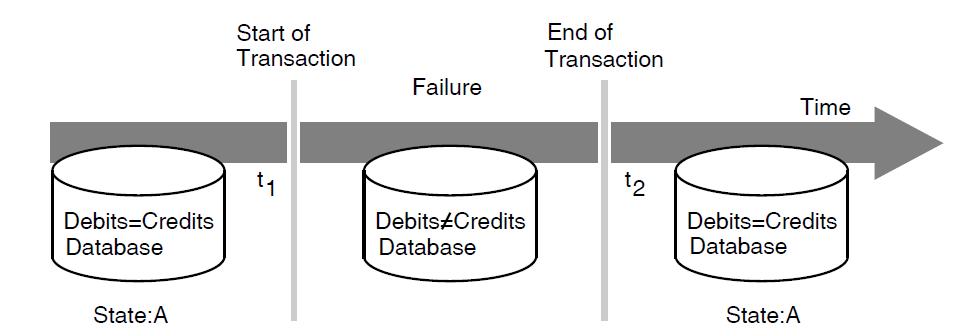
Figure 1.1, ''Restoring a Database After a Failure'' illustrates a money transfer transaction in which one account is to be debited while another is to be credited with the same amount. If a failure occurs after the start of the transaction (time t1) and before the end of the transaction (time t2), the system does not know whether debits equal credits at the time of failure. Therefore, the transaction processing system must abort the transaction and not update the database (either the debit or the credit). After the transaction aborts, you can resubmit the transaction for processing. In some cases, you can design the system to resubmit the transaction automatically.
For a computer transaction to ensure that data remains in a consistent and uncorrupted state when a database is updated, the transaction must pass the ACID (atomicity, consistency, isolation, and durability) test:
Atomicity – A transaction has atomicity, that is, the operations that make up the transaction either all execute to completion, or appear as if they never occurred. If some operations succeed and others fail, the data in the database will not be in a consistent state.
Consistency – A transaction has consistency, that is, it successfully transforms the system and the database from one valid state to another. Consistency in a transaction processing system stems mainly from correct application programming (for example, always debiting and crediting the same amount).
Isolation – A transaction has isolation, that is, it behaves the same whether run serially or concurrently. If a transaction is processed concurrently with other transactions, it behaves as if it were the only transaction executing in the system. Transactions must not interfere with each other’s database updates.
Durability – A transaction has durability, that is, all the changes that it makes to the database become permanent when the transaction is committed.
The ACID properties and the ability to recover in the event of a failure are primary design considerations for any transaction processing system. VSI’s resource managers ensure transactions with ACID properties.
1.1.2. Logical View of a Transaction Processing System
A transaction processing system comprises components that fit together to manage and control complex applications. Figure 1.2, ''Logical View of a TP System'' shows a logical view of a TP system.
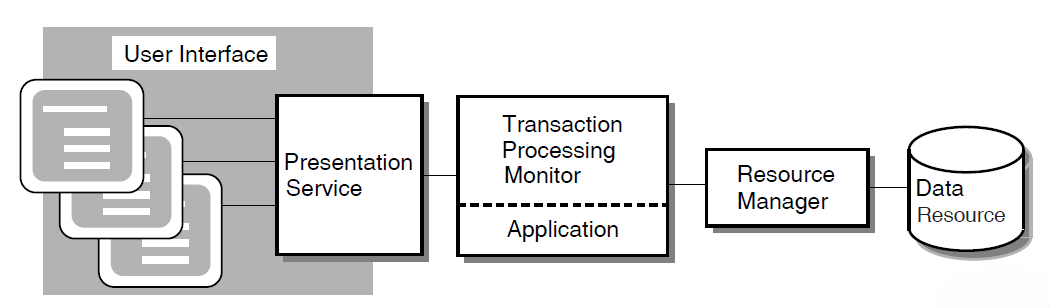
The user interface is the data input element in the TP system. The user interface usually includes a presentation service such as the DECforms forms management system. The AVERTZ sample application design, for example, incorporates DECforms, which integrates text and simple graphics into forms and menus that application programs use to collect and display information for the user. At run time, the form, the display device, and the application program send data to and receive data from one another.
A transaction processing monitor is a software product such as ACMS that provides an environment in which you develop and run transaction processing application programs. The TP monitor can include facilities for terminal and forms management, data management, network access, authorization and security, and restart/recovery.
The application consists of one or more pieces that receive the input data and initiate the required transaction. For the developer of application programs, the transaction processing environment usually provides:
Presentation services to convert data from record formats as stored on the computer system to presentation formats that are easily dealt with by terminal users
Database services that provide basic READ, WRITE, and UPDATE services, plus the coordination and resource scheduling that permits the application developer to access the system’s database
Queuing services that permit an application designer to submit transactions for execution at a later time for processing by other applications
A resource manager controls shared access to a set of recoverable resources, such as a database. A resource manager may be a database management system, file management system, or queuing facility. The data resource is a collection of data items that represent business information. The resource manager provides for reading and writing of data to ensure permanent storage of transaction results. The AVERTZ application uses the Rdb database management system.
Centralized transaction processing refers to a TP system in which all of the components run on the same computer.
Distributed transaction processing refers to a TP system in which one or more of the components run on separate computers and communicate across a network. For example, you can distribute the user interface to a smaller front- end computer and use more powerful computers for back-end data processing.
Another form of distributed TP involves distributing databases. In some TP design situations, it is desirable to locate multiple databases on different computers. It may also be necessary to coordinate a transaction that spans multiple databases located on different computers.
1.1.3. Application Development Life Cycle
Several phases make up the life cycle of a TP application. For an overall perspective of application development, it is helpful to know where the design phase fits into this life cycle.
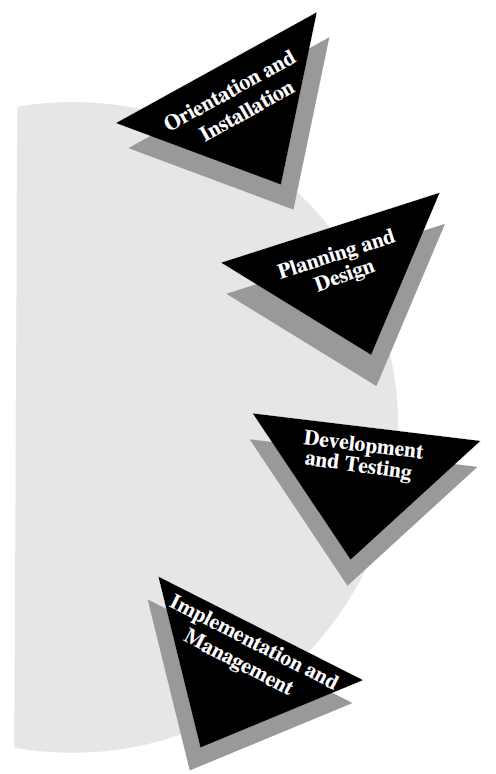
Figure 1.3, ''Application Development Life Cycle'' identifies the phases of the application development life cycle and illustrates the circular nature of a process that requires revisiting and refining an application several times during the course of developing a complex application.
The following actions constitute an application development life cycle:
During the orientation and installation phase, you install the product and the supporting products and deliver training in the development of applications.
During the planning and design phase, you perform requirements analysis, functional analysis, and prototyping for an application.
During the development and testing phase, you write and test the code that implements the design of the application.
During the implementation and management phase, you transfer an application from your development system to a production system and fulfill system management requirements for the application.
At the beginning of this book is a map of all the ACMS information that supports the application development life cycle. This map lists the complete ACMS documentation that covers each phase of the life cycle.
1.2. ACMS Application Development Concepts
An ACMS application consists of a set of tasks that relate to the functions of a business. A task is the unit of work that a user selects from an ACMS menu. Each task usually comprises a sequence of steps that perform this unit of work. You use the ACMS task definition language to define tasks.
Figure 1.4, ''Execution Flow of an ACMS Task Definition'' illustrates the basic principles of the ACMS task definition language (TDL) used to write a task definition. The task definition specifies an interface to the presentation service (forms management system) for communication with a terminal or other device. The task definition also specifies an interface to a procedure server for executing procedures (user-written subroutines) that handle database I/O and computational work.
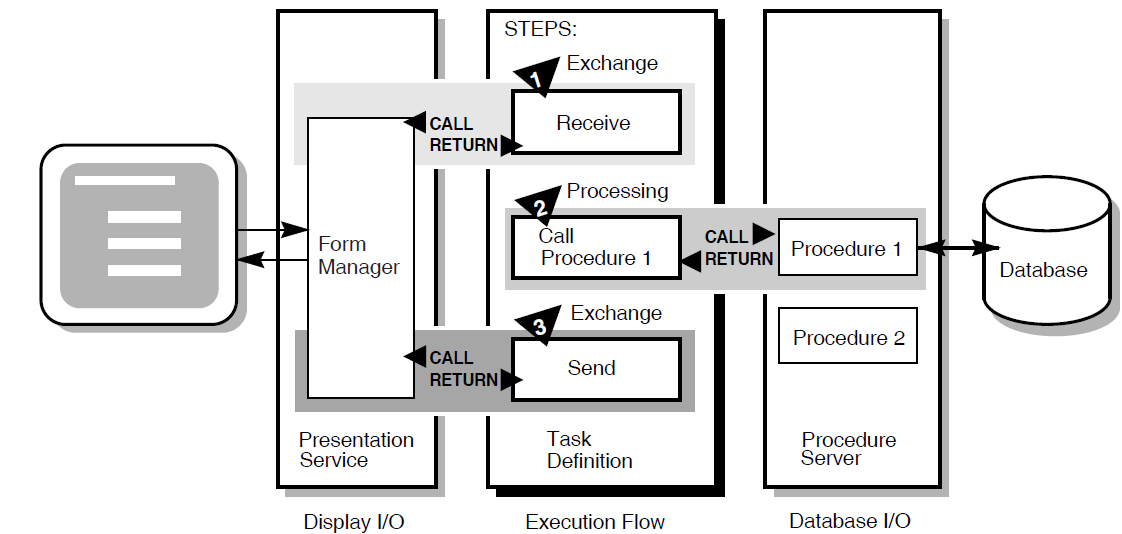
The semantics of the ACMS task definition language are based on a call and return model. The task definition performs calls to the presentation service in exchange steps, and to the procedure server in processing steps. The presentation service and procedure server perform a function and return control to the task definition. Upon return of control to the task definition, subsequent parts of a step can evaluate the results of the call and, if necessary, handle any error conditions.
In Figure 1.4, ''Execution Flow of an ACMS Task Definition'', for example:
In the first exchange step, the task definition calls the presentation service to display a form on the terminal screen (for example, a form to add a new employee record to a database). When the terminal user finishes filling in the form, the user presses a specified key (or keys) that returns the input data to the task definition.
In the processing step, the task definition then calls Procedure 1 in the procedure server to write that input data to the database. Procedure 1 then returns its results (either success or failure). If Procedure 1 succeeds, the task ends with a success status. If Procedure 1 fails to write to the database, the task continues executing at step 3.
In the second exchange step, the task definition calls the presentation service to send an error message to the terminal screen (for example, that the employee number of the new record duplicates an existing employee number). The presentation service then returns control to step 3, which ends the task.
1.2.1. Writing ACMS Definitions
The ACMS task definition language allows you to write an ACMS definition as a series of simple, English-like statements. The four types of ACMS definitions are:
A task definition describes, in steps, the work to be accomplished in the task. For example, a task can collect information from a user and call a procedure to store the information in a file or database.
A task group definition specifies similar tasks for control purposes and defines resources common to all tasks in the group.
An application definition describes the environment and control characteristics of tasks and task groups.
A menu definition describes how users access tasks in one or more applications.
You build the task, task group, and application definitions into binary files that run as an application under the control of the ACMS run-time environment. You build a menu definition into a binary file that is not necessarily tied to a single application.
Figure 1.5, ''ACMS Application Components'' illustrates the ACMS development components for a simple ACMS application with two tasks (for example, one to add a new employee record to a database, and one to update an existing employee record).

Figure 1.5, ''ACMS Application Components'' does not show that there can be more than one task group definition specified for a single application. Also, more than one menu definition can specify tasks that point to the same application. Conversely, a single menu definition can specify tasks in different applications.
Because ACMS applications are modular, you develop each part of an application independently. If you need to change a task definition later, the change does not necessarily affect the task group, application, or menu definitions. Many types of changes do not affect other modules.
1.2.2. Composition of ACMS Definitions
A task definition controls the exchange of information with the user, and the processing of that information against the file or database. Each ACMS task definition is made up of one or more steps. ACMS breaks the work to be accomplished by a task into two types of steps:
Exchange steps usually interact with the Form Manager to handle forms I/O (that is, the exchange of information between the task and the user). An exchange step can interact with VSI DECforms or VSI TDMS forms, or interface with other devices using the ACMS Request Interface or the ACMS Systems Interface for communicating with nonstandard devices. Figure 1.4, ''Execution Flow of an ACMS Task Definition'' illustrates an execution flow with two exchange steps.
Processing steps call step procedures (user-written subroutines) to handle computations and interactions with databases or files, typically using procedures written in a high-level programming language (any language adhering to the OpenVMS Calling Standard). ACMS uses two types of servers: procedure servers for executing a procedure, and DCL servers for invoking images or DCL commands. Figure 1.4, ''Execution Flow of an ACMS Task Definition'' illustrates an execution flow with one processing step.
A server process may perform an initialization routine of common work when the server is started, rather than each time a task is selected. ACMS manages pools of servers to save on process creation and image activation.
Servers are single-threaded and serially reusable (that is, while attached to a task, a server process is not available to other tasks until released by the task). A single server process can be called by many different ACMS tasks in a serial fashion. Once a call is complete, the server is then available to be called by another ACMS task.
When ACMS starts a processing step, it allocates a procedure server process to a task to execute the procedure in that step. This single- threaded process remains allocated to the task for the duration of one or more processing steps.
In ACMS, a workspace is a buffer used to pass data between the task and processing steps, and between the task and exchange steps.
Task group definitions combine similar tasks of an application that need to share common resources such as workspaces, VSI DECforms forms, and procedure servers.
The application definition describes:
Task groups that belong to an application
Characteristics that control the tasks, such as security restrictions on which users can select a particular task
Servers, such as the number of server processes that can be active at the same time
Application characteristics, such as whether application activity is recorded in the audit trail log
Menu definitions list both tasks and additional menus that a user can select from a menu. For example, the tasks on a menu can include adding new employee records, displaying employee information, and entering labor data.
When you write definitions for ACMS tasks, ACMS automatically stores the definitions in a CDD dictionary. At run time, the definitions are represented in binary form in databases defined by ACMS. For example, a task group definition is represented by a task group database that contains a binary representation of the task group definition.
1.2.3. ACMS Workspaces
ACMS tasks can use three types of workspaces: task, group, and user. Task workspaces commonly pass information between processing steps and exchange steps. They can be used only by a single task, but may be passed as parameters to other called tasks. Task workspaces exist only for the duration of the task.
A system workspace is a special task workspace that ACMS provides that contains information about the state of the task and about the task submitter.
You can use group and user workspaces to share information among several tasks in a task group. They are available to all the tasks in a task group. A group workspace is allocated when the first task needs it and remains available for the life of the application.
A user workspaceis allocated to a terminal user the first time the user selects a task in the task group, and remains available until the user logs out or the application stops. User workspaces store information that pertains to an individual user.
1.3. ACMS Integration with VSI DECforms
Although ACMS supports several presentation services, ACMS supports DECforms as its primary presentation service. VSI DECforms provides such features as FIMS compliance, device-class independence, storage of form context between exchanges, input verification (values, ranges, and types), and escape routines.
1.3.1. VSI DECforms Concepts
The VSI DECforms architecture provides a full separation of form from function. This separation allows you to write an application program (the function) without being concerned with the intricacies of the user interface (the form) for that program.
Normally, the term form means a document with blanks for the insertion of information. In VSI DECforms, however, the form is a specification that may govern the complete user interface to an application program. The form specification completely describes all terminal screen interactions, the data that is transferred to and from the screen, and any display processing that takes place.
A panel consists of the information and images that are physically displayed on the user’s terminal screen. A panel is composed of such items as fixed background information (literals), fields (blanks for insertion of information), attributes, function key control, and customized help messages.
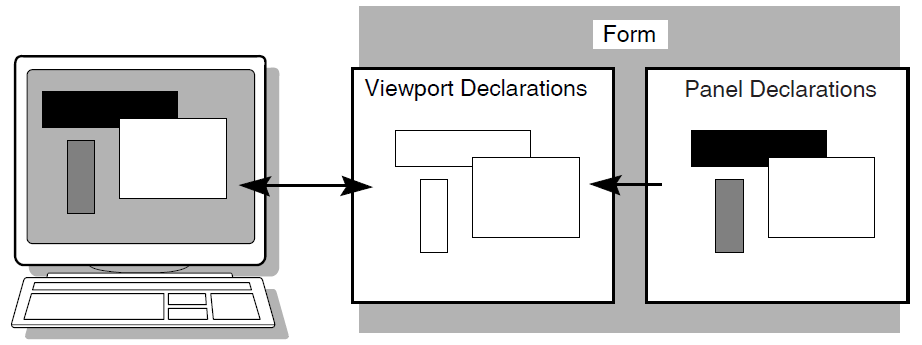
You can partition the display into rectangular areas called viewports by specifying viewport declarations within the form definition. You can adjust the viewport to any size and locate it anywhere on the display (such that viewports overlap one another). For a panel to be visible, it must be associated with a viewport.
Figure 1.6, ''Panels and Viewports'' illustrates the concept of specifying panel declarations and viewport declarations within the VSI DECforms form definition. You specify a viewport name within each panel declaration. By doing this, you map each panel to a specific viewport. At run time, each panel appears on the terminal screen within its viewport.
The VSI DECforms Form Manager is the run-time component that provides the interface between the terminal display and an ACMS application. The Form Manager controls panel display, user input, and data transfer between the form and ACMS. A VSI DECforms form is loaded by the Form Manager at execution time under the direction of an ACMS task.
ACMS begins a session with VSI DECforms when an ACMS task first references the form. The syntax that references the form is contained in the ACMS task definition.
1.3.2. ACMS Interaction with VSI DECforms
In VSI DECforms, the form record is a structure that controls data transfer between ACMS and the form. The form record identifies which form data items (variables associated with the form) are to be returned to ACMS.
Figure 1.7, ''VSI DECforms Interaction with ACMS'' shows the interaction between VSI DECforms and ACMS when ACMS requests information from VSI DECforms.
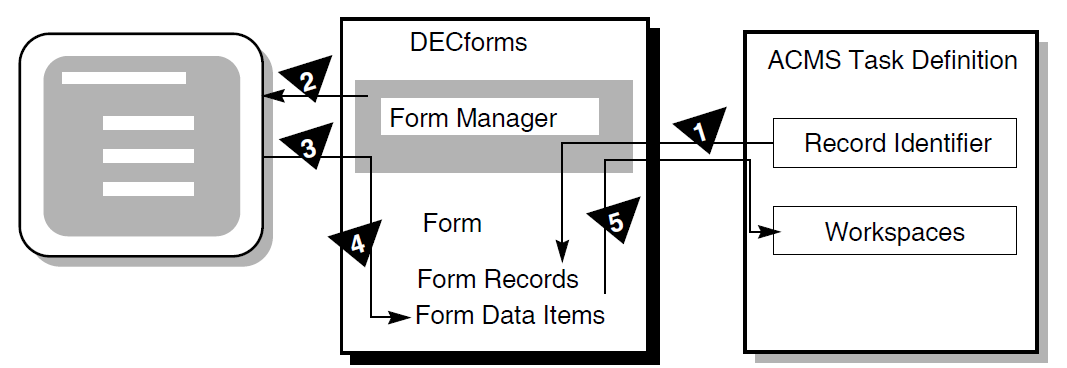
The following steps are the sequence of events that occur when ACMS requests information from VSI DECforms:
To request information, ACMS calls the Form Manager with a RECEIVE or TRANSCEIVE call. In that call, ACMS performs the following operations:
Tells the Form Manager the name of the form needed to collect data.
Tells the Form Manager the record identifier being received.
Gives the Form Manager the ACMS workspaces used to transfer data.
The Form Manager displays a panel on the user’s terminal screen. The displayed panel is specified in the form that ACMS names in its RECEIVE or TRANSCEIVE call to VSI DECforms.
The Form Manager accepts input from the user’s terminal.
The Form Manager uses the form record to store the user’s input data in the appropriate form data items.
The Form Manager completes the request by returning data to the ACMS workspaces.
1.3.3. Distributed Forms Processing
To distribute forms processing, you can off-load a presentation service such as DECforms onto a front-end system (or submitter node). From there, users select tasks that are submitted over the network to a back-end system (or application node). The back end contains the application and resource managers that perform the application execution and data processing, respectively. Figure 1.8, ''Off-Loading Forms Processing to a Submitter Node'' illustrates this configuration.
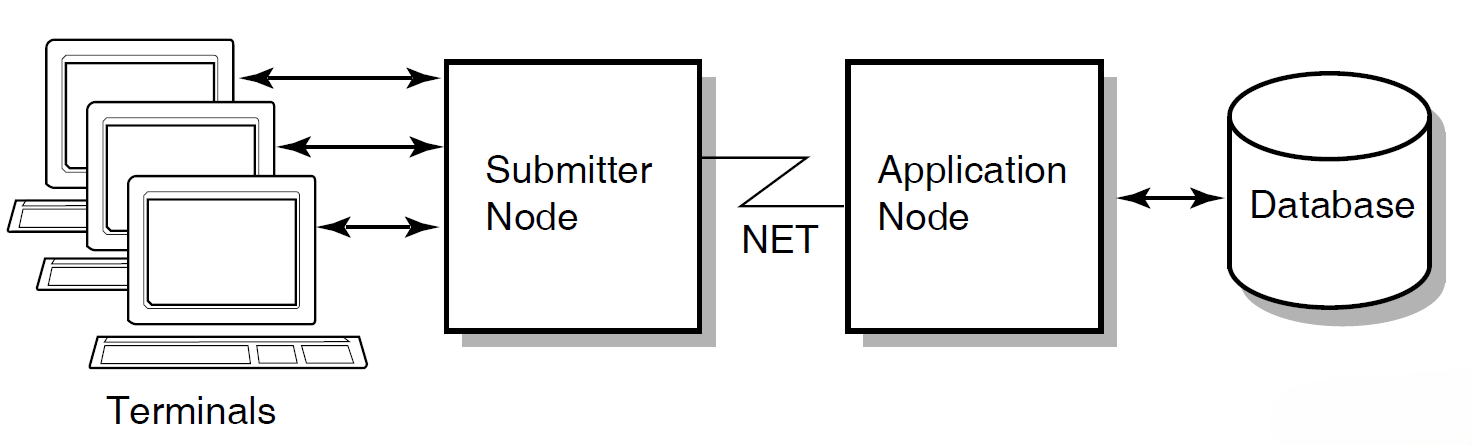
In a multithreaded system such as ACMS, a single process can manage more than one user or process at the same time. Consequently, a single process on the submitter node can display forms and menus for many users. A single process on the application node can handle flow control for many users at one time.
1.4. ACMS Integration with Resource Managers
Resource managers (RMs) are the software products that store and manage the data accessed by ACMS applications. A resource manager controls shared access to a set of recoverable resources, such as a database.
All of the resource managers supported by the ACMS software provide access to recoverable data, because they support ACID transactions (that is, the transactions are atomic and fully recoverable). Step procedures can access the following resource managers either locally or remotely:
Rdb database management system
DBMS database management system
RMS file management system
ACMS queuing facility
The resource managers supported by the ACMS software are not part of the TP system, but are instead data management systems layered on the operating system (OS). This OS layering of resource managers permits database sharing among TP and non-TP applications, decision support systems, and remote nodes requesting data.
Because ACMS supports Rdb as its primary database management system, the following section discusses Rdb concepts. For additional Rdb conceptual information, refer to the Rdb documentation.
1.4.1. Rdb Database Management Concepts
A database management system searches for data in a database by following a path. In some systems, the designer specifies detailed path information. In other systems, the software determines this information for itself. In all systems, designers can take steps (such as specifying advanced features) to improve the performance of the database application. Although there are three database types (hierarchical, network, and relational), this discussion covers only the relational database model.
A relational database such as Rdb represents data as a set of independent tables. A table (also called a relation) is a collection of rows (records) and columns (fields). At each row-column intersection, you can store a single data item (such as a customer’s last name). Each table usually contains many individual data records (for example, one record for each customer).
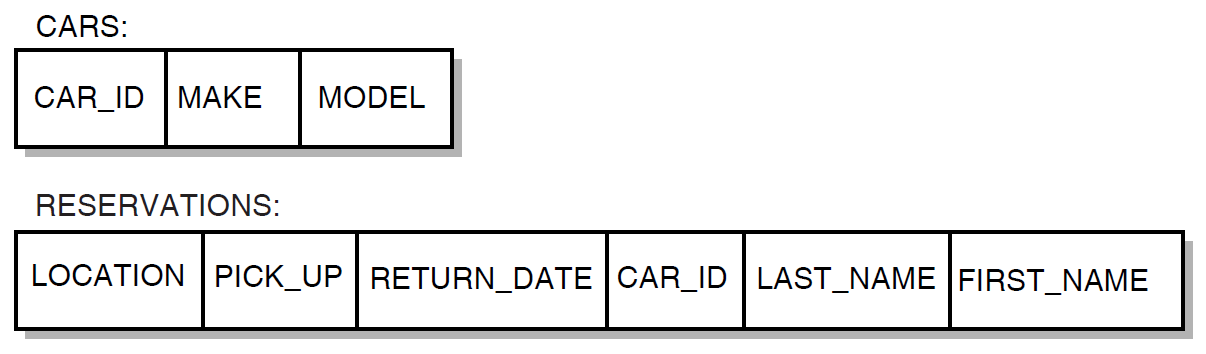
In an Rdb database, relationships among data items are not physically stored. Instead, data is stored in the tables, and relationships between two or more records are established by matching the values of fields common to those tables (such as the CAR_ID field in Figure 1.9, ''The Relational Database Model''). Because the CAR_ID field is common to both records, it is easy to associate a particular car with information about who is renting it.
A relational database permits quick and easy maintenance of a database that changes frequently (for example, one that is affected by tax laws or government regulations). To increase the complexity of relationships that can be drawn among data in the database:
Change existing row-column information – For example, you can add new columns to an existing row in the CARS table, with information about the car’s features, such as engine size.
Add new tables with relationships to existing tables – For example, you can create a new table with columns about each location in the car rental firm, enter data records with information for all locations, and then use a common column (location code) to combine information about specific locations and the cars at those locations.
The major data manipulation language for a relational database is SQL. This language is an ANSI standard that allows different vendors’ database management systems to use the same language.
1.4.2. ACMS Interaction with a Resource Manager
To access a database, ACMS interacts with a procedure server process. The procedure server process, in turn, interacts with the resource manager of the database. As shown in Figure 1.10, ''A Resource Manager Interacting with ACMS'', processing steps call step procedures (user-written subroutines) to handle interactions with the resource managers of databases or files.
ACMS uses a procedure server process for executing a procedure. When starting a processing step, ACMS allocates a procedure server process to the task to execute the procedure for that step. The procedure server process remains allocated to the task for the duration of one or more processing steps in the task.
In an update task, you need at least one exchange step to prompt the user for a key value, and another to display the requested record for modification. You need one processing step to retrieve the record from the database, and another to write the record back to the database with the user’s changes. Figure 1.10, ''A Resource Manager Interacting with ACMS'' shows the interactions between ACMS and the procedure server process, and between the procedure server process and the resource manager, to execute a simple update task.
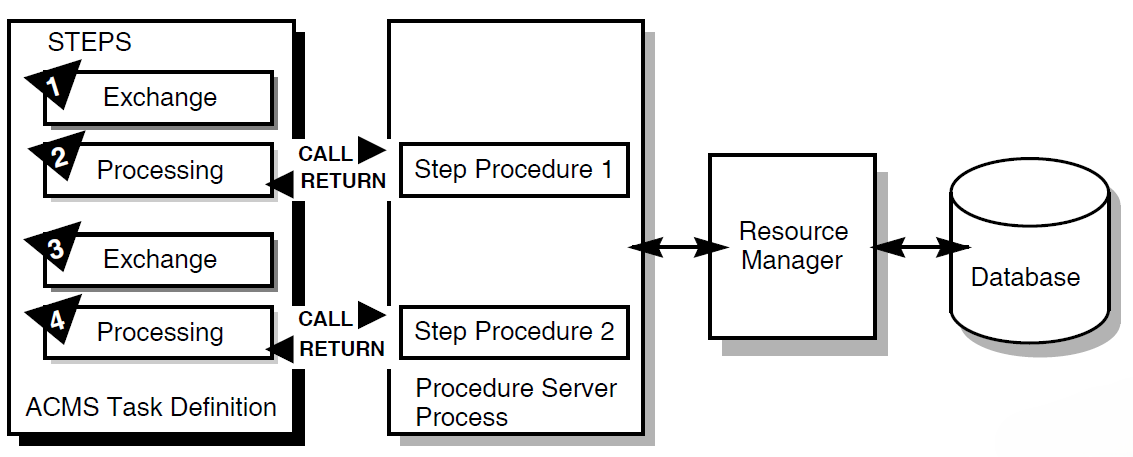
The update task executes the following series of steps:
An exchange step calls the Form Manager (not shown) to display a panel on which the user can supply a key value (for example, an employee number).
A processing step calls Procedure 1, which in turn retrieves the employee record from the database through its resource manager. The procedure uses the employee number as a key into the database.
An exchange step calls the Form Manager to display a panel with the information contained in the employee record. The user can modify this information (for example, change the employee’s address).
A processing step calls Procedure 2, which in turn writes the modified employee record to the database.
For a full picture of the ACMS execution flow that includes the Form Manager’s role in exchange steps, refer to Figure 1.4, ''Execution Flow of an ACMS Task Definition''.
1.4.3. Distributed Resource Managers
One form of distributed TP involves distributed databases. Because of size, manageability, or performance considerations, it is sometimes necessary to partition a single large file or database into a number of smaller ones. In some cases it is also desirable to situate separate databases on different nodes.
ACMS transactions can span multiple resource managers either locally or remotely. An ACMS application uses the DECdtm transaction-management services to guarantee atomic updates to two or more independent databases. Moreover, these databases can be of different types. For example, a distributed transaction can involve Rdb, DBMS, and RMS resource managers.
1.5. ACMS Distributed Transactions
One part of ACMS application development is deciding whether ACMS transactions need to be distributed transactions (that is, multiple database transactions coordinated by the DECdtm services). The DECdtm services are part of OpenVMS and provide the transaction management system support for distributed transactions. These services support a two-phase commit protocol that guarantees atomicity of distributed transactions.
In its role as the transaction coordinator, a DECdtm transaction manager communicates with the resource managers and implements the two-phase commit protocol needed to ensure atomicity of distributed transactions. With this protocol, a transaction can be committed only when all the resource managers involved in the transaction have acknowledged that they are ready and able to commit the requested modifications to the databases.
ACMS makes use of DECdtm transactions to coordinate transactions that involve:
Multiple resource managers
For example, it is possible to coordinate modifications to two Rdb databases located on the same or different nodes.
It is also possible to coordinate modifications to different databases, such as an Rdb database, a DBMS database, and an RMS file, located on different nodes or on the same node.
ACMS task queues and resource managers
For example, ACMS can coordinate the insertion of queued task entries into an ACMS queue file (marked for RMS recovery-unit journaling) with changes made to an RMS file or a database such as Rdb or DBMS.
ACMS can also coordinate the removal of queued task elements from an ACMS queue file (marked for RMS recovery-unit journaling) with the changes made to a file or database.
An ACMS queue file is an RMS indexed file. To use recovery-unit journaling on an ACMS queue file, you must have installed the RMS Journaling layered product.
Any of the following components can start and end a distributed transaction: a task definition, the ACMS Queued Task Initiator (QTI), a user-written agent, or a step procedure.
1.5.1. Coordination of Multiple Resource Managers
In a distributed network of TP systems, a DECdtm transaction manager on each node coordinates the actions of transaction participants, such as resource managers, on that node. The transaction manager on the node where the transaction was started is responsible for coordinating the two-phase commit protocol for the transaction.
In the execution of a transaction, participants can include:
Multiple resource managers on a local node, spanning one or more processes
Multiple transaction managers on other nodes in the network, and their associated resource managers
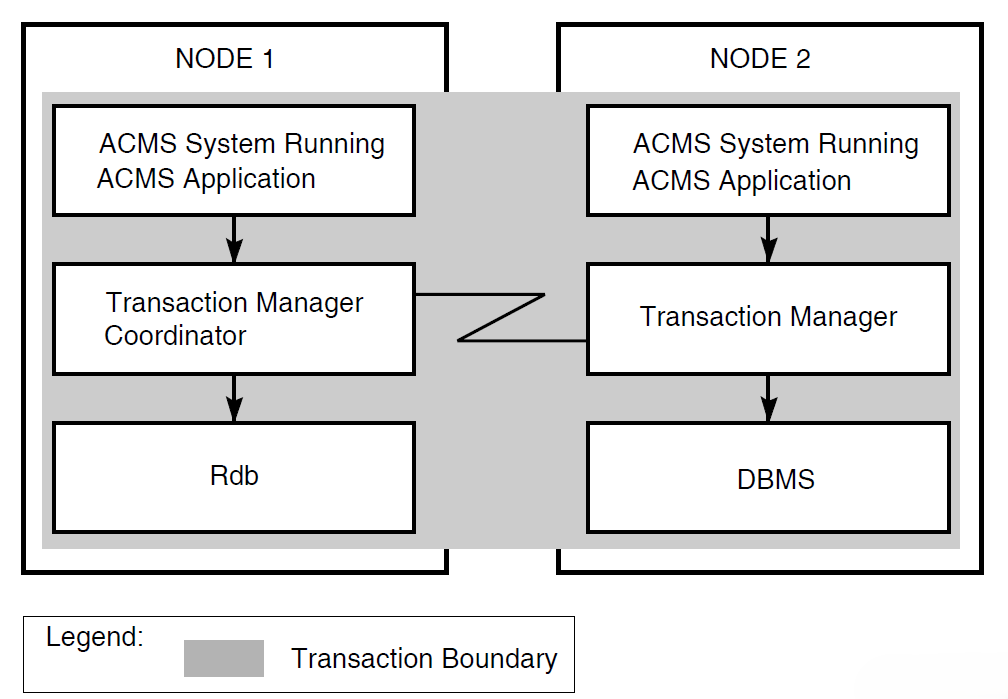
In Figure 1.11, ''Coordinating Multiple Resource Managers'', the transaction manager on node 1 coordinates the transaction started by the application program on node 1 with the participating transaction manager on node 2. The transaction boundary of this single distributed transaction encompasses two resource managers: an Rdb resource manager on node 1, and a DBMS resource manager on node 2. Coordination by DECdtm ensures that either the update occurs to both databases or that the update does not occur at all.
1.5.2. Coordination of ACMS Task Queues
ACMS provides a queuing facility to capture and initiate tasks in an application. In nondistributed transactions, to guarantee "exactly once" semantics, you must use the unique queue-record identifiers generated by the ACMS queued task facility. See VSI ACMS for OpenVMS Writing Applications. In distributed transactions, however, using the queue element identifiers is not necessary.
In a distributed transaction, DECdtm transaction managers coordinate
transactions involving queuing and dequeuing activities, and related database
updates. For DECdtm services to coordinate the removal of queued task entries
from a queue file with the changes made to databases by those queued tasks, you
must mark the queue file for RMS recovery-unit journaling using the SET
FILE/RU_JOURNAL command.
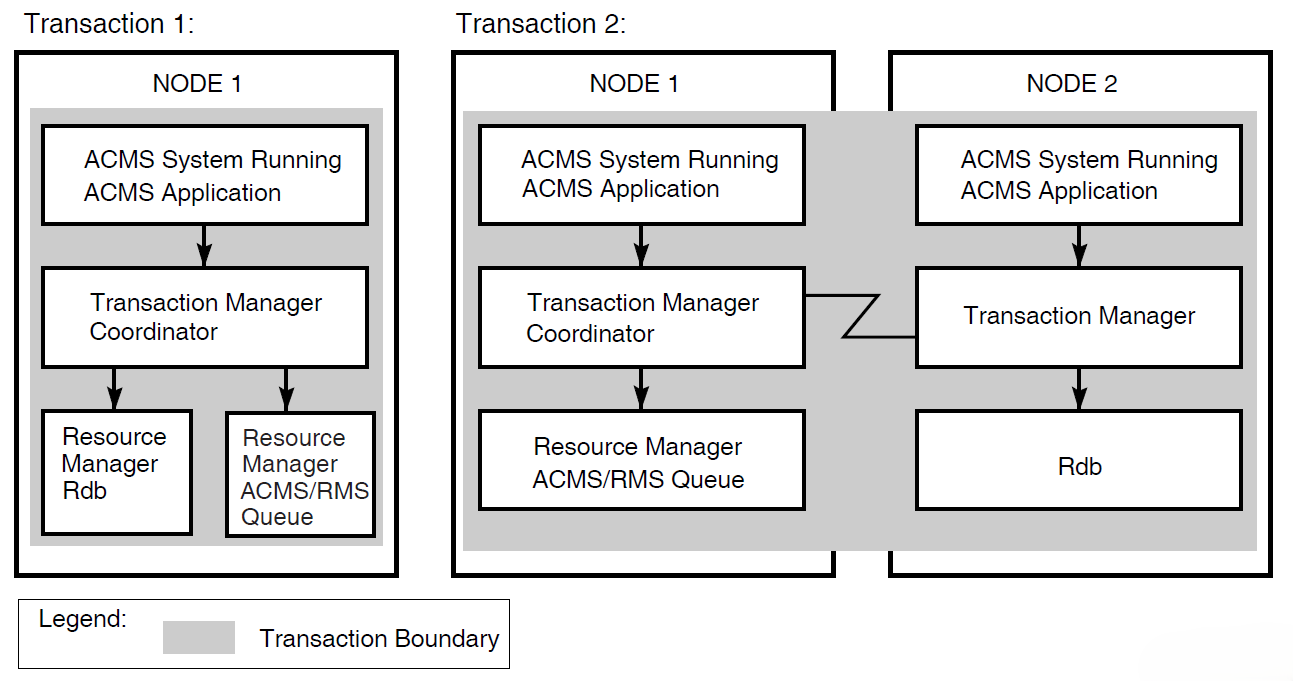
Figure 1.12, ''Coordinating Task Queues with Database Updates'' illustrates two distributed transactions:
Transaction 1 with a queuing operation
The transaction manager on node 1 coordinates transaction 1 (started by the application program on node 1). Transaction 1 updates the local Rdb database and inserts a queued task element into an ACMS queue file (an RMS indexed file).
Transaction 2 with a dequeuing operation
At some later time, the transaction manager on node 1 coordinates transaction 2 (started by the QTI of the ACMS system on node 1). Transaction 2 removes the queued task element from the ACMS queue file. Transaction 2 then invokes the task on node 2 that updates the Rdb database on node 2, all as a single transaction.
Before reading an entry from a queue file marked for recovery-unit journaling, the QTI starts a DECdtm transaction. After reading the record in the queue file, the QTI then starts the specified task.
If the task completes successfully, the QTI deletes the queued task record from the queue and ends the transaction. If the task fails, the QTI aborts the transaction, causing any database or file modifications made by the queued task to be undone.
The QTI starts another transaction to process a failed queued task record. Depending on the reason for the failure, the QTI either sets the queued task entry to a retry state, removes the queued task record from the queue file and moves it onto an error queue, or simply deletes the queued task record from the queued file. For more information about the QTI, refer to VSI ACMS for OpenVMS Writing Applications.
1.6. Interactive Transaction Handling
An interactive transaction contains exchange steps within the bounds of the transaction.
Both the Rdb and DBMS database products support only a single active recovery unit in any one server process at a time. Therefore, once a server starts a database transaction, either as an independent transaction or as part of a distributed transaction, the server processes involved in the transaction must remain allocated to the task until the end of the transaction.
When a task retains context in a server during an exchange step, the server process remains idle during that time and cannot be allocated to another task. In order to avoid the following performance and database contention issues, tasks do not usually include exchange steps within the bounds of a database transaction or a distributed transaction:
Retaining context during an exchange step.
While a task is retaining context in a server during an exchange step, the server process cannot be allocated to another task. The result is that other task instances that are waiting to use the server may have to wait a long time before they can continue executing. If ACMS increases the number of server processes to resolve the delay, the degree of contention for resources in the database increases because additional processes are now competing for those resources.
Locking resources in the database.
As a transaction executes, the resource managers acquire locks on resources in the database to maintain the consistency and integrity of the data there. Other server processes that need to access the same resources may have to wait a long time to acquire locks on those resources before they can continue executing.
In a task that contains processing steps that begin and end independent database transactions, the default is to release context in the server after each step, freeing the server process for use by another task instance. In a task that uses distributed transactions, you cannot release context in the servers participating in the transaction until the end of the transaction. However, at the end of the transaction, the task must release context in the server processes participating in the transaction.
Despite the performance issues, your application might need to make use of interactive transactions in certain situations, such as the need to lock a record while the user is updating its contents. If so, and you are using independent database transactions, you can retain context in a server at the end of a processing step and over a subsequent exchange step. If you are using distributed transactions, you can include an exchange step within the bounds of a distributed transaction.
1.7. Recovery
ACMS uses the term database transaction to describe the part of a transaction that insures that database operations can be recovered. The term recovery unit has the same meaning for RMS files. The transaction does not permanently change a database or file until the successful completion of all operations in the database transaction or recovery unit, respectively. Then all changes are made at once.
In a nondistributed transaction, a procedure calls Rdb, DBMS, or RMS directly to both begin and end a database transaction or recovery unit.
In distributed transactions, however, DECdtm services control recovery for the transaction. The beginning and the end of the distributed transaction boundary are specified in the task definition.
ACMS provides an exception handling capability for the ACMS task definition language that a task can use to recover from transaction failures. This capability, called exception handling, identifies action statements to be executed as the result of an exception. The exception handler part of a step controls task execution following an exception in the work or action portion of the current step.
ACMS distributed transactions are subject to possible DECdtm failures such as resource manager process failure (either before the end-of-transaction or after it, when participants in the transaction are preparing to commit), coordinator node failure, or network failure. DECdtm services provide a planned recovery action for all such failures. The four rules that govern DECdtm recovery are as follows:
Before the end-of-transaction is issued:
If any failure occurs before the application initiates end-of-transaction, the transaction rolls back.
After the end-of-transaction is issued:
If any participant in the distributed transaction does not vote YES (that is, votes NO or aborts), the transaction rolls back.
Once a participant votes YES, it cannot complete the transaction independently; any prepared participant must await the coordinator’s decision.
Once the coordinator logs the commit record, the transaction commits.
1.8. ACMS Run-Time System
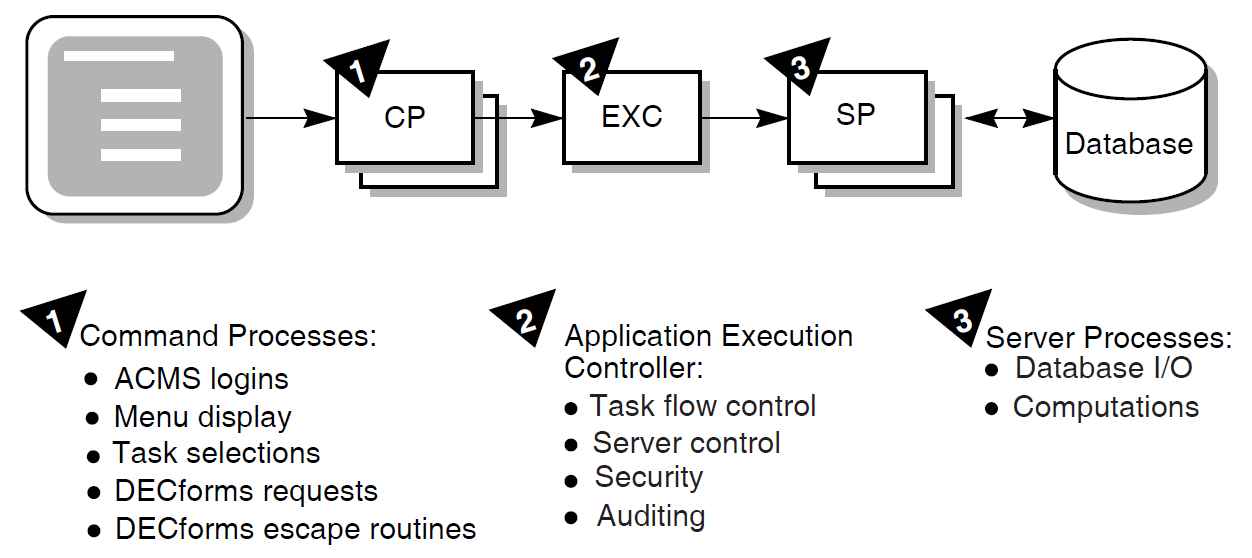
The ACMS run-time system has eight specialized processes, discussed in VSI ACMS for OpenVMS Getting Started. Of these eight, however, three processes determine the performance, availability, reliability, and usability of the system:
Command Process (CP)
Application Execution Controller process (EXC)
Procedure server process (SP)
The CP, EXC, and SP processes are also the processes that are most affected by design decisions. Application-specific definitions and programs run in these three processes.
Figure 1.13, ''Three Processes of the Run-Time System'' provides an overview of these processes and their uses. The following sections discuss the three processes and the design issues related to each.
1.8.1. Command Process (CP)
The Command Process handles the user interface for an ACMS application. Except for those applications that use a user-written or custom ACMS agent, or that use ACMS queuing, the Command Process is responsible for:
Signing in the user to ACMS and, for controlled terminals, verifying that the user is an authorized OpenVMS user.
Displaying menus, command prompts, and help text for users as they determine what tasks are available for them to select
Handling the initiation of tasks once the user has selected a task, including both remote and local tasks
Handling forms interaction during the execution of the task, including task-specific help as well as input and output dialog
Handling a user’s exit from the ACMS system
Understanding the behavior of the Command Process can help ensure that your user interface design takes advantage of ACMS to meet the design’s primary goal. The goal of user interface design is to enable the user to work as effectively as possible: minimize learning time and maximize the work that the system does for the user.
The ACMS implementation of the Command Process might affect your design in two areas:
Support of front-end distibution (off-loading forms processing).
In front-end distribution, the Command Process is responsible for initiating tasks on a remote application node. The presentation service in the Command Process then handles the packaging and unpackaging of data for exchange steps that is sent over the network to and from the remote node. In a distributed environment, workspace size is an important consideration because the workspace is passed across the network.
Support for multiple Command Processes per system.
ACMS allows you to have multiple Command Processes active at one time on a given system, so that the resources allocated to the user interface activity can be tailored according to the number of users and the complexity of the work. ACMS allows you to define how many terminals are handled by each Command Process.
You can allocate the Command Processes statically at the time the ACMS system is started, or you can allow dynamic creation and deletion of Command Processes as the load varies. Each additional Command Process requires additional memory resources, and may affect CPU resources through paging if sufficient memory is not available.
1.8.2. Application Execution Controller (EXC)
The Application Execution Controller handles flow control for the application. There is only one Application Execution Controller for each ACMS application, that is, for each run-time application database file. All tasks in the application are handled by the Application Execution Controller unique to that application. Therefore, processing design decisions can have a significant affect on the behavior of the Application Execution Controller.
The Application Execution Controller:
Interprets the task definition, represented in binary form in the task group database file, to determine what calls to make to a presentation service for form display or to procedure servers for database activities
Interprets the control statements in the task definition to make these decisions (if-then-else, while-do, and so forth)
Allocates workspaces for task, group, and user workspaces, and manages these workspaces
Handles the creation and deletion of server processes, to the extent that a given application uses dynamic rather than static allocation of servers
Understanding the implementation of the Application Execution Controller can help you make decisions relevant to processing design.
1.8.3. Procedure Server Process (SP)
The procedure server process handles computation and database activity for the application. One or more processes can represent each procedure server definition. You can statically or dynamically assign the number of physical processes corresponding to a server definition.
These processes contain customer-written code. Data design or processing design decisions that affect the implementation of this code have a dramatic affect on the application’s performance. Therefore, understanding server implementation can help you make good data design and processing design decisions.
The procedure server process is a single-threaded process, allocated to one task for the duration of one or more processing steps. The length of time that the server is allocated to a task, therefore, has a direct effect on the number of server processes needed in the application. The procedure server process is the only ACMS process that interacts with data files or databases. The length of time that a server is allocated to a task, therefore, can also have a direct effect on the amount of data contention in the application.
Once released by a task, the procedure server process can be assigned for use by another task. Consequently, there is no guarantee that a task will return to the same procedure server process for subsequent processing steps. The application code cannot assume that the server procedure’s context will be the same once the task releases the server and subsequently attaches to a server again.
Chapter 2. ACMS Application Design
This chapter explains how to design a transaction processing application using ACMS. It describes the role of the design process in the overall application development life cycle. The steps in the design process are mapped to the remaining chapters of this manual.
This chapter also describes the documents used to outline the design: the Requirements Specification, Functional Specification, and Programming Specification.
2.1. Understanding the ACMS Application Development Cycle
As an ACMS application designer, you have been presented with the task of creating a TP application to automate a part of your business. This manual offers a design process that gathers and organizes the information needed to create an efficient and effective transaction processing application. The terminology of the design process outlined here is less important than information gathered through that process. Where the terminology is unfamiliar, or the steps seem out of sequence, consider in your own terms the need being addressed. The aim is to create an application design that accurately reflects the business need, and in which all the design implications have been acknowledged and addressed before the application is written.
A complete, logically coherent design for an ACMS application includes descriptions of the following components of the application:
ACMS-specific parts of the application
3GL procedures
User interfaces
Database or databases
This manual provides you with design guidelines for ensuring that all components work together.
Note
Section 2.2, ''Relating Application Design and Database Design'' describes the relationship between application and database design. Although database design is outside of the scope of this manual, it is well-documented in data management product documentation, such as the Rdb documentation.
Section 1.1.3, ''Application Development Life Cycle'' describes the application development life cycle. Recall that the application development life cycle consists of:
Orientation and installation of base products
Planning and design
Development and testing
Implementation and management
This manual describes the planning and design phase of the application development life cycle. The following documents structure the planning and design phase:
Requirements Specification
During requirements analysis you collect and analyze information about the business functions the application must perform. You define specific requirements that the application must meet for performing each business function. The Requirements Specification describes why an application is needed.
Functional Specification
You carry out functional analysis to specify the TP technology the application will include to perform each business function. Determine atomic units of work–or transactions–within each business function. Determine the need for deferred processing, distributed forms processing, and data location. The Functional Specification describes what TP functionality is required.
Programming Specification
You map business functions to ACMS tasks and define an ACMS implementation that provides the required functionality for the application. The Programming Specification describes how the functionality will be implemented.
The planning and design phase can also include an optional prototype effort to create simplified models of the application to test the design’s structure. This manual does not address prototyping.
Application design is an iterative process. Each time you complete a step in the design process, you must validate that your design still meets your stated goals, which you define during requirements analysis. If not, you may have to modify either your design or your application requirements. Even though you typically cannot begin coding your application until your design is complete, keep in mind that the development process is not linear.
2.2. Relating Application Design and Database Design
Application design and database design are separate but related work. Application design and database design may be done by the same person, or by different people. In either case, although both designs can begin simultaneously, at some point application design must await some of the results of database design.
The design of an ACMS application and its accompanying database begins with the same requirements, which are defined in the Requirements Specification. Therefore, both application and database design must meet the same set of requirements.
Following the requirements analysis phase, database design proceeds to a detailed data analysis to ensure that data descriptions are complete and accurate, and to determine if anticipated business changes warrant modifications to data descriptions. Then, normalization of the database follows. Normalization eliminates data redundancy from the proposed database model. Generally, application design cannot proceed until database normalization is complete.
However, you cannot assume that database design is complete when application design begins; only the preliminary phases of database design precede application design. Once both design processes begin, they are interdependent. To ensure that all the requirements of the application are accounted for, consider the needs of the application design and the database design separately. Then, after each step in the design process, compare the application and database design to ensure that they match.
2.3. Using Software in the Design of ACMS Applications
ACMS design requires you to consider the following software components and products:
Database software
ACMS applications are designed to work with Rdb, RMS, and DBMS software. Consult the appropriate database documentation for guidelines on database design and use.
Processing software
You also need to understand the function of the OpenVMS operating system, and in particular DECdtm transaction services, which provide two-phase commit functionality. You also should be familiar with the CDD data dictionary, which stores ACMS data definitions, and the Trace facility, an optional layered product that logs ACMS performance events.
User interface software
ACMS applications use VSI DECforms software as their default forms management product. Optionally, you can use the TDMS forms product or the ACMS Systems Interface or Request Interface.
You also need to select a CASE environment:
Investigate DECdesign for applicability
Consider the use of the following Software Engineering Tools (DECset) during the implementation and maintenance of your application:
DEC/Code Management System (CMS)
CMS provides an efficient method for storing project files and tracking all changes to those files.
DEC/Test Manager (DTM)
DTM organizes software tests and automates the way you run tests and evaluate test results.
Language-Sensitive Editor (LSE)
LSE is a multilanguage programmable editor designed to help develop and maintain source code.
DEC/Module Management System (MMS)
MMS automates and simplifies the building of software systems.
Performance and Coverage Analyzer (PCA)
PCA helps you analyze the run-time behavior of your application.
Source Code Analyzer (SCA)
SCA is a multilanguage, multimodule, interactive cross-reference and static analysis tool. It can help you to understand the complexities of a large software project by allowing you to make inquiries about the symbols used in the project’s code.
Investigate the DECtp Implementation Toolkit
The DECtp Implementation Toolkit is a set of recommended methods and tools for defining and creating a consistent transaction processing environment. The toolkit provides methods for using the VSI DECset tools in VSI’s transaction processing development environment.
2.4. Identifying the Steps in the ACMS Application Design Process
Table 2.1, ''Steps for Designing an ACMS Application'' summarizes the steps involved in designing an ACMS application, the design document that relates to each step, and the chapters in this book that describe each step. Table 2.2, ''Design Documentation for an ACMS Application'' describes each design document.
| Step | Description | Design Document | Further Information |
|---|---|---|---|
| 1 | Define or reaffirm business problem that application will solve. | Requirements Specification | Chapter 3, "Creating a Requirements Specification" |
| 2 | Specify each business function that the application will automate. List distinct activities involved in performing each business function. | Requirements Specification | Chapter 3, "Creating a Requirements Specification" |
| 3 | Determine requirements, in business terms, for how each business function should be performed. | Requirements Specification | Chapter 3, "Creating a Requirements Specification" |
| 4 | Determine data entities accessed by each business function. | Requirements Specification | Chapter 3, "Creating a Requirements Specification" |
| 5 | Write Requirements Specification. Requirements | Requirements Specification | Appendix A, "Requirements Specification Template" |
| 6 | (Database designer performs initial database design) | ||
| 7 | Determine one or more transactions within each business function,and determine functionality used to implement those transactions, including the use of deferred processing and distributed forms processing. | Functional Specification | Chapter 4, "Creating a Functional Specification" |
| 8 | Write Functional Specification. Review Functional Specification with users of the application and members of design team. Refine requirements, if necessary. | Functional Specification | Appendix B, "Functional Specification Template" |
| 9 | Map each business function to one or more ACMS tasks. | Programming Specification | Chapter 5, "Mapping Business Functions and Transactions to ACMS Tasks" |
| 10 | Design task definitions. | Programming Specification | Chapter 6, "Designing ACMS Tasks" |
| 11 | Design code for step procedures. | Programming Specification | Chapter 7, "Designing Server Procedures" |
| 12 | Design user interface. | Programming Specification | Chapter 8, "Designing User Interfaces" |
| 13 | Design overall application structure, including task groups. | Programming Specification | Chapter 9, "Designing Task Group and Application Definitions" |
| 14 | Write Programming Specification | Programming Specification | Appendix C, "Programming Specification Template" |
| Name | Description |
|---|---|
| Requirements Specification | Specifies the business need and the requirements to solve that business need. The Requirements Specification is high level and can be produced in a limited time frame. It does not contain specific design details unless these are considered to be a business requirement. It bridges that gap between a customer’s business need and the Functional Specification and Programming Specification. |
| Functional Specification | Specifies, in non-technical terms, what the solution does for the customer. It is a detailed specification of the functionality to be addressed by the solution. This document defines what functions the system will be capable of performing. It is the blueprint for the subsequent design and programming of the system. To write this, the designer must understand the functionality available in forms, databases, ACMS, and other software and hardware. |
| Programming Specification | Describes a design that provides the proposed functionality and meets the business requirements. Some of the activities can be included here instead of in the Functional Specification. |
Chapter 3. Creating a Requirements Specification
State the business problem your ACMS application is going to solve.
Describe high-level requirements for each business function such as information flow, frequency of the use of the function, availability, user access to data, and so forth.
Supply to the database designer the details about the information used by each business function. This information is the basis for the initial database design, which must be completed before you can proceed to mapping business functions to transactions (described in Section 4.2, ''Mapping Business Functions to Transactions'').
3.1. Defining the Business Problem
Before designing an application, you must analyze the business problem and produce a Requirements Specification that describes the business need addressed by the application. The goal of the Requirements Specification is to define, in terms of the business and at a high level of detail, what the application must accomplish.
For example, the work of the AVERTZ car rental company is to rent cars. For AVERTZ, the business problem is to create a TP system that allows car rental agents interactively to display, enter, and update data stored in a car rental database when serving customers. A description of the business problem includes not only a description of the need, but also the goals with related measurements.
The Requirements Specification also defines constraints on an application that are independent of the step-by-step analysis of the work being performed. Constraint information includes who will use the application, how frequently the users will access the application, and what users will be granted access to different parts of the application. It also includes data security requirements, minimum acceptable performance, and time and cost for delivery of the working application. Section 3.3, ''Defining Additional Requirements for Business Functions'' describes how to collect these additional requirements.
Appendix A, "Requirements Specification Template" contains a sample template for a Requirements Specification.
3.2. Analyzing the Work Requirements
Business areas – the major organizational areas of the company
Business functions – types of work handled within the business area
Business activities – discrete steps taken to complete the work within a business function
Note
You might describe your business in terms other than "business area", "business function", and "business activities". Whatever the name, the aim is to move from the general (business area) to the specific (business activities). For consistency, this book will use only those terms.
The following sections describe a requirements analysis based on the description of business areas, business functions, and business activities.
3.2.1. Business Areas
Most businesses are divided into areas, departments, or functions. The requirements for a TP system are the sum total of the requirements for each business area. Each business area collects and maintains data on its own and shares some of this data with other areas of the business. Derive an application requirements list by studying current business practices and questioning department managers and prospective users of the system.
|
Business Area |
|---|
|
Reservation processing |
|
Site management |
|
Car information |
|
Customer accounts |
Note that the AVERTZ sample application handles only the reservation processing business area of the AVERTZ company.
3.2.2. Business Functions
This section describes the business functions that comprise the reservation processing area of the AVERTZ business.
Entering 3000 new car reservations daily. Initial reservation information consists of the pickup date, customer name, location, preferred car type, and rate. Half of the reservations are made over the phone and half are walk-in.
The system has estimated load of 90,000 reservations at any given time, an average of one reservation per customer.
Checking out an average of 2,500 cars per day, finding the reservation by the reservation identifier or the customer's name. The checkout data needs to record the date, car number, and mileage.An average of 500 reservations a day are canceled.
Checking in an average of 2,500 cars per day, finding the reservation by the reservation identifier or the customer's name. When the car is checked in, the rental charge is calculated, based on the car type (compact, intermediate, full size), the rental location, the length of the rental, and discount (if any). Finally, a bill is processed (payment can be made in cash or through a credit card), and the car is returned to the system at the current site.
3.2.3. Analyzing Business Activities
Each business function consists of a set of business activities. These activities are the logical transactions that the application system must perform and that the database must support. To determine database and application requirements, first develop a description of each discrete business function. Then list activities that users perform to carry out each business function.
| Business Areas | Business Functions Within Areas |
|---|---|
| Reservation processing | Reserve a car |
| Check out a car | |
| Check in a car | |
| Site management | Add new sites |
| List site directory | |
| Create car/site report | |
| Car information | Add new car information |
| Create car history report | |
| Customer accounts | Create customer report |
|
Business Function Within Area | Step |
Activities Within Business Function |
|---|---|---|
| Reserve a car |
1 |
Enter any of the following information:
|
|
2 |
If no site ID is supplied, and there is more than one site in the city, choose from a list of sites. | |
|
3 |
Once site ID is identified, if multiple customers have the same name, choose from a list of customers. | |
|
4 |
If it's a new customer, add information. If it's an existing customer, update information, if necessary. | |
|
5 |
Provide a reservation number and ask if the customer wants to check out car. | |
|
6 |
If checkout is requested at the time of the reservation, begin the checkout by finding if a car is available (go to step 4 below). | |
| Check out a car |
1 |
For a customer who made a reservation previously and did not checkout a car then, enter either the customer ID or the reservation ID, or both. |
|
2 |
If the customer has multiple reservations, choose from a list of that customer's reservations. | |
|
3 |
Once a single reservation has been identified, update the customer and reservation information, if necessary. | |
|
4 |
Once the customer and the reservation information is complete (either from an on-the-spot reservation and checkout, or when the customer comes in some time after reservation to check out the car), ask for cars of the specified type. | |
|
5 |
If no cars of the specified type are available, select a more expensive type. | |
|
6 |
Choose from a list of cars of the specified type. | |
|
7 |
Allow the user to check out the car, cancel the reservation, or quit without canceling the reservation. | |
| Check in a car |
1 |
Enter either the reservation ID or the customer ID, or both. |
|
2 |
If the customer has multiple reservations, choose from a list of that customer's reservations. | |
|
3 |
Once a single reservation has been identified, update the customer and reservation information, if necessary. | |
|
4 |
Enter the new odometer and gas gauge readings. | |
|
5 |
Compute the customer's bill. | |
|
6 |
Update the reservation record, reset car availability flag and the actual odometer reading, and the return date of the car. |
3.3. Defining Additional Requirements for Business Functions
Run-time environment of the application
Implementation of the application
3.3.1. Defining Run-Time Requirements
Information flow
Describe the information exchanged during the execution of each business function, where it originates, and where it terminates.
Number of people
Determine how many people perform each function.
Frequency
Determine how frequently each function is performed and when the most people perform the function concurrently.
Execution time
Determine the maximum time you are prepared to allow for execution of each function.
Availability
AVERTZ processes 3000 reservations each day, and checks out 2500 cars each day. The reservation, checkout, and checkin functions must each take no longer than one minute.
Specify when the database must be available for the user to do the work and when the user can continue working even if the database is unavailable.
AVERTZ rental agents always require access to the databases to reserve a car, to check out a car, or to check in a car.
Processing immediacy
Specify whether or not the work performed by the business function must be processed immediately when a user executes the function. Immediate processing requires the user to wait for the application processing to complete before continuing the work. Otherwise, you can defer the processing work of the application so the user can immediately resume work after executing a business function.
Although AVERTZ rental agents need processing immediacy for reserving a car or checking a car out, they can defer the checkin of a car. At checkin, the information gathered is for billing purposes and for car inventory purposes. Therefore, the AVERTZ application supplies deferred processing of car checkins in the form of a queued task. This is also useful if the customer does not want to wait for the checkin process to be handled online.
Flexibility
Consider the costs of maintaining and changing the application. Specify any future considerations, particularly growth considerations, that may have implications for how the business function is implemented. Take into account the most aggressive long-range business plans for your company.
Security
Determine and specify which user will be able to execute which business functions. Describe auditing requirements.
Usability
Consider how the business function is performed and by what type of users (or devices) and based on that information, determine the most likely user interface for the application.
The AVERTZ sample application handles car rentals. The users are car rental agents. They need several simple forms to enter a relatively limited number of data items.
3.3.2. Defining Implementation Requirements
Delegating responsibilities and setting a timetable
Describing environmental constraints
Setting up a quality control system
3.4. Analyzing Data Entities
Entity or entities each business function uses in meeting its responsibilities
An entity is an object about which you need to maintain data. Examples of entities for a car rental system are the car, the reservation, and the customer.
Attributes of the entities
An attribute is an item of data about an entity, describing or characterizing that entity. Examples of attributes for a car entity are the license plate number, the manufacturer name, and the year of manufacture.
Relationships among the entities
A relationship is a connection between entities. For example, each customer can have many reservations, while each reservation is associated with only one customer. Therefore, the relationship between customers and reservations is one-to-many (1–M). Though one-to-many relationships are the most common, one-to-one (1–1) and many-to-many (M–M) relationships between entities are also possible.
Entities, attributes, and relationships are established through the database design, based on the Requirements Specification. However, good application design depends upon an understanding of the entities, attributes, and relationships to create proper access to the data.
3.5. Completing the Requirements Analysis
The result of your requirements analysis is a Requirements Specification for use in both the database design and the application design. Appendix A, "Requirements Specification Template" contains a sample template for a Requirements Specification.
Once the requirements analysis is complete and the initial database design exists, the application design moves to the functional analysis described in Chapter 4, "Creating a Functional Specification".
Chapter 4. Creating a Functional Specification
Define recoverable units of database work within your application so that if the application fails between steps, the application can recover and the data in the database maintains its integrity.
Plan the distribution of the forms, application, and databases within the context of your business requirements to best make use of TP functionality.
Appendix B, "Functional Specification Template" contains a Functional Specification template.
4.1. Identifying TP Functionality
Chapter 3, "Creating a Requirements Specification" described how to define the business functions and the business activities comprising those functions, resulting in a Requirements Specification. The process of defining these business functions and activities is essentially linear: for example, describing a series of steps the user takes to carry out the processing of a reservation.
The next step is to relate the business functions to TP functionality in a Functional Specification by identifying one or more transactions within each business function. The focus of this step is modular or matrix-oriented, rather than linear: for example, several business functions may require the same transaction in the course of carrying out the work. Or, a single business function may require repeated use of a single transaction.
Database design is an integral part of this iterative design process. The database design analysis of transactions depends on the application design of transactions. And conversely, the application design of data access depends upon the transaction analysis carried out in database design. This section describes the process of transaction analysis from the point of view of application design.
4.2. Mapping Business Functions to Transactions
Database transaction
A database transaction is a set of updates to recoverable resources within a single file or database.
Distributed transaction
A distributed transaction is the grouping of multiple database transactions into a single recoverable unit or logical database transaction.
Database transactions and distributed transactions are both atomic units of work, and must succeed or fail as a whole. They may appear to the user as identical operations, but they require very different design and implementation strategies.
For example, suppose that you and a friend use branches of the same bank in different cities. Your friend writes you a check that you deposit in your branch. If the bank uses one central database for all accounts, your account is credited and your friend's account is debited in a single database transaction. If, however, each branch maintains a separate database for local accounts, a distributed transaction credits your account using one database transaction and debits your friend's account using another database transaction. In both scenarios, the credit and debit constitute an atomic unit of work–a single transaction from the point of view of ACMS.
This manual uses the term transaction to cover both database and distributed transactions, unless the distinction is necessary for the description of a particular design issue.
4.2.1. Determining the Need for Distributed or Nondistributed Transactions
A single resource manager – for example, for one or more Rdb databases on a single node
Multiple resource managers – for example, for Rdb databases on separate nodes, or an Rdb database and an RMS file on the same or separate nodes
You determine the number and type of resource managers and their expected interaction from the information supplied about the business functions in the Requirements Specification. With that information, you can design the needed transactions.
At this point, the initial database design should have been completed. You now know whether the information accessed by each business function is stored in one or multiple databases or files. As you map the flow of data for each business function from submitter to resource manager, you determine when to use distributed and nondistributed transactions.
Integral to this process is the determination of whether or not you need distributed transactions. Generally, nondistributed transactions are preferable because distributed transactions are more difficult to design and to control, and because they use more resources. However, in some cases distributed transactions are unavoidable. In other cases, they have advantages which outweigh a similar nondistributed transaction.
The following figures illustrate a range of business organizations, from single-site, single-database businesses to multiple-site, multiple-database organizations. The implications of each type of organization are outlined, particularly from the point of view of distributed and nondistributed transactions.
Figure 4.1, ''A Single-Site Business with a Single Database'' illustrates a single-site business with a single database.
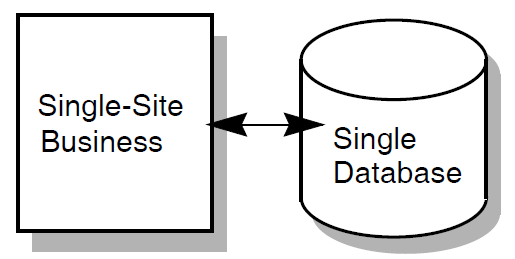
This business probably does not use distributed transactions. For example, a retail shop with a single database for inventory uses nondistributed transactions. However, the existence of a single database does not preclude the possibility of a distributed transaction. For example, the use of a queued task with access to a single database requires that the transaction be distributed.
Figure 4.2, ''A Single-Site Business with Multiple Databases'' illustrates a single-site business with multiple databases.
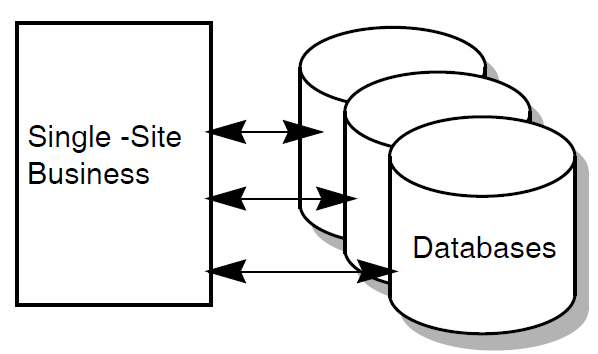
A single factory, for example, uses a vertically partitioned database for functional partitioning of the data: parts, customers, and employees. This business may or may not require distributed transactions. Most update transactions probably affect only a single database. However, if some update transactions involve more than one database, those transactions are distributed transactions.
Figure 4.3, ''A Multiple-Site Business with Multiple Central Databases'' shows a business with multiple sites and multiple databases.
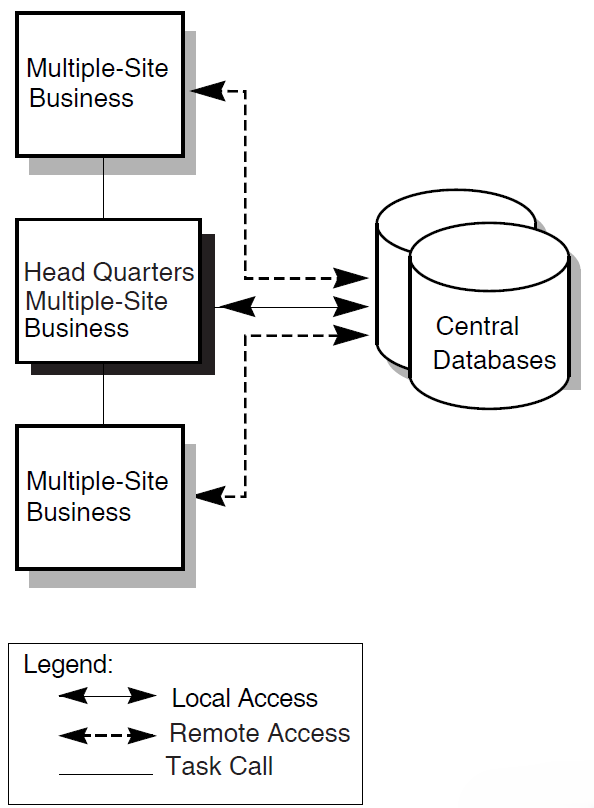
Directly, through remote access to the databases
The central office uses the databases locally; the branch offices use remote database access.
Indirectly, by task calling
Applications at branch sites contain tasks that use procedure servers to call tasks in an application at headquarters. The central office has local access to the database.
Your TP system can include elements both of remote access and of task calling to the central application.
The AVERTZ company uses this model. Section 6.6.2, ''Choosing an Access Method to Remote Data'' describes design issues for remote data access.
A similar business organization can use distributed forms processing for an entirely different TP system. Distributed forms processing places front-end forms at the car rental sites and back-end processing at the central databases. Branch sites do not have applications that communicate by direct remote access to databases or by indirect access through task calling to a central application. See Section 4.3, ''Using Distributed Forms Processing'' for guidelines on distributed forms processing.
A configuration with central databases is easier to maintain and control than one with local databases, but if the central system fails, no application work can be done. However, you can maintain high availability with a VMScluster at the central site. Allow for higher application availability by creating a configuration in which if one central system fails, you can failover to an alternate system.
Note that a similar configuration might include a single central database, rather than multiple databases. While multiple databases indicate the likelihood of the need for distributed transactions, keep in mind that a single database can require distributed transactions if task queuing is used.
Figure 4.4, ''A Multiple-Site Business with Multiple-Site Databases'' describes a system with multiple databases at multiple sites.
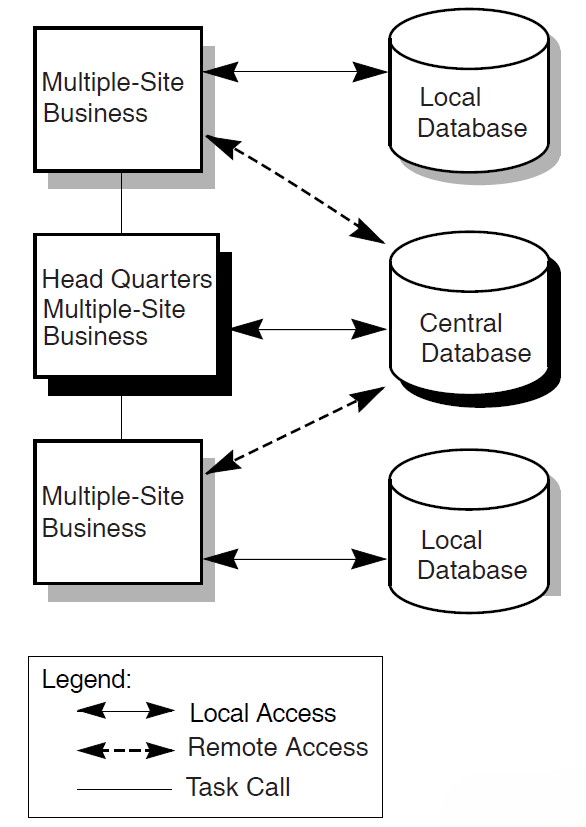
This model contains the same elements as the multiple-site, central databases model, but adds local databases at branch sites. An example is a bank that maintains local databases for the accounts of regular branch patrons, but also maintains one or more central databases.
Such a system improves performance and allows local application availability to continue if the link goes down, but is more difficult to manage and control than a system with a database or databases in a central location. This configuration is likely to have a relatively high need for distributed transactions. This configuration might also make extensive use of distributed transactions for initiating queued tasks, particularly for ensuring the integrity of distributed transactions if links fail.
These examples do not exhaust the possible combinations of business sites and resource managers. To design the most successful application, take into account the organization of your business and the type and configuration of your resource managers. Consider not only the current organization, but also likely growth scenarios. You can then maximize your design to take best advantage of that configuration.
Auditing information is gathered from the terminal and the main database.
Information is added simultaneously to the main database and to the auditing database.
Using a distributed transaction to update these two databases ensures that if the first database transaction succeeds and the second database transaction fails, the first is rolled back.
In such a scenario, the use of multiple databases mandates a distributed transaction. Figure 4.5, ''Determining Data Flow for Business Functions'' depicts the data flow for this distributed transaction.
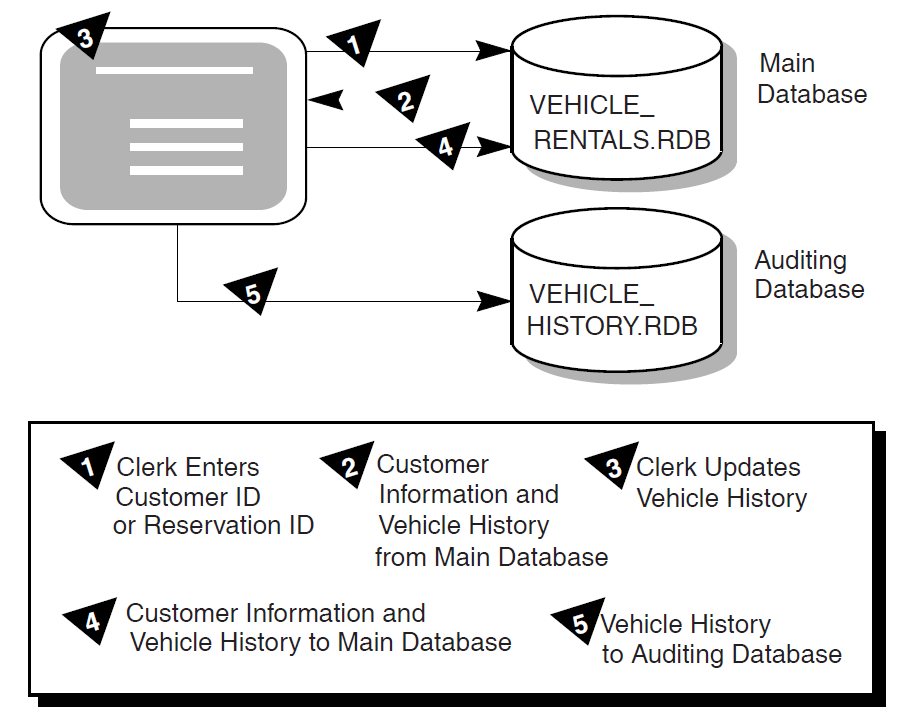
4.2.2. Determining the Processing Immediacy for Each Business Function
You may identify transactions that do not need to be processed immediately, or that are better left for later processing. In this case, even if your application requires only a single database you may need to design one or more distributed transactions. You do this by designating a distributed transaction that includes both the database and the task queue as resource managers (if you need to coordinate the enqueue or the dequeue of the queued task with modifications to the database).
Defer processing work and allow users to immediately continue working after selecting a task
Keep applications available to users when the back-end, processing node is unreachable
- Provide automatic retry of queued tasks that have failed
Note
When DECdtm is used, the ACMS QTI ensures that queued tasks are processed only once (without any programmer intervention, which was required in versions of ACMS lower than Version 4.0 to achieve this effect).
See Chapter 6, "Designing ACMS Tasks" for details about designing distributed transactions that include queuing.
Chapter 6, "Designing ACMS Tasks" also describes the use of queuing for distributed forms processing in applications which use a front-end node for data entry and then queue tasks for processing by a back-end node. When both nodes are available, the back-end node processes queued tasks at regular intervals. If the back-end node goes down, the front-end node continues to queue tasks, providing users with uninterrupted access to the application for entering data on the front-end node. The tasks remain queued until the back-end node becomes available for processing.
Using the DECdtm transaction services and an ACMS queue file marked for recovery unit journaling, ACMS guarantees that changes made to a database by a queued task are committed only once.
4.2.3. Defining Transactions to Avoid Lock Contention
In TP systems, locking is a necessary control technique for regulating concurrent access to shared data in a database. Because multiple users concurrently access a shared database in a TP system, locking issues are of great importance when designing TP applications. The goal is to design the smallest possible transactions (the smallest atomic units of work) to allow quick release of servers and maximum access to records.
You must often segment a business function into multiple transactions to minimize lock contention. While User A updates Record A, the record is locked. User B must wait for User A's transaction to finish before updating Record A.
Figure 4.6, ''Record Locking'' illustrates locking from the point of view of two users needing access to the same record in a database.
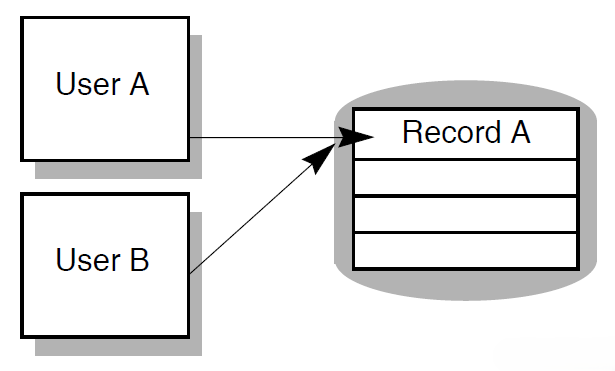
Record locks
File pointers or currency indicators
Other process characteristics
Retaining server context can adversely affect performance both by withdrawing the server from use by other task steps, and by handling a transaction that holds locks on databases across steps, thereby blocking other users from the records that are locked.
4.2.4. Identifying Transactions Within Each Business Function
Keeping in mind the issues of lock contention and of distributed and nondistributed transactions, this section offers guidelines for identifying the transactions related to each business function.
Specify transactions when operations change data in a file or database.
Locking a record ensures that no one can change the record while you are updating it. Otherwise, users trying to get access to the same records must wait for transactions to complete before they can do their work. Record locking is automatic when you use Rdb. Lock only the records that are changing.
Do not include exchange steps within the bounds of a transaction.
Lock duration affects performance. If you design a transaction to include exchange steps, you maintain the record lock throughout the time it takes the terminal user to respond. This can greatly increase transaction time over the time necessary for execution of data manipulation statements alone.
Avoid unnecessary read operations within the bounds of a transaction.
Operations that only read data from the database and display it to the user do not require record locks. A lock held across a read operation in a transaction is not likely to be as costly as one held across an exchange step, but still has some cost. For example, a transaction consisting of a database update followed by a read, followed by another update locks all the records. If the read is lengthy, lock contention can become serious.
Make transaction units as short as possible.
Because resource managers do not release record locks until the transaction is committed or rolled back, keeping transaction units short reduces database contention and ensures better application performance.
4.2.5. Identifying Transactions in the AVERTZ Application
|
Business Function |
Step |
Transactions |
Read Update |
Dist? |
Database |
|---|---|---|---|---|---|
|
Reserve a car |
1 |
Find a site |
Read |
No |
VEHICLE_RENTALS |
|
2 |
Read existing information about the customer |
Read |
No |
VEHICLE_RENTALS | |
|
3 |
Update the customer information |
Update |
Yes |
VEHICLE_RENTALS, VEHICLE_HISTORY | |
|
4 |
Write the reservation |
Update |
Yes |
VEHICLE_RENTALS, VEHICLE_HISTORY | |
|
Check out a car (at reservation time) |
1 |
Find a car |
Update |
No |
VEHICLE_RENTALS |
|
2 |
Update the customer information |
Update |
Yes |
VEHICLE_RENTALS, VEHICLE_HISTORY | |
|
3 |
Complete the checkout or cancellation |
Update |
Yes |
VEHICLE_RENTALS, VEHICLE_HISTORY | |
|
4 |
Write the checkout or cancellation history |
Update |
Yes |
VEHICLE_RENTALS, VEHICLE_HISTORY | |
|
Check out a car (not at reservation time) |
1 |
Read existing information about the customer |
Read |
No |
VEHICLE_RENTALS |
|
2 |
Update the customer information |
Update |
No |
VEHICLE_RENTALS | |
|
3 |
Find a car |
Update |
No |
VEHICLE_RENTALS | |
|
4 |
Complete the checkout or cancel |
Update |
Yes |
VEHICLE_RENTALS, VEHICLE_HISTORY | |
|
5 |
Write the checkout or cancellation history |
Update |
Yes |
VEHICLE_RENTALS, VEHICLE_HISTORY | |
|
Check in a car |
1 |
Read existing information about the customer |
Read |
No |
VEHICLE_RENTALS |
|
2 |
Update the customer information |
Update |
No |
VEHICLE_RENTALS | |
|
3 |
Find the rental history |
Read |
No |
VEHICLE_RENTALS | |
|
4 |
Complete the checkin |
Update |
Yes |
VEHICLE_RENTALS, VEHICLE_HISTORY |
|
Transactions | Business Functions | ||
|---|---|---|---|
|
Reserve a car |
Check out a car |
Check in a car | |
Find a site |
x | ||
Read existing information about the customer |
x |
x | |
Update the customer information |
x |
x |
x |
Write a reservation |
x | ||
Find a car |
x | ||
Complete check out |
x | ||
Cancel |
x |
x | |
Write the checkout or cancellation history |
x | ||
Find the rental history |
x | ||
Complete the checkin |
x | ||
4.3. Using Distributed Forms Processing
An ACMS application usually consists of forms processing and database processing. In an ACMS application without distributed forms processing, all ACMS components are on a single node, and the databases are usually on the same node as the ACMS system.
Improved performance
In a distributed system the more powerful machines can be dedicated to database processing while smaller machines handle the forms processing. For example, local offices can have access to a central application and database without overburdening the central node with terminal processing. Tasks that do terminal I/O in processing steps cannot be separated into front-end and back-end processing and therefore cannot be part of a distributed-forms application. To distribute the forms part of an application, you control terminal I/O through exchange steps.
Flexibility of system configurations
Wider availability
More applications are available to the users, because they can have access to applications on nodes other than their own with better performance and a more convenient interface than by using the
SET HOSTcommand.Better reliability
With a distributed system, you can install applications on more than one node of a system. If a node fails, ACMS can process a search list so that users are automatically switched to an alternate node where the same application is running.
However, with distributed forms processing, consider the issue of increased DECnet overhead that results from passing workspaces during task processing. Keep workspaces to an acceptable size and do not pass them unnecessarily.
Chapter 5. Mapping Business Functions and Transactions to ACMS Tasks
This chapter provides guidelines for mapping business functions and transactions to ACMS tasks.
This information serves as the framework of a Programming Specification by identifying the forms, ACMS tasks, task groups, server procedures, menus and applications used by each business function. Tasks (and steps within tasks), procedures, and forms can be used and reused in a variety of combinations and in differing orders to carry out most efficiently the work outlined in the Requirements Specification, using the transactions described in the Functional Specification.
See Chapter 6, "Designing ACMS Tasks", Chapter 7, "Designing Server Procedures", and Chapter 8, "Designing User Interfaces" for specific design guidelines about tasks, server procedures and user interfaces. Chapter 9, "Designing Task Group and Application Definitions" offers design guidelines for task groups and applications. Appendix C, "Programming Specification Template" contains a Programming Specification template.
5.1. Deciding on the Relationship Between Business Functions and Tasks
Create one task for each business function.
A single task for each business function allows for clear mapping between the business function and the ACMS implementation. However, this design does not efficiently reuse sections of the task definition. Figure 5.1, ''Mapping One Business Function to One Task'' illustrates this model.
Figure 5.1. Mapping One Business Function to One Task 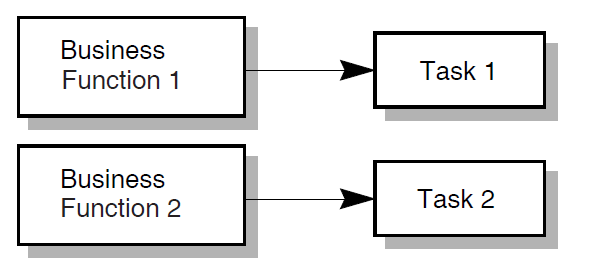
Combine several logically associated business functions into a single task.
This solution adds user-friendliness by minimizing the need for the user to return to the menu. By combining similar tasks, you can avoid coding similar task work multiple times. This solution allows for a clear structure because of close correspondence between the menu and the task. However, the task becomes more complicated. Also, security issues arise because all users use the same task; multiple tasks allow for different ACLs depending on security requirements. Figure 5.2, ''Mapping Multiple Business Functions to One Task'' illustrates this model.
Figure 5.2. Mapping Multiple Business Functions to One Task 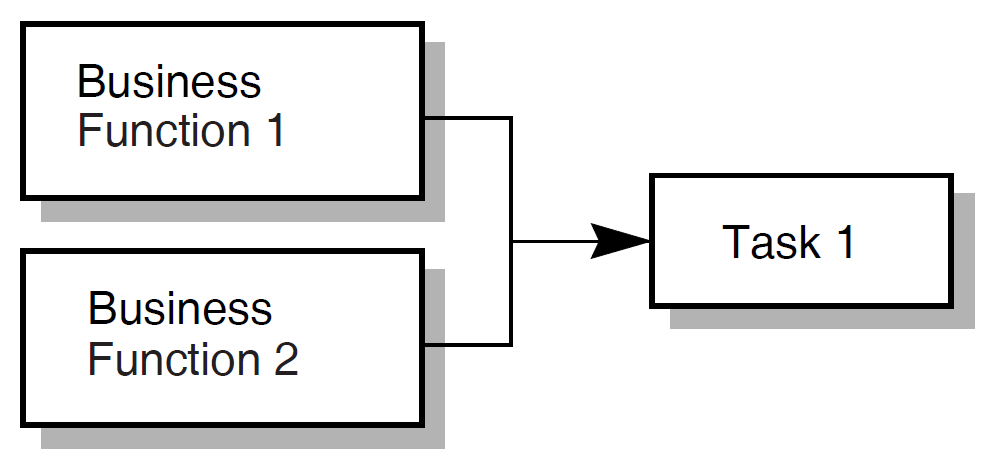
Create tasks consisting of unique components which multiple business functions can use.
If similar work must be performed in more than one business function, create tasks that isolate that work. Then use task calling to combine these finer-grained tasks as needed for each business function. The AVERTZ task design follows this model. Figure 5.3, ''Mapping Multiple Business Fucntions to Multiple Tasks'' illustrates this model.
Figure 5.3. Mapping Multiple Business Fucntions to Multiple Tasks 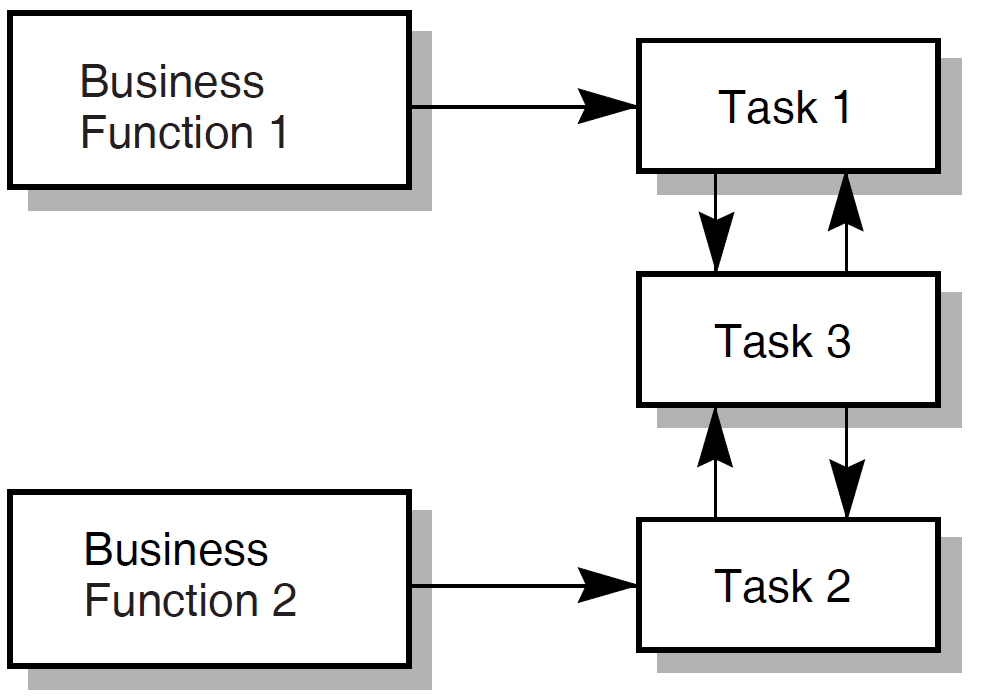
The mapping of business functions to ACMS functionality highlights the modular design of ACMS. A business function often consists of more than one task, because the operations necessary for that business function often are necessary for another business function as well. Therefore, two or more business functions can share one or more tasks that contain the needed functionality. Likewise, server procedures called from within tasks are often shared.
5.2. Planning Tasks for an Application
Sequence in which users supply information
Characteristics of transactions
Need for flow control
Distinction between work at the task level and at the step procedure level
The following sections offer high-level guidelines for these task design issues.
5.2.1. Considering User-Supplied Information When Designing Tasks
Information supplied to the application is a key factor in task design. Users often supply the initial information. Or, initial information comes from a combination of users and databases.
When you design a task, consider the sequence in which information is gathered. For example, when a customer checks in a car, the AVERTZ clerk must associate that customer to a car, and to information about that car that is stored in a database. The clerk must collect this information before calculating the bill.
So, an ACMS task often starts with an exchange step that asks the user for information–either new information, or a key field for access to information previously stored in a database. For example, all three of the AVERTZ business functions represented on the main menu (RESERVE, CHECKOUT, and CHECKIN) begin by invoking the single DECforms form to gather basic customer information. See Section 5.3, ''ACMS Tasks for the AVERTZ Application'' for an outline of all components in the AVERTZ application.
Moreover, key identifying information is often required in several locations in an application. Modular design allows you to isolate a common sequence of operations into a task that can be called as needed by other tasks. In the AVERTZ application the CHECKOUT and CHECKIN menu choices invoke the Checkout and Checkin tasks, respectively. Both choices invoke the form to gather identical information (customer name or reservation ID). Therefore, both the Checkout and Checkin tasks immediately call the get reservation task to identify the customer's reservation. Once the reservation has been identified, control returns to the Checkout or Checkin task to handle the operations specific to checking out or checking in a car.
Similarly, you can use your business functions to identify other exchange steps and order them sequentially within the outline of a task. If you plan to create called tasks for repeated sequences of operations, you can begin planning the exchange steps to be isolated in the called tasks.
5.2.2. Considering Transactions When Designing Tasks
Just as the order of the business activities described in Chapter 3, "Creating a Requirements Specification" affects the sequence of exchange steps in the task, the nature and order of the transactions described in Chapter 4, "Creating a Functional Specification" affects the processing steps.
Transactions result, directly or indirectly, from information gathered in exchange steps. When you order your transactions to reflect the business activities which they carry out, take into account the characteristics of transactions. For example, do not include an exchange step within a distributed transaction. Even if your analysis indicates that an exchange step fits logically within the transaction, the cost of maintaining locks in the database s while awaiting a user response is likely to be prohibitive.
5.2.3. Considering Flow Control When Designing Tasks
You often need the information derived from an exchange or processing step to decide the next operation. This often entails the use of REPEAT STEP, GOTO, GOTO STEP <step-label> syntax, nested blocks, or conditional logic. As you outline your tasks, consider the information flow.
Note where work flow leads to an exchange or processing step that can cause ambiguity for the user. For example, in the AVERTZ reservation task the user can specify the exact rental site by entering the site ID. A user who does not know the site ID can alternately enter a city name. If there is more than one rental site in the city, a list appears with all the site IDs for that city. The user can then choose a site. The reservation tasks handles this anticipated problem with conditional logic and GOTO PREVIOUS EXCHANGE syntax. If the user knows the site ID, the task flows directly to displaying customer information. If not, the task gets the possible site IDs and loops back.
5.2.4. Considering Task-Level Work and Procedure-Level Work When Designing Tasks
You sometimes have the choice of placing the work of the application at the task level or at the step-procedure level. For example, you can use task syntax or procedure code to handle conditional logic. Conditional logic is best placed in the task definition, if the resolution of the conditional logic avoids calling a step procedure. More complex conditional logic related, for example, to the results of computations, is better placed in procedures.
5.3. ACMS Tasks for the AVERTZ Application
|
Task Name |
Task Definition Name |
|---|---|
|
Reservation task |
VR_RESERVE_TASK |
|
Checkout task |
VR_CHECKOUT_TASK |
|
Complete Checkout task |
VR_COMPLETE_CHECKOUT_TASK |
|
Checkin task |
VR_CHECKIN_TASK |
|
Get Reservation task |
VR_GETRESV_TASK |
Note
The ACMS documentation includes other tasks and server procedures that use the AVERTZ example. However, these additional tasks and procedures are provided as illustrations of specific ACMS features, and are not an integral part of the working sample application.
The Reservation, Checkout, and Checkin tasks are selected by ACMS menu choices that correspond to these tasks. The Get Reservation and Complete Checkout tasks are called by one or more of the tasks that are menu selections. The following sections outline the work of the five tasks with respect to the business functions identified in the Requirements Specification. Succeeding chapters detail elements of the ACMS functionality used to carry out the work of the application.
5.3.1. The Reservation Task
Gathering all the customer information necessary to make a reservation
Identifying the site at which the customer wishes to check out a car
Identifying available cars and allowing the user to choose one
|
Procedure Name and Description |
Server |
Task Used in |
|---|---|---|
|
VR_READ_SERVER |
Reservation |
|
VR_READ_SERVER |
Reservation |
|
VR_UPDATE_SERVER, VR_LOG_SERVER |
Reservation, Checkout |
|
VR_UPDATE_SERVER |
Reservation, Get Reservation |
|
VR_LOG_SERVER |
Reservation, Checkout, Complete Checkout |
|
VR_READ_SERVER |
Checkout |
|
VR_UPDATE_SERVER |
Checkout, Complete Checkout |
|
VR_READ_SERVER |
Checkout |
|
VR_UPDATE_SERVER |
Checkout |
|
VR_READ_SERVER |
Checkout |
|
VR_UPDATE_SERVER |
Get Reservation |
|
VR_UPDATE_SERVER |
Complete Checkout |
A customer can make a reservation in advance, or can take a car immediately upon reserving it. The process of checking out a car is common to either of these situations. Therefore both the Reservation task and the Checkout task call a common task, the Complete Checkout task. See Section 5.3.5, ''The Complete Checkout Task''. Figure 5.4, ''The Structure of the VR_RESERVE TASK'' shows the flow of the VR_RESERVE_TASK.
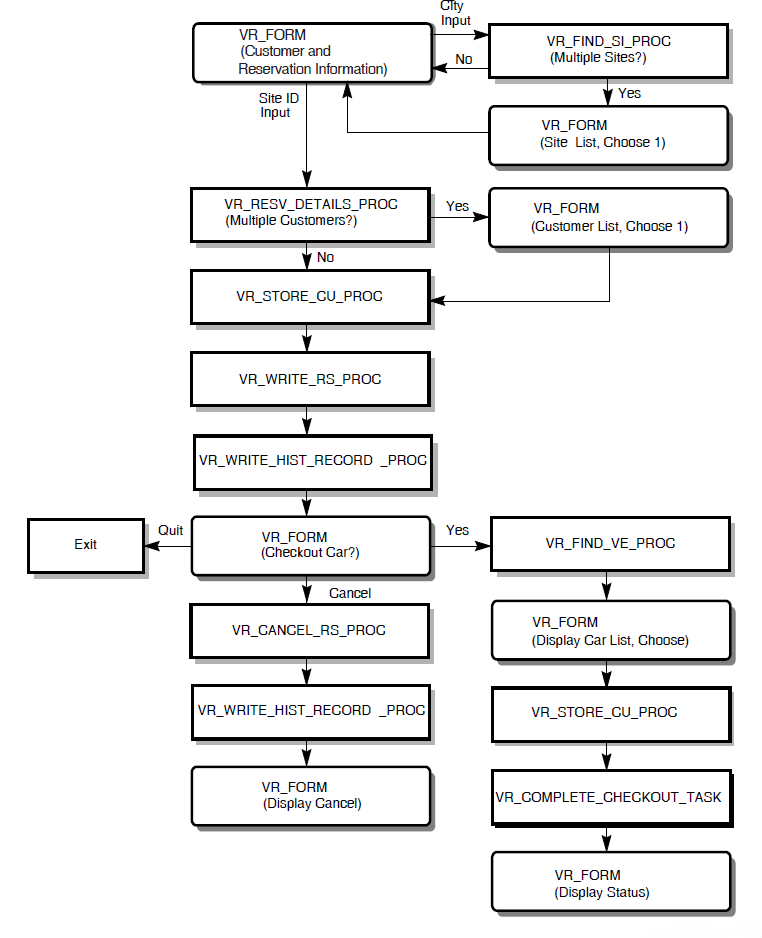
5.3.2. The Checkout Task
The Checkout task in the AVERTZ application, named VR_CHECKOUT_TASK, is used when a customer who has previously made a reservation arrives to take a car. Recall that the customer can also check out a car immediately upon making a reservation. Checking out a car at reservation time does not use VR_CHECKOUT_TASK. So, the checkout business function is initiated either by the VR_RESERVE_TASK or the VR_CHECKOUT_TASK. In either case, it is completed by the VR_COMPLETE_CHECKOUT_TASK. See Section 5.3.5, ''The Complete Checkout Task''.
Calls VR_GETRESV_TASK to check the reservation and customer information. The Checkin task also uses VR_GETRESV_TASK. See Section 5.3.4, ''Get Reservation Task''.
Identifies available cars and allows the user to choose one.
Updates the customer information.
Calls VR_COMPLETE_CHECKOUT_TASK to complete the checkout of the car.
Figure 5.5, ''The Structure of the VR_CHECKOUT_TASK'' shows the flow of the VR_CHECKOUT_TASK.
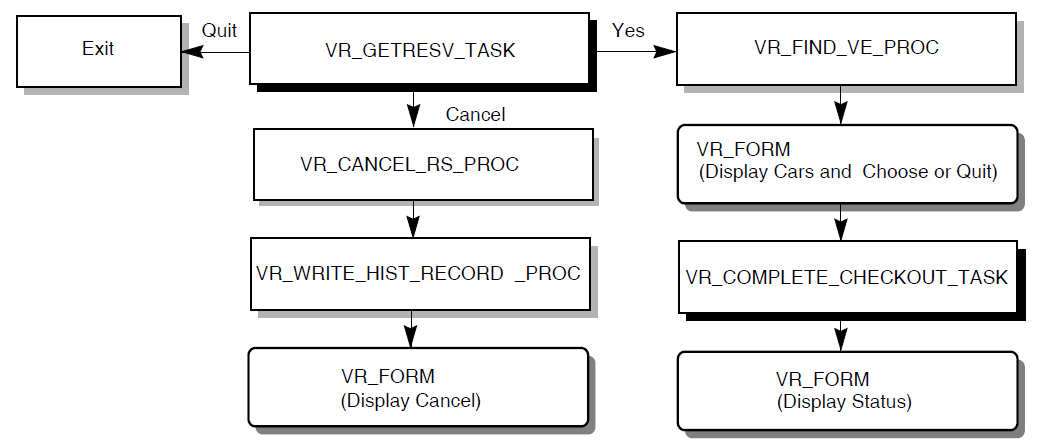
5.3.3. The Checkin Task
Calls VR_GETRESV_TASK to identify the unique reservation and to modify any customer information, if necessary
VR_GETRESV_TASK is a separate called task, because the Checkout task requires the identical work performed.
Uses the procedures listed in Table 5.2, ''Step Procedures Used in AVERTZ Application'' to get information needed to check in the car.
Figure 5.6, ''The Structure of the VR_CHECKIN_TASK'' shows the flow of the VR_CHECKIN_TASK.
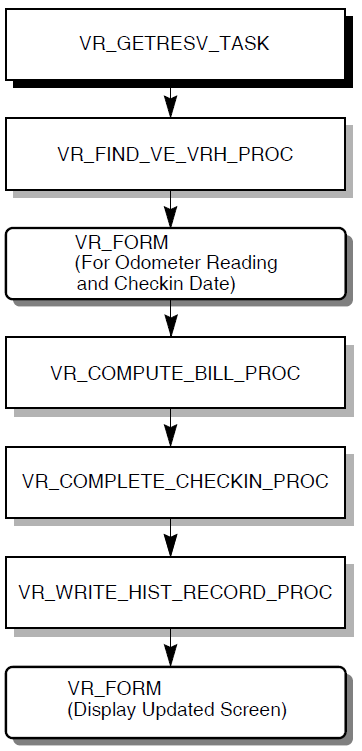
5.3.4. Get Reservation Task
VR_FORM – asks for reservation ID and customer ID, displays multiple reservations for the customer, if necessary, to identify a single one, and displays customer and reservation information that can be modified if necessary.
The procedures for finding and updating customer information, as listed in Table 5.2, ''Step Procedures Used in AVERTZ Application''.
VR_GETRESV_TASK operates only in the context of the Checkout or Checkin tasks. Once its work is completed, control returns to whichever of those tasks called it.
Figure 5.7, ''The Structure of the VR_GETRESEV_TASK'' shows the flow of the VR_GETRESV_TASK.
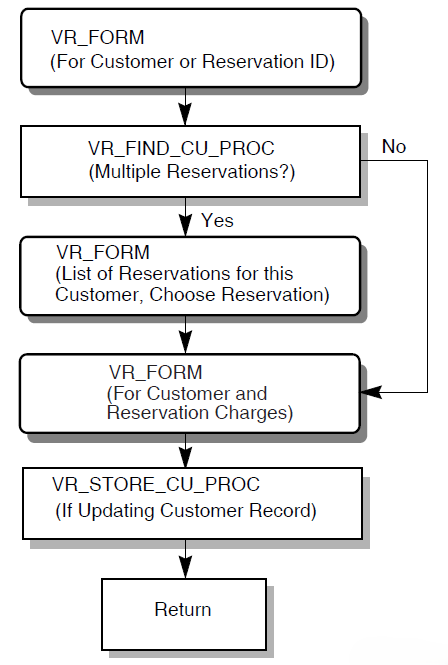
5.3.5. The Complete Checkout Task
The Complete Checkout task in the AVERTZ application is named VR_COMPLETE_CHECKOUT_TASK. This task is used both in the reserve car and checkout business functions. VR_COMPLETE_CHECKOUT_TASK completes or cancels the reservation, based on the choice made by the user after choosing a car (either in the reservation task or the Checkout task).
To do this, the task the procedures listed in Table 5.2, ''Step Procedures Used in AVERTZ Application'' to complete the checkout of the car.
VR_COMPLETE_CHECKOUT_TASK operates only in the context of the Checkout or Reservation tasks. Once its work is completed, control returns to whichever of those tasks called it.
Figure 5.8, ''The Structure of the VR_COMPLETE_CHECKOUT_TASK'' shows the flow of the VR_COMPLETE_CHECKOUT_TASK.
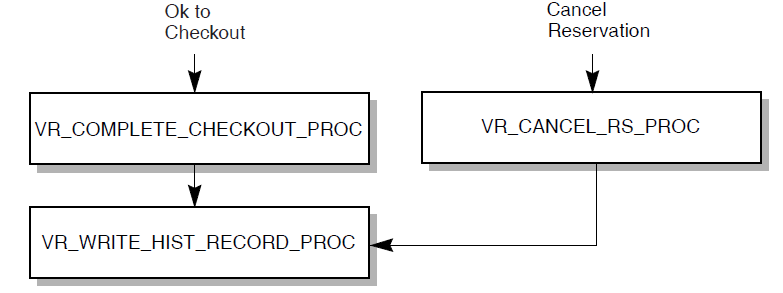
Chapter 6. Designing ACMS Tasks
Defining processing steps that do similar work in one step. See Section 6.2.1, ''Step Sequencing''.
Controlling task flow through step sequencing, conditional processing, and task calling. See Section 6.2, ''Controlling Task Flow ''.
Using a reusable procedure server for step procedures, and releasing server context. See Section 6.3, ''Designing Procedure Servers for Step Procedures''.
Defining and using workspaces. See Section 6.4, ''Designing and Using Workspaces''.
Processing with task queuing. See Section 6.5, ''Using Task Queuing''.
Using distributed transactions within an application. See Section 6.6, ''Designing Distributed Transactions'' and Chapter 4, "Creating a Functional Specification".
Using ACMS exception handling. ACMS lets you handle and recover from errors that interrupt the execution of a task. See Section 6.7, ''Handling Exceptions''.
6.1. Choosing Single-Step or Multiple-Step Tasks
A task that runs a single image, command, or procedure (such as running the OpenVMS Mail Utility) is a special type of task called a single-step task. A task that consists of both exchange and processing steps, or multiple processing steps, is called a multiple-step task.
A single-step task usually consists of a single OpenVMS image running in a single processing step. The task uses one server process–similar to an OpenVMS interactive process–from start to finish, with all the attendant overhead. A multiple-step task uses specialized processes that allow multiple users to share a single process. The processing of a multiple-step task involves moving from one ACMS process to another. For example, control moves from the Application Execution Controller (EXC) process that directs the flow of a task into the Command Process (CP) or server process in which an exchange step or processing step runs.
When ACMS runs a multiple-step task, only the processing steps of that task require the use of a server process. Exchange steps are handled by another ACMS process capable of handling input/output for a number of users simultaneously. A server process does not need to remain allocated to a task during an exchange step. Other tasks can use the server process during an exchange step.
Design your application to minimize the processes required by ACMS. Specialize the work that a server process does. Arrange for quick processing of the work so that the server is released for use by other users. This can decrease the resources required for the application, especially for complex applications.
Some activities, such as extensive data analysis, are better implemented as batch command procedures than as interactive multiple-step tasks. The procedure can be submitted to the batch queue from a single-step task running in a DCL server from the menu.
Similarly, you can write a single-step task that is invoked as a queued task.
- An existing application written in a high-level programming language can be used with ACMS. Include the existing application in a single-step task by using either:
The IMAGE IS clause, either in a processing step of a task definition or as a processing subclause in the task group definition. The existing application requires no modification.
The CALL clause, either in the processing step of the task definition or as a processing subclause in the task group definition. Use of this clause requires some modification to the existing application code.
However, if terminal I/O is performed by the image, you cannot invoke the task remotely.
You may want to consider converting such a single-step task to multiple steps. If the existing image is well structured, with terminal I/O and processing in modular paragraphs, the cost of conversion to a multiple-step task running in reusable procedure servers is repaid by the savings in resources.
The rest of this chapter describes design issues which, while not all confined to multiple-step tasks, are more likely to arise with multiple-step tasks.
6.2. Controlling Task Flow
Step sequencing
Nested blocks and conditional processing
Task-call-task facility
6.2.1. Step Sequencing
Within a multiple-step task, step sequencing is important for dividing the task into exchange and processing steps. Multiple-step tasks also allow you to use conditional statements to write structured, modular task definitions. You can create a complex task by using many exchange and processing steps. Or, create a series of less complex tasks and use the task-call-task feature to connect the tasks. Task calling improves clarity and maintainability, and provides for sharing of called tasks as subroutines.
Typically, a task definition consists of an alternating flow of exchange and processing steps, matching the business functions being handled by the task. This sequence is likely to take best advantage of the ACMS run-time system: exchange steps handle terminal I/O, while processing steps handle computation and database I/O.
However, there is some overhead associated with going into either an exchange step or a processing step. The number of step invocations at run time affects your run-time performance. Therefore, minimize the number of steps, to the extent that you do not compromise maintainability or server process performance. If your task has consecutive steps of the same type, consider combining them into a single step.
You also control step sequencing with syntax that redirects the task flow from the literal
order of steps within the task definition: for example, REPEAT STEP,
GOTO, or GOTO
STEP<step-label>. Redirection of task
flow often results from conditional action (described in Section 6.2.2, ''Conditional Processing'').
For example, the AVERTZ reservation task contains an initial exchange step that allows the user to choose a rental site by entering a site ID or a city. If the user enters a city and the city contains more than one site, the user can choose from a list of sites for that city. Once the user identifies a single site by any of these three means, the user enters customer and reservation information. All this activity takes place in a single exchange step rather than in a series of exchange steps. Conditional logic handles the identification of a single site, and the REPEAT STEP clause takes the user back to the point at which customer and reservation information is gathered if a single site was not immediately identified.
6.2.2. Conditional Processing
Test values of workspace fields to control task flow from block steps, processing steps, or exchange steps
Test status values returned from procedures to control task flow
Test values input by terminal users to control task flow
Use nested blocks to modularize tasks, performing the work in the nested block only if a condition is met
Do conditional logic in the task definition rather than in the step procedure if this avoids the need to invoke a processing step. By moving conditional and flow control logic out of the server procedure and into the task definition, you reduce the amount of time the task needs to go to the procedure server, freeing the server for other tasks to use. For example, if a customer has not updated any customer information, have the task skip over the processing step which performs a database update.
However, a procedure handles complex low-level business logic more efficiently than the task syntax does. See Section 6.3.2, ''Retaining and Releasing Server Context''.
Nested blocks enhance the modularity of task definitions. By using a nested block step, you can group processing and exchange steps into a block which is used only under particular conditions. ACMS processes the block only if a certain condition is met.
See VSI ACMS for OpenVMS Writing Applications for a description of a nested block.
6.2.3. Task-Call-Task Feature
In processing steps, you can call another task in the same task group, instead of calling a procedure in a procedure server. This is the task-call-task feature. A called task is similar to a subroutine in a 3GL program, based on the call and return model. Execution of the calling task continues when the called task completes. With task-call-task, control passes to the task you call (along with whatever workspaces you name as parameters), and then returns to the place from which you made the call.
Calling from one task to another is useful for applications that need to implement sophisticated task-to-task flow control mechanisms.
Task-call-task is particularly useful for providing modular code. The called tasks in the AVERTZ application illustrate this use of task-call-task. The Reservation task and the Checkout task both call the Complete Checkout task to handle identical processing related to checking out a car or canceling the reservation. Similarly, the Checkout task and Checkin task both call the Get Reservation task to gather information on the customer that is needed either at checkout or checkin of a car.
Allowing the user to call a task
Customizing menus
Enhancing security checking
Creating a library of common tasks
The following sections explain the use of task calling for these purposes.
6.2.3.1. Allowing the User to Call a Task
Some applications require that a user interrupt current work, perform some other related task, and then return to the original task. For example, the user doing an update task to change the database may need to run an inquiry task to check on the current status of the data.
Task-call-task provides an easy method for the application developer to implement this functionality. Create DECforms .IFDL code that returns literal text to an exchange step when the user presses a function key. The exchange step tests for the presence of the text string. If the text string is returned, the exchange step goes to a processing step that calls another task.
Exercise this option with care, however. To ensure that no information from the exchange step is lost, you must retain that information in a workspace, or ensure that the form data is not changed by the called task.
6.2.3.2. Customizing Menus
The menu interface supplied with ACMS uses DECforms. You may prefer to customize the ACMS menu by editing the DECforms .IFDL file, or to use another menu interface, such as TDMS. The appendixes in VSI ACMS for OpenVMS Writing Applications describe customizing the display characteristics of ACMS menus.
However, if you want to pass data between a menu and a task, you must write your own menu. You can use a selection string to pass information from an ACMS menu to a task, but this method has limited functions: values are not returned from the task, and only text is passed.
Instead, you can use task calling for greater functionality from a menu. Create a menu entry that selects a task and use task-call-task in the menu task to select tasks in the rest of the application. The limitation of this method is that the menu task and all called tasks must be in the same task group.
To avoid the task-call-task limitation of a menu task, write an agent program. An agent program allows you to select a task in any ACMS application on any node, as you can with the ACMS-supplied menu. You can also use the same forms capability and the same ACMS processing capabilities. The agent can be single-threaded or multithreaded. However, a single-threaded agent requires one agent process for each user process.
6.2.3.3. Enhancing Security Checking
ACMS task security is based on task Access Control Lists. You can use task calling to enhance that feature, or use an entirely different task security mechanism.
For example, you can prevent nonprivileged users from seeing tasks they are not authorized to select. To do this, write a menu task that determines the user's rights list information and then displays only the names of those tasks that the user is allowed to select.
Or, you can implement an application-specific security mechanism. Write a menu task that prompts for a user name and password, validates these in an application-specific authorization file, and displays only those tasks that are authorized for that user. The task should be local, so that only a menu task can call it.
6.2.3.4. Creating Common Library Tasks
Some applications require similar processing to be performed at multiple points within a task group. Or, applications may require many tasks within a task group to perform the same set of processing or exchange steps. The task-call-task feature allows you to build up a "library" of common functions implemented as tasks. These common tasks can be called from multiple points within a task or from different tasks within a task group. VSI ACMS for OpenVMS Writing Applications describes task syntax for the task-call-task feature.
6.3. Designing Procedure Servers for Step Procedures
A procedure server is a collection of step procedures which are called by processing steps. Each procedure server consists of one or more server processes, each executing the same server image. The ACMS application definition and task group definition define the procedure server. Server processes are the instances of each procedure server.
Figure 6.1, ''Structure of a Procedure Server'' illustrates the structure of a procedure server.
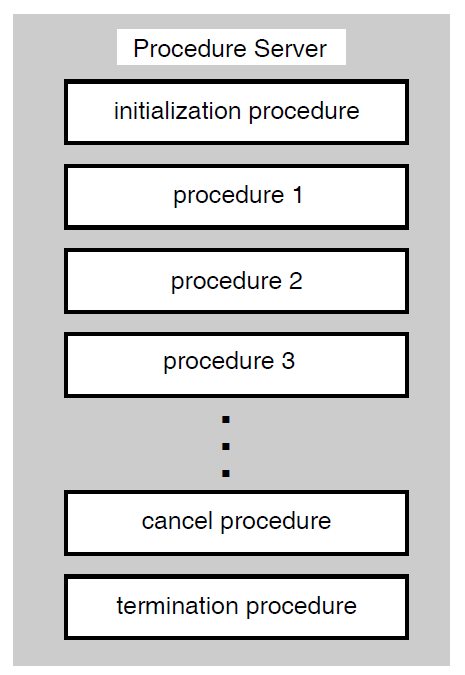
In addition to differing in the number of steps they contain, tasks differ in the processing they require and, therefore, in the kinds of server processes they use. ACMS uses DCL servers to handle the work for images, DCL commands or procedures, and DATATRIEVE commands or procedures. Procedure servers handle the work of calls to subroutines in processing steps.
Handle, at the starting and stopping of the server process, overhead work such as opening and closing files in initialization, termination, and cancel procedures for all the step procedures running in the procedure server.
Use workspaces that pass information between steps, requests, procedures, and task instances. The only data available to a DCL server is the contents of the ACMS$SELECTION_STRING system workspace, formatted into parameter symbols P1 to P8.
Allow for distributed forms processing if terminal I/O is handled by exchange steps.
Can balance processing throughout multiple procedure servers to allow a more granular level of process tuning.
|
Server Type |
Processes |
|---|---|
|
Procedure Server |
Procedures |
|
DCL Server |
Images, DCL commands or procedures, DATATRIEVE commands or procedures |
6.3.1. Designing Procedure Servers
Design of the step procedures controlled by each procedure server
Grouping of step procedures into procedure servers
Number of server processes allowed for each procedure server (specified in the application definition)
6.3.1.1. Designing Step Procedures
Minimizing the time within the code
Trapping all recoverable error conditions and return known values to the task
Making effective use of initialization, cancel, and termination procedures
Using event or error logging
See Chapter 7, "Designing Server Procedures" and VSI ACMS for OpenVMS Writing Server Procedures for detailed design guides for writing step procedures.
6.3.1.2. Grouping Step Procedures in a Procedure Server
Database transaction type
Separate read-only and read-write transactions into different procedures servers. When you commit a read-write transaction, Rdb prestarts a new read-write transaction, even if the read-write transactions only read the database.
Database resources
If you link all the procedures that use a particular resource into the same procedure server, you have better control over database contention. Each procedure server must maintain information about each resource to which it has access.
Transaction length
Do not force short transactions to wait for long transactions. One solution is to keep short transactions in one procedure server so that they can complete quickly. However, if a short transaction must wait for a long transaction to finish, you will have less lock contention if they both execute serially in the same procedure server.
Processing and security requirements
Different step procedures can have vastly different requirements for memory and other system resources. If necessary, consider creating procedure servers based on the characteristics assigned to the server user name: the privileges, quotas, and resources required by the step procedures using that server.
Operation type
For update transactions, mix insert, modify, and delete transactions in the same procedure server. If you isolate delete transactions in their own servers, you cannot reuse space freed by the deleted records.
OpenVMS accounting requirements
You may need to track OpenVMS accounting statistics for work done in various procedure servers.
6.3.1.3. Setting the Number of Server Processes for a Procedure Server
Keep the number of server processes to a minimum. Use reusable server processes, and as few as possible to accomplish your application's work. Database contention may result as the number of server processes with access to the database increases.
Make available enough server processes so that tasks do not have to wait an unreasonable length of time for a procedure server.
6.3.2. Retaining and Releasing Server Context
Much of the benefit of ACMS multiple-step tasks comes from releasing the server process when a processing step has completed. If a user is filling in information on a form or reading information from a form, the task does not need a server process. A multiple-step task needs a server process only at the time of computation or interaction with files or databases.
Record locks
File pointers or currency indicators
Other process characteristics
While releasing server context complicates the design of tasks, retaining server context tends to degrade overall performance, in some cases severely. Figure 6.2, ''Effects of Retaining and Releasing Server Context'' shows the difference between retaining and releasing server context when a task includes more than one processing step or repeats the same processing step.
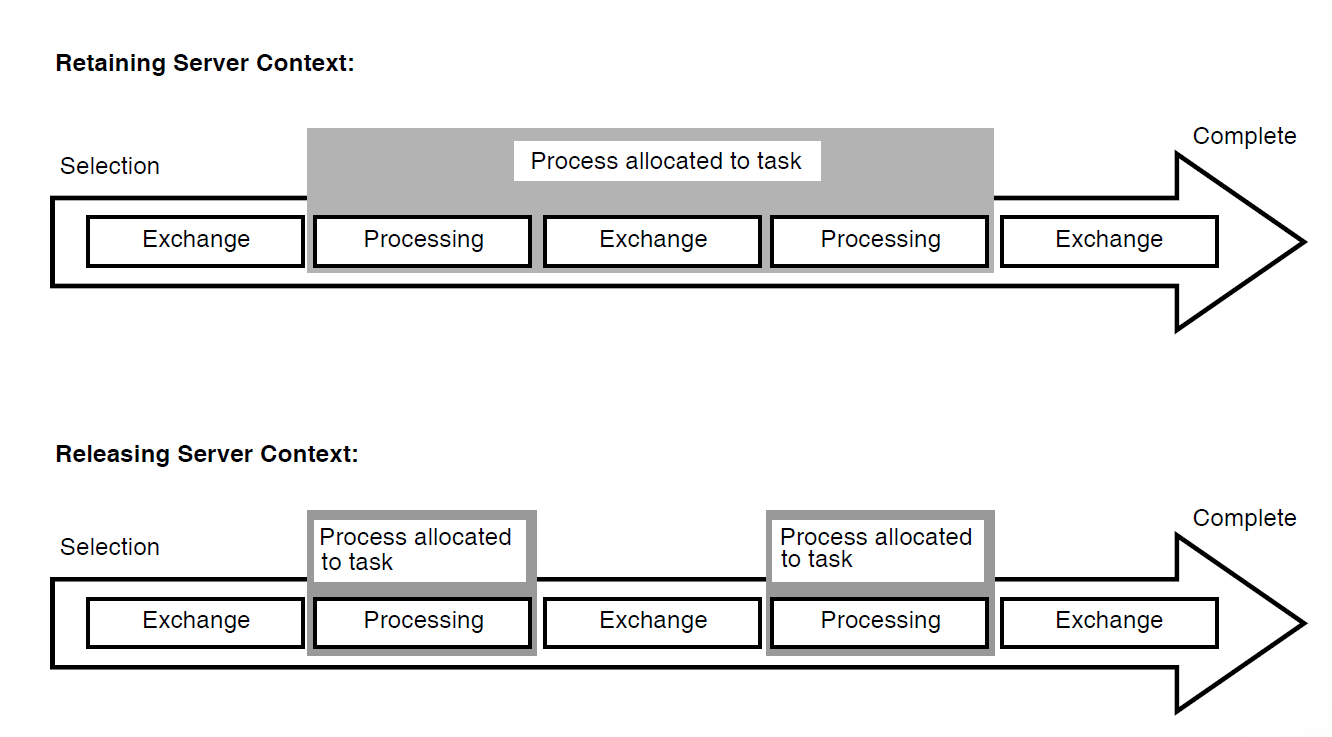
In a multiple-step task, a server process is allocated when the first processing step begins. If the task releases context, the server process is released when the task completes the processing step.
Releasing server context between processing steps means that a server process otherwise tied to the task is released to handle other tasks. Because processing time is typically much shorter than the time required for terminal I/O, a server process can handle many processing steps during the time required for a single exchange step. Releasing server context allows the application to require fewer server processes. Fewer processes accessing the data minimizes data contention.
The first processing step of an update task could lock the records used by the task, so that one user cannot make changes to the records while another is trying to make changes. However, locks held by the step procedure in a processing step are part of the context associated with the server handling the work in that step. Therefore, designing your task to lock records between processing steps requires retaining server context.
Avoid retaining server context as much as possible, because of the negative effects on application performance. However, retaining server context is a useful way to design update tasks when the records in the database are not updated frequently. Also, requirements for server context are different in distributed transactions. See Section 6.6, ''Designing Distributed Transactions''.
If the application does update the records frequently (such as in a car rental application or in a parts inventory), design the update task to read a record in the first processing step, then reread for update in the second step, checking for changes.
6.3.3. Working in a Task or a Step Procedure
This section offers guidelines about choosing where to do work that could be initiated either from a task or a step procedure. See Chapter 7, "Designing Server Procedures" and VSI ACMS for OpenVMS Writing Server Procedures for more information about step procedures.
Database I/O
Make database transactions as short as possible and include only the work appropriate to the procedure server. For example, if the procedure is in a server used for updates, do only database I/O required for updates. Move all other I/O to another procedure server, such as one used for reads.
Calculations
Be careful not to do intensive calculations in a procedure server that has limited server processes that also have I/O procedures. You do not want tasks waiting to do updates while another task does calculations.
File opens or database binds
By moving this work to a server initialization procedure, you can save the time that it takes to do this work when a task first calls a step procedure.
Flow control
It is usually preferable to have conditional logic in the task definition rather than in the procedure. See Section 6.2.2, ''Conditional Processing''. However, sometimes conditional logic belongs in the procedure:Complex business logic usually belongs in the procedure, not the task.
Conditional logic requiring array addressing belongs in the procedure, because the task does not allow for array addressing.
If logic internal to a procedure can preclude the need to return to the task definition, avoid the resulting reinvocation of the procedure by keeping the logic in the procedure.
Terminal I/O
When a step procedure does terminal I/O, the task ties up the procedure for the lengthiest part of the task's work. Also, the task cannot be distributed. The only reason to do terminal I/O in a procedure is if you must have access to some capability outside ACMS that requires terminal I/O.
Data moves
Handle most data moves in the step procedure. However, do not have a task call a step procedure just to do a simple data move. Instead, use th MOVE statement in the task definition. However, a step procedure must handle array element manipulation.
Data validation
You can put data validation in either the form or the step procedure. The method you use can affect the performance and maintainability of the application.
6.4. Designing and Using Workspaces
A workspace is a buffer used to pass data between the form and the task, and between the task and the processing steps. A workspace can also hold application parameters and status information. Workspaces are passed to step procedures and tasks as parameters. You must define the workspace structure and store in CDO or DMU format.
6.4.1. Workspace Size
In the execution of an application, workspaces pass from the Command Process for exchange steps to the server process for processing steps, and back throughout the execution of a task. Information for use by these processes is stored within workspaces.
Part of the cost of communication across the network lies in the size of these workspaces. Consider this network cost when you design workspaces. Workspaces have to be stored in global sections or made up into packets to be passed over the network in a distributed transaction. Consider the total size of all the workspaces you are passing to the form or processing step.
Note that passing one workspace of 500 bytes is less expensive than passing 5 workspaces of 100 bytes each, providing all 500 bytes are required. Avoid passing unnecessary data, however large or small the workspace you use. Passing a 2250-byte workspace that requires three network packets is not unduly costly if you intend to use most or all of the data in the workspace. Passing 250 bytes that require one network packet is wasteful if you do not need the data.
6.4.2. Workspace Structure
To match exactly your database or file record descriptions
A workspace containing exactly the same fields as a relation in an Rdb database is easy to maintain. However, it may use more memory than necessary and may pass more data then necessary.
To contain only the data necessary to do the work at hand
Such a workspace minimizes the use of memory and passes only the data needed. It may be more difficult to maintain.
Note that no single workspace can be larger than 65,536 bytes. The total size of all workspaces (including system workspaces) cannot exceed 65,536 bytes for a task instance. This effectively limits the size of a single workspace to 65,536 bytes, minus the size of all ACMS system workspaces, because all system workspaces are always present (for example, the system workspace size is 519 bytes in ACMS Version 4.2).
6.4.3. Using Task, Group, or User Workspaces
Task workspace
A task workspace stores database records and control information required by the task. ACMS system workspaces are a special type of task workspace, defined by ACMS.
Group workspace
Group workspaces store relatively static application-wide information (such as the interest rate for a financial application).
User workspace
User workspaces store static user information (such as a user security profile) or information specific to the user that changes during the session (such as an accounting of the kind of work done by the user).
|
Characteristic |
Task |
Group |
User |
|---|---|---|---|
|
Availability |
For the duration of the task instance |
For as long as the application is started (active) |
For the user's ACMS session within the application |
|
Purpose |
Passes information between:
|
Stores relatively static information required by many tasks in a group |
Stores user-specific information |
|
CPU cost |
Copied once from the .TDB at task start, not copied back at taskcompletion. |
Copied from the permanent workspace pool to the temporary pool at task start. Copied back to the permanent workspace pool only if accessed for update by the task. |
Copied from the permanent workspace pool to the temporary pool at task start. Copied back to the permanent workspace pool only if accessed for update by the task. |
|
Memory cost |
Exists only in the temporary workspace pool |
One copy in the permanent pool and one copy for each task referring to the workspace in the temporary pool |
One copy for each user in the permanent workspace pool, one copy for each task instance referring to the workspace for each user in the temporary workspace pool |
6.4.4. Declaring and Referring to Workspaces
Task workspaces
If you declare a workspace in the task definition, at the task group build, ADU stores in the .TDB file one copy of the workspace each time it is declared in a task. When you declare a workspace in the task group definition and refer to it in the task definition, the task refers to a single definition of the workspace that exists in the .TDB file.
Therefore, declaring the workspace in the task group definition rather than the task definition decreases .TDB size (resulting in a decrease in the EXC and server process working set requirements) and improves run-time performance. For maintainability, define workspaces in the group and refer to them in the task definitions, even if the workspace is used in only one task.
Group workspaces
If you declare a group workspace in the task definition, there is one copy of the workspace in the permanent workspace pool for each task. In effect, the workspace becomes task-specific rather than being shared by all tasks. However, all users running a specific task see the same copy.
If you declare a group workspace in the task group, each task uses a single copy of the workspace in the permanent workspace pool. As a result, all tasks referring to the workspace see the same copy.
Figure 6.3, ''Declaring Group Workspaces in the Task Definition'' and Figure 6.4, ''Declaring Group Workspaces in the Task Group Definition'' illustrate the differences between declaring and referring to group workspaces.
Figure 6.3. Declaring Group Workspaces in the Task Definition 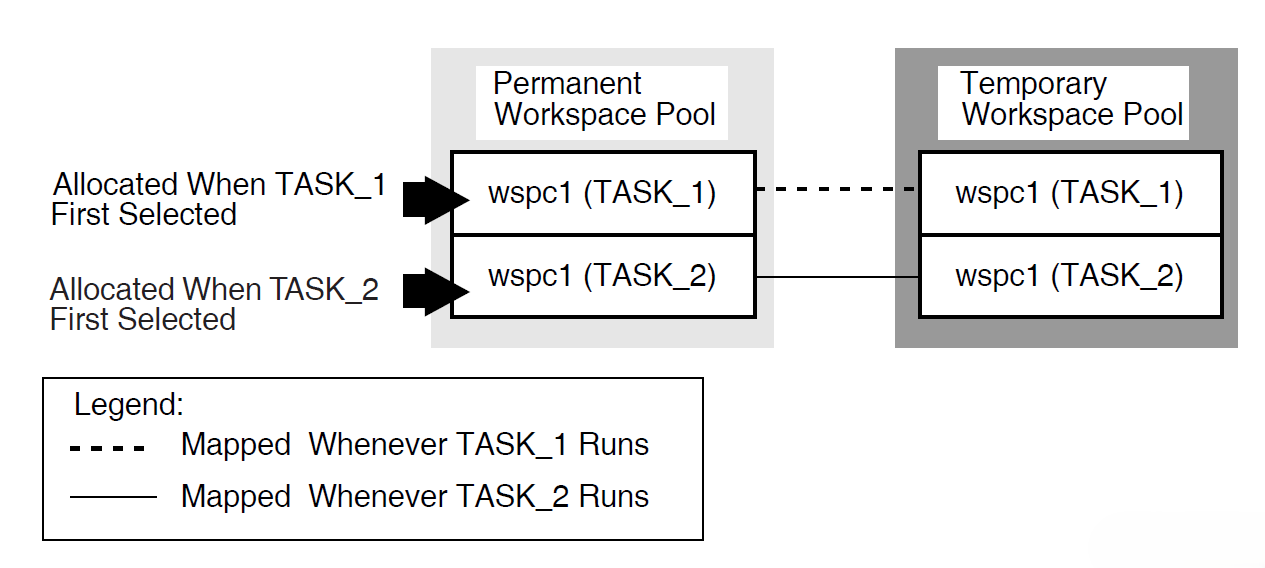
Figure 6.4. Declaring Group Workspaces in the Task Group Definition 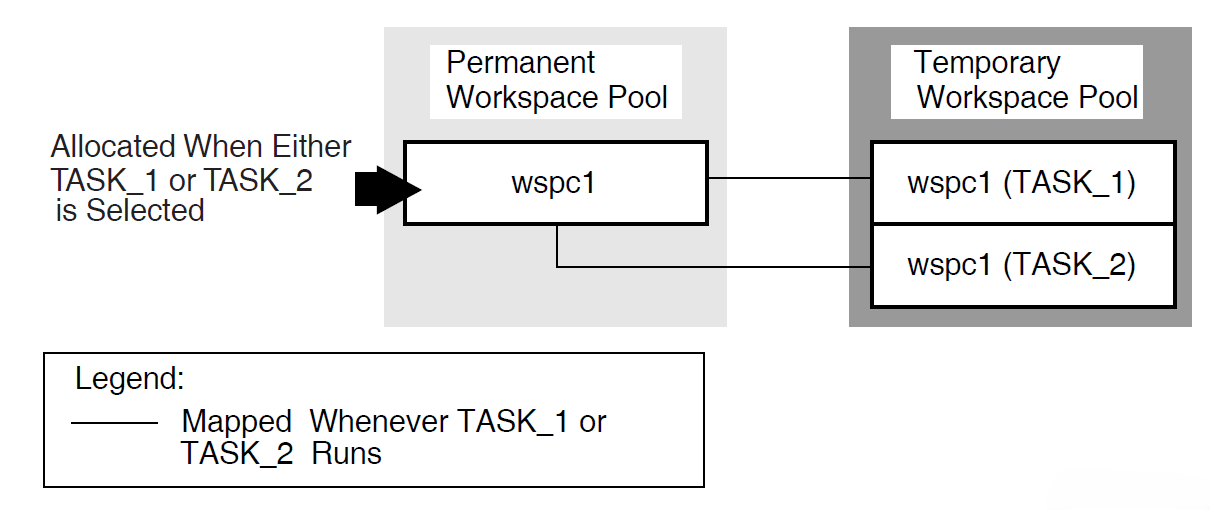
User workspaces
If you declare a user workspace in multiple task definitions, the same user will have multiple copies of the workspace in the permanent workspace pool. In effect, the workspace becomes both user-specific and task-specific rather than just user-specific.
If you declare a user workspace in the task group definition, each user has just one copy of that workspace in the permanent workspace pool. As a result, ACMS maintains a single copy of the workspace for each user. This copy is used by all tasks selected by a particular user. For example, use this method to store user profile information in a single workspace.
Figure 6.5, ''Declaring User Workspaces in the Task Definition'' and Figure 6.6, ''Declaring User Workspaces in the Task Group Definition'' illustrate the differences between declaring user workspaces in the task, or declaring them in the task group and referring to them in the task.
Figure 6.5. Declaring User Workspaces in the Task Definition 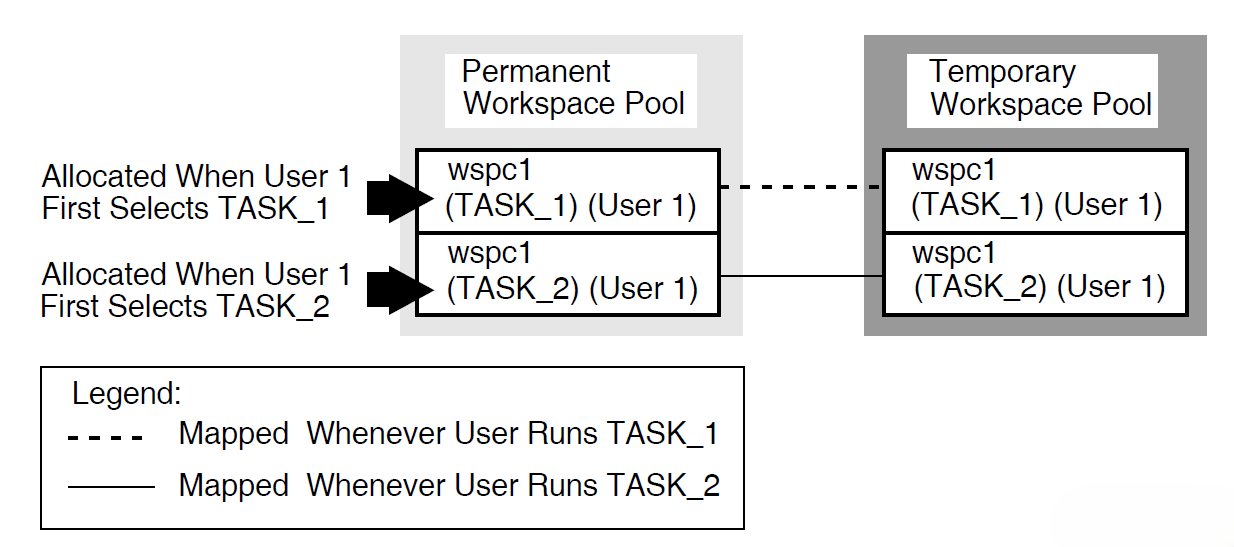
Figure 6.6. Declaring User Workspaces in the Task Group Definition 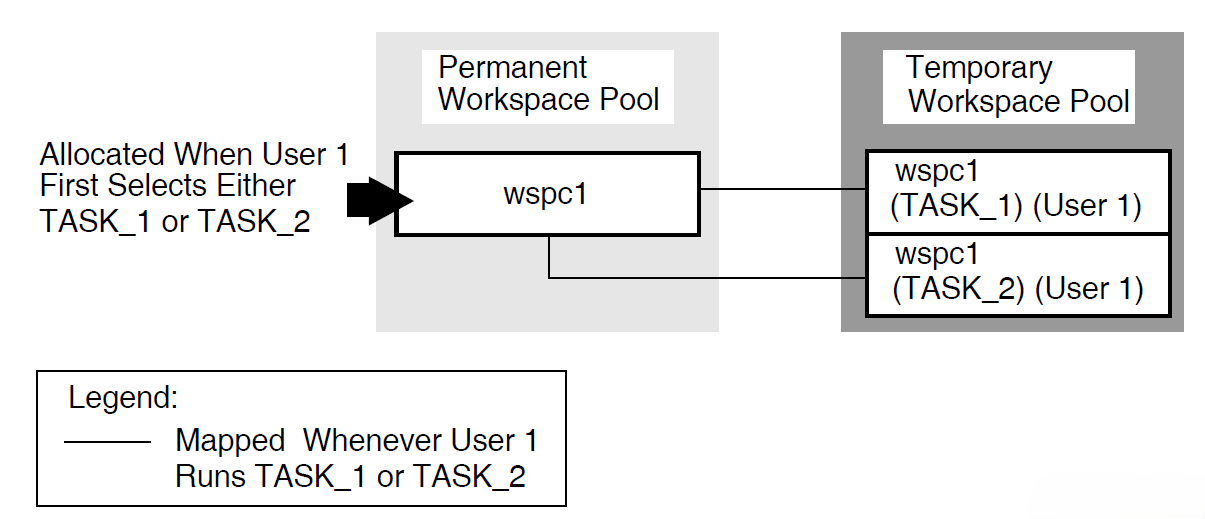
The AVERTZ application declares all workspaces in the task group definition, and refers to them as needed in the task definition.
6.4.5. Specifying Access for Workspaces
ACMS allows a called task to accept arguments in the form of task workspaces. User-written agents or tasks may pass workspaces to other tasks. You can specify READ, WRITE, or MODIFY access for each workspace you include in a TASK ARGUMENT clause. Use MODIFY for passing and returning data, READ for passing data, and WRITE for returning data.
Specifying READ access on task workspace arguments can provide performance benefits, since ACMS does not have to return the workspace to the parent task or agent when the called task completes.
In creating workspaces for task calls, bear in mind the trade-off between workspace size and the various access types. For large workspaces, it is more efficient to pass data using a READ workspace and return data using a WRITE workspace than it is to pass and return data in a single MODIFY workspace. Conversely, it is more efficient to pass a single MODIFY workspace containing a small amount of data than it is to pass several separate READ and WRITE workspaces. The default is MODIFY.
The called tasks in the AVERTZ application are the Get Reservation task and the Complete Checkout task. Both tasks receive data from a parent task in the VR_SENDCTRL_WKSP workspace. However, neither task needs to return any data to the parent task in this workspace. Therefore, the VR_SENDCTRL_WKSP workspace is defined in both tasks as a task argument workspace with READ access. Both tasks also receive data from a parent task in the VR_CONTROL_WKSP workspace. Also, both tasks return information to the parent task in this workspace. Therefore, the VR_CONTROL_WKSP workspace is defined in both tasks as a task argument workspace with MODIFY access.
The Get Reservation task returns information to the parent task in the VR_RESERVATIONS_WKSP workspace after reading reservation information from the database. The VR_RESERVATIONS_WKSP workspace is defined as a task argument workspace with WRITE access in the Get Reservation task, because the task does not receive any data from the parent task in this workspace. However, the Complete Checkout task also receives data from the parent task in the VR_RESERVATIONS_WKSP workspace, in addition to returning information to the parent task in this workspace. Therefore, the VR_RESERVATIONS_WKSP workspace is defined as a task argument with MODIFY access in the Complete Checkout task.
See VSI ACMS for OpenVMS Writing Applications for a complete description of workspaces.
6.5. Using Task Queuing
Data capture and deferred processing of data
Queue the data with a task name in an ACMS task queue and process it at a later time when the demand for resources is less, if the application has the following requirements:Needs to collect a large amount of data in a short time
Does not need to process the data immediately
Needs to allow the users to continue without delay
For example, an application has hundreds of time cards that must be processed in a very short amount of time during a shift change. In this type of application, processing each data item immediately has adverse effects on the performance of the system, so it is useful to capture the data and store it for future processing. This type of processing is known as desynchronized processing, because the data capture and the data processing are not synchronized.
High application availability
Queuing is an important feature in distributed environments that allow users to continue working even if an application is not available. For example, an application uses a front-end node for data entry and queues these tasks for processing by a back-end node. When both nodes are up, the back-end node processes the queued tasks at regular intervals. If the back-end node goes down, the front-end node continues to queue the tasks, thus providing uninterrupted access to the application for terminal users entering data on the front end. These tasks remain queued until the back-end node becomes available and the front-end node can submit them.
Transaction persistence
If a system failure interrupts the processing of a queued task, the queuing facilities continue to dequeue and submit that task until the task succeeds. If the task fails for a different reason and cannot be resubmitted, ACMS writes the queue entry to an error queue, where it can be subsequently retrieved and processed by the application, based on the error status.
For these and other similar requirements, you can use the ACMS queuing facility to capture and initiate the tasks in your ACMS application.
Combine queuing with normal processing within a task when the data does not need to be synchronized. For example, in a task that ends with an update of multiple records, you can put the final processing step into a queued task; all the preceding steps can be interactive, even if they included write or modify operations. See the VSI ACMS for OpenVMS Writing Applications for details about implementing a queued task, as well as a queued task example based on the AVERTZ application. The AVERTZ company offers a quick-checkin service for its customers. During peak periods, when many cars are being returned at the same time, customers can enter into the system their reservation information and the odometer reading from the car. The application stores the checkin information as a queued task that is processed at a later, less busy time. Section 6.6, ''Designing Distributed Transactions'' describes the use of a queued task within a distributed transaction.
6.6. Designing Distributed Transactions
A business function usually involves several database operations. By including a set of operations within the bounds of a transaction, you are instructing ACMS to ensure that all updates are performed as an atomic transaction. ACMS uses the DECdtm services to ensure the integrity of a distributed transaction. Chapter 4, "Creating a Functional Specification" describes how to identify transactions for your business functions, including distributed transactions. This section offers details about the design of distributed transactions.
6.6.1. Locating Transaction Control
Task
Declaring the distributed transaction in the task definition ensures full ACMS functionality. For example, you can use the Trace software to track the distributed transaction if the transaction starts on a block step or a processing step. Also, if you always declare the distributed transaction in the task definition, you maintain consistent task definitions. Declaring the distributed transaction in the task definition contributes to ease of maintenance, because control of the transaction remains with the task and is insulated from changes to the procedure code. Within the task definition, you declare the distributed transaction either at the:Block step
If the task has more than one processing step participating in the distributed transaction, the transaction must start on the block step.
Processing step
If only a single processing step participates in a distributed transaction, you can start the distributed transaction on the processing step. This method offers the advantage of allowing the use of one-phase commit if only a single local resource manager is being used. In such a case, two-phase commit is not required. For example, consider a banking transaction that consists of debiting of one account and crediting another. If the transaction involves the accounts of two patrons of the same branch (and the data is stored within the same resource manager), the local transaction requires only one-phase commit. If the transaction involves the accounts of patrons of different branches (and the data is in different resource managers), the two-phase commit functionality of a distributed transaction is required.
If you start the transaction at the block step, the transaction starts in a different process (the Application Execution Controller) than the one in which the resource manager is executing (the server process). Therefore, you assume the full overhead of two phase commit. If you start the transaction at the processing step in the task, the transaction starts in the server process. By using conditional logic in your step procedure, you can make use of one-phase commit where appropriate.
Step procedure
Declaring the distributed transaction in a step procedure makes transaction retries easier to handle. However, the transaction is not under the control of ACMS. Therefore, you must code all the DECdtm service calls and assume responsibility for the integrity of the transaction. Also, you lose some ACMS functionality, such as the use of Trace.
Agent
Using a distributed transaction started in an agent, you can coordinate the database modifications made by a task with modifications made to a local database or file by the agent. For example, the ACMS Queued Task Initiator (QTI) uses a distributed transaction to coordinate the removal of a queued task element from an ACMS task queue with the modifications made to a database by the queued task instance. You can also use distributed transactions started in an agent in the design of a highly-available system using a fault-tolerant machine as a front-end system. For example, an agent on a front-end system collects information that is processed in a database by a system on a back-end VMScluster. After collecting the appropriate information, the agent starts a distributed transaction and then calls a task on a back-end system as part of the distributed transaction. When the task completes, the agents ends the distributed transaction. If the transaction commits successfully, the agent can process the next task. If the transaction aborts, perhaps because the back-end system fails, then the agent can retry the operation by calling the same task on a different system in the back-end VMScluster. By calling the task in a distributed transaction, the agents knows with absolute certainty whether or not the database operations performed by the task on the back-end system were successful, or if they failed and need to be retried.
6.6.2. Choosing an Access Method to Remote Data
A task called from an agent in a server procedure
If you use the ACMS$CALL or ACMS$START_CALL services in a step procedure called from a task, the procedure acts as an SI agent. As an agent, the procedure can call a task in another application, and has access to databases serving that task on the same or another node. Figure 6.7, ''Including a Called Task Within a Procedure in a Distributed Transaction'' shows pseudocode for the use of the ACMS$CALL service to call a task from a procedure. The example is a debit/credit banking operation between accounts on remote branches of the same bank. Figure 6.8, ''Remote Update Using Called Task from Procedure'' illustrates the use of the ACMS$CALL service to control processes and minimize network traffic.
Figure 6.7. Including a Called Task Within a Procedure in a Distributed Transaction 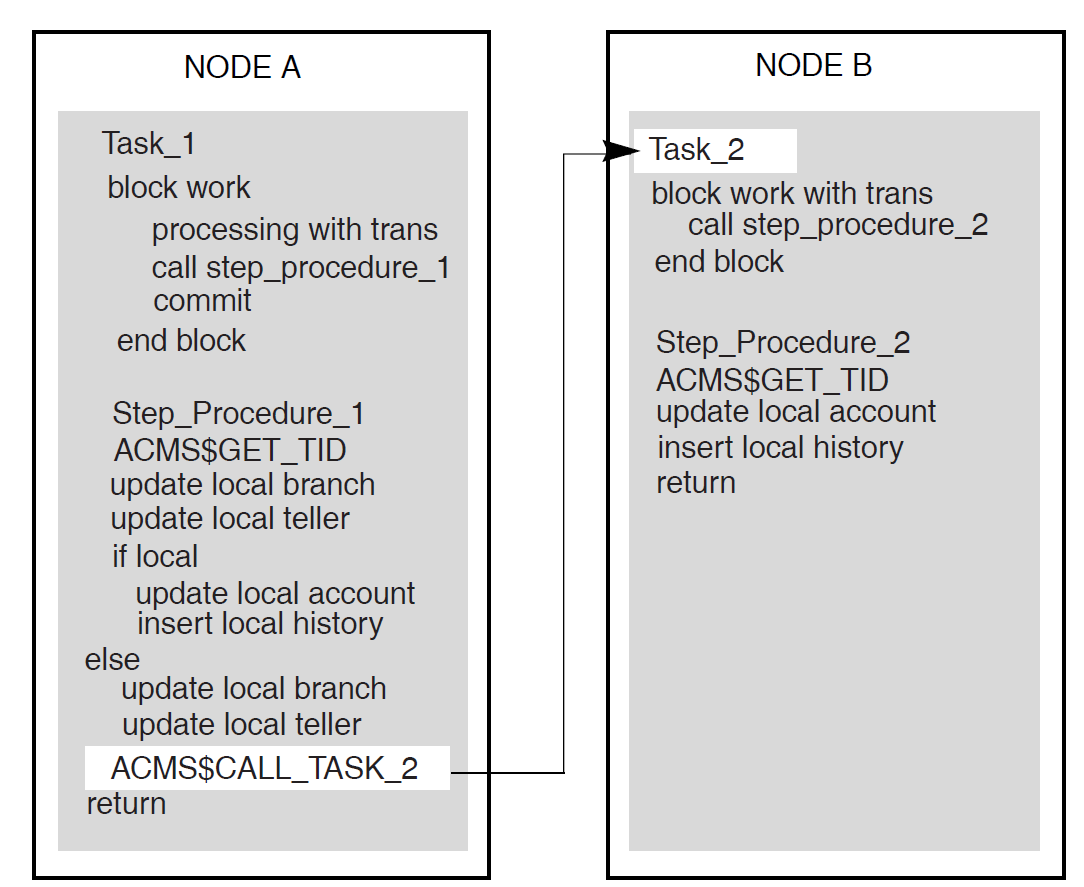
Figure 6.8. Remote Update Using Called Task from Procedure 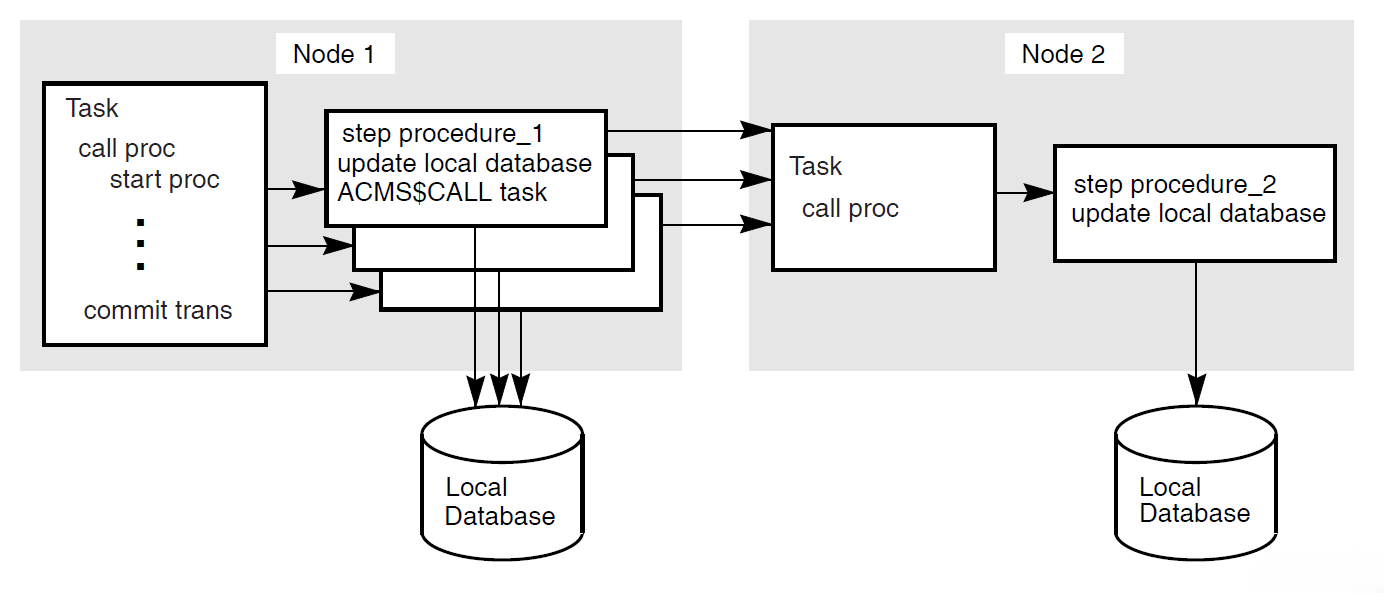
Note
If you use task-call-task to call a task directly from another task, you do not have access to tasks in other task groups or applications. Both tasks must be in the same task group within the same application.
Queued task
A queued task can participate in a distributed transaction at enqueue or at dequeue. The distributed transaction encompasses the database transaction and the ensuing enqueue, or the dequeue and the ensuing database transaction:Enqueue
An application can store a queued task element in a task queue, including any data needed by the queued task.
Dequeue
The QTI starts a distributed transaction, dequeues the queued task element and initiates the queued task in the specified application. The database processed by the dequeued task element can be remote from the source of the data used by the queued task element. In fact, the two databases, the applications, and the task queue can all be on the same or different nodes.
If a queued task fails, the QTI places the failed queued task element on an error queue associated with the task queue so that remedial action can be taken. The QTI rolls back the transaction. If there is no error queue, the QTI removes the task from the queue, and commits the transaction.
Remote Rdb, DBMS, or RMS
In this case, you do not use ACMS$CALL from the step procedure for access to the called task. Instead, you use the remote access capabilities of the resource manager from within the local ACMS procedure.
When you use the remote access capability of Rdb, for example, the initialization procedure might attach to a local database and a remote database when the server process starts. To handle the access to the remote database, Rdb creates a process on the remote node. This method has disadvantages:Each local process accessing a remote database requires a process on the remote node.
The additional processes accessing the database on the remote node result in increased contention for resources in the remote database.
Each database access from the local node to the remote node requires a message exchange between the two nodes.
Operators on the remote node have less control over the database, because it is being accessed by processes on other nodes.
In contrast, with ACMS$CALL, you do not need a process on the remote machine for every server process on the local machine; the database-access tasks called by the local machine can use the same server processes as the tasks on the remote machine. This reduces the number of processes required by the remote machine, resulting in a decrease on database contention. For example, in Figure 6.8, ''Remote Update Using Called Task from Procedure'' the remote task on Node 2 can use the same server processes as the local tasks to access the database.
If you use the ACMS$CALL service to perform distributed transactions, you issue only two messages for each task call, regardless of the number of database accesses being performed by the server for the remote task. One message invokes the task, and one signals the completion.
Note
Additional messages are exchanged between the local and remote nodes as part of the two-phase commit protocol at the end of the transaction.
Figure 6.9, ''Using Rdb Remote Access for a Distributed Transaction'' shows pseudocode for a distributed transaction with Rdb remote access. Figure 6.10, ''Remote Update Using Rdb Remote Server'' illustrates the processes created and network traffic generated with the remote access method.
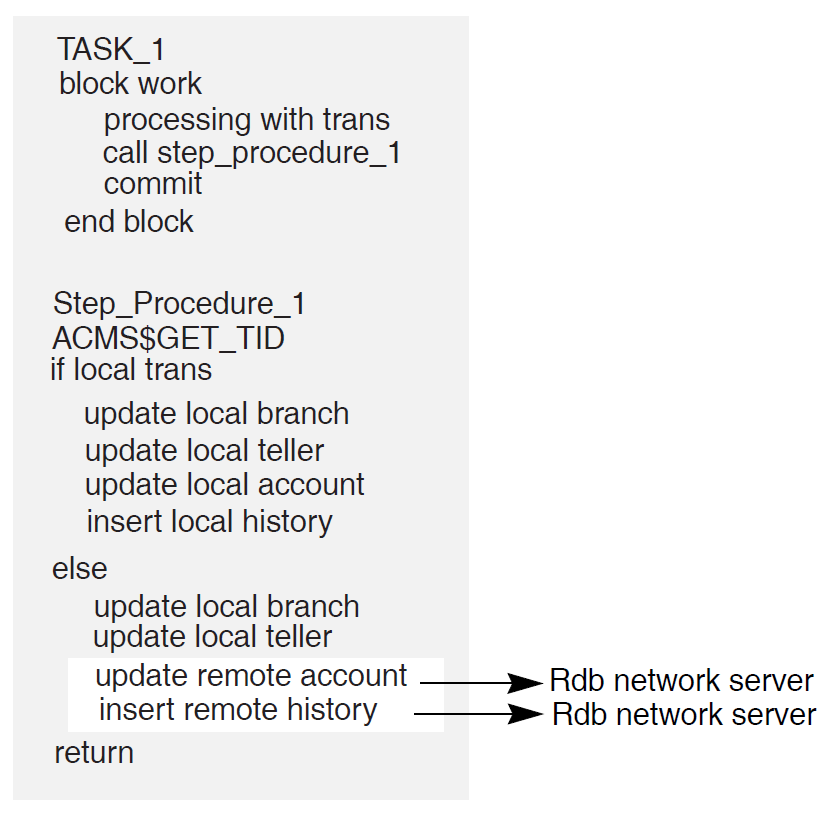
Minimizes server processes and lock contention on the remote node
In Figure 6.8, ''Remote Update Using Called Task from Procedure'', the ACMS$CALL in the step procedure on Node 1 calls the task on Node 2. The remote task on Node 2 uses the same server process to access the database as the local tasks on Node 2. In Figure 6.10, ''Remote Update Using Rdb Remote Server'', each server process on Node 1 requires an Rdb server process on Node 2, in addition to the ACMS procedure server processes (not shown). These additional processes lead to increased contention in the database.
Minimizes network traffic
ACMS$CALL results in a single network transmission in each direction. Remote updates require network transmissions for each database verb. The result can be multiple network transmissions for each update.
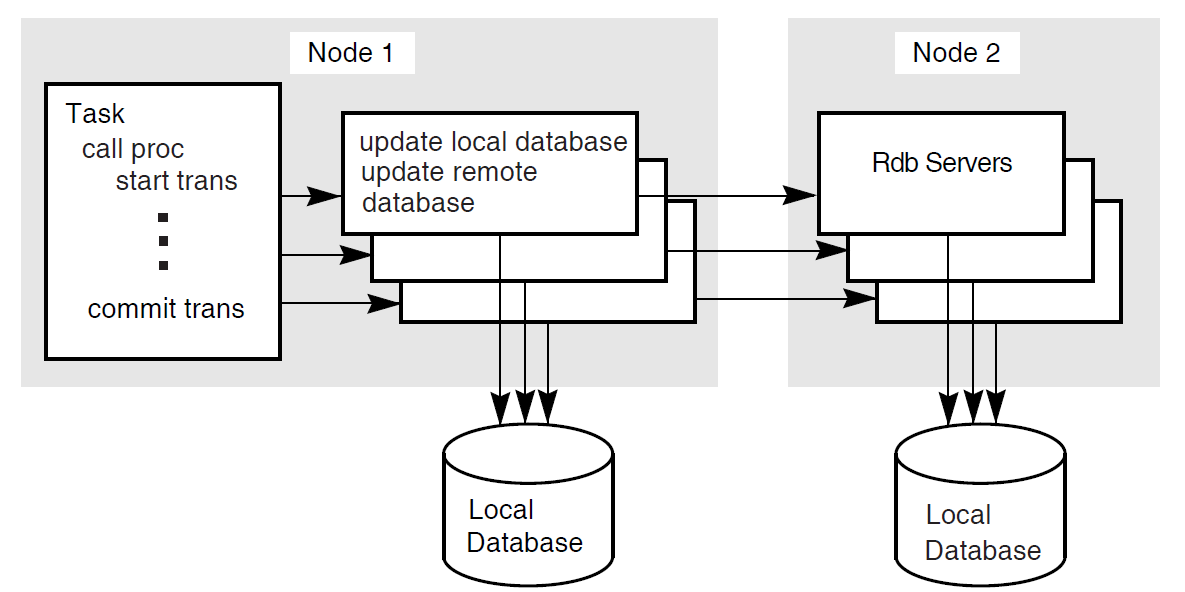
6.6.3. Distributed Transactions in the AVERTZ Application
The AVERTZ sample application maintains a history log database, in addition to the main database. Any customer or reservation information written to the main database must be written to the history log database as well, for auditing purposes. The AVERTZ application uses distributed transactions to ensure that both databases commit the same information.
VSI ACMS for OpenVMS Writing Applications details the writing of distributed transactions in an ACMS task.
6.7. Handling Exceptions
ACMS raises an exception if it detects an error condition while a task is executing. You can use the exception handler component of the task definition language to control task execution after an exception is raised in a task. Use of exception handlers in tasks is optional. If you do not specify an action to take when an exception is raised, ACMS cancels the task. You use exception handler action clauses to direct the flow of the task after an exception is raised. For example, you can use an exception handler to retry a distributed transaction that times out.
Step exception
You can handle a step exception in the:Exception handler part of the step on which the exception occurs
Exception handler on an outer block step
Transaction exception
A transaction exception is an error that causes a distributed transaction to fail.
You can handle a transaction exception in:Exception handler part of the step that starts the transaction
Exception handler on an outer block step
Nonrecoverable exception
A nonrecoverable exception is an error from which the task cannot recover. When a nonrecoverable exception is raised, ACMS cancels the task.
See VSI ACMS for OpenVMS Writing Applications for details about implementing exception handling.
Chapter 7. Designing Server Procedures
This chapter provides guidelines for mapping your defined transactions to step procedure implementations. It helps you decide when and where a step procedure performs the desired operations, such as database recovery and validation.
7.1. Writing Server Procedures
Structuring the procedure as a subprogram or function
The programming language used must be able to receive parameters and return status to a calling program. Structure your procedure as an externally callable subroutine.
Assigning a unique name to each procedure in a server
This name is an entry point into the procedure and must correspond to the procedure name defined in the task group and referred to in the task definitions.
Opening files and binding databases in initialization procedures rather than in the step procedures
An initialization procedure performs work specific to a server process.
Using workspaces to pass information between the task definition and the procedure.
Using CDD for record definitions and for workspace record definitions (for languages supporting CDD)
VSI ACMS for OpenVMS Writing Server Procedures describes these programming considerations in detail.
7.2. Returning Status to the Task Definition
Using the return status facility provided for subprograms or functions in the language used
Putting status information directly into a user-defined workspace that has been passed as a parameter to the procedure
User-defined workspaces are more flexible than the return status facility, but require additional memory. The return status facility uses the predefined ACMS$PROCESSING_STATUS workspace, but offers a limited set of values to pass.
The chapter on writing step procedures in VSI ACMS for OpenVMS Writing Server Procedures describes ACMS$PROCESSING_STATUS in detail. ACMS$PROCESSING_STATUS is also used to return messages based on the result of a returned status. See Section 7.3, ''Returning Messages to Users''.
7.3. Returning Messages to Users
Task retrieves the error message text from the message file
Use the GET MESSAGE task syntax to translate a success or failure status from the procedure for a specific message in a message file. ACMS stores the return status in the ACMS$PROCESSING_STATUS workspace. Based on the return status, the task retrieves error message text from the message file, and places the message text in the message portion of the ACMS$PROCESSING_STATUS workspace.
The task syntax minimizes coding needed for access to the messages. Also, by using message files you can change the message text without affecting the task definition or the step procedure code.
However, you cannot use FAO arguments with this method. FAO arguments allow for arguments to messages. For example, with an FAO argument, the user receives a message saying "Order 2387 not found", rather than simply "Order not found". Process the message in the step procedure to use FAO arguments.
Step procedure retrieves the message text from the message file
Use OpenVMS system services or run-time library (RTL) routines to retrieve and process the error message text in the step procedure.
Use this method if you want FAO arguments for your messages. You must use a user-defined workspace to pass the message, so you must do more coding than if you use GET MESSAGE to process the message in the task.
Form receives a status indicator to be processed by the form in a user-defined workspace
You can hard code messages in the VSI DECforms form, and display the message based on an error indicator returned to the form. Use this method if you want to use the VSI DECforms capability for user-specific language. However, hard-coded messages make maintenance more difficult.
Step procedure contains literal error message
You construct the complete error message using literal message text stored in the step procedure, formatting variable error messages if necessary. The advantage to this method is that you do not need to use message files or OpenVMS system services, or RTL routines to return error messages to users. The disadvantage is that you must always modify and recompile the step procedure and relink the procedure server image if you need to change the format of an error message.
VSI ACMS for OpenVMS Writing Server Procedures describes the details of step procedure coding used to process messages by any of these methods. VSI ACMS for OpenVMS Writing Applications describes the task syntax needed for processing messages.
7.4. Handling Errors
You typically write an error handler to process errors returned by a resource manager, such as Rdb, DBMS, or RMS, when starting and ending a database transaction or recovery unit, and when accessing data in a database or a file.
Some errors are expected, and are handled by resuming normal program execution. For example, a resource manager might return an error if a record does not exist in a file or a database. In this case, the procedure can return an error status to the task. In the action part of the processing step, the task retrieves the error message text associated with the error status and then transfers control to an exchange step to display the error message for the user. Alternatively, if the error condition is handled by an exception handler on the processing step or on an outer block step, the procedure can raise a step exception by calling the ACMS$RAISE_STEP_EXCEPTION service. The action clauses in the exception handler can then process the exception condition and resume execution elsewhere in the task.
Resource managers can also return a number of recoverable errors that a procedure should check for and handle. For example, resource managers return deadlock errors if the OpenVMS lock manager detects a deadlock condition between two or more processes. If the database transaction or recovery unit is participating in a distributed transaction, the procedure can raise a transaction exception by calling the ACMS$RAISE_TRANS_EXCEPTION service. After ACMS aborts the distributed transaction, an exception handler in the the task can automatically retry the transaction. Alternatively, if the database transaction or recovery unit is not participating in a distributed transaction, the error handler can roll back and retry the database transaction or recovery unit within the procedure.
Finally, resource managers can return a number of nonrecoverable errors. For example, suppose the failure of a disk on which a file or database storage area resides. The procedure server cannot continue until resolution of the problem. If a non-recoverable error is detected, a procedure can log the error in the ACMS audit log by signaling the error condition, and then cancel the task by raising a non-recoverable exception using the ACMS$RAISE_NONREC_EXCEPTION service.
VSI ACMS for OpenVMS Writing Server Procedures describes the details of handling errors and raising exceptions in step procedures.
7.4.1. Avoiding Cancel Procedures
Adverse effect on application performance
By calling a cancel procedure following an exception, ACMS must make an additional call to each server process to execute the server cancel procedure. If a server process does not need to be run down following an exception, there is a delay in the allocation of the server process to another task instance. If the server process is run down as a result of the exception, then calling the cancel procedure increases the time required to shut down and restart the server process, and could be better handled by the use of a termination procedure.
Difficulty of writing cancel procedures
Since an exception can be raised at any time while a task is executing, a server cancel procedure must be able to clean up a server process under all conditions. Writing a cancel procedure that performs all the necessary cleanup operations correctly is very difficult; it is easy to miss something that should be cleaned up. Besides, cancel procedures make your applications more complex and thus more difficult to maintain.
Control recovery units with transaction steps in the task definition.
Resource managers automatically roll back active recovery units participating in a distributed transaction if that transaction aborts. Therefore, you do not need to write a cancel procedure to do rollback if all recovery units participate in distributed transactions controlled by the task definition.
Following an exception, ACMS will not run down a server process participating in a distributed transaction until the transaction has been rolled back. Therefore, a database recovery process will not be started if a server process is run down as the result of an exception being raised. See VSI ACMS for OpenVMS Writing Server Procedures for details about situations in which cancel procedures are unavoidable.
Allow server processes to run down following an exception.
In most cases, if an exception requires ACMS to interrupt a step procedure while it is executing, allowing the server process to run down as part of the exception handling sequence has the advantage that OpenVMS will automatically perform most, if not all, of the necessary cleanup operations. For example, when a process is run down, OpenVMS automatically closes any channels that are still open. Also, any locks currently owned by the process are freed.
If an exception requires the interruption of server process execution, avoid operations that require cleanup.
For example, if you use task workspaces to store data rather than allocate memory using LIB$GET_VM, then you do not need to use a cancel procedure to free memory allocated in this way.
However, some applications may require that a step procedure acquire a nondistributed-transaction-based resource. For example, a step procedure may need to acquire an OpenVMS lock using the $ENQ service before performing a critical operation. Using the $DEQ service, the step procedure releases the lock as soon as the operation has been completed.
When an exception is raised, ACMS immediately interrupts a server process. If the code is interrupted during the time that the server process has acquired the lock, the server may not have the opportunity to call the $DEQ service. Since the server is using an OpenVMS lock mechanism, OpenVMS will automatically release the lock when the server process runs down. If the server is using an application-specific mechanism to maintain locks on resources, however, then running a server process down following an exception does not solve the problem; the resource will still be locked.
VSI ACMS for OpenVMS Writing Server Procedures describes how to prevent the interruption of a procedure server while it is executing, and the conditions under which a procedure is run down.
7.5. Performance Considerations
Use precompiled data manipulation language or SQL module language in step procedures for database access, if the language you are using supports them.
Using the DBQ$INTERPRET and RDB$INTERPRET services is discouraged, because these services must interpret and compile the DML statements at run time. This can be costly in CPU usage and response time.
Call the ACMS$START_CALL service to start the remote task.
Update the local database while the remote task is updating the remote database.
Call the ACMS$WAIT_FOR_CALL_END service to wait for the remote task to complete.
7.6. Performing Terminal I/O from a Procedure Server
One of the major advantages of implementing an application with ACMS is that you can easily separate your terminal I/O from your database I/O. You do this by performing terminal I/O in exchange steps and database I/O in processing steps. This design offers better performance and the ability to distribute tasks over multiple nodes.
However, sometimes terminal I/O is unavoidable in a processing step–for example, if you are incorporating an existing program into an application. In such cases, it may be simpler to make the existing program a single-step task that does terminal I/O than to convert the program to a multiple-step task, which requires removing the terminal I/O from the program and placing it in exchange steps. VSI ACMS for OpenVMS Writing Server Procedures gives details about how to handle terminal I/O from a processing step.
Chapter 8. Designing User Interfaces
This chapter provides guidelines for designing VSI DECforms menus and forms. It also describes issues in the design of nonstandard ACMS user interfaces, such as customer-written interfaces created using the ACMS Systems Interface (SI) or Request Interface (RI).
8.1. Designing a User Interface
Keep the user in mind
You must understand the users' vocabulary, what work they do, and how they do it. Talk with users, observe them, involve them in the design, and be a user yourself.
Put the user in control
Provide flexibility by providing multiple ways of having access to an application's functions. Use progressive disclosure, so that necessary and common functions are presented first. More sophisticated and less frequently used functions should be hidden from view, but must be easily accessible.
Provide direct manipulation
Make your application respond to input as rapidly as possible. Make the output of your application available as input.
Keep your interface natural
Design so that work flows naturally. Give each screen object a distinct appearance, but maintain a graphically uniform interface. Provide an easy navigation mechanism.
Provide consistency
When components work in a manner that is consistent with other components:Users are less afraid to try new functions.
Similar components operate analogously and have similar uses.
Same action always has the same result.
Function and position of components does not change based on context.
Keyboard functions are standard across functions and tasks.
Communicate application actions to the user
Well designed forms let the users know what is happening:Give users feedback whenever they have initiated an action.
Anticipate errors so that you can avoid them in your design, enable the support of recovery attempts, and provide appropriate help messages.
Require that the user take explicit action before altering or deleting data.
Avoid common user interface design pitfalls
The following guidelines can help you avoid common pitfalls:Pay attention to details. For example, consistent capitalization of menu items and dialog box labels reduces textual distraction for users.
Allow for as much redesign as possible. The first design is not a solution but a fresh perspective from which to view interface design problems.
Design interactively. The development cycle of implementation, feedback, evaluation, and change avoids costly errors by allowing for early recognition and correction of problems.
Start with a fresh perspective. Avoid the temptation to convert an existing interface to a new one simply by translating it.
Hide implementation details. The interface design is driven by the user's work, not the underlying system.
Recognize conflicting guidelines. Two or more design guidelines often conflict with each other. Recognize these occurrences and carefully weigh all the factors when designing a solution.
8.2. Choosing a User Interface for ACMS
DECforms software
TDMS software
ACMS Request Interface
ACMS Systems Interface
VSI recommends the use of VSI DECforms. ACMS support of VSI DECforms is asynchronous, allowing for the most efficient use of resources. See Section 8.3.1, ''VSI DECforms Structure and Design''. Figure 8.1, ''Interfaces to ACMS'' illustrates the use of various interfaces to ACMS.
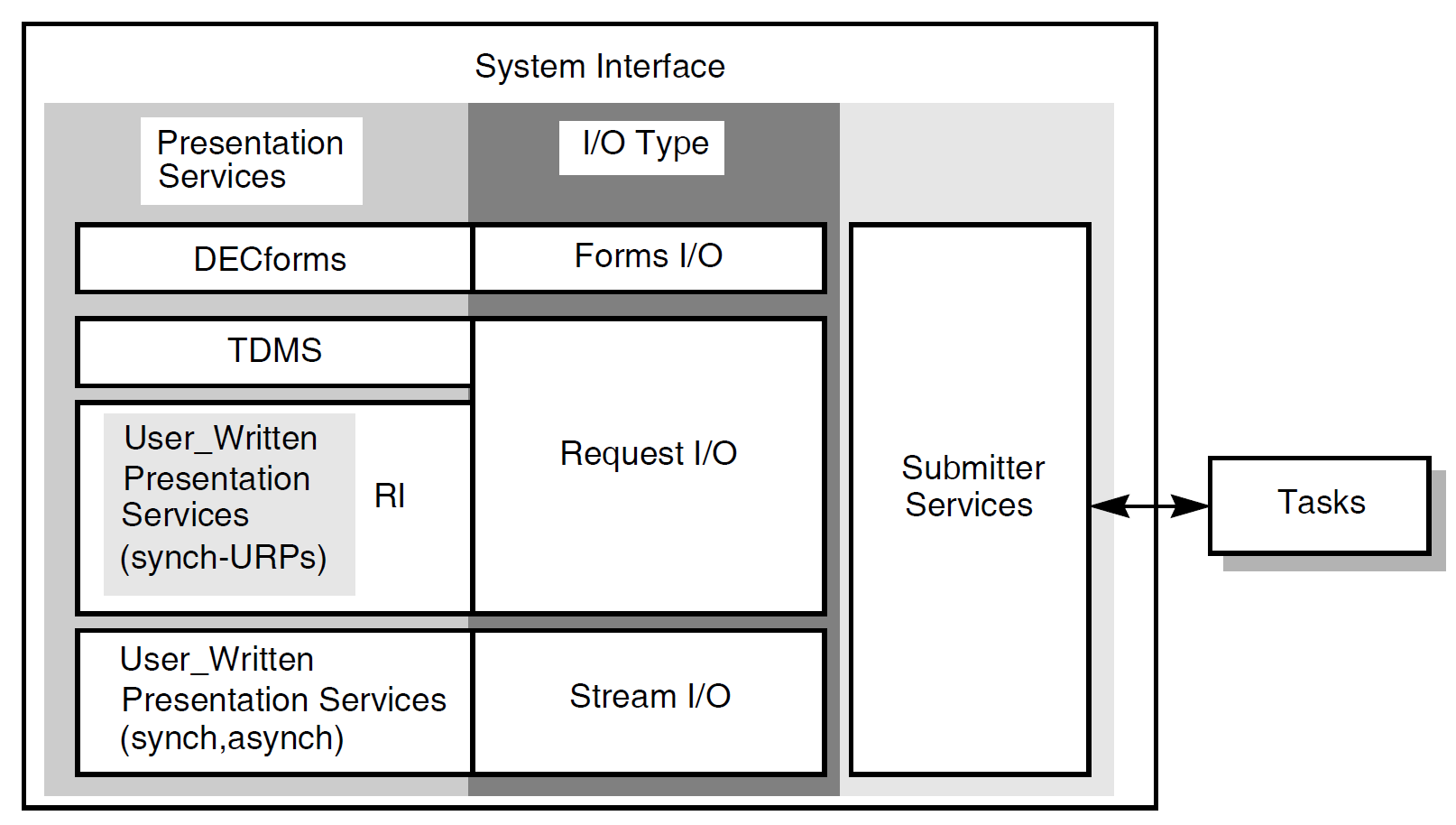
Forms I/O
VSI DECforms is the forms I/O presentation server. VSI DECforms is the recommended tool for creating and controlling the user interface to an ACMS application. Section 8.3, ''Using VSI DECforms'' describes design issues specific to VSI DECforms.
Request I/O
TDMS is the default request I/O presentation server. You can also use the ACMS Request Interface (RI) to write your own request I/O presentation service. Section 8.4, ''Using TDMS'' describes design issues specific to TDMS. See Section 8.6.1, ''Using Request I/O and the Request Interface'' for a description of RI design issues.
Stream I/O
You can use stream I/O syntax to exchange information with ACMS agents, using the stream services in the ACMS Systems Interface (SI). Section 8.6.1, ''Using Request I/O and the Request Interface'' describes stream I/O design issues.
VSI DECforms and TDMS limit you to collecting user input from VSI DECforms-supported and TDMS-supported terminals. Request I/O and the RI provide the flexibility of choosing an interface from other I/O devices to ACMS without affecting the multiple-step task structure or the ease-of-maintenance features inherent in an ACMS application.
You can also perform terminal I/O from step procedures running in the processing steps of your task. However, because this method ties up a server process, it can result in loss of performance, and might require the Application Execution Controller (EXC) to start additional server processes. Also, you cannot use remote tasks if you include terminal I/O in a step procedure. See Chapter 7, "Designing Server Procedures" for more information about I/O from step procedures.
8.3. Using VSI DECforms
VSI DECforms helps separate form from function. The form in which data is gathered and displayed to the user is completely separate from the function that the application must perform in processing the data.
8.3.1. VSI DECforms Structure and Design
FIMS compliance
Device-class independence
Storage of form context between exchanges
Procedural elements that control the user's interaction with the form
Input verification (values, ranges, types, cross-field)
Procedural escapes
Form
Encompasses the panel, viewport, and layout to describe how to display, collect, and process information.
Layout
Describes the attributes and appearance of the entire form, including its default size and background color, the different types of display devices the form can be used on (for example VT100, VT200 or VT300), and different user languages (for example, French or English).
Panel
Physically displays the background information and field images on the display device.
Viewport
Defines the area of the screen where one or more panels are displayed. Viewports can overlap each other.
You can declare only one form in each source file, but you can declare multiple layouts, panels, and viewports within a form.
Screen design
Controls
Menus
Dialog boxes
Help
Internationalization issues
See the VSI DECforms documentation on the VMS Software Documentation webpage at https://docs.vmssoftware.com for detailed descriptions of these topics.
8.3.2. Using VSI DECforms with ACMS
The task group names all the forms that are used by the tasks in the task group. ACMS begins a session with a VSI DECforms form when the form is first used by a task. The context of the form is kept until the session is ended, either when the user logs out or the application is stopped. This allows the form to keep information across exchange steps.
The task definition contains the syntax in exchange steps that request information (with a SEND, RECEIVE or TRANSCEIVE call). The task definition uses the record identifier to name the form record specifying which data items are to be returned to ACMS or sent to the form. The task also specifies the workspaces in ACMS to which the data items are mapped.
The VSI DECforms Forms Manager is a run-time system that provides the interface between the terminal and an ACMS application. The Forms Manager controls the appearance of the display, user input, and data transfer between the form and ACMS. When data is being used in the form, it is placed in form data items. The Forms Manager maps the data items to corresponding ACMS workspace fields through a structure definition called the form record.
8.3.2.1. Design Issues for VSI DECforms and ACMS
Associate related form data in the form records you define. Consider whether the form data items always need to be passed together between the form and ACMS. If you pass 10 items only once, and pass other data items 4 times during the execution of the application, it is probably more efficient to group the 10 data items in a record separate from the other data items.
- ACMS often needs to send messages separately from the form data. Therefore, to avoid moving data unnecessarily, separate the message field from other data-item fields. Do this by creating a separate form record that contains only the VSI DECforms reserved record field MESSAGEPANEL.
Note
Design your form so that other panels do not overlay the message panel. If you do not, the message panel comes to the surface when a new message is displayed, obscuring the currently active panel. This frustrates the user.
Because VSI DECforms allows the form to perform interaction with the terminal, you can choose to put some of the application logic in the form on the front end rather than the in application on the back end.
Use Procedural Escape Units (PEUs) sparingly and never perform data I/O in them. PEUs cause other terminal threads in the CP to stall.
Do as much data validation as possible within the form. Verify as much data as possible before shipping it to the task.
Determine if you want your form processing to be menu driven or data driven. For example, a menu-driven form processing might have a menu with Add, Modify, Delete, and Inquiry for customer data. For example, a data-driven form processing design might have a maintenance menu. If customer data exists, the form allows for deletion or modification. If no data exists, the form allows for the addition of a customer.
Use text data type fields whenever possible.
Data type conversion involves data movement; as, for example, when converting a longword record field to a text form field. VSI DECforms must call in a routine to convert the data from one type to another. Because only text data types can be displayed on a form, the quickest and cheapest record fields to display are text data type fields. Consider the cost of data type conversion when designing the data for an application.
Check field contents with VSI DECforms validation.
If you need to check on the contents of a field, do as much as you can with VSI DECforms validation. If you use a step procedure to validate the field, you incur the cost of shifting the context of the task from exchange step to processing step, as well as the cost of passing workspaces from one to the other.
Avoid shipping large workspaces back and forth in applications with distributed forms.
Consider the size of a DECnet packet when you design the application. Design workspaces to be no larger than needed.
8.3.2.2. Deciding the Number of VSI DECforms Forms
Run-time efficiency
A single form is more efficient than multiple forms. When a user selects a task that uses a form, a form session is created the first time the form is used. There is a cost associated with the initialization of the form session. Also, once a form is invoked, the form session remains active until the user signs out of ACMS or the application is stopped.
Debugging and maintenance
A single large form can be more difficult to debug and maintain than several smaller forms.
Business considerations
You might want to separate the interface to independent parts of your business.
Data context in the form
If you use a single form, you can store information on a front-end system between task instances as form data in the form. While this can be an advantage in minimizing network use for providing information to the form, there is also a risk of data inconsistency when information is updated in the database.
Choosing binary form files or shareable image files
ACMS allows the use of either binary form files (.FORM) or shareable image files (.EXE). The .EXE format reduces the amount of memory required in a multiuser environment since the form is loaded into memory only once–the first time it is selected after the application is started. The same image file is accessed by all users and remains open until the application and the terminal subsystem are stopped.
When the binary form file is used, the .FORM file is loaded into memory each time a user selects the form, so the form may take longer to display. However, the use of binary form files adds flexibility since newer versions of forms can be installed by stopping and restarting the application without having to stop the terminal subsystem, which would disconnect user sessions in other applications as well. The .FORM files are useful during development of forms for multiple ACMS applications on the same node.
Creating one form file with multiple forms
A VSI DECforms shareable image (.EXE) can contain multiple forms. This allows the development of independent forms, but binds the ACMS agent process to only one file. However, each form is still individually initialized.
8.4. Using TDMS
Avoid using scrolled regions
Rather than map each instance of a record field to a form field, TDMS allows you to map many instances of the record fields to a single form field. The terminal user can scroll through the display with the up and down arrow keys. This can be useful for programmer productivity, but it negatively affects performance. TDMS scrolled regions are costly in terms of the processing time required to map large arrays.
Use text data type fields whenever possible
Data type conversion involves data movement, for example, when converting a longword record field to a text form field. TDMS must call in a routine to convert the data from one type to another. Because only text data types can be displayed on a form, the quickest and cheapest record fields to display are text data type fields. Consider the cost of data type conversion when designing the data for an application.
Check field contents with TDMS validation
If you need to check on the contents of a field, do as much as you can with TDMS validation. If you use a step procedure to validate the field, you incur the cost of shifting the context of the task from exchange step to processing step, as well as the cost of passing workspaces from one to the other.
Avoid shipping large workspaces back and forth in applications with distributed forms
Consider the size of a DECnet packet when you design the application. Design workspaces to be no larger than needed.
Avoid extensive video attributes
8.5. Using TDMS Run-Time Support
This section describes a TDMS run-time support feature that can improve response time for local users. This feature allows you to select whether TDMS run-time support for local users is provided by the Application Execution Controller (EXC) process or by a Command Process (CP).
The EXC handles task flow control for the application. For each ACMS application, there is only one EXC. All tasks in the application are handled by the EXC unique to that application.
The CP handles the user interface for an ACMS application. One or more CPs provide user interface support (menu displays and data presentation). ACMS allows you to have multiple CPs active at one time on a given system, so that you can tailor the resources allocated to the user interface activity according to the number of users and the complexity of the work.
TDMS run-time support by the EXC creates a problem if there are many local TDMS users, because the data presentation work for all of the users is carried out in the one EXC. Consequently the EXC becomes overburdened, and response times degrade.
The TDMS run-time support feature allows you to specify CPs to provide local TDMS run-time support, rather than the EXC providing it automatically. This allows you to accommodate for TDMS loads by adjusting the number of CPs available.
8.5.1. Specifying CPs for Local TDMS Run-Time Support
You control local TDMS run-time support by defining a logical name. For each ACMS application, you decide whether you want the EXC or the CPs to provide local TDMS run-time support. If you decide that the CPs should provide local support, define the system or group logical name ACMS$LOCAL_TDMS_IN_AGENT to equate to the characters T, t, Y, or y, or to an odd-numbered value.
The logical name ACMS$LOCAL_TDMS_IN_AGENT is undefined
The logical name is equated to a character other than T, t, Y, or y
The logical name is equated to an even numeric value or zero
The EXC process evaluates the logical name when the process is invoked. Therefore, you must define the logical name before starting the application.
DCL-command method
Application Definition Utility (ADU) clause method
8.5.2. Defining the Logical Name
The following sections illustrate both methods of defining the logical name for local TDMS run-time support. The DCL-command method defines the logical name systemwide; the ADU-clause method defines it for just one application.
8.5.2.1. DCL-Command Method
$DEFINE/SYSTEM/EXEC ACMS$LOCAL_TDMS_IN_AGENT Y
$DEFINE/SYSTEM/EXEC ACMS$LOCAL_TDMS_IN_AGENT 0
8.5.2.2. ADU-Clause Method
 APPLICATION LOGICAL IS "ACMS$LOCAL_TDMS_IN_AGENT" = "1";

 APPLICATION USERNAME IS ...;
 TASK GROUPS ARE
   .
   .
   .
 END TASK GROUPS;
 END DEFINITION;
 APPLICATION LOGICAL IS "ACMS$LOCAL_TDMS_IN_AGENT" = F;
 APPLICATION USERNAME IS ...;
 TASK GROUPS ARE
   .
   .
   .
 END TASK GROUPS;
 END DEFINITION;
Note that while the numeric value 1 in Example 8.1, ''Defining Local CP Support'' requires quotation marks, the string F in Example 8.2, ''Defining Local EXC Support'' does not. This conforms to the ADU syntax rules. For information about ADU clause syntax, refer to the VSI ACMS for OpenVMS ADU Reference Manual.
8.6. Using Request I/O and Stream I/O for Nonstandard Devices
Providing access to ACMS from a badge reader, a bar-code reader, touch screens, or communications interfaces
Writing a customized terminal I/O interface
Providing distributed processing that is not already provided by ACMS (such as access to systems other than systems that support ACMS products)
Developing a customized menu interface (an ACMS/ALL-IN-1 interface module, for example)
Note
ACMS provides an interface that allows you to call ACMS tasks from an ALL-IN-1 menu. You can invoke ALL-IN-1 under ACMS, in a DCL server. However, running ALL-IN-1 from ACMS in this way can have a severe negative effect on system performance.
Section 8.6.1, ''Using Request I/O and the Request Interface'' describes the Request Interface and request I/O. Section 8.6.2, ''Using Stream I/O'' describes stream I/O.
8.6.1. Using Request I/O and the Request Interface
An ACMS-supplied agent
ACMS supplies a single-user agent that uses the RI. Alternatively, you can write your own single-user agent using the SI services. The RI agent supplied with ACMS, ACMS$RI_AGENT, uses the SI services to sign the user in to ACMS, enable the RI, and call tasks in an ACMS application.
Task independence
With the RI, for each exchange step, ACMS code in the agent process determines whether to call a TDMS request or a User-written Request Procedure (URP). In the task definition, the same syntax is used to describe the information to be processed on an exchange step, whether the agent uses TDMS requests or URPs. Therefore, an agent that is using TDMS requests, and an agent that has enabled the RI and is using URPs, can both call the same task definition. Thus, the task definition is independent of the presentation service being used by the agent.
With the stream services, stream I/O syntax in the task definition describes the information to be processed on an exchange step. A task that uses stream I/O can only be called by an agent that can process the stream I/O requests from the task. Thus, you might have to write multiple task definitions for a single task that can be called from a terminal supported by TDMS or from other devices not supported by TDMS.
Flexibility
With the RI you can pass multiple workspaces in an exchange step. However, you can only pass one read and one write workspace in an exchange step that uses stream I/O.
VSI ACMS for OpenVMS Writing Applications describes the details of RI use.
8.6.2. Using Stream I/O
Asynchronous processing
The RI provides only a synchronous interface. Therefore, you can write only single-user agents for use with the RI. Stream services offer both a synchronous and an asynchronous interface. Using the asynchronous interface, you can support multiple submitters in a single agent process. This saves resources if your system must support many non-standard devices. Using the RI, each device would require a separate agent process. Using the stream services, you can support many devices in a single process.
Network usage
With the RI, the data in the workspaces specified in each exchange step is sent from the application to the agent process at the start of the exchange step and is returned again at the end of the exchange step. This can cause unnecessary network traffic if the data only needs to be transferred one way. Using stream I/O, only the data in the write workspace is sent from the application to the agent and only the data in the read workspace is returned from the agent back to the application.
Chapter 9. Designing Task Group and Application Definitions
This chapter provides guidelines for grouping tasks into task groups, and for defining applications.
9.1. Designing Task Groups
A task group describes a collection of tasks and the resources available to those tasks. Resources include workspaces, request libraries, forms, user request procedure libraries, message files, and the procedure servers in which processing is done.
9.1.1. Grouping Common Elements in a Task Group
Procedure servers
Task groups cannot share procedure server processes at run time. Therefore, group together tasks that use the same server to allow those tasks to share the same pool of server processes.
DECforms forms
ACMS enables VSI DECforms form sessions based on the task group in which the form is declared. Therefore, if multiple tasks need to share form data in a DECforms form, you must include those tasks in a single task group.
Group and user workspaces
Group and user workspaces cannot be shared between tasks in different task groups. Therefore, include tasks that use the same group or user workspaces into a single task group.
Also, if you use the task-call-task facility, you must include both parent and called tasks in the same task group
9.1.2. Determining the Number of Task Groups in an Application
Decreasing the number of procedure servers required for the application
Every task group within an application must have at least one procedure server. By creating only a single task group, you save system resources by servicing all the tasks with one procedure server, or with only a few.
Promoting sharing of resources
For example, group and user workspace contents can be shared. This is helpful if a sequence of tasks with similar data is necessary. The user need not repeatedly type in the same data.
Easing application growth
If new tasks are added that have to share resources with other tasks, you don't have to restructure the task group.
Easing application building
With only one task group, building the application is less complicated.
Increasing build time
Increasing the task group size increases the time necessary to build the task group. If you have to rebuild your task group often, take into consideration the resources and time required to build.
Causing possible maintenance problems
If your task group becomes too large, or the scope of the functions included in the task group become too varied, coordinating task group maintenance can become a problem.
Inhibiting ability to group tasks logically
In some instances, it may be beneficial to group tasks according to function. For example, if an application has tasks for accounting and tasks for engineering, separate the tasks into two groups to ease maintenance and create logically defined groups of tasks.
Consider using multiple task groups during the development of an application, and then combining those groups when the application is put into production. Using multiple task groups during development has advantages such as decreased build time. Combining the task groups before the application is put into production allows you to realize the benefits of fewer, or a single task group.
9.1.3. Improving Performance with the Task Group Definition
RUNDOWN ON CANCEL procedure server subclause
If you use the RUNDOWN ON CANCEL clause, and a task is canceled while it is executing or retaining context in a server process, ACMS runs down the process and starts a new one if required. To avoid unnecessary server process rundowns, use the RUNDOWN ON CANCEL IF INTERRUPTED clause. Using this clause, ACMS only runs down a server process if ACMS interrupted the server process while it was executing. If a task is canceled while retaining context in a server, the server process is not canceled and can be used by another task. RUNDOWN ON CANCEL is the default.
USERNAME IS TERMINAL USER procedure server subclause
The REUSABLE server subclause in the task group definition is the default for both DCL and procedure servers. However, using the clause USERNAME IS TERMINAL USER in application or task group definitions overrides this default and creates procedure servers that are not reusable.
Every time a terminal user selects a task running in a procedure server defined with the USERNAME IS TERMINAL USER subclause, a new server process must be created for that task instance.
- If your application includes both inquiry and update tasks, you can avoid a good measure of database contention by defining two procedure servers for your application:
One whose procedures access the database in read-only mode for inquiry purposes
One whose procedures use read-write access for updates
AVERTZ makes this distinction, using the VR_READ_SERVER and the VR_UPDATE_SERVER. With this kind of separation, tasks that only query the database do not contend with tasks that update it. More importantly, the number of server processes simultaneously accessing the database for update is usually fewer with this approach, significantly reducing contention.
Also, you can create servers that access specific sets of relations in the database. This allows you to further reduce database contention by giving you greater control over the number of servers that are used to access particular areas of the database. AVERTZ employs this technique by using the VR_UPDATE_SERVER to access the RESERVATIONS, VEHICLES, and VEHICLE_RENTAL_HISTORY relations, and the VR_CU_UPDATE_SERVER to access the CUSTOMERS and CU_ID_INC_CONTROL relations.
9.2. Designing Applications
Names the task groups that contain the tasks of the application
Assigns a user name to the Application Execution Controller (EXC), the ACMS system process that controls the application
Assigns user names to the server processes created by the application
Control access to tasks
Audit task events
Enable and disable tasks
Specify transaction timeouts
You control procedure servers in an application by assigning server control attributes in the application definition. These attributes determine the processing characteristics of a procedure server.
VSI ACMS for OpenVMS Writing Applications gives details about writing application definitions.
9.2.1. Determining the Number of Applications
Decreases the number of Application Execution Controllers, and improves the overall use of system resources.
Minimizes the duplication of similar or identical task groups.
Each application supports at least one task group. With a single application, you can eliminate some task groups. Fewer task groups require fewer procedure servers, thereby further improving overall resource use.
Allows for moving or separating of applications to separate machines
Eases maintenance by separating applications by specialized functions
Conserves resources if you have functions that do not need to process simultaneously
For example, you can design an application that is active only one day a week, freeing resources on other days.
Meets needs for financial accounting
If resource costs are to be shared on an application basis, multiple applications are needed . For example, OpenVMS accounting for an application's users cannot be done because processes and resources are shared among all the users. If separate applications exist you can charge each user individually based on the unique application name.
9.2.2. Improving Performance with the Application Definition
Adjust the number of server processes that your application runs
At definition time, you can establish parameters for an application that reduce the amount of tuning you need to do after implementation. For example, you can set the minimum and maximum values for the server process count to a number likely to eliminate unnecessary server process creation and deletion.
AVERTZ sets VR_READ_SERVER to a maximum of 3, and to a minimum of 1. VR_UPDATE_SERVER has both a maximum and minimum of 1. As you monitor the performance of your application, you can adjust these values.
Segregate procedure servers by function
Providing separate servers for read or write functions is a common design model. You can also choose to provide one or more procedure servers for CPU-intensive procedures. Or, you can provide one or more separate procedure servers for activity with special security considerations.
The AVERTZ application uses the VR_LOG_SERVER for security and auditing purposes. AVERTZ segregates procedure servers by read or write functions.
Create separate user names for the various procedure servers
This use of separate user names allows for specific privileges and quotas.
Avoid the USERNAME IS TERMINAL USER procedure server subclause
The REUSABLE procedure server subclause in the task group definition is the default for both DCL and procedure servers. However, using the clause USERNAME IS TERMINAL USER in application or task group definitions overrides this default and creates procedure servers that are not reusable.
Every time a terminal user selects a task with a processing step running in a procedure server defined with the USERNAME IS TERMINAL USER subclause, a new server process must be created for that user. ACMS, however, places its emphasis on shared and reusable resources. To take advantage of this, your application should run as few server processes as needed to do the work of the application.
Use the server subclause NO PROTECTED WORKSPACES
The default is PROTECTED WORKSPACES. The default action is for the server to map only the portion of the task instance workspace pool used by the current task. This portion is mapped at the start of a processing step and unmapped at the end of the step, ensuring that one task cannot access the workspaces of any other task in the group.
The NO PROTECTED WORKSPACE clause saves workspace mapping time. However, use it carefully since it maps the entire task instance workspace pool for a task group. Use it only after you have thoroughly debugged your procedure server and are certain that task procedures will not accidentally write over workspaces belonging to another task.
Exercise care with the SERVER MONITORING INTERVAL clause
This clause determines how often ACMS checks the queues of tasks waiting for procedure servers. You use it in conjunction with the CREATION INTERVAL, CREATION DELAY, DELETION INTERVAL, and DELETION DELAY clauses, which alter the ACMS-supplied defaults for these values. Use of these clauses affects the rate and interval at which new server processes are created or deleted. If you set the server monitoring interval too low, ACMS can use up most of its resources in checking on its own performance.
Choose whether or not to use the AUDIT subclause
The AUDIT subclause records application and task activity in the ACMS audit trail log. For example, if you enable application auditing, ACMS records application events, such as online modifications to the application. If you enable task auditing, ACMS records the start and end of task instances. ACMS always audits unusual events, such as unexpected server deaths and unexpected task cancellations, in the ACMS audit trail log.
Some OpenVMS and ACMS system parameters also require monitoring before they can be set optimally. Working set sizes for the Application Execution Controller (EXC) and server processes can be monitored after installation of your application and changed to meet your requirements. For information about tools with which to make these observations and change corresponding parameter values, see VSI ACMS for OpenVMS Managing Applications which includes sections on ACMS system monitoring, tuning, and setting the OpenVMS SYSGEN parameters that ACMS affects.
For RMS files, see Guide to OpenVMS File Applications.
For Rdb databases, see the Rdb documentation.
For DBMS databases, see the DBMS documentation.
Appendix A. Requirements Specification Template
The Requirements Specification specifies the business need and the requirements that must be met to solve that business need. The Requirements Specification is high level and can be produced in a limited time frame. It does not contain specific design details unless these are considered to be a business requirement. It bridges that gap between a customer's business need and the Functional Specification and Programming Specification.
A.1. Overview
This section presents an overview of the system and basic requirements.
A.2. Business Objectives
This section covers the business needs to which the eventual solution will respond, and the business goals with related measurements.
A.2.1. Business Needs
Identify the business needs of the customer.
A.2.2. Business Goals and Measurements
Identify the business goals of the customer and how they are measured.
A.3. Solution Requirements
A.3.1. Current Business System
- Business area A
Business functions
Communication being used (forms, letters, telephone, computer)
Average time required to carry out each business function
Frequency of each business function
Drawbacks of current approach
Business area B
As for business area A
A.3.2. Proposed Business System
- Information flow
What information
Where information originates
Where information terminates
- Execution time
Throughput
Response-time
- Availability
Reliability
Recoverability
Processing immediacy
- Security
Access
Audit/Tracking
Authentification
- Usability
Learning
Using
- Flexibility
Maintainability
Enhancement cost
Maintenance cost
Ease of change
Evolution (expected change)
- Business constraints
Company policies
Development costs
Operational costs
Time scale and deadlines
A.4. Scope
This section covers the business-related system environment needs. It also covers the business related general solution needs, which typically are defined by strategies external to the project. Training, documentation, and support requirements are presented here. It specifies any requirements that will not be met by the project and explains why they will not be met:
A.4.1. Environment
Current systems
Geographic distribution
Space constraints
A.4.2. Proposed Implementation
Phased or one-off
Timetable
Rollout
Responsibilities
A.4.3. Forecast Benefits
Acceptance criteria
A.4.4. Quality Requirement
Maintainability
Service response
A.4.5. General Solution Requirements
Coexistence/interoperability
- Implementation requirements
Cost
Tools
Training
Product
Internationalization
Standards
Business rules
- Operation requirements
Centralized/decentralized operation
Number and organization of operational staff
Compatibility between processes and existing user habits
A.4.6. Project Limitation
List any limitations to implementing the solution.
A.5. Alternative Solutions Rejected
Any other solutions with the reason why they were not selected.
Appendix B. Functional Specification Template
The Functional Specification specifies, in non-technical terms, what the solution does for the customer. It is a detailed specification of the functionality to be addressed by the solution. This document defines what functions the system will be capable of performing. It is the blueprint for the subsequent design and programming of the system.
Functional specifications are used for monitoring progress during system development, and are the basis of final customer acceptance of the complete system. A definitive Functional Specification ensures that the Customer's functional needs are correctly identified.
B.1. Overview
Introduction
Solution description
Objective and customer goals
Existing methods and processes
Required methods and processes
Impact
Implementation requirements
B.2. Solution Detail
This is the main section of the Specification. It provides sufficient detail to constitute the definition of the system. It describes what is required, how the requirements will be met, and includes a logical model of the proposed solution.
B.2.1. External Interfaces
General principles and common characteristics
Layout of the different reports and screens
Help information
B.2.2. Transaction Analysis
Create a logical database design
Refine the business transactions into database transactions
Identify details of distributed transactions
Determine transaction volumes and their origination
Define transaction availability
Define the concurrency
Define the transaction and data immediacy
Define the distributed forms processing
Define the deferred processing
B.2.3. Inputs/Outputs
Data volumes
Availability
Fault tolerance
Throughput
Response time
B.3. Environmental Requirements
Organizational
User
Physical
Hardware environmental requirements
Software environmental requirements
Security
B.4. Quality Requirements
Ease of use
Maintainability
Reliability
Evolvability
Compatibility
B.5. General Requirements
Performance
Packaging
Implementation
Installation
B.6. Solution Limitations
Any stated requirements not met or specific limitations imposed for the new system are listed here.
B.7. Documentation
This section describes the publications to be provided for the system, including user, system, and technical documentation.
B.8. Training
This section describes training requirements and how they will be met. The training may include user, operation, and technical training.
Appendix C. Programming Specification Template
Application development environment
System
Tasks
User Interface
System Design Review
C.1. Application Development Environment
Data resource manager
TP monitor
User Interface
Design methodology
Project team structure
Quality assurance method
CASE environment
Programming language
C.2. System Design
High-level structure by organizing into applications and task groups
Standards for handling availability and recovery
Standards for security features
Standards for error-handling
Methods for handling messages returned to users
Guidelines for server procedures
Guidelines for forms functionality
Guidelines for queuing
Standards for naming conventions, code layout conversions, and other standards
Standards related to internationalization
Standards for testing methods and procedures
Guidelines for using CDD dictionaries during design and implementation
C.3. Task Design
Define the individual tasks in detail
Define workspaces and resolve workspace-related issues
C.4. Server Procedure Design
Specific database activities
Access paths for the task
Estimated logical database I/Os for the procedures
C.5. User Interface Design
Confirm the user interface approach, based on completed task design
Design the menus
Define function keys for each form
Define the forms
Design the reports
Refine the user interface decisions
C.6. Design Review
Organize a formal design review
Review system goals, requirements, and assumptions
Present the system design using walkthroughs, demonstrations, and oral descriptions
Perform quality assurance on the logical design
Identify and analyze issues
Resolve issues or get agreement on how they will be resolved