VSI ACMS for OpenVMS Quick Reference Guide
- Software Version:
- ACMS for OpenVMS Version 5.3-3
- Operating System and Version:
- VSI OpenVMS Alpha Version 8.4-2L1 or higher
VSI OpenVMS IA-64 Version 8.4-1H1 or higher
Preface
1. About VSI
VMS Software, Inc. (VSI) is an independent software company licensed by Hewlett Packard Enterprise to develop and support the OpenVMS operating system.
2. Intended Audience
This manual is a quick reference to all the syntax for the utilities of VSI ACMS for OpenVMS (ACMS) software.
This manual is intended for application designers, programmers, and anyone responsible for managing applications using ACMS.
3. Document Structure
|
Lists syntax for the ACMS Application Definition Utility (ADU) commands and clauses. | |
|
Lists syntax for the ACMS management utilities and operator commands. | |
|
Chapter 3, "ACMS Application Programming Services and Task Debugger Commands" |
Lists syntax for the ACMS programming services and Task Debugger commands. |
|
Lists syntax for the ACMS Systems Interface services. | |
|
Illustrates and provides a detailed checklist of the phases of ACMS application development. | |
|
Summarizes the relationships between different parts of ACMS applications. | |
|
Describes ACMS system workspaces. |
4. ACMS Help
ACMS and its components provide extensive online help.
DCL level help
Enter
HELP ACMSat the DCL prompt for complete help about theACMScommand and qualifiers, and for other elements of ACMS for which independent help systems do not exist. DCL level help also provides brief help messages for elements of ACMS that contain independent help systems (such as the ACMS utilities) and for related products used by ACMS (such as DECforms or Oracle CDD/Repository).ACMS utilities help
Each of the following ACMS utilities has an online help system:
ACMS Debugger ACMSGEN Utility
ACMS Queue Manager (ACMSQUEMGR)
Application Definition Utility (ADU)
Application Authorization Utility (AAU)
Device Definition Utility (DDU)
User Definition Utility (UDU)
Audit Trail Report Utility (ATR)
Software Event Log Utility Program (SWLUP)
The two ways to get utility-specific help are:
Run the utility and type
HELPat the utility prompt.Use the DCL
HELPcommand. At the "Topic?" prompt, type@followed by the name of the utility. Use the ACMS prefix, even if the utility does not have an ACMS prefix (except for SWLUP). For example:Topic? @ACMSQUEMGR Topic? @ACMSADU
However, do not use the ACMS prefix with SWLUP:
Topic? @SWLUP
Note
Note that if you run the ACMS Debugger Utility and then type
HELP, you must specify a file. If you ask for help from the DCL level with@, you do not need to specify a file.ACMSPARAM.COM and ACMEXCPAR.COM help
Help for the command procedures that set parameters and quotas is a subset of the DCL level help. You have access to this help from the DCL prompt, or from within the command procedures.
LSE help
ACMS provides ACMS-specific help within the LSE templates that assist in the creation of applications, tasks, task groups, and menus. The ACMS- specific LSE help is a subset of the ADU help system. Within the LSE templates, this help is context-sensitive. Type
HELP/IND (PF1-PF2)at any placeholder for which you want help.Error help
ACMS and each of its utilities provide error message help. Use
HELP ACMS
              ERRORS
from the DCL prompt for ACMS error message help. UseHELP ERRORSfrom the individual utility prompts for error message help for that utility.Terminal user help
At each menu within an ACMS application, ACMS provides help about terminal user commands, special key mappings, and general information about menus and how to select tasks from menus.
Forms help
For complete help for DECforms or TDMS, use the help systems for these products.
6. OpenVMS Documentation
The full VSI OpenVMS documentation set can be found on the VMS Software Documentation webpage at https://docs.vmssoftware.com.
7. VSI Encourages Your Comments
You may send comments or suggestions regarding this manual or any VSI document by sending electronic mail to the following Internet address: <docinfo@vmssoftware.com>. Users who have VSI OpenVMS support contracts through VSI can contact <support@vmssoftware.com> for help with this product.
8. Conventions
The following conventions are used in this manual:
| Ctrl/x | A sequence such as Ctrl/x indicates that you must press and hold the key labeled Ctrl while you press another key or a pointing device button. |
| PF1 x | A sequence such as PF1 x indicates that you must first press and release the key labeled PF1 and then press and release another key or a pointing device button. |
| Return | In the HTML version of this document, this convention appears as brackets rather than a box. |
| . . . |
A horizontal ellipsis in examples indicates one of the following
possibilities:
|
| ⋮ | A vertical ellipsis indicates the omission of items from a code example or command format; the items are omitted because they are not important to the topic being discussed. |
Monospace text | Monospace type indicates code examples and interactive screen displays. In the C programming language, monospace type in text identifies the following elements: keywords, the names of independently compiled external functions and files, syntax summaries, and references to variables or identifiers introduced in an example. In the HMTL version of this document, this text style may appear as italics. |
| - | A hyphen at the end of a command format description, command line, or code line indicates that the command or statement continues on the following line. |
| numbers | All numbers in text are assumed to be decimal unless otherwise noted. Nondecimal radixes—binary, octal, or hexadecimal—are explicitly indicated. |
| bold text | Bold text represents the introduction of a new term or the name of an argument, an attribute, or a reason. In the HMTL version of this document, this text style may appear as italics. |
| italic text | Italic text indicates important information, complete titles of manuals, or
variables. Variables include information that aries in system output (Internal error
number), in command lines
(/PRODUCER=name), and in command
parameters in text (where dd represents the predefined code for
the device type). |
| UPPERCASE | Uppercase text indicates the name of a routine, the name of a file, the name of a file protection code, or the abbreviation for a system privilege. In command format descriptions, uppercase text is an optional keyword. |
| UPPERCASE | In command format descriptions, uppercase text that is underlined is required. You must include it in the statement if the clause is used. |
| lowercase | In command format descriptions, a lowercase word indicates a required element. |
| <lowercase> | In command format descriptions, lowercase text in angle brackets indicates a required clause or phrase. |
| ( ) | In command format descriptions, parentheses indicate that you must enclose the options in parentheses if you choose more than one. |
| [ | | ] | In command format descriptions, vertical bars within square brackets indicate that you can choose any combination of the enclosed options, but you can choose each option only once. |
| { | | } | In command format descriptions, vertical bars within braces indicate that you must choose one of the options listed, but you can use each option only once. |
9. References to Oracle Products
VSI ACMS documentation set, to which this document belongs, refers to the following Oracle products by their full and abbreviated names:
| Full product name | Shortened product name |
|---|---|
| Oracle Common Data Dictionary | CDD |
| Oracle Rdb | Rdb |
| Oracle Database/DBMS | DBMS |
| Oracle Trace | Trace |
Chapter 1. ADU Commands and Clauses
This chapter contains syntax for the commands and clauses of the ACMS Application Definition Utility (ADU). ADU commands allow you to create or change definitions for ACMS tasks, task groups, applications, and menus. The definitions themselves are made up of ADU clauses and phrases. See the VSI ACMS for OpenVMS ADU Reference Manual for more information about ADU commands and clauses.
1.1. ADU Commands
Use ADU commands to create or change the definitions an ACMS application uses, or to gather information about your own work or that of an ACMS application. You can issue ADU commands interactively or in a command file.
To create an ACMS application, use ADU commands to reset your data dictionary default directory during a session, as well as write, change, copy, delete, and compile definitions for tasks, task groups, menus, and applications. Use other ADU commands to build or rebuild task group, menu, and application database files.
To gather information about your work, you can use ADU commands to check the version of ADU on your system, log an interactive session to a file in your default directory for later reference, check if logging is active, and verify the work a command file performs during execution. To gather information about an ACMS application, you can use ADU commands to list the contents of task group, application, or menu database files, so you can check the consistency of procedure names, workspaces, and servers. See the VSI ACMS for OpenVMS ADU Reference Manual for a detailed explanation of the syntax of ADU commands.
Table 1.1, ''Startup Qualifiers and Their Functions'' lists the ADU startup command qualifiers.
|
Qualifier |
Function |
|---|---|
|
Tells ADU whether or not to execute a startup command file when you invoke the
utility. By default, when you invoke ADU, it runs a command file named
ADUINI.COM, located in your default directory. To
invoke a different startup command file, include its file specification with the
When you specify the |
|
By default, ADU creates a journal file that contains every keystroke made
during your ADU session. The journal file, named
ADUJNL.JOU, is located in your default directory. The
journal file is saved if your ADU session is interrupted. When you exit normally
(by using the Use the |
|
/PATH=path-name |
Assigns a CDD directory. If you do not specify a path name, ADU uses the default CDD directory. |
|
If you specify the
|
1.1.1. @ (At sign) Command (ADU>)
@ (At sign) (ADU>)
@ (At sign) (ADU>) — Executes a command file containing either ADU commands or ACMS definitions. If you do not specify a file type, ACMS supplies .COM as the default.
Format
1.1.2. ATTACH Command (ADU>)
ATTACH Command (ADU>)
ATTACH Command (ADU>) — Transfers control from your process to another process in your job.
Format
1.1.3. BUILD Command (ADU>)
BUILD (ADU>)
BUILD (ADU>) — Converts object definitions from the dictionary into binary database files that ACMS uses at run time.
Format
| Command Qualifiers | Defaults |
|---|---|
| /AUDIT=standard-audit-string |
| /[NO]DEBUG | /NODEBUG |
|
|
| /[NO]LOG | /NOLOG |
| /NOOBJECT |
| /[NO]PRINT | /NOPRINT |
| /[NO]STDL | /STDL |
| /[NO]SYSLIB | /SYSLIB |
| /[NO]SYSSHR | /SYSSHR |
| /NOUSERLIBRARY |
1.1.4. COMPILE Command (ADU>)
COMPILE (ADU>)
COMPILE (ADU>) — Checks an application, task group, menu, or task definition for syntax errors, and writes the compilation results to a file.
Format
| Command Qualifiers | Defaults |
|---|---|
| /NODIAGNOSTICS |
|
|
| /[NO]LOG | /NOLOG |
| /OUTPUT=output-file-spec [,...] ) | |
| /[NO]PRINT | /NOPRINT |
1.1.5. COPY Command (ADU>)
COPY (ADU>)
COPY (ADU>) — Creates a copy of a definition.
Format
| Command Qualifiers | Defaults |
|---|---|
| /AUDIT=standard-audit-string |
| /[NO]LOG | /NOLOG |
1.1.6. CREATE Command (ADU>)
CREATE (ADU>)
CREATE (ADU>) — Checks an application, task group, menu, or task definition for syntax errors, and stores valid new definitions in the dictionary.
Format
| Command Qualifiers | Defaults |
|---|---|
| /AUDIT=standard-audit-string |
| /NODIAGNOSTICS |
|
|
| /[NO]LOG | /NOLOG |
| /[NO]PRINT | /NOPRINT |
1.1.7. DELETE Command (ADU>)
DELETE (ADU>)
DELETE (ADU>) — Removes a definition from the dictionary.
Format
| Command Qualifiers | Defaults |
|---|---|
| /[NO]CONFIRM | /NOCONFIRM |
| /[NO]LOG | /NOLOG |
1.1.8. DUMP Command (ADU>)
DUMP (ADU>)
DUMP (ADU>) — Displays the contents of an application, menu, or task group database file.
Format
| Command Qualifiers | Defaults |
|---|---|
| /NOOUTPUT |
| /[NO]PRINT | /NOPRINT |
1.1.9. EDIT Command (ADU>)
EDIT (ADU>)
EDIT (ADU>) — Invokes a text editor to let you make changes to the last command you entered.
Format
1.1.10. EXIT Command (ADU>)
EXIT (ADU>)
EXIT (ADU>) — Ends the current ADU session and returns you to the DCL prompt.
Format
1.1.11. HELP Command (ADU>)
HELP (ADU>)
HELP (ADU>) — Displays information about ADU commands and clauses.
Format
| Command Qualifiers | Defaults |
|---|---|
| /[NO]PROMPT | /PROMPT |
1.1.12. LINK Command (ADU>)
LINK (ADU>)
LINK (ADU>) — Converts object definitions from OpenVMS files into binary database files that ACMS uses at run time.
Format
| Command Qualifiers | Defaults |
|---|---|
| /AUDIT=standard-audit-string |
| /[NO]DEBUG | /NODEBUG |
|
|
| /[NO]LOG | /NOLOG |
| /NOOBJECT |
| /[NO]PRINT | /NOPRINT |
| /[NO]STDL | /STDL |
| /[NO]SYSLIB | /SYSLIB |
| /[NO]SYSSHR | /SYSSHR |
| /NOUSERLIBRARY |
1.1.13. LIST Command (ADU>)
LIST (ADU>)
LIST (ADU>) — Displays the contents of a definition in a dictionary directory.
Format
| Command Qualifiers | Defaults |
|---|---|
| /NOOUTPUT |
| /[NO]PRINT | /NOPRINT |
1.1.14. MODIFY Command (ADU>)
MODIFY (ADU>)
MODIFY (ADU>) — Retrieves a definition from the dictionary and runs a text editor so you can change the definition.
Format
| Command Qualifiers | Defaults |
|---|---|
| /AUDIT=standard-audit-string |
| /NODIAGNOSTICS |
|
|
| /[NO]LOG | /NOLOG |
| /[NO]PRINT | /NOPRINT |
1.1.15. REPLACE Command (ADU>)
REPLACE (ADU>)
REPLACE (ADU>) — Replaces an old dictionary definition with a new one.
Format
| Command Qualifiers | Defaults |
|---|---|
| /AUDIT=standard-audit-string |
| /[NO]CREATE | /CREATE |
| /NODIAGNOSTICS |
|
|
| /[NO]LOG | /NOLOG |
| /[NO]PRINT | /NOPRINT |
1.1.16. SAVE Command (ADU>)
SAVE (ADU>)
SAVE (ADU>) — Puts the last command you entered in the file you designate.
Format
1.1.17. SET DEFAULT Command (ADU>)
SET DEFAULT (ADU>)
SET DEFAULT (ADU>) — Assigns your default directory in the dictionary.
Format
1.1.18. SET LOG Command (ADU>)
SET LOG (ADU>)
SET LOG (ADU>) — Creates a log file of an interactive ADU session you enable with the
SET LOG command. The SET NOLOG command
disables logging.
Format
1.1.19. SET VERIFY Command (ADU>)
SET VERIFY (ADU>)
SET VERIFY (ADU>) — Displays commands and source definitions as they are processed from a
command file you execute with the @(At sign) command. The
SET NOVERIFY command disables the displaying of processed
commands and source definitions.
Format
1.1.20. SHOW DEFAULT Command (ADU>)
SHOW DEFAULT (ADU>)
SHOW DEFAULT (ADU>) — Displays your current default dictionary directory.
Format
1.1.21. SHOW LOG Command (ADU>)
SHOW LOG (ADU>)
SHOW LOG (ADU>) — Displays information about logging you enable with the SET
LOG command. The SET NOLOG command disables
logging.
Format
1.1.22. SHOW VERSION Command (ADU>)
SHOW VERSION (ADU>)
SHOW VERSION (ADU>) — Displays the current software version number of ADU.
Format
1.1.23. SPAWN Command (ADU>)
SPAWN (ADU>)
SPAWN (ADU>) — Creates a subprocess of the current process and transfers job control to the subprocess.
Format
| Command Qualifiers | Defaults |
|---|---|
| /INPUT=file-spec | /INPUT=SYS$INPUT |
| /[NO]LOGICAL_NAMES | /LOGICAL_NAMES |
| /OUTPUT=SYS$OUTPUT |
| /PROCESS [=subprocess-name] | |
| /[NO]SYMBOLS | /SYMBOLS |
| /[NO]WAIT | /WAIT |
1.2. %INCLUDE
Many definitions share common parts. For example, suppose you always include certain default characteristics in an application definition. Instead of rewriting the same part of a definition many times, you can use %INCLUDE to put the contents of a file in a source definition.
1.2.1. %INCLUDE
%INCLUDE
%INCLUDE — Includes the contents of a file in a source definition. If you do not specify a file type, ACMS supplies the .COM default.
Format
1.3. Task Definition Clauses
This section lists the syntax for the ADU clauses and phrases you use to write task
definitions. You use these clauses with the ADU CREATE,
MODIFY, REPLACE, or EDIT
commands.
A task definition is made up of clauses describing the attributes of a task and the work done when a user selects a task. Task attribute clauses can either define the implementation characteristics or the control attributes of a task.
Task attribute clauses describe general characteristics of a task, such as the workspaces used by task steps or a default server that handles processing work. You can override some characteristics by specifying the same clause with a different attribute in a step definition.
The work part of a task is defined either in a processing step or a block step made up of processing and exchange steps. You can define a single-step task or use the BLOCK WORK clause to define multiple-step tasks. ACMS lets you nest block steps so that a task can contain multiple blocks.
This section begins with overview syntax for tasks, block step phrases, exchange steps, processing steps, action clauses, and exception handler action clauses. The overview syntax is followed by syntax for individual task definition clauses and phrases.
1.3.1. Task Syntax
1.3.2. Block Step Phrases Syntax
1.3.3. Exchange Step Syntax
1.3.4. Processing Step Syntax
1.3.5. Action Clauses Syntax
1.3.6. BLOCK Clause (Block)
BLOCK Clause (Block)
BLOCK Clause (Block) — Describes the work done in a block step in terms of block, exchange, processing, and action clauses.
Format
1.3.7. CALL Clause (Processing)
CALL Clause (Processing)
CALL Clause (Processing) — Names a procedure in a procedure server to do the work for a processing step. Also names any workspaces used by that procedure.
Format
1.3.8. CALL TASK Clause (Processing)
CALL TASK Clause (Processing)
CALL TASK Clause (Processing) — Names a task called by a processing step and any workspaces supplied to the called task.
Format
1.3.9. CANCEL ACTION Phrase (Block)
CANCEL ACTION Phrase (Block)
CANCEL ACTION Phrase (Block) — Specifies processing ACMS does when a task is canceled.
Format
1.3.10. CANCEL TASK Clause (Action)
CANCEL TASK Clause (Action)
CANCEL TASK Clause (Action) — Stops the task in the action part of the current step by canceling the current task instance.
Format
1.3.11. CANCELABLE Clause (Task)
CANCELABLE Clause (Task)
CANCELABLE Clause (Task) — Specifies whether or not a task can be canceled by a user or task submitter.
Format
1.3.12. COMMIT TRANSACTION Clause (Action)
COMMIT TRANSACTION Clause (Action)
COMMIT TRANSACTION Clause (Action) — Signals the end of a distributed transaction and makes permanent any file or database operations performed within the distributed transaction.
Format
1.3.13. CONTROL FIELD Clause (Action, Block, Exchange, Processing)
CONTROL FIELD Clause (Action, Block, Exchange, Processing)
CONTROL FIELD Clause (Action, Block, Exchange, Processing) — Performs a step or action based on a condition.
Format
1.3.14. DATATRIEVE COMMAND Clause (Processing)
DATATRIEVE COMMAND Clause (Processing)
DATATRIEVE COMMAND Clause (Processing) — Names a DATATRIEVE command to do work for a processing step.
Format
1.3.15. DCL COMMAND Clause (Processing)
DCL COMMAND Clause (Processing)
DCL COMMAND Clause (Processing) — Names a DCL command to do work for a processing step.
Format
1.3.16. DEFAULT FORM Clause (Task)
DEFAULT FORM Clause (Task)
DEFAULT FORM Clause (Task) — Names a default form used by the SEND, RECEIVE, and TRANSCEIVE clauses in exchange steps of a task.
Format
1.3.17. DEFAULT REQUEST LIBRARY Clause (Task)
DEFAULT REQUEST LIBRARY Clause (Task)
DEFAULT REQUEST LIBRARY Clause (Task) — Names a default request library used by REQUEST clauses in exchange steps of a task.
Format
1.3.18. DEFAULT SERVER Clause (Task)
DEFAULT SERVER Clause (Task)
DEFAULT SERVER Clause (Task) — Names a default server to handle processing and cancel actions for the step or steps in a task.
Format
1.3.19. DELAY Clause (Task)
DELAY Clause (Task)
DELAY Clause (Task) — Controls whether or not ACMS pauses after a task finishes running before clearing the screen and displaying the ACMS menu.
Format
1.3.20. EXCEPTION HANDLER Clause (Block, Exchange, Processing)
EXCEPTION HANDLER Clause (Block, Exchange, Processing)
EXCEPTION HANDLER Clause (Block, Exchange, Processing) — Describes the actions to be taken to recover from one or more exceptions.
Format
1.3.21. EXCHANGE Clause (Task)
EXCHANGE Clause (Task)
EXCHANGE Clause (Task) — Describes the interaction between the application and the user.
Format
1.3.22. EXIT BLOCK Clause (Action)
EXIT BLOCK Clause (Action)
EXIT BLOCK Clause (Action) — Transfers control of the task to the action part of the block step definition.
Format
1.3.23. EXIT TASK Clause (Action)
EXIT TASK Clause (Action)
EXIT TASK Clause (Action) — Ends the current task.
Format
1.3.24. FORM I/O Phrase (Block)
FORM I/O Phrase (Block)
FORM I/O Phrase (Block) — Specifies that the exchange steps in a block step use DECforms to interface with the user.
Format
1.3.25. GET ERROR MESSAGE Clause (Action)
GET ERROR MESSAGE Clause (Action)
GET ERROR MESSAGE Clause (Action) — Uses the OpenVMS message facility to translate a message number into a message and move that message from a message file to a workspace field.
Format
1.3.26. GLOBAL Clause (Task)
GLOBAL Clause (Task)
GLOBAL Clause (Task) — Specifies that a task can be selected from a menu, called by an agent, or called by another task.
Format
1.3.27. GOTO STEP Clause (Action)
GOTO STEP Clause (Action)
GOTO STEP Clause (Action) — In the action part of a step definition, specifies which block, exchange, or processing step to execute next.
Format
1.3.28. IF THEN ELSE Clause (Action, Block, Exchange, Processing)
IF THEN ELSE Clause (Action, Block, Exchange, Processing)
IF THEN ELSE Clause (Action, Block, Exchange, Processing) — Takes action based on values you test with Boolean expressions. Use the IF THEN ELSE clause to start a block, exchange, or processing step (thereby creating a conditional block, exchange, or processing step), or to start an action clause (thereby creating a conditional action clause).
Format
1.3.29. IMAGE Clause (Processing)
IMAGE Clause (Processing)
IMAGE Clause (Processing) — Names an OpenVMS image to do work for a processing step.
Format
1.3.30. LOCAL Clause (Task)
LOCAL Clause (Task)
LOCAL Clause (Task) — Specifies that a task can be called by or chained to another task, but not selected from a menu or called by an agent.
Format
1.3.31. MOVE Clause (Action)
MOVE Clause (Action)
MOVE Clause (Action) — Specifies that a number, the numeric value of a global symbol, workspace field, or quoted string is to move into another workspace field or fields.
Format
1.3.32. NO EXCHANGE Clause (Exchange)
NO EXCHANGE Clause (Exchange)
NO EXCHANGE Clause (Exchange) — Specifies that an exchange step does not do any work.
Format
1.3.33. NO PROCESSING Clause (Processing)
NO PROCESSING Clause (Processing)
NO PROCESSING Clause (Processing) — Specifies that the step does not do any processing work.
Format
1.3.34. NO SERVER CONTEXT ACTION Clause (Action)
NO SERVER CONTEXT ACTION Clause (Action)
NO SERVER CONTEXT ACTION Clause (Action) — Maintains the current state of any server context associated with the task.
Format
1.3.35. NO TERMINAL I/O Phrase (Block, Processing)
NO TERMINAL I/O Phrase (Block, Processing)
NO TERMINAL I/O Phrase (Block, Processing) — States that the block or processing step does no terminal I/O.
Format
1.3.36. NONPARTICIPATING SERVER Phrase (Processing)
NONPARTICIPATING SERVER Phrase (Processing)
NONPARTICIPATING SERVER Phrase (Processing) — Excludes a processing step from participating in an existing distributed transaction.
Format
1.3.37. PROCESSING Clause (Task)
PROCESSING Clause (Task)
PROCESSING Clause (Task) — Describes work done in a single-step processing task.
Format
1.3.38. RAISE EXCEPTION Clause (Action)
RAISE EXCEPTION Clause (Action)
RAISE EXCEPTION Clause (Action) — Raises a step exception and passes control to the exception handler action part of the step.
Format
1.3.39. READ Clause (Exchange)
READ Clause (Exchange)
READ Clause (Exchange) — If the block step uses STREAM I/O, the READ clause reads from an ACMS stream into a workspace. If the block step uses REQUEST I/O, the READ clause passes information from the exception line (line 24) on the terminal screen to a workspace.
Format
1.3.40. RECEIVE Clause (Exchange)
RECEIVE Clause (Exchange)
RECEIVE Clause (Exchange) — Transfers information from form data items to your task workspace.
Format
1.3.41. RELEASE SERVER CONTEXT Clause (Action)
RELEASE SERVER CONTEXT Clause (Action)
RELEASE SERVER CONTEXT Clause (Action) — Releases the server process allocated for a task.
Format
1.3.42. REPEAT STEP Clause (Action)
REPEAT STEP Clause (Action)
REPEAT STEP Clause (Action) — Repeats the current exchange, processing, or block step.
Format
1.3.43. REQUEST Clause (Exchange)
REQUEST Clause (Exchange)
REQUEST Clause (Exchange) — Names a TDMS request that does input and output for an exchange step.
Format
1.3.44. REQUEST I/O Phrase (Block, Processing)
REQUEST I/O Phrase (Block, Processing)
REQUEST I/O Phrase (Block, Processing) — Specifies using TDMS to communicate with the user. Specify the REQUEST I/O phrase at the block or processing step level.
Format
1.3.45. RETAIN SERVER CONTEXT Clause (Action)
RETAIN SERVER CONTEXT Clause (Action)
RETAIN SERVER CONTEXT Clause (Action) — Retains the server context within the current server.
Format
1.3.46. ROLLBACK TRANSACTION Clause (Action)
ROLLBACK TRANSACTION Clause (Action)
ROLLBACK TRANSACTION Clause (Action) — Marks the end of a distributed transaction and returns any files and databases within the transaction to the state they were in before the transaction started.
Format
1.3.47. SELECT FIRST Clause (Action, Block, Exchange, Processing)
SELECT FIRST Clause (Action, Block, Exchange, Processing)
SELECT FIRST Clause (Action, Block, Exchange, Processing) — Takes action based on values you test with Boolean expressions. Use a SELECT FIRST clause to start a block, exchange, or processing step (thereby creating a conditional block, exchange, or processing step), or to start an action clause (thereby creating a conditional action clause).
Format
1.3.48. SEND Clause (Exchange)
SEND Clause (Exchange)
SEND Clause (Exchange) — Transfers information from your task workspace to form data items.
Format
1.3.49. SERVER CONTEXT Phrase (Block)
SERVER CONTEXT Phrase (Block)
SERVER CONTEXT Phrase (Block) — Specifies whether or not server context is retained by default between steps in a block step.
Format
1.3.50. STREAM I/O Phrase (Block)
STREAM I/O Phrase (Block)
STREAM I/O Phrase (Block) — Specifies that the exchange steps in a block step use ACMS streams to communicate with the user or other task submitter.
Format
1.3.51. TASK ARGUMENTS Phrase (Task)
TASK ARGUMENTS Phrase (Task)
TASK ARGUMENTS Phrase (Task) — Identifies the names and the order of the task workspace arguments that can be supplied to a called task by an agent or by another task.
Format
1.3.52. TERMINAL I/O Phrase (Processing)
TERMINAL I/O Phrase (Processing)
TERMINAL I/O Phrase (Processing) — Specifies that a processing step communicates directly with the terminal by means of programming statements, OpenVMS services, or TDMS requests.
Format
1.3.53. TRANSACTION Phrase (Block, Processing)
TRANSACTION Phrase (Block, Processing)
TRANSACTION Phrase (Block, Processing) — Identifies the block or processing step as a transaction; all work within the step either completes successfully or is rolled back.
Format
1.3.54. TRANSCEIVE Clause (Exchange)
TRANSCEIVE Clause (Exchange)
TRANSCEIVE Clause (Exchange) — Combines the SEND and RECEIVE operations. First, DECforms sends data from your task workspace to form data items. Then it moves data from the form to your task workspace.
Format
1.3.55. USE WORKSPACE Clause (Task)
USE WORKSPACE Clause (Task)
USE WORKSPACE Clause (Task) — Names one or more workspaces, declared in the task group, that a task needs to access.
Format
1.3.56. WAIT Clause (Task)
WAIT Clause (Task)
WAIT Clause (Task) — Controls whether or not ACMS displays a message prompting users to press Return. Pressing Return clears the terminal screen and displays the previous ACMS menu.
Format
1.3.57. WHILE DO Clause (Block, Exchange, Processing)
WHILE DO Clause (Block, Exchange, Processing)
WHILE DO Clause (Block, Exchange, Processing) — Performs block, exchange, or processing work as long as a specified Boolean expression evaluates to true.
Format
1.3.58. WORKSPACES Clause (Task)
WORKSPACES Clause (Task)
WORKSPACES Clause (Task) — Names one or more workspaces used by steps in a task.
Format
1.3.59. WRITE Clause (Exchange)
WRITE Clause (Exchange)
WRITE Clause (Exchange) — If the block step uses STREAM I/O, the WRITE clause writes the contents of a workspace field to a stream. If the block step uses REQUEST I/O, the WRITE clause passes a literal string or the contents of a workspace to the exception line (line 24) on the terminal screen.
Format
1.4. Task Group Definition Clauses
A task group is a set of tasks that share resources and are built into a single database file. This section lists the syntax for the ADU clauses and subclauses used to define task groups.
Use task group clauses to define:
Characteristics applying to all tasks in the group
Servers that handle the processing for tasks in the group
Also use task group clauses to name the tasks belonging to the group and to define some tasks directly in the task group definition.
You can use two kinds of subclauses with task group clauses: processing subclauses and server subclauses. If a task consists of a single processing step, you can include the definition for the task directly in the task group definition. The task group clauses used to define a task directly in a task group definition are called processing subclauses.
When you define a server in a task group definition, use server subclauses to describe characteristics for that server.
You can define a task directly in a task group definition if that task:
Consists of a single unconditional processing step
Defines no step actions or exception handler actions
Defines no default server or default form file
Uses no workspaces other than the ACMS system workspaces
If a task definition does not follow these rules, name it in the task group definition. Define it separately, using task and block clauses.
This section begins with overview syntax for task groups, processing subclauses, and server subclauses. The overview syntax is followed by syntax for individual task group definition clauses and subclauses.
1.4.1. Task Group Syntax
1.4.2. Processing Subclauses Syntax
1.4.3. Server Subclauses Syntax
1.4.4. ALWAYS EXECUTE TERMINATION PROCEDURE Subclause (Server)
ALWAYS EXECUTE TERMINATION PROCEDURE Subclause (Server)
ALWAYS EXECUTE TERMINATION PROCEDURE Subclause (Server) — Specifies that ACMS should always process the server’s termination procedure when the server process is run down.
Format
1.4.5. CALL Subclause (Processing)
CALL Subclause (Processing)
CALL Subclause (Processing) — Names a procedure in a procedure server to do the work for a processing step.
Format
1.4.6. CANCEL PROCEDURE Subclause (Server)
CANCEL PROCEDURE Subclause (Server)
CANCEL PROCEDURE Subclause (Server) — Names a procedure that runs when a task instance is canceled while that task is processing in a server or is maintaining server context in the server.
Format
1.4.7. DATATRIEVE COMMAND Subclause (Processing)
DATATRIEVE COMMAND Subclause (Processing)
DATATRIEVE COMMAND Subclause (Processing) — Runs a DATATRIEVE command to do work for a processing step.
Format
1.4.8. DCL AVAILABLE Subclause (Server)
DCL AVAILABLE Subclause (Server)
DCL AVAILABLE Subclause (Server) — Allows you to specify the loading of the DCL command line interpreter (CLI) into a procedure server process.
Format
1.4.9. DCL COMMAND Subclause (Processing)
DCL COMMAND Subclause (Processing)
DCL COMMAND Subclause (Processing) — Uses a DCL command to process a task.
Format
1.4.10. DCL PROCESS Subclause (Server)
DCL PROCESS Subclause (Server)
DCL PROCESS Subclause (Server) — Indicates that a server processes tasks that use DCL commands or command procedures, DATATRIEVE commands or procedures, or OpenVMS images.
Format
1.4.11. DEFAULT OBJECT FILE Subclause (Server)
DEFAULT OBJECT FILE Subclause (Server)
DEFAULT OBJECT FILE Subclause (Server) — Specifies a file name for the object module produced for a server when you build the task group containing that server.
Format
1.4.12. DEFAULT TASK GROUP FILE Clause (Task Group)
DEFAULT TASK GROUP FILE Clause (Task Group)
DEFAULT TASK GROUP FILE Clause (Task Group) — Names the default file specification of the task group database.
Format
1.4.13. DYNAMIC USERNAME Subclause (Server)
DYNAMIC USERNAME Subclause (Server)
DYNAMIC USERNAME Subclause (Server) — Specifies that the user name, UIC, and default directory of a server change to match those of the user each time the server process is used.
Format
1.4.14. FIXED USERNAME Subclause (Server)
FIXED USERNAME Subclause (Server)
FIXED USERNAME Subclause (Server) — Specifies that the user name, UIC, and default directory of the server are those associated with the user name the server starts under.
Format
1.4.15. FORMS Clause (Task Group)
FORMS Clause (Task Group)
FORMS Clause (Task Group) — Names the forms the task group uses.
Format
1.4.16. IMAGE Subclause (Processing)
IMAGE Subclause (Processing)
IMAGE Subclause (Processing) — Names the OpenVMS image that ACMS runs when users select an image task.
Format
1.4.17. INITIALIZATION PROCEDURE Subclause (Server)
INITIALIZATION PROCEDURE Subclause (Server)
INITIALIZATION PROCEDURE Subclause (Server) — Names a procedure that runs when a procedure server image is started. An initialization procedure performs such activities as opening files used by the procedures handled by a server.
Format
1.4.18. MESSAGE FILES Clause (Task Group)
MESSAGE FILES Clause (Task Group)
MESSAGE FILES Clause (Task Group) — Names the message files used by the GET ERROR MESSAGE clause in the definitions of tasks in a task group.
Format
1.4.19. PROCEDURE SERVER IMAGE Subclause (Server)
PROCEDURE SERVER IMAGE Subclause (Server)
PROCEDURE SERVER IMAGE Subclause (Server) — Identifies a server as a procedure server and names the procedure server image that does processing work for one or more tasks.
Format
1.4.20. PROCEDURES Subclause (Server)
PROCEDURES Subclause (Server)
PROCEDURES Subclause (Server) — Names the step procedures that can run in a procedure server.
Format
1.4.21. REQUEST LIBRARIES Clause (Task Group)
REQUEST LIBRARIES Clause (Task Group)
REQUEST LIBRARIES Clause (Task Group) — Names the request libraries the task group uses.
Format
1.4.22. REUSABLE Subclause (Server)
REUSABLE Subclause (Server)
REUSABLE Subclause (Server) — Identifies a server process as able or unable to process more than one processing step for more than one task without being restarted. Server processes that are not reusable must be started each time they are needed.
Format
1.4.23. RUNDOWN ON CANCEL Subclause (Server)
RUNDOWN ON CANCEL Subclause (Server)
RUNDOWN ON CANCEL Subclause (Server) — Causes a procedure server to exit when a task cancel occurs while the task is keeping context in that server. When the server exits, ACMS releases server context. If you specify RUNDOWN ON CANCEL IF INTERRUPTED, ACMS runs down the server process only if ACMS interrupts the execution of a step procedure due to an exception.
Format
1.4.24. SERVERS Clause (Task Group)
SERVERS Clause (Task Group)
SERVERS Clause (Task Group) — Defines the servers that handle the processing work for the tasks in a task group.
Format
1.4.25. TASKS Clause (Task Group)
TASKS Clause (Task Group)
TASKS Clause (Task Group) — Identifies the tasks belonging to the task group you define.
Format
1.4.26. TERMINATION PROCEDURE Subclause (Server)
TERMINATION PROCEDURE Subclause (Server)
TERMINATION PROCEDURE Subclause (Server) — Names a procedure that runs when a procedure server image is stopped.
Format
1.4.27. USERNAME Subclause (Server)
USERNAME Subclause (Server)
USERNAME Subclause (Server) — Indicates that the server process runs under the OpenVMS user name of the user, and has the same UIC and default directory as that user.
Format
1.4.28. WORKSPACES Clause (Task Group)
WORKSPACES Clause (Task Group)
WORKSPACES Clause (Task Group) — Declares one or more workspaces used by the tasks in a task group.
Format
1.5. Application Definition Clauses
An application definition consists of a set of clauses that define control attributes for tasks, servers, and the application execution controller (EXC) that manages the server processes in which tasks run. This section lists the syntax for the ADU clauses and subclauses you use to define applications.
Two application definition clauses are required. The TASK GROUPS clause names the task group or groups that define the tasks of an application. The APPLICATION USERNAME clause defines the user name under which the application execution controller runs. The other clauses in the application definition are optional.
When ADU begins processing an application definition, it assigns default values to all characteristics of tasks and servers. You can change these default values by assigning different task characteristics to the tasks of an application with the TASK ATTRIBUTES or TASK DEFAULTS clause and by assigning different server characteristics to the servers of an application with the SERVER ATTRIBUTES or SERVER DEFAULTS clause.
This section begins with overview syntax for application definitions, server attributes clauses, server defaults clauses, task attributes clauses, and task defaults clauses. The overview syntax is followed by syntax for individual application definition clauses and subclauses.
1.5.1. Application Definition Syntax
1.5.2. SERVER ATTRIBUTES Clause Syntax
1.5.3. SERVER DEFAULTS Clause Syntax
1.5.4. TASK ATTRIBUTES Clause Syntax
1.5.5. TASK DEFAULTS Clause Syntax
1.5.6. ACCESS Subclause (Task)
ACCESS Subclause (Task)
ACCESS Subclause (Task) — Defines who can and cannot select a task.
Format
1.5.7. APPLICATION DEFAULT DIRECTORY Clause (Application)
APPLICATION DEFAULT DIRECTORY Clause (Application)
APPLICATION DEFAULT DIRECTORY Clause (Application) — Assigns a default device and directory for the process in which an application execution controller (EXC) runs.
Format
1.5.8. APPLICATION LOGICALS Clause (Application)
APPLICATION LOGICALS Clause (Application)
APPLICATION LOGICALS Clause (Application) — Defines one or more process logical names for the process in which an application execution controller (EXC) runs.
Format
1.5.9. APPLICATION NAME TABLES Clause (Application)
APPLICATION NAME TABLES Clause (Application)
APPLICATION NAME TABLES Clause (Application) — Specifies one or more logical name tables the application execution controller (EXC) can use.
Format
1.5.10. APPLICATION USERNAME Clause (Application)
APPLICATION USERNAME Clause (Application)
APPLICATION USERNAME Clause (Application) — Assigns an OpenVMS user name under which the application execution controller (EXC) runs.
Format
1.5.11. AUDIT Clause (Application, Server, Task)
AUDIT Clause (Application, Server, Task)
AUDIT Clause (Application, Server, Task) — Determines whether or not application, server, and/or task events are written to the ACMS Audit Trail Log.
Format
1.5.12. CANCELABLE Subclause (Task)
CANCELABLE Subclause (Task)
CANCELABLE Subclause (Task) — Specifies whether or not a task can be canceled by a user or task submitter while the task is executing.
Format
1.5.13. CREATION DELAY Subclause (Server)
CREATION DELAY Subclause (Server)
CREATION DELAY Subclause (Server) — Controls how long ACMS waits before beginning to create new server processes when tasks are waiting for a server process.
Format
1.5.14. CREATION INTERVAL Subclause (Server)
CREATION INTERVAL Subclause (Server)
CREATION INTERVAL Subclause (Server) — Controls the intervals at which ACMS creates new server processes.
Format
1.5.15. DEFAULT APPLICATION FILE Clause (Application)
DEFAULT APPLICATION FILE Clause (Application)
DEFAULT APPLICATION FILE Clause (Application) — Defines the application database file (.ADB) that ACMS uses when you do not
name an application database file with the BUILD
command.
Format
1.5.16. DEFAULT DIRECTORY Subclause (Server)
DEFAULT DIRECTORY Subclause (Server)
DEFAULT DIRECTORY Subclause (Server) — Assigns a default device and directory for each of the server processes that are associated with a server.
Format
1.5.17. DELAY Subclause (Task)
DELAY Subclause (Task)
DELAY Subclause (Task) — Controls whether or not ACMS waits 3 seconds after a task finishes running before clearing the screen and displaying the ACMS menu.
Format
1.5.18. DELETION DELAY Subclause (Server)
DELETION DELAY Subclause (Server)
DELETION DELAY Subclause (Server) — Controls how long ACMS waits before deleting inactive server processes.
Format
1.5.19. DELETION INTERVAL Subclause (Server)
DELETION INTERVAL Subclause (Server)
DELETION INTERVAL Subclause (Server) — Controls the intervals at which ACMS deletes inactive server processes.
Format
1.5.20. DISABLE Subclause (Task)
DISABLE Subclause (Task)
DISABLE Subclause (Task) — Specifies that a task is not available for selection by task submitters.
Format
1.5.21. DYNAMIC USERNAME Subclause (Server)
DYNAMIC USERNAME Subclause (Server)
DYNAMIC USERNAME Subclause (Server) — Specifies that the user name, UIC, and default directory of a server change to match that of the user each time the server process is allocated for a task.
Format
1.5.22. ENABLE Subclause (Task)
ENABLE Subclause (Task)
ENABLE Subclause (Task) — Specifies that a task is available for selection by task submitters.
Format
1.5.23. FIXED USERNAME Subclause (Server)
FIXED USERNAME Subclause (Server)
FIXED USERNAME Subclause (Server) — Specifies that the user name, UIC, and default directory of the server are those associated with the user name under which the server process starts.
Format
1.5.24. GLOBAL Subclause (Task)
GLOBAL Subclause (Task)
GLOBAL Subclause (Task) — Specifies that a task can be selected from a menu, called by an agent, or called by another task.
Format
1.5.25. LOCAL Subclause (Task)
LOCAL Subclause (Task)
LOCAL Subclause (Task) — Specifies that a task can be called by or chained to another task, but not selected from a menu or called by an agent.
Format
1.5.26. LOGICALS Subclause (Server)
LOGICALS Subclause (Server)
LOGICALS Subclause (Server) — Defines a set of process logical names for one or more server processes.
Format
1.5.27. MAXIMUM SERVER PROCESSES Clause (Application, Server)
MAXIMUM SERVER PROCESSES Clause (Application, Server)
MAXIMUM SERVER PROCESSES Clause (Application, Server) — Sets the maximum number of OpenVMS processes that can be created for an application or for a particular server within an application. This number cannot exceed the maximum number of processes that can be created for any given system (determined by the SYSGEN parameter MAXPROCESSCNT).
Format
1.5.28. MAXIMUM TASK INSTANCES Clause (Application)
MAXIMUM TASK INSTANCES Clause (Application)
MAXIMUM TASK INSTANCES Clause (Application) — Sets the largest number of task instances that can be active at one time for an application.
Format
1.5.29. MINIMUM SERVER PROCESSES Subclause (Server)
MINIMUM SERVER PROCESSES Subclause (Server)
MINIMUM SERVER PROCESSES Subclause (Server) — Sets the minimum number of server processes that you want ACMS to have available for a server at one time.
Format
1.5.30. NAME TABLES Subclause (Server)
NAME TABLES Subclause (Server)
NAME TABLES Subclause (Server) — Specifies one or more logical name tables the server process can use.
Format
1.5.31. PROTECTED WORKSPACES Subclause (Server)
PROTECTED WORKSPACES Subclause (Server)
PROTECTED WORKSPACES Subclause (Server) — Enables a workspace mapping option that maps the entire task instance workspace pool during the first procedure call to a task server. The workspaces stay mapped until the server runs down.
Format
1.5.32. SERVER ATTRIBUTES Clause (Application)
SERVER ATTRIBUTES Clause (Application)
SERVER ATTRIBUTES Clause (Application) — Defines the control attributes for individual servers. Both the SERVER ATTRIBUTES and SERVER DEFAULTS clauses use the same subclauses.
Format
1.5.33. SERVER DEFAULTS Clause (Application)
SERVER DEFAULTS Clause (Application)
SERVER DEFAULTS Clause (Application) — Changes one or more of the current default settings for one or more server control attributes. The changes you make with the SERVER DEFAULTS clause affect all of the servers defined explicitly or implicitly after the SERVER DEFAULTS clause.
Format
1.5.34. SERVER MONITORING INTERVAL Clause (Application)
SERVER MONITORING INTERVAL Clause (Application)
SERVER MONITORING INTERVAL Clause (Application) — Controls how often queues are checked to determine whether or not to create or delete new server processes.
Format
1.5.35. SERVER PROCESS DUMP Subclause (Server)
SERVER PROCESS DUMP Subclause (Server)
SERVER PROCESS DUMP Subclause (Server) — Specifies whether or not an OpenVMS process dump is generated for a server process if the process terminates abnormally.
Format
1.5.36. TASK ATTRIBUTES Clause (Application)
TASK ATTRIBUTES Clause (Application)
TASK ATTRIBUTES Clause (Application) — Defines one or more task control attributes on a task-by-task basis.
Format
1.5.37. TASK DEFAULTS Clause (Application)
TASK DEFAULTS Clause (Application)
TASK DEFAULTS Clause (Application) — Changes the default values for one or more task control attributes in an application definition.
Format
1.5.38. TASK GROUPS Clause (Application)
TASK GROUPS Clause (Application)
TASK GROUPS Clause (Application) — Names the task groups containing the tasks associated with an application. Include at least one TASK GROUPS clause in each application definition you write.
Format
1.5.39. TRANSACTION TIMEOUT Subclause (Task)
TRANSACTION TIMEOUT Subclause (Task)
TRANSACTION TIMEOUT Subclause (Task) — Places a limit on how long a distributed transaction can remain active.
Format
1.5.40. USERNAME Subclause (Server)
USERNAME Subclause (Server)
USERNAME Subclause (Server) — Defines the user name the server process runs under.
Format
1.5.41. WAIT Subclause (Task)
WAIT Subclause (Task)
WAIT Subclause (Task) — Controls whether or not ACMS displays a message prompting users to press Return. Pressing Return clears the terminal screen and displays the previous ACMS menu.
Format
1.6. Menu Definition Clauses
Menu definitions describe the contents of ACMS menus, which are screen displays of entries that users can select. Users can select task entries that do the work of an application, or menu entries that display other menus with their own entries. This section lists the syntax for the ADU clauses and subclauses you use to define menus.
The ENTRIES clause is the only required menu clause. It includes a required subclause specifying whether an entry selects a task or another menu. The ENTRIES clause can also include optional subclauses for displaying descriptive text and controlling screen display characteristics.
This section begins with overview syntax for menu definitions. The overview syntax is followed by syntax for individual menu definition clauses and subclauses and for the application specification parameter.
1.6.1. Menu Definition Syntax
1.6.2. CONTROL TEXT Clause (Menu)
CONTROL TEXT Clause (Menu)
CONTROL TEXT Clause (Menu) — Lets you customize your DECforms menu by sending up to five control text items to the form.
Format
1.6.3. DEFAULT APPLICATION Clause (Menu)
DEFAULT APPLICATION Clause (Menu)
DEFAULT APPLICATION Clause (Menu) — Defines the application specification that ACMS uses as the default for TASK entries, unless you name a different application database file with the TASK subclause.
Format
1.6.4. DEFAULT MENU FILE Clause (Menu)
DEFAULT MENU FILE Clause (Menu)
DEFAULT MENU FILE Clause (Menu) — Defines the menu database file that ACMS uses as the default when it builds
a menu tree. ACMS builds the menu tree when you use the ADU BUILD
command and includes the specified menu as the top menu in the tree.
Format
1.6.5. DELAY Subclause (Optional ENTRIES)
DELAY Subclause (Optional ENTRIES)
DELAY Subclause (Optional ENTRIES) — Controls whether or not ACMS waits 3 seconds after a task entry stops running before clearing the screen and displaying the ACMS menu.
Format
1.6.6. ENTRIES Clause (Menu)
ENTRIES Clause (Menu)
ENTRIES Clause (Menu) — Defines an entry as a menu entry or as a task entry. A menu entry displays a menu when users select the entry. A task entry runs a task.
Format
1.6.7. HEADER Clause (Menu)
HEADER Clause (Menu)
HEADER Clause (Menu) — Defines the title of a menu.
Format
1.6.8. MENU Subclause (Required ENTRIES)
MENU Subclause (Required ENTRIES)
MENU Subclause (Required ENTRIES) — Defines an entry as a menu and points to the CDD location of the definition for that menu.
Format
1.6.9. REQUEST Clause (Menu)
REQUEST Clause (Menu)
REQUEST Clause (Menu) — Identifies the TDMS request that defines the menu layout.
Format
1.6.10. TASK Subclause (Required ENTRIES)
TASK Subclause (Required ENTRIES)
TASK Subclause (Required ENTRIES) — Names the task ACMS runs when a user selects the entry from a menu.
Format
1.6.11. TEXT Subclause (Optional ENTRIES)
TEXT Subclause (Optional ENTRIES)
TEXT Subclause (Optional ENTRIES) — Provides descriptive text that ACMS displays with a menu or task entry.
Format
1.6.12. WAIT Subclause (Optional ENTRIES)
WAIT Subclause (Optional ENTRIES)
WAIT Subclause (Optional ENTRIES) — Controls whether or not ACMS prompts a user to press Return, after a task entry completes, before clearing the screen and displaying the ACMS menu.
Format
1.6.13. Application Specification Parameter
Application Specification Parameter
Application Specification Parameter — Several ADU clauses include an application specification parameter. For example, in the DEFAULT APPLICATION clause, you must specify the name of the application that is the default when the user signs in to ACMS.
Format
The syntax for the application specification parameter is:
1.7. Declining Features Syntax
The task clauses and phrases in this section are considered to be declining features in the task definition language. It is recommended that you use the distributed transaction syntax to control file and database transactions. Most of the clauses and phrases in this section are for declaring file and database recovery units in the task definition.
In addition to clauses and phrases related to file and database recovery units, this section contains the CONTINUE ON BAD STATUS phrase and the GOTO TASK and REPEAT TASK clauses. It is recommended that you use the RAISE EXCEPTION and EXCEPTION HANDLER clauses instead of CONTINUE ON BAD STATUS; the CALL TASK clause instead of GOTO TASK; and REPEAT STEP instead of REPEAT TASK.
Existing applications that use the clauses and phrases in this section can run under ACMS Version 4.0 or higher.
1.7.1. COMMIT Clause (Action)
COMMIT Clause (Action)
COMMIT Clause (Action) — Signals the end of the current transaction in steps you define using DBMS, Rdb, RMS, or SQL recovery units. Also causes any changes made since the start of the transaction to be written to the DBMS or Rdb database or an RMS file.
Format
1.7.2. CONTINUE ON BAD STATUS Phrase (Processing)
CONTINUE ON BAD STATUS Phrase (Processing)
CONTINUE ON BAD STATUS Phrase (Processing) — Instructs ACMS to continue task execution if a task called by a processing step returns a failure status.
Format
1.7.3. DBMS RECOVERY Phrase (Block, Processing)
DBMS RECOVERY Phrase (Block, Processing
DBMS RECOVERY Phrase (Block, Processing — The DBMS RECOVERY phrase readies a DBMS database at the start of a block or processing step.
Format
1.7.4. GOTO TASK Clause (Action)
GOTO TASK Clause (Action)
GOTO TASK Clause (Action) — Ends the current task and starts a new task without requiring the user to make a task selection.
Format
1.7.5. NO RECOVERY UNIT ACTION Clause (Action)
NO RECOVERY UNIT ACTION Clause (Action)
NO RECOVERY UNIT ACTION Clause (Action) — Specifies that there is no action taken on any active recovery unit.
Format
1.7.6. RDB RECOVERY Phrase (Block, Processing)
RDB RECOVERY Phrase (Block, Processing)
RDB RECOVERY Phrase (Block, Processing) — Starts an Rdb database transaction at the beginning of a block or processing step.
Format
1.7.7. REPEAT TASK Clause (Action)
REPEAT TASK Clause (Action)
REPEAT TASK Clause (Action) — Ends the current task instance and restarts the task without requiring the user to select the task from a menu.
Format
1.7.8. RETAIN RECOVERY UNIT Clause (Action)
RETAIN RECOVERY UNIT Clause (Action)
RETAIN RECOVERY UNIT Clause (Action) — Maintains the recovery unit within the current server.
Format
1.7.9. RMS RECOVERY Phrase (Block, Processing)
RMS RECOVERY Phrase (Block, Processing)
RMS RECOVERY Phrase (Block, Processing) — Starts an RMS recovery unit for a block or processing step.
Format
1.7.10. ROLLBACK Clause (Action)
ROLLBACK Clause (Action)
ROLLBACK Clause (Action) — Signals the end of a recovery unit, returning all recoverable objects to the state they were in at the beginning of the current recovery unit.
Format
1.7.11. SQL RECOVERY Phrase (Block, Processing)
SQL RECOVERY Phrase (Block, Processing)
SQL RECOVERY Phrase (Block, Processing) — Starts an SQL transaction with an Rdb database or a VIDA database at the beginning of a block or processing step.
Format
Chapter 2. ACMS Management Utilities and Commands
This chapter contains syntax for the ACMS application and system management utilities, and operator and show commands.
2.1. ACMSQUEMGR Commands
This section contains syntax for the ACMS Queue Manager (ACMSQUEMGR) Utility commands. ACMSQUEMGR commands allow you to create and manage ACMS task queues and the queued task elements in the queues. See VSI ACMS for OpenVMS Managing Applications for more information about ACMSQUEMGR commands and qualifiers.
2.1.1. CREATE QUEUE Command (ACMSQUEMGR>)
CREATE QUEUE Command (ACMSQUEMGR>)
CREATE QUEUE Command (ACMSQUEMGR>) — Creates a queue for queued task elements.
Format
| Command Qualifiers | Defaults |
|---|---|
| /DEQUEUE=keyword | /DEQUEUE=RESUMED |
| /ENQUEUE=keyword | /ENQUEUE=RESUMED |
| /FILE_SPECIFICATION=file-spec | SYS$SYSTEM:<queue-name>.DAT |
| /MAX_WORKSPACES_SIZE=n | /MAX_WORKSPACES_SIZE=256 |
2.1.2. DELETE ELEMENT Command (ACMSQUEMGR>)
DELETE ELEMENT Command (ACMSQUEMGR>)
DELETE ELEMENT Command (ACMSQUEMGR>) — Removes one or more queued task elements from the specified queue.
Format
| Command Qualifiers | Defaults |
|---|---|
| /[NO]CONFIRM | /NOCONFIRM |
| /EXCLUDE=(keyword[,...]) | None |
| /SELECT=(keyword[,...]) | None |
2.1.3. DELETE QUEUE Command (ACMSQUEMGR>)
DELETE QUEUE Command (ACMSQUEMGR>)
DELETE QUEUE Command (ACMSQUEMGR>) — Deletes the queue you specify.
Format
| Command Qualifiers | Defaults |
|---|---|
| /[NO]PURGE | /NOPURGE |
2.1.4. EXIT Command (ACMSQUEMGR>)
EXIT Command (ACMSQUEMGR>)
EXIT Command (ACMSQUEMGR>) — Ends the ACMSQUEMGR session and returns to DCL level.
Format
2.1.5. HELP Command (ACMSQUEMGR>)
HELP Command (ACMSQUEMGR>)
HELP Command (ACMSQUEMGR>) — Displays information about ACMSQUEMGR commands and qualifiers.
Format
| Command Qualifiers | Defaults |
|---|---|
| /[NO]PROMPT | /PROMPT |
2.1.6. MODIFY QUEUE Command (ACMSQUEMGR>)
MODIFY QUEUE Command (ACMSQUEMGR>)
MODIFY QUEUE Command (ACMSQUEMGR>) — With a qualifier, modifies the static characteristics of a task queue.
Format
| Command Qualifiers | Defaults |
|---|---|
| /FILE_SPECIFICATION=file-spec | Existing queue repository file |
| /MAX_WORKSPACES_SIZE=n | Existing definition specification |
2.1.7. SET ELEMENT Command (ACMSQUEMGR>)
SET ELEMENT Command (ACMSQUEMGR>)
SET ELEMENT Command (ACMSQUEMGR>) — With the /PRIORITY qualifier, sets the priority of one or
more queued task elements. With the /STATE qualifier, sets the
state of one or more queued task elements.
Format
| Command Qualifiers | Defaults |
|---|---|
| /[NO]CONFIRM | /NOCONFIRM |
| /EXCLUDE=(keyword[,...]) | None |
| /PRIORITY=n | None |
| /SELECT=(keyword[,...]) | None |
| /STATE=[NO]HOLD | None |
2.1.8. SET QUEUE Command (ACMSQUEMGR>)
SET QUEUE Command (ACMSQUEMGR>)
SET QUEUE Command (ACMSQUEMGR>) — With a qualifier, dynamically sets the queue state. The changes to the queue state take effect immediately.
Format
| Command Qualifiers | Defaults |
|---|---|
| /DEQUEUE=keyword | Current queue state |
| /ENQUEUE=keyword | Current queue state |
2.1.9. SHOW ELEMENT Command (ACMSQUEMGR>)
SHOW ELEMENT Command (ACMSQUEMGR>)
SHOW ELEMENT Command (ACMSQUEMGR>) — Displays information about one or more queued task elements in a queue.
Format
| Command Qualifiers | Defaults |
|---|---|
| /BRIEF | /BRIEF |
| /EXCLUDE=(keyword[,...]) | None |
| /FULL | /BRIEF |
| /OUTPUT[=file-spec] | /OUTPUT=SYS$OUTPUT |
| /SELECT=(keyword[,...]) | None |
| /TOTAL_ONLY | /BRIEF |
2.1.10. SHOW QUEUE Command (ACMSQUEMGR>)
SHOW QUEUE Command (ACMSQUEMGR>)
SHOW QUEUE Command (ACMSQUEMGR>) — Displays the characteristics of the task queue you specify.
Format
| Command Qualifiers | Defaults |
|---|---|
| /OUTPUT[=file-spec] | /OUTPUT=SYS$OUTPUT |
2.2. AAU Commands
This section contains syntax for the ACMS Application Authorization Utility (AAU) commands. AAU commands allow you to authorize ACMS applications. See VSI ACMS for OpenVMS Managing Applications for more information on AAU commands and qualifiers.
2.2.1. ADD Command (AAU>)
ADD Command (AAU>)
ADD Command (AAU>) — Authorizes one or more application names for installation in ACMS$DIRECTORY.
Format
| Command Qualifiers | Defaults |
|---|---|
| /ACL=(access-control-list[,...]) | From DEFAULT definition |
| /APPL_USERNAME=username | From DEFAULT definition |
| /[NO]DYNAMIC_USERNAMES | From DEFAULT definition |
| /SRV_USERNAMES[=(server-username[,...])] | From DEFAULT definition |
| /[NO]WILD_SUFFIX | From DEFAULT definition |
2.2.2. COPY Command (AAU>)
COPY Command (AAU>)
COPY Command (AAU>) — Makes a copy of an existing application authorization.
Format
| Command Qualifiers | Defaults |
|---|---|
| /ACL=(access-control-list[,...]) | From source authorization |
| /APPL_USERNAME=username | From source authorization |
| /[NO]DYNAMIC_USERNAMES | From source authorization |
| /SRV_USERNAMES[=(server-username[,...])] | From source authorization |
| /[NO]WILD_SUFFIX | From source authorization |
2.2.3. DEFAULT Command (AAU>)
DEFAULT Command (AAU>)
DEFAULT Command (AAU>) — Changes information in the DEFAULT authorization.
Format
| Command Qualifiers | Defaults |
|---|---|
| /ACL=(access-control-list[,...]) | From existing authorization |
| /APPL_USERNAME=username | From existing authorization |
| /[NO]DYNAMIC_USERNAMES | From existing authorization |
| /SRV_USERNAMES[=(server-username[,...])] | From existing authorization |
| /[NO]WILD_SUFFIX | From existing authorization |
2.2.4. EXIT Command (AAU>)
EXIT Command (AAU>)
EXIT Command (AAU>) — Ends an AAU session and returns to the DCL prompt.
Format
2.2.5. HELP Command (AAU>)
HELP Command (AAU>)
HELP Command (AAU>) — Displays information about AAU commands and qualifiers.
Format
| Command Qualifiers | Defaults |
|---|---|
| /[NO]PROMPT | /PROMPT |
2.2.6. LIST Command (AAU>)
LIST Command (AAU>)
LIST Command (AAU>) — Writes the contents of an authorization to ACMSAAU.LIS in your default directory or to an output file you specify.
Format
| Command Qualifiers | Defaults |
|---|---|
| /BRIEF | Full authorizations |
| /OUTPUT[=file-spec] | /OUTPUT=ACMSAAU.LIS |
2.2.7. MODIFY Command (AAU>)
MODIFY Command (AAU>)
MODIFY Command (AAU>) — Changes information in an application authorization.
Format
| Command Qualifiers | Defaults |
|---|---|
| /ACL=(access-control-list[,...]) | From existing authorization |
| /APPL_USERNAME=username | From existing authorization |
| /[NO]DYNAMIC_USERNAMES | From existing authorization |
| /SRV_USERNAMES[=(server-username[,...])] | From existing authorization |
| /[NO]WILD_SUFFIX | From existing authorization |
2.2.8. REMOVE Command (AAU>)
REMOVE Command (AAU>)
REMOVE Command (AAU>) — Deletes an authorization from the ACMSAAF.DAT application authorization database file.
Format
2.2.9. RENAME Command (AAU>)
RENAME Command (AAU>)
RENAME Command (AAU>) — Gives an application authorization a new name.
Format
| Command Qualifiers | Defaults |
|---|---|
| /ACL=(access-control-list[,...]) | From old authorization |
| /APPL_USERNAME=username | From old authorization |
| /[NO]DYNAMIC_USERNAMES | From old authorization |
| /SRV_USERNAMES[=(server-username[,...])] | From old authorization |
| /[NO]WILD_SUFFIX | From old authorization |
2.2.10. SHOW Command (AAU>)
SHOW Command (AAU>)
SHOW Command (AAU>) — Displays information about application authorizations on your terminal screen.
Format
| Command Qualifiers | Defaults |
|---|---|
| /BRIEF | Displays full authorizations |
2.3. ACMSGEN Commands
This section contains syntax for the ACMSGEN Utility commands. ACMSGEN commands allow you to modify ACMS parameters. See VSI ACMS for OpenVMS Managing Applications for more information about the ACMSGEN commands and qualifiers.
2.3.1. EXIT Command (ACMSGEN>)
EXIT Command (ACMSGEN>)
EXIT Command (ACMSGEN>) — Ends the ACMSGEN session and returns to the DCL prompt.
Format
2.3.2. HELP Command (ACMSGEN>)
HELP Command (ACMSGEN>)
HELP Command (ACMSGEN>) — Displays information about ACMSGEN commands and qualifiers.
Format
2.3.3. SET Command (ACMSGEN>)
SET Command (ACMSGEN>)
SET Command (ACMSGEN>) — Changes parameter values in the ACMSGEN work area. The parameter changes are
not made to any real parameter until you use the WRITE
command.
Format
2.3.4. SHOW Command (ACMSGEN>)
SHOW Command (ACMSGEN>)
SHOW Command (ACMSGEN>) — Displays the value in the work area, the default value, the minimum value, the maximum value, the unit of measure, and the dynamic/fixed status for ACMS system parameters.
Format
| Command Qualifiers | Defaults |
|---|---|
| /ACC | None |
| /ALL | None |
| /CP | None |
| /EXC | None |
| /MSS | None |
| /QTI | None |
| /TSC | None |
2.3.5. USE Command (ACMSGEN>)
USE Command (ACMSGEN>)
USE Command (ACMSGEN>) — Initializes the ACMSGEN work area with values from a work file.
Format
2.3.6. USE ACTIVE Command (ACMSGEN>)
USE ACTIVE Command (ACMSGEN>)
USE ACTIVE Command (ACMSGEN>) — Initializes the ACMSGEN work area with active values for all parameters from an ACMS system global section.
Format
2.3.7. USE CURRENT Command (ACMSGEN>)
USE CURRENT Command (ACMSGEN>)
USE CURRENT Command (ACMSGEN>) — Initializes the ACMSGEN work area with current values for all parameters from the SYS$SYSTEM:ACMSPAR.ACM parameter file.
Format
2.3.8. USE DEFAULT Command (ACMSGEN>)
USE DEFAULT Command (ACMSGEN>)
USE DEFAULT Command (ACMSGEN>) — Initializes the ACMSGEN work area with ACMS default values for all ACMS parameters.
Format
2.3.9. WRITE Command (ACMSGEN>)
WRITE Command (ACMSGEN>)
WRITE Command (ACMSGEN>) — Writes values from the ACMSGEN work area to a work file, creating a new version of the file.
Format
2.3.10. WRITE ACTIVE Command (ACMSGEN>)
WRITE ACTIVE Command (ACMSGEN>)
WRITE ACTIVE Command (ACMSGEN>) — Changes active values for dynamic parameters by writing values from the ACMSGEN work area to an ACMS system global section.
Format
2.3.11. WRITE CURRENT Command (ACMSGEN>)
WRITE CURRENT Command (ACMSGEN>)
WRITE CURRENT Command (ACMSGEN>) — Changes current values by writing values from the ACMSGEN work area to the SYS$SYSTEM:ACMSPAR.ACM file.
Format
2.4. ATR Commands
This section contains syntax for the ACMS Audit Trail Report (ATR) Utility commands. ATR commands allow you to generate reports containing information logged by the Audit Trail Logger. See VSI ACMS for OpenVMS Managing Applications for more information on ATR commands and qualifiers.
2.4.1. EXIT Command (ATR>)
EXIT Command (ATR>
EXIT Command (ATR> — Ends the ATR Utility session and returns to the DCL prompt.
Format
2.4.2. HELP Command (ATR>)
HELP Command (ATR>)
HELP Command (ATR>) — Displays information about ATR Utility commands and their qualifiers
Format
2.4.3. LIST Command (ATR>)
LIST Command (ATR>)
LIST Command (ATR>) — Produces a report about information in the Audit Trail Log file. You can limit the amount of information in the report by using qualifiers.
Format
| Command Qualifiers | Defaults |
|---|---|
| /APPLICATION=application-name | All application names |
| /BEFORE[=time] | Full report |
| /BRIEF | Full report |
| /IDENTIFICATION=task-id | All task IDs |
| /OUTPUT=file-spec | /OUTPUT=SYS$OUTPUT |
| /SINCE[=time] | Full report |
| /SUBMITTER=submitter-id | All submitter IDs |
| /TASK=task-name | All task names |
| /TERMINAL=device-name | All device names |
| /TYPE=type | All types |
| /USERNAME=user-name | All user names |
2.5. DDU Commands
This section contains syntax for the ACMS Device Definition Utility (DDU) commands. You can use DDU commands to authorize and control ACMS terminals. See VSI ACMS for OpenVMS Managing Applications for more information about DDU commands and qualifiers.
2.5.1. ADD Command (DDU>)
ADD Command (DDU>)
ADD Command (DDU>) — Authorizes and assigns login characteristics to an ACMS terminal by creating a DDU definition and adding it to the device authorization file (ACMSDDF.DAT).
Format
| Command Qualifiers | Defaults |
|---|---|
| /[NO]AUTOLOGIN=username | From DEFAULT definition |
| /[NO]CONTROLLED | From DEFAULT definition |
|
| From DEFAULT definition |
2.5.2. COPY Command (DDU>)
COPY Command (DDU>)
COPY Command (DDU>) — Authorizes a terminal, using the login characteristics from the DDU definition you specify.
Format
| Command Qualifiers | Defaults |
|---|---|
| /[NO]AUTOLOGIN=username | From source definition |
| /[NO]CONTROLLED | From source definition |
|
| From source definition |
2.5.3. DEFAULT Command (DDU>)
DEFAULT Command (DDU>)
DEFAULT Command (DDU>) — Changes information in the DDU DEFAULT definition.
Format
| Command Qualifiers | Defaults |
|---|---|
| /[NO]AUTOLOGIN=username | From current DEFAULT definition |
| /[NO]CONTROLLED | From current DEFAULT definition |
|
| From current DEFAULT definition |
2.5.4. EXIT Command (DDU>)
EXIT Command (DDU>)
EXIT Command (DDU>) — Ends the DDU session and returns to the DCL prompt.
Format
2.5.5. HELP Command (DDU>)
HELP Command (DDU>)
HELP Command (DDU>) — Displays information about DDU commands and qualifiers.
Format
| Command Qualifiers | Defaults |
|---|---|
| /[NO]PROMPT | /PROMPT |
2.5.6. LIST Command (DDU>)
LIST Command (DDU>)
LIST Command (DDU>) — Writes DDU definitions to ACMSDDU.LIS in your default directory, or to an output file you specify.
Format
| Command Qualifiers | Defaults |
|---|---|
| /BRIEF | Full DDU definitions |
| /OUTPUT[=file-spec] | /OUTPUT=ACMSDDU.LIS |
2.5.7. MODIFY Command (DDU>)
MODIFY Command (DDU>)
MODIFY Command (DDU>) — Changes the login characteristics in a DDU definition.
Format
| Command Qualifiers | Defaults |
|---|---|
| /[NO]AUTOLOGIN=username | From current definition |
| /[NO]CONTROLLED | From current definition |
|
| From current definition |
2.5.8. REMOVE Command (DDU>)
REMOVE Command (DDU>)
REMOVE Command (DDU>) — Removes a DDU definition from the device authorization file.
Format
2.5.9. RENAME Command (DDU>)
RENAME Command (DDU>)
RENAME Command (DDU>) — Changes the device name in a DDU definition.
Format
| Command Qualifiers | Defaults |
|---|---|
| /[NO]AUTOLOGIN=username | From old definition |
| /[NO]CONTROLLED | From old definition |
|
| From old definition |
2.5.10. SHOW Command (DDU>)
SHOW Command (DDU>)
SHOW Command (DDU>) — Displays DDU definitions.
Format
| Command Qualifiers | Defaults |
|---|---|
| /BRIEF | Full definition |
2.6. Operator Commands
This section contains syntax for the ACMS operator commands. ACMS operator commands allow you to control the ACMS system and its components. See VSI ACMS for OpenVMS Managing Applications for more information about ACMS operator commands and qualifiers.
2.6.1. ACMS/CANCEL TASK Command
ACMS/CANCEL TASK Command
ACMS/CANCEL TASK Command — Stops one or more task instances. With qualifiers, stops only the task instance you identify.
Format
| Command Qualifiers | Defaults |
|---|---|
| /APPLICATION=application-name | All applications |
| /[NO]CONFIRM | /CONFIRM |
| /DEVICE=device-name | All devices |
| /IDENTIFIER=task-id | All tasks |
| /[NO]LOG | /NOLOG |
| /SUBMITTER=submitter-id | All submitters |
| /USER=user-name | All user names |
2.6.2. ACMS/CANCEL USER Command
ACMS/CANCEL USER Command
ACMS/CANCEL USER Command — Cancels a user by stopping all of the user’s outstanding tasks and by signing the user out of ACMS.
Format
| Command Qualifiers | Defaults |
|---|---|
| /[NO]CONFIRM | /CONFIRM |
| /DEVICE=device-name | All devices |
| /[NO]LOG | /NOLOG |
| /SUBMITTER=submitter-id | All submitters |
2.6.3. ACMS/DEBUG Command
ACMS/DEBUG Command
ACMS/DEBUG Command — Starts the ACMS Task Debugger. This command allows you to test tasks and server procedures without building an entire ACMS application.
Format
| Command Qualifiers | Defaults |
|---|---|
| /AGENT_HANDLE | None |
| /PID | None |
| /SERVER | None |
| /TWS_POOLSIZE[=n] | 1600 pagelets (on Alpha and IA-64) |
| /TWSC_POOLSIZE[=n] | 50 pagelets (on Alpha and IA-64) |
| /WORKSPACE | None |
2.6.4. ACMS/ENTER Command
ACMS/ENTER Command
ACMS/ENTER Command — Allows a terminal that has logged in to OpenVMS to use the ACMS menu system.
Format
| Command Qualifiers | Defaults |
|---|---|
| /[NO]RETURN | /RETURN |
2.6.5. ACMS/INSTALL Command
ACMS/INSTALL Command
ACMS/INSTALL Command — Installs an application in ACMS$DIRECTORY or removes an application database file from ACMS$DIRECTORY.
Format
| Command Qualifiers | Defaults |
|---|---|
| /[NO]REMOVE | /NOREMOVE |
2.6.6. ACMS/MODIFY APPLICATION Command
ACMS/MODIFY APPLICATION Command
ACMS/MODIFY APPLICATION Command — Modifies the attributes of an active application.
Format
| Command Qualifiers | Defaults |
|---|---|
| /APPLICATION_ATTRIBUTES=(attribute[,...]) | None |
| /[NO]CONFIRM | /CONFIRM |
| /[NO]LOG | /NOLOG |
| /SERVER_ATTRIBUTES=(attribute[,...]) | None |
| /TASK_ATTRIBUTES=(attribute[,...]) | None |
2.6.7. ACMS/REPLACE SERVER Command
ACMS/REPLACE SERVER Command
ACMS/REPLACE SERVER Command — Replaces a server image with a new version of that image. All subsequent tasks use the new image.
Format
| Command Qualifiers | Defaults |
|---|---|
| /APPLICATION=application-name | All applications |
| /[NO]CONFIRM | /CONFIRM |
| /[NO]LOG | /NOLOG |
2.6.8. ACMS/REPROCESS APPLICATION_SPEC Command
ACMS/REPROCESS APPLICATION_SPEC Command
ACMS/REPROCESS APPLICATION_SPEC Command — Causes ACMS to retranslate the application specification for an application and redirect all subsequent task selections to the application pointed to by the application specification.
Format
| Command Qualifiers | Defaults |
|---|---|
| /[NO]CONFIRM | /CONFIRM |
| /[NO]LOG | /NOLOG |
2.6.9. ACMS/RESET AUDIT Command
ACMS/RESET AUDIT Command
ACMS/RESET AUDIT Command — Resets the ACMS Audit Trail Log, and causes the current ACMS Audit Trail Log file to close and a new log file to open.
Format
2.6.10. ACMS/RESET TERMINALS Command
ACMS/RESET TERMINALS Command
ACMS/RESET TERMINALS Command — Causes ACMS to read the Device Definition Utility (DDU) database file, authorize any new controlled terminals, and release any terminals no longer authorized.
Format
2.6.11. ACMS/SET QUEUE Command
ACMS/SET QUEUE Command
ACMS/SET QUEUE Command — Sets the processing characteristics of a started task queue. The processing characteristics are used by the queued task initiator (QTI) to process tasks in a queue.
Format
| Command Qualifiers | Defaults |
|---|---|
| /TASK_THREADS=n | /TASK_THREADS=1 |
2.6.12. ACMS/SET SYSTEM Command
ACMS/SET SYSTEM Command
ACMS/SET SYSTEM Command — Depending on the qualifiers used, enables or disables Audit Trail logging, or enables or disables ACMS operator terminals.
Format
| Command Qualifiers | Defaults |
|---|---|
| /[NO]AUDIT | Current setting |
| /[NO]OPERATOR | Current setting |
| /PROCESS | Current setting |
| /TERMINAL=device-name | Current setting |
2.6.13. ACMS/SHOW APPLICATION Command
ACMS/SHOW APPLICATION Command
ACMS/SHOW APPLICATION Command — Displays information about one or more active ACMS applications in static
mode. See the ACMS/SHOW APPLICATION/CONTINUOUS command to display
application information in continuous mode.
Format
| Command Qualifiers | Defaults |
|---|---|
| /CONNECTIONS | No connection information displayed |
| /DETACHED_TASKS | No detached task information displayed |
| /POOL | No pool information displayed |
| /SERVER_ATTRIBUTES | No server attributes displayed |
| /TASK_ATTRIBUTES | No task attributes displayed |
2.6.14. ACMS/SHOW APPLICATION/CONTINUOUS Command
ACMS/SHOW APPLICATION/CONTINUOUS Command
ACMS/SHOW APPLICATION/CONTINUOUS Command — Displays information about an active ACMS application in continuous refresh mode.
Format
| Command Qualifiers | Defaults |
|---|---|
| /[NO]BEGINNING_TIME=time | /NOBEGINNING_TIME |
| /[NO]ENDING_TIME=time | /NOENDING_TIME |
| /[NO]INTERVAL[=seconds] | /NOINTERVAL |
| /[NO]OUTPUT[=file-spec] | /NOOUTPUT |
2.6.15. ACMS/SHOW QTI Command
ACMS/SHOW QTI Command
ACMS/SHOW QTI Command — Displays the run-time characteristics of the queued task initiator (QTI).
Format
2.6.16. ACMS/SHOW QUEUE Command
ACMS/SHOW QUEUE Command
ACMS/SHOW QUEUE Command — Displays information about one or more task queues.
Format
2.6.17. ACMS/SHOW SERVER Command
ACMS/SHOW SERVER Command
ACMS/SHOW SERVER Command — Displays information about one or more servers running under a specified application.
Format
| Command Qualifiers | Defaults |
|---|---|
| /APPLICATION=application-name | All applications |
2.6.18. ACMS/SHOW SYSTEM Command
ACMS/SHOW SYSTEM Command
ACMS/SHOW SYSTEM Command — Displays information about the ACMS run-time system, all local and remote users, and all local applications.
Format
| Command Qualifiers | Defaults |
|---|---|
| /POOL | No pool information displayed |
| /ALL | All processes using message-switch displayed |
2.6.19. ACMS/SHOW TASK Command
ACMS/SHOW TASK Command
ACMS/SHOW TASK Command — Displays information about one or more active ACMS tasks executing on the local node.
Format
| Command Qualifiers | Defaults |
|---|---|
| /APPLICATION=application-name | All applications |
| /DEVICE=device-name | All devices |
| /IDENTIFIER=task-id | All tasks |
| /SUBMITTER=submitter-id | All submitters |
| /USER=user-name | All users |
2.6.20. ACMS/SHOW USER Command
ACMS/SHOW USER Command
ACMS/SHOW USER Command — Displays information about ACMS users. With qualifiers, displays information about only those users you identify
Format
| Command Qualifiers | Defaults |
|---|---|
| /ALL | /ALL |
| /APPLICATION | All applications |
| /DEVICE=device-name | All devices |
| /[NO]FULL | /NOFULL |
| /LOCAL | All submitters |
| /REMOTE | All submitters |
| /SUBMITTER=submitter-id | All submitters |
2.6.21. ACMS/START APPLICATION Command
ACMS/START APPLICATION Command
ACMS/START APPLICATION Command — Starts one or more ACMS applications.
Format
2.6.22. ACMS/START QTI Command
ACMS/START QTI Command
ACMS/START QTI Command — Starts the queued task initiator (QTI).
Format
2.6.23. ACMS/START QUEUE Command
ACMS/START QUEUE Command
ACMS/START QUEUE Command — Starts the task queue you specify. Once you start a task queue, the QTI begins processing any queued task elements in the queue.
Format
| Command Qualifiers | Defaults |
|---|---|
| /ERROR_QUEUE=error-queue-name | No error queue |
| /TASK_THREADS=n | /TASK_THREADS=1 |
2.6.24. ACMS/START SYSTEM Command
ACMS/START SYSTEM Command
ACMS/START SYSTEM Command — Starts the ACMS system.
Format
| Command Qualifiers | Defaults |
|---|---|
| /[NO]AUDIT | /AUDIT |
| /[NO]QTI | /NOQTI |
| /[NO]TERMINALS | /TERMINALS |
2.6.25. ACMS/START TASK Command
ACMS/START TASK Command
ACMS/START TASK Command — Starts a detached task in the specified application.
Format
| Command Qualifiers | Defaults |
|---|---|
| /[NO]LOG | /NOLOG |
| /[NO]RETRY_LIMIT[=n] | /RETRY_LIMIT=0 |
| /SELECTION_STRING=selection_string | Null string |
| /USERNAME=username | User name of application |
| /WAIT_TIMER=n | /WAIT_TIMER=5 seconds |
2.6.26. ACMS/START TERMINALS Command
ACMS/START TERMINALS Command
ACMS/START TERMINALS Command — Starts the terminal subsystem controller (TSC) when ACMS is running. The
ACMS/START TERMINALS command enables terminal users to access
ACMS menus.
Format
2.6.27. ACMS/STOP APPLICATION Command
ACMS/STOP APPLICATION Command
ACMS/STOP APPLICATION Command — Stops one or more ACMS applications.
Format
| Command Qualifiers | Defaults |
|---|---|
| /[NO]CANCEL | /NOCANCEL |
2.6.28. ACMS/STOP QTI Command
ACMS/STOP QTI Command
ACMS/STOP QTI Command — Stops the queued task initiator (QTI) and all active task queues.
Format
| Command Qualifiers | Defaults |
|---|---|
| /[NO]CANCEL | /NOCANCEL |
2.6.29. ACMS/STOP QUEUE Command
ACMS/STOP QUEUE Command
ACMS/STOP QUEUE Command — Stops the specified task queue.
Format
| Command Qualifiers | Defaults |
|---|---|
| /[NO]CANCEL | /NOCANCEL |
2.6.30. ACMS/STOP SYSTEM Command
ACMS/STOP SYSTEM Command
ACMS/STOP SYSTEM Command — Stops the ACMS system, the terminal subsystem controller (TSC), the queued task initiator (QTI), and all applications.
Format
| Command Qualifiers | Defaults |
|---|---|
| /[NO]CANCEL | /NOCANCEL |
2.6.31. ACMS/STOP TERMINALS Command
ACMS/STOP TERMINALS Command
ACMS/STOP TERMINALS Command — Stops the terminal subsystem controller (TSC), thereby canceling the tasks of all ACMS menu users and logging out all current terminal users.
Format
2.7. SWLUP Commands
This section contains syntax for the ACMS Software Event Log Utility (SWLUP) commands. SWLUP commands allow you to generate reports containing information logged by the Software Event Logger (SWL). See VSI ACMS for OpenVMS Managing Applications for more information about SWLUP commands and qualifiers.
2.7.1. @ (At sign) Command (SWLUP>)
@ (At sign) Command (SWLUP>)
@ (At sign) Command (SWLUP>) — Runs an indirect command file that contains SWLUP commands.
Format
2.7.2. EDIT Command (SWLUP>)
EDIT Command (SWLUP>)
EDIT Command (SWLUP>) — Lets you edit the last SWLUP command you typed, or lets you create an edit buffer for entering SWLUP commands.
Format
2.7.3. EXIT Command (SWLUP>)
EXIT Command (SWLUP>)
EXIT Command (SWLUP>) — Causes SWLUP to exit or ends the execution of a command file.
Format
2.7.4. HELP Command (SWLUP>)
HELP Command (SWLUP>)
HELP Command (SWLUP>) — Displays information about SWLUP commands and qualifiers.
Format
| Command Qualifiers | Defaults |
|---|---|
| /[NO]PROMPT | /PROMPT |
2.7.5. LIST Command (SWLUP>)
LIST Command (SWLUP>)
LIST Command (SWLUP>) — Lists events recorded in the Software Event Logger file.
Format
| Command Qualifiers | Defaults |
|---|---|
| /BEFORE[=time] |
Full report |
| /EVENT_CODE=event-code[,...] |
All event codes |
| /FACILITY=facility-name[,...] |
All facilities |
| /IMAGE=image-name[,...] |
All images |
| /INPUT=file-spec | /INPUT=SYS$ERRORLOG:SWL.LOG |
| /OUTPUT=file-spec | /OUTPUT=SYS$OUTPUT |
|
Does not print | |
| /PROCESS_NAME=process-name[,...] |
All processes |
| /SEVERITY=severity-code[,...] |
All severity codes |
| /SINCE[=time] |
Full report |
| /USER=user-name[,...] |
All user names |
2.7.6. RENEW Command (SWLUP>)
RENEW Command (SWLUP>)
RENEW Command (SWLUP>) — Starts a new system wide Software Event Logger file.
Format
2.7.7. SAVE Command (SWLUP>)
SAVE Command (SWLUP>)
SAVE Command (SWLUP>) — Writes to a file that the last command typed.
Format
2.7.8. SET [NO]LOG Command (SWLUP>)
SET [NO]LOG Command (SWLUP>)
SET [NO]LOG Command (SWLUP>) — Enables or disables creation of a log file that records your SWLUP session.
Format
2.7.9. SET [NO]VERIFY Command (SWLUP>)
SET [NO]VERIFY Command (SWLUP>)
SET [NO]VERIFY Command (SWLUP>) — Enables or disables the printing of commands stored in an indirect command file. SWLUP sends output to the default output device SYS$OUTPUT.
Format
2.7.10. SHOW CURRENT Command (SWLUP>)
SHOW CURRENT Command (SWLUP>)
SHOW CURRENT Command (SWLUP>) — Displays the name of the current log file opened by the SWL detached process.
Format
2.7.11. SHOW LOG Command (SWLUP>)
SHOW LOG Command (SWLUP>)
SHOW LOG Command (SWLUP>) — Displays whether or not you are currently logging SWLUP commands and the name of the log file, if applicable.
Format
2.7.12. SHOW VERSION Command (SWLUP>)
SHOW VERSION Command (SWLUP>)
SHOW VERSION Command (SWLUP>) — Displays the current version of SWLUP on the default output device SYS$OUTPUT.
Format
2.7.13. STOP Command (SWLUP>)
STOP Command (SWLUP>)
STOP Command (SWLUP>) — Stops the SWL detached process so that it can exit properly.
Format
2.8. UDU Commands
This section contains syntax for the ACMS User Definition Utility (UDU) commands. You can use UDU commands to authorize ACMS users. See VSI ACMS for OpenVMS Managing Applications for more information about the UDU commands and qualifiers.
2.8.1. ADD Command (UDU>)
ADD Command (UDU>)
ADD Command (UDU>) — Authorizes and assigns sign-in characteristics to ACMS users by adding UDU definitions to the user authorization file (ACMSUDF.DAT). You can use qualifiers to assign sign-in characteristics or let new definitions receive information from the UDU DEFAULT definition.
Format
| Command Qualifiers | Defaults |
|---|---|
| /[NO]AGENT |
From DEFAULT definition |
| /[NO]DISPLAY_MENU |
From DEFAULT definition |
| /[NO]FINAL=(keyword[,...]) |
From DEFAULT definition |
| /[NO]INITIAL=(keyword[,...]) |
From DEFAULT definition |
| /LANGUAGE=language-name |
From DEFAULT definition |
| /MDB=menu-database-file |
From DEFAULT definition |
| /MENU[=menu-path-name] |
From DEFAULT definition |
|
|
From DEFAULT definition |
| /[NO]SKIPMENULANGUAGE |
From DEFAULT definition |
2.8.2. ADD/PROXY Command (UDU>)
ADD/PROXY Command (UDU>)
ADD/PROXY Command (UDU>) — Adds a user proxy to the ACMS proxy file
(ACMSPROXY.DAT). Before you can use the ADD
/PROXY command, you must have already created a proxy file using the
CREATE /PROXY command.
Format
2.8.3. COPY Command (UDU>)
COPY Command (UDU>)
COPY Command (UDU>) — Authorizes and assigns sign-in characteristics to ACMS users by creating new UDU definitions from existing UDU definitions. With qualifiers, you can assign different sign-in characteristics to the new definitions.
Format
| Command Qualifiers | Defaults |
|---|---|
| /[NO]AGENT |
From source definition |
| /[NO]DISPLAY_MENU |
From source definition |
| /[NO]FINAL=(keyword[,...]) |
From source definition |
| /[NO]INITIAL=(keyword[,...]) |
From source definition |
| /LANGUAGE=language-name |
From source definition |
| /MDB=menu-database-file |
From source definition |
| /MENU[=menu-path-name] |
From source definition |
|
|
From source definition |
| /[NO]SKIPMENULANGUAGE |
From source definition |
2.8.4. CREATE/PROXY Command (UDU>)
CREATE/PROXY Command (UDU>)
CREATE/PROXY Command (UDU>) — Creates an empty ACMS proxy file (ACMSPROXY.DAT).
Format
2.8.5. DEFAULT Command (UDU>)
DEFAULT Command (UDU>)
DEFAULT Command (UDU>) — Changes information in the UDU DEFAULT definition.
If you omit one or more qualifiers from an ADD command, the
resulting new definition receives information from the existing DEFAULT
definition.
Format
| Command Qualifiers | Defaults |
|---|---|
| /[NO]AGENT |
From existing DEFAULT definition |
| /[NO]DISPLAY_MENU |
From existing DEFAULT definition |
| /[NO]FINAL=(keyword[,...]) |
From existing DEFAULT definition |
| /[NO]INITIAL=(keyword[,...]) |
From existing DEFAULT definition |
| /LANGUAGE=language-name |
From existing DEFAULT definition |
| /MDB=menu-database-file |
From existing DEFAULT definition |
| /MENU[=menu-path-name] |
From existing DEFAULT definition |
|
|
From existing DEFAULT definition |
| /[NO]SKIPMENULANGUAGE |
From existing DEFAULT definition |
2.8.6. EXIT Command (UDU>)
EXIT Command (UDU>)
EXIT Command (UDU>) — Ends the UDU session and returns to DCL level.
Format
2.8.7. HELP Command (UDU>)
HELP Command (UDU>)
HELP Command (UDU>) — Displays information about UDU commands and qualifiers.
Format
| Command Qualifiers | Defaults |
|---|---|
| /[NO]PROMPT | /PROMPT |
2.8.8. LIST Command (UDU>)
LIST Command (UDU>)
LIST Command (UDU>) — Writes UDU definitions to ACMSUDU.LIS in your default directory or to a specified output file.
Format
| Command Qualifiers | Defaults |
|---|---|
| /BRIEF |
Full definition |
| /OUTPUT[=file-spec] |
/OUTPUT[=file-spec] |
2.8.9. LIST/PROXY Command (UDU>)
LIST/PROXY Command (UDU>)
LIST/PROXY Command (UDU>) — Writes all the proxies in the ACMS proxy file to the output file
ACMSPROXY.LIS. You can use the /OUTPUT
qualifier to specify a different output file name.
Format
| Command Qualifiers | Defaults |
|---|---|
| /OUTPUT[=file-spec] |
ACMSPROXY.LIS |
2.8.10. MODIFY Command (UDU>)
MODIFY Command (UDU>)
MODIFY Command (UDU>) — Changes the user information by allowing you to change information in UDU definitions.
Format
| Command Qualifiers | Defaults |
|---|---|
| /[NO]AGENT |
From existing definition |
| /[NO]DISPLAY_MENU |
From existing definition |
| /[NO]FINAL=(keyword[,...]) |
From existing definition |
| /[NO]INITIAL=(keyword[,...]) |
From existing definition |
| /LANGUAGE=language-name |
From existing definition |
| /MDB=menu-database-file |
From existing definition |
| /MENU[=menu-path-name] |
From existing definition |
|
|
From existing definition |
| /[NO]SKIPMENULANGUAGE |
From existing definition |
2.8.11. REMOVE Command (UDU>)
REMOVE Command (UDU>)
REMOVE Command (UDU>) — Removes a UDU definition from the user authorization file.
Format
2.8.12. REMOVE/PROXY Command (UDU>)
REMOVE/PROXY Command (UDU>)
REMOVE/PROXY Command (UDU>) — Removes the specified proxy from the ACMS proxy file (ACMSPROXY.DAT).
Format
2.8.13. RENAME Command (UDU>)
RENAME Command (UDU>)
RENAME Command (UDU>) — Changes the user names and, with qualifiers, other information in UDU definitions.
Format
| Command Qualifiers | Defaults |
|---|---|
| /[NO]AGENT |
From old definition |
| /[NO]DISPLAY_MENU |
From old definition |
| /[NO]FINAL=(keyword[,...]) |
From old definition |
| /[NO]INITIAL=(keyword[,...]) |
From old definition |
| /LANGUAGE=language-name |
From old definition |
| /MDB=menu-database-file |
From old definition |
| /MENU[=menu-path-name] |
From old definition |
|
|
From old definition |
| /[NO]SKIPMENULANGUAGE |
From old definition |
2.8.14. SHOW Command (UDU>)
SHOW Command (UDU>)
SHOW Command (UDU>) — Displays UDU definitions.
Format
| Command Qualifiers | Defaults |
|---|---|
| /BRIEF |
Full definition |
2.8.15. SHOW/PROXY Command (UDU>)
SHOW/PROXY Command (UDU>)
SHOW/PROXY Command (UDU>) — Displays one or more proxies in the ACMS proxy file (ACMSPROXY.DAT).
Format
Chapter 3. ACMS Application Programming Services and Task Debugger Commands
This chapter contains reference material for the programming services supplied by ACMS, and for the ACMS Task Debugger commands.
3.1. ACMS Application Programming Services
This section provides reference material for the ACMS application programming services, ACMS$GET_TID, ACMS$RAISE_NONREC_EXCEPTION, ACMS$RAISE_STEP_EXCEPTION, ACMS$RAISE_TRANS_EXCEPTION, and ACMSAD$REQ_CANCEL, and the ACMS queuing services, ACMS$DEQUEUE_TASK and ACMS$QUEUE_TASK.
3.1.1. ACMS$GET_TID
ACMS$GET_TID
ACMS$GET_TID — Is used by a server procedure to obtain the transaction ID (TID) currently associated with an executing task.
Format
ACMS$GET_TID
(tid.wo.r)
3.1.2. ACMS$RAISE_NONREC_EXCEPTION
ACMS$RAISE_NONREC_EXCEPTION
ACMS$RAISE_NONREC_EXCEPTION — Used by a server procedure to raise a nonrecoverable exception and cancel the task.
Format
ACMS$RAISE_NONREC_EXCEPTION
([exception_code.rl.r])
3.1.3. ACMS$RAISE_STEP_EXCEPTION
ACMS$RAISE_STEP_EXCEPTION
ACMS$RAISE_STEP_EXCEPTION — Raises a step exception if a step procedure detects an error from which it cannot recover, but which the task definition is able to handle.
Format
ACMS$RAISE_STEP_EXCEPTION
([exception_code.rl.r])
3.1.4. ACMS$RAISE_TRANS_EXCEPTION
ACMS$RAISE_TRANS_EXCEPTION
ACMS$RAISE_TRANS_EXCEPTION — Raises a transaction exception if a step procedure detects an error from which it cannot recover, but which the task definition is able to handle.
Format
ACMS$RAISE_TRANS_EXCEPTION
([exception_code.rl.r])
3.1.5. ACMSAD$REQ_CANCEL
ACMSAD$REQ_CANCEL
ACMSAD$REQ_CANCEL — Cancels a task. ACMS writes the task cancellation to the Audit Trail Log. When you include a reason parameter, the call also writes the reason for the cancel to the Audit Trail Log. This service is considered to be a declining feature. It is recommended that you use ACMS$RAISE_NONREC_EXCEPTION instead.
Format
ACMSAD$REQ_CANCEL
([reason.rl.r])
3.1.6. ACMS$DEQUEUE_TASK
ACMS$DEQUEUE_TASK
ACMS$DEQUEUE_TASK — Removes or reads a queued task element from the queued task repository and returns information about the task.
Format
ACMS$DEQUEUE_TASK
(queue_name.rt.dx,
[element_id.rr.r],
[flags.rlu.r],
[ret_task.wt.dx],
[ret_application.wt.dx],
[ret_workspace_list.wz.r],
[ret_workspace_count.wl.r],
[ret_element_priority.wl.r],
[ret_username.wt.dx],
[ret_element_id.wr.r],
[ret_error_count.wlu.r],
[ret_last_error.wlu.r],
[ret_last_error_adt.wadt.r])
3.1.7. ACMS$QUEUE_TASK
ACMS$QUEUE_TASK
ACMS$QUEUE_TASK — Stores the queued task element in an on-disk queued task repository.
Format
ACMS$QUEUE_TASK
(queue_name.rt.dx,
task.rt.dx,
application.rt.dx,
[workspace_list.rz.r],
[flags.rlu.r],
[element_priority.rl.r],
[username.rt.dx],
[element_id.wr.r])
3.2. ACMS Task Debugger Commands
This section lists the commands available with the ACMS Task Debugger. Use these commands to run an ACMS task without starting an application, to control the task, and to examine and change the contents of the workspaces the task uses as it runs.
3.2.1. @ (At sign) Command
@ (At sign) Command
@ (At sign) Command — Runs the ACMS Task Debugger commands contained in the named file. The file can contain any ACMS Task Debugger command, including another @ command.
Format
@ file-spec3.2.2. ACCEPT Command
ACCEPT Command
ACCEPT Command — Allows the Task Debugger to accept calls from an agent program.
Format
ACCEPT [/qualifier] | Command Qualifiers | Defaults |
|---|---|
|
/CONTINUOUS |
None |
3.2.3. ASSIGN Command
ASSIGN Command
ASSIGN Command — Assigns a process logical name for a server.
Format
ASSIGN [/qualifier] equivalence-name logical-name
| Command Qualifiers | Defaults |
|---|---|
|
/SERVER=server-name |
/SERVER=current-server |
3.2.4. CANCEL BREAK Command
CANCEL BREAK Command
CANCEL BREAK Command — Removes one or more breakpoints from a task or from all tasks.
Format
CANCEL BREAK [/qualifiers] [breakpoint]
| Command Qualifiers | Defaults |
|---|---|
|
/ALL[=task-name] |
None |
3.2.5. CANCEL TASK Command
CANCEL TASK Command
CANCEL TASK Command — Cancels the current task.
Format
CANCEL TASK
3.2.6. CANCEL TRANSACTION_TIMEOUT Command
CANCEL TRANSACTION_TIMEOUT Command
CANCEL TRANSACTION_TIMEOUT Command — Cancels any transaction timeout period previously set.
Format
CANCEL TRANSACTION_TIMEOUT
3.2.7. DEPOSIT Command
DEPOSIT Command
DEPOSIT Command — Puts a value into a workspace field.
Format
DEPOSIT [/qualifiers] workspace-field-name=value
| Command Qualifiers | Defaults |
|---|---|
|
Same as for OpenVMS Debugger |
3.2.8. EXAMINE Command
EXAMINE Command
EXAMINE Command — Displays the contents of a workspace field.
Format
EXAMINE [/qualifiers] workspace-field-name [OF workspace-record-name]
3.2.9. EXIT Command
EXIT Command
EXIT Command — Ends the debugging session or ends the execution of commands in a command
procedure. If typed after the ACMSDBG> prompt, the EXIT command stops all
subprocesses started by the Task Debugger and returns to DCL command level. If included in a
command procedure, the EXIT command returns control to the command stream
that started the command procedure.
Format
EXIT
3.2.10. GO Command
GO Command
GO Command — Continues a task after a breakpoint. Also returns to a server process that you left
from with Ctrl/G and continues any command after an
INTERRUPT command.
Format
GO
3.2.11. HELP Command
HELP Command
HELP Command — Displays information about Task Debugger commands, step points, control characters, and symbols.
Format
HELP [topic] [...]3.2.12. INTERRUPT Command
Interrupts a server and gives control to the OpenVMS Debugger in that server process. Use this command to get to the DBG> prompt so you can set breakpoints, examine addresses, or change values in a server that has already been started.
INTERRUPT Command
INTERRUPT Command — Interrupts a server and gives control to the OpenVMS Debugger in that server process. Use this command to get to the DBG> prompt so you can set breakpoints, examine addresses, or change values in a server that has already been started.
Format
INTERRUPT server-name [/qualifiers]
| Command Qualifiers | Defaults |
|---|---|
|
/[TASK=task-name] |
None |
3.2.13. SELECT Command
SELECT Command
SELECT Command — Selects and starts a task.
Format
SELECT task-name [selection-string]
3.2.14. SET BREAK Command
SET BREAK Command
SET BREAK Command — Sets a breakpoint in the task.
Format
SET BREAK task-name \ step-name \ location
SET BREAK task-name \ event
3.2.15. SET SERVER Command
SET SERVER Command
SET SERVER Command — Names the server used as the default for the ASSIGN command.
Format
SET SERVER server-name3.2.16. SET TRANSACTION_TIMEOUT
Sets the current transaction timeout period.
SET TRANSACTION_TIMEOUT
SET TRANSACTION_TIMEOUT — Sets the current transaction timeout period.
Format
SET TRANSACTION_TIMEOUT seconds3.2.17. SHOW BREAK Command
SHOW BREAK Command
SHOW BREAK Command — Displays task-level breakpoints you have set.
Format
SHOW BREAK
3.2.18. SHOW SERVERS Command
SHOW SERVERS Command
SHOW SERVERS Command — Displays all servers you have started (and not stopped) in the current Task Debugger session
Format
SHOW SERVERS
3.2.19. SHOW TRANSACTION_TIMEOUT
SHOW TRANSACTION_TIMEOUT
SHOW TRANSACTION_TIMEOUT — Displays the value of the current transaction timeout.
Format
SHOW TRANSACTION_TIMEOUT
3.2.20. SHOW VERSION Command
SHOW VERSION Command
SHOW VERSION Command — Displays the version number of the Task Debugger.
Format
SHOW VERSION
3.2.21. START Command
START Command
START Command — Starts one or more reusable servers.
Format
START [/qualifier] [server-name] [,...]
| Command Qualifiers | Defaults |
|---|---|
|
/ALL |
None |
3.2.22. STEP Command
STEP Command
STEP Command — Runs the task from the current step point to the next task-level step point. When
stepping through a task that was called by another task, the Task Debugger proceeds through
all the steps in the called task until the task completes. Control then returns to the parent
task where you can continue typing the STEP command to cause the Task
Debugger to step through the parent task.
Format
STEP
3.2.23. STOP Command
STOP Command
STOP Command — Stops one or more servers.
Format
STOP [/qualifier] [server-name][,...]
| Command Qualifiers | Defaults |
|---|---|
|
/ALL |
None |
Chapter 4. Systems Interface (SI) Services
This chapter provides reference material for calling the SI initialization, exchange I/O, submitter, and stream services in agent programs.
4.1. Initialization and Exchange I/O Services
This section provides reference material for calling the SI initialization and exchange I/O services in agent programs.
4.1.1. ACMS$INIT_EXCHANGE_IO
ACMS$INIT_EXCHANGE_IO
ACMS$INIT_EXCHANGE_IO — When the agent is prepared to perform any necessary exchange I/O, ACMS$INIT_EXCHANGE_IO specifies the type of I/O to perform. It returns an exchange I/O ID. For tasks that use DECforms, call ACMS$INIT_EXCHANGE_IO to open a DECforms session.
Format
ACMS$INIT_EXCHANGE_IO(submitter_id.rq.r, exchange_io_id.wq.r, [io_enable_flag.rl.r], [item_list.rx.r], [io_capabilities_flag.wl.r]ACMS$INIT_EXCHANGE_IO_A(submitter_id.rq.r, exchange_io_id.wq.r, [io_enable_flag.rl.r], [item_list.rx.r], [io_capabilities_flag.wl.r], [comp_status.wq.r], [efn.rbu.r], [astadr.szem.r], [astprm.rz.v]
4.1.2. ACMS$SIGN_IN
ACMS$SIGN_IN
ACMS$SIGN_IN — Lets an agent sign in a task submitter to ACMS.
Format
ACMS$SIGN_IN(submitter_id.wq.r, [username.rt.dx], [device.rt.dx], [cancel_routine.rem.r], [cancel_param.rz.v]ACMS$SIGN_IN_A(submitter_id.wq.r, [username.rt.dx], [device.rt.dx], [cancel_routine.rem.r], [cancel_param.rz.v], [comp_status.wq.r], [efn.rbu.r], [astadr.szem.r], [astprm.rz.v]
4.1.3. ACMS$SIGN_OUT
ACMS$SIGN_OUT
ACMS$SIGN_OUT — Lets an agent remove a task submitter from ACMS.
Format
ACMS$SIGN_OUT(submitter_id.rq.r, [cancel_flag.rlu.r]ACMS$SIGN_OUT_A(submitter_id.rq.r, [cancel_flag.rlu.r], [comp_status.wq.r], [efn.rbu.r], [astadr.szem.r], [astprm.rz.v]
4.1.4. ACMS$TERM_EXCHANGE_IO
ACMS$TERM_EXCHANGE_IO
ACMS$TERM_EXCHANGE_IO — This service allows an agent to finish using any I/O initialized during the ACMS$INIT_EXCHANGE_IO services. ACMS$TERM_EXCHANGE_IO frees any resources being used by the submitter, for example, DECforms sessions or TDMS channels. Any active call on the channel is canceled.
Format
ACMS$TERM_EXCHANGE_IO(exchange_io_id.rq.r)ACMS$TERM_EXCHANGE_IO_A(exchange_io_id.rq.r, [comp_status.wq.r], [efn.rbu.r], [astadr.szem.r], [astprm.rz.v]
4.2. Submitter Services
This section provides reference material for the submitter services.
4.2.1. ACMS$CALL
ACMS$CALL
ACMS$CALL — Submits an ACMS task. This service completes when the task ends. If you use the asynchronous ACMS$CALL_A service, you also must call the ACMS$WAIT service.
Format
ACMS$CALL([submitter_id.rq.r], procedure_id.rq.r, arguments.rz.r, [tid.ro.r])ACMS$CALL_A([submitter_id.rq.r], procedure_id.rq.r, arguments.rz.r, [tid.ro.r], [comp_status.wq.r], [efn.rbu.r], [astadr.szem.r], [astprm.rz.v])
4.2.2. ACMS$CANCEL_CALL
ACMS$CANCEL_CALL
ACMS$CANCEL_CALL — Cancels a task started by the task submitting agent. This service only cancels tasks started with ACMS$START_CALL. The agent must also use the ACMS$WAIT_FOR_CALL_END service with this service to get notification of the call canceling.
Format
ACMS$CANCEL_CALL([submitter_id.rq.r], call_id.rq.r, [reason_code.rlu.r])ACMS$CANCEL_CALL_A([submitter_id.rq.r], call_id.rq.r, [reason_code.rlu.r], [comp_status.wq.r], [efn.rbu.r], [astadr.szem.r], [astprm.rz.v])
4.2.3. ACMS$GET_PROCEDURE_INFO
ACMS$GET_PROCEDURE_INFO
ACMS$GET_PROCEDURE_INFO — Finds and returns the I/O method (terminal, request, stream, or none), the procedure ID for the task, and the number of workspace arguments the agent can pass to a task in an ACMS application.
Format
ACMS$GET_PROCEDURE_INFO([submitter_id.rq.r], procedure.rt.dx, package.rt.dx, item_list.rx.r)ACMS$GET_PROCEDURE_INFO_A([submitter_id.rq.r], procedure.rt.dx, package.rt.dx, item_list.rx.r, [comp_status.wq.r], [efn.rbu.r], [astadr.szem.r], [astprm.rz.v])
4.2.4. ACMS$START_CALL
ACMS$START_CALL
ACMS$START_CALL — Submits an ACMS task. This service completes when the task has been submitted. It returns a call ID to the agent.
Format
ACMS$START_CALL([submitter_id.rq.r], procedure_id.rq.r, call_id.wq.r, arguments.rz.r, [tid.ro.r])ACMS$START_CALL_A([submitter_id.rq.r], procedure_id.rq.r, call_id.wq.r, arguments.rz.r, [tid.ro.r], [comp_status.wq.r], [efn.rbu.r], [astadr.szem.r], [astprm.rz.v])
4.2.5. ACMS$WAIT_FOR_CALL_END
ACMS$WAIT_FOR_CALL_END
ACMS$WAIT_FOR_CALL_END — Waits for a task to complete. This service only waits for tasks started with ACMS$START_CALL. This service also reports access errors that occurred after the task was submitted.
Format
ACMS$WAIT_FOR_CALL_END([submitter_id.rq.r], call_id.rq.r)ACMS$WAIT_FOR_CALL_END_A([submitter_id.rq.r], call_id.rq.r, [comp_status.wq.r], [efn.rbu.r], [astadr.szem.r], [astprm.rz.v])
4.3. Stream Services
This section provides reference material for calling the SI stream services in agent programs.
4.3.1. ACMS$REPLY_TO_STREAM_IO
ACMS$REPLY_TO_STREAM_IO
ACMS$REPLY_TO_STREAM_IO — Reacts to I/O requests on the stream. The agent must gather information for the ACMS$WAIT_FOR_STREAM_IO input string and fill the string before calling this service.
Format
ACMS$REPLY_TO_STREAM_IO(connect_id.rq.r, io_id.wq.r, [io_status.rl.r])ACMS$REPLY_TO_STREAM_IO_A(connect_id.rq.r, io_id.wq.r, [io_status.rl.r], [comp_status.wq.r], [efn.rbu.r], [astadr.szem.r], [astprm.rz.v])
4.3.2. ACMS$WAIT_FOR_STREAM_IO
ACMS$WAIT_FOR_STREAM_IO
ACMS$WAIT_FOR_STREAM_IO — Waits for I/O messages. This service completes when the application execution controller (EXC) executes a READ or WRITE clause in the task definition.
Format
ACMS$WAIT_FOR_STREAM_IO(connect_id.rq.r, output_object.wz.r, input_object.wz.r, io_id.wq.r, [cancel_routine.rem.r], [cancel_param.rz.v])ACMS$WAIT_FOR_STREAM_IO_A(connect_id.rq.r, output_object.wz.r, input_object.wz.r, io_id.wq.r, [comp_status.wq.r], [efn.rbu.r], [astadr.szem.r], [astprm.rz.v], [cancel_routine.rem.r], [cancel_param.rz.v])
4.4. Superseded Services
This section provides reference material for six services used in earlier versions of ACMS.
4.4.1. ACMS$CLOSE_RR
ACMS$CLOSE_RR
ACMS$CLOSE_RR — Closes a TDMS channel to a terminal and disassociates it from a submitter ID. Any active TDMS call on the channel is canceled.
Format
ACMS$CLOSE_RR([channel.rlu.r], [nullarg])ACMS$CLOSE_RR_A([channel.rlu.r], [nullarg], [comp_status.wq.r], [efn.rbu.r], [astadr.szem.r], [astprm.rz.v])
4.4.2. ACMS$CONNECT_STREAM
ACMS$CONNECT_STREAM
ACMS$CONNECT_STREAM — Establishes a connection to a stream and returns a connect ID. Before using this service, you have to create a stream with ACMS$CREATE_STREAM.
Format
ACMS$CONNECT_STREAM(stream.id.rq.r, mode.rl.r, connect.id.wq.r, [submitter.id.rq.r])ACMS$CONNECT_STREAM_A(stream.id.rq.r, mode.rl.r, connect.id.wq.r, [comp_status.wq.r], [efn.rbu.r], [astadr.szem.r], [astprm.rz.v], [submitter_id.rq.r])
4.4.3. ACMS$CREATE_STREAM
ACMS$CREATE_STREAM
ACMS$CREATE_STREAM — Creates a stream and returns the stream identification.
Format
ACMS$CREATE_STREAM(mode.rl.r, stream_id.wq.r)ACMS$CREATE_STREAM_A(mode.rl.r, stream_id.wq.r, [comp_status.wq.r], [efn.rbu.r], [astadr.szem.r], [astprm.rz.v])
4.4.4. ACMS$DELETE_STREAM
ACMS$DELETE_STREAM
ACMS$DELETE_STREAM — Deletes a stream. Use this service after ACMS$DISCONNECT_STREAM disconnects all connect IDs to the stream. Once deleted, a stream is not available for use by other tasks.
Format
ACMS$DELETE_STREAM(stream_id.rq.r, [flags.rl.r])ACMS$DELETE_STREAM_A(stream_id.rq.r, [flags.rl.r], [comp_status.wq.r], [efn.rbu.r], [astadr.szem.r], [astprm.rz.v])
4.4.5. ACMS$DISCONNECT_STREAM
ACMS$DISCONNECT_STREAM
ACMS$DISCONNECT_STREAM — Breaks a connection to a stream. The application execution controller (EXC) must disconnect from the stream before the agent can disconnect.
Format
ACMS$DISCONNECT_STREAM(connect_id.rq.r, [flags.rl.r])ACMS$DISCONNECT_STREAM_A(connect_id.rq.r, [flags.rl.r], [comp_status.wq.r], [efn.rbu.r], [astadr.szem.r], [astprm.rz.v])
4.4.6. ACMS$OPEN_RR
ACMS$OPEN_RR
ACMS$OPEN_RR — For tasks that use TDMS, the agent calls ACMS$OPEN_RR to open a TDMS channel to a terminal and associates it with a submitter ID. Subsequent task selections for that submitter use the channel for all task request I/O, including remote request I/O. For tasks that use the ACMS Request Interface (RI), the agent calls ACMS$OPEN_RR to prepare the agent process to do the I/O.
Format
ACMS$OPEN_RR(device.rt.dx, channel.wlu.r, [submitter_id.rq.r], [flags.rl.r], [nullarg])ACMS$OPEN_RR_A(device.rt.dx, channel.wlu.r, [submitter_id.rq.r], [flags.rl.r], [nullarg], [comp_status.wq.r], [efn.rbu.r], [astadr.szem.r], [astprm.rz.v])
Appendix A. Checklist for ACMS Application Development
Figure A.1, ''ACMS Application Design, Development, and Use'' illustrates the phases of application development for ACMS, from the initial design of an application to the actual production of the application. Figure A.1, ''ACMS Application Design, Development, and Use'' is followed by a more detailed checklist of the phases of application development you can use with the figure.
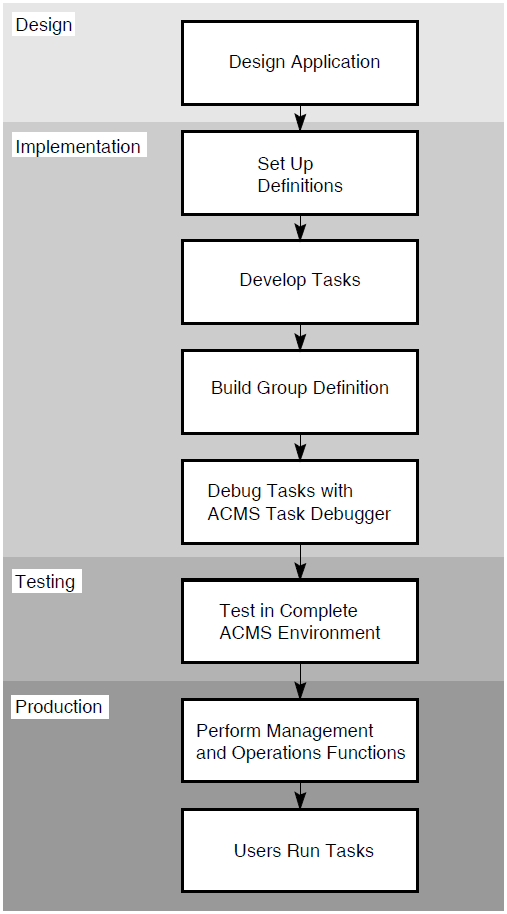
- Design application
Analyze business
Design application
Create preliminary definition and other specifications
Set up data
RMS:Define the records (CDO)
Create the files (RMS utilities or DCL commands)
DBMS:Define the schema, subschema, storage schema (DDL)
Create the database (DBO)
Rdb:Define the records and their relationships (SQL or RDO)
Create the database (SQL or RDO)
- Define tasks
Create task definitions (ADU)
- Create workspaces
Create a file containing record definition (editor)
Store the definition in the data dictionary (CDO)
- Create DECforms forms
Create the panel using the panel editor (FDE)
Edit the IFDL file
Translate the IFDL file to the FORM file (IFDL translator)
- Create TDMS forms
Define background text, input and output fields (FDU)
Define the help form (FDU)
- Create TDMS requests
Define a request (RDU)
Define a request library (RDU)
Build the request library (RDU)
- Write procedures
Write and compile step procedures
Write and compile initialization and termination procedures for each procedure server
Write and compile cancel procedures
- Create message files
Create message source files (editor or DCL)
Generate object modules (OpenVMS Message Utility)
Generate executable message files (DCL
LINKcommand)
- Create task groups
Define the task group including tasks and servers (ADU)
Build the task group using the
/DEBUGqualifier (ADU)
- Create the procedure server image
Link the task group transfer module, the message file object module, and the object modules for step procedures, cancel procedures, and initialization and termination procedures (
LINK/DEBUGcommand)
- Debug
Run tasks under ACMS Task Debugger and OpenVMS Symbolic Debugger
Revise definitions and programs and test again
- Set up the application
Create the application definition (ADU)
Build the application database (ADU)
- Move the application database to ACMS$DIRECTORY
Use the DCL
COPYcommandOr, create the application authorization definition (AAU) and use the
ACMS/INSTALLcommand
- Set up menus
Create menu definitions (ADU)
Build the menu database (ADU)
- Test the application
Start the application and run tasks to test implementation
- Authorize users
Authorize users for access to OpenVMS (OpenVMS Authorize Utility)
Authorize users for access to ACMS, assign the menu database and initial the menu (UDU)
- Authorize terminals
Authorize terminals for access to ACMS (DDU)
Define whether terminals are controlled by ACMS or OpenVMS (DDU)
- Manage and tune the application
Start and stop application
Monitor and tune application
Modify application, servers, tasks, and menus as necessary
Appendix B. Changing and Debugging ACMS Applications
Application development is a cyclical process. Omissions or problems in the analysis or design might not show up until implementation is complete. To correct these omissions or problems, you might need to redo part of the design and implementation. For this reason, it is helpful to understand what parts of an application have to change if you change some other part.
|
Changed Component |
Changes to Related Components |
When Change Takes Effect |
|---|---|---|
|
Menu database name (.MDB) |
User definitions (in ACMSUDF.DAT file) pointing to menu database must be changed. |
Next time user signs in to ACMS. |
|
Menu definitions should be changed if they include a clause naming database file. |
When user signs in after menu database is rebuilt. | |
|
Menu definition |
Menu database containing that definition must be rebuilt. New database must be put in directory pointed to by ACMSUDF.DAT records (usually ACMS$DIRECTORY). |
When user signs in after menu database is rebuilt. |
|
Application database name (.ADB) |
Menu definitions pointing to tasks in that application must be changed and menu database rebuilt. |
When user signs in after menu database is rebuilt. |
|
Application authorization definitions must be modified to reflect new application name. |
When application database is reinstalled with | |
|
Application definition |
Application database must be rebuilt. Menu definition database does not need to be changed unless name of task is changed in application definition. |
When application is stopped and restarted. |
|
If changes to application definition conflict with existing authorization for
application in ACMSAAF.DAT, authorization must be modified and
application database reinstalled with |
When application is moved to ACMS$DIRECTORY with
| |
|
Task group database name (.TDB) |
Application definition must be changed and rebuilt. Task group definition should be changed and rebuilt if it points to task group database file. |
When application is stopped and restarted. |
|
Task group definition |
Task group database must be rebuilt. |
When application is stopped and restarted. |
|
If a task was added or removed, the application database must be rebuilt, even if no change is required in application definition. | ||
|
If a task is removed or a task name changed, menu definition pointing to task must be changed. In addition, the menu database and application database must be rebuilt. If the task removed from the task group was also named in application definition, application definition must be changed and rebuilt. | ||
|
If default control attributes of a task are changed, and these attributes are not overridden in application definition, application database must be rebuilt. | ||
|
If changes to task group definition conflict with existing authorization for
application in ACMSAAF.DAT, authorization must be modified and
application database reinstalled with |
When application is moved to ACMS$DIRECTORY with
| |
|
Task definition |
Task group database must be rebuilt. |
When application is stopped and restarted. |
|
If default control attributes of task are changed, and these attributes are not overridden in application definition, application database must be rebuilt. | ||
|
If task name is changed, task group definition must be changed to reflect new name. | ||
|
Request |
Request library (.RLB) must be rebuilt. |
When application is stopped and restarted. |
|
If number of records or if record definitions used by request are changed, task group database must be rebuilt. | ||
|
If request name is changed, task definition must be changed. | ||
|
If request library name is changed, task group definition must be changed. | ||
|
Form definition |
Request library (.RLB) must be rebuilt. |
When application is stopped and restarted. |
|
If form name is changed, request definition must be changed. | ||
|
Form panel |
FORM file must be back-translated to produce a source IFDL file. Object module must be extracted and relinked with or without escape units. |
When application is stopped and restarted. |
|
Form record |
IFDL file must be translated to produce a new FORM file. Object module must be extracted and relinked with or without escape units. |
When application is stopped and restarted. |
|
Step procedure |
Step procedure must be recompiled and server image (.EXE) relinked |
When application is stopped and restarted, or when server is replaced. |
|
If number of workspaces or if record definitions that the procedure uses for workspaces are changed, task must be redefined and task group database rebuilt. | ||
|
If procedure name is changed, procedure server definition in task group must be changed. Task definition must be changed. | ||
|
Message source file |
File of message texts (.EXE) must be relinked. |
When server using message is restarted after relink. |
|
If message was added or removed or order of messages changed, new message object module must be generated. Server image must be relinked with the new module. |
Stop and restart application to ensure that changes are available. | |
|
Workspace definition |
If task definition, form record, request, or procedure refers to fields that have changed name, definition or program must be changed. Task group database or request library must be rebuilt, or procedure relinked. |
When application is stopped and restarted after rebuild. |
|
Both task group and form file or request library must also be rebuilt and program relinked if order of fields in workspace or other characteristics have changed, even if requests, task definitions, and procedures are not affected by change. | ||
|
If name of workspace definition is changed, procedure, task definition, and form record or request must also be changed. Task group and request library must be rebuilt. Procedure must be recompiled and relinked. | ||
|
Application authorization (with AAU) |
If using |
When application database is moved into ACMS$DIRECTORY with
|
|
If changes to authorization place further restrictions on application, remove old application from ACMS$DIRECTORY and reinstall application database. | ||
|
User or device authorization (with UDU or DDU) |
If change does not affect access control lists or menu names, no other change is required. |
Next time user signs in to ACMS. |
|
If change affects access control lists in application definition, application must be redefined and rebuilt. | ||
|
If change affects names of menus, menus must be redefined and rebuilt. | ||
|
If change affects which terminals are controlled by ACMS, no other change is required. |
After |
File | Description |
|---|---|
Data files or database files for task group | Created and populated using either RMS, DBMS, or Rdb. |
Message file or files for task group | Created with the OpenVMS Message Utility. This file contains text of messages and their message symbols. You need this file only if your tasks use the GET MESSAGE clause to access a message file that is separate from the server image. |
Procedure Server Images | Created with the |
DECforms form files | Created using DECforms. |
Task database – TDB | Created with the |
File | Description |
|---|---|
ADU input files | Contain source definitions for task groups and tasks. |
CDO input files | Contain CDD source definitions for ACMS workspace records. |
RDU input files | Contain source definitions for requests and request libraries. |
Step, initialization, termination, and cancel procedures | Written in COBOL, BASIC, or other high-level languages. |
Message source files | Contain source text for messages. |
Procedure server transfer module | Created by building the task group. Contains vectors for the procedures handled by the server and the main entry point for the procedure server image. |
Appendix C. Summary of ACMS System Workspaces
Each of the three ACMS system workspaces has a different purpose. All of the Common Data Definition Language (CDDL) record definitions for these workspaces are stored in the CDD$TOP.ACMS$DIR.ACMS$WORKSPACES directory in the CDD. This appendix lists these workspaces and explains the uses of each.
C.1. ACMS$PROCESSING_STATUS System Workspace
|
ACMS$PROCESSING_STATUS Workspace | |
|---|---|
|
ACMS$L_STATUS | |
|
Type |
Signed longword |
|
Description |
Contains the return status from the last processing step. The initial value of the ACMS$L_STATUS field is set to 1 (SUCCESS) when a task is started. |
|
ACMS$T_SEVERITY_LEVEL | |
|
Type |
Text |
|
Size |
1 character |
|
Description |
Contains a single-character severity level code representing the return status in the ACMS$L_STATUS field. The characters this field can contain are: S (SUCCESS), I (INFORMATION), W (WARNING), E (ERROR), F (FATAL), ? (OTHER). The initial value of ACMS$T_SEVERITY_LEVEL is "S". |
|
ACMS$T_STATUS_TYPE | |
|
Type |
Text |
|
Size |
1 character |
|
Description |
Contains a single character indicating the severity level of the return status in the ACMS$L_STATUS field. A "G" indicates the low bit in the ACMS$L_STATUS field is set to 1. A "B" indicates the low bit is clear. The initial value of the ACMS$T_STATUS_TYPE field is "G". |
|
ACMS$T_STATUS_MESSAGE/ACMS$T_STATUS_MESSAGE_LONG | |
|
Type |
Text |
|
Size |
80/132 characters |
|
Description |
ACMS$T_STATUS_MESSAGE is an 80-character variant of the 132-character ACMS$T_STATUS_MESSAGE_LONG field. When you use the GET ERROR MESSAGE clause, this field contains the error message associated with the return status code in ACMS$L_STATUS. The ACMS$T_STATUS_MESSAGE_LONG field is set initially to spaces. |
C.2. ACMS$SELECTION_STRING System Workspace
|
ACMS$SELECTION_STRING Workspace | |
|---|---|
|
ACMS$T_SELECTION_STRING | |
|
Type |
Text |
|
Size |
255 characters |
|
Description |
Contains the selection string provided by a terminal user at task selection time. If the user does not provide a selection string, ACMS sets the field to spaces. If the task is a queued task, the first 32 bytes of the selection string contain the queued task element ID. |
C.3. ACMS$TASK_INFORMATION System Workspace
|
ACMS$TASK_INFORMATION Workspace | |
|---|---|
|
ACMS$AL_TASK_ID | |
|
Type |
Signed longword array |
|
Size |
4 longwords |
|
Description |
Contains the task ID in binary format for the current task instance; the ACMS$AL_TASK_ID field is a four-element longword array. It is possible that two task instances can have the same value, if the tasks have been selected on two different nodes. To ensure a unique task identifier, use both the ACMS$AL_TASK_ID field and the ACMS$T_SUBMITTER_NODE field. |
|
ACMS$L_TASK_SEQUENCE_NUMBER | |
|
Type |
Signed longword |
|
Description |
Contains the number of the current task instance within the current task; the content of this field is always one (1) when the task is initially selected from a menu. ACMS increments this number each time the user repeats the task or chains to another task, thus starting a new task instance without returning to the menu. |
|
ACMS$T_TASK_NAME | |
|
Type |
Text |
|
Size |
31 characters |
|
Description |
Contains the task name as defined in the application under which the task is running. ACMS does not update this field when a task chains to another task. |
|
ACMS$T_TASK_IO_DEVICE | |
|
Type |
Text |
|
Size |
8 characters |
|
Description |
Contains the device name for the task submitter. For remote users, the device name is always NL. For local request I/O or terminal I/O users, this field includes the terminal device name. For stream I/O or no I/O, this field is set to spaces. If this field contains a device name (not spaces or NL), then the device can be used by the task to perform I/O from a processing step. |
|
ACMS$AL_TASK_SUBMITTER_ID | |
|
Type |
Signed longword array |
|
Size |
4 longwords |
|
Description |
Contains the current terminal user's identification code for the user who started the current task instance. This field is a four-element longword array. |
|
ACMS$T_TASK_USERNAME | |
|
Type |
Text |
|
Size |
12 characters |
|
Description |
Contains the OpenVMS user name for the terminal user who started the current task instance. For remote tasks, this is the name of the proxy. |
|
ACMS$T_SUBMITTER_NODE_NAME | |
|
Type |
Text |
|
Size |
15 characters |
|
Description |
Contains the DECnet node name for the task submitter. |
|
ACMS$L_CALL_SEQUENCE_NUMBER | |
|
Type |
Signed longword |
|
Description |
Contains the call sequence number of the currently called task. ACMS increments this number each time a task calls another task. |
|
ACMS$T_SIGN_IN_USERNAME | |
|
Type |
Text |
|
Size |
12 characters |
|
Description |
Contains the OpenVMS user name of the user on the submitter node. If a submitter selects a remote task, then the user name under which that task runs may be different from the user name under which the task is signed in. The contents of the ACMS$T_TASK_USERNAME is based on the proxy lookup and user name defaulting mechanism and may differ from the ACMS$T_SIGN_IN_USERNAME field. If a submitter selects a local task, the ACMS$T_SIGN_IN_USERNAME field will be the same as the ACMS$T_TASK_USERNAME field. To distinguish between users that have the same name but reside on different nodes, use the ACMS$T_SIGN_IN_USERNAME field with the ACMS$T_SUBMITTER_NODE_NAME field to log the user name and the node location. |
|
ACMS$T_SIGN_IN_DEVICE | |
|
Type |
Text |
|
Size |
8 characters |
|
Description |
Contains the name of the device that was supplied to ACMS when the submitter signed in. For applications using the ACMS command process, this field contains a terminal device name. For applications using a user-written command process (agent), this field can contain a terminal device name, the name of a nonterminal device that the agent is handling, or the NL device specification. Use the ACMS$T_SIGN_IN_DEVICE field with the ACMS$T_SUBMITTER_NODE_NAME field to log the device name and its node location. It is necessary to use both of these fields if you wish to distinguish between devices that have the same name but are residing on different nodes. |