VSI ACMS for OpenVMS Systems Interface Programming
- Software Version:
- ACMS for OpenVMS Version 5.3-3
- Operating System and Version:
- VSI OpenVMS Alpha Version 8.4-2L1 or higher
VSI OpenVMS IA-64 Version 8.4-1H1 or higher
Preface
The ACMS Systems Interface (SI) is a group of system services that enable a programmer to interface a wide range of external devices and systems with the VSI ACMS for OpenVMS (ACMS) run-time environment. For example, you can provide a new method of menu selection or an alternate terminal management system to replace or supplement the default ACMS menu system.
This manual introduces the concept of the ACMS agent program, a program that invokes a task that executes in an ACMS application. This manual clarifies and complements information you gain by first reading the manuals in the Planning and Design as well as the Development and Testing phases of the documentation life cycle.
1. About VSI
VMS Software, Inc. (VSI) is an independent software company licensed by Hewlett Packard Enterprise to develop and support the OpenVMS operating system.
2. Intended Audience
Read this manual if you need a detailed description of and reference information about the ACMS Systems Interface, referred to in this document as the SI. This manual is for systems programmers, experienced users, or application designers with a strong knowledge of ACMS, the VSI OpenVMS operating system, and programming on the OpenVMS operating system.
3. Document Structure
|
Introduces the SI services, gives a brief description of each, and describes the function of agent programs. | |
|
Explains the features common to all the SI services and the features common to the various languages that can call the services. | |
|
Chapter 3, "Agent Programs That Coordinate Distributed Transactions" |
Explains the specific SI services that agent programs need to call to start and end a distributed transaction and to access data on remote nodes. |
|
Chapter 4, "Agent Program Initialization and Exchange I/O Services" |
Describes the initialization services and exchange I/O services, and gives reference information for calling them in agent programs. |
|
Describes the submitter services and gives reference information for calling them in agent programs. | |
|
Describes the stream services and gives reference information for calling them in agent programs. | |
|
Provides a number of agent program examples. | |
|
Describes superseded exchange I/O and stream services. |
4. ACMS Help
ACMS and its components provide extensive online help.
DCL level help
Enter
HELP ACMSat the DCL prompt for complete help about theACMScommand and qualifiers, and for other elements of ACMS for which independent help systems do not exist. DCL level help also provides brief help messages for elements of ACMS that contain independent help systems (such as the ACMS utilities) and for related products used by ACMS (such as DECforms or Oracle CDD/Repository).ACMS utilities help
Each of the following ACMS utilities has an online help system:
ACMS Debugger ACMSGEN Utility
ACMS Queue Manager (ACMSQUEMGR)
Application Definition Utility (ADU)
Application Authorization Utility (AAU)
Device Definition Utility (DDU)
User Definition Utility (UDU)
Audit Trail Report Utility (ATR)
Software Event Log Utility Program (SWLUP)
The two ways to get utility-specific help are:
Run the utility and type
HELPat the utility prompt.Use the DCL
HELPcommand. At the "Topic?" prompt, type@followed by the name of the utility. Use the ACMS prefix, even if the utility does not have an ACMS prefix (except for SWLUP). For example:Topic? @ACMSQUEMGR Topic? @ACMSADU
However, do not use the ACMS prefix with SWLUP:
Topic? @SWLUP
Note
Note that if you run the ACMS Debugger Utility and then type
HELP, you must specify a file. If you ask for help from the DCL level with@, you do not need to specify a file.ACMSPARAM.COM and ACMEXCPAR.COM help
Help for the command procedures that set parameters and quotas is a subset of the DCL level help. You have access to this help from the DCL prompt, or from within the command procedures.
LSE help
ACMS provides ACMS-specific help within the LSE templates that assist in the creation of applications, tasks, task groups, and menus. The ACMS- specific LSE help is a subset of the ADU help system. Within the LSE templates, this help is context-sensitive. Type
HELP/IND (PF1-PF2)at any placeholder for which you want help.Error help
ACMS and each of its utilities provide error message help. Use
HELP ACMS
              ERRORS
from the DCL prompt for ACMS error message help. UseHELP ERRORSfrom the individual utility prompts for error message help for that utility.Terminal user help
At each menu within an ACMS application, ACMS provides help about terminal user commands, special key mappings, and general information about menus and how to select tasks from menus.
Forms help
For complete help for DECforms or TDMS, use the help systems for these products.
5. Related Documents
The following table lists the documents in the VSI ACMS for OpenVMS documentation set.
| ACMS Information | Description |
|---|---|
| VSI ACMS Version 5.0 for OpenVMS Installation Guide | Description of installation requirements, the installation procedure, and postinstallation tasks. |
| VSI ACMS for OpenVMS Getting Started | Overview of ACMS software and documentation. Tutorial for developing a simple ACMS application. Description of the AVERTZ sample application. |
| VSI ACMS for OpenVMS Concepts and Design Guidelines | Description of how to design an ACMS application. |
| VSI ACMS for OpenVMS Writing Applications | Description of how to write task, task group, application, and menu definitions using the Application Definition Utility. Description of how to write and migrate ACMS applications on an OpenVMS system. |
| VSI ACMS for OpenVMS Writing Server Procedures | Description of how to write programs to use with tasks and how to debug tasks and programs. |
| VSI ACMS for OpenVMS Systems Interface Programming | Description of using Systems Interface (SI) Services to submit tasks to an ACMS system. |
| VSI ACMS for OpenVMS ADU Reference Manual | Reference information about the ADU commands, phrases, and clauses. |
| VSI ACMS for OpenVMS Quick Reference | List of ACMS syntax with brief descriptions. |
| VSI ACMS for OpenVMS Managing Applications | Description of authorizing, running, and managing ACMS applications, and controlling the ACMS system. |
| VSI ACMS for OpenVMS Remote Systems Management Guide | Description of the features of the Remote Manager for managing ACMS systems, how to use the features, and how to manage the Remote Manager. |
| Online help | Online help about ACMS and its utilities. |
6. OpenVMS Documentation
The full VSI OpenVMS documentation set can be found on the VMS Software Documentation webpage at https://docs.vmssoftware.com.
7. VSI Encourages Your Comments
You may send comments or suggestions regarding this manual or any VSI document by sending electronic mail to the following Internet address: <docinfo@vmssoftware.com>. Users who have VSI OpenVMS support contracts through VSI can contact <support@vmssoftware.com> for help with this product.
8. Conventions
| Ctrl/x | A sequence such as Ctrl/x indicates that you must press and hold the key labeled Ctrl while you press another key or a pointing device button. |
| PF1 x | A sequence such as PF1 x indicates that you must first press and release the key labeled PF1 and then press and release another key or a pointing device button. |
| Return | In the HTML version of this document, this convention appears as brackets rather than a box. |
| . . . |
A horizontal ellipsis in examples indicates one of the following
possibilities:
|
| ⋮ | A vertical ellipsis indicates the omission of items from a code example or command format; the items are omitted because they are not important to the topic being discussed. |
Monospace text | Monospace type indicates code examples and interactive screen displays. In the C programming language, monospace type in text identifies the following elements: keywords, the names of independently compiled external functions and files, syntax summaries, and references to variables or identifiers introduced in an example. In the HMTL version of this document, this text style may appear as italics. |
| - | A hyphen at the end of a command format description, command line, or code line indicates that the command or statement continues on the following line. |
| numbers | All numbers in text are assumed to be decimal unless otherwise noted. Nondecimal radixes—binary, octal, or hexadecimal—are explicitly indicated. |
| bold text | Bold text represents the introduction of a new term or the name of an argument, an attribute, or a reason. In the HMTL version of this document, this text style may appear as italics. |
| italic text | Italic text indicates important information, complete titles of manuals, or
variables. Variables include information that aries in system output (Internal
error number), in command lines
(/PRODUCER=name), and in command
parameters in text (where dd represents the predefined code
for the device type). |
| UPPERCASE | Uppercase text indicates the name of a routine, the name of a file, the name of a file protection code, or the abbreviation for a system privilege. In command format descriptions, uppercase text is an optional keyword. |
| UPPERCASE | In command format descriptions, uppercase text that is underlined is required. You must include it in the statement if the clause is used. |
| lowercase | In command format descriptions, a lowercase word indicates a required element. |
| <lowercase> | In command format descriptions, lowercase text in angle brackets indicates a required clause or phrase. |
| ( ) | In command format descriptions, parentheses indicate that you must enclose the options in parentheses if you choose more than one. |
| [ | | ] | In command format descriptions, vertical bars within square brackets indicate that you can choose any combination of the enclosed options, but you can choose each option only once. |
| { | | } | In command format descriptions, vertical bars within braces indicate that you must choose one of the options listed, but you can use each option only once. |
9. References to Oracle Products
VSI ACMS documentation set, to which this document belongs, refers to the following Oracle products by their full and abbreviated names:
| Full product name | Shortened product name |
|---|---|
| Oracle Common Data Dictionary | CDD |
| Oracle Rdb | Rdb |
| Oracle Database/DBMS | DBMS |
| Oracle Trace | Trace |
Chapter 1. Overview of the ACMS Systems Interface
An agent program is a program that invokes a task that executes in an ACMS application. An agent process is an OpenVMS process in which an agent program executes. ACMS provides a default agent program called the command process (CP), which uses a forms interface to interact with the terminal user. The ACMS Systems Interface (SI) provides a set of services that allow programmers to write their own agent programs.
This chapter briefly describes SI services and tells how to call them from an agent program.
1.1. The ACMS Systems Interface
The ACMS Systems Interface is a set of system services that you can use to enable user-written code in an agent process to submit ACMS tasks. The default ACMS command process (CP) is a supplied agent that handles user sign-in, menu presentation, task submission, and exchange steps with supported forms management systems such as DECforms.
By using the SI, you can write an agent program to replace or supplement the default ACMS task selection method. You can also write agent programs to meet special interfacing or user interaction requirements. Customer-written agent programs can coexist with the default agent programs supplied by ACMS.
Provide access to ACMS from devices not supported by DECforms (for example, a badge reader, bar-code reader, or touch screens)
Write a customized terminal I/O interface (as an alternative to using DECforms)
Provide distributed processing that is not already provided by ACMS (such as accessing systems other than ACMS systems)
- Coordinate distributed transactions used by tasks that are called from an agent program
Note
Although you can access ACMS from an ALL-IN-1 agent, running the ALL-IN-1 system from within an ACMS DCL server process may have severe negative impact on system performance.
This is only a partial list of all the extensions to ACMS that are possible using the SI. An agent program can be very simple or very complex; it can handle requests for a single user or multiple users.
An agent program designed to handle multiple users, however, is far more complicated and involves developing asynchronous code. Before attempting to implement any complex SI facilities, you must consider the commitment of time and resources necessary to develop and support an SI program.
1.2. Systems Interface Services
The SI provides a set of callable services to sign in, access tasks, and otherwise communicate with ACMS. Programmers must set up various data structures using a language that supports the OpenVMS calling standard.
Table 1.1, ''Systems Interface Services'' lists the groups of SI services and gives a brief description of each group.
|
SI Services |
Description |
|---|---|
|
Initialization Services |
Provide a sign-in service to identify a task submitter to the ACMS system and a sign-out service to remove the task submitter from the ACMS system. |
|
Exchange I/O Services |
Specify the type of exchange I/O to be performed and terminate an agent program's exchange I/O. |
|
Submitter Services |
Submit tasks for processing by the ACMS run-time system. The submitter services are used to call and cancel tasks. |
|
Stream Services |
Implement alternate task I/O methods. The stream services are useful if you use asynchronous processing, simultaneous multitasking, or multithreaded agent programs. They are also useful when exchanging large amounts of data primarily in one direction on each exchange step, such as sending or receiving a list of data items. |
Initialization Services – Chapter 4, "Agent Program Initialization and Exchange I/O Services"
Exchange I/O Services – Chapter 4, "Agent Program Initialization and Exchange I/O Services"
Submitter Services – Chapter 5, "Submitter Services"
Stream Services – Chapter 6, "Stream Services"
In addition, two services, ACMS$SIGNAL and ACMS$WAIT, perform error handling and synchronization functions common to many of the SI services. A discussion and reference material for the ACMS$SIGNAL and ACMS$WAIT services are included in Chapter 2, "Common Features of the Systems Interface".
1.3. Agent Programs
A task submitter is any authorized ACMS user who selects tasks for processing, provides input for that processing, and receives the results of that processing. Task submitters must also be authorized OpenVMS users.
An agent program uses the SI services on behalf of one or more task submitters. You can write an agent program in any language that supports the OpenVMS calling standard. A task submitter is associated with an OpenVMS user name that identifies the user to the ACMS system.
The function of the agent program is much like the ACMS command process. In fact, the ACMS command process is an agent program supplied with ACMS. An agent program can sign in to ACMS to represent a single task submitter or multiple task submitters, if necessary. An agent program interacts with the user or external system and invokes tasks to perform required processing. The method of interacting with a user can be a menu system on a terminal screen or some other method.
By default, a task submitter is a DECforms-supported terminal such as the DEC VT series terminals. However, an agent program can recognize almost anything as a task submitter – from a person sitting at a terminal to a badge reader, DECtalk, or a postage scale. Each of these external entities is supported by the agent program.
Figure 1.1, ''Agent Programs Submitting Tasks to ACMS'' shows the steps agent programs use to submit tasks to the ACMS system.
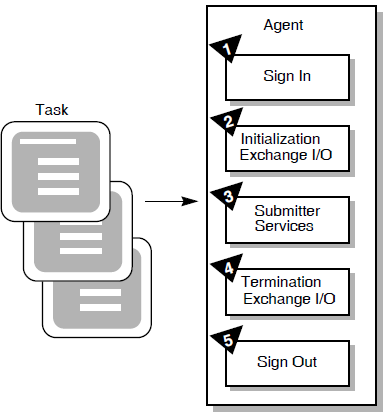
Figure 1.1, ''Agent Programs Submitting Tasks to ACMS'' shows the following:
The SI initialization services interact with the ACMS Application Central Controller (ACC) to sign in to ACMS.
Once signed in, the agent program initializes for I/O.
Submitter services call tasks in ACMS applications.
The agent program can use task arguments to pass data that is mapped to workspaces when the task instance begins execution. When the task instance ends, this data can be updated and can return to the agent program.
In addition, an agent program can control the distributed transaction in which called tasks participate.
The agent program terminates exchange I/O.
The agent program signs out.
This sequence of processing by an agent program is similar to that of the ACMS command process. The primary work of the agent program is in the third phase, where it calls ACMS tasks.
1.3.1. Calling Tasks
The main purpose of the SI is to allow access to an ACMS system from outside the typical ACMS environment. Agent programs do not have access to the standard ACMS menus and are, therefore, expected to provide their own methods of interacting with the user or external system. If menus are required, the agent program must support a menu system. In addition, the agent program is free to run any initial or final tasks, as required. Using the SI services, an agent program can also provide distributed processing functions such as communications between an ACMS system and other systems.
Agent programs can call tasks on behalf of one or more task submitters. Several agent programs can submit tasks at the same time; a single agent program can submit more than one task at a time on behalf of a submitter. These tasks can be selected in a combination of local node applications and remote node applications, as required. While the CP limits the interactive user to a single task initiated from the menu, you can write an agent program that allows the task submitter to access more than one task at a time.
An agent program can pass data to a task as arguments. A task can read and modify data stored in a task as argument workspaces. A task can also return the modified workspace contents to the agent program. The agent program can then use the data in subsequent task executions. See Chapter 5, "Submitter Services" for a discussion of the services you use to call ACMS tasks and to pass data as arguments. An agent program can use the DECdtm services to start a distributed transaction and then call a task as part of that transaction. When the task completes, the agent program can commit the DECdtm transaction; the agent program can thus coordinate the database I/O performed in the agent with the I/O performed in the task.
1.3.2. Using Streams
Form I/O – method of input/output that uses DECforms
Request I/O – method of input/output that uses TDMS
Stream I/O – method of input/output that uses ACMS stream services
Streams are ACMS communication channels between an agent program and an application. Stream I/O can be used to interface other systems or devices not supported by form I/O and request I/O.
Streams provide communication between ACMS tasks and agent programs. Agent programs then communicate with devices not supported by DECforms or TDMS.
When an agent program performs multithreaded or asynchronous processing
When large amounts of data are passed in an exchange step primarily in one direction
Figure 1.2, ''Stream Connection'' shows the stream connection between an agent program and an ACMS Application Execution Controller (EXC).
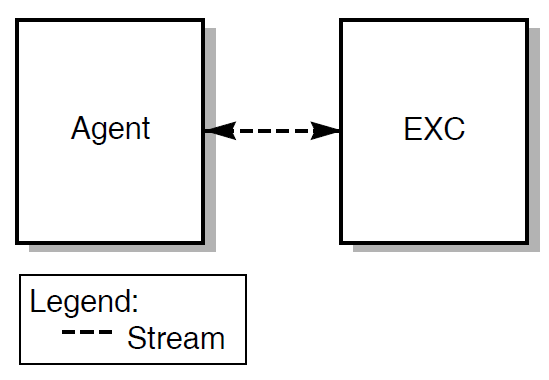
Because the agent program works on behalf of the task submitter, the agent program creates and connects a stream between itself and the EXC. The EXC is the interpreter of the task definition.
1.3.3. Using SI Identifiers
Submitter
Exchange I/O
Procedure
Call
Connect
I/O
Agent programs allocate memory for these structures and then pass the memory address to an SI service that either fills in the information or uses the information stored in the ID by a previous service.
Structure definitions for these IDs are currently available for BLISS, C, FORTRAN, MACRO, Pascal, and PL/I. Chapter 2, "Common Features of the Systems Interface" documents the definition and declaration files available for these languages. Other languages must define their own structures to store these IDs.
Chapter 2. Common Features of the Systems Interface
This chapter describes features common to the SI services and the various languages that use them. The chapter also explains the reference format used in the following chapters and describes the ACMS$SIGNAL and ACMS$WAIT support services.
2.1. Features Common to the SI Services
All of the SI services follow the OpenVMS Calling and Condition Handling Standards. This manual assumes you will use and the OpenVMS Programming Interfaces: Calling a System Routine VSI OpenVMS System Services Reference Manual: GETUTC–Z as references for these standards when using the SI services.
2.1.1. Service Call Specification
|
Name |
Shows the service name in uppercase characters. |
|
Description |
Gives you a brief explanation of what the service does. |
|
Format |
Shows the syntax of the service. |
|
Parameters |
Explains the parameters you can use with the service. |
|
Return Status |
Lists each of the status values you can receive when you call the service and when the service completes. |
2.1.2. Parameter Notation
The format descriptions for the services use OpenVMS procedure parameter notation. Each parameter can have four characteristics, represented by two groups of symbols following the parameter. The characteristics definable for each parameter are:
<name>.<access type><data type>.<pass mech><parameter form>
The characteristics are always listed in the preceding order. A period (.) separates access and data types from the passing mechanism and the parameter form. For example:
comp_status.wq.r
In this example, comp_status is to be written by the service (w);
comp_status is a quadword (q); and comp_status is passed by reference
(r).
|
Parameter Notation |
Symbol |
Meaning |
|---|---|---|
|
Access type |
m |
Modify access |
|
r |
Read access only | |
|
s |
Call without stack unwinding | |
|
w |
Write and read access | |
|
Data type |
bu |
Byte logical (unsigned) |
|
l |
Longword integer (signed) | |
|
lc |
Longword return status | |
|
lu |
Longword logical (unsigned) | |
|
o |
Octaword integer (signed) | |
|
q |
Quadword integer (signed) | |
|
t |
Character-coded text string | |
|
w |
Word integer (signed) | |
|
x |
Data type by descriptor | |
|
z |
Unspecified | |
|
zem |
Procedure entry mask | |
|
Passing mechanism |
d |
By descriptor |
|
r |
By reference | |
|
v |
By immediate value | |
|
Parameter form |
none |
Scalar (also called atomic data type) |
|
x |
Class type by descriptor |
2.1.3. Return Status
Each asynchronous SI service produces a status code when the service is called and another when the service completes. The severity of these status codes can be SUCCESS, INFORMATIONAL, WARNING, ERROR, or FATAL. If the service returns a SUCCESS or INFORMATIONAL status code, the completion events defined for the service occur. If the service returns a WARNING, ERROR, or FATAL status code, the completion events do not occur.
2.1.4. Synchronous and Asynchronous Calling Formats
SI services usually have two formats: a synchronous format and an asynchronous format. The exceptions are ACMS$SIGNAL and ACMS$WAIT, which have only a synchronous format.
Agent programs can call asynchronous SI services from either mainline or asynchronous system trap (AST) level. An agent program must call a synchronous service from mainline level; synchronous services return an error message if called from AST level.
The synchronous and asynchronous SI services perform all operations identically, except that the asynchronous services return a status message to the caller both when the initial call is made and when the completion events occur. Synchronous services return a status message to the caller only after the operation has completed.
When a call to a synchronous SI service returns to the calling routine, the service and all processing are finished. The service returns a completion status value to indicate the success or failure of the service. For example, an agent program might call ACMS$SIGN_IN to sign a task submitter in to the ACMS system. When control returns to the calling module, the agent program checks the return status to determine whether or not the sign-in service completed successfully.
Note
Many of the services rely on asynchronous system traps (ASTs) being delivered in order to operate. Therefore, components that use these services should not disable ASTs for long periods of time.
If it was unable to begin processing the request, ACMS returns a failure status when the initial call is made. For example, ACMS might return a failure status if it could not read an argument passed to the service. If a call to an asynchronous service fails and the service returns an error status to the calling agent program, the service does not take place, and ACMS does not set an event flag or call an AST completion routine.
comp_status.wq.refn.rbu.rastadr.szem.rastprm.rz.v.
- comp_status
The final completion status of the service. This is a two longword block. The block is set to zero when the service starts successfully, and the return status message from the service is ACMS$_PENDING. When the service completes, the first longword of the block contains the final status. The completion status contains a nonzero value when the service is finished.
- efn
The event flag that is set when the service completes. When the service starts successfully and returns the ACMS$_PENDING status, the event flag is cleared. Because ACMS sets the event flag only when the service is done, the agent program should check the comp_status parameter first for a nonzero value to verify that the service really ended. See $SYNCH in VSI OpenVMS System Services Reference Manual: GETUTC–Z.
- astadr
The address of an AST routine to be called when the service completes. If the service started successfully (the return status is ACMS$_PENDING), this AST is delivered when the service completes.
- astprm
The parameter the AST passes to the service completion routine.
To determine the success or failure of a call to an asynchronous SI service, the agent program must supply the address of a quadword completion status block that ACMS can use to store the status result. An agent program normally uses an event flag or an AST completion routine to determine that an asynchronous service has completed. The agent program might also pass an optional parameter to the AST completion routine.
ACMS$SIGN_IN
ACMS$SIGN_IN — The synchronous and asynchronous formats for ACMS$SIGN_IN are the following:
Format
ACMS$SIGN_IN(submitter_id.wq.r, [username.rt.dx], [device.rt.dx], [cancel_routine.zem.r], [cancel_param.rz.v]ACMS$SIGN_IN_A(submitter_id.wq.r, [username.rt.dx], [device.rt.dx], [cancel_routine.zem.r], [cancel_param.rz.v], [comp_status.wq.r], [efn.rbu.r], [astadr.szem.r], [astprm.rz.v]
2.1.5. ACMS$SIGNAL and ACMS$WAIT Support Services
Following are descriptions of the ACMS$SIGNAL and ACMS$WAIT synchronous support services, which you can use to obtain additional status information about an error.
2.1.5.1. ACMS$SIGNAL
ACMS$SIGNAL
ACMS$SIGNAL — When an agent program encounters an error during a call to an SI service, the service returns a status value to the agent program. In some cases, you need additional information about the error. To get additional error information, an agent program can call the ACMS$SIGNAL service. This service signals the secondary status, if any. The ACMS$SIGNAL service does not signal the primary error status, only secondary status information. The agent program must also call LIB$SIGNAL to signal the primary error status if all error logging is done using a condition handler.
Information
By writing a condition handler, an agent program can collect error messages and write them to an error log. You can set up a condition handler in an agent program that receives the secondary status and any FAO parameters for the secondary status values in the signal array. See the VSI OpenVMS Calling Standard for a discussion of signals in the OpenVMS calling standard.
Only the SI submitter services store secondary status information. The services store information on a per-submitter basis, and ACMS saves this secondary status information only until the next SI service for the same task submitter completes. For synchronous SI services, the agent program should call the ACMS$SIGNAL service immediately after any service that returns an error status. For asynchronous SI services, the agent program should call the ACMS$SIGNAL service in the AST completion routine.
Calling ACMS$SIGNAL from an AST routine is necessary to prevent another service from interrupting ACMS and possibly storing error information about other error conditions. When a service completes, any errors saved from the last service are deleted.
Note
Do not use event flags if your agent program calls several asynchronous services at the same time for a single task submitter. ACMS cannot ensure that ACMS$SIGNAL will return information on the correct service completion because any of the services could have set the event flag.
Format
ACMS$SIGNAL (id.rq.r)Parameters
- id
The submitter ID returned on the ACMS$SIGN_IN service.
Because the ACMS$SIGNAL service requires a submitter ID as input, the agent program must explicitly sign in task submitters using the ACMS$SIGN_IN service, and pass the address of the submitter ID returned by the ACMS$SIGN_IN service to ACMS$SIGNAL. For example, the ACMS$SIGNAL service might return an error condition if the submitter ID is invalid.
Note
Because the submitter ID is returned on successful completion of the ACMS$SIGN_IN service, ACMS$SIGNAL fails after an unsuccessful call to the ACMS$SIGN_IN service.
Return Status
|
Status |
Severity Level |
Description |
|---|---|---|
|
ACMS$_NORMAL |
Success |
Normal successful completion |
|
ACMS$_NTSNIN |
Error |
Bad ID |
See Chapter 7, "Sample Agent Programs" for examples of agent programs that call the ACMS$SIGNAL service.
2.1.5.2. ACMS$WAIT
ACMS$WAIT
ACMS$WAIT — The SI asynchronous services sometimes invoke processing at mainline level instead of AST level. An agent program can call the ACMS$WAIT service to stall the mainline level process until an asynchronous service completes. The ACMS$WAIT service operates in a fashion similar to the $SYNCH system service. ACMS$WAIT checks that an event flag is set and a completion status block contains a nonzero status value; when these conditions are met, then the asynchronous SI service has completed and ACMS$WAIT returns to the calling agent program.
Additional Information
ACMS provides the ACMS$WAIT service for times when the SI asynchronous services need to perform processing at mainline level (instead of at AST level) to avoid hanging the process at AST level while performing a synchronous operation.
ACMS performs synchronous operations at mainline by having the ACMS$WAIT service process a queue of requests for these operations. This ensures that the SI services can continue processing at AST level. Because of this, one user cannot stop all processing in the agent program for all others while that user performs time-consuming operations.
ACMS$CALL_A
ACMS$START_CALL_A
ACMS$WAIT_FOR_CALL_END_A
Note
An agent program must use the ACMS$WAIT service at mainline level if it uses these asynchronous services. If an agent program does not use ACMS$WAIT with these services, it is possible for the service to hang indefinitely.
The ACMS$WAIT service uses a completion status block parameter. The ACMS$WAIT service puts the mainline code into a wait state. The code is resumed when the first longword of the completion status block is set to a nonzero value and the ACMS$EFN event flag is set.
When calling an asynchronous submitter service from mainline level, use the ACMS$WAIT service with the completion status parameter to wait for completion of the service.
When you write an asynchronous multiuser agent program, you may want to suspend the mainline level and allow all activity to occur at AST level. Use ACMS$WAIT to suspend mainline level. Initialize the completion status buffer to zero before calling the service; do not use the status buffer in any other call.
You can resume the mainline level by manually setting the ACMS$EFN flag and moving a nonzero completion status to the completion status buffer. Mainline level is generally resumed when running down the agent program.
- If an agent program selects a task that performs any exchange step using DECforms or TDMS request I/O, you must use the ACMS$WAIT service instead of SYS$HIBER or SYS$WAITFR. Set the completion status parameter to a nonzero value for the equivalent of a SYS$WAKE at mainline level.
Note
You must use ACMS$WAIT in such situations even if .RLB or .FORM files are manually cached, because ACMS checks the remote .RLB or .FORM file to make sure that the submitter node has the latest copy.
Format
ACMS$WAIT (comp_status.rq.r)Parameters
- comp_status
The status block that waits for a nonzero value.
Note
ACMS$WAIT waits for only one event flag that is stored in a global location called ACMS$EFN. The ACMS$EFN symbol is not the value of the event flag. Rather it is the address of the location where the event flag number is stored. Therefore, declare ACMS$EFN as an external longword variable, not an external longword constant. Also, you must pass ACMS$EFN explicitly to all SI services when you use ACMS$WAIT, because ACMS does not set the event flag implicitly.
Return Status
The first longword of the IOSB is the return status. The return status is the completion status of the call that was waited for.
ACMS$WAIT may also return the completion status of the relevant asynchronous service.
2.1.6. Single-Threaded and Multithreaded Agent Programs
You may want to have an agent program submit tasks for one user at a time. Single-threaded agent programs submit tasks to ACMS for only one user at a time. These agent programs are synchronous and are therefore easier to write and maintain. However, because single-threaded agent programs handle only one user, each user requires a separate OpenVMS process. This makes single-threaded agent programs expensive in terms of computing resources.
You may want to have an agent program handle several users simultaneously. Multithreaded agent programs submit tasks for several users at a time. For each user, the agent program calls the ACMS$SIGN_IN service to sign the user in to ACMS, returning a submitter ID.
Use a separate context, or thread, for each submitter. You can keep the information for each thread in heap storage. Because the agent program handles several threads, allocate an area of memory for each thread in the process to store information pertinent to that thread.
Avoid operations that can stall the process. It is best to use the SI services and I/O operations asynchronously to avoid interrupting the execution of a process. Prompting a terminal user for information in a synchronous format, for example, can hold up all other threads in the process while they wait for that user to supply a response.
Use separate I/O channels for each thread. You can establish a separate channel for each thread by using RMS or QIO statements in your agent program. For example, you can use the $OPEN and $CONNECT statements to open a channel for each thread. Then use the $GET and $PUT statements to read and write information for that thread.
Provide for error isolation. Do not let an error in one thread interrupt or stop the processing of all other threads for that agent program. When an error occurs, provide an escape for that thread, such as signing the thread out of ACMS, rather than stopping the whole agent process.
2.1.7. Default Submitter Feature
Note
The default submitter feature continues to be supported for existing applications of ACMS. This feature is in decline, however, and is not recommended for new development. You cannot use the Default Submitter Feature for agent programs that perform DECforms I/O, because they must call ACMS$INIT_EXCHANGE_IO, which requires the submitter ID returned from ACMS$SIGN_IN.
The ACMS$SIGN_IN service is optional for certain types of single-threaded agent programs. If you do not use ACMS$SIGN_IN, the default submitter feature is activated during the first call to an SI service.
If you write a single-threaded agent program that submits tasks under its own user name and does not use a terminal, you can omit calling the ACMS$SIGN_IN service and using the submitter ID parameter when calling subsequent SI services.
For single-threaded agent programs that do not call the ACMS$SIGN_IN service, the user is signed in automatically during the first call to an SI service, but a submitter ID is not returned to the user. Thus, the agent program cannot pass a submitter ID to any subsequent SI services.
Cannot call tasks that perform DECforms I/O
Must submit tasks under their own user name
Must not use SYS$INPUT
May receive ACMS$SIGN_IN errors from the first service called
Cannot call the ACMS$SIGNAL service
Must not call ACMS$SIGN_IN service at any time
If an agent program calls the ACMS$SIGN_IN service, it must use the ACMS$SIGN_IN service for each task submitter that it handles. The agent program must also pass a submitter ID to all subsequent SI services.
2.1.8. Running an Agent Program
Once you successfully compile and link an agent program, you invoke it with DCL commands as you do with any other program. It is important, however, to have the ACMS system running before you start the agent program. It is also important, if a Request Interface (RI) agent or a user-written agent uses DECforms in ACMS tasks, to define a logical name to prepare for using the agent.
Section 2.1.8.1, ''Preparing to Use RI or User-Written Agents that Use DECforms in Tasks'' describes defining the logical name. Section 2.1.8.2, ''Starting an Agent Program'' describes starting an agent program.
2.1.8.1. Preparing to Use RI or User-Written Agents that Use DECforms in Tasks
Whether CMA is in the process
The version of DECforms being used
Depending on these two conditions, the ACMS agent with respect to DECforms operates in either single-user mode or multi-user mode.
Single-user mode is defined as one user at a time executing an ACMS task. A single-threaded user-written agent is an example of single-user mode.
Multi-user mode is defined as more than one user at a time executing an ACMS task. A CP is an example of multi-user mode. If you use a multi-user user-written agent with DECforms Version 2.2, the agent must be linked with CMA.
$DEFINE/PROCESS ACMS$DECFORMS_IN_AGENT "Y"
DECforms Version 1.4 is used.
Defining the logical name ACMS$DECFORMS_IN_AGENT is not required, but has no harmful effects. Defining the logical name causes ACMS to load the FORMS$MANAGER forms manager during initialization, rather than when the first DECforms call is made.
DECforms Version 2.1B is used.
Define the logical name ACMS$DECFORMS_IN_AGENT to a TRUE value. Doing so ensures that ACMS brings CMA into the process if CMA is not already there.
DECforms Version 2.2 is used.
If the agent is intended to run in single-user mode, defining the logical name ACMS$DECFORMS_IN_AGENT has no effect, because CMA is not in the process. Defining the logical name causes ACMS to load the FORMS$MANAGER forms manager during initialization, rather than when the first DECforms call is made.
Define the logical name ACMS$DECFORMS_IN_AGENT only when using DECforms Version 2.1B or when using DECforms Version 2.2 in multi-user mode.
2.1.8.2. Starting an Agent Program
RUN command. For example:
$RUN MYAGENT.EXE
$RUN/DETACHED/UIC=[1,4] -_$/INPUT=MTAINPUT.DAT -_$/OUTPUT=MTAOUTPUT.LOG -_$/PROCESS=ACMS_MYAGENT MYAGENT.EXE
This example shows that the agent program receives its input from the file MTAINPUT.DAT and logs messages in the file MTAOUTPUT.LOG. The next section describes some additional considerations for writing a multithreaded agent program.
2.1.9. Debugging an Agent Program with ACMS$CHECK
When developing an agent program, you may make programming errors, such as omitting required parameters or incorrectly ordering parameters. To improve performance, ACMS does not check these parameters but instead returns access violations for errors. Access violations are generic and do not describe the error or the parameter that caused the problem. Therefore, to help debug agent programs, the SI allows you to set the ACMS$CHECK logical name, which tells the SI to probe parameters. If ACMS$CHECK cannot access a parameter, it returns relevant error messages rather than access violations.
$DEFINE ACMS$CHECK TRUE$RUN DISK$:[AGENT.OBJ]PROGRAM...$DEASSIGN ACMS$CHECK
You usually enable ACMS$CHECK by making the ACMS$CHECK logical name accessible to your agent program as a process or job logical name. Defining the ACMS$CHECK logical name affects any agent program that has access to the logical name. For instance, defining the logical name as a system logical name affects every agent program on the system including the ACMS command process. The ACMS$CHECK logical name is translated when an agent program starts. Once enabled, ACMS$CHECK remains enabled for the life of the agent program. ACMS$CHECK cannot be enabled or disabled after an agent program starts.
Defining ACMS$CHECK as a logical name aids the debugging process. Although it is a valuable debugging aid, using ACMS$CHECK greatly reduces the performance of an agent program because it causes all arguments to be checked. Therefore, be sure to disable parameter checking by deassigning ACMS$CHECK at the end of the debugging session.
2.2. Features Common to Languages that Call the Systems Interface
- Structure layouts for the various service IDs. The SI services create and pass IDs, which are quadwords, to each other. The ID names are:
ACMS$CALL_ID
ACMS$CONNECT_ID
ACMS$EXCHANGE_IO_ID
ACMS$IO_ID
ACMS$PROCEDURE_ID
ACMS$STREAM_ID
ACMS$SUBMITTER_ID
- Length of the IDs. You can resolve these sizes at compile or link time. The size of the IDs is 8 bytes and is given by the following constants:
ACMS$S_CALL_ID
ACMS$S_CONNECT_ID
ACMS$S_EXCHANGE_IO_ID
ACMS$S_IO_ID
ACMS$S_PROCEDURE_ID
ACMS$S_STREAM_ID
ACMS$S_SUBMITTER_ID
Constants other than return status values that are used in service calls for both input and output. Examples of this type of constant are the item codes in the item list in the ACMS$GET_PROCEDURE_INFO service. These constants are resolved at compile time.
Status values declared as external literals. They are resolved at link time.
Some language interface files contain entry point information. The BLISS require file, for example, provides keyword macros for all the services.
The following sections discuss how BLISS, C, FORTRAN, MACRO, Pascal, and PL/I access the services. The last section describes how to use the services with other languages.
2.2.1. BLISS
The require file SYS$LIBRARY:ACMSBLI.R32 is supplied for BLISS programmers. The system manager can compile this file into a BLISS library file. See the BLISS-32 documentation for information on using require files, creating library files, and using library files.
Contains keyword macros for all the services. The macro name is the service name prefixed with a dollar sign ($). The keyword macro for ACMS$SIGN_IN, for example, is $ACMS$SIGN_IN.
Contains structure definitions for all IDs. Use these IDs in declaration definitions. The name of the structure is the same as the name given in the structure layouts listed in Section 2.2, ''Features Common to Languages that Call the Systems Interface''.
Defines constants other than return status values.
2.2.2. C
The text library SYS$LIBRARY:ACMSCC.TLB is supplied for C programmers. Refer to C documentation for information about using the text library files in programs.
ACMS$SUBMITTER
ACMS$STREAM
Contain routine definitions for all the SI services as functions returning long integers.
Contain structure definitions for all IDs. Use these IDs in declarations. The name of the structure is the same as that given in the structure list above.
Define constants other than return status values. These constants are defined by #DEFINE preprocessor definitions.
2.2.3. FORTRAN
The text library SYS$LIBRARY:ACMSFOR.TLB is supplied for FORTRAN programmers. See FORTRAN documentation for information on using the text library files in programs.
ACMS$SUBMITTER
ACMS$STREAM
Contain all the services defined as EXTERNAL INTEGER*4 functions.
Contain byte arrays for all IDs. The name of the byte array is the same as the name given in the structure list in Section 2.2, ''Features Common to Languages that Call the Systems Interface''. The byte array gives the programmer one of each of the IDs.
Define constants other than return status values. These constants are defined as parameters. For a method of referring to return status values, see the sample program in Chapter 7, "Sample Agent Programs" for an example of a FORTRAN agent program using ACMS$_SENDER_DISCONN.
2.2.4. MACRO
ACMS$SUBMITTER
ACMS$STREAM
Use these macros to include the appropriate definitions for the services used. These macros take one parameter, either <=> or <==>. The parameter determines whether the constant definitions are made locally or globally.
Contains the size of the IDs
Defines constants other than return status values
2.2.5. Pascal
The source file SYS$LIBRARY:ACMSPAS.PAS is supplied for Pascal programmers. The system manager must process this file into a PASCAL ENVIRONMENT file. See the Pascal documentation for information on creating and using environment definitions.
Contains routine definitions for all the services.
Contains record definitions for all IDs. Use these IDs in declarations. The name of the record is the same as the name given in the structure list in Section 2.2, ''Features Common to Languages that Call the Systems Interface''.
Defines constants other than return status values.
Note
If you use the nonpositional syntax form of parameter association, you must use PROCEDURE_ rather than PROCEDURE as the formal parameter name for ACMS$GET_PROCEDURE_INFO, because PROCEDURE is a reserved word in Pascal. See VSI Pascal Reference Manual for more information.
2.2.6. PL/I
The text library SYS$LIBRARY:ACMSPLI.TLB is supplied for PL/I programmers. See PL/I documentation for information on using text library files in programs.
ACMS$SUBMITTER
ACMS$STREAM
Contain routine definitions for all the services.
Contain structure definitions for all IDs as BASED variables. Use these IDs in declarations. The name of the structure is the same as the name given in the structure list in Section 2.2, ''Features Common to Languages that Call the Systems Interface''.
Define constants other than return status values. These constants are defined by %REPLACE preprocessor definitions.
2.2.7. Other Languages
Services as external functions that return longword integers.
Constants other than return status values as external longword integer literals. These values are resolved at compile or link time.
Return status values as external longword integer literals. These values are resolved at link time.
Chapter 3. Agent Programs That Coordinate Distributed Transactions
A distributed transaction is the grouping of operations on multiple recoverable resources (such as files and databases) into a single recovery unit or logical database transaction. Distributed transactions can include more than one type of resource manager and have the properties of atomicity, isolation, and durability.
An agent program, which can run either under the control of ACMS or external to ACMS, can call tasks that are executed as part of a distributed transaction. For example, an agent program can access a database locally and then call an ACMS task in an application on a remote node. The task can call a step procedure that accesses a second database locally on the remote node. You can coordinate both database accesses as part of the same distributed transaction. See Section 3.3, ''Accessing Remote Data''.
|
System Service |
Use to |
|---|---|
|
$START_TRANS |
Start transaction |
|
$START_TRANSW |
Start transaction and wait |
|
$END_TRANS |
End transaction |
|
$END_TRANSW |
End transaction and wait |
|
$ABORT_TRANS |
Roll back transaction |
|
$ABORT_TRANSW |
Roll back transaction and wait |
Note
The optional TRANSW (wait) system services complete synchronously; that is, they return to the caller after the request has actually completed.
For more information on VSI DECdtm services, refer to documentation for OpenVMS Version 5.4 or higher.
- For a task, the composability rules are the following:
The task's root block step or root processing step must be a distributed transaction action.
The action part of the root step must not specify an explicit distributed transaction step.
The sequencing action in the action part of the root step must be EXIT TASK, CANCEL TASK, or RAISE EXCEPTION.
You can use the ADU command
DUMP GROUPto dump a task group to determine whether or not a task is composable. - For an application, the composability rules are the following:
The application must run under ACMS Version 3.2 or higher.
The application must have been rebuilt using ACMS Version 3.2 or higher.
- For an agent program, the composability rules are the following:
The agent program must use SI services for ACMS Version 3.2 or higher.
Before it starts a task, the agent program must call the $START_TRANS system service to start a distributed transaction and to obtain a transaction ID (TID).
- The agent program must call the task, passing the TID, by using either of the following:
ACMS$START_CALL and ACMS$WAIT_FOR_CALL_END
ACMS$CALL
The task that is called joins the distributed transaction established by the $START_TRANS service if the task is composable. If the task that is called is not composable, it is cancelled.
- When the task completes, the agent program can either end or roll back the distributed transaction by using one of the following:
$END_TRANS, to end the transaction
$ABORT_TRANS, to roll back the transaction
The choice between $END_TRANS and $ABORT_TRANS depends on the final completion status of the task. However, a call to the $END_TRANS service can fail with an error status if the distributed transaction is rolled back between the end of the task and the time the agent program calls the $END_TRANS service. A transaction can roll back in this manner for a number of reasons; for example, the network communication between two or more participants in the distributed transaction could fail, or the
ACMS/CANCEL
                                    TASK
command could be used to cancel the task while it is still in the pending end-of-transaction state.
3.1. Starting a Distributed Transaction
For a task to participate in an active distributed transaction, the agent program can either pass the TID returned by the $START_TRANS service or omit the TID argument. By default, if you do not pass the TID and there is a default distributed transaction in the agent program, the task joins the distributed transaction.
For a task not to participate in an active distributed transaction, the agent program must explicitly pass a TID consisting of zeros. If the agent process has done a $START_TRANS in the process and the agent program does not want this task to join the default distributed transaction, this is the only way to ensure that the task will not participate in an active distributed transaction.
- ACMS$CALL
- ACMS$CALL_A
- ACMS$START_CALL
- ACMS$START_CALL_A
The calling sequences for these services are listed in Chapter 5, "Submitter Services".
When an agent program passes a TID to one of these services, ACMS attempts to pass the TID on to the task. If an agent program tries to pass a TID to a task that cannot join a distributed transaction, either the ACMS$WAIT_FOR_CALL_END or the ACMS$CALL service returns ACMS$_TASKNOTCOMP, indicating that the task is not composable.
ACMS$_NOTRANSNODE - ACMS does not support transactions on this application node.
This error is returned when the application is running on a node that has ACMS Version 3.1 or earlier installed.
ACMS$_NOTRANSADB - Transactions are not supported in the ACMS application database (ADB).
This error is returned when the application database has not been rebuilt with ACMS Version 3.2 or higher.
status = $OPEN                       ! Open a data file
status = $CONNECT                    ! Connect a record stream
status = $OPEN                       ! Open an error file
status = $CONNECT                    ! Connect a record stream
UNTIL <no more records to process>

    BEGIN
    trx_aborted = FALSE              ! Assume everything will work
    status = $START_TRANSW           ! Start a transaction
    status = $GET                    ! Read a record from the file
    status = $ACMS$CALL              ! Call a task
    IF .status                       ! If task completed OK,
    THEN                             ! then...

        BEGIN
        status = $DELETE             !   Delete the record
        status = $END_TRANSW         !   and end the transaction
        IF NOT .status               !   If transaction rolled back,
        THEN                         !   then...
            txn_aborted = TRUE       !     Set the flag so we know
        END

    IF NOT .status                   ! If something went wrong (task
    THEN                             ! failed or txn rolled back,
        BEGIN                        ! then...
        IF NOT .txn_aborted          !   If txn hasn't rolled back,
        THEN                         !   then...
            $ABORT_TRANS             !     Roll back transaction
        $START_TRANSW                !   Start a new transaction
        $GET                         !   Reread record from file
        $PUT                         !   Store record in error file
        $DELETE                      !   Delete rec. from data file
        $END_TRANSW                  !   And end the transaction
        END

$DISCONNECT                          ! Disconnect both
$DISCONNECT                          ! record streams
$CLOSE                               ! Close both the data
$CLOSE                               ! and error files
3.2. Rolling Back a Distributed Transaction
An agent program can use the $ABORT_TRANS service to roll back a transaction and, therefore, cancel the associated task. The task is cancelled with the OpenVMS status DDTM$_ABORTED.
   status = ACMS$START_CALL
   < additional processing >
   IF .error_condition_detected
   THEN
       cancel_status = ACMS$CANCEL_CALL
   task_status = ACMS$WAIT_FOR_CALL_END
   IF .error_condition_detected OR NOT .task_status
   THEN
       IF .task_status
       THEN
           cancel_status = $ABORT_TRANS
< task termination processing >Before calling a task
Because a task has not been called, the rollback affects only database interactions that the agent program has performed.
While a task is active
If a task is active when the agent program rolls back the transaction, then the task and any subordinate tasks are cancelled with an OpenVMS status of DDTM$_ABORTED. If you need a more meaningful reason for the cancellation, use the ACMS$CANCEL_CALL service to cancel the task.
If, however, the task was in the process of completing at the time of the cancel, then the agent process may still need to use the $ABORT_TRANS service if the task subsequently completes with a success status, that is, if the request to cancel the task arrives at the EXC process after the EXC has completed the task and returned the results to the agent.
After the task completes, but before calling $END_TRANS
If a transaction is rolled back after a called task completes (that is, the task instance called by the agent program is in a pending state awaiting the end of the transaction), then any database operations that were performed by the task and the agent program as part of the transaction are undone.
After the task completes, and after calling $END_TRANS
If the transaction has already reached the point of committing, then the DECdtm services refuse to roll back the transaction. If the transaction has not yet reached the point of committing, then the transaction is rolled back.
3.3. Accessing Remote Data
Invoke an ACMS remote task on Node B from a step procedure on Node A.
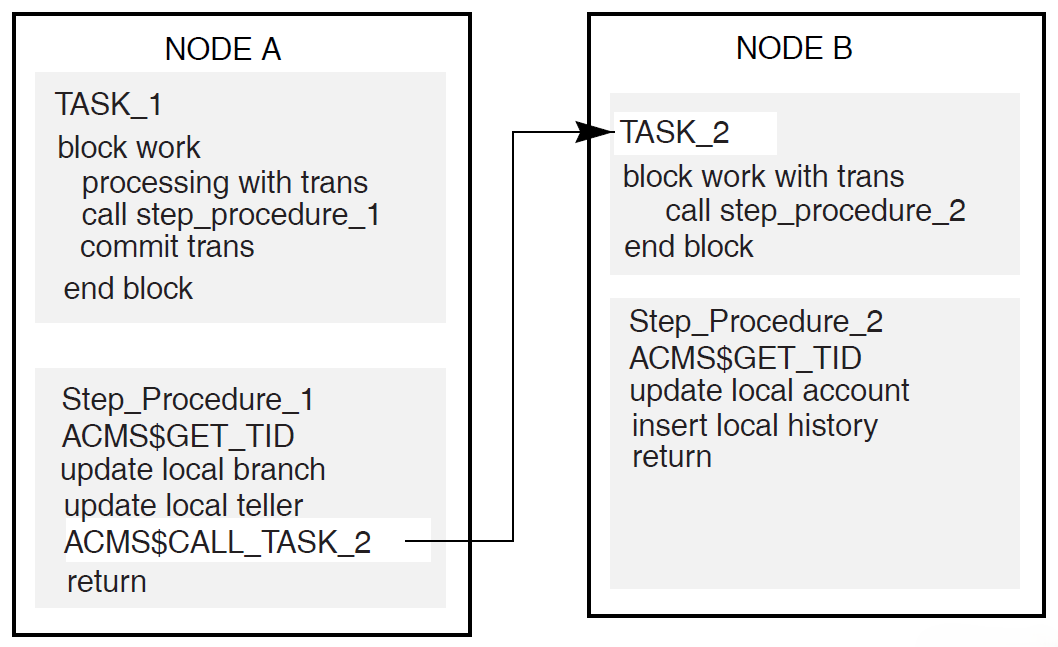
With this method, you use a step procedure as an agent program to call a task on Node B. Figure 3.1, ''Using a Step Procedure as an Agent Program'' illustrates this method.
Invoke a database server (Rdb, for example) on Node B from a step procedure on Node A.
With this method, each instance of a procedure server on Node A maps to one specific instance of a database server process on Node B and any additional systems that Node A needs to access.
Number of server processes created
Possibility of lock contention on the remote node
Network traffic
When you use the first method, ACMS remote access, a step procedure on Node A acts as an agent program by using the SI system service call ACMS$CALL to invoke a task in an application on Node B. ACMS$CALL passes the TID to the application on Node B and forces the called task on Node B to join the distributed transaction that starts in the calling task on Node A. The called task on Node B executes and performs database access by calling appropriate processing step procedures locally.
Figure 3.1, ''Using a Step Procedure as an Agent Program'' illustrates the use of a step procedure as an agent program to call a task in an application on a remote node.
REPLACE TASK BANKING_SAMPLE_TSK /DIAGNOSTIC
DEFAULT FORM IS BANKING_SAMPLE_FORM;
WORKSPACE IS BANKING_SAMPLE_WORKSPACE WITH TYPE TASK;

     BLOCK WORK WITH FORM I/O

        INPUT_REQUEST:

         EXCHANGE
      TRANSCEIVE RECORD BANKING_SAMPLE_REC, BANKING_SAMPLE_REC
        IN BANKING_SAMPLE_FORM
          SENDING BANKING_SAMPLE_WORKSPACE
          RECEIVING BANKING_SAMPLE_WORKSPACE;


        BANKING_SAMPLE_PROCESSING:

        PROCESSING WITH DISTRIBUTED TRANSACTION
          CALL BANKING_SAMPLE_TXN IN BANKING_SAMPLE_SERVER
          USING BANKING_SAMPLE_WORKSPACE;

!+
!  Check the return status in the field ACMS$L_STATUS.
!  This field contains 1 is success, -913 if deadlock.
!  If deadlock, try again.  Otherwise, cancel task.
!-


        ACTION IS
            SELECT FIRST TRUE OF
            (ACMS$L_STATUS = 1):    COMMIT TRANSACTION;
            (ACMS$L_STATUS = -913): ROLLBACK TRANSACTION;
                                    GOTO STEP BANKING_SAMPLE_PROCESSING;
            NOMATCH:                ROLLBACK TRANSACTION;
                                    CANCEL TASK;
            END SELECT;


        EXCEPTION ACTION IS
            CANCEL TASK;


        OUTPUT_REQUEST:

         EXCHANGE
          TRANSCEIVE RECORD BANKING_SAMPLE_REC, BANKING_SAMPLE_REC
            IN BANKING_SAMPLE_FORM
          SENDING BANKING_SAMPLE_WORKSPACE
          RECEIVING BANKING_SAMPLE_WORKSPACE;


!+
!  Examine the control field. If the request returns Y,
!  then leave the task; else, repeat the task.
!-


        ACTION IS
            IF (BANKING_SAMPLE_WORKSPACE.WORKSPACE_EXIT_SWITCH = "Y") THEN
                EXIT TASK;
            ELSE
                GOTO STEP BANKING_SAMPLE_PROCESSING;
            END IF;


    END BLOCK WORK;

END DEFINITION;
The agent program BANKING_SAMPLE_TXN, shown in Example 3.4, ''Step Procedure in C that Acts as an Agent Program'', performs local updates of branch and teller data. It then invokes a remote task to update an account on a remote node. The remote task, BANKING_SAMPLE_ACTUPD_TSK, joins in the distributed transaction by declaring WITH DISTRIBUTED TRANSACTION on a block step in the task definition. The remote task calls a procedure on the remote node, BANKING_SAMPLE_ACTUPD_TXN, to update the database locally on the remote node.
REPLACE TASK BANKING_SAMPLE_ACTUPD_TSK /DIAGNOSTIC
WORKSPACE IS BANKING_SAMPLE_WORKSPACE WITH TYPE TASK;
TASK ARGUMENT IS BANKING_SAMPLE_WORKSPACE WITH ACCESS MODIFY;

    BLOCK WORK WITH DISTRIBUTED TRANSACTION NO I/O


        BANKING_SAMPLE_PROCESSING:

        PROCESSING
            CALL BANKING_SAMPLE_ACTUPD_TXN IN BANKING_SAMPLE_ACTUPD_SERVER
            USING BANKING_SAMPLE_WORKSPACE;

    END BLOCK WORK;


    ACTION IS
        IF (ACMS$L_STATUS <> 1) THEN
            CANCEL TASK RETURNING ACMS$L_STATUS;
        END IF;

END DEFINITION;
3.4. Step Procedure in C that Acts as an Agent Program
| Declare tid_structure used to retrieve TID from ACMS. |
| Set up SQL context structure for local updates. |
| Set up interface to SI services. |
| Pull in workspace definitions from CDD. |
| Retrieve TID from ACMS. |
| Call initialization routine in preparation for call to remote task. |
| Call remote task passing submitter ID, task information, workspace, and TID. |
| Check return status of call to remote task; log error message if failure. |
| Check for SQL errors. NoteSteps 10 through 13 are actually substeps within step 6. |
| Specify task name and application name; note that the application is running on a remote node. |
| Sign in to ACMS. |
| Prepare and get remote procedure information. |
| Pass workspace from agent program to remote task. |
/*************************************************************************/ /* */ /* Sample Banking Application */ /* Branch/Teller Update Transaction */ /* -------------------------------- */ /* */ /* This is the server procedure called by the BANKING_SAMPLE_TSK task */ /* to perform local update of branch and teller data and invoke the */ /* remote task, BANKING_SAMPLE_ACTUPD_TASK, for update of an account */ /* on a remote node. */ /*************************************************************************/ #include ssdef #include stdio #include descrip #include string #include ACMS$SUBMITTER /* DECdtm transaction ID structure */ struct tid_structure{ long int field_1; long int field_2; short int field_3; short int field_4; long int field_5; } tid; /* SQL Transaction context structure */ struct context_structure
{ long int version; long int type; long int length; struct tid_structure in_tid; long int end; }; char txn_time[9],txn_date[7]; $DESCRIPTOR(date_time_dscrptr,"dd-mmm-yyyy hh:mm:ss.hh"); /* Data Structure for ACMS/SI */
struct ACMS$SUBMITTER_ID submitter_id; struct ACMS$PROCEDURE_ID procedure_id; struct dsc$descriptor wksp_dscrptr; struct dsc$descriptor tsk_dscrptr; struct dsc$descriptor appl_dscrptr; char appl_name[32]; struct single_item_list_structure { short int proc_bufsize; short int proc_itmcode; char *proc_bufaddr; char *proc_retlen; int item_last; } single_item_list; struct arg_list_struct { long int count; char *sel_str; char *ext_sts; char *tsk_io; char *ws_1; } arg_list; /* SQL and Database Declaration */ EXEC SQL INCLUDE SQLCA; EXEC SQL DECLARE SCHEMA FOR FILENAME BANK_SAMPLE; EXEC SQL INCLUDE FROM DICTIONARY BANKING_SAMPLE_WORKSPACE;
/*********************************************************/ /* Banking Sample Transaction. */ /*********************************************************/ banking_sample_txn(workspace_area) struct banking_workspace *workspace_area; { struct banking_workspace WSBuff; char ActBranchBuff[5],ActAccountBuff[7]; static struct context_structure context={1,1,16,{0,0,0,0,0},0}; char ErrMsgText[300]; int ErrMsgLength; int status; $DESCRIPTOR(ErrMsgBuffDsc,""); /* Copy some data values from workspace to local buffers due */ /* to the lack of pointer support in Embedded SQL for C. */ WSBuff.workspace_branch = workspace_area->workspace_branch; WSBuff.workspace_teller = workspace_area->workspace_teller; strncpy(ActBranchBuff, workspace_area->workspace_account.workspace_acc_branch, 4); strncpy(ActAccountBuff, workspace_area->workspace_account.workspace_acc_account, 6); WSBuff.workspace_delta = workspace_area->workspace_delta; /* Get TID from ACMS and store into SQL context structure */ status = ACMS$GET_TID(&tid);
if (!(status & SS$_NORMAL)) return(status); context.in_tid = tid; EXEC SQL WHENEVER SQLERROR GOTO sql_error_check; /* Initialization in preparation for ACMS RPC call. */ status = InitializeACMSRPC();
if (!(status & SS$_NORMAL)) return(status); transaction_restart: /***********************************************/ /* Modify Branch. */ /***********************************************/ /* Perform update on the MONEY field for appropriate branch in BRANCH relation. */ EXEC SQL USING CONTEXT :context UPDATE BRANCH B SET B.BR_MONEY_FIELD = B.BR_MONEY_FIELD + :WSBuff.workspace_delta WHERE B.BR_BRANCH = :WSBuff.workspace_branch; /***********************************************/ /* Modify Teller. */ /***********************************************/ /* Perform update on MONEY field for appropriate teller in the TELLER relation. */ EXEC SQL USING CONTEXT :context UPDATE TELLER T SET T.TEL_MONEY_FIELD = T.TEL_MONEY_FIELD + :WSBuff.workspace_delta WHERE (T.TEL_BRANCH = :WSBuff.workspace_branch) AND (T.TEL_TELLER = :WSBuff.workspace_teller); /**********************************************/ /* Invoke remote task to update Account and */
/* store History records via ACMS$CALL. */ /**********************************************/ wksp_dscrptr.dsc$a_pointer = workspace_area; wksp_dscrptr.dsc$w_length = sizeof(*workspace_area); status = ACMS$CALL (&submitter_id, &procedure_id, &arg_list, &tid); /* Check return status code - if failure, log error msg */
if (!(status & SS$_NORMAL)) { error_logging("ACMS$CALL error.", status, WSBuff.workspace_branch, WSBuff.workspace_teller, ActBranchBuff, ActAccountBuff, WSBuff.workspace_delta); return(status); } /* End of Transaction. */ workspace_area->workspace_delta = 0; status = SS$_NORMAL; return(status); /* Log error message if SQL error. */
sql_error_check: ErrMsgBuffDsc.dsc$a_pointer = ErrMsgText; SQL$GET_ERROR_TEXT(&ErrMsgBuffDsc,&ErrMsgLength); ErrMsgText[ErrMsgLength] = '\0'; error_logging(ErrMsgText, SQLCA.SQLCODE, WSBuff.workspace_branch, WSBuff.workspace_teller, ActBranchBuff, ActAccountBuff, WSBuff.workspace_delta); return(SQLCA.SQLCODE); } InitializeACMSRPC() { int status; /* initialize ACMS RPC data structure */ tsk_dscrptr.dsc$a_pointer = "BANKING_SAMPLE_ACTUPD_TSK";
tsk_dscrptr.dsc$w_length = 25; strcpy(&appl_name[0],"SLVSTR::BANK_SAMPLE_APP"); appl_dscrptr.dsc$a_pointer = &appl_name[0]; appl_dscrptr.dsc$w_length = strlen(&appl_name[0]); /* Sign-in to ACMS as a task submitter. */ status = ACMS$SIGN_IN(&submitter_id,0,0,0,0);
if (!(status & SS$_NORMAL)) { error_logging("ACMS sign-in error.",status,0,0," "," ",0); return(status); } /* Prepare ACMS$GET_PROCEDURE_INFO item list for remote task */
single_item_list.proc_bufsize = ACMS$S_PROCEDURE_ID; single_item_list.proc_itmcode = ACMS$K_PROC_PROCEDURE_ID; single_item_list.proc_retlen = 0; single_item_list.item_last = 0; /* Get remote procedure information */ single_item_list.proc_bufaddr = &procedure_id; status = ACMS$GET_PROCEDURE_INFO (&submitter_id, &tsk_dscrptr, &appl_dscrptr, &single_item_list); if (!(status & SS$_NORMAL)) { error_logging("ACMS GET_PROCEDURE_INFO error.",status, 0,0," "," ",0); return(status); } /* Prepare ACMS$CALL() argument list for remote task */ arg_list.count = 4; arg_list.sel_str = 0; arg_list.ext_sts = 0; arg_list.tsk_io = 0; arg_list.ws_1 = &wksp_dscrptr;
return(1); }
Chapter 4. Agent Program Initialization and Exchange I/O Services
Authorizing an agent program
Signing an agent program in to ACMS
Initializing an agent program to perform specified exchange I/O
Terminating exchange I/O
Signing an agent program out of ACMS
This chapter also provides reference material in alphabetical order for calling SI services in agent programs.
Before an agent program can call any ACMS tasks, it must identify one or more task submitters to ACMS. The SI provides a service to sign the task submitter in to ACMS.
After the ACMS Central Controller (ACC) checks the identity of the task submitter, the agent program must indicate the types of exchange I/O to be performed. The SI provides a service that allows the agent program to declare the types of exchange I/O to be performed, setting up the necessary data structures to support the I/O methods selected. If TDMS exchange I/O is declared, the SI services open a TDMS channel.
When the submitter is finished performing exchange I/O , an agent program calls an SI service to finish any I/O that has been initialized, and frees any resources used by the task submitter.
After exchange I/O is terminated and the resources are freed, the agent program can then sign out one or more task submitters. The SI provides services to sign the task submitter out of ACMS. Figure 4.1, ''Signing In a Task Submitter to ACMS'' shows how an agent program interacts with ACMS components to sign a task submitter in to ACMS.
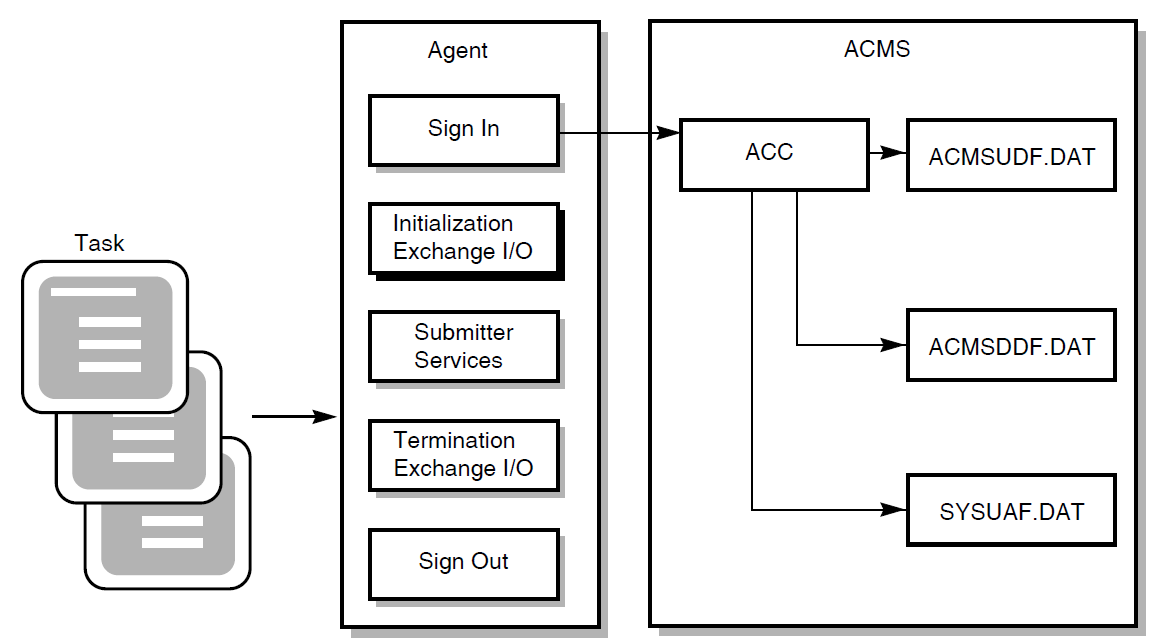
The ACC verifies the user name and device name against the ACMSUDF.DAT user definition file, the ACMSDDF.DAT device definition file, and the SYSUAF.DAT file.
|
Service Name |
Description |
|---|---|
|
ACMS$SIGN_IN |
Identifies a task submitter to ACMS and returns a SUBMITTER_ID. |
|
ACMS$SIGN_OUT |
Removes a task submitter from ACMS. |
Only users authorized with the ACMS User Definition Utility (UDU) can gain access to ACMS. Also, if the task uses a terminal or other device for I/O , the terminal or device must be authorized with the ACMS Device Definition Utility (DDU). See VSI ACMS for OpenVMS Managing Applications for more information about authorizing users and devices with UDU and DDU.
|
Service Name |
Description |
|---|---|
|
ACMS$INIT_EXCHANGE_IO |
Readies the agent program to perform various types of exchange I/O. Specifies the type of I/O to be performed and returns an exchange I/O ID. |
|
ACMS$TERM_EXCHANGE_IO |
Cleans up after the agent program is finished performing exchange I/O for tasks. Allows an agent program to finish any I/O initialized by the ACMS$INIT_EXCHANGE_IO services, freeing any resources being used by the submitter. |
The exchange I/O services and reference material for calling them in agent programs are discussed in Section 4.3, ''Specifying the Type of I/O'' and Section 4.4, ''Terminating Exchange I/O''.
4.1. Authorizing an Agent Program in ACMS
If the agent program submits tasks under its own user name, the agent program's OpenVMS user name does not need to be defined as a privileged ACMS agent program; no special qualifiers are necessary when authorizing a user with the ACMS User Definition Utility.
- If the agent program submits tasks under other user names, the system manager must define the user name under which the agent program executes as an authorized ACMS agent program. The system manager authorizes an agent program by using the
/AGENTqualifier when running the ACMS User Definition Utility to add the agent program user name. For example:UDU>ADD user-name/AGENTThe
/AGENTqualifier marks this user name as an agent program. Authorizing a user name as an agent program is like using the OpenVMS DETACH privilege because it allows the agent program to use any OpenVMS user name.
ACMS assumes that privileged agent programs verify their task submitters and any devices they use. For example, an agent program might verify a terminal user by asking for a name and password and checking them against a database maintained by the agent program.
If the agent program submits tasks that use terminal I/O, the agent program must pass the terminal's device name to ACMS when it signs in the task submitter. Unless the agent program has been authorized with the OpenVMS SHARE privilege, ACMS also checks that the agent program owns the terminal.
If the agent program submits tasks that do no I/O or that do stream I/O, the agent program can either omit the device name parameter or pass the value NL: for the device name. If the agent program omits the device name, it defaults to NL:
4.2. Signing In a Task Submitter to ACMS
An agent program uses the ACMS$SIGN_IN service to identify a task submitter's user name and device name (if I/O is to be performed on a terminal) to ACMS during sign-in. After ACMS verifies the user name and device, the agent program can submit tasks to ACMS.
The ACMS$SIGN_IN service assigns a submitter ID, which is passed to other SI services that the agent program calls for this task submitter. The sign-in service also provides an optional cancel routine that notifies the agent program if the submitter ID is forced out of the ACMS system because the system stopped or because an operator canceled the submitter.
- If the agent program signs in a user name that is different from the user name of the agent process, the ACMS$SIGN_IN service fails and returns the message:
ACMS$_NOSYSTEM, The ACMS system was not available
- If the agent program signs in under its own user name or without passing a user name, the ACMS$SIGN_IN service completes successfully and returns the message:
ACMS$_SIGNIN_NOAUTH, Sign in completed successfully without
authentication.
Although this user name is signed in to ACMS, the user cannot select tasks from any ACMS application until the ACMS system is started.
Signin_status = ACMS$SIGN_IN

if signin_status eql ACMS$_SIGNIN_NOAUTH
then
     sign_out the submitter

if signin_status eql ACMS$_SIGNIN_NOAUTH or ACMS$_NOSYSTEM
then
     [exit the agent
               or
      retry "n" times]
Note
An agent program must sign a user in to ACMS with a "username" argument to ACMS$SIGN_IN in capital letters.
ACMS$_BADUSER - The user is either not in the user definition
                file or not in SYSUAF.
4.3. Specifying the Type of I/O
The agent program calls ACMS$INIT_EXCHANGE_IO to specify the type of I/O to be performed. The service returns an exchange I/O ID. This ID keeps track of the types of I/O the submitter can perform. The exchange I/O ID is passed to the call or start call service as the third argument in the task argument list.
You must supply the exchange I/O parameter. This value is returned upon successful completion of the call.
All tasks that use DECforms in exchange steps
All tasks that perform stream I/O in exchange steps
All tasks on remote nodes that use TDMS in exchange steps
The Application Execution Controller (EXC) performs exchange I/O for local TDMS tasks only.
To perform terminal I/O from a DCL or a procedure server, call ACMS$INIT_EXCHANGE_IO. ACMS$SIGN_IN provides the device name. That device name is passed to the DCL or procedure server.
4.4. Terminating Exchange I/O
The ACMS$TERM_EXCHANGE_IO service allows an agent program to finish any I/O initialized with ACMS$INIT_EXCHANGE_IO. ACMS$TERM_EXCHANGE_IO frees any resources being used by the submitter. For example, DECforms sessions or TDMS channels are freed by ACMS$TERM_EXCHANGE_IO.
4.5. Signing Out a Task Submitter from ACMS
The agent program uses the ACMS$SIGN_OUT service to remove a task submitter from ACMS. The sign-out service identifies the task submitter by its submitter ID. The sign-out service provides an optional parameter to cancel all calls still active when the sign-out service executes. If this parameter is omitted and calls are still active, the sign-out service fails and returns a status code to the agent program indicating there are still active calls for this submitter.
The rest of this chapter contains reference material for using ACMS$INIT_EXCHANGE_IO, ACMS$SIGN_IN, ACMS$SIGN_OUT, and ACMS$TERM_EXCHANGE_IO in an agent program.
4.6. ACMS$INIT_EXCHANGE_IO
ACMS$INIT_EXCHANGE_IO
ACMS$INIT_EXCHANGE_IO — Specifies the type of I/O the agent program or device can perform. ACMS$INIT_EXCHANGE_IO is called by the agent program and returns an exchange I/O ID.
Additional Information
Note
If an agent program enables stream I/O and associates it with a submitter, the agent program must call ACMS$WAIT_FOR_STREAM_IO for all tasks (except tasks that do no terminal I/O), whether or not the task performs stream I/O.
Format
ACMS$INIT_EXCHANGE_IO(submitter_id.rq.r, exchange_io_id.wq.r, [io_enable_flags.rl.r], [item_list.rx.r], [io_capabilities_flags.wl.r])ACMS$INIT_EXCHANGE_IO_A(submitter_id.rq.r, exchange_io_id.wq.r, [io_enable_flags.rl.r], [item_list.rx.r], [io_capabilities_flags.wl.r], [comp_status.wq.r], [efn.rbu.r], [astadr.szem.r], [astprm.rz.v])
Parameters
- submitter_id
The submitter ID corresponding to a signed-in submitter (user). This ID is returned by the ACMS$SIGN_IN service. No default submitter ID is allowed.
- exchange_io_id
This ID keeps track of the type of I/O the submitter is performing. This ID is passed to the call or start call service as the third argument in the task argument list.
The exchange_io_id parameter must be supplied. This value is returned upon successful completion of the call.
- io_enable_flags
These flags indicate which type of I/O the agent program wishes to perform. If this flag is not supplied, the agent program can call a task that performs DECforms and TDMS I/O, but it cannot use the Request Interface.
To use TDMS, the default value of the io_enable_flags argument initializes the agent program. If it is certain that tasks will never use TDMS I/O, disable TDMS to conserve resources. If the ACMS$V_IO_DISABLE_TDMS flag is set on the call to ACMS$INIT_EXCHANGE_IO, TDMS is disabled for the agent process. Because TDMS is completely disabled in the agent process, if a task that uses TDMS for I/O is selected, it is canceled.
To use DECforms, the default value of the io_enable_flags argument initializes the agent program. If you are certain that you will never use DECforms, it is advisable to disable DECforms in order to conserve resources. If the ACMS$V_IO_DISABLE_DECFORMS flag is set on the call to ACMS$INIT_EXCHANGE_IO, DECforms is disabled for the agent process. Because DECforms is completely disabled in the agent process, if a task that uses DECforms for I/O is selected, it is canceled.
To use the Request Interface (RI), you must set the ACMS$V_IO_ENABLE_SYNC_RI flag on the call to ACMS$INIT_EXCHANGE_IO. In some cases, it may be desirable to disable DECforms and TDMS. For example, if the device is not supported by DECforms or TDMS, disabling DECforms and TDMS can conserve resources. Further information regarding the RI is in VSI ACMS for OpenVMS Writing Applications.
Stream I/O is implicitly enabled by passing a connect ID in the item list.
- item_list
This is the address of an item list describing the information requested. An item list is an OpenVMS data type that is used to pass information to and from a service. Item lists are made up of one or more item descriptors. The list of item descriptors must be terminated by an item code of 0. Detailed information regarding item lists is in VSI OpenVMS Programming Concepts Manual, Volume I.
Possible item codes are:ACMS$K_TDMS_CHANNEL
To obtain TDMS channel codes, set up an item list with an entry whose item code is ACMS$K_TDMS_CHANNEL. The buffer is a longword that receives the channel number.
ACMS$K_CONNECT_ID
If you wish to use stream I/O in the agent program, you need to provide an entry in the item list. The buffer is a quadword that receives the connect ID. The connect ID returned by the service is used to wait for and reply to stream I/O operations. See Chapter 6, "Stream Services" for further details regarding stream I/O .
- io_capabilities_flags
- This flag is a longword containing bits indicating which I/O methods are successfully initialized. The following bits are defined:
ACMS$V_DECFORMS_AVAILABLE
This bit is set if DECforms is successfully initialized. If DECforms is not installed on the system, or was disabled, the bit is clear.
ACMS$V_TDMS_AVAILABLE
This bit is set if TDMS is successfully initialized. If TDMS is not installed on the system, or was disabled, the bit is clear.
ACMS$V_STREAM_AVAILABLE
This bit is set if the stream services are successfully initialized.
ACMS$V_RI_AVAILABLE
This bit is set if ACMS has successfully enabled the RI.
Return Status
The following list summarizes each error returned by ACMS$INIT_EXCHANGE_IO.
|
Status |
Severity Level |
Description |
|---|---|---|
|
ACMS$_NORMAL |
Success |
Normal successful completion. |
|
ACMS$_SOME_IO_NOT_AVAILABLE |
Success |
Some of the requested I/O methods have not been initialized. |
|
ACMS$_PENDING |
Informational |
Successful operation pending asynchronous completion. The final status is in the completion status block. |
|
ACMS$_USERMODE |
Error |
The user mode was invalid. |
|
ACMS$_INVSUB |
Error |
The submitter ID was invalid. |
|
ACMS$_NTSNIN |
Error |
The submitter was not signed in. |
|
ACMS$_INVEXCHIOID |
Error |
The exchange I/O ID was invalid. |
|
ACMS$_INVDEV |
Error |
The device name was invalid. |
|
ACMS$_INVFLAGS |
Error |
Invalid flags word. |
|
ACMS$_INVENBRI |
Error |
Invalid ENABLE RI flags. |
|
ACMS$_INVITEMDESC |
Error |
Invalid item list. |
|
ACMS$_INVITEMCODE |
Error |
Invalid item code. |
|
ACMS$_INVBUFSIZ |
Error |
Invalid buffer size. |
|
ACMS$_INVBUFADR |
Error |
Invalid buffer address. |
|
ACMS$_INVRETLEN |
Error |
Invalid return length. |
|
ACMS$_INVIOCAPFLAG |
Error |
Invalid I/O capabilities flag. |
|
ACMS$_INVCMPSTS |
Error |
Invalid completion status. |
|
ACMS$_INVEFN |
Error |
Invalid event flag number. |
|
ACMS$_INVASTADR |
Error |
Invalid AST routine address. |
|
ACMS$_INV_SIGNOUT_ACTIVE |
Error |
Submitter is in process of sign-out. |
|
ACMS$_INTERNAL |
Error |
ACMS internal error. |
The parameters comp_status.wq.r, efn.rbu.r,
astadr.szem.r, and astprm.rz.v are asynchronous service arguments.
See Chapter 2, "Common Features of the Systems Interface" for a discussion of these parameters.
LIB$GET_VM
$CLREF
$DCLAST
ACMS$OPEN_RR_A
ACMS$CREATE_STREAM_A
ACMS$CONNECT_STREAM_A
TSS$OPEN
4.7. ACMS$SIGN_IN
ACMS$SIGN_IN
ACMS$SIGN_IN — Signs a task submitter in to ACMS.
Format
ACMS$SIGN_IN(submitter_id.wq.r, [username.rt.dx], [device.rt.dx], [cancel_routine.zem.r], [cancel_param.rz.v])ACMS$SIGN_IN_A(submitter_id.wq.r, [username.rt.dx], [device.rt.dx], [cancel_routine.zem.r], [cancel_param.rz.v], [comp_status.wq.r], [efn.rbu.r], [astadr.szem.r], [astprm.rz.v])
Parameters
- submitter_id
The submitter identification that is output by the ACMS$SIGN_IN service.
- username
- The OpenVMS user name of the submitter signing in. The default is the agent program's user name. The ACMS Central Controller (ACC) makes sure that the user name exists in ACMSUDF.DAT. If the user name specified is different from the agent program's user name, ACC verifies that the agent program's user name is privileged by checking the agent program definition in the ACMSUDF.DAT database file.
Note
An agent program must sign a user in to ACMS with a capitalized "username" argument to ACMS$SIGN_IN.
If a user-generated character string descriptor is used, the length field of the string must be exactly the same as the length of the character string that describes the user name.
- device
The terminal device name that you supply if the task performs I/O to the terminal. The device name can be a physical device name or a logical name. The default is NL:. ACC makes sure that the device name exists in the ACMSDDU.DAT database file.
- cancel_routine
- The routine called (at AST level) when the submitter is canceled. If this parameter is omitted, the agent program receives no notification when the submitter is canceled. Any further operations by this submitter fail. When this parameter is used, the agent program receives notification when the submitter is canceled, after which the following parameters are passed to the cancel routine:
cancel_paramThe cancel user parameter that was passed with ACMS$SIGN_IN. This is passed by value, rather than by reference.
submitter_idThe address of the two-longword identification of the submitter being canceled. This is the address of the submitter_id passed by ACMS$SIGN_IN.
reasonThe longword indicating the reason for the user cancellation. The possible reasons are:ACMS$_ACMS_GONE – the ACMS system has stopped
ACMS$_SUB_CANCELED – the submitter was canceled by an operator request
This is passed by value, rather than by reference.
- cancel_param
The value to be passed to the cancel routine.
The parameters
comp_status.wq.r,efn.rbu.r,astadr.szem.r, andastprm.rz.vare asynchronous service arguments. See Chapter 2, "Common Features of the Systems Interface" for a discussion of these parameters.
Return Status
|
Status |
Severity Level |
Description |
|---|---|---|
|
ACMS$_NORMAL |
Success |
Normal successful completion |
|
ACMS$_PENDING |
Informational |
Successful operation pending asynchronous completion. The final status is in the completion status block. |
|
ACMS$_BADAGENT |
Error |
The agent is not a valid ACMS agent program. |
|
ACMS$_BADDEVICE |
Error |
The device is not defined in the device definition file. |
|
ACMS$_BADUSER |
Error |
The user is either not in the user definition file or not in SYSUAF. |
|
ACMS$_INSUFPRM |
Error |
Not enough arguments were passed to this service. |
|
ACMS$_INTERNAL |
Error |
Internal error. |
|
ACMS$_INVASTADR |
Error |
The AST address was invalid. |
|
ACMS$_INVCANAST |
Error |
The cancel user routine was invalid. |
|
ACMS$_INVCMPSTS |
Error |
The completion status block was invalid. |
|
ACMS$_INVDEV |
Error |
The device name was invalid. |
|
ACMS$_INVEFN |
Error |
The event flag was invalid. |
|
ACMS$_INVLOGIN |
Error |
Invalid login attempt. |
|
ACMS$_INVSUB |
Error |
The submitter ID was invalid. |
|
ACMS$_INVUSER |
Error |
The user name was invalid. |
|
ACMS$_NODEVACC |
Error |
No access to specified device. |
|
ACMS$_SYNASTLVL |
Error |
Synchronous services may not be called from AST level. |
|
ACMS$_USERMODE |
Error |
This service must be called from user mode. |
Note
Special situations exist if an agent program attempts to sign a submitter in when the ACMS system is not started. See Section 4.2, ''Signing In a Task Submitter to ACMS'' for guidelines on handling these situations.
4.8. ACMS$SIGN_OUT
ACMS$SIGN_OUT
ACMS$SIGN_OUT — Removes a task submitter from the ACMS system.
Format
ACMS$SIGN_OUT(submitter_id.rq.r, [cancel_flag.rlu.r])ACMS$SIGN_OUT_A(submitter_id.rq.r, [cancel_flag.rlu.r], [comp_status.wq.r], [efn.rbu.r], [astadr.szem.r], [astprm.rz.v])
Parameters
- submitter_id
The identification of the task submitter signing out. This ID is assigned in the ACMS$SIGN_IN service.
- cancel_flag
The address of the flag that specifies whether or not to cancel active calls. If the low bit of this flag is set, active calls are canceled and the sign-out routine completes successfully. If this flag is not set or is not passed and there are calls active, the sign-out routine fails.
The parameters
comp_status.wq.r,efn.rbu.r,astadr.szem.r, andastprm.rz.vare asynchronous service arguments. See Chapter 2, "Common Features of the Systems Interface" for discussion of these parameters.
Return Status
|
Status |
Severity Level |
Description |
|---|---|---|
|
ACMS$_NORMAL |
Success |
Normal successful completion. |
|
ACMS$_PENDING |
Informational |
Successful operation pending asynchronous completion. The final status is in the completion status block. |
|
ACMS$_ACTIVE_CALL |
Error |
Calls are still active for this submitter. |
|
ACMS$_INSUFPRM |
Error |
Not enough arguments were passed to this service. |
|
ACMS$_INTERNAL |
Error |
Internal error. |
|
ACMS$_INVASTADR |
Error |
The AST address was invalid. |
|
ACMS$_INVCANFLG |
Error |
The cancel flag parameter was invalid. |
|
ACMS$_INVCMPSTS |
Error |
The completion status block was invalid. |
|
ACMS$_INVEFN |
Error |
The event flag was invalid. |
|
ACMS$_INVSUB |
Error |
The submitter ID was invalid. |
|
ACMS$_NODEVACC |
Error |
No access to specified device. |
|
ACMS$_NTSNIN |
Error |
Submitter was not signed in. |
|
ACMS$_SIGNOUT_ACTIVE |
Error |
A sign-out is active. |
|
ACMS$_SYNASTLVL |
Error |
Synchronous services may not be called from AST level. |
|
ACMS$_USERMODE |
Error |
This service must be called from user mode. |
4.9. ACMS$TERM_EXCHANGE_IO
ACMS$TERM_EXCHANGE_IO
ACMS$TERM_EXCHANGE_IO — Terminates any I/O initialized during the ACMS$INIT_EXCHANGE_IO services. ACMS$TERM_EXCHANGE_IO frees any resources being used by the submitter, for example, DECforms sessions or TDMS channels.
Format
ACMS$TERM_EXCHANGE_IO(exchange_io_id.rq.r)ACMS$TERM_EXCHANGE_IO_A(exchange_io_id.rq.r, [comp_status.wq.r], [efn.rbu.r], [astadr.szem.r], [astprm.rz.v])
Parameters
- exchange_io_id
The ID returned from an ACMS$INIT_EXCHANGE_IO call. You must supply this parameter.
The parameters
comp_status.wq.r,efn.rbu.r,astadr.szem.r, andastprm.rz.vare asynchronous service arguments. See Chapter 2, "Common Features of the Systems Interface" for a discussion of these parameters.
Return Status
|
Status |
Severity Level |
Description |
|---|---|---|
|
ACMS$_NORMAL |
Success |
Normal successful completion. (Synchronous calls only.) |
|
ACMS$_PENDING |
Informational |
Successful operation pending asynchronous completion. The final status is in the completion status block. |
|
ACMS$_USERMODE |
Error |
Invalid user mode. |
|
ACMS$_INVEXCHIOID |
Error |
Invalid exchange I/O ID. |
|
ACMS$_INVCMPSTS |
Error |
Invalid completion status. |
|
ACMS$_INVEFN |
Error |
Invalid event flag number. |
|
ACMS$_INVASTADR |
Error |
Invalid AST routine address. |
|
ACMS$_SIGNOUT_ACTIVE |
Error |
Submitter is in process of sign-out. |
|
ACMS$_INTERNAL |
Error |
Internal error. |
LIB$GET_VM
$CLREF
$DCLAST
ACMS$CLOSE_RR_A
ACMS$DELETE_STREAM_A
ACMS$DISCONNECT_STREAM_A
TSS$CLOSE
FORMS$DISABLE
Chapter 5. Submitter Services
This chapter describes how an agent program calls the submitter services to submit ACMS tasks. The chapter also provides reference material for using these services. The calls are listed in alphabetical order in the reference section of the chapter.
Find the information necessary to call a task
Start a task
Cancel a task, if necessary
Wait for a task to complete
Figure 5.1, ''Calling a Task in ACMS'' shows an agent program calling a task in ACMS. Using the submitter services to invoke the task, the agent program can work on behalf of one or more task submitters.
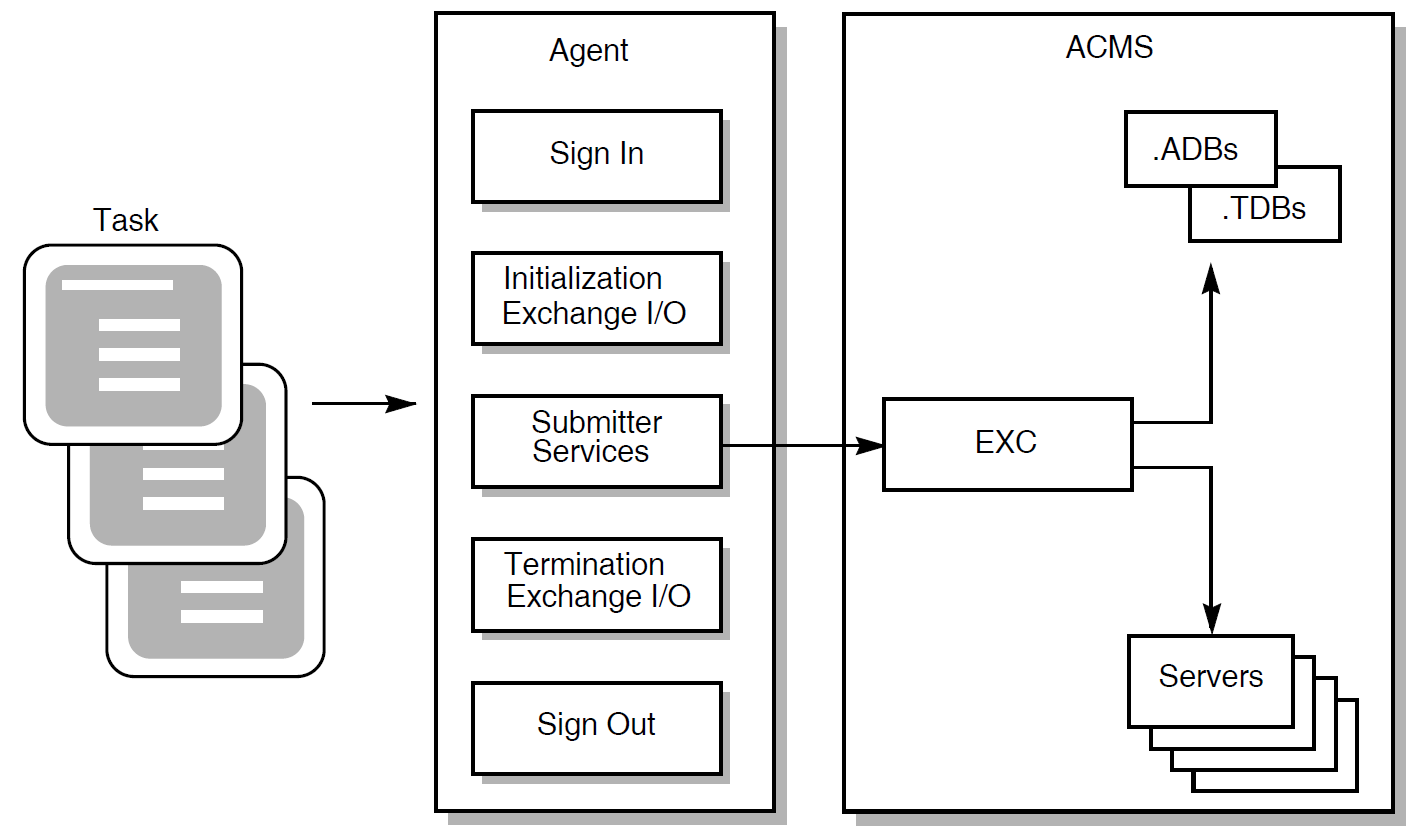
|
Service Name |
Description |
|---|---|
|
ACMS$GET_PROCEDURE_INFO |
Finds the procedure ID, the I/O method, and the number of workspaces for the task. |
|
ACMS$CALL |
Calls a task and ends when the task completes. |
|
ACMS$START_CALL |
Calls a task and returns when the task has been submitted to ACMS. Use this service with ACMS$WAIT_FOR_CALL_END. This service returns a CALL_ID, which you use with ACMS$CANCEL_CALL and ACMS$WAIT_FOR CALL_END to identify the task instance. |
|
ACMS$CANCEL_CALL |
Cancels a task before the end of the task. This service cancels tasks started with ACMS$START_CALL. |
|
ACMS$WAIT_FOR_CALL_END |
Waits for a task to complete. Use this service to wait for tasks started with ACMS$START_CALL. |
5.1. Preparing to Call a Task
An application stops and restarts, or is reprocessed
An agent program must call ACMS$GET_PROCEDURE_INFO to get the information associated with the new application.
All task submitters that have selected tasks in the application have signed out
The agent program only keeps track of applications that its submitters are currently using.
If a call to ACMS$START_CALL or ACMS$CALL returns ACMS$_NOSUCH_PKG or ACMS$_INVPROCID, then the application has been stopped or reprocessed since the call to ACMS$GET_PROCEDURE_INFO was performed. In this case, it is necessary to call ACMS$GET_PROCEDURE_INFO again to attempt to get a new, valid procedure ID. If this call fails with ACMS$_NOSUCH_PKG, then the application has been stopped.
In addition, an agent can pass a DECdtm distributed transaction ID (TID) to a task by using one of the services that accept a TID: ACMS$CALL, ACMS$CALL_A, ACMS$START_CALL, and ACMS$START_CALL_A.
An agent program can supply a selection string, extended status,and I/O information. If a task is written to accept task workspace arguments passed when the task begins, the agent program can supply the list of workspace arguments the agent program passes to the ACMS task. This information is passed in an argument list when the agent program starts the task by calling the ACMS$CALL or ACMS$START_CALL services.
Selection string
You pass data to the ACMS$SELECTION_STRING system workspace in a task using the selection string argument. The selection string argument is optional.
Extended status
You can provide an extended status argument in which ACMS can return a status message when the task completes. The extended status argument is optional. This string is filled in with the translation of the task's status when the task completes.
I/O argument
You use this parameter to pass the exchange I/O ID returned from ACMS$INIT_EXCHANGE_IO.
If a task does not perform I/O, the task I/O parameter is optional. If the task I/O parameter is supplied and the task does not perform I/O, the task I/O parameter will be ignored.
List of workspace arguments
You supply workspaces to tasks in the fourth and subsequent arguments of the argument list. The fourth argument is used to initialize the first task argument workspace defined in the task definition. The fifth argument is used to initialize the second workspace defined as a task argument, and so on. Workspace arguments are optional. If a task is written to accept workspaces, the agent program can pass them in the argument list.
Figure 5.2, ''Arguments Passed for a Task Using a Full Task Argument List'' shows an argument list for an agent program that supplies all of the arguments. This figure assumes that the agent program supplies two task workspace arguments.
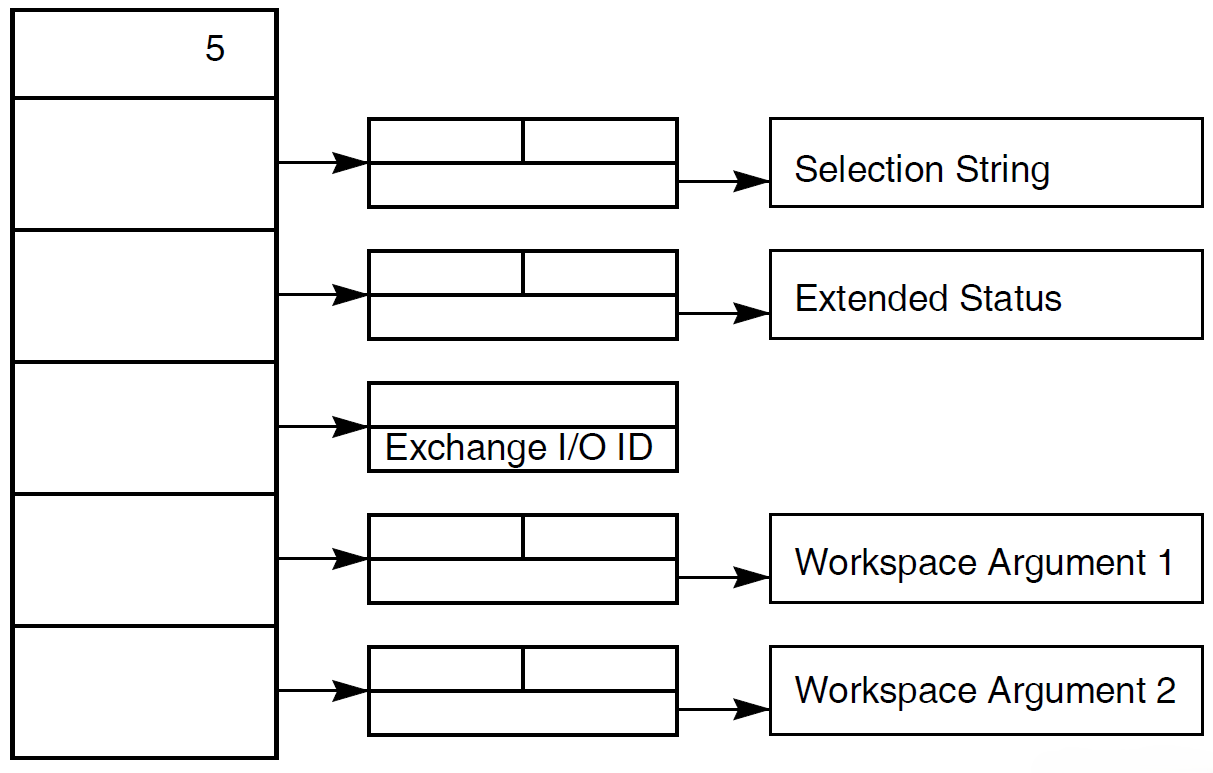
Figure 5.3, ''Arguments Passed for a Task Doing No I/O'' is an example of an argument list for a task that does not perform I/O and supplies two task argument workspaces to a task.
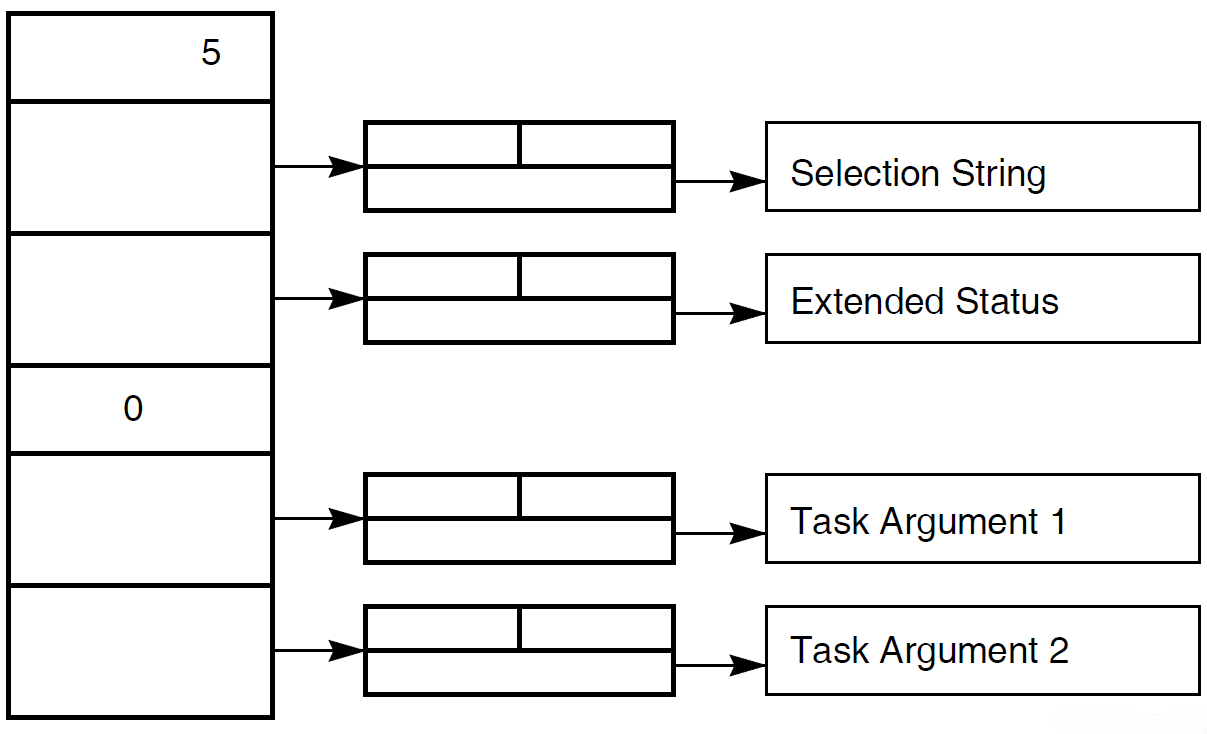
Detailed information about the ACMS$CALL, ACMS$START_CALL, ACMS$GET_PROCEDURE_INFO services, and their parameters is available in the reference sections in this chapter, which begin with Section 5.4, ''ACMS$CALL''.
5.2. Calling a Task
An agent program can call ACMS tasks using either the ACMS$CALL or the ACMS$START_CALL service. If the agent program may need to cancel the task (for example, if a terminal user types Ctrl/C), the agent program should use the ACMS$START_CALL service. Both of these services accept the passing of a transaction ID (TID). See Section 5.2.1, ''Passing a Transaction ID (TID)''.
If you do not foresee any reason for an agent program to cancel a task, then the agent program can use the ACMS$CALL service. This service calls a task and completes when the task completes; the ACMS task causes the service to end.
Do not use ACMS$WAIT if the agent uses stream I/O. If an agent program creates a stream and associates it with a submitter, the agent program must call ACMS$WAIT_FOR_STREAM_IO for all tasks, whether or not the called task performs stream I/O.
The ACMS$START_CALL service calls a task and returns a call ID. Because this service completes as soon as the task is submitted to ACMS, the agent program must use the ACMS$WAIT_FOR_CALL_END service to wait for the task to complete.
The ACMS$WAIT_FOR_CALL_END service waits for the task to complete and returns any errors in its completion status block.
An agent program must also use the ACMS$WAIT service when it calls the ACMS$CALL_A, ACMS$START_CALL_A, or ACMS$WAIT_FOR_CALL_END_A asynchronous submitter services. See Chapter 2, "Common Features of the Systems Interface" for an explanation of the ACMS$WAIT service.
If application reprocessing is necessary, precede all calls to ACMS$CALL with ACMS$GET_PROCEDURE_INFO.
5.2.1. Passing a Transaction ID (TID)
ACMS$START_CALL and ACMS$WAIT_FOR_CALL_END
ACMS$CALL
Note
The TID parameter does not exist in versions prior to ACMS Version 3.2. In versions of ACMS prior to Version 3.2, the position of the TID parameter was reserved to VSI. If you used this parameter for customer code in the past, the code behaves unpredictably with ACMS Versions 3.2 and higher.
When an agent program passes a TID to one of these services, ACMS attempts to pass the TID on to the task. A TID can be passed to a task only if the task is composable. Chapter 2, "Common Features of the Systems Interface" discusses passing a TID to a composable task in more detail.
5.2.2. Supplying Workspaces to a Task
An agent program can supply workspaces to and receive workspaces from an ACMS task. An agent program can supply workspaces to a task when it calls the task using either the ACMS$CALL or ACMS$START_CALL service. The task can use the data in the workspace supplied by the agent program. When the task completes with a successful status, ACMS returns the contents of all MODIFY and WRITE access workspaces to the agent program.
If a task fails, the contents of all WRITE access workspaces are considered to be undefined.
The agent program supplies workspaces as arguments in an argument list in the ACMS$CALL or ACMS$START_CALL services. The agent program defines one argument for each workspace it intends to pass to the ACMS task. The agent program must supply the arguments to the task in the same order that they are listed in the TASK ARGUMENTS clause in the ACMS task definition.
5.2.3. Supplying the Correct Number of Task Argument Workspaces
The ACMS task definition defines the number of task argument workspaces the task expects to receive and the order in which the agent program must supply them to the task. Although the ACMS task definition specifies the workspace names and the order of the task workspace arguments that the agent program can supply, the agent program has the option of omitting one or more of the workspaces defined as TASK ARGUMENTS in the ACMS task definition.
If the agent program does not supply all the workspaces, ACMS initializes each missing workspace with the default value defined for it in the task group database (.TDB). Default values are defined with the CDD INITIAL CONTENTS clause and included in the .TDB when you build the task group database. If there is no default value defined, ACMS fills the workspace with zeros.
%ACMS-F-ERRREADARG, Error during task initialization: cannot read an
argument in argument list
%ACMSPKG-E-ARGNUMMATCH, Argument number mismatch between received data
and expected data
To avoid receiving these errors, the agent program can use the ACMS$GET_PROCEDURE_INFO service to determine the number of task argument workspaces defined for a task. See the discussion of the ACMS$GET_PROCEDURE_INFO service in Section 5.1, ''Preparing to Call a Task'' and in the reference section for more information.
The agent program can also receive the %ACMSPKG-E-ARGNUMMATCH error if you increase the number of task argument workspaces defined in the task definition and rebuild the task group, but you do not rebuild the application definition. ACMS stores the number of task argument workspaces in the application database (.ADB) as well as the task group database (.TDB).
If you increase the number of task argument workspaces from three to four and rebuild the task group, then the .TDB file describes the correct number of task workspace arguments. However, unless you also rebuild the application to produce a new .ADB file, the old version still describes the task as having only three task workspace arguments. ACMS uses the .ADB file when formatting the message that it sends from the agent program to the application to start the task.
5.2.4. Accessing Task Workspaces
Modify access
Modify is the default access method for the TASK ARGUMENTS clause. You define a task workspace with modify access if the ACMS task needs to update one or more fields in that workspace. A workspace argument defined with modify access is initialized with data supplied by the agent program.
If the workspace data is not supplied by the agent program, the workspace is initialized with data supplied on the task call (default values are defined with the CDD INITIAL CONTENTS clause and included in the .TDB when you build the task group database). If there is no default value defined, ACMS fills the workspace with zeros. The task can modify the contents of this workspace during execution, and ACMS returns the modifications to the agent program when the task completes.
Read access
You define a task workspace with read access if the ACMS task does not need to return any data in the fields of the workspace back to the agent program. A workspace argument defined for read access is initialized with the data supplied by the agent program.
If the workspace data is not supplied by the agent program, the workspace is initialized with data supplied on the task call (default values are defined with the CDD INITIAL CONTENTS clause and included in the .TDB when you build the task group database). If data is not supplied on the task call, the workspace is initialized with zeros. The task can modify the contents of the workspace during execution, but the modifications are lost when the task ends.
Write access
You define a task workspace with write access if the task needs to return data in one or more fields of the workspace back to the agent program. A workspace argument defined with write access is initialized with the default contents defined in the .TDB. Default values are defined with the CDD INITIAL CONTENTS clause and included in the .TDB when you build the task group database.
If there is no default value defined, ACMS fills the workspace with zeros. The task can modify the contents of this workspace, and ACMS returns the modifications to the agent program when the task completes executing.
You can optimize the performance of ACMS and the agent program by specifying the read and write access instead of modify access whenever possible. Specifying read access for the task workspace can provide performance gains if ACMS does not need to return updated data to the agent program when the task completes. Specifying write access for the task workspace provides performance gains if the agent program does not need to send data from the agent program to the task in the application.
The modify access type is the default for the TASK ARGUMENTS clause. Although modify access is less efficient in terms of performance when passing large records, it may be the best option if you are passing small workspaces and are interested in ease of use. Defining the task workspace with modify access allows data to be passed back and forth in a single workspace. In general, using modify access is more efficient for small database records; as record size increases, performance decreases.
The ACMS$CALL and ACMS$START_CALL services pass workspaces by descriptor. The application execution controller checks the length of the workspace when starting the task.
See VSI ACMS for OpenVMS Writing Applications and VSI ACMS for OpenVMS ADU Reference Manual for more information on defining tasks that can accept workspace arguments from an agent program. See the syntax for the ACMS$CALL and ACMS$START_CALL services later in this chapter for information on providing argument lists to tasks in an ACMS application.
5.3. Canceling a Task
An agent program can use the ACMS$CANCEL_CALL service to cancel tasks. The ACMS$CANCEL_CALL service can be used only to cancel tasks that are started with the ACMS$START_CALL service. ACMS$START_CALL returns a call ID that can be used with the ACMS$CANCEL_CALL service to stop a task prematurely.
For example, use ACMS$CANCEL_CALL to cancel tasks when a terminal user presses Ctrl/Y. ACMS expects a task to be canceled when the terminal user presses Ctrl/Y (or Ctrl/C, if the server is not running a task that enables a Ctrl/C handler). If an agent program does not use ACMS$CANCEL_CALL to cancel any active tasks when a user presses Ctrl/Y, then Ctrl/Y cancels are ignored and the tasks will run to completion.
You can use the ACMS$CANCEL_CALL service to send multiple cancel requests to a single task instance. For example, consider the case where an agent program starts a menu task for a user. During the day, the user selects tasks from the menu task to perform the user's business transactions. Because the user might need to press Ctrl/C to cancel more than one task called by the menu task, ACMS allows the agent program to call the ACMS$CANCEL_CALL service many times. See VSI ACMS for OpenVMS Writing Applications for more information on how ACMS processes task cancellation requests for tasks called by other tasks.
5.4. ACMS$CALL
ACMS$CALL
ACMS$CALL — Submits an ACMS task. This service completes when the task ends. If you use the asynchronous ACMS$CALL_A service, it is also necessary to call the ACMS$WAIT service. See Chapter 2, "Common Features of the Systems Interface" for an explanation of the ACMS$WAIT service. If application reprocessing is required, the agent program must use the ACMS$GET_PROCEDURE_INFO service before calling ACMS$CALL.
Format
ACMS$CALL([submitter_id.rq.r], procedure_id.rq.r, [arguments.rz.r], [tid.ro.r])ACMS$CALL_A([submitter_id.rq.r], procedure_id.rq.r, [arguments.rz.r], [tid.ro.r], [comp_status.wq.r], [efn.rbu.r], [astadr.szem.r], [astprm.rz.v])
Parameters
- submitter_id
The submitter ID corresponding to a signed-in submitter. The submitter ID is returned on the ACMS$SIGN_IN service.
This parameter is optional for agent programs that do not use ACMS$SIGN_IN. Use of the default submitter feature, however, is not recommended for new development. See Section 2.1.6, ''Single-Threaded and Multithreaded Agent Programs'' and Section 2.1.7, ''Default Submitter Feature'' for a discussion of this point.
- procedure_id
The procedure ID of the task to call. You obtain this procedure ID by calling the ACMS$GET_PROCEDURE_INFO service.
- arguments
The list of arguments to pass, if any. See Section 5.1, ''Preparing to Call a Task'' for more information about using the argument list.
This is a standard OpenVMS argument list that contains:selection_string.rt.dxAn agent program passes data to the ACMS$SELECTION_STRING system workspace in a task using the selection string argument. Initialize the selection string argument in the argument list with the address of an OpenVMS string descriptor that references the selection string data.
The selection string argument is optional. If the agent program does not pass any information to the ACMS$SELECTION_STRING workspace, the agent program must set this argument to zero. When an agent program does not supply a selection string argument, ACMS initializes the ACMS$SELECTION_STRING workspaces with spaces.
extended_status.wt.dxWhen ACMS ends a task, it returns the message text associated with the task's final completion status back to the agent program. To access the message text after a task has completed, initialize the extended status argument with the address of an OpenVMS string descriptor into which ACMS can store the data.
The extended status argument is optional. If the agent program does not need to access the task's completion status message text, set this argument to zero. If you do not supply the address of a string descriptor in this argument, ACMS does not return the message text from the application to the agent program.Note
The extended status string cannot be filled if the application execution controller (EXC) cannot start a task (for example, if the EXC terminates abnormally, if a DECnet link terminates, or if EXC runs out of virtual memory). The extended status string also cannot be filled if the submitter services detect an error – for example, if the submitter services receive an invalid procedure argument list, there is an internal error, or a task ends because the EXC terminated abnormally before completing the task.
I/O argument
There are several ways to pass I/O information to a task. The preferred method is to pass the exchange I/O ID as the I/O argument. ACMS supports the use of the other methods for compatibility with previously-developed agent programs.
The methods of passing I/O information to the task are:exchange_io_id.rq.rThe I/O argument can be an exchange I/O ID returned from the ACMS$INIT_EXCHANGE_IO service.
terminal_name.rt.dxThe I/O argument can also be a terminal specifcation for tasks that perform request I/O or terminal I/O.
stream_id.rq.rFor stream I/O tasks, you can initialize this argument with the address of the stream ID.
For tasks that do not perform I/O, you can set this argument to zero. If the agent program does not pass any workspaces to the task, it can omit this argument.
workspacesYou supplyworkspacesto tasks in the fourth and successive arguments of the task's argument list. The workspace supplied in the fourth argument is used to initialize the first task argument workspace defined in the TASK ARGUMENTS clause in the task definition. The fifth argument is used to initialize the second workspace defined as a task argument in the TASK ARGUMENTS clause, and so on. Workspaces are passed to the task by descriptor. Therefore, initialize each workspace argument with the address of an OpenVMS string descriptor that references the workspace data. The read, write, or modify access to each workspace is determined by the TASK ARGUMENTS clause in the task:workspace_n.rt.dxworkspace_n.wt.dxworkspace_n.mt.dx
Workspace arguments are optional. If you do not want to supply one or more workspaces to a task, initialize the corresponding arguments in the task's argument list to zero. If you do not supply data to a workspace defined in a task as a TASK ARGUMENT, ACMS initializes that workspace with the default contents from the .TDB or with zeros.
See Section 5.1, ''Preparing to Call a Task'' and Section 5.2, ''Calling a Task'' for detailed information on how to pass a workspace to a task. See the VR_AGENT.C program and the VR_FAST_CHECKIN_TASK.TDF task definition in the ACMS$EXAMPLES directory for an example of an agent program calling a task.
- tid
The transaction ID (TID) that the $START_TRANS service returns.
The parameters
comp_status.wq.r,efn.rbu.r,astadr.szem.r, andastprm.rz.vare asynchronous service arguments. See Chapter 2, "Common Features of the Systems Interface" for a discussion of these parameters.
Note
If an agent program attempts to supply more workspace arguments to a task than there are TASK ARGUMENT workspaces defined for that task, then the ACMS$CALL and ACMS$START_CALL services complete and return the "%ACMS-F-ERRREADARG, Error during task initialization: cannot read an argument in argument list" error. The agent program can use the ACMS$GET_PROCEDURE_INFO service to determine the correct number of TASK ARGUMENT workspaces defined for the task.
Return Status
|
Status |
Severity Level |
Description |
|---|---|---|
|
ACMS$_NORMAL |
Success |
Normal successful completion. |
|
ACMS$_PENDING |
Informational |
Successful operation pending asynchronous completion. The final status is in the completion status block. |
|
ACMS$_CALL_CANCELLED |
Error |
Task was cancelled by task submitter. |
|
ACMS$_ERRREADARG |
Error |
Error during task initialization; cannot read an argument in the argument list. |
|
ACMS$_EXCPTN_STEPACTN |
Error |
Exception results from a step action in the task definition. |
|
ACMS$_NEED_DEVICE |
Error |
Task requires a device; none provided. |
|
ACMS$_NEED_DEVORRR |
Error |
Task requires a device name or RR server. |
|
ACMS$_NEED_IOID |
Error |
Task is defined with I/O. |
|
ACMS$_INSUFPRM |
Error |
Not enough arguments were passed to this service. |
|
ACMS$_INTERNAL |
Error |
Internal error. |
|
ACMS$_INVARGLST |
Error |
The argument list is invalid. |
|
ACMS$_INVASTADR |
Error |
The AST address was invalid. |
|
ACMS$_INVCMPSTS |
Error |
The completion status block was invalid. |
|
ACMS$_INVEFN |
Error |
The event flag was invalid. |
|
ACMS$_INVPROCID |
Error |
The procedure ID was invalid. |
|
ACMS$_INVSUB |
Error |
The submitter ID was invalid. |
|
ACMS$_INVTID |
Error |
Returned if ACMS does not have access to the Transaction ID (TID). The symbol is not defined as a universal symbol and will result in a link error if declared and accessed as a global symbol. This symbol has not been defined since ACMS Version 3.3b. |
|
ACMS$_NOSUCH_PROC |
Error |
There is no such procedure in the package. |
|
ACMS$_NOSUCH_PKG |
Error |
There is no such application defined. |
|
ACMS$_NOTAVAIL |
Error |
The feature is not yet available. |
|
ACMS$_NOTRANSADB |
Error |
No transaction support in the application database file (.ADB). |
|
ACMS$_NOTRANSNODE |
Error |
ACMS does not support transactions on the application node. |
|
ACMS$_NTSNIN |
Error |
Submitter was not signed in. |
|
ACMS$_OPR_CANCELLED |
Error |
Task canceled by system operator. |
|
ACMS$_SRVDEAD |
Error |
The server or EXC stopped unexpectedly. |
|
ACMS$_SRVNOTFOUND |
Error |
The server was not found. |
|
ACMS$_SIGNOUT_ACTIVE |
Error |
A sign-out is active. |
|
ACMS$_SYNASTLVL |
Error |
Synchronous services may not be called from AST level. |
|
ACMS$_TASKNOTCOMP |
Error |
Task is not composable. |
|
ACMS$_TRANSTIMEDOUT |
Error |
Transaction did not complete within specified time limit. |
|
ACMS$_USERMODE |
Error |
This service must be called from user mode. |
5.5. ACMS$CANCEL_CALL
ACMS$CANCEL_CALL
ACMS$CANCEL_CALL — Cancels a task that was started by the task submitting agent program. This service only cancels tasks that were started with ACMS$START_CALL. The agent program must also use the ACMS$WAIT_FOR_CALL_END service with this service to get notification of the call canceling.
Additional Information
Note
The effect of this call might not be immediate or successful, due to the asynchronous nature of ACMS.
Format
ACMS$CANCEL_CALL([submitter_id.rq.r], call_id.rq.r, [reason_code.rlu.r])ACMS$CANCEL_CALL_A([submitter_id.rq.r], call_id.rq.r, [reason_code.rlu.r], [comp_status.wq.r], [efn.rbu.r], [astadr.szem.r], [astprm.rz.v])
Parameters
- submitter_id
The identification of the task submitter calling the task. The ACMS$SIGN_IN service returns this ID. This parameter is optional for agent programs that do not use ACMS$SIGN_IN. Use of the default submitter feature, however, is not recommended for new development. See Section 2.1.6, ''Single-Threaded and Multithreaded Agent Programs'' and Section 2.1.7, ''Default Submitter Feature'' for discussions of this point.
- call_id
The identification returned by ACMS$START_CALL. The call must be started by the same submitter as the one using the ACMS$CANCEL_CALL service.
- reason_code
- The reason code contains the reason for the cancel request. The parameter is passed to the application execution controller. The default is the following:
ACMS$_CALL_CANCELLED: the task was canceled by the task
submitter.
The reason code is the extended status of the call and the completion status returned on the ACMS$WAIT_FOR_CALL_END service.
The parameters
comp_status.wq.r,efn.rbu.r,astadr.szem.r, andastprm.rz.vare asynchronous service arguments. See Chapter 2, "Common Features of the Systems Interface" for a discussion of these parameters.
Return Status
|
Status |
Severity Level |
Description |
|---|---|---|
|
ACMS$_NORMAL |
Success |
Normal successful completion. |
|
ACMS$_PENDING |
Informational |
Successful operation pending asynchronous completion. The final status is in the completion status block. |
|
ACMS$_INSUFPRM |
Error |
Not enough arguments were passed to this service. |
|
ACMS$_INTERNAL |
Error |
Internal error. |
|
ACMS$_INVASTADR |
Error |
The AST address was invalid. |
|
ACMS$_INVCALLID |
Error |
The call ID was invalid. |
|
ACMS$_INVCMPSTS |
Error |
The completion status block was invalid. |
|
ACMS$_INVEFN |
Error |
The event flag was invalid. |
|
ACMS$_INVREACOD |
Error |
The reason code parameter was invalid. |
|
ACMS$_INVSUB |
Error |
The submitter ID was invalid. |
|
ACMS$_NTSNIN |
Error |
Submitter was not signed in. |
|
ACMS$_OBSCALLID |
Error |
The call ID is obsolete. |
|
ACMS$_SIGNOUT_ACTIVE |
Error |
A sign-out is active. |
|
ACMS$_SYNASTLVL |
Error |
Synchronous services may not be called from AST level. |
|
ACMS$_USERMODE |
Error |
This service must be called from user mode. |
5.6. ACMS$GET_PROCEDURE_INFO
ACMS$GET_PROCEDURE_INFO
ACMS$GET_PROCEDURE_INFO — Finds and returns the procedure ID for the task, the number of workspace arguments the agent program can pass to a task in an ACMS application, and the I/O method (forms, terminal, request, stream, or none). If application reprocessing is necessary, use ACMS$GET_PROCEDURE_INFO before using ACMS$CALL, ACMS$CALL_A, ACMS$START_CALL, or ACMS$START_CALL_A.
Format
ACMS$GET_PROCEDURE_INFO([submitter_id.rq.r], procedure.rt.dx, package.rt.dx, item_list.rx.r)ACMS$GET_PROCEDURE_INFO_A([submitter_id.rq.r], procedure.rt.dx, package.rt.dx, item_list.rx.r, [comp_status.wq.r], [efn.rbu.r], [astadr.szem.r], [astprm.rz.v])
Parameters
- submitter_id
The identification of the task submitter that the ACMS$SIGN_IN service returns.
This parameter is optional for agent programs that do not use ACMS$SIGN_IN. Use of the default submitter feature, however, is not recommended for new development. See Section 2.1.6, ''Single-Threaded and Multithreaded Agent Programs'' and Section 2.1.7, ''Default Submitter Feature'' for discussions of this point.
- procedure
The name of the task for which you want to find information. The name passed must be in capital letters, but can include trailing blanks.
- package
The name of the application from which you want to select the task. The name passed must be in capital letters, but can include trailing blanks. However, if the package parameter is a logical name, then the equivalence name or names cannot contain trailing blanks.
- item_list
The list of one or more item descriptors that describe the task I/O method, WAIT/DELAY information, or procedure ID. An item descriptor has the following format:
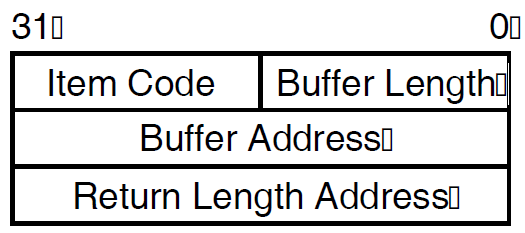
Buffer length
The length of the buffer pointed to by the buffer address.
Item code
The symbolic name defining the requested information.
Buffer address
The address of a buffer to receive the requested information.
Return length address
The address of the word to receive the length of the information returned. If you specify this address as zero, no length is returned.
ACMS$K_PROC_PROCEDURE_ID
The quadword procedure ID associated with the input task name and application name. The buffer to receive the information returned by ACMS$K_PROCEDURE_ID is equal in length to ACMS$S_PROCEDURE_ID, eight bytes. The agent program uses the procedure ID to identify a task when the agent program calls the task using the ACMS$CALL or ACMS$START_CALL service. The procedure ID becomes invalid when either the application stops or all the task submitters who selected tasks in the application sign out.
If the ACMS$CALL or ACMS$START_CALL services use a procedure ID that has changed, they receive the ACMS$_NOSUCH_PKG error message. When an agent program receives this error, it can call the ACMS$GET_PROCEDURE_INFO service to get the new procedure ID for the task.
ACMS$K_PROC_IO_METHOD
The I/O method used by the task. ACMS$K_PROC_IO_METHOD returns a longword. This value can be one of the following symbols:ACMS$K_IO_TERMINAL
The task uses the terminal directly. The task cannot be selected remotely.
ACMS$K_IO_DECFORMS
The task performs DECforms request I/O in exchange steps. The task can be selected remotely.
ACMS$K_IO_REQUEST
The task either performs TDMS request I/O in exchange steps or uses the RI. The task can be selected remotely.
ACMS$K_IO_STREAM
The task uses ACMS stream I/O. The agent program may have to do I/O work for this task. The task can be selected remotely.
ACMS$K_IO_NONE
The task does not do any I/O. The agent program does not do I/O work for this task. The task can be selected remotely.
ACMS$K_PROC_WAIT_DELAY_ACTION
The wait/delay action defined for this task. ACMS$K_PROC_WAIT_DELAY_ACTION returns a longword. The value can be one of the following symbols:ACMS$K_WAIT
The WAIT clause controls whether or not ACMS displays a message prompting users to press Return. Pressing Return clears the terminal screen and displays the previous ACMS menu.
ACMS$K_DELAY
The DELAY clause controls whether or not ACMS pauses after a task finishes running before clearing the screen and displaying the ACMS menu.
ACMS$K_NO_ACTION
ACMS$K_PROC_WORKSPACE_COUNT
The number of workspaces the agent program passes when it calls a task in an ACMS application. ACMS$K_PROC_WORKSPACE_COUNT returns a longword.
You must end the list with an item descriptor that has an item code of zero.
The parameters comp_status.wq.r, efn.rbu.r,
astadr.szem.r, and astprm.rz.v are asynchronous service arguments.
See Chapter 2, "Common Features of the Systems Interface" for a discussion of these parameters.
Return Status
|
Status |
Severity Level |
Description |
|---|---|---|
|
ACMS$_NORMAL |
Success |
Normal successful completion. |
|
ACMS$_PENDING |
Informational |
Successful operation pending asynchronous completion. The final status is in the completion status block. |
|
ACMS$_INSUFPRM |
Error |
Not enough arguments were passed to this service. |
|
ACMS$_INTERNAL |
Error |
Internal error. |
|
ACMS$_INVASTADR |
Error |
The AST address was invalid. |
|
ACMS$_INVBUFADR |
Error |
The buffer address in an item descriptor was invalid. |
|
ACMS$_INVCMPSTS |
Error |
The completion status block was invalid. |
|
ACMS$_INVEFN |
Error |
The event flag was invalid. |
|
ACMS$_INVITEMCODE |
Error |
The item code in an item descriptor was invalid. |
|
ACMS$_INVITEMDESC |
Error |
An item descriptor in the item list was invalid. |
|
ACMS$_INVITEMLIST |
Error |
The item list was invalid. |
|
ACMS$_INVPACKAGE |
Error |
The application name was invalid. |
|
ACMS$_INVPROCEDURE |
Error |
The procedure name was invalid. |
|
ACMS$_INVRETLEN |
Error |
The return length in an item descriptor was invalid. |
|
ACMS$_INVSUB |
Error |
The submitter ID was invalid. |
|
ACMS$_NOSUCH_PKG |
Error |
There is no such application defined. |
|
ACMS$_NOSUCH_PROC |
Error |
There is no such procedure defined. |
|
ACMS$_NTSNIN |
Error |
Submitter was not signed in. |
|
ACMS$_SIGNOUT_ACTIVE |
Error |
A sign-out is active. |
|
ACMS$_SYNASTLVL |
Error |
Synchronous services may not be called from AST level. |
|
ACMS$_USERMODE |
Error |
This service must be called from user mode. |
5.7. ACMS$START_CALL
ACMS$START_CALL
ACMS$START_CALL — Submits an ACMS task. This service completes when the task has been submitted. It returns a call ID to the agent program.
Additional Information
Before using ACMS$START_CALL or ACMS$START_CALL_A, the agent program must use the ACMS$GET_PROCEDURE_INFO service to get the task procedure ID and the task I/O method. Because ACMS$START_CALL only starts the task, you must use it with the ACMS$WAIT_FOR_CALL_END service, which waits for the task to end.
If the task being called performs stream I/O, the agent program must create a stream using the ACMS$INIT_EXCHANGE_IO service before calling the task. This service creates the stream, connects to it, and returns a connect ID to the agent program. See Chapter 6, "Stream Services" for details regarding stream creation.
An agent program must also call the ACMS$WAIT service when it uses the asynchronous service ACMS$START_CALL_A. See Chapter 2, "Common Features of the Systems Interface" for a complete explanation of the ACMS$WAIT service
Format
ACMS$START_CALL([submitter_id.rq.r], procedure_id.rq.r, call_id.wq.r, [arguments.rz.r], [tid.ro.r])ACMS$START_CALL_A([submitter_id.rq.r], procedure_id.rq.r, call_id.wq.r, [arguments.rz.r], [tid.ro.r ], [comp_status.wq.r ], [efn.rbu.r ], [astadr.szem.r ], [astprm.rz.v ] )
Parameters
- submitter_id
The identification of the task submitter calling the task. The ACMS$SIGN_IN service returns this ID.
This parameter is optional for agent programs that do not use ACMS$SIGN_IN. Use of the default submitter feature, however, is not recommended for new development. See Section 2.1.6, ''Single-Threaded and Multithreaded Agent Programs'' and Section 2.1.7, ''Default Submitter Feature'' for discussions of this point.
- procedure_id
The identification of the procedure to call. The agent program obtains the procedure ID by calling the ACMS$GET_PROCEDURE_INFO service.
- call_id
The identification that is produced by this service. The ACMS$WAIT_FOR_CALL_END and the ACMS$CANCEL_CALL services use this ID later.
- arguments
The list of arguments to pass. See Section 5.1, ''Preparing to Call a Task'' for more information about using the argument list.
This is a standard OpenVMS argument list that contains:selection_string.rt.dxAn agent program passes data to the ACMS$SELECTION_STRING system workspace in a task using the selection string argument. Initialize the selection string argument in the argument list with the address of an OpenVMS string descriptor that references the selection string data.
The selection string argument is optional. If the agent program does not pass any information to the ACMS$SELECTION_STRING workspace, the agent program must set this argument to zero. When an agent program does not supply a selection string argument, ACMS initializes the ACMS$SELECTION_STRING workspaces with spaces.
extended_status.wt.dxWhen ACMS ends a task, it returns the message text associated with the task's final completion status back to the agent program. To access the message text after a task has completed, initialize the extended status argument with the address of an OpenVMS string descriptor into which ACMS can store the data.
The extended status argument is optional. If the agent program does not need to access the task's completion status message text, set this argument to zero. If you do not supply the address of a string descriptor in this argument, ACMS does not return the message text from the application to the agent program.Note
The extended status string cannot be filled if the application execution controller (EXC) cannot start a task – for example, if the EXC terminates abnormally, if the DECnet link terminates, or if EXC runs out of virtual memory. The extended status string also cannot be filled if the submitter services detect an error – for example, if the submitter services receive an invalid procedure argument list, there is an internal error, or a task ends because the EXC terminated abnormally before completing the task.
I/O argument
There are several ways to pass I/O information to a task. The preferred method is to pass the exchange I/O ID as the I/O argument. ACMS supports the use of the other methods for compatibility with previously-developed agent programs.The methods of passing I/O information to the task are:
exchange_io_id.rq.rThe I/O argument can be an exchange I/O ID returned from the ACMS$INIT_EXCHANGE_IO service.
terminal_name.rt.dxThe I/O argument can also be a terminal specification for tasks that perform request I/O or terminal I/O.
stream_id.rq.rFor stream I/O tasks, you can initialize this argument with the address of the stream ID.
For tasks that do not perform I/O, you can set this argument to zero. If the agent program does not pass any workspaces to the task, it can omit this argument.
workspacesYou supply workspaces to tasks in the fourth and successive arguments of the task's argument list. The workspace supplied in the fourth argument initializes the first task argument workspace defined in the TASK ARGUMENTS clause of the task definition. The fifth argument initializes the second workspace defined as a task argument in the TASK ARGUMENTS clause, and so on. Workspaces are passed to the task by descriptor. Therefore, initialize each workspace argument with the address of an OpenVMS string descriptor that references the workspace data. The read, write, or modify access to each workspace is determined by the TASK ARGUMENTS clause in the task:
workspace_n.rt.dxworkspace_n.wt.dxworkspace_n.mt.dxWorkspace arguments are optional. If you do not want to supply one or more workspaces to a task, initialize the corresponding arguments in the task's argument list to zero. If you do not supply data to a workspace defined in a task as a task argument, ACMS initializes that workspace with the default contents from the .TDB or with zeros.
See Section 5.1, ''Preparing to Call a Task'' and Section 5.2, ''Calling a Task'' for detailed information on how to pass a workspace to a task. See the VR_AGENT.C program and the VR_FAST_CHECKIN_TASK.TDF task definition in the ACMS$EXAMPLES directory for an example of an agent program calling a task.
- tid
The transaction ID (TID) that the $START_TRANS service returns.
The parameters
comp_status.wq.r,efn.rbu.r,astadr.szem.r, andastprm.rz.vare asynchronous service arguments. See Chapter 2, "Common Features of the Systems Interface" for a discussion of these parameters.
Note
If an agent program attempts to supply more workspace arguments to a task than there are TASK ARGUMENT workspaces defined for that task, then the ACMS$CALL and ACMS$START_CALL services complete and return the "%ACMS-F-ERRREADARG, Error during task initialization: cannot read an argument in argument list" error. The agent program can use the ACMS$GET_PROCEDURE_INFO service to determine the correct number of TASK ARGUMENT workspaces defined for the task.
Return Status
|
Status |
Severity Level |
Description |
|---|---|---|
|
ACMS$_NORMAL |
Success |
Normal successful completion. |
|
ACMS$_PENDING |
Informational |
Successful operation pending asynchronous completion. The final status is in the completion status block. |
|
ACMS$_ERRREADARG |
Error |
Error during task initialization; cannot read an argument in the argument list. |
|
ACMS$_INSUFPRM |
Error |
Not enough arguments were passed to this service. |
|
ACMS$_INTERNAL |
Error |
Internal error. |
|
ACMS$_INVARGLST |
Error |
The argument list is invalid. |
|
ACMS$_INVASTADR |
Error |
The AST address was invalid. |
|
ACMS$_INVCALLID |
Error |
The call ID was invalid. |
|
ACMS$_INVCANAST |
Error |
The cancel user routine was invalid. |
|
ACMS$_INVCMPSTS |
Error |
The completion status block was invalid. |
|
ACMS$_INVEFN |
Error |
The event flag was invalid. |
|
ACMS$_INVEXTCANSTS |
Error |
The extended cancel status was invalid. |
|
ACMS$_INVPROCID |
Error |
The procedure ID was invalid. |
|
ACMS$_INVSELSTR |
Error |
The selection string was invalid. |
|
ACMS$_INVSUB |
Error |
The submitter ID was invalid. |
|
ACMS$_INVTID |
Error |
Returned if ACMS does not have access to the Transaction ID (TID). The symbol is not defined as a universal symbol and will result in a link error if declared and accessed as a global symbol. This symbol has not been defined since ACMS Version 3.3b. |
|
ACMS$_NOSUCH_PKG |
Error |
There is no such application defined. |
|
ACMS$_NOTAVAIL |
Error |
The feature is not yet available. |
|
ACMS$_NOTRANSADB |
Error |
No transaction support in the application database file (ADB). |
|
ACMS$_NOTRANSNODE |
Error |
ACMS does not support transactions on the application node. |
|
ACMS$_NTSNIN |
Error |
Submitter was not signed in. |
|
ACMS$_SRVDEAD |
Error |
The server died unexpectedly. |
|
ACMS$_SRVNOTFOUND |
Error |
The server was not found. |
|
ACMS$_SIGNOUT_ACTIVE |
Error |
A sign-out is active. |
|
ACMS$_SYNASTLVL |
Error |
Synchronous services may not be called from AST level. |
|
ACMS$_TASKNOTCOMP |
Error |
Task is not composable. |
|
ACMS$_USERMODE |
Error |
This service must be called from user mode. |
5.8. ACMS$WAIT_FOR_CALL_END
ACMS$WAIT_FOR_CALL_END
ACMS$WAIT_FOR_CALL_END — Waits for a task to complete. This service waits only for tasks that were started with ACMS$START_CALL. This service also reports access errors that occurred after the task was submitted.
Additional Information
Note
Access control list (ACL) checking for ACMS tasks is done after the task has been submitted. Access errors are reported in the completion status returned in the ACMS$WAIT_FOR_CALL_END service.
Format
ACMS$WAIT_FOR_CALL_END([submitter_id.rq.r], call_id.rq.r )ACMS$WAIT_FOR_CALL_END_A([submitter_id.rq.r], call_id.rq.r, [comp_status.wq.r ], [efn.rbu.r ], [astadr.szem.r ], [astprm.rz.v ] )
Parameters
- submitter_id
The identification of the task submitter calling the task. This ID is returned on the ACMS$SIGN_IN service.
This parameter is optional for agent programs that do not use ACMS$SIGN_IN. Use of the default submitter feature, however, is not recommended for new development. See Section 2.1.6, ''Single-Threaded and Multithreaded Agent Programs'' and Section 2.1.7, ''Default Submitter Feature'' for discussions of this point.
- call_id
The call ID for which this service is waiting. The ACMS$START_CALL service returns this ID.
The parameters
comp_status.wq.r,efn.rbu.r,astadr.szem.r, andastprm.rz.vare asynchronous service arguments. See Chapter 2, "Common Features of the Systems Interface" for a discussion of these parameters.
Return Status
|
Status |
Severity Level |
Description |
|---|---|---|
|
ACMS$_CANCELD |
Informational |
The task was cancelled. |
|
ACMS$_PENDING |
Informational |
Successful operation pending asynchronous completion. The final status is in the completion status block. |
|
ACMS$_WAIT_PROG |
Warning |
Wait-for-call-end is already in progress for this call. |
|
ACMS$_APPL_NOT_STARTED |
Error |
Cannot run task until application is started. |
|
ACMS$_CALL_CANCELLED |
Error |
Task was canceled by the task submitter. |
|
ACMS$_EXCPTN_STEPACTN |
Error |
Exception results from a step action in the task definition. |
|
ACMS$_INSUFPRM |
Error |
Not enough arguments were passed to this service. |
|
ACMS$_INVASTADR |
Error |
The AST address was invalid. |
|
ACMS$_INVCALLID |
Error |
The call ID was invalid. |
|
ACMS$_INVCMPSTS |
Error |
The completion status block was invalid. |
|
ACMS$_INVEFN |
Error |
The event flag was invalid. |
|
ACMS$_INVSUB |
Error |
The submitter ID was invalid. |
|
ACMS$_MAX_TASKS |
Error |
Error during task initialization; application maximum task instances exceeded. |
|
ACMS$_NEED_DEVICE |
Error |
Task requires a device; none provided. |
|
ACMS$_NEED_DEVORR |
Error |
Task requires a device name or RR server. |
|
ACMS$_NEED_IOID |
Error |
Task is defined with I/O. |
|
ACMS$_NTSNIN |
Error |
Submitter was not signed in. |
|
ACMS$_OBSCALLID |
Error |
The call ID is obsolete. |
|
ACMS$_OPR_CANCELED |
Error |
Task canceled by system operator. |
|
Error |
Error during task initialization; security check failed. |
|
ACMS$_SIGNOUT_ACTIVE |
Error |
A sign-out is active. |
|
ACMS$_SRVDEAD |
Error |
The server stopped unexpectedly. |
|
ACMS$_SRVNOTFOUND |
Error |
The server was not found. |
|
ACMS$_SUB_CANCELED |
Error |
The submitter was canceled via an operator request. |
|
ACMS$_SYNASTLVL |
Error |
Synchronous services may not be called from AST level. |
|
ACMS$_TASK_ABORT |
Error |
The task completed abnormally. |
|
ACMS$_TASK_SP_DIED |
Error |
Cancel results from the server process dying. |
|
ACMS$_TRANSTIMEDOUT |
Error |
Transaction did not complete within specified time limit. |
|
ACMS$_TSS$_ILLDEVCHAR |
Error |
Cancel results from a TDMS error; illegal device characteristics. |
|
ACMS$_USERMODE |
Error |
This service must be called from user mode. |
Chapter 6. Stream Services
This chapter discusses how to use streams between ACMS and an agent program. This chapter also provides reference material for calling the stream services in agent programs.
You have multithreaded agents and asynchronous processing
You send large amounts of data in one direction only
Note
Stream services are supported but will not be developed further in subsequent versions of ACMS.
ACMS can use streams to communicate with agents. Agents can communicate with unsupported devices.
You use ACMS$INIT_EXCHANGE_IO to create and connect a stream. See Section 4.6, ''ACMS$INIT_EXCHANGE_IO'' for details regarding ACMS$INIT_EXCHANGE_IO.
You use ACMS$TERM_EXCHANGE_IO to disconnect a stream and delete a stream. See Section 4.9, ''ACMS$TERM_EXCHANGE_IO'' for details regarding ACMS$TERM_EXCHANGE_IO.
Note
If an agent program enables stream I/O and associates it with a submitter, the agent program must call ACMS$WAIT_FOR_STREAM_IO for all tasks (except tasks that do no terminal I/O), whether or not the task performs stream I/O.
Figure 6.1, ''Using Stream Services to Communicate with ACMS'' shows an agent program using a stream to communicate with ACMS.
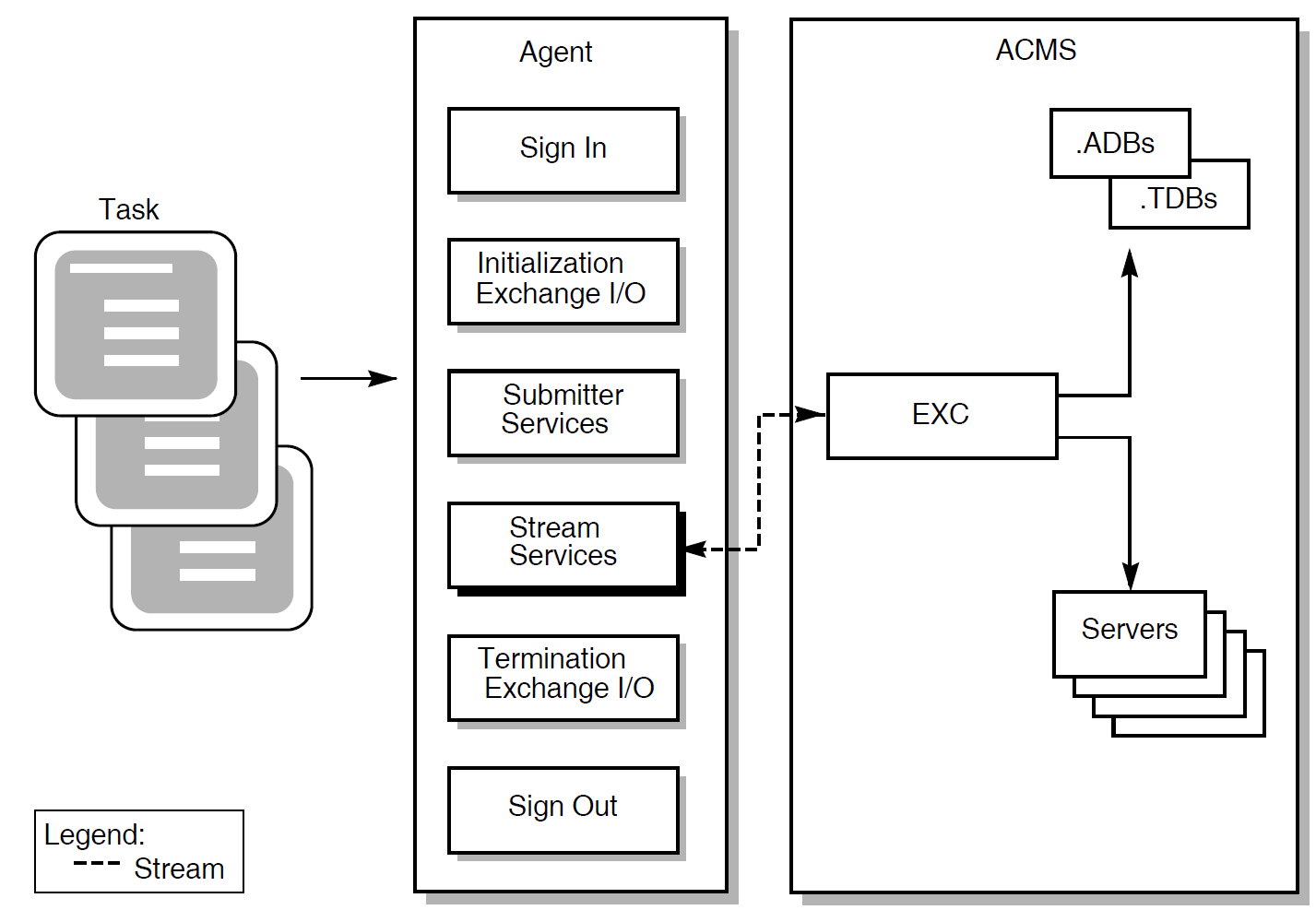
6.1. Overview of Stream Services
|
Service Name |
Description |
|---|---|
|
ACMS$WAIT_FOR_STREAM_IO |
Waits for a message on the stream. Use the ACMS$REPLY_TO_STREAM_IO after processing any information to acknowledge the exchange. If an agent program enables stream I/O and associates it with a submitter, the agent program must call ACMS$WAIT_FOR_STREAM_IO for all tasks (except tasks that do no terminal I/O), whether or not the task performs stream I/O. |
|
ACMS$REPLY_TO_STREAM_IO |
Acknowledges completion of a stream exchange step that was detected using ACMS$WAIT_FOR_STREAM_IO. The task instance then resumes execution. Use this service in combination with ACMS$WAIT_FOR_STREAM_IO. |
BLOCK WORK
WITH STREAM I/O

task1_exchange1:

EXCHANGE IS
READ ACMS$DATA_WORKSPACE;
task1_process1:

PROCESSING IS
CALL procedure-name USING ACMS$DATA_WORKSPACE;
task1_exchange2:

EXCHANGE IS
WRITE ACMS$DATA_WORKSPACE;

END BLOCK;
The EXC is the active end of the stream because it interprets the task definition and sends and requests information from the agent program. The agent program is the passive end of the stream because it does not initiate any communication, but waits for and reacts to requests from the EXC.
The agent program calls the ACMS$WAIT_FOR_STREAM_IO service to wait for a request from the EXC. After processing the information, the agent program calls the ACMS$REPLY_TO_STREAM_IO service to respond to the request.
ACMS$CONNECT_STREAM
ACMS$CREATE_STREAM
ACMS$DELETE_STREAM
ACMS$DISCONNECT_STREAM
ACMS supports these services for agent programs that have already been developed. In new agent programs, however, use ACMS$INIT_EXCHANGE_IO and ACMS_TERM_EXCHANGE_IO. Whenever practical, replace superseded services with ACMS$INIT_EXCHANGE_IO and ACMS_TERM_EXCHANGE_IO.
Superseded services are discussed in Appendix A, "Superseded Services and Parameters".
6.2. ACMS$REPLY_TO_STREAM_IO
ACMS$REPLY_TO_STREAM_IO
ACMS$REPLY_TO_STREAM_IO — This service respond to I/O requests on the stream. If an input string is provided, the agent program must gather information for the ACMS$WAIT_FOR_STREAM_IO input string and fill the string before calling this service.
Format
ACMS$REPLY_TO_STREAM_IO(connect_id.rq.r, io_id.wq.r, [io_status.rl.r])ACMS$REPLY_TO_STREAM_IO_A(connect_id.rq.r, io_id.wq.r, [io_status.rl.r], [comp_status.wq.r], [efn.rbu.r], [astadr.szem.r], [astprm.rz.v])
Parameters
- connect_id
The identification of the stream you are replying to. The ACMS$INIT_EXCHANGE_IO service returns this connect ID.
- io_id
The identification of the message you are replying to. The ACMS$WAIT_FOR_STREAM_IO service returns this ID.
- io_status
The agent program must provide a success value if it wishes to complete the exchange and allow the task to continue. The agent program must provide a failure value if the agent program has detected an error and wishes to cancel the exchange and cancel the task.
The parameters
comp_status.wq.r,efn.rbu.r,astadr.szem.r, andastprm.rz.vare asynchronous service arguments. See Chapter 2, "Common Features of the Systems Interface" for a discussion of these parameters.
Return Status
|
Status |
Severity Level |
Description |
|---|---|---|
|
ACMS$_NORMAL |
Success |
Normal successful completion. |
|
ACMS$_PENDING |
Informational |
Successful operation pending asynchronous completion. The final status is in the completion status block. |
|
ACMS$_BADCONID |
Error |
The connect ID is not correct; either the stream is not connected, the stream is disconnected, or the connect ID is corrupt. |
|
ACMS$_BADIOID |
Error |
The I/O ID is not correct; either there is no suchI/O request, the I/O request has already been replied to, or theI/O ID is corrupt. |
|
ACMS$_CANOTDOIO |
Error |
Cannot perform stream I/O on this connection. The stream is not yet connected. |
|
ACMS$_IONOTACT |
Error |
The specified I/O request was not active. |
|
ACMS$_INSUFPRM |
Error |
Not enough arguments were passed to this service. |
|
ACMS$_INVASTADR |
Error |
The AST address was invalid. |
|
ACMS$_INVASTPRM |
Error |
The AST routine parameter was invalid. |
|
ACMS$_INVCMPSTS |
Error |
The completion status block was invalid. |
|
ACMS$_INVCONID |
Error |
The connect ID was invalid. |
|
ACMS$_INVEFN |
Error |
The event flag was invalid. |
|
ACMS$_INVIOID |
Error |
The I/O ID was invalid. |
|
ACMS$_STRMMSGTOOBIG |
Error |
The size of the objects, including stream overhead, is too large to send over the stream. |
|
ACMS$_SYNASTLVL |
Error |
You cannot call synchronous services from AST level. |
|
ACMS$_WRONGCON |
Error |
The specified I/O request was not on this connection. |
|
ACMS$_BADACTREC |
Fatal |
Bad record format in active response message. |
6.3. ACMS$WAIT_FOR_STREAM_IO
ACMS$WAIT_FOR_STREAM_IO
ACMS$WAIT_FOR_STREAM_IO — Waits for I/O messages. This service completes when the Application Execution Controller (EXC) executes a READ or WRITE clause in the task definition. If an agent program enables stream I/O and associates it with a submitter, the agent program must call ACMS$WAIT_FOR_STREAM_IO for all tasks (except tasks that do no terminal I/O), whether or not the task performs stream I/O.
Additional Information
When ACMS$WAIT_FOR_STREAM_IO returns the status code ACMS$_SENDER_DISCONN, the EXC has disconnected from the stream. The agent program then calls ACMS$WAIT_FOR_CALL_END to wait for the end of the task.
Format
ACMS$WAIT_FOR_STREAM_IO(connect_id.rq.r, output_object.wz.r, input_object.wz.r, io_id.wq.r, [cancel_routine.zem.r], [cancel_param.rz.v])ACMS$WAIT_FOR_STREAM_IO_A(connect_id.rq.r, output_object.wz.r, input_object.wz.r, io_id.wq.r, [comp_status.wq.r], [efn.rbu.r], [astadr.szem.r], [astprm.rz.v], [cancel_routine.zem.r], [cancel_param.rz.v])
Parameters
- connect_id
The identification of the stream on which you are waiting for data requests. The ACMS$INIT_EXCHANGE_IO service returns this connect ID.
- output_object
The message sent over the stream from the Application Execution Controller (EXC) to the agent program.
This is a pointer to a string descriptor containing either a prompt or output information from the EXC. The agent program can use this output as a terminal prompt (if the task uses a terminal) or, for example, as a key to get a record from a file. If there is no output, the parameter contains a zero; otherwise, it contains the address of the string descriptor.
- input_object
The address of the message to send over the stream from the agent program to the EXC.
This is a pointer to an empty string descriptor reserved for reply information from the agent. The agent program gathers input and puts it into this descriptor before calling the ACMS$REPLY_TO_STREAM_IO service. If there is no input, the parameter contains a zero; otherwise, it contains the address of the string descriptor.
The agent program truncates the strings or blank fills them to the right as necessary.
- io_id
The identification that this service returns. ACMS$REPLY_TO_STREAM_IO later uses this ID to distinguish which I/O request to reply to.
- cancel_routine
- When you use the cancel_routine parameter in an agent, the agent program is notified if the ACMS EXC requests to cancel the current stream I/O operation. If the cancel_routine parameter is omitted, the agent program is not notified of the EXC request to cancel the stream I/O. The
cancel_routineexecutes at AST level and is passed the following parameters:cancel_paramThe cancel parameter that was passed with the ACMS$WAIT_FOR_STREAM_IO service.
connect_idThe address of the two-longword identification of the current stream connection. ACMS$INIT_EXCHANGE_IO passes this ID.
io_idThe address of the two-longword identification of the stream I/O request to cancel.
After receiving cancel notification, the agent program responds to the cancellation by calling ACMS$REPLY_TO_STREAM_IO. Until the agent program calls ACMS$REPLY_TO_STREAM_IO, ACMS cannot cancel the task.
- cancel_param
The value to be passed to the cancel routine.
The parameters
comp_status.wq.r,efn.rbu.r,astadr.szem.r, andastprm.rz.vare asynchronous service arguments. See Chapter 2, "Common Features of the Systems Interface" for a discussion of these parameters.
Return Status
|
Status |
Severity Level |
Description |
|---|---|---|
|
ACMS$_NORMAL |
Success |
Normal successful completion. |
|
ACMS$_PENDING |
Informational |
Successful operation pending asynchronous completion. The final status is in the completion status block. |
|
ACMS$_DISC_PURGE |
Warning |
A disconnect purged the I/O request. |
|
ACMS$_SENDER_DISCONN |
Warning |
The sender has disconnected from the stream. |
|
ACMS$_BADCONID |
Error |
The connect ID is not correct; either the stream is not connected, the stream is disconnected, or the connect ID is corrupt. |
|
ACMS$_CANOTDOIO |
Error |
Cannot perform stream I/O on this connection. The stream is not yet connected. |
|
ACMS$_INSUFPRM |
Error |
Not enough arguments were passed to this service. |
|
ACMS$_INVASTADR |
Error |
The AST address was invalid. |
|
ACMS$_INVASTPRM |
Error |
The AST routine parameter was invalid. |
|
ACMS$_INVCMPSTS |
Error |
The completion status block was invalid. |
|
ACMS$_INVCONID |
Error |
The connect ID was invalid. |
|
ACMS$_INVEFN |
Error |
The event flag was invalid. |
|
ACMS$_INVINOBJ |
Error |
The input object was invalid. |
|
ACMS$_INVIOID |
Error |
The I/O ID was invalid. |
|
ACMS$_INVOUTOBJ |
Error |
The output object was invalid. |
|
ACMS$_IO_ACTIVE |
Error |
An I/O request is already active on this connect; only one I/O request is allowed at a time. |
|
ACMS$_SYNASTLVL |
Error |
You cannot call synchronous services from AST level. |
Chapter 7. Sample Agent Programs
The first example is a user-written agent program in C that starts a distributed transaction.
The second example is a FORTRAN general-purpose agent program that handles all types of exchange I/O except stream I/O and Request Interface I/O.
The third example is a C agent program that submits tasks performing stream I/O or no I/O.
The fourth example is a BLISS agent program that shows the use of superseded exchange I/O services. This example is provided for the convenience of programmers who must maintain agent programs written for earlier versions of ACMS. Do not use the techniques shown in this example when developing new agents.
The fifth example is a Pascal agent program that shows the use of the ACMS$WAIT service.
7.1. C Agent Program that Starts a Distributed Transaction
Example 7.1, ''C Agent Program that Starts a Distributed Transaction'' is a user-written agent program in C that starts a distributed transaction. The agent program uses the $START_TRANSW system service to start the distributed transaction.
| Get reservation information from the terminal operator. |
| Start a distributed transaction. |
| Call the task VR_FAST_CHECKIN_TASK. |
| Commit the distributed transaction if the called task completes successfully. |
| Roll back the distributed transaction if the called task fails. |
/**************************************************************/
/* */
/* Version: 01 */
/* Authors: HP */
/* */
/**************************************************************/
/**************************************************************/
/* F U N C T I O N A L D E S C R I P T I O N */
/* */
/* */
/* VR_AGENT is an ACMS agent program that acts like an ATM */
/* where you type in your reservation number and odometer */
/* reading, drop the keys in a slot, and walk away. The */
/* system bills you later for the amount you owe. The */
/* agent uses QIOs to get the data, starts a distributed */
/* transaction, then calls a task to do the work. The task */
/* consists of a nonparticipating step that validates the */
/* reservation number, a step that queues a task to do the */
/* actual checkin work, and a step that writes a history */
/* record. If the task succeeds, the agent commits the */
/* transaction. If the task fails, the agent aborts the */
/* the transaction and notifies the user of the problem. */
/* The agent is also responsible for handling errors, such */
/* as transaction timeouts. */
/* */
/**************************************************************/
/*************************************************/
/* */
/* Include's / Define's / Macros Required */
/* */
/*************************************************/
#include descrip
#include iodef
#include rmsdef
#include ssdef
#include stdio
#include stsdef
#include ACMS$SUBMITTER
#include ACMS$STREAM
#define MAX_RESERVATION 10
#define MAX_ODOMETER 6
#define MAX_RETRY 5
#define TRUE 1
#define FALSE 0
#define CANCEL 'C'
#define check_status(stat) if (!(stat & 1)) LIB$STOP(stat)
/*****************************/
/* */
/* Declare Global Data */
/* */
/*****************************/
globalvalue ACMS$_NOSUCH_PKG;
globalvalue ACMS$_SRVDEAD;
globalvalue ACMS$_TRANSTIMEDOUT;
globalvalue RDB$_DEADLOCK;
globalvalue RDB$_LOCK_CONFLICT;
globalvalue RDMS$_DEADLOCK;
globalvalue RDMS$_LCKCNFLCT;
globalvalue RDMS$_TIMEOUT;
typedef struct {
short int bufsize;
short int itmcode;
int bufadr;
int retlen;
} item;
typedef int quadword[2];
struct fast_check_in_blk {
int reservation_id;
int return_odometer_reading;
quadword actual_return_date;
} fast_check_in_wksp;
struct io_stat_blk {
short int status ;
short int msg_len ;
int unused;
} iosb;
struct {
item pr_id;
int terminator;
} task_info_list;
int status, *tid[ 4 ], argument_list[ 5 ];
short chan;
char task_status[ 80 ];
$DESCRIPTOR(task_status_desc, task_status);
$DESCRIPTOR(task_name_desc, "VR_FAST_CHECKIN_TASK");
$DESCRIPTOR(appl_name_desc, "VR_APPL");
struct dsc$descriptor_s fast_check_in_wksp_desc;
struct ACMS$SUBMITTER_ID submitter_id;
struct ACMS$PROCEDURE_ID procedure_id;
struct ACMS$CALL_ID call_id;
main ()
/**************************************************************************/
/* */
/* Get procedure information to see if the application is running. */
/* */
/* While the application is up and running, prompt user for */
/* reservation ID and odometer reading. */
/* */
/* If the user enters the data, process the fast checkin transaction. */
/* */
/* If the user aborts, then notify the user that the transaction was */
/* not processed. */
/* */
/**************************************************************************/
{
for (;;)
{
status = initialization ();
check_status(status);
status = ACMS$GET_PROCEDURE_INFO(&submitter_id,
&task_name_desc,
&appl_name_desc,
&task_info_list);
while (status & STS$M_SUCCESS)
{
status = get_data ();
if (status & STS$M_SUCCESS)
status = process_this_transaction();
else if (status == RMS$_EOF)
status = report_user_abort();
check_status(status);
status = ACMS$GET_PROCEDURE_INFO(&submitter_id,
&task_name_desc,
&appl_name_desc,
&task_info_list);
}
if (status == ACMS$_NOSUCH_PKG)
status = application_not_running();
check_status(status);
status = termination ();
check_status(status);
}
}
initialization ()
/************************************************/
/* */
/* Assign channel and sign user in to ACMS. */
/* Set up descriptors, task info list, and */
/* argument lists for later processing */
/* */
/************************************************/
{
$DESCRIPTOR(terminal, "SYS$COMMAND");
status = SYS$ASSIGN (&terminal, &chan,0,0);
if (status & STS$M_SUCCESS)
status = ACMS$SIGN_IN(&submitter_id, 0, 0);
if (status & STS$M_SUCCESS)
{
fast_check_in_wksp_desc.dsc$w_length = sizeof(fast_check_in_wksp);
fast_check_in_wksp_desc.dsc$a_pointer = &fast_check_in_wksp;
fast_check_in_wksp_desc.dsc$b_dtype = DSC$K_DTYPE_T;
fast_check_in_wksp_desc.dsc$b_class = DSC$K_CLASS_S;
task_info_list.pr_id.bufsize = ACMS$S_PROCEDURE_ID;
task_info_list.pr_id.itmcode = ACMS$K_PROC_PROCEDURE_ID;
task_info_list.pr_id.bufadr = &procedure_id;
task_info_list.pr_id.retlen = 0;
task_info_list.terminator = 0;
argument_list[ 0 ] = 4;
argument_list[ 1 ] = 0;
argument_list[ 2 ] = &task_status_desc;
argument_list[ 3 ] = 0;
argument_list[ 4 ] = &fast_check_in_wksp_desc;
}
return status;
}
get_data ()
/*********************************************************/
/* */
/* Prompt for reservation ID and odometer reading. */
/* */
/* For the purpose of this example, it is expected */
/* that input will consist of numeric characters & */
/* that the user will enter leading zeroes. */
/* */
/* e.g., Reservation ID 000123456 */
/* Odometer Reading 05575 */
/* */
/* Validation will be done to ensure this; the */
/* user can abort by entering "Cancel." */
/* */
/*********************************************************/
{
short input_complete;
char reservation[ MAX_RESERVATION ];
char odometer[ MAX_ODOMETER ];
$DESCRIPTOR(reservation_desc, reservation);
$DESCRIPTOR(odometer_desc, odometer);
$DESCRIPTOR(input_reservation_id, "Input Reseveration Id 'Cancel' to Exit: ");
$DESCRIPTOR(input_odometer, "Input Odometer Reading 'Cancel' to Exit: ");
input_complete = FALSE;
while (input_complete == FALSE)
{
printf("\n");
status = SYS$QIOW (0,
chan,
IO$_READPROMPT|IO$M_CVTLOW,
&iosb,
0, 0,
&reservation,
reservation_desc.dsc$w_length,
0, 0,
input_reservation_id.dsc$a_pointer,
input_reservation_id.dsc$w_length);
if (status & STS$M_SUCCESS)
status = iosb.status;
if ((status & STS$M_SUCCESS) && (reservation[0] == CANCEL))
status = RMS$_EOF;
if (status & STS$M_SUCCESS)
status = OTS$CVT_TU_L(&reservation_desc,
&fast_check_in_wksp.reservation_id,
4,0);
if ((status & STS$M_SUCCESS) || (status == RMS$_EOF))
input_complete = TRUE;
}
if (status & STS$M_SUCCESS)
{
input_complete = FALSE;
while (input_complete == FALSE)
{
printf("\n");
status = SYS$QIOW (0,
chan,
IO$_READPROMPT|IO$M_CVTLOW,
&iosb,
0, 0,
&odometer,
odometer_desc.dsc$w_length,
0, 0,
input_odometer.dsc$a_pointer,
input_odometer.dsc$w_length);
if (status & STS$M_SUCCESS)
status = iosb.status;
if ((status & STS$M_SUCCESS) && (odometer[0] == CANCEL))
status = RMS$_EOF;
if (status & STS$M_SUCCESS)
status = OTS$CVT_TU_L(&odometer_desc,
&fast_check_in_wksp.return_odometer_reading,
4,0);
if ((status & STS$M_SUCCESS) || (status == RMS$_EOF))
input_complete = TRUE;
}
}
if (status & STS$M_SUCCESS)
status = SYS$GETTIM (&fast_check_in_wksp.actual_return_date);
return status;
}
process_this_transaction()
/********************************************************************/
/* */
/* Start transaction. Call the task. Commit if successful. */
/* Abort if failure. Retry if timed out. Notify user whether */
/* transaction succeeded or failed. */
/* */
/********************************************************************/
{
short retry, trans_completed;
retry = 0;
trans_completed = FALSE;
while ((trans_completed == FALSE) && (retry < MAX_RETRY))
{
status = SYS$START_TRANSW (0,0,&iosb,0,0,tid);
if (status & STS$M_SUCCESS)
status = iosb.status;
check_status(status);
status = call_return_task();
if (status & STS$M_SUCCESS)
{
status = SYS$END_TRANSW (0,0,&iosb,0,0,tid);
if (status & STS$M_SUCCESS)
status = iosb.status;
check_status(status);
trans_completed = TRUE;
}
else
{
if ((status == ACMS$_TRANSTIMEDOUT) ||
(status == ACMS$_SRVDEAD) ||
(status == RDB$_DEADLOCK) ||
(status == RDMS$_DEADLOCK) ||
(status == RDB$_LOCK_CONFLICT) ||
(status == RDMS$_LCKCNFLCT) ||
(status == RDMS$_TIMEOUT))
++retry;
else
retry = MAX_RETRY;
status = SYS$ABORT_TRANSW (0,0,&iosb,0,0,tid);
if (status & STS$M_SUCCESS)
status = iosb.status;
check_status(status);
}
}
if (trans_completed == FALSE)
status = notify_failure();
else
status = notify_success();
return status;
}
call_return_task()
/******************************************************************/
/* */
/* Call the task. Error handling will be done by the calling */
/* task. */
/* */
/******************************************************************/
{
status = ACMS$START_CALL (&submitter_id,
&procedure_id,
&call_id,
argument_list,
tid);
if (status & STS$M_SUCCESS)
status = ACMS$WAIT_FOR_CALL_END (&submitter_id,
&call_id);
return status;
}
notify_failure ()
/*******************************************************************/
/* */
/* Failure returned from called task is displayed to the user. */
/* */
/*******************************************************************/
{
printf("\n");
status = SYS$QIOW (0,
chan,
IO$_WRITEVBLK,
&iosb,
0, 0,
task_status_desc.dsc$a_pointer,
task_status_desc.dsc$w_length,
0, 0, 0, 0);
return status;
}
application_not_running()
/*************************************************************/
/* */
/* Display application not running and wait 60 seconds. */
/* */
/*************************************************************/
{
float wait_time = 10.0;
$DESCRIPTOR(appl_not_up_msg, "Application not Available at this time" );
printf("\n");
status = SYS$QIOW (0,
chan,
IO$_WRITEVBLK,
&iosb,
0, 0,
appl_not_up_msg.dsc$a_pointer,
appl_not_up_msg.dsc$w_length,
0, 0, 0, 0);
if (status & STS$M_SUCCESS)
status = iosb.status;
if (status & STS$M_SUCCESS)
status = LIB$WAIT(&wait_time);
return status;
}
notify_success()
/*************************************************************/
/* */
/* Display transaction has been successfully completed. */
/* */
/*************************************************************/
{
$DESCRIPTOR(success_queued_msg, "Transaction Successfully Queued ");
printf("\n");
status = SYS$QIOW (0,
chan,
IO$_WRITEVBLK,
&iosb,
0, 0,
success_queued_msg.dsc$a_pointer,
success_queued_msg.dsc$w_length,
0, 0, 0, 0);
if (status & STS$M_SUCCESS)
status = iosb.status;
return status;
}
report_user_abort()
/******************************************************/
/* */
/* Display operation canceled at user's request. */
/* */
/******************************************************/
{
$DESCRIPTOR(user_abort_msg, "Fast Checkin Has Been Canceled by user ");
printf("\n");
status = SYS$QIOW (0,
chan,
IO$_WRITEVBLK,
&iosb,
0, 0,
user_abort_msg.dsc$a_pointer,
user_abort_msg.dsc$w_length,
0, 0, 0, 0);
if (status & STS$M_SUCCESS)
status = iosb.status;
return status;
}
termination ()
/****************************************************/
/* */
/* Deassign channel and sign user out of ACMS */
/* */
/****************************************************/
{
status = SYS$DASSGN(chan);
if (status & STS$M_SUCCESS)
status = ACMS$SIGN_OUT(&submitter_id);
return status;
}7.2. FORTRAN General-Purpose Agent Program
PROGRAM fortran_agent
C
C   This agent program allows the user to select tasks of all exchange I/O
C   methods except stream I/O or I/O involving the ACMS Request Interface
C   (RI).
C
        IMPLICIT NONE
C
 INCLUDE 'SYS$LIBRARY:ACMSFOR (ACMS$SUBMITTER)/LIST'

        RECORD / ACMS$SUBMITTER_ID / submitter_id
        RECORD / ACMS$EXCHANGE_IO_ID / exchange_io_id
        RECORD / ACMS$PROCEDURE_ID / procedure_id
        RECORD / ACMS$CALL_ID / call_id


     INTEGER*4 status
 INTEGER*4 LIB$SYS_TRNLOG, LIB$GET_INPUT, LIB$PUT_OUTPUT
C
C Variable declarations for ACMS$SIGN_IN
C
 CHARACTER*10 terminal_name
 INTEGER*4 terminal_name_desc (2)


C
C Variable declarations for ACMS$GET_PROCEDURE_INFO
C
 LOGICAL select_task
 LOGICAL need_task_info
C
 INTEGER*4 io_method
 CHARACTER*31 application_name
 CHARACTER*31 task_name
 INTEGER*4 task_name_desc (2)
 INTEGER*4 task_name_len


C
 INTEGER*2 task_info_list (14)
     EQUIVALENCE ( task_info_list (1), itm_io_bufsize )
     INTEGER*2 itm_io_bufsize
     EQUIVALENCE ( task_info_list (2), itm_io_itmcode )
     INTEGER*2 itm_io_itmcode
     EQUIVALENCE ( task_info_list (3), itm_io_bufadr )
     INTEGER*4 itm_io_bufadr
     EQUIVALENCE ( task_info_list (5), itm_io_retlen )
     INTEGER*4 itm_io_retlen


C
     EQUIVALENCE ( task_info_list (7), itm_proc_bufsize )
     INTEGER*2 itm_proc_bufsize
     EQUIVALENCE ( task_info_list (8), itm_proc_itmcode )
     INTEGER*2 itm_proc_itmcode
     EQUIVALENCE ( task_info_list (9), itm_proc_bufadr )
     INTEGER*4 itm_proc_bufadr
     EQUIVALENCE ( task_info_list (11), itm_proc_retlen )
     INTEGER*4 itm_proc_retlen
C
     EQUIVALENCE ( task_info_list (13), itm_last )
     INTEGER*4 itm_last


C
C Variable declarations for ACMS$START_CALL
C
 INTEGER*4 argument_list (4)

 CHARACTER*255 selection_string
 CHARACTER*80 status_string
     INTEGER*4 selection_string_desc (2)
     INTEGER*4 status_string_desc (2)


C***************************************************************************

C
C Sign in to ACMS, including terminal so that tasks ACMS can authenticate
C the terminal and the submitter can select tasks that use the terminal.
C
 status = LIB$SYS_TRNLOG ('TT', , terminal_name)
 IF (.NOT. status) THEN
     CALL LIB$SIGNAL (%VAL (status) )
 END IF


 status = ACMS$SIGN_IN (  submitter_id,
 1                        ,
 2    terminal_name )

 IF (.NOT. status) THEN
     CALL LIB$SIGNAL (%VAL (status) )
 END IF


C
C Initialize the submitter to do exchange I/O on behalf of the tasks that it
C selects.  This submitter is written to do any kind of exchange I/O except
C stream I/O or I/O involving the ACMS Request Interface (RI).
C
        status = ACMS$INIT_EXCHANGE_IO ( submitter_id, exchange_io_id )
 IF (.NOT. status) THEN
     CALL LIB$SIGNAL (%VAL (status) )
 END IF


C
C Construct the item list to get information about the task
C
     itm_io_bufsize = 4
     itm_io_itmcode = ACMS$K_PROC_IO_METHOD
     itm_io_bufadr = %LOC (io_method )
     itm_io_retlen = 0


     itm_proc_bufsize = ACMS$S_PROCEDURE_ID
     itm_proc_itmcode = ACMS$K_PROC_PROCEDURE_ID
     itm_proc_bufadr = %LOC ( procedure_id )
     itm_proc_retlen = 0
C
     itm_last = 0
C
C Loop for task selections, until user types EXIT instead of application name
C
 select_task = .TRUE.
 DO WHILE (select_task)


C
C Loop until we get a good application/task name.
C
     need_task_info = .TRUE.
     DO WHILE (need_task_info)


C
C Ask for application name and task name.
C
 status = LIB$GET_INPUT (application_name, 'Application name: ')
 IF (.NOT. status) THEN
     CALL LIB$SIGNAL ( %VAL (status) )
 ELSE
     IF (application_name .EQ. 'EXIT') THEN
  select_task = .FALSE.
         GO TO 2000
     END IF
 END IF


 status = LIB$GET_INPUT (task_name, 'Task name: ', task_name_len)
 IF (.NOT. status) THEN
     CALL LIB$SIGNAL ( %VAL (status) )
 END IF

 task_name_desc (1) = task_name_len
 task_name_desc (2) = %LOC (task_name)
C
C Get the procedure ID for the task.
C If we have a good application/task name, continue.  Otherwise,
C print error message and try again.
C


 status = ACMS$GET_PROCEDURE_INFO ( submitter_id,
1                                          task_name_desc,
    2               application_name,
    3                                          task_info_list )
 IF (.NOT. status) THEN
         CALL LIB$SIGNAL (%VAL( status ) )
 ELSE
     need_task_info = .FALSE.
 END IF
        END DO


C
C Get the selection string, if any.
C
        status = LIB$GET_INPUT (selection_string, 'Selection string: ')
         IF (.NOT. status) THEN
             CALL LIB$SIGNAL (%VAL (status) )
        END IF


C
C Set up argument list for the task.
C
C   - Selection string descriptor
C   - Extended status descriptor
C   - Exchange I/O ID
C
            argument_list (1) = 3


        selection_string_desc (1)= LEN (selection_string)
    selection_string_desc (2)= %LOC (selection_string)
    argument_list (2) = %LOC (selection_string_desc)
C
        status_string_desc (1) = LEN (status_string)
    status_string_desc (2) = %LOC (status_string)
    argument_list (3) = %LOC (status_string_desc)
C
            argument_list (4) = %LOC (exchange_io_id)


C
C Now start the task.
C
     status = ACMS$START_CALL ( submitter_id,
     1          procedure_id,
     2          call_id,
     3      argument_list )
     IF (.NOT. status) THEN
      CALL LIB$SIGNAL (%VAL (status) )
     END IF


C
C Wait for task to complete.
C
    status = ACMS$WAIT_FOR_CALL_END (submitter_id,
    1      call_id)
    IF (.NOT. status) THEN
      CALL LIB$SIGNAL (%VAL (status) )
    END IF


C Display final status for task.
C
 IF ((status_string .NE. ' ') .AND.
 1   (status_string .NE. 'Task completed normally')) THEN
     CALL LIB$PUT_OUTPUT (status_string)
 END IF


C
C We come here when the user wishes to exit the agent program.
C
2000 END DO


C
C Sign the submitter out.
C
     status = ACMS$SIGN_OUT ( submitter_id )
  IF (.NOT. status) THEN
     CALL LIB$SIGNAL (%VAL (status) )
  END IF
C
END
7.3. C Agent Program that Performs Stream I/O or No I/O
/*
 *  This agent program is a special-case agent that only handles tasks
 *  that do stream I/O in exchange steps.
 */


/** include descriptor declarations **/
#include "sys$library:descrip.h"


/** include ACMS definition files (from sys$library:acmscc.tlb) **/
#include acms$submitter
#include acms$stream


#define SUCCESS 1
#define TRUE 1
#define FALSE 0
#define NULL 0


/** define structure for item list **/
struct item {
    short int bufsize;
    short int itmcode;
    char *bufadr;
    int retlen;
};


main()
{

/*
 *      External routines
 */
int LIB$GET_INPUT();
int LIB$PUT_OUTPUT();


/*
 *      Variables for ACMS IDs
 */
struct ACMS$SUBMITTER_ID submitter_id;
struct ACMS$EXCHANGE_IO_ID exchange_io_id;
struct ACMS$CONNECT_ID connect_id;
struct ACMS$PROCEDURE_ID procedure_id;
struct ACMS$IO_ID io_id;


/*
 *      Variables for ACMS$INIT_EXCHANGE_IO
 */
struct item init_exch_io_list[2] =
    { ACMS$S_CONNECT_ID, ACMS$K_CONNECT_ID, &connect_id, 0,
      0, 0 };   /* zero the last longword (2 words) for list termination */
int io_enable_flags;


/*
 *      Variable declarations for ACMS$GET_PROCEDURE_INFO
 */
int io_method;

char task_name_string[39], appl_name_string[255];
$DESCRIPTOR(task_name_desc,task_name_string);
$DESCRIPTOR (appl_name_desc,appl_name_string);
$DESCRIPTOR (appl_prompt_desc,"Application name: ");
$DESCRIPTOR (task_prompt_desc,"Task name: ");


/*
 *     Item list structure to be used in ACMS$GET_PROCEDURE_INFO
 *
 * There are 2 elements specified in this item list:
 *  1) 4 bytes of data for ACMS$K_PROC_IO_METHOD, to be
 *     returned in variable io_method.
 *  2) 8 bytes data for ACMS$K_PROC_PROCEDURE_ID, to be
 *     returned in variable procedure_id.
 *  (This code omits the return length variable address, which
 *   could be specified to receive the actual length of data
 *   returned for each item.)
 *  Other possible items include:
 *   - ACMS$K_PROC_WORKSPACE_COUNT to receive count of TASK ARGUMENTS
 *        which the task could accept from the agent program
 *   - ACMS$K_PROC_WAIT_DELAY_ACTION to receive the wait/delay
 *        action specified in the task definition
 */


struct item task_info_list[3] =
    { 4, ACMS$K_PROC_IO_METHOD, &io_method, 0,
      ACMS$S_PROCEDURE_ID, ACMS$K_PROC_PROCEDURE_ID, &procedure_id, 0,
      0, 0 };   /* zero the last longword (2 words) for list termination */


/*
 * Variable declarations for ACMS$START_CALL
 */

struct ACMS$CALL_ID call_id;
int argument_list[4];
char selection_string[255], status_string[80];
$DESCRIPTOR(selection_string_desc,selection_string);
$DESCRIPTOR(status_string_desc,status_string);


/*
 * Variable declarations for ACMS$WAIT_FOR_STREAM_IO
 */
globalvalue int ACMS$_SENDER_DISCONN;
int sender_disconn;
short int processing_io;
char *input_string_addr, *output_string_addr;


/*
 *      Miscellaneous variables
 */
int status;
short int i, all_spaces;

/**************************************************************/


/*
 * Sign in to ACMS, no terminal IO, only stream IO
 */
    status = ACMS$SIGN_IN (&submitter_id);
    if ((status & 1) != SUCCESS) LIB$SIGNAL (status);


/*
 *      Set up the agent program to do only stream I/O in exchange steps.
 */
    io_enable_flags = ACMS$M_IO_DISABLE_TDMS + ACMS$M_IO_DISABLE_DECFORMS;

    status = ACMS$INIT_EXCHANGE_IO ( &submitter_id,
                                     &exchange_io_id,
                                     &io_enable_flags,
                                     &init_exch_io_list );
    if ((status & 1) != SUCCESS) LIB$SIGNAL (status);


/*
 * Get the procedure ID for the task
 *  - prompt the user for the task name
 *  - prompt the user for application logical name
 *    (These strings should be entered in upper case
 *     or converted to upper case.)
 *  - then call ACMS$GET_PROCEDURE_INFO
 */
    status = LIB$GET_INPUT ( &task_name_desc, &task_prompt_desc );
    if ((status & 1) != SUCCESS) LIB$SIGNAL (status);


    status = LIB$GET_INPUT ( &appl_name_desc, &appl_prompt_desc );
    if ((status & 1) != SUCCESS) LIB$SIGNAL (status);

    status = ACMS$GET_PROCEDURE_INFO (&submitter_id,
           &task_name_desc,
           &appl_name_desc,
           task_info_list);
    if ((status & 1) != SUCCESS) LIB$SIGNAL (status);


/*
 * Set up the argument list for the task
 */
    argument_list[0] = 3;
    argument_list[1] = &selection_string_desc;
    argument_list[2] = &status_string_desc;
    argument_list[3] = &exchange_io_id;


/*
 *  Now start the task.  This agent program does not supply TASK
 *  ARGUMENTS. If TASK ARGUMENTS were used, they would require
 *  the task_info_list structure to be expanded to include the item
 *  ACMS$K_PROC_WORKSPACE_COUNT, which returns the number of TASK
 *  ARGUMENTS (if any) declared in the task definition.  This agent
 *  program would then build descriptors pointing to C variables
 *  corresponding to the number of arguments to be supplied.  Then
 *  argument_list[4] would be supplied the address of the
 *  first argument descriptor, argument_list[5] the address of the
 *  second argument descriptor.  argument_list[0] would be amended to
 *  reflect the total argument count = 3 + NUMBER_OF_TASK_ARGUMENTS
 *  supplied to the task by the agent program.
 */


    status = ACMS$START_CALL (&submitter_id,
             &procedure_id,
             &call_id,
             argument_list);
    if ((status & 1) != SUCCESS) LIB$SIGNAL (status);

/*
 *  This agent program handles only tasks that do no exchange I/O and
 *  tasks that do stream I/O.  If it is a NO I/O task, skip the stream
 *  processing.
 */
    if (io_method == ACMS$K_IO_NONE)
        processing_io = FALSE;
    else
        {
        processing_io = TRUE;
        sender_disconn = ACMS$_SENDER_DISCONN;
        }


/*
 *      Process the stream task with the following algorithm:
 *
 *          - wait for notification to begin the I/O (WAIT_FOR_STREAM_IO
 *              completes)
 *          - do the I/O
 *          - reply that the I/O is finished (REPLY_TO_STREAM_IO)
 *          - wait for more notification - if there is no more I/O. the
 *              sender will disconnect and we will be finished
 */


    while (processing_io)
    {
     status = ACMS$WAIT_FOR_STREAM_IO (&connect_id,
          &output_string_addr,
          &input_string_addr,
          &io_id);
     if ((status & 1) != SUCCESS)
     {
            processing_io = FALSE;
            if (status != sender_disconn)
                LIB$SIGNAL (status);
     }
     else


        {
            /*
              *      We have been notified to do the I/O - do it
             */
            if ((output_string_addr != NULL) && (input_string_addr == NULL))
            {
                status = LIB$PUT_OUTPUT (output_string_addr);


     if ((status & 1) != SUCCESS) LIB$SIGNAL (status);
            }

            if (input_string_addr != NULL)
            {
                if (output_string_addr == NULL)
    status = LIB$GET_INPUT (input_string_addr);
   else
    status = LIB$GET_INPUT (input_string_addr,
       output_string_addr);
   if ((status & 1) != SUCCESS) LIB$SIGNAL (status);
            }


            /*
             *      Tell the application that we are done with
             *      the I/O
             */
            status = ACMS$REPLY_TO_STREAM_IO (&connect_id,
               &io_id);
            if ((status & 1) != SUCCESS) LIB$SIGNAL (status);

        }   /* end of successful WAIT_FOR_STREAM_IO */

    } /*  end while loop  */


/*
 * Wait for the task to complete
 */
    status = ACMS$WAIT_FOR_CALL_END (&submitter_id, &call_id);
    if ((status & 1) != SUCCESS) LIB$SIGNAL (status);

/*
 *      Terminate the exchange I/O for the submitter
 */
    status = ACMS$TERM_EXCHANGE_IO (&exchange_io_id);


/*
 * Sign the submitter out
 */
    status = ACMS$SIGN_OUT (&submitter_id);
    if ((status & 1) != SUCCESS) LIB$SIGNAL (status);


/*
 * Display the final status
 */
    all_spaces = TRUE;
    for (i = 0; (i < 80) && (status_string[i] != NULL) && all_spaces; i++)
     if (status_string[i] != ' ')
      all_spaces = FALSE;

    if (!all_spaces)
     LIB$PUT_OUTPUT (status_string);
}
7.4. BLISS Agent Program that Uses Superseded Services
Note
Example 7.4, ''BLISS Agent Program that Uses Superseded Services'' is provided for the convenience of programmers who need to maintain agent programs written for earlier versions of ACMS. Do not use the techniques shown in this example when developing new agent programs.
MODULE bliss_agent (IDENT = 'V2.1-000',
         MAIN = agent_main,
         ADDRESSING_MODE (EXTERNAL=GENERAL,
     NONEXTERNAL=LONG_RELATIVE)) =
BEGIN


!
! External References
!
EXTERNAL ROUTINE
    LIB$SYS_TRNLOG,
    LIB$GET_EF,
    LIB$FREE_EF,
    LIB$GET_INPUT,
    LIB$PUT_OUTPUT,
    STR$UPCASE;
EXTERNAL LITERAL
    ACMS$_SENDER_DISCONN,
    ACMS$_NORMAL;


!
! Library Files
!
LIBRARY 'SYS$LIBRARY:STARLET';
LIBRARY 'SYS$LIBRARY:ACMSBLI';


ROUTINE agent_main =
!
!   Agent's main routine
!
BEGIN

    LOCAL
 status,
 sub_id:              ACMS$SUBMITTER_ID,


!
! Variable declarations for ACMS$GET_PROCEDURE_INFO_A
!
 task_name:           BLOCK [ DSC$K_D_BLN, BYTE],
 application_name:    BLOCK [ DSC$K_D_BLN, BYTE],
 io_method,
     task_info_list:      $ITMLST_DECL ( ITEMS = 2 ),
     have_task_info,


!
! Variable declarations for ACMS$START_CALL_A
!
 proc_id:              CMS$PROCEDURE_ID,
 task_id:                ACMS$CALL_ID,
     argument_list:        VECTOR [4,LONG],
     selection_string:   BLOCK [ DSC$K_D_BLN, BYTE],
     status_string:      BLOCK [ DSC$K_D_BLN, BYTE],
     terminal_name:  BLOCK [ DSC$K_D_BLN, BYTE],


!
! Variable declarations for Stream Services
!
        stream_id:           ACMS$STREAM_ID,
        connect_id:          ACMS$CONNECT_ID,
 io_id:       ACMS$IO_ID,
 output_string_addr:  REF BLOCK [4, BYTE],
 input_string_addr:   REF BLOCK [4, BYTE],
     processing_io,


!
! Variable declarations for asychronous service arguments
!
     comp_status_block:   VECTOR [ 2, LONG ],
     event_flag;

    LITERAL
        TRUE = 1 EQL 1,
        FALSE = 0 EQL 1;

    BIND
     comp_status = comp_status_block [ 0 ];


!
! Initialize dynamic string descriptors
!
    $INIT_DYNDESC ( task_name );
    $INIT_DYNDESC ( application_name );
    $INIT_DYNDESC ( selection_string );
    $INIT_DYNDESC ( status_string );
    $INIT_DYNDESC ( terminal_name );

    status = LIB$GET_EF ( event_flag );
    IF NOT .status THEN SIGNAL ( .status );


    status = LIB$SYS_TRNLOG ( %ASCID'TT', 0, terminal_name );
    IF .status NEQ SS$_NORMAL THEN SIGNAL ( .status );
!
!   Sign in to ACMS
!
    status = $ACMS$SIGN_IN_A (SUBMITTER_ID = sub_id,
             DEVICE = terminal_name,
             COMP_STATUS = comp_status,
             EFN = event_flag );
    IF NOT .status
    THEN
     SIGNAL (.status)
    ELSE
     BEGIN
     $WAITFR ( EFN = .event_flag );
     IF NOT .comp_status THEN SIGNAL ( .comp_status );
    END;


!
! Set up item list
!
    $ITMLST_INIT ( ITMLST = task_info_list,
         ( ITMCOD = ACMS$K_PROC_PROCEDURE_ID,
           BUFSIZ = ACMS$S_PROCEDURE_ID,
           BUFADR = proc_id ),

         ( ITMCOD = ACMS$K_PROC_IO_METHOD,
           BUFSIZ = %UPVAL,
           BUFADR = io_method ) );


    have_task_info = FALSE;
!
! Loop until we get a good application/task name
!

    DO
        BEGIN
    !
    ! Ask for application name and task name.
    ! Convert names to all caps for comparisons in ACMS.
    !
 status = LIB$GET_INPUT (application_name, %ASCID 'Application name: ');
 IF NOT .status THEN SIGNAL (.status);

        status = STR$UPCASE (application_name, application_name);
        IF .status NEQ SS$_NORMAL THEN SIGNAL ( .status );


 status = LIB$GET_INPUT (task_name, %ASCID 'Task name: ');
 IF NOT .status THEN SIGNAL (.status);

        status = STR$UPCASE (task_name, task_name);
        IF .status NEQ SS$_NORMAL THEN SIGNAL ( .status );


        !
        ! Ask ACMS if task is known and get its ID
        !
        status = $ACMS$GET_PROCEDURE_INFO_A ( SUBMITTER_ID = sub_id,
                                              PROCEDURE = task_name,
                                              PACKAGE = application_name,
                                              ITEM_LIST = task_info_list,
                  EFN = event_flag,
                  COMP_STATUS = comp_status );
     IF NOT .status
     THEN
         SIGNAL ( .status )


     ELSE
         BEGIN
         $WAITFR ( EFN = .event_flag );
         IF .comp_status EQL ACMS$_NORMAL
         THEN
      have_task_info = TRUE
         ELSE
      SIGNAL ( .comp_status );
         END;
     END
    UNTIL .have_task_info;


!
! Get the selection string
!
    status = LIB$GET_INPUT (selection_string, %ASCID 'Selection string: ');
    IF NOT .status THEN SIGNAL (.status);


!
! If the I/O method is stream, then setup the stream
!
    IF .io_method EQL ACMS$K_IO_STREAM
    THEN
 BEGIN


 status = $ACMS$CREATE_STREAM_A (MODE = %REF(ACMS$K_STRM_BIDIRECTIONAL),
            STREAM_ID = stream_id,
             COMP_STATUS = comp_status,
             EFN = event_flag );
     IF NOT .status
     THEN
         SIGNAL (.status)
     ELSE
         BEGIN
         $WAITFR ( EFN = .event_flag );
         IF NOT .comp_status THEN SIGNAL ( .comp_status );
         END;


 status = $ACMS$CONNECT_STREAM_A (STREAM_ID = stream_id,
             CONNECT_ID = connect_id,
           MODE = %REF(ACMS$K_STRM_PASSIVE),
              COMP_STATUS = comp_status,
                EFN = event_flag );
     IF NOT .status
     THEN
         SIGNAL (.status)
     ELSE
         BEGIN
         $WAITFR ( EFN = .event_flag );
         IF NOT .comp_status THEN SIGNAL ( .comp_status );
         END;

 END;


!
! Set up argument list for task
!
    argument_list [1] = selection_string;
    argument_list [2] = status_string;

    SELECTONE .io_method OF
 SET
 [ACMS$K_IO_NONE]:
     argument_list [0] = 2;
 [ACMS$K_IO_TERMINAL,
  ACMS$K_IO_REQUEST]:
     BEGIN
     argument_list [0] = 3;
     argument_list [3] = terminal_name;
     END;
 [ACMS$K_IO_STREAM]:
     BEGIN
     argument_list [0] = 3;
     argument_list [3] = stream_id;
     END;
 [OTHERWISE]:
     SIGNAL (SS$_ABORT);
 TES;


!
! Now start the task
!
    status = $ACMS$START_CALL_A (SUBMITTER_ID = sub_id,
          PROCEDURE_ID = proc_id,
                               ARGUMENTS = argument_list,
                               CALL_ID = task_id,
              COMP_STATUS = comp_status,
              EFN = event_flag );


    IF NOT .status
    THEN
     SIGNAL (.status)
    ELSE
     BEGIN
     $WAITFR ( EFN = .event_flag );
     IF NOT .comp_status THEN SIGNAL ( .comp_status );
     END;


!
! If the task I/O method is stream, process the stream I/O in the following
! loop
    IF .io_method EQL ACMS$K_IO_STREAM
    THEN
     BEGIN
     processing_io = TRUE;
     WHILE .processing_io DO

            BEGIN


     status = $ACMS$WAIT_FOR_STREAM_IO_A
              ( CONNECT_ID = connect_id,
                                 OUTPUT_OBJECT = output_string_addr,
                                 INPUT_OBJECT = input_string_addr,
     IO_ID = io_id,
                COMP_STATUS = comp_status,
               EFN = event_flag );
     IF NOT .status
         THEN
          SIGNAL (.status)
         ELSE
             BEGIN
             $WAITFR ( EFN = .event_flag );
             IF .comp_status EQL ACMS$_SENDER_DISCONN
         THEN
             processing_io = FALSE
             THEN
            SIGNAL ( .comp_status )
        ELSE
            BEGIN


        !
        ! See what kind of EXCHANGE was in the task defintion
        !
         IF .output_string_addr NEQ 0 AND .input_string_addr EQL 0
         THEN


!
! Exchange step was a WRITE
!
        BEGIN
    status = LIB$PUT_OUTPUT (.output_string_addr);
    IF NOT .status THEN SIGNAL (.status);
    END;


    IF .input_string_addr NEQ 0
    THEN
    IF .output_string_addr EQL 0
    THEN
        !
        ! Exchange step was a READ
        !
        BEGIN
        status = LIB$GET_INPUT (.input_string_addr);
        IF NOT .status THEN SIGNAL (.status);
        END


    ELSE
        !
        ! Exchange step was a READ WITH PROMPT
        !
        BEGIN
        status = LIB$GET_INPUT (.input_string_addr,
              .output_string_addr );
        IF NOT .status THEN SIGNAL (.status);
        END;


           !
           ! Reply to the I/O request
           !
              status = $ACMS$REPLY_TO_STREAM_IO_A
              (CONNECT_ID = connect_id,
           IO_ID = io_id,
                         EFN = event_flag );
           IF NOT .status
           THEN
               SIGNAL (.status)
            ELSE
            BEGIN
            $WAITFR ( EFN = .event_flag );
            IF NOT .comp_status THEN SIGNAL ( .comp_status );
            END;


           END;        ! End of successful wait_for_stream_io completion

              END;        ! End of successful wait_for_stream_io starting

             END;  ! End of stream processing loop

    END; ! End of stream task


!
!   Wait for task to complete
!
    status = $ACMS$WAIT_FOR_CALL_END_A (SUBMITTER_ID = sub_id,
                                        CALL_ID = task_id,
                       COMP_STATUS = comp_status,
                       EFN = event_flag );
    IF NOT .status
    THEN
     SIGNAL (.status)
    ELSE
     BEGIN
     $WAITFR ( EFN = .event_flag );
     IF NOT .comp_status THEN SIGNAL ( .comp_status );
     END;


!
! If a stream was used, disconnect it and delete it
!
    IF .io_method EQL ACMS$K_IO_STREAM
    THEN
 BEGIN


 status = $ACMS$DISCONNECT_STREAM_A (CONNECT_ID = connect_id,
                           COMP_STATUS = comp_status,
                   EFN = event_flag );
        IF NOT .status
        THEN
         SIGNAL (.status)
        ELSE
         BEGIN
         $WAITFR ( EFN = .event_flag );
         IF NOT .comp_status THEN SIGNAL ( .comp_status );
         END;


 status = $ACMS$DELETE_STREAM_A (STREAM_ID = stream_id,
         COMP_STATUS = comp_status,
         EFN = event_flag );
        IF NOT .status
        THEN
         SIGNAL (.status)
        ELSE
         BEGIN
         $WAITFR ( EFN = .event_flag );
         IF NOT .comp_status THEN SIGNAL ( .comp_status );
         END;

 END;


    status = $ACMS$SIGN_OUT_A ( SUBMITTER_ID = sub_id,
        COMP_STATUS = comp_status,
        EFN = event_flag );
    IF NOT .status
    THEN
     SIGNAL (.status)
    ELSE
     BEGIN
     $WAITFR ( EFN = .event_flag );
     IF NOT .comp_status THEN SIGNAL ( .comp_status );
     END;
!
! Display final status
!
    IF CH$NEQ (.status_string [DSC$W_LENGTH], .status_string [DSC$A_POINTER],
            1, UPLIT (' '), %C' ')
    THEN
 LIB$PUT_OUTPUT (status_string);

    status = LIB$FREE_EF ( event_flag );
    IF NOT .status THEN SIGNAL ( .status );

    RETURN SS$_NORMAL;

    END;

END ELUDOM
7.5. Pascal Agent Program that Uses ACMS$WAIT
[INHERIT('SYS$LIBRARY:STARLET','SYS$LIBRARY:ACMSPAS')]
PROGRAM campus_transactions(INPUT,OUTPUT);

{ Program to gather transactions from various nodes.
  After all transactions are complete, generate a report }

CONST
  pstring_length = 32;


TYPE

  uword = [WORD] 0..65535;                    { Unsigned word }
  ubyte = [BYTE] 0..255;                      { Unsigned byte }

  pstring = PACKED ARRAY [1..pstring_length] OF CHAR;


  { descriptor datatype }
  desc_type = [BYTE(8)]
              RECORD
              length : [POS(0)] uword;
              dtype  : [POS(16)] ubyte;
              class  : [POS(24)] ubyte;
              ptr    : [POS(32),UNSAFE] INTEGER;
              END;

  quad = PACKED ARRAY [0..1] OF [UNSAFE] INTEGER;


  nodes = (eku,nku,wku,ul,cmu);

  arg_list = PACKED ARRAY [0..3] OF [UNSAFE] INTEGER;

VAR
  submitter_id : ACMS$SUBMITTER_ID;
  exchange_io_id: ACMS$EXCHANGE_IO_ID;
  status       : [unsafe] INTEGER;
  status_block : ARRAY[eku..cmu] OF quad;
  selection_string : ARRAY[eku..cmu] of desc_type;
  padded_application_name : pstring;
  padded_task_name : pstring;
  status_string    : ARRAY[eku..cmu] of desc_type;
  argument_list: ARRAY[eku..cmu] OF arg_list;
  i : nodes;


{ Run-time library output routine }
[external] FUNCTION lib$put_output(%REF desc :desc_type):integer;extern;


{ Run-time library routine to signal errors }
[ASYNCHRONOUS,EXTERNAL(LIB$SIGNAL)]
PROCEDURE signal(%IMMED condition : INTEGER;
                 %IMMED fao_parms : [UNSAFE,LIST] INTEGER);EXTERN;

FUNCTION init_dyndesc:desc_type;
{ Function to initialize dynamic string desciptors }
VAR
 temp : desc_type;


BEGIN
   WITH temp DO
   BEGIN
     length := 0;
     class := dsc$k_class_d;
     dtype := dsc$k_dtype_t;
     ptr := 0;
   END;
   init_dyndesc := temp;
END ; { function init_dyndesc}


PROCEDURE call_task( SUBMITTER_ID :ACMS$SUBMITTER_ID;
                     APPLICATION_NAME : pstring;
                     TASK_NAME : pstring;
                     VAR argument_list: arg_list;
                     VAR STATUS_BLOCK : quad);


{ Procedure to perform an $acms$_call_a for the requested task }

TYPE
  uword = [WORD] 0..65535;


  item_type = [BYTE (12)]
              RECORD
                buffer_length : [POS (0)] uword;
                item_code     : [POS (16)] uword;
                buffer_address: [POS (32),UNSAFE] INTEGER;
                ret_length_adr: [POS (64),UNSAFE] INTEGER;
              END ; {item_type}


   list_type = [BYTE (16)]
               RECORD
                  list : [POS (0) ] item_type;
                  term : [POS (96)] INTEGER;
               END; {list_type}
 VAR
   status    : [UNSAFE] INTEGER;
   proc_list : list_type;
   procedure_id : ACMS$PROCEDURE_ID;
   ACMS$EFN  : [EXTERNAL] ubyte;


 BEGIN { call_task}

   { Build get procedure info list }
   WITH proc_list.list DO
     BEGIN
       buffer_length := acms$s_procedure_id;
       item_code := acms$k_proc_procedure_id;
       buffer_address := iaddress(procedure_id);
       ret_length_adr := 0;
     END ; {with proc_list}
   proc_list.term := 0;


   { Get procedure_id via acms$get_procedure_info }
   status := $ACMS$GET_PROCEDURE_INFO(SUBMITTER_ID := submitter_id,
                                     PACKAGE := application_name,
                                     procedure_ := task_name,
                                     item_list := proc_list);
   IF not odd(status) THEN SIGNAL(status);


   status := $ACMS$CALL_A(SUBMITTER_ID := submitter_id,
                          PROCEDURE_ID := procedure_id,
                          ARGUMENTS := argument_list,
                          EFN := ACMS$EFN,
                          COMP_STATUS := status_block);
    IF not odd(status) THEN SIGNAL(status);

 END ; { procedure call_task }


BEGIN { main }

  { Init argument list for calls }
  FOR i := eku TO cmu DO
  BEGIN
    status_string[i] := init_dyndesc;
    selection_string[i] := init_dyndesc;

    argument_list[i][0] := 3; {Number of argument in list}
    argument_list[i][1] := IADDRESS(selection_string[i]);
    argument_list[i][2] := IADDRESS(status_string[i]);
    argument_list[i][3] := IADDRESS(exchange_io_id);
  END;{for}


  { sign into acms }

  status := $ACMS$SIGN_IN(SUBMITTER_ID := submitter_id);
  IF not odd(status) THEN SIGNAL(status);

  status := $ACMS$INIT_EXCHANGE_IO(SUBMITTER_ID := submitter_id,
                                   EXCHANGE_IO_ID := exchange_io_id );
  IF not odd(status) THEN SIGNAL(status);

  padded_task_name := PAD ( 'ENROLLMENT_TRANSACTIONS', ' ', pstring_length );

  padded_application_name := PAD ( 'EKU::TRANSACTIONS', ' ', pstring_length );


  call_task(SUBMITTER_ID := submitter_id,
            application_name := padded_application_name,
            task_name := padded_task_name,
            argument_list := argument_list[eku],
            status_block := status_block[eku]);

  padded_application_name := PAD ( 'NKU::TRANSACTIONS', ' ', pstring_length );

  call_task(SUBMITTER_ID := submitter_id,
            application_name := padded_application_name,
            task_name := padded_task_name,
            argument_list := argument_list[nku],
            status_block := status_block[nku]);

  padded_application_name := PAD ( 'WKU::TRANSACTIONS', ' ', pstring_length );


  call_task(SUBMITTER_ID := submitter_id,
            application_name := padded_application_name,
            task_name := padded_task_name,
            argument_list := argument_list[wku],
            status_block := status_block[wku]);


  padded_application_name := PAD ( 'UL::TRANSACTIONS', ' ', pstring_length );

  call_task(SUBMITTER_ID := submitter_id,
            application_name := padded_application_name,
            task_name := padded_task_name,
            argument_list := argument_list[ul],
            status_block := status_block[ul]);


{ Now wait for all the procedures to complete }

FOR i := eku to ul DO
   BEGIN
     status := $ACMS$WAIT(COMP_STATUS := status_block[i]);
     { Wait for routine to complete}
     IF not odd(status) THEN SIGNAL(status);

     IF not odd (status_block[i][0])
     THEN
        signal(status_block[i][0])
     ELSE
        { Tell user status result of his request }
        LIB$PUT_OUTPUT(status_string[i]);
   END;


{ Call report generating routine }

 padded_task_name := PAD ( 'GENERATE_REPORTS',' ', pstring_length );

 padded_application_name := PAD ( 'CMU::REPORTS', ' ', pstring_length );

 call_task(submitter_id := submitter_id,
            application_name := padded_application_name,
            task_name := padded_task_name,
            argument_list :=argument_list[cmu],
            status_block := status_block[cmu]);


 status := $ACMS$WAIT(COMP_STATUS := status_block[cmu]);
 IF not odd(status) THEN SIGNAL(status);

 IF not odd (status_block[cmu][0])
 THEN
    signal(status_block[cmu][0])
 ELSE
    { Tell user status result of his request }
    LIB$PUT_OUTPUT( status_string[cmu]);

status := $ACMS$TERM_EXCHANGE_IO(EXCHANGE_IO_ID := exchange_io_id);
IF not odd(status) THEN SIGNAL(status);


status := $ACMS$SIGN_OUT(SUBMITTER_ID := submitter_id);
IF not odd(status) THEN SIGNAL(status);

END. {main}
Appendix A. Superseded Services and Parameters
The first part of this appendix describes six services used in earlier versions of ACMS and provides reference material for calling these services in agent programs. These six services have been replaced by ACMS$INIT_EXCHANGE_IO and ACMS$TERM_EXCHANGE_IO. You need to use the new services and arguments for all agent programs that call tasks that perform DECforms I/O.
The new services simplify systems interface programming and simplify program maintenance. Use them with TDMS, RI, and stream services as well as with DECforms. For information regarding the new services, see Chapter 4, "Agent Program Initialization and Exchange I/O Services".
ACMS supports the superseded services for agent programs that are already implemented. It also supports the superseded task I/O arguments. In new agent programs, however, use the ACMS$INIT_EXCHANGE_IO and ACMS$TERM_EXCHANGE_IO services. Whenever practical, change the superseded services to ACMS$INIT_EXCHANGE_IO and ACMS_TERM_EXCHANGE_IO in existing agent programs.
Do not mix the new services and the superseded services indiscriminately. Any attempt to use a superseded service to close a call opened with the new service results in an invalid status message. Any attempt to use the new service to close a call opened with a superseded service results in a status message of invalid.
The second part of the appendix describes parameters that were passed into the task I/O argument of the ACMS$CALL and ACMS$START_CALL services in versions of ACMS earlier than Version 3.2. Beginning with ACMS Version 3.1, instead of passing a device name or stream ID to the task I/O argument, use the exchange I/O ID for tasks that perform request I/O, stream I/O, or terminal I/O.
|
Service Name |
Description |
|---|---|
|
ACMS$OPEN_RR |
Opens a TDMS channel to a terminal and associates it with a submitter ID. Subsequent task selections for that submitter use the channel. |
|
ACMS$CLOSE_RR |
Closes a TDMS channel to a terminal and disassociates it from a submitter ID. |
|
ACMS$CREATE_STREAM |
Creates a stream and returns a stream ID. |
|
ACMS$CONNECT_STREAM |
Establishes a stream connection on which the agent program and the EXC can exchange messages. This service returns a connect ID. |
|
ACMS$DISCONNECT_STREAM |
Breaks a connection to a stream and invalidates the connect ID. |
|
ACMS$DELETE_STREAM |
Deletes the stream. This service is normally used after ACMS$DISCONNECT_STREAM. |
The rest of this appendix contains reference material for using the superseded services. The services appear in alphabetical order.
A.1. ACMS$CLOSE_RR
ACMS$CLOSE_RR
ACMS$CLOSE_RR — The ACMS$CLOSE_RR service closes a TDMS channel to a terminal and disassociates it from a submitter ID. Any active TDMS call on the channel is canceled. If the agent program uses ACMS$INIT_EXCHANGE_IO to open a channel, it must also use ACMS$TERM_EXCHANGE_IO to close the channel. If the agent program attempts to use a superseded service to close a channel opened by a new service, this results in status returns of invalid.
Note
This service has been superseded. ACMS supports this service for existing applications using TDMS. Use the ACMS$TERM_EXCHANGE_IO service in new applications.
Format
ACMS$CLOSE_RR([channel.rlu.r], [nullarg])ACMS$CLOSE_RR_A([channel.rlu.r], [nullarg], [comp_status.wq.r], [efn.rbu.r], [astadr.szem.r], [astprm.rz.v])
Parameters
- channel
The TDMS channel returned from a previous ACMS$OPEN_RR call. The agent program must supply this parameter.
- nullarg
Place-holding argument. This argument is reserved for VSI's use.
The parameters comp_status.wq.r, efn.rbu.r,
astadr.szem.r, and astprm.rz.v are asynchronous service arguments.
See Chapter 2, "Common Features of the Systems Interface" for a discussion of these parameters.
Return Status
This list summarizes each error returned by this service. Attempts to use ACMS$CLOSE_RR to close a channel opened with ACMS$INIT_EXCHANGE_IO result in a status message of invalid. Also, invalid status returns from TSS$CLOSE might be returned to the agent program. See the VAX TDMS Reference Manual for more information on TSS$CLOSE.
|
Status |
Severity Level |
Description |
|---|---|---|
|
ACMS$_NORMAL |
Success |
Normal successful completion. |
|
ACMS$_PENDING |
Informational |
Successful operation pending asynchronous completion. The final status is in the completion status block. |
|
ACMS$_TDMSNOTINST |
Informational |
TDMS is not installed on the system. |
|
ACMS$_INSUFPRM |
Error |
Not enough arguments were passed to this service. |
|
ACMS$_INTERNAL |
Error |
Internal error. |
|
ACMS$_INVCHAN |
Error |
Invalid channel – channel not known. |
|
ACMS$_INVEFN |
Error |
The event flag was invalid. |
|
ACMS$_SYNASTLVL |
Error |
Synchronous services may not be called from AST level. |
A.2. ACMS$CONNECT_STREAM
ACMS$CONNECT_STREAM
ACMS$CONNECT_STREAM — ACMS$CONNECT_STREAM establishes a connection to a stream and returns a connect ID. Before using this service, it is necessary to create a stream with ACMS$CREATE_STREAM.
Additional Information
Note
This service has been superseded. ACMS supports this service for applications that have already been implemented. To simplify the writing of agent programs, and to simplify program maintenance, use the ACMS$INIT_EXCHANGE_IO service in new applications.
Format
ACMS$CONNECT_STREAM(stream_id.rq.r, mode.rl.r, connect_id.wq.r, [submitter_id.rq.r])ACMS$CONNECT_STREAM_A(stream_id.rq.r, mode.rl.r, connect_id.wq.r, [comp_status.wq.r], [efn.rbu.r], [astadr.szem.r], [astprm.rz.v], [submitter_id.rq.r])
Parameters
- stream_id
The identification of the stream to which you want to connect. This ID is returned by ACMS$CREATE_STREAM.
- mode
The mode of this stream connection must always be set to ACMS$K_STRM_PASSIVE.
- connect_id
The identification that is returned by this service to identify this stream connection. This ID is used later by ACMS$DISCONNECT_STREAM, ACMS$WAIT_FOR_STREAM_IO, and ACMS$REPLY_TO_STREAM_IO.
- submitter_id
This ID is used to associate the stream ID with the submitter. The submitter_id argument is optional. You must use this parameter if the agent program calls an ACMS task that performs DECforms, TDMS, or terminal I/O, and that task calls another task that performs stream I/O.
The parameters comp_status.wq.r, efn.rbu.r,
astadr.szem.r, and astprm.rz.v are asynchronous service arguments.
See Chapter 2, "Common Features of the Systems Interface" for a discussion of these parameters.
Return Status
|
Status |
Severity Level |
Description |
|---|---|---|
|
ACMS$_NORMAL |
Success |
Normal successful completion. |
|
ACMS$_PENDING |
Informational |
Successful operation pending asynchronous completion. The final status is in the completion status block. |
|
ACMS$_SENDER_DISCONN |
Warning |
The sender has disconnected from the stream. |
|
ACMS$_BADMODE |
Error |
The mode value specified was invalid. |
|
ACMS$_BADSTRMID |
Error |
The stream ID is not correct; either the stream was not created, it was deleted, or the stream ID was corrupt. |
|
ACMS$_CANOTCON |
Error |
The state of the stream does not allow for connects. The agent program must be connected before the EXC. |
|
ACMS$_INSUFPRM |
Error |
Not enough arguments were passed to this service. |
|
ACMS$_INVASTADR |
Error |
The AST address was invalid. |
|
ACMS$_INVASTPRM |
Error |
The AST routine parameter was invalid. |
|
ACMS$_INVCMPSTS |
Error |
The completion status block was invalid. |
|
ACMS$_INVCONID |
Error |
The connect ID was invalid. |
|
ACMS$_INVEFN |
Error |
The event flag was invalid. |
|
ACMS$_INVMODE |
Error |
The mode of the stream was invalid. |
|
ACMS$_INVSTRMID |
Error |
The stream ID was invalid. |
|
ACMS$_MAXCNSCONN |
Error |
The maximum number of agent programs have already connected to the stream. |
|
ACMS$_SYNASTLVL |
Error |
Synchronous services may not be called from AST level. |
|
ACMS$_UNKMODE |
Error |
The mode specified was not understood by the stream arbitrator. |
|
ACMS$_BADCONNCTLMSG |
Fatal |
Invalid function code on control message received by connection. |
A.3. ACMS$CREATE_STREAM
ACMS$CREATE_STREAM
ACMS$CREATE_STREAM — The ACMS$CREATE_STREAM service creates a stream and returns the stream identification. It is used in conjunction with ACMS$CONNECT_STREAM. If an agent program creates and connects a stream, the agent program must call ACMS$WAIT_FOR_STREAM_IO for all tasks (except tasks that do no terminal I/O), whether or not the task performs stream I/O.
Note
ACMS$CREATE_STREAM has been superseded. ACMS supports this service for applications that have already been implemented. To simplify the writing of agent programs and to simplify program maintenance, use the ACMS$INIT_EXCHANGE_IO service in new applications.
Format
ACMS$CREATE_STREAM(mode.rl.r, stream_id.wq.r)ACMS$CREATE_STREAM_A(mode.rl.r, stream_id.wq.r, [comp_status.wq.r], [efn.rbu.r], [astadr.szem.r], [astprm.rz.v])
Parameters
- mode
The mode of the stream must always be set to ACMS$K_STRM_BIDIRECTIONAL.
- stream_id
The stream identification that is returned by this service. The ID is passed to any task that connects to this stream.
The parameters comp_status.wq.r, efn.rbu.r,
astadr.szem.r, and astprm.rz.v are asynchronous service arguments.
See Chapter 2, "Common Features of the Systems Interface" for a discussion of these parameters.
Return Status
|
Status |
Severity Level |
Description |
|---|---|---|
|
ACMS$_NORMAL |
Success |
Normal successful completion. |
|
ACMS$_PENDING |
Informational |
Successful operation pending asynchronous completion. The final status is in the completion status block. |
|
ACMS$_BADMODE |
Error |
The mode value specified was invalid. |
|
ACMS$_INSUFPRM |
Error |
Not enough arguments were passed to this service. |
|
ACMS$_INVASTADR |
Error |
The AST address was invalid. |
|
ACMS$_INVASTPRM |
Error |
The AST routine parameter was invalid. |
|
ACMS$_INVCMPSTS |
Error |
The completion status block was invalid. |
|
ACMS$_INVEFN |
Error |
The event flag was invalid. |
|
ACMS$_INVMODE |
Error |
The mode of the stream was invalid. |
|
ACMS$_INVSTRMID |
Error |
The stream ID was invalid. |
|
ACMS$_SYNASTLVL |
Error |
Synchronous services may not be called from AST level. |
A.4. ACMS$DELETE_STREAM
ACMS$DELETE_STREAM
ACMS$DELETE_STREAM — The ACMS$DELETE_STREAM service deletes a stream. Use this service after ACMS$DISCONNECT_STREAM disconnects all connect IDs to the stream. Once deleted, a stream is not available for use by other tasks.
Note
This service has been superseded. ACMS supports this service for applications that have already been implemented. To simplify the writing of agent programs and to simplify program maintenance, use the ACMS$TERM_EXCHANGE_IO service in new applications.
Format
ACMS$DELETE_STREAM(stream_id.rq.r, [flags.rl.r])ACMS$DELETE_STREAM_A(stream_id.rq.r, [flags.rl.r], [comp_status.wq.r], [efn.rbu.r], [astadr.szem.r], [astprm.rz.v])
Parameters
- stream_id
The identification of the stream you want to delete. This is the ID returned by ACMS$CREATE_STREAM.
- flags
You can set a bit in the flag, ACMS$M_STRM_DISCONNECT, to specify what to do on a stream deletion.
ACMS$M_STRM_DISCONNECT disconnects all connections to this stream. If you do not set this bit, the stream is not deleted until all connections to the stream are disconnected.
The parameters comp_status.wq.r, efn.rbu.r,
astadr.szem.r, and astprm.rz.v are asynchronous service arguments.
See Chapter 2, "Common Features of the Systems Interface" for a discussion of these parameters.
Return Status
|
Status |
Severity Level |
Description |
|---|---|---|
|
ACMS$_NORMAL |
Success |
Normal successful completion. |
|
ACMS$_PENDING |
Informational |
Successful operation pending asynchronous completion. The final status is in the completion status block. |
|
ACMS$_BADFLAGS |
Error |
Some or all of the flags specified were invalid. |
|
ACMS$_BADSTRMID |
Error |
The stream ID is not correct; either the stream was not created, it was deleted, or the stream ID was corrupt. |
|
ACMS$_INSUFPRM |
Error |
Not enough arguments were passed to this service. |
|
ACMS$_INVASTADR |
Error |
The AST address was invalid. |
|
ACMS$_INVASTPRM |
Error |
The AST routine parameter was invalid. |
|
ACMS$_INVCMPSTS |
Error |
The completion status block was invalid. |
|
ACMS$_INVEFN |
Error |
The event flag was invalid. |
|
ACMS$_INVSTRMID |
Error |
The stream ID was invalid. |
|
ACMS$_NOTCREATED |
Error |
The stream is not yet created or it was not created by this process. |
|
ACMS$_STILLCONNECTS |
Error |
There are still connections active on the stream. |
|
ACMS$_SYNASTLVL |
Error |
Synchronous services may not be called from AST level. |
A.5. ACMS$DISCONNECT_STREAM
ACMS$DISCONNECT_STREAM
ACMS$DISCONNECT_STREAM — ACMS$DISCONNECT_STREAM breaks a connection to a stream. The application execution controller (EXC) must disconnect from the stream before the agent program can disconnect.
Note
This service has been superseded. ACMS supports this service for applications that have already been implemented. To simplify the writing of agent programs and to simplify program maintenance, use the ACMS$TERM_EXCHANGE_IO service in new applications.
Format
ACMS$DISCONNECT_STREAM
(connect_id.rq.r,
[flags.rl.r])
(connect_id.rq.r,
[flags.rl.r],
[comp_status.wq.r],
[efn.rbu.r],
[astadr.szem.r],
[astprm.rz.v])
Parameters
- connect_id
The identification of the stream you want to disconnect. This is the ID returned by the ACMS$CONNECT_STREAM service.
- flags
Reserved.
The parameters comp_status.wq.r, efn.rbu.r,
astadr.szem.r, and astprm.rz.v are asynchronous service arguments.
See Chapter 2, "Common Features of the Systems Interface" for a discussion of these parameters.
Return Status
|
Status |
Severity Level |
Description |
|---|---|---|
|
ACMS$_NORMAL |
Success |
Normal successful completion. |
|
ACMS$_PENDING |
Informational |
Successful operation pending asynchronous completion. The final status is in the completion status block. |
|
ACMS$_SENDER_DISCONN |
Warning |
The sender has disconnected from the stream. |
|
ACMS$_BADCONID |
Error |
The connect ID is not correct; either the stream is not connected, it is disconnected, or the connect ID is corrupt. |
|
ACMS$_BADFLAGS |
Error |
Some or all of the flags specified were invalid. |
|
ACMS$_INSUFPRM |
Error |
Not enough arguments were passed to this service. |
|
ACMS$_INVASTADR |
Error |
The AST address was invalid. |
|
ACMS$_INVASTPRM |
Error |
The AST routine parameter was invalid. |
|
ACMS$_INVCMPSTS |
Error |
The completion status block was invalid. |
|
ACMS$_INVCONID |
Error |
The connect ID was invalid. |
|
ACMS$_INVEFN |
Error |
The event flag was invalid. |
|
ACMS$_NOTCONNECTED |
Error |
The connection is not currently connected to the stream. |
|
ACMS$_SENDER_CONN |
Error |
Cannot disconnect the agent program until the EXC has disconnected. |
|
ACMS$_STILLREQUESTS |
Error |
There are still requests active on the connection. |
|
ACMS$_SYNASTLVL |
Error |
Synchronous services may not be called from AST level. |
A.6. ACMS$OPEN_RR
ACMS$OPEN_RR
ACMS$OPEN_RR — For previously implemented tasks that use TDMS, you call ACMS$OPEN_RR to open a TDMS channel and associate it with a submitter ID. Subsequent task selections for that submitter use the channel for all task request I/O, including remote request I/O. For previously implemented tasks that use the ACMS Request Interface (RI), you call ACMS$OPEN_RR to prepare the agent process to do the I/O. ACMS$OPEN_RR must be closed with ACMS$CLOSE_RR. If an attempt is made to close it with ACMS$TERM_EXCHANGE_IO, an invalid status is returned.
Note
This service has been superseded. ACMS supports this service for applications that have already been implemented. To simplify writing agent programs, and to simplify program maintenance, use the ACMS$INIT_EXCHANGE_IO service in new applications.
Format
ACMS$OPEN_RR(device.rt.dx, channel.wlu.r, [submitter_id.rq.r], [flags.rl.r], [nullarg])ACMS$OPEN_RR_A(device.rt.dx, channel.wlu.r, [submitter_id.rq.r], [flags.rl.r], [nullarg], [comp_status.wq.r], [efn.rbu.r], [astadr.szem.r], [astprm.rz.v])
Parameters
- device
The name of the terminal the channel opens.
- channel
An output parameter naming the TDMS channel that is open. This parameter can later be used as an input parameter to the ACMS$CLOSE_RR service. The agent program can use this channel for its own TDMS calls.
- submitter_id
The submitter ID corresponding to a signed-in submitter (user). This ID is returned by the ACMS$SIGN_IN service. This parameter defaults to a quadword that is equal to zero.
- flags
TDMS is enabled by default. The ACMS$OPEN_RR remote request service does not enable the agent program to call tasks that use DECforms.
If agent programs use the ACMS Request Interface (RI), it is necessary to set the ACMS$V_FORCE_AGENT_IO flag. In ACMS Version 3.0, agent programs that did not set this flag could still use the RI in a distributed environment, though they could not use the RI if it selected tasks from an application on the same node. Starting with ACMS Version 3.1, agent programs without this flag do not work in a distributed environment.
If only the RI is used, TDMS can be disabled to conserve resources. If the agent program sets the ACMS$M_DISABLE_TDMS flag on the call to ACMS$OPEN_RR, TDMS is disabled for the agent process, indicating that the agent program uses only the RI. Because TDMS is completely disabled in the agent process, TDMS is not used even if a task uses TDMS I/O and an .RLB file exists to perform the request.
- nullarg
The nullarg parameter is a place-holding argument. This argument is reserved for VSI's use.
The parameters comp_status.wq.r, efn.rbu.r,
astadr.szem.r, and astprm.rz.v are asynchronous service arguments.
See Chapter 2, "Common Features of the Systems Interface" for a discussion of these parameters.
Return Status
The following list summarizes each error returned by this service. Invalid status returns from TSS$CLOSE might be returned to the agent program. See the VAX TDMS Reference Manual for more information on TSS$CLOSE.
|
Status |
Severity Level |
Description |
|---|---|---|
|
ACMS$_NORMAL |
Success |
Normal successful completion. |
|
ACMS$_PENDING |
Informational |
Successful operation pending asynchronous completion. The final status is in the completion status block. |
|
ACMS$_TDMSNOTINST |
Informational |
TDMS is not installed. |
|
ACMS$_NTSNIN |
Error |
Submitter was not signed in. |
|
ACMS$_INSUFPRM |
Error |
Not enough arguments were passed to this service. |
|
ACMS$_INTERNAL |
Error |
Internal error. |
|
ACMS$_INVDEV |
Error |
The device name was invalid. |
|
ACMS$_INVEFN |
Error |
The event flag was invalid. |
|
ACMS$_SYNASTLVL |
Error |
Synchronous services may not be called from AST level. |
|
ACMS$_TDMSDISABLED |
Error |
TDMS is disabled and RI shared image library has not been specified. |
TSS$OPEN also results in invalid status returns.
A.7. Superseded Parameters of the Task I/O Argument
This section contains information about parameters that were passed into the task I/O argument in versions of ACMS earlier than Version 3.2. In each case, while the task I/O argument is still supported, use the exchange I/O ID for tasks that perform request I/O, stream I/O, or terminal I/O in new applications.
A.7.1. Argument List for a Task That Performs Request I/O
Note
This method has been superseded by implementation of the exchange I/O ID feature. This figure is included for reference for agent programs that have already been developed. Use the exchange I/O ID in new agent programs.
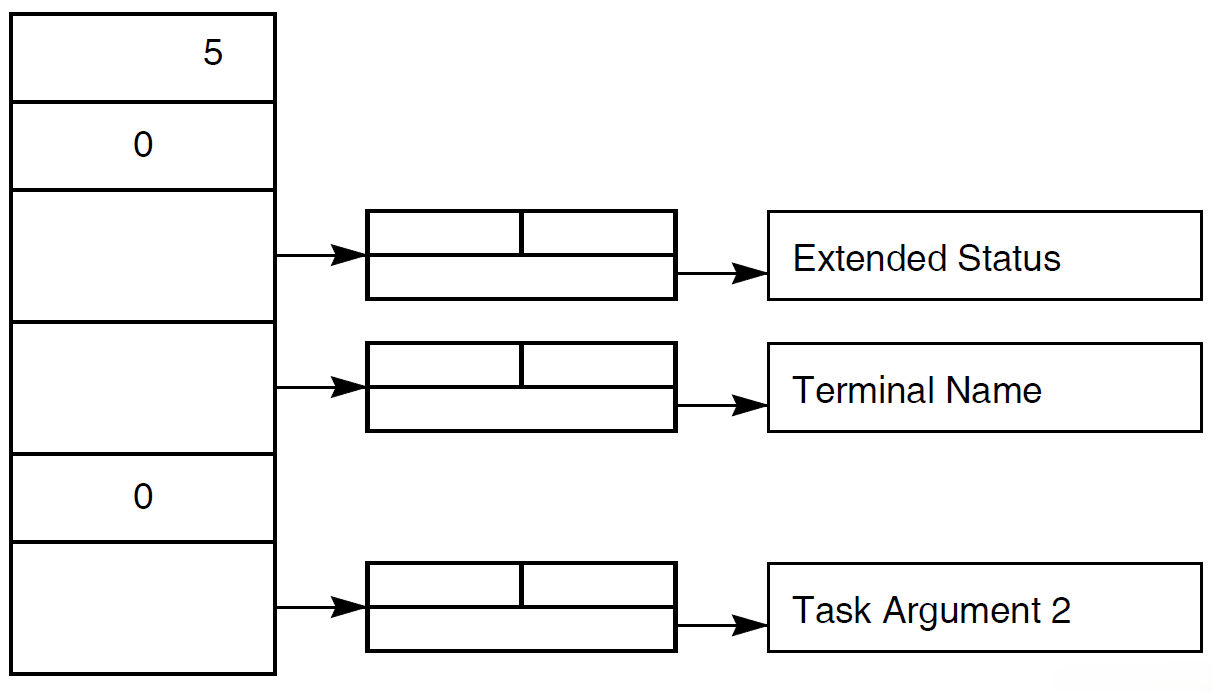
A.7.2. Argument List for a Task That Passes Only Stream I/O
Note
This method has been superseded by implementation of the exchange I/O ID feature. This figure is included for reference for agent programs that have already been developed. Use the exchange I/O ID in new agent programs.
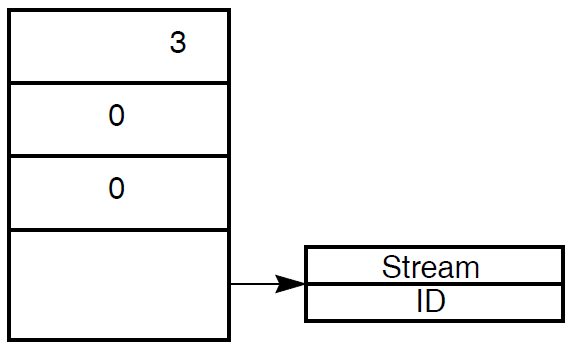
A.7.3. Argument List with Selection String, Extended Status, and Terminal I/O Defined
Note
This method has been superseded by implementation of the exchange I/O ID feature. This figure is included for reference for agent programs that have already been developed. Use the exchange I/O ID in new agent programs.
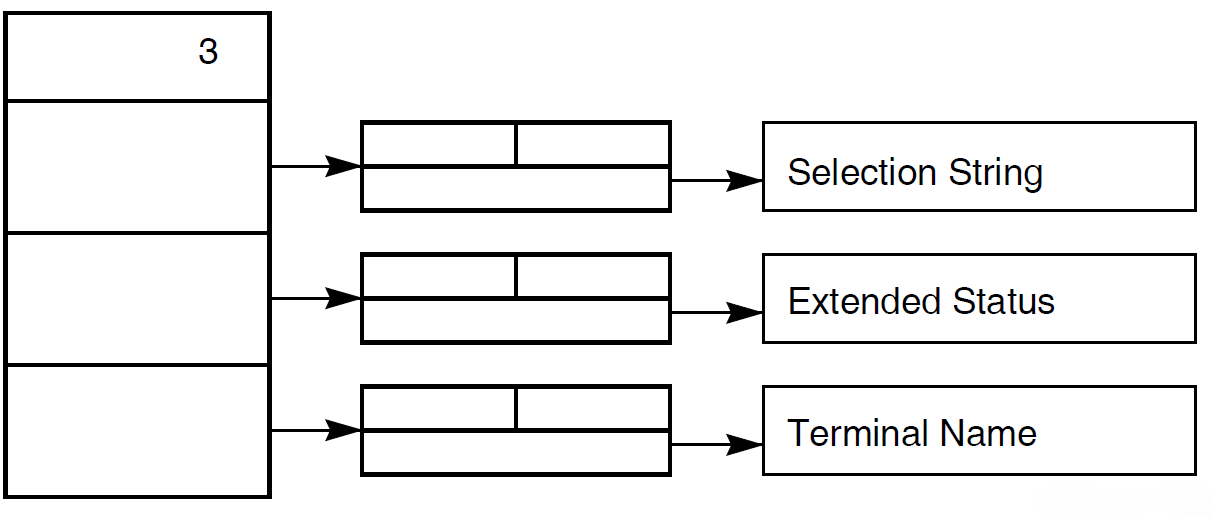
Detailed information about the ACMS$CALL, ACMS$START_CALL, ACMS$GET_PROCEDURE_INFO services and their parameters is available in Chapter 5, "Submitter Services".