VSI ACMS for OpenVMS ADU Reference Manual
- Software Version:
- ACMS for OpenVMS Version 5.3-3
- Operating System and Version:
- VSI OpenVMS Alpha Version 8.4-2L1 or higher
VSI OpenVMS IA-64 Version 8.4-1H1 or higher
Preface
1. About VSI
VMS Software, Inc. (VSI) is an independent software company licensed by Hewlett Packard Enterprise to develop and support the OpenVMS operating system.
2. Intended Audience
This manual is intended for all ACMS users.
This manual contains reference information about the commands and clauses of the Application Definition Utility (ADU) of VSI ACMS for OpenVMS (ACMS). To learn how to use the ADU, read VSI ACMS for OpenVMS Writing Applications.
3. Document Structure
|
Describes the commands for use with ADU. | |
|
Explains how to use %INCLUDE, which lets you include portions of other definitions in a definition. | |
|
Describes task and block step clauses, which define the work and actions of a task. | |
|
Describes the task group definition clauses, which name the tasks and servers in an application. | |
|
Describes application definition clauses, which name the task groups in the application and specify control characteristics for tasks and servers defined in the task group definition. | |
|
Describes menu clauses, which define menus in standard ACMS format. | |
|
Contains reference material for task clauses and phrases whose use is no longer recommended. | |
|
Describes documentation for ADU error messages. | |
|
Describes ACMS system workspaces. |
4. ACMS Help
ACMS and its components provide extensive online help.
DCL level help
Enter
HELP ACMSat the DCL prompt for complete help about theACMScommand and qualifiers, and for other elements of ACMS for which independent help systems do not exist. DCL level help also provides brief help messages for elements of ACMS that contain independent help systems (such as the ACMS utilities) and for related products used by ACMS (such as DECforms or Oracle CDD/Repository).ACMS utilities help
Each of the following ACMS utilities has an online help system:
ACMS Debugger ACMSGEN Utility
ACMS Queue Manager (ACMSQUEMGR)
Application Definition Utility (ADU)
Application Authorization Utility (AAU)
Device Definition Utility (DDU)
User Definition Utility (UDU)
Audit Trail Report Utility (ATR)
Software Event Log Utility Program (SWLUP)
The two ways to get utility-specific help are:
Run the utility and type
HELPat the utility prompt.Use the DCL
HELPcommand. At the "Topic?" prompt, type@followed by the name of the utility. Use the ACMS prefix, even if the utility does not have an ACMS prefix (except for SWLUP). For example:Topic? @ACMSQUEMGR Topic? @ACMSADU
However, do not use the ACMS prefix with SWLUP:
Topic? @SWLUP
Note
Note that if you run the ACMS Debugger Utility and then type
HELP, you must specify a file. If you ask for help from the DCL level with@, you do not need to specify a file.ACMSPARAM.COM and ACMEXCPAR.COM help
Help for the command procedures that set parameters and quotas is a subset of the DCL level help. You have access to this help from the DCL prompt, or from within the command procedures.
LSE help
ACMS provides ACMS-specific help within the LSE templates that assist in the creation of applications, tasks, task groups, and menus. The ACMS- specific LSE help is a subset of the ADU help system. Within the LSE templates, this help is context-sensitive. Type
HELP/IND (PF1-PF2)at any placeholder for which you want help.Error help
ACMS and each of its utilities provide error message help. Use
HELP ACMS
              ERRORS
from the DCL prompt for ACMS error message help. UseHELP ERRORSfrom the individual utility prompts for error message help for that utility.Terminal user help
At each menu within an ACMS application, ACMS provides help about terminal user commands, special key mappings, and general information about menus and how to select tasks from menus.
Forms help
For complete help for DECforms or TDMS, use the help systems for these products.
5. Related Documents
The following table lists the books in the VSI ACMS for OpenVMS documentation set.
| ACMS Information | Description |
|---|---|
| VSI ACMS Version 5.0 for OpenVMS Installation Guide | Description of installation requirements, the installation procedure, and post-installation tasks. |
| VSI ACMS for OpenVMS Getting Started | Overview of ACMS software and documentation. Tutorial for developing a simple ACMS application. Description of the AVERTZ sample application. |
| VSI ACMS for OpenVMS Concepts and Design Guidelines | Description of how to design an ACMS application. |
| VSI ACMS for OpenVMS Writing Applications | Description of how to write task, task group, application, and menu definitions using the Application Definition Utility. Description of how to write and migrate ACMS applications on an OpenVMS system. |
| VSI ACMS for OpenVMS Writing Server Procedures | Description of how to write programs to use with tasks and how to debug tasks and programs. |
| VSI ACMS for OpenVMS Systems Interface Programming | Description of using Systems Interface (SI) Services to submit tasks to an ACMS system. |
| VSI ACMS for OpenVMS ADU Reference Manual | Reference information about the ADU commands, phrases, and clauses. |
| VSI ACMS for OpenVMS Quick Reference | List of ACMS syntax with brief descriptions. |
| VSI ACMS for OpenVMS Managing Applications | Description of authorizing, running, and managing ACMS applications, and controlling the ACMS system. |
| VSI ACMS for OpenVMS Remote Systems Management Guide | Description of the features of the Remote Manager for managing ACMS systems, how to use the features, and how to manage the Remote Manager. |
| Online help | Online help about ACMS and its utilities. |
6. OpenVMS Documentation
The full VSI OpenVMS documentation set can be found on the VMS Software Documentation webpage at https://docs.vmssoftware.com.
7. VSI Encourages Your Comments
You may send comments or suggestions regarding this manual or any VSI document by sending electronic mail to the following Internet address: <docinfo@vmssoftware.com>. Users who have VSI OpenVMS support contracts through VSI can contact <support@vmssoftware.com> for help with this product.
8. Conventions
The following conventions are used in this manual:
| Ctrl/x | A sequence such as Ctrl/x indicates that you must press and hold the key labeled Ctrl while you press another key or a pointing device button. |
| PF1 x | A sequence such as PF1 x indicates that you must first press and release the key labeled PF1 and then press and release another key or a pointing device button. |
| Return | In the HTML version of this document, this convention appears as brackets rather than a box. |
| . . . |
A horizontal ellipsis in examples indicates one of the following
possibilities:
|
| ⋮ | A vertical ellipsis indicates the omission of items from a code example or command format; the items are omitted because they are not important to the topic being discussed. |
Monospace text | Monospace type indicates code examples and interactive screen displays. In the C programming language, monospace type in text identifies the following elements: keywords, the names of independently compiled external functions and files, syntax summaries, and references to variables or identifiers introduced in an example. In the HMTL version of this document, this text style may appear as italics. |
| - | A hyphen at the end of a command format description, command line, or code line indicates that the command or statement continues on the following line. |
| numbers | All numbers in text are assumed to be decimal unless otherwise noted. Nondecimal radixes—binary, octal, or hexadecimal—are explicitly indicated. |
| bold text | Bold text represents the introduction of a new term or the name of an argument, an attribute, or a reason. In the HMTL version of this document, this text style may appear as italics. |
| italic text | Italic text indicates important information, complete titles of manuals, or
variables. Variables include information that aries in system output (Internal error
number), in command lines
(/PRODUCER=name), and in command
parameters in text (where dd represents the predefined code for
the device type). |
| UPPERCASE | Uppercase text indicates the name of a routine, the name of a file, the name of a file protection code, or the abbreviation for a system privilege. In command format descriptions, uppercase text is an optional keyword. |
| UPPERCASE | In command format descriptions, uppercase text that is underlined is required. You must include it in the statement if the clause is used. |
| lowercase | In command format descriptions, a lowercase word indicates a required element. |
| <lowercase> | In command format descriptions, lowercase text in angle brackets indicates a required clause or phrase. |
| ( ) | In command format descriptions, parentheses indicate that you must enclose the options in parentheses if you choose more than one. |
| [ | | ] | In command format descriptions, vertical bars within square brackets indicate that you can choose any combination of the enclosed options, but you can choose each option only once. |
| { | | } | In command format descriptions, vertical bars within braces indicate that you must choose one of the options listed, but you can use each option only once. |
9. References to Oracle Products
VSI ACMS documentation set, to which this document belongs, refers to the following Oracle products by their full and abbreviated names:
| Full product name | Shortened product name |
|---|---|
| Oracle Common Data Dictionary | CDD |
| Oracle Rdb | Rdb |
| Oracle Database/DBMS | DBMS |
| Oracle Trace | Trace |
Chapter 1. Application Definition Utility Commands
Use Application Definition Utility (ADU) commands to create or change the definitions an ACMS application uses, or to monitor your own work or that of an ACMS application. You can issue ADU commands interactively or in a command file.
To create an ACMS application, you can use ADU commands to reset your CDD default directory during a session, and write, change, copy, delete, and compile definitions for tasks, task groups, menus, and applications. Other ADU commands let you build or rebuild task group, menu, and application database files.
To gather information about your work, you can use ADU commands to check the version of ADU on your system, log an interactive session to a file in your default directory for later reference, check if logging is active, and verify the work a command file performs during execution. To gather information about an ACMS application, you can use ADU commands to list the contents of task group, application, or menu database files, so you can check the consistency of procedure names, workspaces, and servers.
1.1. Explanations of Reference Page Terminology
Name | Lists the name of the clause, command, or phrase in bold |
Description | Explains what the clause, command, or phrase does |
Format | Lists the syntax of the clause, command, or phrase, including optional and required parts |
Keywords | List and explain ACMS reserved words |
Parameters | List and explain the parts of a clause, command, or phrase you must supply |
Default | Explains what ACMS does if you omit an optional clause, command, or phrase |
Qualifiers | List and explain modifiers and defaults for the commands |
Notes | List additional information about clauses, commands, or phrases |
Examples | List and explain sample clauses, commands, or phrases |
The commands and clauses are listed by alphabetical order in each chapter or section. In the reference chapters, reference information about each clause, command, or phrase begins at the top of a new page.
1.2. Starting and Stopping ADU
This section explains how to invoke the Application Definition Utility (ADU) and exit from it.
1.2.1. Starting ADU
There are three ways to invoke ADU. Two methods use startup qualifiers; the third allows you to enter the utility only in default mode. After invoking the utility, ACMS displays the ADU> prompt.
By using the
MCRcommandStart ADU by entering the following command at the DCL prompt:$MCR ACMSADUADU>Include startup command qualifiers on the MCR ACMSADU command line.
By defining a foreign command
Define a foreign command in your LOGIN.COM file to invoke ADU. Then, whenever you enter that command at the DCL prompt, you are in ADU.
Before using the foreign command ADU to invoke the utility, put the following definition in your LOGIN.COM file. Then process the LOGIN.COM by entering @LOGIN.COM at the DCL prompt to make the foreign command available for the current session. After the current session, the command is automatically defined whenever you log in.
The following definition creates ADU as the foreign command to invoke the utility:$ ADU :== $ACMSADU
After defining the foreign command and processing the login file, enter ADU at the DCL prompt to invoke the utility:$ADUADU>Include startup command qualifiers on the command line by using the command:$ADU /COMMAND=RESERVATIONSBy using the
RUNcommandEnter theRUNcommand at the DCL prompt to invoke ADU:$RUN SYS$SYSTEM:ACMSADUADU>Do not include ADU command qualifiers when invoking the utility with the
RUNcommand.
Table 1.1, ''Startup Qualifiers and Their Functions'' lists the startup command qualifiers and their functions. Use
these qualifiers when invoking ADU with the MCR command or a foreign command.
|
Qualifier |
Function |
|---|---|
|
Tells ADU whether or not to execute a startup command file when you invoke the utility.
By default, when you invoke ADU, it runs a command file named ADUINI.COM, located in your
default directory. To invoke a different startup command file, include its file
specification with the When you specify the |
|
By default, ADU creates a journal file that contains every keystroke made during your
ADU session. The journal file, named ADUJNL.JOU, is located in your default directory. The
journal file is saved if your ADU session is interrupted. When you exit normally (by using
the Use the |
|
/PATH=path-name |
Assigns a CDD directory. If you do not specify a path name, ADU uses the default CDD directory. |
|
If you specify the
|
1.2.2. Stopping ADU
|
Command |
Meaning |
|---|---|
|
EXIT |
Ends your ADU session and returns control to the DCL command level without issuing
any messages. Using the |
|
Ctrl/Z |
Ends your ADU session and returns control to the DCL command level without issuing any messages. |
|
Ctrl/Y |
Abruptly ends your ADU session and returns control to the DCL command level without displaying any messages. Using Ctrl/Y can leave your definitions in an inconsistent state; so, use this method of exiting from ADU only when other methods fail. |
1.3. Command Summary
This section summarizes the ADU commands and qualifiers. Table 1.3, ''Summary of ADU Commands'' lists the ADU commands and qualifiers, and describes their functions.
Commands and Qualifiers | Function |
|---|---|
| Runs a file containing utility commands and/or clauses. The commands in the file run as if you typed them interactively. |
| Permits you to switch control of your terminal from your current process to another process in your job. |
| Creates a database file that ACMS can use at run time. |
| Checks an application, task group, menu, or task definition for syntax errors, and writes the compilation results to a file. |
| Creates a copy of an application, menu, task, or task group definition from the dictionary and stores it with a new name in a new location in the dictionary. |
| Checks and stores valid application, task, or task group definitions in the dictionary. |
| Removes an application, menu, task, or task group definition from the dictionary. |
| Displays the contents of an application, menu, or task group database file. |
| Recalls the last command you typed, including any definition source, and starts a text editor, making the command or command and definition available for change. |
| Ends the ADU session and returns you to the DCL prompt. |
| Displays information about ADU commands and clauses. |
| Converts object definitions from OpenVMS files into binary database files that ACMS uses at run time. |
| Displays the specified application, menu, task, or task group definition stored in the dictionary. |
| Recalls an object definition from the dictionary and runs a text editor so you can change the definition. |
| Creates a new definition and replaces the old definition with the new one. |
| Puts the last command you typed, including any definition source, in the file you specify. |
| Sets the default directory in the dictionary. |
| Enables or disables utility logging. Logs information about the utility session to the default log file or to a file you specify. |
| Enables or disables the display of commands ADU processes from an indirect command file. |
| Displays your current dictionary default directory. |
| Displays whether utility logging is enabled or disabled and what the log file is. |
| Displays the version number of the utility. |
| Creates a subprocess of the current process. Can be used to leave ADU temporarily to execute a DCL command or run an OpenVMS image. |
1.4. Common ADU Command Qualifiers
The
/AUDITand/NOAUDITcommand qualifiers are common to theBUILD,COPY,CREATE,MODIFY, andREPLACEcommands.The
/LISTand/NOLISTcommand qualifiers are common to theBUILD,COMPILE,CREATE,LINK,MODIFY, andREPLACEcommands.The
/[NO]LOGcommand qualifier is common to theBUILD,COMPILE,COPY,CREATE,DELETE,LINK,MODIFY, andREPLACEcommands.The
/[NO]PRINTcommand qualifier is common to theBUILD,COMPILE,CREATE,DUMP,LINK,LIST,MODIFY, andREPLACEcommands.
Descriptions of these command qualifiers are listed here rather than under each command in the reference pages.
- /AUDIT [=audit-list]
/NOAUDIT Stores audit history information about the definition you are using.
The [=audit-list] parameter specifies either the audit information or where it comes from. The audit information can come from a default history list ADU supplies, from either the word or string specified in the audit-list parameter itself, or from the contents of one or several files specified in the audit-list parameter. The audit information can also come from a combination of these items.
The following list explains the audit information you can specify as an audit-list parameter:- Single-word audit text:
/AUDIT=VERSION1
In this example, the audit information comes from the single word that follows the qualifier. Quotation marks (" ") are optional because the text is one word.
- Multiple-word audit string:
/AUDIT="This is version 1"
In this example, the audit information comes from the multiple-word string that follows the qualifier. Quotation marks (" ") are required if the audit text contains spaces or special characters.
- File specification:
/AUDIT="@YOURDISK:[USER2]AUDIT.TXT"
In this example, the audit information comes from the contents of a file. ADU interprets each line of the file as an audit string. The file specification must be introduced with an at sign (@) and enclosed in quotation marks (" ").
- List of strings and/or file specifications:
/AUDIT=(VERSION1,"Bryan's Version","@EXTRAUD.SRC")
In this example, the audit information comes from a single word, a string, and a file. The entire list must be enclosed in parentheses. The items in the list must be separated with commas.
ADU does not accept more than 64 lines, entries, or records in an audit list or in an audit string you specify in an audit file specification.
The default history list entry that ADU supplies includes:Operation the command performed
Name of the user
User UIC and process name
Name of the utility
Date and time of the operation
The following example shows the default audit history list that accompanies an ADUBUILDcommand:Build by MORRISSEY (UIC [MORRISSEY]) in process MORRISSEY using ACMS ADU V4.0 on 9-MAR-1994 14:19:77.94 for program ADU.If you include an audit list with the
/AUDITqualifier, ADU supplies both the standard history list entry and the audit list you define.The
/NOAUDITqualifier prevents the creation of a history list entry.- /LIST [=list-file-spec]
/NOLIST Creates a list file containing messages that occurred during a command operation and the statistics for that operation. The file specification names the file in which you want to store the output listing. If you do not include a file specification, ADU derives the file specification using the full given name of the definition, including dollar signs ($) and underscores (_), and the default file type .LIS.
The
/NOLISTqualifier does not create a list file.The default in interactive mode is
/NOLIST. The default in batch mode is/LIST.- /LOG
/NOLOG (default) Displays a message indicating whether or not the operation was successful.
The default is
/NOLOG.- /PRINT
/NOPRINT (default) Sends the list file to the SYS$PRINT queue. If you use the
/PRINTqualifier without a/LISTqualifier, ADU creates, prints, and then deletes the list file./NOPRINTis the default.
@ (At sign) Command (ADU>)
@ (At sign) Command (ADU>) — Executes a command file containing ADU commands and/or ACMS definitions. Use this command to compile a definition without writing the definition interactively in ADU.
Format
Parameter
- command-file-spec
The name of the command file containing the commands and/or definitions you are submitting to ADU.
Notes
By default, the ADU @ (at sign) command executes a file with a file type .COM located in your default directory. If the file type is not .COM, you must specify the file type when you execute the command.
If the definition contains errors, ADU displays diagnostic messages and the lines
containing the errors. ADU does not display each line of the command file as it executes unless
you use the ADU SET VERIFY command.
Example
ADU>@PERS_APPL%ADU-I-NONODWLCR, Object 'PERS_APPL' does not exist, creating objectADU>
This example executes a command file, PERS_APPL.COM, that contains the definition for the ACMS application PERS_APPL. ADU compiles the definition, stores the object in the dictionary, and returns an informational message saying that ADU is creating the object.
ATTACH (ADU>)
ATTACH (ADU>) — Transfers control from one process to another process in your job. Use this command if you entered ADU from a subprocess and want to return to a higher process without exiting ADU. You can also use this command to enter a lower process without exiting from the current subprocess.
Format
Parameter
- process-name
The name of the process to which control is transferred.
Notes
The ATTACH command does not terminate the process from which you issue
it. To terminate the process and return to the next higher process in the process tree in your
job, log out.
Use the ADU ATTACH command the way you use the DCL
ATTACH command.
Example
ADU>ATTACH NEILSEN_1%DCL-S-RETURNED, control returned to process NEILSEN_1
This command returns control of your job to a previously created subprocess, NEILSEN_1.
The command does not terminate the process from which you issued the ATTACH
command.
BUILD (ADU>)
BUILD (ADU>) — Uses output from the CREATE command to build a database file
that ACMS can run. When used with the /STDL qualifier – first BUILD
GROUP /STDL, then BUILD APPLICATION /STDL – to translate ACMS
task group information to STDL format, first builds an intermediate-format World Wide Web (web)
database file and then, using the web database file, builds an STDL source file.
Format
| Command Qualifiers | Defaults |
|---|---|
|
/AUDIT[=audit-list] |
/AUDIT=standard-audit-string |
|
/NOAUDIT | |
|
/[NO]DEBUG |
/NODEBUG |
|
/LIST[=list-file-spec] |
/LIST (Batch) |
|
/NOLIST |
/NOLIST (Interactive) |
|
/[NO]LOG |
/NOLOG |
|
/OBJECT=(file-spec [,...] ) |
/NOOBJECT |
|
/NOOBJECT | |
|
/[NO]PRINT |
/NOPRINT |
|
/[NO]STDL |
/NOSTDL |
|
/[NO]SYSLIB |
/SYSLIB |
|
/[NO]SYSSHR |
/SYSSHR |
|
/USERLIBRARY=(file-spec [,...] ) |
/NOUSERLIBRARY |
|
/NOUSERLIBRARY |
Keywords
- APPLICATION
Builds an application database.
- GROUP
Builds a task group database.
- MENU
Builds a menu database.
Parameters
- path-name
The CDD path name of the definition you want the
BUILDcommand to process. When used with theBUILD GROUP /STDLcommand, path-name is the task group name; when used with theBUILD APPLICATION /STDLcommand, path-name is the application name.- database-file-spec
The file specification for the database file that the
BUILDcommand creates. This output file is a database file that ACMS uses at run time. TheBUILDcommand can create an application, task group, or menu database file; a special intermediate-format web database file; or a special application STDL file.If you do not name a database file when you build an application, task group, or menu definition, ADU uses the file named in the DEFAULT FILE clause of the definition. If the definition does not name a default database file, ACMS uses the full given name (including dollar signs and underscores) of the given name of the application, task group, or menu you are building.
The database produced by the
BUILDcommand depends on the type of definition you are building.When you build an application definition, the
BUILDcommand produces an application database (.ADB) file with a default .ADB file type.When you build a menu definition, the
BUILDcommand produces a menu database (.MDB) file with a default .MDB file type.When you build a task group definition, theBUILDcommand produces:A task database file – default file type: .TDB
One or more procedure server transfer module files – default file type: .OBJ
When you use the/STDLqualifier in two special processing stages --group_tasktranslation, thenapplication_grouptranslation – to translate ACMS task group information to STDL format, allowing you subsequently to build a Windows NT client interface that enables ACMS applications to be accessed by NT clients, theBUILDcommand produces:An intermediate-format web database file, produced by the
group_tasktranslation initiated withBUILD GROUP /STDL, containing task, task group, and record information and used as input inapplication_grouptranslation processing – default file type: .WDBAn STDL source file, produced by the
application_grouptranslation initiated byBUILD APPLICATION /STDL, containing a task group specification and related data type and record definitions and using as input an intermediate web database file fromgroup_tasktranslation processing – default file type: .STDL
For example:ADU> BUILD APPLICATION PERSONNEL PERS.ADB
The default directory is your current default directory. The default device is SYS$DISK, which must translate to a device name.
Qualifiers
- /AUDIT [=audit-list]
/NOAUDIT The
/AUDITand/NOAUDITqualifiers are common to several ADU commands. See Section 1.4, ''Common ADU Command Qualifiers'', which describes common qualifiers.- /[NO]DEBUG
Makes the contents of workspaces available for you to examine or deposit during a debugging session. Use this qualifier only when building a task group.
The
/NODEBUGqualifier makes the contents of workspaces unavailable during a debugging session.The default is
/NODEBUG.- /LIST [=list-file-spec]
/NOLIST The
/LISTand/NOLISTqualifiers are common to several ADU commands. See Section 1.4, ''Common ADU Command Qualifiers'', which describes common qualifiers.- /[NO]LOG
The
/[NO]LOGqualifier is common to several ADU commands. See Section 1.4, ''Common ADU Command Qualifiers'' which describes common qualifiers.- /OBJECT=(file-spec [,...] )
/NOOBJECT The
/OBJECTand/NOOBJECTqualifiers control whether or not object modules are searched for global symbol resolution during build group processing. You can use the/OBJECTqualifier to point to message files. The default is/NOOBJECT.- /[NO]PRINT
The
/[NO]PRINTqualifier is common to several ADU commands. See Section 1.4, ''Common ADU Command Qualifiers'' which describes common qualifiers.- /[NO]STDL
Translates an ACMS application's task headers and task group, task, and record definitions extracted from the CDD to an STDL task group specification, data type definitions, STDL record definitions, and task group headers with records as arguments. The translation takes place in two processing stages:
group_tasktranslation, which is initiated by theBUILD GROUP /STDLcommand, andapplication_grouptranslation, which is initiated by theBUILD APPLICATION /STDLcommand. You use the STDL output file to create the client interface that enables Windows NT clients to access ACMS applications.- /[NO]SYSLIB
The
/[NO]SYSLIBqualifier controls whether or not to search the default system libraries SYS$LIBRARY:IMAGELIB.OLB and SYS$LIBRARY:STARLET.OLB to resolve global symbols during build group processing. The default is/SYSLIB. The system libraries are not searched if you use the/NOSYSLIBqualifier. If you use both the/NOSYSLIBand/SYSSHRqualifiers, the/SYSSHRqualifier is ignored.- /[NO]SYSSHR
The
/[NO]SYSSHRqualifier controls whether or not to search SYS$LIBRARY:IMAGELIB.OLB to resolve global symbols during build group processing. The default is/SYSSHR.- /USERLIBRARY=(file-spec [,...] )
/NOUSERLIBRARY The
/USERLIBRARYand/NOUSERLIBRARYqualifiers control whether or not to search user-specified object libraries and shared image libraries to resolve global symbols during build group processing. The default is/NOUSERLIBRARY. If you use the/NOSYSLIBor/NOSYSSHRqualifier, you can specify the default system libraries SYS$LIBRARY:IMAGELIB.OLB or SYS$LIBRARY:STARLET.OLB with the/USERLIBRARYqualifier.
Notes
Use the DCL COPY command to copy the database file into the directory that ACMS$DIRECTORY points to. This requires that you have write access to ACMS$DIRECTORY.
Use the
ACMS/INSTALLoperator command to put the application database file into ACMS$DIRECTORY. You must be authorized to use theACMS/INSTALLcommand.
A menu database file can be in any directory. However, its location must match the file
specification of the user definition file (ACMSUDF.DAT) named by the User Definition Utility
/MDB qualifier. In general, keep menu database files in the directory
pointed to by ACMS$DIRECTORY. See VSI ACMS for OpenVMS Managing Applications for details
about using the User Definition Utility.
A task group database file (.TDB) can be in any directory. However, its location must match the file specification that is used in the TASK GROUPS clause of the application definition.
The BUILD MENU command moves all subordinate menus into the menu
database, as well as the menu (top menu) that you name in the BUILD command.
When you build a task group, ADU produces one task group database. ADU produces one procedure server object module for each procedure server named in the task group definition. The object module for each server is named in the DEFAULT OBJECT FILE subclause for that server. However, if you do not use the DEFAULT OBJECT FILE subclause for a server, ADU derives the name of the object file from the unique name of the server. ADU uses the full given name, including dollar signs ($) and underscores (_), for the default name of the object file.
To resolve global symbols, ACMS first searches, in order, the files specified with the
/OBJECT qualifier. If the global symbol is not found, ACMS searches, in
order, the libraries specified with the /USERLIBRARY qualifier. If the
symbol is still not found, ACMS then searches the default system libraries
SYS$LIBRARY:IMAGELIB.OLB and
SYS$LIBRARY:STARLET.OLB, in that order. Once a global symbol is
found, the search stops.
The /STDL qualifier translates an ACMS application's task headers and
task group, task, and record definitions (extracted from the CDD) to an STDL task group
specification, data type definitions, STDL record definitions, and task group headers with
records as arguments. The translation takes place in two processing stages: group task
translation, which is initiated by the BUILD GROUP /STDL command, and
application group translation, which is initiated by the BUILD APPLICATION
/STDL command.
Group Task Translation
Group task translation produces a temporary binary file containing ACMS task and task group information. Group task translation must be performed for the ACMS task group that comprises the application. The command syntax is:
In this format, acms_group_name refers to the name of the ACMS task group.
The /STDL qualifier directs ADU to output task and record information that is used for
completing the translation to STDL format. The output file produced by the /STDL qualifier has
a name in the format group.WDB.
The .WDB file type indicates the intermediate-format web database file. The
BUILD GROUP command writes the file to the default directory. See Chapter 4, "Task Group Definition Clauses" for information about the ADU task-group definition clause
DEFAULT TASK GROUP FILE.
The /NOSTDL qualifier instructs ADU not to produce the
intermediate-format file. The default qualifier is /NOSTDL.
Application Group Translation
Application group translation reads the task group name as specified in the application
and translates the intermediate-format task group file built from the group_task
translation. The command syntax is:
In this format, application_name refers to the name of an ACMS application.
The /STDL qualifier directs the translator during the processing
initiated by the ADU BUILD APPLICATION command to generate STDL code using
the intermediate-format group file that was created during the ADU BUILD
GROUP compilation. The output is a file with a name in the format
application_name.STDL.
ADU generates in the default directory an STDL source file containing a task group specification and related data type and record definitions. You use this file to create the client interface that enables Windows NT clients to access ACMS applications.
Examples
ADU>SET DEFAULT DISK1:[CDDPLUS]APPLICATIONADU>BUILD APPLICATION PERSONNEL PERSONNEL.ADB /LOG%ACMSCDU-I-BLDSRVNAM, Building server EMPLOYEE_SERVER%ACMSCDU-I-BLDTSKNAM, Building task EMPLOYEE%ACMSCDU-I-BLDTSKNAM, Building task DATR%ACMSCDU-I-BLDTSKNAM, Building task EDTR%ACMSCDU-I-BLDTSKNAM, Building task MAIL%ACMSCDU-I-WRITEADB, Writing ADB-ACMSCDU-I-BYTESWRIT, 1180 bytes (3 blocks)%ACMSCDU-S-APPBUILT, Application DISK1:[CDDPLUS]APPLICATION.PERSONNEL built into file'EXAMPLES$:[EXAMPLES]PERSONNEL.ADB;1'ADU>After setting the default CDD directory to DISK1:[CDDPLUS]APPLICATION, use the
BUILDcommand to process the Personnel application. The/LOGqualifier displays messages about the build operation and returns you to the ADU> prompt. The last message indicates that theBUILDcommand created the database file and put it in the PERSONNEL.ADB file located in your current default directory.ADU>BUILD MENU DISK1:[CDDPLUS]EXAMPLES.EMPLOYEE_MENU MENU.MDB /LOG%ACMSCDU-I-PROCTASK, Processing task 'EMPLOYEE'%ACMSCDU-I-MENUNAME, Menu named 'EMPLOYEE_MENU'%ACMSCDU-I-LODMENNAM, Loading menu%ACMSCDU-I-MENPTHLOD, Menu CDD object 'DISK1:[CDDPLUS]EXAMPLES.EMPLOYEE_ MENU' loaded%ACMSCDU-I-PROCMENU, Processing menu 'UTILITY_MENU'%ACMSCDU-I-PROCTASK, Processing task 'DATR'%ACMSCDU-I-PROCTASK, Processing task 'EDTR'%ACMSCDU-I-PROCTASK, Processing task 'MAIL'%ACMSCDU-I-WRITEMDB, Writing MDB-ACMSCDU-I-BYTESWRIT, 1128 bytes (3 blocks)%ACMSCDU-S-MENBUILT, Menu DISK1:[CDDPLUS]EXAMPLES.EMPLOYEE_MENU built into file'EXAMPLES$:[EXAMPLES]MENU.MDB;1'The
BUILDcommand in this example builds a menu using the menu definition in the CDD directory EXAMPLES with the given name EMPLOYEE_MENU. The/LOGqualifier confirms that the output database file MENU.MDB is in your default directory and that the associated tasks and submenus were built using the main menu definition.ADU>BUILD GROUP AVERTZ_CDD_GROUP:VR_TASK_GROUP -_ADU>AVERTZ_TDB:VR_TASK_GROUP.TDB/OBJECT=AVERTZ_OBJ:VRMSG.OBJThe
BUILDcommand in this example builds a task group using the task group definition in the CDD directory AVERTZ_CDD_GROUP with the given name VR_TASK_GROUP. The/OBJECTqualifier instructs ADU to use the VRMSG.OBJ message file to resolve symbols during processing.
COMPILE (ADU>)
COMPILE (ADU>) — Checks an application, task group, menu, or task definition for syntax errors, and writes the compilation results to a file.
Format
| Command Qualifiers | Defaults |
|---|---|
|
/DIAGNOSTICS[=diagnostics-file-spec] |
/NODIAGNOSTICS |
|
/LIST [=list-file-spec] |
/NOLIST |
|
/LOG |
/NOLOG |
|
/OUTPUT [=output-file-spec] |
/NOOUTPUT |
|
|
/NOPRINT |
Keywords
- APPLICATION
Compiles an application definition.
- GROUP
Compiles a task group definition.
- MENU
Compiles a menu definition.
- TASK
Compiles a task definition.
Parameters
- reference-name
The name by which the ACMS entity to be compiled should be referenced in other definitions.
For tasks, this name is used in the following ways:In a task definition when the task is called from another task (CALL TASK
<task-name>)In a group definition in the TASK DEFINITION IS
<task-name> clause.
For menus, this name is used when a menu entry is another menu (MENU IS
<menu-name>).
- definition-file-spec
The file specification of the source definition file.
Qualifiers
- /DIAGNOSTICS [=diagnostics-file-spec]
/NODIAGNOSTICS Tells ADU to produce a diagnostics file that LSE uses when you issue the LSE
REVIEWcommand. ADU places the diagnostics file in your default directory. If you use the/DIAGNOSTICSqualifier without specifying a diagnostics file specification, ADU creates a diagnostics file that has the entity name with a file type .DIA./NODIAGNOSTICSis the default in batch or interactive mode.- /LIST [=list-file-spec]
/NOLIST The
/LISTand/NOLISTqualifiers are common to several ADU commands. See Section 1.4, ''Common ADU Command Qualifiers'', which describes common qualifiers.- /[NO]LOG
The
/[NO]LOGqualifier is common to several ADU commands. See Section 1.4, ''Common ADU Command Qualifiers'', which describes common qualifiers.- /OUTPUT [=output-file-spec]
/NOOUTPUT The default file specification to use to determine the file in which to put the results of the compilation. The
/NOOUTPUTqualifier allows you to check for compilation errors without producing an output file.- /[NO]PRINT
The
/[NO]PRINTqualifier is common to several ADU commands. See Section 1.4, ''Common ADU Command Qualifiers'', which describes common qualifiers.
Notes
COMPILE command to submit a source definition to ADU
interactively or from a command file. ADU compiles the definition. If ADU finds no syntax
errors, it stores the compilation results in a file. ADU determines the output file
specification using several pieces of information. The defaults are as follows: The device defaults to the current device.
The directory defaults to the current directory.
The file name defaults to the name parameter.
The file extension defaults to .ABJ for application result files, .GBJ for task group result files, .MBJ for menu result files, and .TBJ for task result files.
Any of the components of the file specification can be overridden by supplying them with
the /OUTPUT qualifier.
Examples
ADU>COMPILE TASK PERSONNEL PERSONNEL.TDFADU>This command processes a task source definition in the PERSONNEL.TDF file in your current directory and puts the compilation results in the PERSONNEL.TBJ file.
ADU>COMPILE GROUP INVENTORY_GROUP INVENTORY /OUTPUT = USERD$:[INVENTORY.OBJ]ADU>This command processes a task group source definition in the INVENTORY.GDF file in your current directory and puts the compilation results in USERD$:[INVENTORY.OBJ]INVENTORY_GROUP.GBJ.
COPY (ADU>)
COPY (ADU>) — Creates a copy of a definition. Use this command to copy a definition in your own
directory or in a different dictionary directory. Instead of rewriting an entire definition,
you can save time by copying a definition of source code. Then change parts of the definition
to suit your specific application. You can also use the COPY command to
convert definitions from Dictionary Management Utility (DMU) to Common Dictionary Operator
(CDO) format.
Format
| Command Qualifiers | Defaults |
|---|---|
|
/AUDIT[=audit-list] |
/AUDIT=standard-audit-string |
|
/NOAUDIT | |
|
/[NO]LOG |
/NOLOG |
Keywords
- APPLICATION
Makes a copy of an application definition.
- GROUP
Makes a copy of a task group definition.
- MENU
Makes a copy of a menu definition.
- TASK
Makes a copy of a task definition.
Parameters
- src-path-name
The CDD path name of the definition you want to copy.
- dst-path-name
The CDD path name to use for storing the definition you are copying.
Qualifiers
- /AUDIT [=audit-list]
/NOAUDIT The
/AUDITand/NOAUDITqualifiers are common to several ADU commands. See Section 1.4, ''Common ADU Command Qualifiers'', which describes common qualifiers.- /[NO]LOG
The
/[NO]LOGqualifier is common to several ADU commands. See Section 1.4, ''Common ADU Command Qualifiers'', which describes common qualifiers.
Notes
Copy the definition to a temporary dictionary directory.
Delete the original source definition.
Copy the definition from the temporary directory back to the source directory.
Delete the temporary directory by deleting its contents.
You must use the temporary directory because the CDD dictionaries share name space.
Example
ADU>SET DEFAULT DISK1:[CDDPLUS]APPLICATIONADU>COPY APPLICATION UPDATE_ONE UPDATE_TWO/LOG%ACMSCDU-S-APPCOPIED, Application DISK1:[CDDPLUS]APPLICATION.UPDATE_ONEcopied to DISK1:[CDDPLUS]APPLICATION.UPDATE_TWOADU>
This COPY command creates a copy of the dictionary definition
UPDATE_ONE in your default CDD directory. To use the new definition, set your default to
DISK1:[CDDPLUS]APPLICATION and use the given name UPDATE_TWO. The
/LOG qualifier confirms that the COPY command
successfully created a new copy of the application definition. Control returns to the ADU>
prompt.
CREATE (ADU>)
CREATE (ADU>) — Checks an application, task group, menu, or task definition for syntax errors, and stores valid new definitions in the dictionary. Use this command to create the components of an ACMS application.
Format
| Command Qualifiers | Defaults |
|---|---|
|
/AUDIT[=audit-list] |
/AUDIT=standard-audit-string |
|
/NOAUDIT | |
|
/DIAGNOSTICS[=diagnostics-file-spec] |
/NODIAGNOSTICS |
|
/NODIAGNOSTICS | |
|
/LIST[=list-file-spec] |
/LIST (Batch) |
|
/NOLIST |
/NOLIST (Interactive) |
|
/[NO]LOG |
/NOLOG |
|
/[NO]PRINT |
/NOPRINT |
Keywords
- APPLICATION
Creates an application definition.
- GROUP
Creates a task group definition.
- MENU
Creates a menu definition.
- TASK
Creates a task definition.
Parameters
- path-name
The CDD path name that the
CREATEcommand uses to store the processed definition.- file-spec
The file specification of the source definition file.
Qualifiers
- /AUDIT [=audit-list]
/NOAUDIT The
/AUDITand/NOAUDITqualifiers are common to several ADU commands. See Section 1.4, ''Common ADU Command Qualifiers'', which describes common qualifiers.- /DIAGNOSTICS [=diagnostics-file-spec]
/NODIAGNOSTICS Tells ADU to produce a diagnostics file that LSE uses when you issue the LSE
REVIEWcommand. ADU places the diagnostics file in your default directory. If you use the/DIAGNOSTICSqualifier without specifying a diagnostics file specification, ADU creates a diagnostics file that has the entity name with a file type .DIA./NODIAGNOSTICSis the default in batch or interactive mode.- /LIST [=list-file-spec]
/NOLIST The
/LISTand/NOLISTqualifiers are common to several ADU commands. See Section 1.4, ''Common ADU Command Qualifiers'', which describes common qualifiers.- /[NO]LOG
The
/[NO]LOGqualifier is common to several ADU commands. See Section 1.4, ''Common ADU Command Qualifiers'', which describes common qualifiers.- /[NO]PRINT
The
/[NO]PRINTqualifier is common to several ADU commands. See Section 1.4, ''Common ADU Command Qualifiers'', which describes common qualifiers.
Notes
Use the CREATE command to submit a source definition to ADU
interactively or from a command file. ADU compiles the definition. If ADU finds no syntax
errors, it stores the new object definition in the dictionary.
When you use the CREATE command interactively, ADU displays the
ADUDFN> prompt for you to type the definition. If you make typing mistakes, use the
EDIT command at the ADU> prompt and correct your errors without retyping
the entire definition. ADU does not store a definition containing errors in the dictionary.
If you do not include a file specification for your definition, ADU assigns the default file type of .ADF for application source files, .GDF for task group source files, .MDF for menu source files, and .TDF for task definition source files.
When you create a new definition, it is a good idea to use the REPLACE
command in a command file instead of the CREATE command. The
REPLACE command stores new definitions or replaces existing definitions in
the dictionary. The CREATE command processes new definitions only.
If you use the /DIAGNOSTICS qualifier, ADU creates an LSE diagnostics
file every time you issue the command. LSE uses the diagnostics file to help you debug your
definitions with the LSE REVIEW command.
If you use the /DIAGNOSTICS qualifier in a command file, ADU creates a
diagnostics file every time you run the command file. To save disk space, use the DCL
PURGE or DCL DELETE command to reduce the number of
versions in your default directory or delete unneeded diagnostics files.
Examples
ADU>CREATE APPLICATION EMPLOYEE PERSONNEL.ADFADU>This command processes an application source definition in the file PERSONNEL.ADF in your default directory and puts the definition in the dictionary.
ADU>SET DEFAULT DISK1:[CDDPLUS]DEPARTMENTADU>CREATE GROUP GROUP_ONE TSK/LOG%ADU-S-TGPCREATE, task group GROUP_ONE createdADU>After setting the default to DISK1:[CDDPLUS]DEPARTMENT, you can specify the path name with just the given name GROUP_ONE. This saves you the trouble of specifying the entire path name each time you use the dictionary. The keyword to use in creating a task group is GROUP. The
CREATEcommand finds the source definition file in TSK.GDF in your default directory. Because you omit the file type from the source definition file specification, the ADU assigns a file type of .GDF. ADU displays a message indicating that the create operation was successful.
DELETE (ADU>)
DELETE (ADU>) — Removes a definition from the dictionary. Use this command when you no longer need the components of an ACMS application.
Format
| Command Qualifiers | Defaults |
|---|---|
|
/[NO]CONFIRM |
/NOCONFIRM |
|
/[NO]LOG |
/NOLOG |
Keywords
- APPLICATION
Deletes an application definition.
- GROUP
Deletes a task group definition.
- MENU
Deletes a menu definition.
- TASK
Deletes a task definition.
Parameter
- path-name
The CDD path name of the definition to delete.
Qualifiers
- /[NO]CONFIRM
Returns information about the dictionary definition you want to delete and prompts you for confirmation before deleting the definition. The
/NOCONFIRMqualifier prevents ADU from prompting you for confirmation.The default is
/NOCONFIRM.- /[NO]LOG
The
/[NO]LOGqualifier is common to several ADU commands. See Section 1.4, ''Common ADU Command Qualifiers'' which describes common qualifiers.
Examples
ADU>DELETE MENU MENU_ONE/LOG%CDU-S-MENDELETE, menu DISK1:[CDDPLUS]EXAMPLE.MENU_ONE deletedADU>This example deletes the dictionary menu MENU_ONE in your default dictionary directory. The
/LOGqualifier displays a message telling you the menu definition was successfully deleted.ADU>DELETE APPLICATION AFP.UPDATE_EMPLOYEEThis example deletes an application definition with the path name AFP.UPDATE_EMPLOYEE. If you omit the
/LOGqualifier, ADU does not return a message indicating that the definition was deleted.
DUMP (ADU>)
DUMP (ADU>) — Displays the contents of an application, menu, or task group database file. The
DUMP command provides information about definitions that programmers use
for cross-referencing and tracking pieces to debug an ACMS application. The
DUMP command provides information in one listing, that is usually located
in several different source files. Use this command for references to servers, workspaces,
logical and given names, step names, and other components in an ACMS application.
Format
| Command Qualifiers | Defaults |
|---|---|
|
/OUTPUT[=file-spec] |
/NOOUTPUT |
|
/NOOUTPUT | |
|
/[NO]PRINT |
/NOPRINT |
Keywords
- APPLICATION
Displays the contents of an application database file.
- GROUP
Displays the contents of a task group database file.
- MENU
Displays the contents of a menu database file.
Parameter
- database-file-spec
Names the application (.ADB), task group (.TDB), or menu (.MDB) database file whose contents you want to see. File types default to .ADB for application databases, .TDB for task group databases, and .MDB for menu databases. The default device and directory are your current default device and directory.
Qualifiers
- /OUTPUT [=file-spec]
/NOOUTPUT Names the file to which ADU writes the output from the
DUMPcommand. If you do not use the/OUTPUTqualifier, ADU displays the dump information. If you use/OUTPUTbut do not name a file, ADU writes the dump information to a default file in your current default directory. The default file is named ADULIS.LIS.The
/NOOUTPUTqualifier displays dump information but does not create a file.The default is
/NOOUTPUT.- /[NO]PRINT
The
/[NO]PRINTqualifier is common to several ADU commands. See Section 1.4, ''Common ADU Command Qualifiers'' which describes common qualifiers.
Notes
The DUMP command displays summary information about menus, tasks, task
groups, and applications in the database. That information includes, among other items, the
file size, number of servers, and tasks in the database. To use this command, the application
does not have to be active.
DUMP APPLICATION command lists: Application user name and default directory
Number of application and server logicals
Given names for task group, server, and user
Maximum number of server processes
Maximum number of task instances
Creation and deletion intervals and delays
Task index and application server indexes
Application and server logical name tables
Task type (local or global)
Task status (enabled or disabled)
Server workspace mapping (workspaces protected or not protected)
Application monitoring interval
Transaction timeout
DUMP GROUP command lists: - Summary information about the group, including:
Number of each type of workspace
Number of servers and tasks
Form files
Request libraries
Message files
- Summary information about workspaces the group uses, including:
Index number
Name
Size
Owner
Type (task or group)
Initial contents (in hexadecimal and character format)
- Summary information about servers the group uses, including:
Group server name
User name
User name attributes
Image file name, type, and index number
Whether the server is reusable or is to be run down if the task is canceled
- Summary information about tasks in the group, including:
Task name, index number, input/output type
Workspaces that the task references
Workspace index number
Block work
Cancelable status of the task
Workspaces
- Summary information about each step in a task, including:
Name and index
Attributes
Work
Action
Exception handler
Workspaces
Total workspace size
Recovery
Sequencing action
DUMP MENU command lists summary information about menus in the
application's menu tree, including: Application and task names
Number of entries per screen
- Summary information about each entry, including:
Name
Number
Status
Type
Menu header
Menu node and request names
You can terminate the output from the DUMP MENU, DUMP
APPLICATION, and DUMP GROUP commands by pressing
Ctrl/C.
Example
ADU> DUMP MENU ACMS$EXAMPLES:ADSAMPLE.MDB/OUTPUT=ADSAMPLE.DMPThis command dumps the contents of the menu database file ADSAMPLE.MDB that exists in the directory ACMS$EXAMPLES into a new file named ADSAMPLE.DMP in the current default directory.
EDIT (ADU>)
EDIT (ADU>) — Invokes a text editor. Use this command to correct errors in the last command line or source definition you submitted to ADU.
Format
Notes
When you invoke the EDIT command, ADU writes the last command line or
definition to a temporary file in your default directory. If you enter ADU and do not issue a
command before invoking EDIT, ADU gives you an empty file.
The file name of this temporary file is derived from your OpenVMS process identification
number so each editing file has a unique name. The names of these temporary files follow the
format ADU_C<PID>.COM, where <PID> is your OpenVMS
process identification number. ADU spawns a subprocess and translates the system logical
ADU$EDIT to invoke a text editor.
By default, the EDIT command uses the EDT text editor. You can change
the default so the EDIT command invokes the LSE text editor. For more
information on changing the default editor, see VSI ACMS for OpenVMS Writing Applications.
To correct an error while creating or replacing a source definition, complete the
definition and return to the ADU> prompt before issuing the EDIT command.
You cannot issue the EDIT command from the ADUDFN> prompt.
When you exit the editor after correcting a command line or definition, ADU invokes the
ADU_C<PID>.COM file containing the corrected command or definition. If a
corrected definition is free of errors, ADU creates or replaces the new definition in the
dictionary as though you typed it interactively. If a corrected command line is free of errors,
ADU executes the command line. ADU then deletes the ADU_C<PID>.COM file.
If the command line or definition contains errors, ADU displays diagnostic messages and
deletes the ADU_C<PID>.COM file. If you leave the editor abnormally, ADU
deletes the ADU_C<PID>.COM file.
Example
ADU>REPLACE GROUP GROUP_ONE TSK.GDB/LOG%ADU-E-ERRINP, error on input file ACMS$EXC[EXAMPLE]TSK.GDB;-RMS-E-FNF, file not found%ADU-E-NOTGPREP, no task group replacedIn this example, ADU finds an error when it processes the
REPLACEcommand. The source file should be TSK.GDF.To edit the command line, type
EDITat the ADU> prompt:ADU>EDITADU creates the file ADU_C
<PID>.COM in your default directory and places your previous command in the file. ADU spawns a subprocess, and translates the system logical ADU$EDIT to invoke the text editor.You can correct the command line in the editing file:
REPLACE GROUP GROUP_ONE TSK.GDF/LOG
*exit
When you exit the editor, the screen displays the following message:
SYS$32T:[MARTOCCHIO]ADU_C23A00284.COM;1 1 LINE
The
REPLACEcommand now compiles correctly. ADU stores the new definition in the dictionary, deletes the ADU_C23A00284.COM file, and displays a message to confirm the successful operation:%ADU-S-TGPREPLAC, task group DISK1:[CDDPLUS]EXAMPLE.GROUP_ONE replacedADU>
EXIT Command (ADU>)
EXIT Command (ADU>) — Ends the current ADU session and returns to the DCL prompt. Use this command when you finish using ADU and want to leave the utility.
Format
Note
Pressing Ctrl/Z at the ADU> prompt is equivalent to using the
EXIT command.
ADU>EXIT$Typing
EXITat the ADU> prompt ends the ADU session and returns you to the DCL prompt.ADU>EX$This example shows that you can exit ADU by typing the first two characters of the
EXITcommand.
HELP (ADU>)
HELP (ADU>) — Displays information about ADU commands and clauses. Use this command to obtain instructions on the use of ADU commands, information about ADU clauses and definitions, or error messages generated by ADU.
Format
| Command Qualifiers | Defaults |
|---|---|
|
/[NO]PROMPT |
/PROMPT |
Parameter
- topic
Names one or more topics about which you want information.
Qualifiers
- /[NO]PROMPT
Prompts you for topics about which you want information. Always type the
/PROMPTqualifier immediately after theHELPkeyword.The
/NOPROMPTqualifier keeps ADU from prompting you for topics. After ADU displays the information you requested, it returns directly to the ADU> prompt without displaying the Topic? prompt. Always type the/NOPROMPTqualifier immediately after theHELPkeyword.The default is
/PROMPT.
Notes
ADU HELP follows the same conventions as the OpenVMS HELP facility.
Press Return at the HELP prompt to move to a higher or more general level in the HELP hierarchy.
The HELP text is in the file SYS$HELP:ACMSADU.HLB. You can modify it using the standard OpenVMS facilities.
Example
ADU>HELPInformation available: %INCLUDE & @ APPLICATION ATTACH BUILD Command_Recall COPY CREATE DELETE DUMP EDIT Errors EXIT GROUP HELP KEYPAD LIST LSE MENU MODIFY REPLACE SAVE SET SHOW SPAWN STEPS TASK Topic?
In this example, the HELP command displays the ADU help that is
available. Type one of these topics at the Topic? prompt to get the information
you need.
Topic? SHOWSHOW
Specifies that you wish to choose one of the SHOW operations.
Format:
SHOW keyword
Valid keywords are DEFAULT, LOG, and VERSION.
Additional information available:
DEFAULT LOG VERSION
SHOW Subtopic? This command displays HELP information about the SHOW command and
displays a prompt at which you can get information about the three SHOW
command keywords.
LINK (ADU>)
LINK (ADU>) — Converts object definitions from OpenVMS files into binary database files that ACMS
uses at run time. This LINK command is executed from within ADU. Do not
confuse it with the DCL LINK command.
Format
| Command Qualifiers | Defaults |
|---|---|
|
/AUDIT[=audit-list] |
/AUDIT=standard-audit-string |
|
/NOAUDIT | |
|
/[NO]DEBUG |
/NODEBUG |
|
/LIST[=list-file-spec] |
/LIST (Batch) |
|
/NOLIST |
/NOLIST (Interactive) |
|
/[NO]LOG |
/NOLOG |
|
/OBJECT=(file-spec [,...] ) |
/NOOBJECT |
|
/NOOBJECT | |
|
/[NO]PRINT |
/NOPRINT |
|
/[NO]STDL |
/NOSTDL |
|
/[NO]SYSLIB |
/SYSLIB |
|
/[NO]SYSSHR |
/SYSSHR |
|
/USERLIBRARY=(file-spec [,...] ) |
/NOUSERLIBRARY |
|
/NOUSERLIBRARY |
Keywords
- APPLICATION
Builds an application database.
- GROUP
Builds a task group database.
- MENU
Builds a menu database.
Parameters
- compile-result-file-spec
The file that contains the compilation results of the object to be linked. The file name component of the file specification must be supplied. If the file specification is not fully qualified, the following defaults are used: current device; current directory; and a file type of .ABJ for applications, .GBJ for task groups, and .MBJ for menus. When used with the
LINK GROUP
         /STDL
command, path-name is the task group name; when used with theLINK APPLICATION /STDLcommand, path-name is the application name.- database-file-spec
The file specification for the database file that the
LINKcommand creates. This output file is a database file that ACMS uses at run time. TheLINKcommand can create an application, task group, or menu database file.If you do not name a database file when you link an application, task group, or menu definition, ADU uses the file named in the DEFAULT APPLICATION FILE, DEFAULT GROUP FILE, or DEFAULT MENU FILE clause in the application, task group, or menu definition. If you do not use the DEFAULT APPLICATION FILE, DEFAULT GROUP FILE, or DEFAULT MENU FILE clause, ADU derives the database file specification from the given name of the application, task group, or menu. ACMS uses the full given name, including dollar signs ($) and underscores (_), for the default database file name.
The default file type for an application database file is .ADB, for a menu database file it is .MDB, and for a task group database file it is .TDB.
The default directory is your current default directory. The default device is SYS$DISK, which must translate to a device name.
Qualifiers
- /[NO]DEBUG
Creates symbols for the ACMS Task Debugger. These symbols are appended to the task group database (.TDB) file. Use this qualifier to examine workspaces in the ACMS debugger or deposit workspaces into the debugger. You can use this qualifier only when linking a task group.
The
/NODEBUGqualifier makes the contents of workspaces unavailable during a debugging session.The default is
/NODEBUG.- /LIST [=list-file-spec]
/NOLIST The
/LISTand/NOLISTqualifiers are common to several ADU commands. See Section 1.4, ''Common ADU Command Qualifiers'', which describes common qualifiers.- /[NO]LOG
The
/[NO]LOGqualifier is common to several ADU commands. See Section 1.4, ''Common ADU Command Qualifiers'' which describes common qualifiers.- /OBJECT=(file-spec [,...] )
/NOOBJECT Controls whether object modules are searched for global symbol resolution during link group processing.
The default is
/NOOBJECT.- /[NO]PRINT
The
/[NO]PRINTqualifier is common to several ADU commands. See Section 1.4, ''Common ADU Command Qualifiers'', which describes common qualifiers.- /REFERENCED_OBJECT_DEFAULT
- The default file specification used to find the referenced compilation results. This qualifier is used in the following cases:
When linking a task group, ADU uses this qualifier to find the compilation results for all of the tasks that are referenced by the task group being linked.
When linking a menu, ADU uses this qualifier to find the compilation results for all of the menus that are referenced by the menu being linked.
You cannot specify the file name with this qualifier.
- /[NO]STDL
Translates an ACMS application's record definitions extracted from the CDD along with the .OBJ files for task headers and task group and task definitions to an STDL task group specification, data type definitions, STDL record definitions, and task group headers with records as arguments. The translation takes place in two processing stages:
group_tasktranslation, which is initiated by theLINK GROUP /STDLcommand, andapplication_grouptranslation, which is initiated by theLINK APPLICATION /STDLcommand. You use the STDL output file to create the client interface that enables Windows NT clients to access ACMS applications.- /[NO]SYSLIB
The
/[NO]SYSLIBqualifier controls whether or not to search the default system libraries SYS$LIBRARY:IMAGELIB.OLB and SYS$LIBRARY:STARLET.OLB to resolve global symbols during link group processing. The default is/SYSLIB. The system libraries are not searched if you use the/NOSYSLIBqualifier. If you use both the/NOSYSLIBand/SYSSHRqualifiers, the/SYSSHRqualifier is ignored.- /[NO]SYSSHR
The
/[NO]SYSSHRqualifier controls whether or not to search SYS$LIBRARY:IMAGELIB.OLB to resolve global symbols during link group processing. The default is/SYSSHR.- /USERLIBRARY=(file-spec [,...] )
/NOUSERLIBRARY The
/USERLIBRARYand/NOUSERLIBRARYqualifiers control whether or not to search user-specified object libraries and shared image libraries to resolve global symbols during link group processing. The default is/NOUSERLIBRARY. If you use the/NOSYSLIBor/NOSYSSHRqualifier, you can specify the default system libraries SYS$LIBRARY:IMAGELIB.OLB or SYS$LIBRARY:STARLET.OLB with the/USERLIBRARYqualifier.
Notes
The device defaults to the current device.
The directory defaults to the current directory.
The file extension defaults to .ABJ for application result files, .GBJ for task group result files, and .MBJ for menu result files.
Any of these components of the file specification can be overridden by supplying them in
the /REFERENCED_OBJECT_ DEFAULT qualifier. ADU uses the name of the entity
that is being pulled in by the link as the file name. ADU produces a procedure server object
module for each procedure server named in the task group definition.
ADU derives the file name from the unique name of the server (from the SERVER IS clause).
If you do not use the DEFAULT OBJECT FILE subclause, ADU derives the name of the server object file from the unique name of the server. ADU uses the full given name, included dollar signs ($) and underscores (_). The file is written to the same directory as the task group database file with a file type of .OBJ.
Examples
ADU>LINK GROUP employee_groupThis command builds a task group database using the task group result file from a previous
COMPILEcommand. The task group result file is in the current directory with the name of employee_group.GBJ. The output file from theLINKcommand will have the name employee_group.TDB.ADU>LINK APPL employee_applThis command builds an application database using the application result file from a previous
COMPILEcommand. The application result file is in the current directory with the name of employee_appl.ABJ. The output file from theLINKcommand will have the name employee_appl.ADB.ADU>LINK MENU employee_menuThis command builds an menu database using the menu result file from a previous
COMPILEcommand. The menu result file is in the current directory with the name of employee_menu.MBJ. The output file from theLINKcommand will have the name employee_menu.MDB.ADU>LINK GROUP group_fields/STDLThis command causes ADU to output task and record information that is used for the final translation to STDL. The output file will have the name group_fields.WDB.
ADU>LINK APPL employee_appl/STDLThis command causes ADU to output STDL code using the intermediate format group file that was created during the ACMSADU COMPILE GROUP compilation. The output file will have the name employee_appl.STDL.
LIST (ADU>)
LIST (ADU>) — Displays the contents of a definition in a dictionary directory. Use this command without a qualifier to display a definition on the screen. Use this command with a qualifier to print a copy of a definition or to create a listing file of a definition.
Format
| Command Qualifiers | Defaults |
|---|---|
|
/OUTPUT[=list-file-spec] |
/NOOUTPUT |
|
/NOOUTPUT | |
|
/[NO]PRINT |
/NOPRINT |
Keywords
- APPLICATION
Displays an application definition.
- GROUP
Displays a task group definition.
- MENU
Displays a menu definition.
- TASK
Displays a task definition.
Parameter
- path-name
The CDD path name of the definition that you want to list.
Qualifiers
- /OUTPUT [=list-file-spec]
/NOOUTPUT Creates a listing file for a definition. The file specification names the listing file you want ADU to create. If you do not include a file specification, ADU derives the name of the listing file from the full given name of the definition you are listing, including dollar signs ($) and underscores (_). The default file type is .LIS. The default device and directory are your current default device and directory.
The
/NOOUTPUTqualifier displays list information but does not create a listing file.The default is
/NOOUTPUT.- /[NO]PRINT
The
/[NO]PRINTqualifier is common to several ADU commands. See Section 1.4, ''Common ADU Command Qualifiers'', which describes common qualifiers.
Examples
ADU>LIST TASK ADD_EMPLOYEE_TASKTask ADD_EMPLOYEE_TASK 1-MAR-1994 13:33:09 ACMS ADU V4.0 Source listing 1-MAR-1994 13:33:09 SYS$INPUT: (1) WORKSPACES ARE ADD_WORKSPACE, QUIT_WORKSPACE; BLOCK WORK WITH FORM I/O GET_EMPLOYEE_INFORMATION: EXCHANGE RECEIVE FORM RECORD ADD_EMPLOYEE_RECORD RECEIVING ADD_WORKSPACE WITH RECEIVE CONTROL QUIT_WORKSPACE; CONTROL FIELD IS QUIT_WORKSPACE.QUIT_KEY " FEXT" : EXIT TASK; END CONTROL FIELD; WRITE_EMPLOYEE_INFORMATION: PROCESSING CALL PERSADD IN PERSONNEL_SERVER USING ADD_WORKSPACE; CONTROL FIELD ACMS$T_STATUS_TYPE "B" : GET ERROR MESSAGE; GOTO PREVIOUS EXCHANGE; END CONTROL FIELD; END BLOCK WORK; ACTION REPEAT TASK; END DEFINITION;This command lists the source definition for the task with the path name ADD_EMPLOYEE_TASK. Because there is no
/OUTPUTor/PRINTqualifier, ADU displays the list information on the terminal screen, supplying the date and time of the listing.ADU>LIST TASK ADD_EMPLOYEE_TASK/OUTPUTThis command creates a listing file for the task definition. Because no file specification is supplied with the
/OUTPUTqualifier, ADU derives the file specification from the path name of the definition. In this example, the name of the listing file created by ADU is ADD_EMPLOYEE_TASK.LIS.ADU>LIST TASK ADD_EMPLOYEE_TASK/OUTPUT=ADDEMPTSK.LIS/PRINTThis
LISTcommand creates a listing file of the dictionary definition ADD_EMPLOYEE_TASK and queues the listing file ADDEMPTSK.LIS to the SYS$PRINT queue.
MODIFY (ADU>)
MODIFY (ADU>) — Retrieves a definition from the dictionary and runs a text editor so you can change
the definition. Use MODIFY to change an object definition stored in the
dictionary. This command lets you modify and replace the definition without retyping the entire
definition. You can also use MODIFY to convert an object definition from DMU
format to CDO format. ADU creates a CDD object and deletes the CDD object.
Format
| Command Qualifiers | Defaults |
|---|---|
|
/AUDIT[=audit-list] |
/AUDIT=standard-audit-string |
|
/NOAUDIT | |
|
/DIAGNOSTICS[=diagnostics-file-spec] |
/NODIAGNOSTICS |
|
/NODIAGNOSTICS | |
|
/LIST[=list-file-spec] |
/NOLIST (Interactive) |
|
/NOLIST |
/LIST (Batch) |
|
/[NO]LOG |
/NOLOG |
|
/[NO]PRINT |
/NOPRINT |
Keywords
- APPLICATION
Changes an application definition.
- GROUP
Changes a task group definition.
- MENU
Changes a menu definition.
- TASK
Changes a task definition.
Parameter
- path-name
The CDD path name of the definition that you want to change.
Qualifiers
- /AUDIT [=audit-list]
/NOAUDIT The
/AUDITand/NOAUDITqualifiers are common to several ADU commands. See Section 1.4, ''Common ADU Command Qualifiers'', which describes common qualifiers.- /DIAGNOSTICS [=diagnostics-file-spec]
/NODIAGNOSTICS Tells ADU to produce a diagnostics file that LSE uses when you issue the LSE
REVIEWcommand. ADU places the diagnostics file in your default directory. If you use the/DIAGNOSTICSqualifier without giving a diagnostics file specification, ADU creates a diagnostics file that has the entity name with a file type of .DIA.The default in batch or interactive mode is
/NODIAGNOSTICS.- /LIST [=list-file-spec]
/NOLIST The
/LISTand/NOLISTqualifiers are common to several ADU commands. See Section 1.4, ''Common ADU Command Qualifiers'', which describes common qualifiers.- /[NO]LOG
The
/[NO]LOGqualifier is common to several ADU commands. See Section 1.4, ''Common ADU Command Qualifiers'', which describes common qualifiers.- /[NO]PRINT
The
/[NO]PRINTqualifier is common to several ADU commands. See Section 1.4, ''Common ADU Command Qualifiers'', which describes common qualifiers.
Notes
When you use the MODIFY command, ADU writes the definition you are
changing to a temporary editing file in your default directory.
ADU creates the file for editing and derives the file name from your OpenVMS process
identification number so the name of each editing file is unique. ADU uses
ADU_C<PID>.COM as a template for the editing file name where
<PID> is your OpenVMS process identification number. ADU spawns a
subprocess and translates the system logical ADU$EDIT to invoke a text
editor.
By default, the MODIFY command uses the EDT text editor. You can
change the default so the MODIFY command invokes the LSE text editor. For
information on changing the default text editor, see VSI ACMS for OpenVMS Writing Applications.
When you exit from the editor, ADU compiles the definition. If it is free of errors, ADU
replaces the definition in the dictionary and deletes the ADU_C<PID>.COM
file. If the command or definition contains errors, ADU displays diagnostic messages and asks
if you want to use the MODIFY command again. At this point you can correct
the errors and recompile the definition. If you do not use the MODIFY
command again, ADU deletes the ADU_C<PID>.COM file without replacing the
original definition that was in the dictionary.
If you leave the editor abnormally, ADU deletes the ADU_C<PID>.COM
file without replacing the original definition that was in the dictionary.
If you create a definition using a command file, and then change the definition in the
dictionary using the MODIFY command, the MODIFY command
does not update the source definition in the command file.
If you use the /DIAGNOSTICS qualifier, ADU creates a diagnostics file
every time you issue the MODIFY command. If you use the
/DIAGNOSTICS qualifier in a command file, ADU creates a diagnostics file
every time you run the command file. To save disk space, use the DCL PURGE
or DELETE command to reduce the number of versions in your default directory
or delete unneeded diagnostics files.
ADU>MODIFY GROUP DEPARTMENT.ADD_DATA/LOGSERVERS ARE EMPLOYEE_SERVER : DCL PROCESS; END SERVERS; TASKS ARE EDT : PROCESSING DCL COMMAND "$EDIT/EDT"; END TASKS; END DEFINITION; %ADU-S-TGPMODIFY, task group DISK1:[CDDPLUS]DEPARTMENT.ADD_DATA modified ADU>In this example, ADU runs your default text editor and displays the task group definition ADD_DATA. After you change the definition and exit from the editor, ADU replaces the old version of the definition with the new version. The
/LOGqualifier displays a message after you exit the editor, indicating that theMODIFYcommand successfully replaced the old version of the ADD_DATA task group with the new version.ADU>MODIFY MENU DISK1:[CDDPLUS]SAMPLE.PERSONNEL_MENUHEADER IS "MODIFY COMMAND EXAMPLE"; ENTRY IS MODIFY: TASK IS MODIFY IN PERSONNEL; END ENTRY; END DEFINITION; ADU>In this example, ADU runs your default text editor and displays the menu definition PERSONNEL_MENU. To convert the object from DMU format to CDO format without changing the definition, exit from the editor. ADU deletes the DMU-formatted object from the dictionary and replaces it with a CDO version. Control returns to ADU, where you can type another command.
REPLACE (ADU>)
REPLACE (ADU>) — Replaces an old dictionary definition with a new one. Use this command to change a definition that exists in the dictionary, or to compile and store a new one.
Format
| Command Qualifiers | Defaults |
|---|---|
|
/AUDIT[=audit-list] |
/AUDIT=standard-audit-string |
|
/NOAUDIT | |
|
/[NO]CREATE |
/CREATE |
|
/DIAGNOSTICS[=diagnostics-file-spec] |
/NODIAGNOSTICS |
|
/NODIAGNOSTICS | |
|
/LIST[=list-file-spec] |
/NOLIST (Interactive) |
|
/NOLIST |
/LIST (Batch) |
|
/[NO]LOG |
/NOLOG |
|
/[NO]PRINT |
/NOPRINT |
Keywords
- APPLICATION
Replaces an old application definition with a new one.
- GROUP
Replaces an old task group definition with a new one.
- MENU
Replaces an old menu definition with a new one.
- TASK
Replaces an old task definition with a new one.
Parameters
- path-name
The CDD path name of the dictionary definition you want to replace.
- file-spec
The file specification of the source definition file.
Qualifiers
- /AUDIT [=audit-list]
/NOAUDIT The
/AUDITand/NOAUDITqualifiers are common to several ADU commands. See Section 1.4, ''Common ADU Command Qualifiers'', which describes common qualifiers.- /[NO]CREATE
Stores a new definition in the dictionary. If the definition does not exist, ADU displays a warning message indicating that the
REPLACEcommand created a definition. The/NOCREATEqualifier ensures that aREPLACEcommand does not create an object in the dictionary.The default is
/CREATE.- /DIAGNOSTICS [=diagnostics-file-spec]
/NODIAGNOSTICS Tells ADU to produce a diagnostics file that LSE uses when you issue the LSE
REVIEWcommand. ADU places the diagnostics file in your default directory. If you use the/DIAGNOSTICSqualifier without giving a diagnostics file specification, ADU creates a diagnostics file that has the entity name with a file type .DIA.The default in batch or interactive mode is
/NODIAGNOSTICS.- /LIST [=list-file-spec]
/NOLIST The
/LISTand/NOLISTqualifiers are common to several ADU commands. See Section 1.4, ''Common ADU Command Qualifiers'', which describes common qualifiers.- /[NO]LOG
The
/[NO]LOGqualifier is common to several ADU commands. See Section 1.4, ''Common ADU Command Qualifiers'', which describes common qualifiers.- /[NO]PRINT
The
/[NO]PRINTqualifier is common to several ADU commands. See Section 1.4, ''Common ADU Command Qualifiers'', which describes common qualifiers.
Notes
ADU compiles the source definition you submit with the REPLACE
command. If ADU finds no syntax errors, it stores the object definition in the dictionary,
replacing the old one. If no object definition exists in the dictionary, ADU creates a new one,
but displays a warning message that the REPLACE command created a new
definition. If you include the /NOCREATE qualifier with the
REPLACE command, ADU does not create a new definition in the dictionary.
When you use the REPLACE command interactively, ADU displays the
ADUDFN> prompt for you to type the definition. If you make a mistake typing, use the
EDIT command at the ADU> prompt and correct your error without retyping the
entire definition. If the definition contains errors, ADU does not replace the definition in
the dictionary.
If you use the REPLACE command to create definitions and do not include the file
specification, ADU assigns the default file type of .ADF for application source files, .GDF for
task group source files, .MDF for menu source files, and .TDF for task definition source files.
If you use the /DIAGNOSTICS qualifier, ADU creates a diagnostics file
every time you issue the REPLACE command. If you use the
/DIAGNOSTICS qualifier in a command file, ADU creates a diagnostics file
every time you run the command file. To save disk space, use the DCL PURGE
or DELETE command to reduce the number of versions in your default directory
or delete unneeded diagnostics files.
Example
ADU>SET DEFAULT DISK1:[CDDPLUS]EXAMPLEADU>REPLACE GROUP GROUP_ONE TSK.GDF/LOG%ACMSADU-S-TGPREPLAC, task group DISK1:[CDDPLUS]EXAMPLE.GROUP_ONE replacedADU>
This command finds the definition source file in TSK.GDF in your default directory,
processes it, and replaces the definition in the dictionary, using the given name GROUP_ONE.
Because you set the default dictionary directory to
DISK1:[CDDPLUS]EXAMPLE, you can use the given name. The
/LOG qualifier displays a message stating that the new definition replaced
the original.
SAVE (ADU>)
SAVE (ADU>) — Puts the last command typed in a file you designate. Use this command to store frequently used ADU commands in a command file. You can execute the command file with the @ (at sign) command to avoid typing and syntax errors.
Format
Parameter
- save-file-spec
The file specification of the file in which you want to store a copy of the last command. This parameter is required. If you omit the file specification, SAVE prompts you for one until you type a response. The default file type is .SAV. ADU searches your default device and directory if you do not include a device or directory specification.
Note
If you use ADU interactively to process a definition with either the
CREATE or the REPLACE command, the definition you type
in response to the ADUDFN> prompt is also available in the saved file. The
SAVE command does not store a copy of a definition that you submit from a
source definition file with the CREATE or the REPLACE
command.
Examples
$ADUADU>SET LOGADU>SAVE TEXTprevious command saved to file EXAMPLES$:[EXAMPLES]TEXT.SAV;1ADU>EXIT$In this example, the
SAVEcommand stores the last command entered (SET LOG) in the file TEXT.SAV. ADU displays a message indicating the name of the file the command was saved in. Because you do not include a file type, ADU assigns the file type .SAV by default. After you exit from ADU and return to the DCL command level, you can use the DCLTYPEcommand to display the contents of the file created with theSAVEcommand.$ADUADU>CREATE MENU MENU_TENADUDFN>DEFAULT APPLICATION IS DEPART;ADUDFN>ENTRIES AREADUDFN>ADD : TASK IS ADD_EMPLOYEE;ADUDFN>TEXT IS "Add Employee Information";ADUDFN>CHANGE : TASK IS CHANGE_EMPLOYEE;ADUDFN>TEXT IS "Change Employee Information";ADUDFN>END ENTRIES;ADUDFN>END DEFINITION;ADU>SAVE MENUSAVE%CDU-I-SAVETOFIL, previous command saved to fileEXAMPLES$:[EXAMPLES]MENUSAVE.SAV;1ADU>EX$TYPE MENUSAVE.SAVCREATE MENU MENU_TEN DEFAULT APPLICATION IS DEPART; ENTRIES ARE ADD : TASK IS ADD_EMPLOYEE; TEXT IS "Add Employee Information"; CHANGE : TASK IS CHANGE_EMPLOYEE; TEXT IS "Change Employee Information"; END ENTRIES; END DEFINITION; $In this example, you enter the menu definition MENU_TEN interactively. After ADU processes the menu definition and puts it in the dictionary, the utility returns control to the ADU> prompt where you can enter the
SAVEcommand to save a copy of the definition in the file MENUSAVE.SAV. After exiting from ADU, you use the DCLTYPEcommand to display the saved file.
SET DEFAULT (ADU>)
SET DEFAULT (ADU>) — Assigns your default directory in the dictionary. Use this command to change your dictionary default setting when you need to use definitions stored in a different dictionary directory.
Format
Parameter
- path-spec
The CDD path name of the directory to which you want to set your default.
Default
If you do not define the logical name CDD$DEFAULT, the default is CDD$TOP.
Notes
If you do not use the SET DEFAULT command to define a default directory
in the dictionary, ADU uses the directory associated with the logical name
CDD$DEFAULT, which is defined as CDD$TOP by
default. If you use the /PATH qualifier when starting the ADU, that default
overrides the CDD$DEFAULT setting. The SET DEFAULT
command overrides both CDD$DEFAULT and the assignment you make with
the /PATH qualifier.
The dictionary default directory that you assign with the SET DEFAULT
command remains set only during the current ADU session, or until you reset it.
Include the
SET DEFAULTcommand in your startup command file ADUINI.COM. For more information on the startup command file, see VSI ACMS for OpenVMS Writing Applications.Use the DCL
DEFINEcommand to assign the logical CDD$DEFAULT to the directory you want to be the default.Use the
/PATHqualifier on the MCR ACMSADU or ADU startup command.
SET DEFAULT command to change
the default setting for the current session if you need to. Note
If you set default to a logical name that is defined as a search list, ADU sets default to only the first directory in the search list. However, if you include a search list logical name in an object's pathname, when processing that object ADU uses all directories included in the search list.
Example
ADU>SET DEFAULT DISK1:[CDDPLUS]ACMS$DIR.ACMS$SAMPLE_RMS.DEPARTMENTADU>SHOW DEFAULTcurrent CDD default path is 'DISK1:[CDDPLUS]ACMS$DIR.ACMS$SAMPLE_ RMS.DEPARTMENT'ADU>SET DEFAULT DISK1:[CDDPLUS]BIGGS.DEFINITION$MENUADU>SHOW DEFAULTcurrent CDD default path is 'DISK1:[CDDPLUS]BIGGS.DEFINITION$MENU'ADU>
This command changes your dictionary default directory from
DISK1:[CDDPLUS]ACMS$DIR.ACMS$SAMPLE_RMS.DEPARTMENT to
DISK1:[CDDPLUS]BIGGS.DEFINITION$MENU. The SHOW
DEFAULT command confirms the change.
SET LOG (ADU>)
SET LOG (ADU>) — Creates a log file of an interactive ADU session. The log file contains a copy of each line you type and all responses ADU makes. Use this command to create a record of each ADU session.
Format
Parameter
- log-file-spec
The file specification of the file in which you want to store the logged information. If you omit the log file specification, ADU logs to a file with the default file name ADULOG.LOG.
The log file that SET LOG creates does not include the ADU> or ADUDFN>
prompts, only commands to and messages from ADU.
Exclamation points (!) precede any commands run from an indirect command file.
The characters !%INC> precede any definition clauses that ADU retrieves from a %INCLUDE file.
Default
SET NOLOG is the default.
Notes
The SET LOG command is valid during the current ADU session.
ADU can resume logging to a log file specified during the same session. If you specify a log file, for example MYLOG.LOG, ADU logs to MYLOG.LOG;1. If you stop and resume logging without specifying a log file, ADU logs to that file with a higher version number. For example, ADU logs to MYLOG.LOG;2.
ADU cannot resume logging to a log file specified during a previous session unless you
rename the file specification. If you rename the file specification, ADU logs to the file
specification with a higher version number. For example, during a previous session, if you
logged to a log file with a file specification OLDLOG.LOG;1, then
during the current session you issue the SET LOG command without
respecifying OLDLOG.LOG, ADU logs to the default
ADULOG.LOG. If ADULOG.LOG exists from an
earlier session, ADU assigns a higher version number. If you respecify
OLDLOG.LOG, ADU logs to OLDLOG.LOG;2.
If you use the SET LOG command often, put it in your ADU startup
command file ADUINI.COM. For more information on the startup command file, see
VSI ACMS for OpenVMS Writing Applications. To save disk space, use the DCL PURGE or
DELETE command to reduce the number of versions in your default directory.
Examples
ADU>SET NOLOGADU>SHOW LOGnot logging to file ADULOG.LOG;1ADU>To stop ADU from logging this utility session, enter the
SET NOLOGcommand. Use theSHOW LOGcommand to confirm that logging is no longer active.ADU>SET LOGADU>SHOW LOGlogging to file ADULOG.LOG;1ADU>In this example, you start ADU and enter the
SET LOGcommand. Because you do not include a file specification with this command, ADU uses the default log file ADULOG.LOG. The SHOW LOG command displays the name of the file to which ADU logs information about the current ADU session. During another ADU session, you can change the log file to a file other than the default. When you want to return to the default file, you must name that file.ADU>SET LOG [ACMS.SAMPLE]DEFINE.LOGIn this example, ADU creates a file named DEFINE.LOG in the ACMS.SAMPLE directory on your default device; or, if the file already exists, ACMS creates a new version of that file.
ADU then writes to the log file all operations you perform with ADU, as well as any messages returned by ADU.
SET VERIFY (ADU>)
SET VERIFY (ADU>) — Displays commands and source definitions as they are processed from a command file
you execute with the @ (at sign) command. The SET VERIFY command is useful
in showing which commands, clauses, or phrases in source files compile with syntax errors. The
SET VERIFY command also writes batch input commands and source definitions
to the batch log. The SET NOVERIFY command suppresses the display.
Format
Default
SET NOVERIFY is the default in interactive mode.
SET VERIFY is the default in batch mode.
Note
When you turn on or turn off verification, the setting stays in effect until the end of the ADU session or until you change the setting again.
Examples
ADU>SET VERIFYADU>@CMDFILE.COM SET LOG SHOW LOGlogging to file EXAMPLES$:[EXAMPLES]ADULOGADU>This example displays the commands that ADU runs from the indirect command file CMDFILE.COM. ADU displays each command as it processes the command file. As the example shows, the two commands in the command file CMDFILE.COM were
SET LOGandSHOW LOG. The log file ADULOG.LOG is on the default device pointed to by the logical EXAMPLES$, and in the default directory EXAMPLES. After processing the command file, ADU returns you to the ADU> prompt.ADU>SET NOVERIFYADU>@CMDFILE.COMADU>This
SET NOVERIFYcommand prevents the display of commands and definition clauses that ADU processes from the CMDFILE.COM indirect command file.
SHOW DEFAULT (ADU>)
SHOW DEFAULT (ADU>) — Displays your current default dictionary directory.
Format
Notes
ADU
SET DEFAULTwhile you are using ADUDCL
DEFINEin your LOGIN.COM file to set the logical CDD$DEFAULT to the new default directoryThe
/PATHqualifier with the MCR ACMSADU or ADU startup commandADU
SET DEFAULTin your ADUINI.COM file
Examples
ADU>SHOW DEFAULTcurrent CDD default path is 'DISK1:[CDDPLUS]BIGGS'ADU>The
SHOW DEFAULTcommand shows that the current default setting for CDD$DEFAULT is DISK1:[CDDPLUS]BIGGS.ADU>SET DEFAULT DISK1:[CDDPLUS]BIGGS.APPLICATIONADU>SHOWShow What :DEFAULTcurrent CDD default path is 'DISK1:[CDDPLUS]BIGGS.APPLICATION'ADU>This
SET DEFAULTcommand assigns DISK1:[CDDPLUS]BIGGS.APPLICATION as the default CDD path name. If you press Return immediately after theSHOWcommand, ADU prompts you for the command keyword. EnterDEFAULTat the prompt to check the current dictionary default.
SHOW LOG (ADU>)
SHOW LOG (ADU>) — Displays information about logging, which you enable with the SET
LOG command. Use this command to see if logging is taking place and to find the name
of the file where you are logging data.
Format
Notes
If logging is not active, the SHOW LOG command displays a message
about the current file specification. The SET LOG command uses that file
specification the next time you enable logging, unless you name a new file.
Examples
$ADUADU>SET LOGADU>SHOW LOGlogging to file EXAMPLES$:[EXAMPLES]ADULOGADU>SET LOG LOGFILE.LOGADU>SHOW LOGlogging to file EXAMPLES$:[EXAMPLES]LOGFILE.LOG;1ADU>The
SET LOGcommand uses the default file ADULOG.LOG in your default directory. The secondSET LOGcommand includes a file name, LOGFILE.LOG. This file remains the log file until you either exit ADU or assign another file. Reassign the default log file ADULOG.LOG by naming that file again with theSET LOGcommand.$ADUADU>SET LOGADU>SHOW LOGlogging to file EXAMPLES$:[EXAMPLES]ADULOG.LOG;1ADU>SET NOLOGADU>SHOW LOGnot logging to file EXAMPLES$:[EXAMPLES]ADULOG.LOG;1ADU>SET LOGlogging to file EXAMPLES$:[EXAMPLES]ADULOG.LOG;2ADU>This example shows that the
SET LOGcommand increases the version number of the default log file each time you enable logging. TheSHOW LOGcommand indicates when logging is active and when it is not.
SHOW VERSION (ADU>)
SHOW VERSION (ADU>) — Displays the current software version number of ADU.
Format
Note
SHOW VERSION command displays the version number in the form:
ACMS ADU Vn.n
Examples
$ADUADU>SHOW VERSIONACMS ADU V5.0ADU>In this example, the
SHOW VERSIONcommand displays the current ADU version number and returns control to the ADU> prompt.$ADUADU>SHOWShow what :VERSIONACMS ADU V5.0ADU>ADU displays a prompt when you press Return immediately after you enter the
SHOWcommand. Enter the VERSION keyword to get a display of the current ADU version number.
SPAWN (ADU>)
SPAWN (ADU>) — Creates a subprocess of the current process and transfers control of your job to the subprocess. Use this command to leave ADU temporarily to perform other tasks without exiting ADU.
Format
| Command Qualifiers | Defaults |
|---|---|
|
/INPUT [=file-spec] |
/INPUT=SYS$INPUT |
|
/[NO]LOGICAL_NAMES |
/LOGICAL_NAMES |
|
/OUTPUT [=file-spec] |
/OUTPUT=SYS$OUTPUT |
|
/NOOUTPUT | |
|
/PROCESS [=subprocess-name] | /PROCESS=USERNAME_n |
|
/[NO]SYMBOLS |
/SYMBOLS |
|
/[NO]WAIT |
/WAIT |
Parameter
- command
The DCL command to be executed in the subprocess that the
SPAWNcommand creates. After executing the DCL command, the subprocess ends and control returns to ADU. If you do not specify a command, ADU presents you with a DCL prompt.
Qualifiers
- /INPUT [=file-spec]
Names a file containing DCL commands to be executed in the subprocess. If you do not specify an input file with the
/INPUTqualifier, the subprocess accepts input from the terminal (SYS$INPUT).If you specify input from both a command and a file, the subprocess executes the command first, then the file.
- /[NO]LOGICAL_NAMES
Tells ADU to copy all the logical names of the parent process to the subprocess. It is faster to create a subprocess without copying the logical names.
The default is
/LOGICAL_NAMES.- /OUTPUT [=file-spec]
/NOOUTPUT Names the file to contain output from the subprocess that the
SPAWNcommand creates. If you do not use the/OUTPUTqualifier, the subprocess directs output to the terminal (SYS$OUTPUT).The
/NOOUTPUTqualifier suppresses all output from the subprocess.If you direct output to the terminal, specify the
/NOWAITqualifier to delay the display of output while you are entering commands.By default, the subprocess sends output to the terminal.
- /PROCESS [=subprocess-name]
Specifies the name of the subprocess to be created.
USERNAME_n is the default subprocess name if you do not include the qualifier.
- /[NO]SYMBOLS
Tells the system whether or not to pass DCL global and local symbols to the subprocess.
The default is
/SYMBOLS.- /[NO]WAIT
Controls whether or not the system waits until the current subprocess is completed before allowing more commands to be issued in the parent process.
Use the
/NOWAITqualifier with the/OUTPUTqualifier so output from the subprocess goes to a file, not your terminal. Otherwise, output from the subprocess interrupts output from your parent process.The default is
/WAIT.
Notes
Use the SPAWN command when you need to read mail, check the contents
of an OpenVMS file, or run a different utility without exiting ADU. If you return to your ADU
session by logging out of the subprocess, the subprocess is terminated. To return to your ADU
session without terminating the subprocess, use the DCL ATTACH command. You
can then return to your subprocess from ADU with the ADU ATTACH command.
Examples
Use the ADU SPAWN command the way you use the DCL
SPAWN command.
ADU>SPAWN$The
SPAWNcommand creates a subprocess and transfers control of your job to that process.ADU>SPAWN TYPE VR_RENTAL_CLASSES_WKSP.CDO!! VR_RENTAL_CLASSES_WKSP.CDO!DEFINE RECORD AVERTZ_CDD_WKSP:VR_RENTAL_CLASSES_WKSPDESCRIPTION IS /* This workspace maps the fields in the *//* RENTAL_CLASSES table in the VEHICLE_RENTALS *//* database. This is a small table that is used *//* to keep track of the 3 AVERTZ types of vehicles – *//* economy, mid-size, and full-size. This workspace *//* is used to pass data between the forms and *//* procedures. */.AVERTZ_CDD_FIELD:COUNTRY_ID.AVERTZ_CDD_FIELD:REQUESTED_RENTAL_CLASS_ID.AVERTZ_CDD_FIELD:DAY_RENTAL_RATE_AMT.AVERTZ_CDD_FIELD:WEEK_RENTAL_RATE_AMT.AVERTZ_CDD_FIELD:MONTH_RENTAL_RATE_AMT.END RECORD.ADU>In this example, ADU creates a subprocess and executes the DCL command
TYPE
        VR_RENTAL_CLASSES_WKSP.CDO
. Because theSPAWNcommand does not include the/NOWAITqualifier, ADU waits for the command to execute before returning control to the parent process, thus terminating the subprocess.ADU>SPAWN/NOWAIT/OUTPUT=LIST_FORM.LOG FDU LIST FORM PERSONNEL_FORMADU>In this example, ADU creates a subprocess and executes the FDU command
LIST
        FORM PERSONNEL_FORM
in that process. The/NOWAITqualifier allows you to issue commands to ADU without waiting for the subprocess to complete. The/OUTPUTqualifier specifies that output from the FDU command is written to the LIST_FORM.LOG file.
Chapter 2. %INCLUDE
Many definitions share common parts. For example, suppose you always include certain default
characteristics in an application definition. Instead of rewriting the same part of a definition
many times, you can use %INCLUDE to put the contents of a file in a source
definition.
%INCLUDE
%INCLUDE — Includes the contents of a file in a source definition. The
%INCLUDE directive saves you from repeating clauses you use in many
definitions; you can place the clauses in a file and use %INCLUDE to bring
them into the source definition.
Format
Parameter
- file-spec
The name of the file containing the information you want to include in another definition. You must enclose the file specification in quotation marks (" "). The default file type is .COM. If you do not name a device and directory, ACMS searches your default device and directory for the file you name.
Notes
The percent sign (%) differentiates %INCLUDE from definition keywords,
component names, and component identifiers you can use in the definition.
Text in a file that you want to include in a definition at a later time must follow the same syntax rules as it would if it were part of the source at that point in the definition.
The %INCLUDE directive can appear on any line before the END
DEFINITION keywords.
If you have used the SET LOG command, ADU puts the text of the include
file in the log beginning with !%INC>.
If you specify that a list file be created, ADU puts the text of the file named with
%INCLUDE and any associated error messages in the list file. It also shows
that the text originated from the included file.
Example
ADU>CREATE APPLICATION PERSONNELADUDFN>%INCLUDE "PERSAPPL.COM"
In this example, ACMS uses the contents of the PERSAPPL.COM file in the current default device and directory to create the definition for the Personnel application.
Chapter 3. Task Definition Clauses
This chapter explains the ADU clauses you use to write task definitions. You use these
clauses with the CREATE, MODIFY, REPLACE,
or EDIT commands.
A task definition is made up of clauses describing the attributes of a task and the work done when a user selects a task. Task attribute clauses can define either the implementation characteristics or the control attributes of a task.
Task attribute clauses describe general characteristics of a task such as the workspaces used by task steps or a default server that handles processing work. You can override some characteristics by specifying the same clause with a different attribute in a step definition.
The work part of a task is defined in either a processing step or a block step made up of processing and exchange steps. You can define a single-step task or use the BLOCK WORK clause to define multiple-step tasks.
A through Z
a through z
0 through 9
Dollar sign ($)
Underscore (_)
%ACMSTDU-F-TKN_INVALID, Invalid token class 1 detected by
PARSER-CMU-F-INROUTINE, error detected in routine <routine-name>|
Clause |
Description |
|---|---|
|
Task Implementation Attribute Clauses | |
|
DEFAULT FORM |
Names a default DECforms form used by the SEND, RECEIVE, and TRANSCEIVE clauses in exchange steps of a task. |
|
DEFAULT REQUEST LIBRARY |
Names a default TDMS request library used by exchange steps in a task. |
|
DEFAULT SERVER |
Names a default server to handle processing steps and canceling actions in a task. |
|
USE WORKSPACES |
Names one or more group-level workspaces the task uses. |
|
WORKSPACES |
Declares one or more workspaces used by steps in the task. |
|
Task Control Attribute Clauses | |
|
DELAY |
Causes a three-second delay before ACMS clears the final screen the task displays. |
|
WAIT |
Causes ACMS to wait for the user to press Return before clearing the final screen a task displays. |
|
Task-Call-Task Attribute Clauses | |
|
GLOBAL |
Specifies that a task can either be selected from a menu or called by another task. |
|
LOCAL |
Specifies that a task can be called by or chained to another task, but cannot be selected from a menu. |
|
CANCELABLE |
Specifies whether a task can be canceled by a task submitter. |
|
TASK ARGUMENTS |
Specifies the list of workspaces that are passed to a task during a Task-Call-Task operation or by an agent calling a task. |
|
Task Work Clauses | |
|
BLOCK |
Describes, in terms of block, exchange, processing, and action clauses, the work done in a block step. |
|
EXCHANGE |
Describes the work done to interact with the terminal user, typically through DECforms form records. |
|
PROCESSING |
Describes the computation and database I/O work that the task performs. |
Example 3.1, ''Task Syntax'' shows the syntax you use to define a task.
If a task consists of a single processing step, you must use the PROCESSING clause in the task definition to describe the work done by the task. However, if the task contains multiple steps or an exchange step, you must use the BLOCK clause to describe the work done by the task. You can use an EXCHANGE clause only within a block step.
REPLACE TASK DTR_TASK DELAY; PROCESSING IS DCL COMMAND "MCR DTR32" IN UTILITY_SERVER; END DEFINITION;
MCR
DTR32, which runs DATATRIEVE. Because this is a DCL command, the task must run in a DCL
server. You can also define single-step tasks that use procedure servers. The DELAY clause causes
ACMS to wait 3 seconds before clearing the final screen of the task and returning the user to a
selection menu. Note
Although you can write single-step task definitions, it is more efficient to use multiple-step tasks. ACMS also lets you define single-step processing tasks in the task group definition. Example 4.2, ''Simple Task Group Definition'' shows how to do this.
Example 3.3, ''More Complex Task Definition (Multiple-Step)'' shows an example of a multiple-step task definition. REVIEW_SCHEDULE_TASK is an inquiry task that lets the terminal operator view employees' performance review schedules.
REPLACE TASK REVIEW_SCHEDULE_TASK
DEFAULT FORM IS DEPART_FORM;
WORKSPACES ARE REVIEW_SCHEDULE_WKSP, CONTROL_WKSP;
BLOCK
WORK WITH FORM I/O
 GET_DEPT_NUMBER:
EXCHANGE
TRANSCEIVE FORM RECORD REVIEW_SCHEDULE_REC,
REVIEW_SCHEDULE_REC
SENDING REVIEW_SCHEDULE_WKSP
RECEIVING REVIEW_SCHEDULE_WKSP
WITH RECEIVE CONTROL CONTROL_WKSP;
CONTROL FIELD IS CONTROL_WKSP.CTRL_KEY
" FEXT" : EXIT TASK;
END CONTROL FIELD;
GET_DEPT_NUMBER:
EXCHANGE
TRANSCEIVE FORM RECORD REVIEW_SCHEDULE_REC,
REVIEW_SCHEDULE_REC
SENDING REVIEW_SCHEDULE_WKSP
RECEIVING REVIEW_SCHEDULE_WKSP
WITH RECEIVE CONTROL CONTROL_WKSP;
CONTROL FIELD IS CONTROL_WKSP.CTRL_KEY
" FEXT" : EXIT TASK;
END CONTROL FIELD;
 GET_FIVE_EMPLOYEES:
PROCESSING
CALL REVIEW_SCHEDULE_GET IN DEPARTMENT_SERVER
USING REVIEW_SCHEDULE_WKSP;
CONTROL FIELD ACMS$T_STATUS_TYPE
"B" : GET ERROR MESSAGE;
GOTO PREVIOUS EXCHANGE;
END CONTROL FIELD;
GET_FIVE_EMPLOYEES:
PROCESSING
CALL REVIEW_SCHEDULE_GET IN DEPARTMENT_SERVER
USING REVIEW_SCHEDULE_WKSP;
CONTROL FIELD ACMS$T_STATUS_TYPE
"B" : GET ERROR MESSAGE;
GOTO PREVIOUS EXCHANGE;
END CONTROL FIELD;
 DISPLAY_EMPLOYEES:
EXCHANGE
SEND FORM RECORD REVIEW_SCHEDULE_REC
SENDING REVIEW_SCHEDULE_WKSP
WITH RECEIVE CONTROL CONTROL_WKSP;
CONTROL FIELD IS CONTROL_WKSP.CTRL_KEY
" FMOR" : GOTO PREVIOUS PROCESSING;
" FEXT" : EXIT TASK;
END CONTROL FIELD;
END BLOCK WORK;
ACTION
REPEAT TASK;
END DEFINITION;
DISPLAY_EMPLOYEES:
EXCHANGE
SEND FORM RECORD REVIEW_SCHEDULE_REC
SENDING REVIEW_SCHEDULE_WKSP
WITH RECEIVE CONTROL CONTROL_WKSP;
CONTROL FIELD IS CONTROL_WKSP.CTRL_KEY
" FMOR" : GOTO PREVIOUS PROCESSING;
" FEXT" : EXIT TASK;
END CONTROL FIELD;
END BLOCK WORK;
ACTION
REPEAT TASK;
END DEFINITION;
| This exchange step uses the REVIEW_SCHEDULE_REC form record to display a panel asking the operator for the number of the department whose schedule of performance reviews they want to see. |
| This processing step uses the REVIEW_SCHEDULE_GET procedure to retrieve the performance review schedules for the first five employees in the department. The server that the step uses is defined in the task group. |
| This exchange step uses the REVIEW_SCHEDULE_REC form record to display the performance review schedules. The operator can type a function key to see the schedules for five more employees, or can exit the task. The keywords END BLOCK WORK signal the end of the work done in the block. |
Action clauses follow block, exchange, and processing steps and control the flow of work within a task. The exchange and processing steps in this example use the CONTROL FIELD action clause which tests a workspace field and directs task flow depending on the results of the test. The block step in this example uses the REPEAT TASK action clause which causes ACMS to repeat the task. This particular task repeats until the CTRL_KEY field contains " FEXT".
You can define tasks as local or global. Global tasks are the default and can be chained to or called by another task or selected from a menu. Local tasks can be chained to or called by another task, but cannot be selected from a menu.
For security reasons, you might want to define a task as local if the task implements its own customer-specific task selection security and does not rely on the ACMS task access control list mechanism.
3.1. Multiple-Step Task Definitions
Attributes of the block step
A conditional to start the block step
Work done in the block step
Actions taken as a result of the work done in the block step
Exception handler actions to recover from task execution errors
You use phrases and clauses to describe each of these parts. Block phrases describe attributes of a block step. Unlike clauses and subclauses, phrases do not end in a semicolon (;). All block phrases are optional.
The work of a block step is made up of one or more processing and exchange steps. Use exchange and processing clauses to describe the work.
You can use block conditional clauses to make initial exchange and processing work dependent on the values of workspace fields.
Use action clauses to describe actions you want to take at the end of a block step, exchange step, or processing step. Action clauses are optional in all step definitions.
Exception handler action clauses let you recover from events or errors that would otherwise prevent the task from executing as expected. Exception handler action clauses are optional in all step definitions.
Figure 3.1, ''Block Step Structure'' shows the structure of a block step.
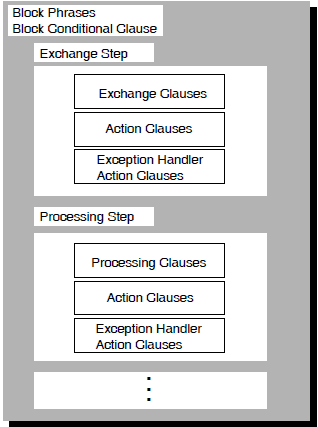
3.2. Nested Blocks
In addition to writing tasks that contain multiple exchange and processing steps within a block step, you can write tasks that contain multiple block steps within a block step. A block step that appears within another block step is a nested block. Figure 3.2, ''Nested Block Arrangement'' shows a block step that nests three other block steps. In this arrangement, the outer block is the root block. A block step that contains another block step is a parent. Because you can create multiple levels of nested blocks, a parent block is not necessarily also the root block.
A task definition cannot contain more than one root block. Therefore, to define a task that contains multiple blocks, you must nest blocks within the root block.
ACMS also lets you use a conditional clause at the block step level to structure your task. By using one of ADU's four block conditional clauses (CONTROL FIELD, IF THEN ELSE, SELECT FIRST, or WHILE DO), you can make the flow of the task dependent on the values of workspace fields. Example 3.4, ''Task Definition with Nested Blocks'' shows an example of a task definition that uses a block conditional clause with nested blocks to direct the task flow.
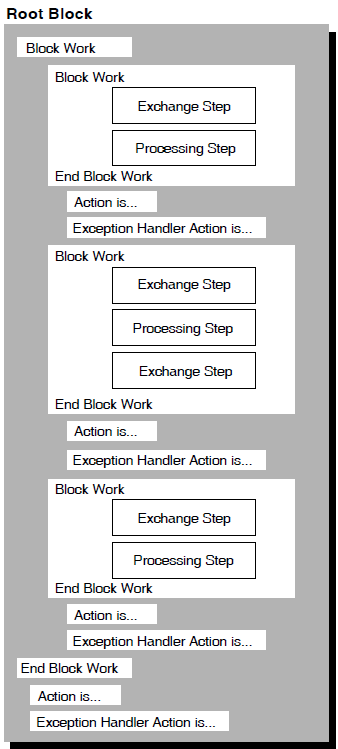
REPLACE TASK CAR_RESERVATION_TASK
DEFAULT SERVER IS CAR_RESERVATION_SERVER;
DEFAULT FORM IS CAR_RESERVATION_FORM;
WORKSPACES ARE RENTAL_CLASSES_WKSP, CONTROL_WKSP,
RESERVATIONS_WKSP, COMPANIES_WKSP, MSG_WKSP;
BLOCK
WORK WITH FORM I/O IS
GET_RENTAL_INFO:
EXCHANGE
TRANSCEIVE RECORD RENTAL_CLASSES_FORM_REC,
RESERVATIONS_FORM_REC
SENDING RENTAL_CLASSES_WKSP
RECEIVING RESERVATIONS_WKSP
WITH RECEIVE CONTROL CONTROL_WKSP;
CONTROL FIELD IS CONTROL_WKSP.CTRL_KEY
" FEXT" : EXIT TASK;
END CONTROL FIELD;
CHECK_CAR_AVAIL:
PROCESSING
CALL VERIFY_AVAILABILITY USING RESERVATIONS_WKSP,
ACMS$PROCESSING_STATUS;
CONTROL FIELD IS ACMS$T_STATUS_TYPE
"B" : GET ERROR MESSAGE;
MOVE ACMS$T_STATUS_MESSAGE
TO MSG_WKSP.MESSAGE_PANEL;
GOTO NEXT EXCHANGE;
"G" : GOTO STEP CHECK_CORP_DISCOUNT;
END CONTROL FIELD;
DISPLAY_ERROR_MSG:
EXCHANGE
SEND RECORD MSG_FORM_REC
SENDING MSG_WKSP;
ACTION IS
GOTO STEP GET_RENTAL_INFO;
 CHECK_CORP_DISCOUNT:
BLOCK WORK IS
IF (COMPANIES_WKSP.CREDIT_CHECK_FLAG = "1")
THEN
CHECK_CORP_DISCOUNT:
BLOCK WORK IS
IF (COMPANIES_WKSP.CREDIT_CHECK_FLAG = "1")
THEN
 DISPLAY_DISCOUNT_RATE:
BLOCK WORK IS
PROCESSING
CALL RECOMPUTE_RATES USING RENTAL_CLASSES_WKSP,
ACMS$PROCESSING_STATUS;
EXCHANGE
SEND RECORD RENTAL_CLASSES_FORM_REC
SENDING RENTAL_CLASSES_WKSP
WITH RECEIVE CONTROL CONTROL_WKSP;
CONTROL FIELD IS CONTROL_WKSP.CTRL_KEY
" FEXT" : EXIT TASK;
END CONTROL FIELD;
END BLOCK WORK;
ELSE
DISPLAY_DISCOUNT_RATE:
BLOCK WORK IS
PROCESSING
CALL RECOMPUTE_RATES USING RENTAL_CLASSES_WKSP,
ACMS$PROCESSING_STATUS;
EXCHANGE
SEND RECORD RENTAL_CLASSES_FORM_REC
SENDING RENTAL_CLASSES_WKSP
WITH RECEIVE CONTROL CONTROL_WKSP;
CONTROL FIELD IS CONTROL_WKSP.CTRL_KEY
" FEXT" : EXIT TASK;
END CONTROL FIELD;
END BLOCK WORK;
ELSE
 PROCESSING
NO PROCESSING;
ACTION
MOVE "DISCOUNT NOT APPLIED"
TO MSG_WKSP.MESSAGE_PANEL;
EXCHANGE
SEND RECORD MESSAGE_FORM_REC
SENDING MSG_WKSP;
END IF;
END BLOCK;
END BLOCK;
END DEFINITION;
PROCESSING
NO PROCESSING;
ACTION
MOVE "DISCOUNT NOT APPLIED"
TO MSG_WKSP.MESSAGE_PANEL;
EXCHANGE
SEND RECORD MESSAGE_FORM_REC
SENDING MSG_WKSP;
END IF;
END BLOCK;
END BLOCK;
END DEFINITION;CAR_RESERVATION_TASK is an example of an inquiry task that a car rental agency might use to provide information to customers about the availability of cars on particular dates. The task uses a block conditional clause with a nested block to determine if the customer is eligible for a corporate discount and, if so, what the new rate is.
The task definition contains several block steps within a root block. The workspaces RENTAL_CLASSES_WKSP, CONTROL_WKSP, RESERVATIONS_WKSP, COMPANIES_WKSP, and MSG_WKSP are available to all steps in the task. The default DECforms form used by exchange and processing steps in the task is CAR_RESERVATION_FORM.
is an exchange that uses the
RENTAL_CLASSES_FORM_REC form record to display a panel asking the
terminal operator for car rental information, and the
RESERVATIONS_FORM_REC form record to map the rental data to the
RESERVATIONS_WKSP workspace.
is a processing step that uses the
VERIFY_AVAILABILITY procedure to check that the type of car requested
is available for the date requested. The server that the step uses is defined in the task group.
If the type of car requested is not available for the specified date, control passes to
, an exchange step that displays a message to the terminal operator.
is a nested block that uses the IF THEN ELSE
conditional clause to determine what work to perform. If the value of the
CREDIT_CHECK_FLAG field in the COMPANIES_WKSP
workspace is 1, meaning that the customer is eligible for a corporate discount, ACMS performs the
work in the DISPLAY_DISCOUNT_RATE block step. Because the
CHECK_CORP_DISCOUNT block appears within the root block and contains
other block steps, it is both a nested block and a parent block.
The processing part of calls the
RECOMPUTE_RATES procedure to calculate a corporate discount rental
rate. The exchange part of then sends the new rental information to the
form for display to the terminal operator.
If the value of the CREDIT_CHECK_FLAG field is not 1, ACMS
performs the work associated with the ELSE keyword. The action part of
moves the message DISCOUNT NOT APPLIED to the
CONTROL_WKSP workspace, and the exchange step sends the message to the
form for display to the terminal operator.
Use the BLOCK clause in a task definition to indicate that the task contains a block step. Example 3.5, ''Structure of Block Step Syntax'' shows the structure of the syntax you use to define a block step.
Block step phrase
Block conditional clause
Exchange step clause
Processing step phrase or clause
Action clause
Exception handler action clause
The following sections describe these phrases and clauses. The reference section lists these phrases and clauses alphabetically, indicating in parentheses the type of phrase or clause.
3.3. Block Step Phrases
Use block phrases to describe attributes that apply to all the steps in a block step. All block phrases are optional. If you use one or more block phrases, you must precede the first one with the WITH keyword. In addition, do not use a semicolon (;) at the end of a block phrase.
A nested block inherits the attributes that you assign to its parent block. The only attributes that you can change on a nested block are server context and distributed transaction. At run time, when ACMS finishes processing a nested block and returns control to the parent block, the attributes originally assigned to the parent block become effective again.
|
Phrase |
Description |
|---|---|
|
CANCEL ACTION |
Describes the processing done when a task cancel occurs. |
|
TRANSACTION |
Identifies the block step as a distributed transaction; all work within the block must either complete successfully or be rolled back. |
|
FORM I/O |
Declares that exchange steps in a block use DECforms to interface with the terminal. |
|
NO TERMINAL I/O |
Declares that exchange steps in a block do not interface with the terminal. |
|
REQUEST I/O |
Declares that exchange steps in a block use TDMS to interface with the terminal. |
|
SERVER CONTEXT |
Specifies whether or not server process context is retained between steps in a block step. |
|
STREAM I/O |
Specifies that the exchange steps in a block step use ACMS streams to interface with the terminal user or other task submitter. |
Example 3.6, ''Block Step Phrases Syntax'' shows the structure of the syntax you use in defining block phrases.
3.4. Block Conditional Clauses
|
Clause |
Description |
|---|---|
|
CONTROL FIELD |
Names a text workspace control field that ACMS tests before doing block, exchange, or processing work. |
|
IF THEN ELSE |
Specifies a Boolean expression that ACMS tests before doing block, exchange, or processing work. |
|
SELECT FIRST |
Specifies one or more Boolean expressions that ACMS tests before doing block, exchange, or processing work. |
|
WHILE DO |
Specifies a Boolean expression that ACMS repeatedly tests. As long as the expression evaluates to true, ACMS performs the corresponding block, exchange, or processing work. |
The CONTROL FIELD block conditional clause lets you test a value, and, based on that value, perform a block, exchange, or processing step. The IF THEN ELSE clause lets you branch to one of two steps, depending on the result of a Boolean expression.
The SELECT FIRST clause can test multiple Boolean expressions. The WHILE DO clause lets you create a loop where ACMS performs the block, exchange, or processing work as long as the specified Boolean expression holds true.
Example 3.7, ''Block Conditional Clauses Syntax'' shows the syntax you use to define block conditional clauses.
ACMS lets you use only one type of I/O per task. Therefore, any exchange or processing work that a block conditional clause uses must be consistent with the forms product that the block step uses. For example, if you assign the FORM I/O attribute to a block, meaning that the block uses DECforms, exchange steps within that block cannot use TDMS clauses (READ, WRITE, or REQUEST); and processing steps cannot use REQUEST I/O.
Because ACMS lets you nest blocks, you can nest block conditional clauses to test for multiple conditions before performing any exchange or processing work. Figure 3.3, ''Block Conditional Clauses with a Nested Block'' shows a sample structure that nests a SELECT FIRST block conditional clause within an IF THEN ELSE block conditional clause.
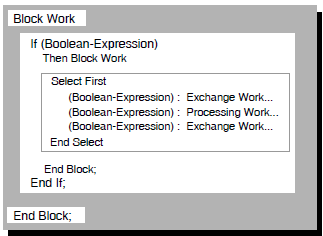
3.5. Exchange Step Clauses
Exchange steps handle interaction with the terminal user and typically use DECforms form records. The clauses you use for an exchange step describe the work to be done in that step. There are no phrases that declare special attributes of exchange steps as there are for processing steps.
|
Clause |
Description |
|---|---|
|
Conditional | |
|
CONTROL FIELD |
Names a text control field that ACMS tests before doing work for the step. |
|
IF THEN ELSE |
Specifies a Boolean expression that ACMS tests before doing work for the step. |
|
SELECT FIRST |
Specifies one or more Boolean expressions that ACMS tests before doing work for the step. |
|
WHILE DO |
Specifies a Boolean expression that ACMS repeatedly tests. As long as the expression evaluates to true, ACMS performs the corresponding work. |
|
Unconditional | |
|
NO EXCHANGE |
States that no output or input is done in the exchange. |
|
READ |
Transfers information from the terminal exception line to a task workspace. |
|
RECEIVE |
Transfers information from DECforms form data items to a task workspace. |
|
REQUEST |
Names a TDMS request that handles interaction between the user and the task. |
|
SEND |
Transfers information from a task workspace to DECforms form data items. |
|
TRANSCEIVE |
Combines SEND and RECEIVE operations in that order. |
|
WRITE |
Transfers information from a task workspace to the terminal exception line. |
RECEIVE, SEND, and TRANSCEIVE are DECforms clauses; READ, REQUEST, and WRITE are TDMS clauses. ACMS lets you use only one type of I/O per task. Therefore, if you specify FORM I/O at the block step level, exchange steps within that block step cannot use TDMS clauses. Likewise, if you specify REQUEST I/O at the block step level, exchange steps within that block cannot use DECforms clauses. The default I/O method for exchange steps is REQUEST I/O.
NO EXCHANGE
READ
RECEIVE
REQUEST
SEND
TRANSCEIVE
WRITE
The CONTROL FIELD clause lets you test a text value and, based on that value, do work in an exchange step using one of the unconditional exchange clauses.
The IF THEN ELSE clause branches to one of two unconditional clauses depending on the result of a Boolean expression.
The SELECT FIRST clause allows you to test multiple values using Boolean expressions. If ACMS encounters a Boolean expression that is true, it performs work in an exchange step using one of the unconditional exchange clauses.
The WHILE DO clause lets you create a loop. As long as the specified Boolean expression holds true, ACMS performs the corresponding unconditional exchange clause.
Example 3.8, ''Exchange Step Clause Syntax'' shows the syntax you use to define an exchange step.
An exchange step can include only one exchange clause to do work for the step. If the exchange step starts with a condition test, there can be only one exchange clause for each value in the CONTROL FIELD, IF THEN ELSE, SELECT FIRST, or WHILE DO clause that creates the condition.
The action part of the step can include action clauses that describe what action you want ACMS to take once the work of the exchange step is done. Action clauses are explained in Section 3.8, ''Action Clauses''.
A task that is to be called from a remote node must do all its I/O in exchange steps and not in processing steps. For I/O restrictions on tasks to be accessed remotely, see Section 3.11, ''I/O Restrictions for Distributed Processing''.
3.6. Processing Step Phrases and Clauses
Called subroutine in a procedure server
Called task
OpenVMS image
DCL command or procedure
DATATRIEVE command or procedure
If you use a processing step to call a task, you can pass workspaces to that task for read, write, or modify purposes. When the called task completes, ACMS returns control to the calling task, and execution continues with the action part of the calling step.
A routine or called task can return a status value to a calling task. The calling task can use this value, or the contents of a task workspace field can be modified by the routine or called task to control subsequent task execution. The called task and the calling task must reside in the same task group.
For more information on calling tasks from processing steps, see CALL TASK Clause (Processing) in Section 3.12, ''Additional I/O Considerations'', and VSI ACMS for OpenVMS Writing Applications.
In a multiple-step task, different processing steps can use different servers and different types of servers. However, a task can retain process context only within one server at a time, unless the processing steps are part of a distributed transaction.
Use processing step clauses to describe the work done in a processing step. You can also use optional processing step phrases at the start of a processing step to describe characteristics of the step. Processing step phrases are similar to block step phrases.
|
Phrase |
Description |
|---|---|
|
TRANSACTION |
Identifies the processing step as a distributed transaction. All work within the processing step must either complete successfully or be rolled back. |
|
NONPARTICIPATING SERVER |
Instructs ACMS to exempt the server from participating in a previously declared distributed transaction. |
|
[NO] TERMINAL I/O |
Declares whether or not the processing step communicates with the terminal. |
|
REQUEST I/O |
Names TDMS as the means of communication between a processing step and the terminal. |
|
Clauses |
Description |
|---|---|
|
Conditional | |
|
CONTROL FIELD |
Names a text field that ACMS tests before doing work for a processing step. |
|
IF THEN ELSE |
Specifies a Boolean expression that ACMS tests before doing work for the step. |
|
SELECT FIRST |
Specifies one or more Boolean expressions that ACMS tests before doing work for the step. |
|
WHILE DO |
Specifies a Boolean expression that ACMS repeatedly tests; as long as the expression evaluates to true, ACMS performs the corresponding work. |
|
Unconditional | |
|
CALL [PROCEDURE] |
Names a procedure that ACMS uses to do work for a processing step. |
|
CALL TASK |
Names a task to be called by a processing step. |
|
DATATRIEVE COMMAND |
Names a DATATRIEVE command to do the processing work for a processing step. |
|
DCL COMMAND |
Names a DCL command to do the processing work for a processing step. |
|
IMAGE |
Names an OpenVMS image to do the processing work for a processing step. |
|
NO PROCESSING |
States that no processing is done in a processing step. |
The work you define in processing steps must be either conditional or unconditional. Defining conditional and unconditional work is described in Section 3.5, ''Exchange Step Clauses''.
Example 3.9, ''Processing Step Syntax'' shows the syntax you use to define a processing step.
Once you use processing phrases and clauses to define the attributes and work of a processing step, you can use action clauses to describe the actions to take at the end of the step. These clauses are described in Section 3.8, ''Action Clauses''.
3.7. Step Labels
You can assign a label to each step you define to help use the ACMS Task Debugger to debug task definitions. A label is a 1- to 31-character identifier. Separate the label from the beginning of the step definition with a colon (:). ACMS generates a label that begins with a dollar sign ($) if you do not assign a label to a step. To refer to a step label with the GOTO STEP clause, you must assign your own label; you cannot use labels generated by ACMS with the GOTO STEP clause. You cannot assign a label to a root block or root processing step. A root processing step is the processing step in a single-step task.
$STEP_1 USER_LABEL_1 $STEP_3 $STEP_4 USER_LABEL_2 $STEP_6
In this example, the steps USER_LABEL_1 and
USER_LABEL_2 would be $STEP_2 and
$STEP_5, if the labels were generated by ACMS. You can display step
labels by using the DUMP GROUP command.
3.8. Action Clauses
Use action clauses to define the actions you want ACMS to take at the end of an exchange step, a processing step, or a block step. These clauses do not make up a separate step in a task definition; they are a part of the step you are defining.
Conditional action
Workspace manipulation
Transaction action
Server context action
Sequencing action
|
Clause |
Description |
|---|---|
|
Conditional Action | |
|
CONTROL FIELD |
Names a text field that ACMS tests before doing work for the step. |
|
IF THEN ELSE |
Specifies a Boolean expression that ACMS tests before doing work for the step. |
|
SELECT FIRST |
Specifies one or more Boolean expressions that ACMS tests before doing work for the step. |
|
Workspace Manipulation | |
|
GET ERROR MESSAGE (*) |
Translates a message number into a message string. |
|
MOVE |
Specifies that a number, the numeric value of a global symbol, a workspace field, or a quoted string, is to be moved into another workspace field or fields. |
|
Transaction Action | |
|
COMMIT TRANSACTION |
Ends the transaction, making database changes permanent. |
|
ROLLBACK TRANSACTION |
Returns all work to its state at the beginning of the transaction and ends the transaction. |
|
Server Context Action | |
|
NO SERVER CONTEXT ACTION |
Specifies that no server context is taken at the end of a step. |
|
RELEASE SERVER CONTEXT |
Discards the server context of the current step. |
|
RETAIN SERVER CONTEXT |
Keeps the process context of the current step for the next step. |
|
Sequencing Action | |
|
CANCEL TASK |
Stops the task without returning control to the action part of the definition. |
|
EXIT BLOCK (*) |
Transfers control to the action part of a block step or to the next block in the task. |
|
EXIT TASK |
Causes the current task to end normally. |
|
GOTO STEP (*) |
Transfers control to another exchange, processing, or block step. |
|
RAISE EXCEPTION |
Raises a step exception and passes control to the exception handler action part of the step. |
|
REPEAT STEP |
Reexecutes the current exchange, processing, or block step. |
Transaction actions
Workspace manipulation
Server process context actions
Task sequencing actions
Refer to Table 3.17, ''Default Server Context Actions'' for the default server context actions.
The action you define for a step must be either unconditional (one or more of the action clauses except CONTROL FIELD, IF THEN ELSE, and SELECT FIRST) or conditional (one or more action clauses used with the CONTROL FIELD, IF THEN ELSE, or SELECT FIRST clause).
The action part of a step, if conditional, can include one or both of the workspace manipulation clauses and one of each of the other four types of action clauses.
Example 3.10, ''Action Syntax'' shows the syntax you use to define actions for a step.
The ACTION keyword is optional; ACMS performs the actions described by the action clauses if you omit it, but you might want to include it to make the task definition easier to read.
3.9. Exception Handler Action Clauses
In addition to using action clauses in the action part of a step, you can use action clauses in the exception handler action part of an exchange, processing, or block step. The exception handler action part of a step lets you recover from errors, known as exceptions, that prevent the task from completing normally. Specifically, you can use the exception handler feature to recover from a distributed transaction that aborts unexpectedly or fails to commit.
Like the action part of a step, the exception handler action part is optional. Exception handler action clauses must follow action clauses, if present, or the work part of the step, if there are no action clauses. You must introduce any exception handler actions with the EXCEPTION HANDLER keywords.
At a minimum, you must include a sequencing action clause in the exception handler action part of a step. Transaction action clauses are not allowed. You can use conditional clauses in the same way you use them in the action part of a step.
Workspace manipulation
Server process context action
Task sequencing actions
For more details on using exception handling, see EXCEPTION HANDLER Clause (Block, Exchange, Processing) in Section 3.12, ''Additional I/O Considerations'', and VSI ACMS for OpenVMS Writing Applications.
3.10. Boolean Expressions
This section describes the Boolean expressions you use to define conditional tests for the IF THEN ELSE, SELECT FIRST, and WHILE DO clauses.
Boolean expressions can be simple or complex. The simplest Boolean expression consists of a single relational expression such as this one:
(FIELD = "1")
3.10.1. Relational Expressions
A relational expression consists of two values separated by a relational operator that is used to test the value of a field. The format for a relational expression is:
The relational expression (FIELD = "1") uses the equal sign (=) as the relational operator that separates FIELD from the literal "1". Be sure to create relational expressions that ACMS can evaluate as either true or false.
The values you use in a relational expression can be workspace fields, workspaces, global symbols, quoted strings, or signed (decimal) literals.
See Section 3.10.7, ''Comparisons'' for valid data type comparisons.
3.10.2. Types of Boolean Expressions
NOT (FIELD = "2")
(GO = "1") OR (STOP = "2")
(GO = "1") AND (STOP = "2")
NOT (FIELD = "5") AND (GO = "1") AND (STOP = "2")
When used to create Boolean expressions, relational expressions are referred to as Boolean operands. For example, a single relational expression can be called a Boolean operand, a Boolean expression, or a relational expression, depending on its context, that is, on how you use it.
3.10.3. Relational Operators
Relational operators that you use to create relational expressions can be any of the symbols listed in Table 3.8, ''Relational Operators''. Each relational operator can test the contents of workspace field names, workspace names, quoted strings, or signed literals.
See Section 3.10.7, ''Comparisons'' for valid data type comparisons.
When comparing values of data-type text strings, you can test values that are either sensitive or not sensitive to case. Use operators that are not case-sensitive when it does not matter if an uppercase "Y" (for example) equals the letter "y" in lowercase. Use case-sensitive operators when you want to distinguish between uppercase and lowercase letters. You can use either the case-sensitive or case-insensitive operators when you are comparing values whose data type is not a text string.
|
Operator Meaning |
Relational Operator Symbols | |
|---|---|---|
|
Case-Insensitive |
Case-Sensitive | |
|
Equal to |
|
|
|
Not equal to |
|
|
|
Greater than |
|
|
|
Greater than or equal to |
|
|
|
Less than |
|
|
|
Less than or equal to |
|
|
3.10.4. Boolean Operators and Associativity
The NOT Boolean operator tests the negation of a relational expression. It processes the clause associated with the expression if the negation of the relational expression is true. Expressions of the type NOT (boolean-operand) are right-associative, meaning that ACMS evaluates the relational expression to the right of the NOT operator. With an expression of the type NOT (NOT (boolean-operand)), ACMS first processes the Boolean operand in parentheses before evaluating the entire Boolean expression.
The AND Boolean operator ties Boolean expressions together. It processes the clause associated with the expression only if all Boolean operands in the expression are true. Expressions of the type (boolean-operand AND boolean-operand) are left-associative. In the following example, three Boolean operands are connected by two AND Boolean operators:
(boolean1) AND (boolean2) AND (boolean3)
Because the AND expression is left-associative, ACMS evaluates the example as follows:
((boolean1) AND (boolean2)) AND (boolean3)
ACMS evaluates each Boolean operand first, evaluates the combination of boolean1 and boolean2 next, and then evaluates the result with boolean3.
The OR Boolean operator processes the clause associated with the expression when either value in the Boolean expression is true. Expressions of the type (boolean-operand OR boolean-operand) are left-associative and follow the same order of evaluation as Boolean expressions connected with the AND Boolean operator.
3.10.5. Precedence
|
Operator |
Operator Example |
|---|---|
|
Expressions in parentheses |
(A = 1) |
|
All relational operators |
(FIELD = "1") |
|
Boolean operator NOT |
NOT (FIELD = "1") |
|
Boolean operator AND |
(FIELD = "1") AND (FIELD = "2") |
|
Boolean operator OR |
(FIELD = "1") OR (FIELD = "2") |
ACMS evaluates all expressions enclosed in parentheses first. Each operator has a position in the hierarchy of operators. The operator's position in this hierarchy indicates when ACMS has to perform the operation called for by the operator.
Parentheses can change the order of precedence of ACMS operators. It is important to know how ACMS processes Boolean expressions so you can use parentheses to make sure your Boolean expressions are evaluated the way you intend. For example, the following Boolean expression contains no parentheses except to enclose each operand. It has three Boolean operands, two Boolean operators, and three relational operators:
(OPERAND1 = "1") AND (OPERAND2 = "1") OR (OPERAND3 = "2")
The first and second operands connected by the AND operator to find their truth value. The AND operator requires that each operand in the expression must be true to be evaluated as true, so ACMS evaluates this expression as false (false AND true = false).
The first result (false) with the third operand. The OR operator evaluates an expression as true if either of the operands in the expression is true. So, because the first and second operand evaluate to false and the third operand is true, ACMS evaluates the entire expression as true.
To illustrate how parentheses can change the truth value of a Boolean expression, suppose you use parentheses in the previous example:
(OPERAND1 = "1") AND ((OPERAND2 = "1") OR (OPERAND3= "2"))
The second and third operands, connected with the OR operator and enclosed in parentheses, as true (true OR true = true)
The first operand (false) with the result of the evaluation of the second and third operands (true) and finds the expression to be false (false AND true = false)
Without parentheses, ACMS follows the rules of precedence and evaluates the expression as true. With parentheses, it evaluates the expression as false. Using parentheses to indicate how you want Boolean expressions evaluated ensures that your expressions are processed as you intend.
3.10.6. Parentheses
- Enclose each Boolean expression in parentheses. For example:
SELECT FIRST TRUE OF (FIELD1 EQ "1") : GOTO STEP_4; END SELECT; - Enclose the operand you include with the NOT operator in parentheses. For example:
SELECT FIRST TRUE OF (FIELD1 = "1") : GOTO STEP_4; (NOT (FIELD = "1")) : GOTO STEP_5; (NOT (NOT (FIELD = 2"))) : GOTO STEP_6; END SELECT; Parentheses can change the ACMS order of precedence as described in Section 3.10.5, ''Precedence''.
Never enclose the NOMATCH keyword in parentheses.
3.10.7. Comparisons
Compares only the following data types: signed longwords, text strings, and CDD structure fields of type UNSPECIFIED.
Compares expressions of the same data type only. For example, you can compare signed longwords only with signed longwords, text strings only with text strings, and so forth. You cannot compare expressions of different data types, such as signed longwords with text strings.
Allows comparisons involving global symbols, which ACMS resolves to a signed longword value using the files specified on the
/OBJECT,/USERLIBRARY,/SYSLIB, and/SYSSHRqualifiers of theBUILD GROUPcommand. ACMS does not resolve user-defined symbols using files specified by the task group MESSAGE FILES clause.Compares text strings of unequal length by padding the shorter field with spaces.
Makes all comparisons between text strings using the OpenVMS run-time library STR$COMPARE_MULTI routine. This routine can use one of several different ordering tables. The default is the VSI Multinational Character Set. In this ordering, both uppercase and lowercase versions of a letter are grouped together. For example, variants of A (A,a) precede variants of b (B, b), and so forth. In the set of variants, lowercase precedes uppercase. Thus, the order of alphanumeric characters is 0, 1, 2, 3, 4, 5, 6, 7, 8, 9, a, A, b, B, and so on. See VSI OpenVMS RTL String Manipulation (STR$) Manual for further information on STR$COMPARE_MULTI. See VSI OpenVMS User's Manual for further information on the VSI Multinational Character Set and the multinational collating sequence.
Allows comparisons between composite fields and quoted strings only if the composite field has the TEXT data type.
Enables you to use CDD structure fields of the UNSPECIFIED type to compare the contents of two workspaces. ACMS makes comparisons between items of type UNSPECIFIED as unsigned byte comparisons, byte by byte, from left to right. Unequal-length fields are compared by extending the shorter field with null characters.
If the operand in a Boolean expression is a workspace name (rather than a workspace field name), ACMS tests the top-level item (structure or elementary item) of the record definition associated with the workspace.
Boolean expressions that you use with the Boolean operators AND, OR, and NOT must be expressions that can be evaluated as either true or false. For example, the expression (FIELD1 AND 1) is not valid.
Boolean expressions that you use with the Boolean operators AND or OR are processed by ACMS from left to right, and Boolean expressions with the NOT operator are processed from right to left. However, this associativity does not have any effect on the truth value of the expression.
3.11. I/O Restrictions for Distributed Processing
Because a task that does I/O in a processing step uses a terminal for input and output and terminals cannot be passed from one process to another over a network, tasks that do I/O in a processing step cannot be called remotely. ACMS cancels tasks that attempt to pass the terminal from the process running the task on the application system to the calling process on the submitter node.
If a task does only STREAM I/O, the task can be called remotely or locally.
If a task does only FORM I/O from exchange steps, the task can be called remotely or locally.
If a task does only REQUEST I/O from exchange steps, the task can be called remotely or locally.
If TERMINAL I/O or REQUEST I/O is specified in the processing step of a task, the task cannot be called remotely because using an I/O option in a processing step requires a terminal.
|
Block |
Processing |
When Permitted |
|---|---|---|
|
No BLOCK step |
NO I/O |
Local/Remote |
|
TERMINAL I/O |
Local only | |
|
REQUEST I/O |
Local only | |
|
BLOCK WITH NO I/O |
NO I/O |
Local/Remote |
|
TERMINAL I/O |
Local only | |
|
REQUEST I/O |
Local only | |
|
BLOCK WITH FORM I/O |
NO I/O |
Local/Remote |
|
TERMINAL I/O |
Local only | |
|
BLOCK WITH REQUEST I/O |
NO I/O |
Local/Remote |
|
TERMINAL I/O |
Local only | |
|
REQUEST I/O |
Local only | |
|
BLOCK WITH STREAM I/O |
NO I/O |
Local/Remote |
3.12. Additional I/O Considerations
A called task can use a different I/O method than the task that called it. For example, a menu task using form I/O can call tasks that use terminal I/O or ACMS stream I/O as well as other form I/O tasks. If you want a task that uses form I/O or terminal I/O to call a task that uses stream I/O, a user-written agent must associate a stream ID with a submitter ID. For more information, see VSI ACMS for OpenVMS Systems Interface Programming.
Although a stream ID can be associated with a submitter ID, it is not possible to associate a terminal device specification with a stream ID. A stream I/O task called by an agent can call only other stream I/O tasks or tasks that do no I/O. A stream I/O task called by an agent cannot call or chain to a task that performs local or remote requests or that performs terminal I/O from a server.
BLOCK Clause (Block)
BLOCK Clause (Block) — Describes the work done in a block step in terms of block, exchange, processing, and action clauses. A BLOCK clause encloses a multiple-step task.
Format
Parameters
- block-phrase
Attributes of a block step. Section 3.3, ''Block Step Phrases'' explains block phrases.
- block-conditional-clause
A clause that tests the values of workspace fields to determine what block, exchange, or processing steps to perform. Section 3.4, ''Block Conditional Clauses'' explains block conditional clauses.
- label
Name of a step. A label is required only if the step is referred to by another step in the task. Labels are also useful when debugging the task definition. If you do not use a label for a step definition, ACMS supplies a default step label in the form of $STEP_n where n is the sequential number of the step within the block step. You can refer to ACMS-supplied labels only when using the ACMS Task Debugger. You cannot use ACMS-supplied step labels when using the GOTO STEP action clause.
To assign a step label, use a 1- to 31-character identifier.
- block-step
A nested block. ACMS lets you nest block steps within other block steps. Section 3.2, ''Nested Blocks'' explains nested blocks.
- exchange-clause
A clause that describes the work done in an exchange step. Section 3.5, ''Exchange Step Clauses'' explains exchange step clauses.
- processing-phrase
Attributes of a processing step. Section 3.6, ''Processing Step Phrases and Clauses'' explains processing step phrases.
- processing-clause
A clause that describes the work done in a processing step. Section 3.6, ''Processing Step Phrases and Clauses'' explains processing step clauses.
- action-clause
A clause that describes conditional or unconditional actions you want to take at the end of a block, exchange, or processing step. Section 3.8, ''Action Clauses'' explains action clauses. Section 3.9, ''Exception Handler Action Clauses'' explains how to use action clauses in the exception handler part of a step.
Clause Default
You must use either the BLOCK clause or the PROCESSING clause to define the work a task does.
Example
REPLACE TASK ADD_EMPLOYEE_TASK
WORKSPACES ARE EMPLOYEE_INFO_WKSP, QUIT_WORKSPACE;
BLOCK
WORK WITH FORM I/O
EXCHANGE
RECEIVE FORM RECORD EMPLOYEE_INFO_RECORD
RECEIVING EMPLOYEE_INFO_WKSP
WITH RECEIVE CONTROL QUIT_WORKSPACE;
CONTROL FIELD IS QUIT_WORKSPACE.QUIT_KEY
" FQUT" : EXIT TASK;
END CONTROL FIELD;
PROCESSING
CALL ADD_EMPL_INFO IN EMPL_SERVER
USING EMPLOYEE_INFO_WKSP
CONTROL FIELD ACMS$T_STATUS_TYPE
"B" : GET ERROR MESSAGE;
GOTO PREVIOUS EXCHANGE;
END CONTROL FIELD;
END BLOCK WORK;
ACTION
REPEAT STEP;
END DEFINITION;In this example, the block phrase FORM I/O is used to indicate that the exchange step in the block uses DECforms to perform I/O. The keywords BLOCK WORK signal the start of the work part of the block step. The work for the block is done by one exchange step and one processing step. The keywords END BLOCK WORK indicate that the work for the block is done. The action taken when the block work is done is REPEAT STEP, which repeats the task.
CALL Clause (Processing)
CALL Clause (Processing) — Names a procedure in a procedure server to do the work for a processing step and any workspaces used by that procedure.
Format
Parameters
- entry-point-name
The entry point name of the procedure in the procedure server image. The entry point name cannot be named TASK or PROCEDURE unless the PROCEDURE keyword is specified.
- server-name
The name of the server in which ACMS runs the procedure named by the CALL clause. When you use the CALL clause, the server you name must be a procedure server. The server you name must be declared in the definition of the task group containing the task you are defining. If you do not name a server, ACMS uses the server named in the DEFAULT SERVER clause in the task part of the task definition
- workspace-name
The given name of the workspace or workspaces the procedure uses. Use the given name or unique name of each workspace. If you list more than one workspace name, you must separate the names with commas. All workspace names must be defined in the WORKSPACES or USE WORKSPACES clause of the task definition. The order of the workspace names must be the same as the order of the workspaces specified in the procedure parameter list. ACMS passes workspaces to the procedure by reference.
Clause Default
If you do not use the CALL clause in a processing step, ACMS does not call a procedure to do work for that step.
Notes
Any procedure you name with the CALL clause must exist in a procedure server.
You can name separate servers in different processing steps or for processing clauses listed for different values of a CONTROL FIELD clause.
Example
WRITE_EMPLOYEE_RECORD;
PROCESSING
CALLO PERSADD IN PERSONNEL
USING ADD_WORKSPACE, PERS_RECORD;The WRITE_EMPLOYEE_RECORD step uses the PERSONNEL server to run the PERSADD procedure that uses the workspaces ADD_WORKSPACE and PERS_RECORD.
CALL TASK Clause (Processing)
CALL TASK Clause (Processing) — Names a task to be called by a processing step and any workspaces that can be supplied to the called task.
Format
Parameters
- task-name
The given name of the task to be called by the processing step of a calling task. Both the calling task and the called task must be in the same task group.
You cannot specify a task definition CDD path name or application task name.
- workspace-name
The given name of the workspace or workspaces passed to the called task. Use the given name or unique name of each workspace. If you list more than one workspace name, you must separate the names with commas. All workspace names must be defined in the TASK ARGUMENT phrase of the task definition of the task being called. The order of the workspace names must be the same as the order of the workspaces specified in the TASK ARGUMENT clause of the called task.
ACMS passes workspaces to a called task by position. The contents of the first workspace identified by the USING phrase in the parent task are moved into the first workspace named in the TASK ARGUMENTS clause in the called task, and so on, for each workspace named in the USING phrase.
You do not have to specify a workspace.
Clause Default
If you do not use the CALL TASK clause in a processing step, ACMS does not call another task.
Notes
You can specify either a task, user, group, or system workspace as an argument to pass to the called task. However, it is not good practice to pass system workspaces as arguments to called tasks. If individual fields from a system workspace in the calling task are required by a called task, pass them to the called task in a task workspace. Data can be moved from a system workspace into a task workspace using a MOVE clause in the task definition or within a procedure called from a processing step.
To pass a system workspace to a called task, define the corresponding TASK ARGUMENT workspace in the called task for READ access. This protects the contents of the system workspace from accidental modification and performs faster than if you define the workspace for MODIFY access.
Must include the DISTRIBUTED TRANSACTION phrase
Cannot include a sequencing action clause other than EXIT TASK, CANCEL TASK, or RAISE EXCEPTION
Cannot include the COMMIT TRANSACTION or ROLLBACK TRANSACTION action clause
Cannot include an exception handler
Cannot include the CANCEL ACTION phrase
A task that conforms to the above rules is a composable task.
After a called task completes, execution of the calling task continues with the action part of the calling processing step. The status fields in the processing status workspace are updated to reflect the status returned by the called task and can be used by the calling task to control subsequent task execution. Subsequent execution of the calling task can be controlled using fields in task workspaces or by using the final completion status and ACMS symbolic message code of the called task.
If the called task is defined with the AUDIT attribute, an audit record is always written to the Audit Trail Logger whenever a task is called or chained from an agent or another task.
ACMS always performs a task access control list check to determine if a task can be executed by the submitter. ACMS does not perform an access control check when a task chains to another task using the GOTO TASK clause.
Example
PROCESSING
CALL TASK ENTER_ORDER USING ORDER_WORKSPACE;
EXCEPTION HANDLER ACTION IS
SELECT FIRST TRUE OF
( ACMS$L_STATUS = ACMS$_CALL_CANCELED ):
GOTO STEP SUBMITTER_CANCEL;
( ACMS$L_STATUS = ACMS$_OPR_CANCELED ):
GOTO STEP OPERATOR_CANCEL;
END SELECT; In this example, the CALL TASK clause specifies that the
processing step calls the task ENTER_ORDER using the workspace
ORDER_WORKSPACE. If the call is not canceled, ACMS continues
execution to the next step in the task. If the ENTER_ORDER task is
canceled by Ctrl/Y, control goes to the
SUBMITTER_CANCEL step. If the task is canceled by an operator using
the ACMS/CANCEL TASK operator command, control goes to the
OPERATOR_CANCEL step.
CANCEL ACTION Phrase (Block)
CANCEL ACTION Phrase (Block) — Specifies the processing ACMS does when a task is canceled.
Format
Parameter
- processing-clause
A processing clause that describes the work done when a task cancel occurs. Describe the work using a CALL, DATATRIEVE COMMAND, DCL COMMAND, or IMAGE processing clause. Each of these clauses is described in Section 3.6, ''Processing Step Phrases and Clauses''.
Phrase Default
The CANCEL ACTION phrase is optional. If you do not specify a cancel action, ACMS does not perform any task-specific work when it cancels the task.
Notes
When a task instance is canceled, ACMS performs the work specified in the CANCEL ACTION phrase as the last step in the task cancellation sequence. If the task is retaining context in any server process when the task is canceled, ACMS calls the cancel procedure named in the CANCEL PROCEDURE subclause of the server definition before performing the CANCEL ACTION work. Because ACMS releases server context after calling a server cancel procedure, a task should not rely on the work specified in the CANCEL ACTION phrase being executed in a server process in which the task was retaining context.
You can use workspaces when defining the cancel action for a block step if that cancel action uses a procedure server. ACMS keeps workspaces associated with a task until it is finished processing the cancel action for that task.
You cannot use the CANCEL ACTION phrase on a nested block.
You cannot use the CANCEL ACTION phrase on the root block of a composable task.
You cannot use a CALL TASK clause in a CANCEL ACTION phrase.
For an example of a cancel procedure, see VSI ACMS for OpenVMS Writing Server Procedures.
Example
BLOCK
WITH CANCEL ACTION
CALL DELETE_ORDER IN ORDER_SERVER
USING ORDER_DATA_RECIf this task is canceled, ACMS calls the DELETE_ORDER procedure in the server named ORDER_SERVER, and passes the ORDER_DATA_REC record to the procedure.
You do not end the CALL subclause with a semicolon (;) because it is part of the CANCEL ACTION phrase.
CANCEL TASK Clause (Action)
CANCEL TASK Clause (Action) — Stops the task in the action part of the current step by canceling the current task instance.
Format
Parameters
- message-number
A literal number identifying a user-defined status value to be displayed when a task is canceled.
- numeric-workspace-field
A workspace field with a CDD signed longword data type. The contents of the field must be the binary longword equivalent of the message symbol for the message you want ACMS to display. ACMS uses the contents of the field to identify a message in one of the message files that can be accessed by the task group associated with the task. The workspace containing this field must be named in either the WORKSPACES or USE WORKSPACES clause in the task definition.
- global-symbol
A valid global symbol identifying a status value to be displayed when a task is canceled. The symbol is resolved to a longword value from the files specified by the
/USERLIBRARY,/OBJECT,/SYSLIB, and/SYSSHRqualifiers of theBUILD GROUPcommand.
Clause Default
The CANCEL TASK clause is optional. If you do not use the CANCEL TASK clause, ACMS does not cancel the task unless it encounters unrecoverable errors. The default sequencing action for the last step within a block is EXIT BLOCK. The default sequencing action for all other steps within a block is GOTO NEXT STEP.
Notes
In the action part of a step, if you do not specify an exception code with the CANCEL TASK clause, ACMS cancels the task with a status of ACMS$_TASK_DEF_CANCELLED. In the exception handler part of a step, if you do not specify an exception code with the CANCEL TASK clause, ACMS cancels the task with the exception code associated with the current exception. If you specify an exception code, it must be a failure status. If you specify a success status, ACMS cancels the task and supplies a failure status after auditing the task cancellation, including the success status code, in the ACMS audit log.
When you use the CANCEL TASK clause, the default transaction action for a step that starts a distributed transaction is ROLLBACK TRANSACTION. If you do not want ACMS to automatically roll back a distributed transaction when processing a CANCEL TASK clause, you can specify COMMIT TRANSACTION in the same action statement as that CANCEL TASK clause. You cannot specify a transaction action on a step within a step that starts a distributed transaction. Therefore, if you specify CANCEL TASK on a step within a distributed transaction, ACMS rolls back the distributed transaction.
If you have defined a cancel procedure for any servers in which the task is retaining context, ACMS executes the cancel procedures for those servers. If the task is not retaining context in any servers when ACMS executes the CANCEL TASK clause, ACMS does not call any cancel procedures.
You can specify the CANCEL ACTION clause in the action part of an exchange, processing, nested block, root processing, or root block step.
You can use the exception handler part of a step to control the execution of a parent task when a called task is canceled.
See VSI ACMS for OpenVMS Writing Applications for information about controlling task cancellations.
Example
PROCESSING WITH NONPARTICIPATING SERVER
CALL PROCEDURE VR_COMPUTE_BILL_PROC
IN VR_READ_SERVER
USING VR_RESERVATIONS_WKSP,
VR_RENTAL_CLASSES_WKSP;
ACTION IS
IF (ACMS$T_STATUS_TYPE = "B")
THEN
CANCEL TASK RETURNING ACMS$L_STATUS;
END IF; This processing step calls the VR_COMPUTE_BILL_PROC procedure, then tests the ACMS$T_STATUS_TYPE field of the ACMS$PROCESSING_STATUS workspace. If the procedure completes successfully, control passes to the next step in the task. However, if the procedure does not complete successfully, the action part of the processing step directs ACMS to cancel the task and return the status from the ACMS$L_STATUS field.
CANCELABLE Clause (Task)
CANCELABLE Clause (Task) — Specifies whether or not a task can be canceled by a terminal user or task submitter. You can use a CANCELABLE clause to control how a terminal user or task submitter can exit a task. If a task is defined as NOT CANCELABLE, it cannot be canceled by pressing Ctrl/Y orCtrl/C.
Format
Clause Default
The CANCELABLE clause is optional.
All tasks are cancelable by default. If you do not use a CANCELABLE clause, a task can be canceled by either a terminal user or a task submitter.
Example
REPLACE TASK MENU_TASK
NOT CANCELABLE;
WORKSPACE IS WORK_RECORD,PERS_RECORD;
BLOCK WORK
PROCESSING
CALL PROCEDURE DISPLAY IN DISPLAY_SERVER;
EXCHANGE
READ PERS_RECORD;
ACTION IS
MOVE PERS_RECORD INTO WORK_RECORD.ENTRY;
PROCESSING IS
SELECT FIRST TRUE
( WORK_RECORD.ENTRY EQ "ADD_EMPLOYEE"):
CALL TASK ADD_EMPLOYEE;
( WORK_RECORD.ENTRY EQ "REVIEW_UPDATE"):
CALL TASK REVIEW_UPDATE;
( WORK_RECORD.ENTRY EQ "GET_EMPLOYEE"):
CALL TASK GET_EMPLOYEE;
( WORK_RECORD.ENTRY EQ "EXIT"):
NO PROCESSING;
NOMATCH:
NO PROCESSING;
END SELECT ;
END BLOCK WORK;
ACTION IS
SELECT FIRST TRUE OF
( WORK_RECORD.ENTRY NE "EXIT"):
REPEAT STEP;
( WORK_RECORD.ENTRY EQ "EXIT"):
EXIT TASK;
NOMATCH:
REPEAT STEP;
END SELECT ;
END DEFINITION;In this example, the task definition for MENU_TASK includes the NOT CANCELABLE clause. You cannot cancel MENU_TASK by pressing Ctrl/Y or Ctrl/C when it is executing.
COMMIT TRANSACTION Clause (Action)
COMMIT TRANSACTION Clause (Action) — Marks the end of a distributed transaction and makes permanent any file or database operations performed within the transaction.
Format
Clause Default
The COMMIT TRANSACTION clause is optional. If you do not explicitly end a distributed transaction by specifying COMMIT TRANSACTION or ROLLBACK TRANSACTION, ACMS commits the transaction; however, if the action part of the step that started the distributed transaction specifies CANCEL TASK or RAISE EXCEPTION, ACMS rolls back the transaction.
Notes
You can specify COMMIT TRANSACTION in the action part of a root block, nested block, root processing step, or a processing step that is part of a multiple-step task. You can specify COMMIT TRANSACTION only in the action part of step that starts a distributed transaction.
Because a distributed transaction must end in the action part of the step that starts the transaction, you cannot specify COMMIT TRANSACTION on a step within a distributed transaction.
If a distributed transaction fails to complete successfully, ACMS cancels the task. Depending upon the reason for the failure, you might want the task to continue to execute instead of canceling. See Section 3.9, ''Exception Handler Action Clauses'' and VSI ACMS for OpenVMS Writing Applications for information on using the EXCEPTION HANDLER ACTION clause to recover from transaction failures.
Table 3.19, ''Default Transaction Actions'' shows the default transaction actions for different situations in a task definition.
Example
BLOCK WORK WITH DISTRIBUTED TRANSACTION
PROCESSING
CALL ENTER_ORDER IN DIST_CTR_DATABASE_UPDATE_SERVER
USING ORDER_ENTRY_RECORD, RESTOCK_RECORD;
PROCESSING
IF (ORDERED_AMOUNT > IN_STOCK_AMOUNT)
THEN CALL QUEUE_REPLENISH_INVENTORY_TASK IN QUEUE_SERVER
USING RESTOCK_RECORD;
END IF;
END BLOCK;
COMMIT TRANSACTION;This example starts a distributed transaction on the block step, includes two processing steps, and ends the transaction in the action part of the block step with COMMIT TRANSACTION.
CONTROL FIELD Clause (Block, Exchange, Processing, Action)
CONTROL FIELD Clause (Block, Exchange, Processing, Action) — Performs a step or action based on a condition. You can use a CONTROL FIELD clause to start a block, processing, or exchange step (thereby creating a conditional block, processing, or exchange step), or to start an action clause (thereby creating a conditional action clause). The CONTROL FIELD clause names a text field in a workspace, possible values for that field, and actions associated with each value. ACMS tests the named field and takes the action associated with the first value that matches the contents of that field. The NOMATCH keyword specifies an action to take if there is no match between the field and a value.
Format
Parameters
- control-field
The name of a workspace field the CONTROL FIELD clause tests to determine what action to take. The field must be a text field and can be either in a workspace you define or in any one of the system workspaces.
When you use the control-field parameter, you can name either just the field or the name of the workspace containing that field followed by a period (.) and the field name.
- value
Either a quoted string or the keyword NOMATCH. Different actions are taken depending on the value in the named workspace field. If the value is a quoted string, that string must be no longer than the length of the field named by the control-field parameter. If the length of the quoted string is shorter than the length of the named field, ACMS fills the extra spaces of the string with blanks.
ACMS does the processing associated with the NOMATCH keyword if none of the other values listed matches the contents of the named field. If you use the NOMATCH keyword, it must be the last value you list in the CONTROL FIELD clause.
- clause
One of the following, depending on the placement of your CONTROL FIELD clause:
block
The start of a nested block with the keywords BLOCK WORK, or the start of an exchange or processing step with the keywords EXCHANGE WORK and PROCESSING WORK, respectively. When you use the CONTROL FIELD clause at the block step level, you can specify multiple block, exchange, and processing steps for each value or NOMATCH you list.
At the block step level, you can use the CONTROL FIELD clause only at the top of the block; you cannot use it between steps within the block.
exchange-clause
Any unconditional exchange clause that is compatible with the I/O method that the block step uses. For example, if a block step uses FORM I/O, exchange steps in that block step can use one of the DECforms clauses (SEND, RECEIVE, or TRANSCEIVE) or NO EXCHANGE, but cannot use a TDMS clause (READ, WRITE, or REQUEST). There can be only one exchange clause for each value or NOMATCH you list in the CONTROL FIELD clause.
processing-clause
Any unconditional processing clause. There can be only one processing clause for each value or NOMATCH you list in the CONTROL FIELD clause.
action-clause
Any unconditional action clause. ACMS provides four types of unconditional action clauses: workspace manipulation, transaction action, server context, and sequencing. For each value or NOMATCH you list in the CONTROL FIELD clause, you can specify one or both of the workspace manipulation clauses and one of each of the other three types of action clauses.
You can use action clauses at the end of a block, exchange, or processing step.
Table 3.11, ''Clauses Compatible with the CONTROL FIELD Clause'' and Table 3.12, ''Action Clauses Compatible with the CONTROL FIELD Clause'' summarize the clauses that you can use within the CONTROL FIELD clause in each step.
|
At This Step |
You Can Specify | ||
|---|---|---|---|
|
BLOCK |
Multiple of:
| ||
|
PROCESSING |
One of:
| ||
|
EXCHANGE |
If task uses FORM I/O |
If task uses REQUEST I/O |
If task uses STREAM I/O |
|
One of:
|
One of:
|
One of:
|
| For each value or NOMATCH you list in the CONTROL FIELD clause, you can specify: | |||
|---|---|---|---|
|
Workspace Actions |
Transaction Actions |
Server Context Actions |
Sequencing Actions |
|
Both: |
One of: |
One of: |
One of: |
|
|
|
|
Keyword
- NOMATCH
Performs the actions in the clause if none of the values in the list matches the contents of the field being tested. The NOMATCH keyword must be the last value in the list. Do not enclose the NOMATCH keyword in parentheses.
Clause Default
The CONTROL FIELD clause is optional. If you do not use the CONTROL FIELD clause or one of the other three conditional clauses, ACMS processes your exchange, processing, or action clauses unconditionally.
General Notes
End each subclause in a CONTROL FIELD clause with a semicolon (;), and end the CONTROL FIELD clause with END CONTROL FIELD and a semicolon (;).
The type of clause you can use within a CONTROL FIELD clause depends on the type of step that you are defining. For example, if you are using CONTROL FIELD to define an exchange step, you can only use exchange clauses.
If you use CONTROL FIELD at the block step level, you can only use it at the top of the block; you cannot specify it between steps within the block.
ACMS takes the action associated with the first value that matches the contents of the field named by the control field parameter.
Before comparing the contents of the control field and the values listed in a CONTROL FIELD clause, ACMS converts both strings to all uppercase, padding with blanks. For example, assume the control-field SAMPLE_FIELD contains space for two characters. If the field contains the character A, all of the following values are valid matches for the contents of that field: "A", "a", "A ", "a ", "A ", "a ".
Processing Clause Notes
A procedure in a processing step always returns a value to the ACMS$L_STATUS field of the ACMS$PROCESSING_STATUS system workspace. ACMS interprets that and stores values in the fields named ACMS$T_SEVERITY_LEVEL and ACMS$T_STATUS_TYPE. If you are testing the ACMS$PROCESSING_STATUS workspace, the control-field is normally either ACMS$T_SEVERITY_LEVEL or ACMS$T_STATUS_TYPE.
S (Success)
I (Information)
W (Warning)
E (Error)
F
G (GOOD)
B (BAD)
The code "G" indicates the low bit is set in the field ACMS$L_STATUS, denoting an error severity level of SUCCESS or INFORMATION. The code "B" indicates the low bit is clear, denoting an error severity of WARNING, ERROR, or FATAL.
See Appendix B, "Summary of ACMS System Workspaces" for further information on system workspaces.
Exchange Clause Note
A common use of the CONTROL FIELD clause in exchange steps is to test whether the terminal user wants to stop a running task. In DECforms, you can define a value associated with a function key so that whenever the terminal user presses that key, DECforms returns that value to a workspace field in ACMS. You can then test the field for that value by using the CONTROL FIELD clause in the action part of an exchange step.
Block Clause Example
BLOCK WORK
CONTROL FIELD PERS_WKSP.TEST_FIELD
"DISPLAY" : PROCESSING WORK
CALL ADD_EMPLOYEE IN PERSONNEL
USING WORKSPACE PERS_WKSP;
NOMATCH : PROCESSING WORK
NO PROCESSING;
EXIT BLOCK;
END CONTROL FIELD;This CONTROL FIELD clause tests the contents of the TEST_FIELD field in the PERS_WKSP workspace. If the value of the field is "DISPLAY", ACMS processes the ADD_EMPLOYEE procedure. However, if TEST_FIELD contains any other value, denoted by the NOMATCH keyword, ACMS performs no processing work and exits from the block.
Exchange Clause Example
EXCHANGE
CONTROL FIELD TEST_RECORD.TEST_FIELD
"NUMBER" : NO EXCHANGE;
NOMATCH : RECEIVE RECORD EMPLOYEE_INFO_RECORD
RECEIVING EMPLOYEE_INFO_WKSP;
END CONTROL FIELD;ACMS tests the contents of TEST_FIELD in the TEST_RECORD workspace being used by the task. If the value "NUMBER" is in that field, ACMS does not do any input or output, but goes on to process the next step in the definition. However, if TEST_FIELD contains any other value, denoted by the NOMATCH keyword, ACMS processes the RECEIVE operation and then goes on to process the next step in the definition.
Processing Clause Example
PROCESSING
CONTROL FIELD PERS_WKSP.TEST_FIELD
"Y" : NO PROCESSING;
NOMATCH : CALL ADD_EMPLOYEE IN PERSONNEL
USING WORKSPACE PERS_WKSP;
END CONTROL FIELD;In this example, the CONTROL FIELD clause tests the field TEST_FIELD in the PERS_WKSP workspace. If the value of that field is "Y", ACMS does not execute a processing step, but goes on to process the next step in the definition. If, however, TEST_FIELD contains any other value, denoted by the NOMATCH keyword, ACMS processes the ADD_EMPLOYEE procedure.
Action Clause Examples
EXCHANGE RECEIVE RECORD ADD_EMPLOYEE_RECORD RECEIVING ADD_EMPLOYEE_WKSP WITH RECEIVE CONTROL QUIT_RECORD; CONTROL FIELD IS QUIT_RECORD.QUIT_KEY " FQUT" : EXIT TASK; END CONTROL FIELD;In this example, if the user presses the PF1 key to exit from the task, the form that contains the ADD_EMPLOYEE_RECORD returns the value " FQUT" to the QUIT_KEY field of the QUIT_RECORD workspace. If " FQUT" is in that field when ACMS processes the CONTROL FIELD clause, ACMS exits from the task. Otherwise, ACMS goes on to process the next step in the definition.
PROCESSING CALL ADD_EMPLOYEE IN PERSONNEL USING PERS_RECORD, ADD_WORKSPACE; CONTROL FIELD ADD_WORKSPACE.WK_CONTROL "ERRORS" : GOTO PREVIOUS EXCHANGE; END CONTROL FIELD; END STEPS;In this example, if the ADD_EMPLOYEE procedure encounters errors, it returns the value "ERRORS" to the WK_CONTROL field of the workspace ADD_WORKSPACE. The CONTROL FIELD clause tests that field. If the WK_CONTROL field contains the value "ERRORS", ACMS executes the previous exchange step in the definition. Otherwise, ACMS goes on to process the next step in the definition.
PROCESSING CALL ADD_EMPLOYEE IN PERSONNEL USING PERS_RECORD, ADD_WORKSPACE; CONTROL FIELD ACMS$T_STATUS_TYPE "B" : GET ERROR MESSAGE; GOTO PREVIOUS EXCHANGE; "G" : GOTO NEXT STEP; END CONTROL FIELD; END STEPS;In this example, the ADD_EMPLOYEE procedure returns a status value. ACMS translates that value and stores either G or B in the ACMS$T_STATUS_TYPE field of ACMS$PROCESSING_STATUS. If the value "B" is in that field when the CONTROL FIELD clause tests it, ACMS gets an error message from the error message file, stores that message in the ACMS$T_STATUS_MESSAGE_LONG field, and executes the previous exchange step in the definition. If the value "G" is in the field, ACMS goes on to process the next step. GOTO NEXT STEP is the default sequencing action for steps within a block.
DATATRIEVE COMMAND Clause (Processing)
DATATRIEVE COMMAND Clause (Processing) — Names a DATATRIEVE command to do work for a processing step.
Format
Parameters
- dtr-command-string
A valid DATATRIEVE command that cannot exceed 254 characters. You must enclose the string in quotation marks.
- server-name
The name of the server in which the DATATRIEVE command is executed. When you use the DATATRIEVE COMMAND clause, the server you name must be a DCL server and must be declared in the definition of the task group containing the task you are defining. If you do not name a server, ACMS uses the server named in the DEFAULT SERVER clause in the task part of the task definition.
Clause Default
The DATATRIEVE COMMAND clause is optional; if you do not use it, ACMS does not invoke a DATATRIEVE command or procedure.
Notes
Any DATATRIEVE command you name must run in a DCL server.
You can pass the contents of a selection string to a DATATRIEVE command in a processing step by using that string as a set of one or more parameters to the command. The selection string provided by the terminal user can be separated by ACMS into parameters P1 through P8. Each parameter is delimited by a space or tab. At run time, ACMS converts any unquoted alphabetic characters to uppercase. To include spaces or tabs in a parameter or to keep a character in lowercase, the terminal user encloses the string with double quotation marks. To include a double quotation mark character in the string itself, the terminal user must enclose that character in double quotation marks. ACMS does not treat exclamation marks or single quotation marks as special characters. Therefore, you do not have to enclose these characters in double quotation marks.
You can use parameters P1 through P8 in the DATATRIEVE command by including the parameter name in single quotes.
For more information on DCL command symbol substitution, see VSI OpenVMS User's Manual.
Example
PROCESSING
DTR COMMAND IS
"DISK1:[CDDPLUS]ACMS$DIR.ACMS$EXAMPLES.DUE"
IN COMMON_UTILITY_SERVER;This task runs a DATATRIEVE procedure named DUE. The procedure is stored in the ACMS$EXAMPLES directory. DISK1:[CDDPLUS] is the dictionary anchor. You must enclose the command string in quotation marks.
DCL COMMAND Clause (Processing)
DCL COMMAND Clause (Processing) — Names a DCL command to do work for a processing step.
Format
Parameters
- dcl-command-string
A valid DCL command that cannot exceed 254 characters beginning with the dollar sign ($) character. You must enclose the command string in quotation marks.
- server-name
The name of the server in which the DCL command is executed. When you use the DCL COMMAND clause, the server you name must be a DCL server declared in the task group. If you do not name a server, ACMS uses the server named in the DEFAULT SERVER clause in the task definition.
Clause Default
The DCL COMMAND clause is optional; if you do not use it, ACMS does not execute a DCL command to do work for a processing step.
Notes
Any DCL command you name must run in a DCL server.
You can pass the contents of a selection string to a DCL command in a processing step by using that string as a set of one or more parameters to the command. The selection string provided by the terminal user can be separated by ACMS into parameters P1 through P8. Each parameter is delimited by a space or tab. At run time, ACMS converts any unquoted alphabetic characters to uppercase. To include spaces or tabs in a parameter or to keep a character in lowercase, the terminal user encloses the string with double quotation marks. To include a double quotation mark character in the string itself, the terminal user must enclose that character in double quotation marks. ACMS does not treat exclamation points or single quotation marks as special characters. Therefore, you do not have to enclose these characters in double quotation marks.
You can use parameters P1 through P8 in the DCL command by including the parameter name in single quotes.
For more information on DCL command symbol substitution, see VSI OpenVMS User's Manual.
Do not use the DCL INQUIRE command in a DCL command procedure that
runs in a DCL server. The INQUIRE command requests the interactive
assignment of a value for a local or global symbol during the execution of a command procedure.
A DCL command procedure running in a DCL server that contains an INQUIRE
command exits with an error status, and the task using the DCL server is canceled.
$READ/PROMPT=SYS$COMMAND<prompt-string><data-item>
$ READ/PROMPT="Enter dec number: " SYS$COMMAND P1 If you use SET VERIFY in a command procedure that runs in a reusable
server, make sure that the command procedure executes a SET NOVERIFY command
before exiting. Otherwise, SET VERIFY remains in effect for the next server
process user.
Example
PROCESSING DCL COMMAND IS "$EDIT/TPU 'P1'" IN PRIVATE_UTILITY_SERVER;
This processing step uses the server PRIVATE_UTILITY_SERVER to execute a DCL command that invokes TPU. The command uses a parameter the user supplies as P1.
DEFAULT FORM Clause (Task)
DEFAULT FORM Clause (Task) — Names a default form used by the SEND, RECEIVE, and TRANSCEIVE clauses in exchange steps of a task.
Format
Parameters
- form-label-name
The name assigned to the form using the WITH NAME keywords in the FORMS clause of the task group definition. The form-label-name uniquely identifies a form within a form file.
Clause Default
The DEFAULT FORM clause is optional. You can name, in the SEND, RECEIVE, or TRANSCEIVE clause of an exchange step, the form used by that step. If you do not specify the form in an exchange step and you do not use the DEFAULT FORM clause, ACMS uses the first form declared in the task group definition.
Notes
If you name a default form for a task, you must use the DEFAULT FORM clause before you define a block or processing step for that task.
When you use the DEFAULT FORM clause, you do not have to name a form in individual exchange steps unless one of those steps uses a record from a different form.
If you name a form with the DEFAULT FORM clause, ACMS passes the name of that form to DECforms. If you do not use the DEFAULT FORM clause, and the form record is not specified in the exchange step of the task, ACMS passes the name of the first form specified in the task group definition.
You can specify a form label in the SEND, RECEIVE, or TRANSCEIVE clause of an exchange step to override a form named by the DEFAULT FORM clause.
Example
DEFAULT FORM IS EMPLOYEE_INFO_FORM;
This names EMPLOYEE_INFO_FORM as the default form for this task. The exchange steps in this task use records from this form unless another form is specified in subsequent exchange steps.
DEFAULT REQUEST LIBRARY Clause (Task)
DEFAULT REQUEST LIBRARY Clause (Task) — Names a default request library used by REQUEST clauses in exchange steps of a task.
Format
Parameter
- request-library-name
The name assigned to the request library using the WITH NAME keywords in the REQUEST LIBRARY clause of the task group definition.
Clause Default
The DEFAULT REQUEST LIBRARY clause is optional. You can name, in the REQUEST clause of an exchange step, the request library used by that step. If you do not specify the request library in an exchange step, and you do not use the DEFAULT REQUEST LIBRARY clause, ACMS uses the first request library declared in the task group definition.
Notes
If you name a default request library for a task, you must use the DEFAULT REQUEST LIBRARY clause before you define a block or processing step for that task.
When you use the DEFAULT REQUEST LIBRARY clause, you do not have to name a request library in individual exchange steps unless one of those steps uses a request from a different request library.
If you name a request library with the DEFAULT REQUEST LIBRARY clause, ACMS searches that library. If you do not use the DEFAULT REQUEST LIBRARY clause, and the request library is not specified in the exchange step of the task, ACMS searches the first library declared in the task group definition.
You can use the IN REQUEST LIBRARY keywords in the REQUEST clause of an exchange step to override a request library named by the DEFAULT REQUEST LIBRARY clause.
Example
DEFAULT REQUEST LIBRARY DEPART_REQUEST_LIBRARY;
This names DEPART_REQUEST_LIBRARY as the default request library for this task. The exchange steps in the task use requests from this library unless specified otherwise in individual exchange steps.
DEFAULT SERVER Clause (Task)
DEFAULT SERVER Clause (Task) — Names a default server to handle processing and canceling actions for the step or steps in a task.
Format
Parameter
- server-name
The name of a server defined in the task group definition. The server-name is a 1- to 31-character identifier.
Clause Default
The DEFAULT SERVER clause is optional. If you do not use the DEFAULT SERVER clause in a task definition, you must use the IN SERVER keywords in each processing step of the task to name the server that you want to handle the work for that step.
Notes
If you name a default server for a task, you must use the DEFAULT SERVER clause before you define a block or processing step for that task.
When you use the DEFAULT SERVER clause, you do not have to name a server in individual processing steps unless one of those steps requires a different server.
You can use the IN SERVER keywords of a processing work clause in a processing step to override a server named in the DEFAULT SERVER clause.
If a task is keeping context in a server and a step in that task names another server, the task must release context of the first server before using the second server.
A task can use more than one server. However, you can retain context only within one server at a time. A task can also use both DCL and procedure servers.
Example
DEFAULT SERVER IS DEPARTMENT_SERVER;
This names DEPARTMENT_SERVER as the default server for this task. The processing steps in the task use the DEPARTMENT_SERVER unless specified otherwise in individual processing steps.
DELAY Clause (Task)
DELAY Clause (Task) — Controls whether or not ACMS pauses after a task finishes running before clearing the screen and displaying the ACMS menu.
Format
Clause Default
The ACMS-supplied default is NO DELAY. This clause is optional.
Notes
You cannot use a DELAY clause and a WAIT clause in the same definition.
The DELAY clause always delays clearing the screen for 3 seconds. You cannot change the time of the delay.
This clause differs from the WAIT clause, which requires users to press Return to have ACMS redisplay the menu.
The WAIT and DELAY clauses determine how quickly ACMS returns user control to a menu when
a task ends. For example, if a user runs a task that displays the time of day with the
SHOW TIME command, by default ACMS displays the time, but then immediately
clears the screen and returns the user to the menu. Both clauses let you delay the time between
when the task ends and when ACMS returns to the selection menu.
WAIT and DELAY attributes specified in a task, task group, or application definition are overridden by WAIT and DELAY clauses in a menu definition.
Example
DELAY;
ACMS waits 3 seconds before clearing the final screen of the task and returning the user to a menu.
EXCEPTION HANDLER Clause (Block, Exchange, Processing)
EXCEPTION HANDLER Clause (Block, Exchange, Processing) — Describes the actions to be taken to recover from one or more exceptions.
Format
Parameters
- action-clause
Describes the actions taken to recover from an exception raised in the same step or in a step within the block step. Section 3.8, ''Action Clauses'' explains action clauses.
Clause Default
The EXCEPTION HANDLER clause is optional. If you do not include the EXCEPTION HANDLER clause in the task definition, and an exception is raised, ACMS cancels the task.
Notes
If you specify the EXCEPTION HANDLER clause, it must appear after the work part of the step and the action part of the step. The action part of the step is optional.
You can include the following types of action clauses: workspace manipulation, server context, and task sequencing. At a minimum, you must include a task sequencing action clause because ACMS does not provide a default sequencing action for the exception handler action part of a step. You cannot specify transaction action clauses.
As in the action part of a step, you can use conditional clauses in the exception handler action part of a step.
Workspace manipulation
Server context
Task sequencing
When an exception is raised, ACMS interrupts the task execution, and searches for an exception handler on the step in which the exception was raised. If the current step does not contain an exception handler, ACMS searches the outer block steps, beginning with the nearest block step and heading towards the root block step. After ACMS finds an exception handler, it stores the exception code in the ACMS$L_STATUS field of the ACMS$PROCESSING_STATUS system workspace.
If ACMS does not find an exception handler, it cancels the task. If ACMS finds an exception handler, but the exception handler does not specify the particular exception code raised, ACMS raises another step exception and searches outer block steps for another exception handler.
For more information on exception handling, see VSI ACMS for OpenVMS Writing Applications.
Example
EXCHANGE
RECEIVE ORDER_LINE_RECORD IN ORDER_FORM
RECEIVING ORDER_LINE_RECORD
WITH TIMEOUT 42;
EXCEPTION ACTION IS
IF (ACMS$L_STATUS = FORMS$_TIMEOUT)
THEN
GOTO STEP HANDLE_FORM_TIMEOUT;
ELSE
CANCEL TASK RETURNING ACMS$L_STATUS;
END IF;The exchange step specifies that the terminal operator must complete the DECforms panel within 42 seconds; otherwise, DECforms raises a timeout exception. The exception handler action part of the step tests for the FORMS$_TIMEOUT exception code in the ACMS$L_STATUS workspace field. If DECforms raises the timeout exception, ACMS passes control to the HANDLE_FORM_TIMEOUT step. If any other exception is raised, ACMS cancels the task.
EXCHANGE Clause (Task)
EXCHANGE Clause (Task) — Describes the interaction between the application and the terminal user.
Format
Parameters
- exchange-clause
Describes the work done in an exchange step. Section 3.5, ''Exchange Step Clauses'' explains exchange step clauses.
- action-clause
Describes the unconditional or conditional action to take when the exchange work is completed. Section 3.8, ''Action Clauses'' explains action clauses.
Clause Default
The EXCHANGE clause is optional. However, if your task uses FORM I/O, you must use an exchange step.
Example
DISPLAY_EMPLOYEES:
EXCHANGE
SEND FORM RECORD REVIEW_SCHEDULE_RECORD
SENDING REVIEW_SCHEDULE_WKSP;The DISPLAY_EMPLOYEES exchange step sends the REVIEW_SCHEDULE_WKSP workspace to a DECforms form.
EXIT BLOCK Clause (Action)
EXIT BLOCK Clause (Action) — Transfers control of the task to the action part of the block step or to the next block in the task definition.
Format
Clause Default
The EXIT BLOCK clause is optional. The default sequencing action for a step within a block is GOTO NEXT STEP. The default sequencing action for a block step or a processing step in a single-step task is EXIT TASK.
Note
If you use the EXIT BLOCK clause in the action part of an exchange or processing step, ACMS transfers control to the action part of the block. If you use the EXIT BLOCK clause in the action part of a block step, ACMS transfers control to the next block in the task definition.
Example
DISPLAY_EMPLOYEES:
EXCHANGE
SEND FORM RECORD REVIEW_SCHEDULE_RECORD
SENDING REVIEW_SCHEDULE_WKSP
WITH RECEIVE CONTROL TEST_WORKSPACE;
CONTROL FIELD IS TEST_WORKSPACE.TEST_KEY
" FMOR" : GOTO PREVIOUS PROCESSING;
" FCAN" : EXIT BLOCK;
END CONTROL FIELD;
ACTION
REPEAT STEP;In the DISPLAY_EMPLOYEES exchange step, DECforms uses the form record REVIEW_SCHEDULE_RECORD to display a panel to the user. If the user presses a key that returns a value " FMOR" to the TEST_KEY field of TEST_WORKSPACE, ACMS processes the previous processing step. If the user presses a key that returns a value " FCAN" to the TEST_KEY field, ACMS exits the block and returns control to the action part of the block step. Because the REPEAT STEP clause is in the action part of the block step, ACMS repeats the task.
EXIT TASK Clause (Action)
EXIT TASK Clause (Action) — Ends the current task.
Format
Parameters
- message-number
A number identifying a user-defined status value to be displayed when a task ends.
- numeric-workspace-field
A workspace field with a CDD signed longword data type. The contents of the field must be the binary longword equivalent of the message symbol for the message you want ACMS to display. ACMS uses the contents of the field to identify a message in one of the message files accessible by the task group associated with the task. The workspace containing this field must be named in either the WORKSPACES or the USE WORKSPACES clause in the task definition.
- global-symbol
A valid global symbol identifying a status value to be displayed when a task ends. The symbol is resolved to a longword value from the files specified by the
/USERLIBRARY,/OBJECT,/SYSLIB, and/SYSSHRqualifiers of theBUILD GROUPcommand.
Clause Default
The EXIT TASK clause is optional. The default sequencing action for a step within a block is GOTO NEXT STEP. The default sequencing action for a block step or a processing step in a single-step task is EXIT TASK.
Notes
When you use the EXIT TASK clause, the default recovery action is COMMIT IF ACTIVE RECOVERY UNIT, and the default context action is RELEASE SERVER CONTEXT IF ACTIVE SERVER CONTEXT.
Because a distributed transaction must end in the action part of the step on which it starts, you cannot specify EXIT TASK on the action part of a step within a distributed transaction.
RETAIN RECOVERY UNIT
RETAIN RECOVERY UNIT IF ACTIVE RECOVERY UNIT
RETAIN SERVER CONTEXT
RETAIN SERVER CONTEXT IF ACTIVE SERVER CONTEXT
A task, whether called from an agent or another task, can end by exiting normally or by canceling itself. The task can return a default ACMS task status code or a user-specific status code. If you specify a return status with the EXIT TASK clause, it must be a success status.
ACMS commits a distributed transaction if you do not specify an explicit transaction action, and returns the final status value to the parent task or agent, with the contents of any workspaces that are defined as TASK ARGUMENTS with MODIFY or WRITE access.
Example
DISPLAY_EMPLOYEES:
EXCHANGE
SEND FORM RECORD REVIEW_SCHEDULE_RECORD
SENDING REVIEW_SCHEDULE_WKSP
WITH RECEIVE CONTROL TEST_WORKSPACE;
CONTROL FIELD IS TEST_WORKSPACE.TEST_KEY
" FMOR" : GOTO PREVIOUS PROCESSING;
" FEXT" : EXIT TASK RETURNING ACMS$_NORMAL;
END CONTROL FIELD; If the user presses a key that returns the value " FCAN" to the TEST_KEY field of the workspace TEST_WORKSPACE, ACMS exits the task normally without returning control to the action part of the block step definition.
FORM I/O Phrase (Block)
FORM I/O Phrase (Block) — Specifies that the exchange steps in a block step use DECforms to interface with the terminal user.
Format
Phrase Default
The default input/output method for exchange steps in a block step is REQUEST I/O.
Notes
If you use the FORM I/O phrase, you cannot use NO TERMINAL I/O, STREAM I/O, or REQUEST I/O in the same block step.
If a block step uses FORM I, processing steps in that block step can use TERMINAL I/O to do work. However, you cannot distribute a task that does any I/O in a processing step.
If a block step uses FORM I, exchange steps in that block step cannot use the REQUEST, READ, or WRITE clauses to do work.
Example
BLOCK WITH FORM I/O
The exchange steps in this block step use DECforms to interface with the terminal user.
GET ERROR MESSAGE Clause (Action)
GET ERROR MESSAGE Clause (Action) — Uses the OpenVMS message facility to translate a message number into a message and move that message from a message file to a workspace field. An exchange step can then display this message on the terminal screen for the terminal user. You normally use this clause to translate the return status of the last procedure into a message.
Format
Parameters
- message-number
A decimal number that references a message in one of the message files declared in the task group definition. If you do not use the message-number parameter, the numeric-workspace-field parameter, or the global-symbol parameter, ACMS uses the value stored in the ACMS$PROCESSING_STATUS workspace to retrieve an error message from a message file.
- numeric-workspace-field
A workspace field with a CDD signed longword data type. The contents of the field must be the binary longword equivalent of the message symbol for the message you want ACMS to display. ACMS uses the contents of the field to identify a message in one of the message files accessible by the task group associated with the task. The workspace containing this field must be named in either the WORKSPACES or the USE WORKSPACES clause in the task definition.
- global-symbol
A valid global symbol identifying a status value to be displayed. The symbol is resolved to a longword value from the files specified by the
/USERLIBRARY,/OBJECT,/SYSLIB, and/SYSSHRqualifiers of theBUILD GROUPcommand.A global symbol can be resolved from a task group message file only if the .OBJ message file is specified or is part of a user-specified object library or shared image library. The object library or shared image library must be specified on the
/OBJECTor/USERLIBRARYqualifiers of theBUILD GROUPcommand.- workspace-string-field
A string field where ACMS stores the error message after it is retrieved from an error message file. If you do not use this parameter, ACMS defaults to storing the message in the ACMS$T_STATUS_MESSAGE_LONG field of the ACMS$PROCESSING_STATUS system workspace.
Clause Default
The GET ERROR MESSAGE clause is optional. If you do not use the GET ERROR MESSAGE clause, ACMS does not move a message from a message file to a field in a workspace.
Notes
You can use the GET ERROR MESSAGE clause only in the action sections of steps within a block.
OpenVMS error message files
ACMS run-time error message files
Message files named in the task group definition
MESSAGE command with the /LIST qualifier:
$ MESSAGE/LIST=DEPTMSG.LIS DEPT.MSG The file you supply with the MESSAGE/LIST command is the source
message file with an .MSG file type. You can name the file to which you want to output the
message listing file. In this example, the name of the source message file is DEPT.MSG, and the
name of the output listing file is DEPTMSG.LIS. If you do not name a listing file, the name of
that file is derived from the name of the source message file.
Look at the listing file to find the hexadecimal code for the message you want to return to the user. Convert the hexadecimal code for the message to a decimal value, and use that decimal code in the GET ERROR MESSAGE clause.
Example
GET_FIVE_EMPLOYEES:
PROCESSING
CALL REVIEW_SCHEDULE_GET IN DEPARTMENT_SERVER
USING REVIEW_SCHEDULE_WKSP;
CONTROL FIELD ACMS$T_STATUS_TYPE
"B" : GET ERROR MESSAGE;
GOTO PREVIOUS EXCHANGE;
END CONTROL FIELD;If the REVIEW_SCHEDULE returns a status code with an error severity level of WARNING, ERROR, or FATAL, ACMS stores the value "B" in the ACMS$T_STATUS_TYPE field of the ACMS$PROCESSING_STATUS workspace. In addition, ACMS uses the returned status code to retrieve a message from a message file. ACMS repeats the previous exchange, which should use a form that displays the retrieved error message.
GLOBAL Clause (Task)
GLOBAL Clause (Task) — Specifies that a task can be selected from a menu, called by an agent, or called by another task.
Format
Clause Default
The GLOBAL clause is optional.
If no GLOBAL or LOCAL clause is specified in a task definition, ACMS uses the default application definition GLOBAL or LOCAL attribute that is in effect when the application is built. If no GLOBAL or LOCAL attribute is specified in either the task definition or the application definition, a task is global by default and can be selected from a menu, called by an agent, or called by another task.
Example
REPLACE TASK MENU_TASK
NOT CANCELABLE;
GLOBAL;
WORKSPACE IS WORK_RECORD, PERS_RECORD;
BLOCK WORK
PROCESSING
CALL PROCEDURE DISPLAY IN DISPLAY_SERVER;
EXCHANGE
READ WORK_RECORD;
PROCESSING
WITH CONTINUE ON BAD STATUS
IS
SELECT FIRST TRUE
( WORK_RECORD.WK_NUMBER EQ 1):
CALL TASK ADD_EMPLOYEE;
( WORK_RECORD.WK_NUMBER EQ 2):
CALL TASK REVIEW_UPDATE;
( WORK_RECORD.WK_NUMBER EQ 3):
CALL TASK GET_EMPLOYEE USING WORK_RECORD, PERS_RECORD;
( WORK_RECORD.WK_NUMBER EQ 4):
NO PROCESSING;
NOMATCH:
NO PROCESSING;
END SELECT ;
ACTION IS
MOVE RMS$_EOF INTO WORK_RECORD.WK_NUMBER,
-1 INTO WORK_RECORD.WK_NUMBER;
END BLOCK WORK;
ACTION IS
SELECT FIRST TRUE OF
( WORK_RECORD.WK_NUMBER NE 4):
REPEAT STEP;
( WORK_RECORD.WK_NUMBER EQ 4):
EXIT TASK;
NOMATCH:
REPEAT TASK;
END SELECT ;
END DEFINITION;In this example, the task definition for MENU_TASK includes a GLOBAL clause. Regardless of any LOCAL or GLOBAL task default in effect when an application using MENU_TASK is built, MENU_TASK is global and can be selected from a menu, called by an agent, or called by another task.
GOTO STEP Clause (Action)
GOTO STEP Clause (Action) — In the action part of a step definition, specifies which exchange, processing, or block step to execute next.
Format
Parameter
- step-label-name
The name of an exchange, processing, or block step. The step-label-name is a step label you defined in the task definition; it cannot be an ACMS-defined step label.
Keywords
- NEXT EXCHANGE/PROCESSING/STEP
Runs the next exchange or processing step in the step block.
- PREVIOUS EXCHANGE/PROCESSING/STEP
Runs the previous exchange or processing step in the step block. BLOCK is not a keyword with the GOTO STEP clause. Therefore, you cannot specify NEXT or PREVIOUS BLOCK.
Clause Default
The GOTO STEP clause is optional; the default action for steps within a block is GOTO NEXT STEP.
Note
If you use the GOTO STEP clause within a conditional clause (CONTROL FIELD, IF THEN ELSE, SELECT FIRST, or WHILE DO), the GOTO STEP clause cannot point to a step that is outside the conditional clause. For example, a GOTO STEP clause within an IF THEN ELSE conditional clause cannot point to a step that appears before the IF keyword or after the END IF keywords.
You cannot use the GOTO STEP clause in the action part of a root block or root processing step.
If you use the GOTO STEP clause in the action part of a nested block, it can point to the beginning of the same block or to an exchange, processing, or block step within the parent block.
If you use the GOTO STEP clause in the action part of an exchange or processing step, it can point to any step within the same block step.
Figure 3.4, ''GOTO STEP Clauses in a Nested Blocks Structure'' shows a sample nested blocks arrangement and indicates the acceptable GOTO STEP statements for the action part of each step in the structure.
Example
GET_FIVE_EMPLOYEES:
PROCESSING
CALL REVIEW_SCHEDULE_GET IN DEPARTMENT_SERVER
USING REVIEW_SCHEDULE_WKSP;
CONTROL FIELD ACMS$T_STATUS_TYPE
"B" : GET ERROR MESSAGE;
GOTO PREVIOUS EXCHANGE;
END CONTROL FIELD;If the REVIEW_SCHEDULE returns a status code with an error severity level of WARNING, ERROR, or FATAL, ACMS stores the value "B" in the ACMS$T_STATUS_TYPE field of the ACMS$PROCESSING_STATUS workspace. In addition, ACMS uses the returned status code to retrieve a message from a message file. ACMS repeats the previous exchange, which should use a form that displays the retrieved error message.
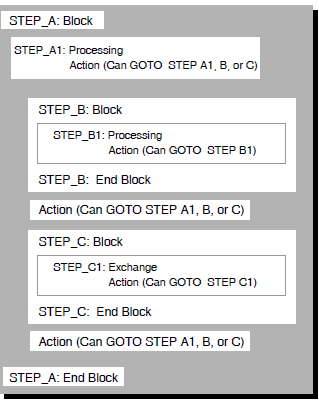
IF THEN ELSE Clause (Block, Exchange, Processing, Action)
IF THEN ELSE Clause (Block, Exchange, Processing, Action) — Takes actions based on values that you test with Boolean expressions. You can use an IF THEN ELSE clause to start a block, exchange, or processing step (thereby creating a conditional block, exchange, or processing step), or to start an action clause (thereby creating a conditional action clause). The IF THEN ELSE clause uses Boolean expressions to compare workspace fields and takes actions based on the results of the expressions. If the expression evaluates to true, ACMS performs the work or action associated with the THEN keyword. If the expression evaluates to false, ACMS performs the work or action associated with the ELSE keyword.
Format
Parameters
- boolean-expression
The Boolean expression must be an expression that ACMS can evaluate as either true or false. You must enclose Boolean expressions in parentheses. See Section 3.10, ''Boolean Expressions'' for a description of Boolean expressions.
- clause
- One of the following, depending on where you place the IF THEN ELSE clause:
block
The start of a nested block with the keywords BLOCK WORK, or the start of an exchange or processing step with the keywords EXCHANGE WORK and PROCESSING WORK, respectively. When you use the IF THEN ELSE clause at the block step level, you can specify multiple block, exchange, and processing steps for each Boolean expression or ELSE you list.
At the block step level, you can use the IF THEN ELSE clause only at the top of the block; you cannot use it between steps within the block.exchange-clause
Any unconditional exchange clause that is compatible with the I/O method that the block step uses. For example, if a block step uses FORM I/O, exchange steps in that block step can use one of the DECforms clauses (SEND, RECEIVE, or TRANSCEIVE) or NO EXCHANGE, but cannot use a TDMS clause (READ, WRITE, or REQUEST). There can be only one exchange clause for each Boolean expression or ELSE you list in the IF THEN ELSE clause.processing-clause
Any unconditional processing clause. There can be only one processing clause for each Boolean expression or ELSE you list in the IF THEN ELSE clause.action-clause
Any unconditional action clause. ACMS provides four types of unconditional action clauses: workspace manipulation, transaction action, server context, and sequencing. For each Boolean expression or ELSE you list in the IF THEN ELSE clause, you can specify one or both of the workspace manipulation clauses and one of each of the other three types of action clauses.
You can use action clauses at the end of a block, exchange, or processing step.
Table 3.13, ''Clauses Compatible with the IF THEN ELSE Clause'' and Table 3.14, ''Action Clauses Compatible with the IF THEN ELSE Clause'' summarize the clauses that you can use within the IF THEN ELSE clause in each step lists the action clauses you can use with the CONTROL FIELD clause.Table 3.13. Clauses Compatible with the IF THEN ELSE Clause At This Step
You Can Specify
BLOCK
Multiple of:BLOCK WORK
EXCHANGE WORK
PROCESSING WORK
PROCESSING
One of:
CALL [PROCEDURE]
CALL TASK
DTR COMMAND
DCL COMMAND
IMAGE
NO PROCESSING
EXCHANGE
If task uses FORM I/O
If task uses REQUEST I/O
If task uses STREAM I/O
One of:
NO EXCHANGE
RECEIVE
SEND
TRANSCEIVE
One of:
NO EXCHANGE
READ
REQUEST
WRITE
One of:
NO EXCHANGE
READ
WRITE
Table 3.14, ''Action Clauses Compatible with the IF THEN ELSE Clause'' lists the action clauses you can use with the IF THEN ELSE clause.
Table 3.14. Action Clauses Compatible with the IF THEN ELSE Clause For each Boolean expression or ELSE you list in the IF THEN ELSE clause, you can specify:
Workspace Actions
Transaction Actions
Server Context Actions
Sequencing Actions
Both:
One of:
One of:
One of:
MOVE
GET ERROR MESSAGE
COMMIT TRANSACTION
ROLLBACK TRANSACTION
NO SERVER CONTEXT ACTION
RELEASE SERVER CONTEXT
RETAIN SERVER CONTEXT
CANCEL TASK
EXIT BLOCK
EXIT TASK
GOTO STEP
RAISE EXCEPTION
REPEAT STEP
Keywords
- THEN
Identifies the action to take if the Boolean expression evaluates to true.
- ELSE
Optional keyword that identifies the action to take if the Boolean expression evaluates to false. If you do not specify ELSE and a corresponding clause, and the Boolean expression evaluates to false, control falls through to the next step. Refer to Table 7.1, ''Default Recovery Actions'' for default recovery actions and Table 3.17, ''Default Server Context Actions'' for default server context actions.
Clause Default
The IF THEN ELSE clause is optional. If you do not use the IF THEN ELSE clause or one of the other three conditional clauses, ACMS processes your exchange, processing, or action clauses unconditionally.
Notes
You must end each subclause in an IF THEN ELSE clause with a semicolon (;), and you must end the IF THEN ELSE clause with END IF and a semicolon (;).
The ELSE keyword and a corresponding clause are optional. If you do not specify ELSE, and the expression evaluates to false, control falls through to the next step.
The type of clause you can use within an IF THEN ELSE clause depends on the type of step that you are defining. For example, if you are using IF THEN ELSE to define an exchange step, you can only use exchange clauses.
If you use IF THEN ELSE at the block step level, you can only use it at the top of the block. You cannot specify it between steps within the block.
Block Clause Example
BLOCK WORK
IF (HIRE_STATUS == "N")
THEN
EXCHANGE
SEND FORM RECORD EMPLOYEE_INFO_RECORD
SENDING EMPLOYEE_INFO_WKSP;
ELSE
PROCESSING
CALL EMPLOYEE_INFO_PROGRAM IN EMPLOYEE_INFO_SERVER
USING EMPLOYEE_INFO_WKSP_1;
ACTION IS
EXIT TASK;
END IF;
END BLOCK;ACMS tests the contents of the HIRE_STATUS workspace field. If the Boolean expression evaluates to true, ACMS performs the exchange step associated with the THEN keyword. If the expression evaluates to false, ACMS performs the processing step associated with the ELSE keyword.
Exchange Clause Example
EXCHANGE
IF ((EMPLOYEE_CONTROL_KEY EQ "SKIP") OR
(OLD_WORKSPACE == NEW_WORKSPACE))
THEN
NO EXCHANGE;
ELSE
SEND FORM RECORD EMPLOYEE_INFO_RECORD
SENDING EMPLOYEE_INFO_WKSP;
END IF;ACMS tests the contents of EMPLOYEE_CONTROL_KEY, OLD_WORKSPACE, and NEW_WORKSPACE. If either Boolean operand in the expression evaluates to true, ACMS does not do any exchange work. If the Boolean expression evaluates to false, ACMS performs the SEND operation associated with the ELSE keyword.
Processing Clause Example
PROCESSING
IF (AGE_ENTERED >= 21)
THEN
CALL STANDARD_PROCESSING USING WAGE_HOUR_DATA;
ELSE
CALL YOUTH_PROCESSING USING WAGE_HOUR_DATA;
END IF; This IF THEN ELSE clause tests the AGE_ENTERED workspace field; and, if the Boolean expression evaluates to true, ACMS performs the processing work associated with the THEN keyword. Otherwise, ACMS performs the processing work associated with the ELSE keyword.
Action Clause Example
ACTION
IF (EMPLOYEE_CONTROL_KEY EQ " FCAN")
THEN
CANCEL TASK;
END IF;In this example, if the user presses the PF1 key to cancel the task, DECforms returns the value " FCAN" to the EMPLOYEE_CONTROL_KEY workspace field. If " FCAN" is in that field when ACMS processes the IF THEN ELSE clause, ACMS cancels the task. Because no ELSE subclause is specified, if the expression evaluates to false, ACMS passes control to the next step.
IMAGE Clause (Processing)
IMAGE Clause (Processing) — Names an OpenVMS image to do work for a processing step.
Format
Parameters
- image-file-spec
The file specification of the OpenVMS image you want to run. A file specification is either an identifier or a quoted string pointing to the location of a file. The default file type is .EXE. The default device and directory are those defined for the server in the application definition.
- server-name
The name of the server in which the image is executed. When you use the image clause, the server you name must be a DCL server. The server you name must be declared in the definition of the task group containing the task you are defining. If you do not name a server, ACMS uses the server named in the DEFAULT SERVER clause in the task part of the task definition.
Clause Default
If you do not use the IMAGE IS clause in a processing step definition, ACMS does not run an image in that step.
Notes
Any image you name must run in a DCL server.
You can pass the contents of a selection string to an image in a processing step by using that string as a set of one or more parameters to the procedure call. The selection string provided by the terminal user can be separated by ACMS into parameters P1 through P8. Each parameter is delimited by a space or tab. At run time, ACMS converts any unquoted alphabetic characters to uppercase. To include spaces or tabs in a parameter or to keep a character in lowercase, the terminal user encloses the string with double quotation marks. To include a double quotation mark character in the string itself, the terminal user must enclose that character in double quotation marks. ACMS does not treat exclamation points or single quotation marks as special characters. Therefore, you do not have to enclose these characters in double quotation marks.
The image can access these symbols by using the OpenVMS Run-Time Library routine that accesses Command Language Interpreter (CLI) symbols, LIB$GET_SYMBOL. See VSI OpenVMS RTL Library (LIB$) Manual for more information.
For more information on DCL command symbol substitution, see VSI OpenVMS User's Manual.
Example
DATR:
PROCESSING
IMAGE IS "SYS$SYSTEM:DTR32"
IN COMMON_UTILITY_SERVER;The DATR task uses the server COMMON_UTILITY_SERVER to invoke the OpenVMS image DTR32.
LOCAL Clause (Task)
LOCAL Clause (Task) — Specifies that a task can be called by or chained to another task, but not selected from a menu or called by an agent.
Format
Clause Default
The LOCAL clause is optional.
If no LOCAL or GLOBAL clause is specified in a task definition, ACMS uses the default application definition LOCAL or GLOBAL attribute in effect when the application is built. If no LOCAL or GLOBAL attribute is specified in either the task definition or the application definition, a task is global by default and can be selected from a menu, called by an agent, or called by another task.
Note
A local task can call or chain to a global task or another local task.
Example
REPLACE TASK UPDATE_ACCOUNT
LOCAL;
PROCESSING WITH RMS RECOVERY
IS
CALL TRANSFER_FUNDS IN SECURE_SERVER;In this example, the task definition for UPDATE_ACCOUNT includes a LOCAL clause. Regardless of any LOCAL or GLOBAL task default in effect when an application using UPDATE_ACCOUNT is built, UPDATE_ACCOUNT is local and can be called only by another task.
MOVE Clause (Action)
MOVE Clause (Action) — Specifies that a number, the numeric value of a global symbol, a workspace field, or a quoted string, is to be moved into another workspace field or fields.
Format
Parameters
- signed-number
A decimal number.
- global-symbol
A valid global symbol that is resolved to a longword value from the files specified by the
/USERLIBRARY,/OBJECT,/SYSLIB, or/SYSSHRqualifiers of aBUILD GROUPcommand.- workspace-field
A valid workspace field.
- quoted-string
A character sequence that starts and ends with a double quote (") and contains a string of 1 to 255 characters.
Note
This clause requires the keyword INTO or TO. If the source is a global symbol, the data type of the target workspace field must be signed longword.
You cannot move signed numbers to variables with data types other than longword.
Although you can specify only one MOVE clause in the action part of a step, you can include multiple move operations within a single MOVE clause.
Example
ACTION IS
MOVE 2 INTO WKSP.RECORD_NUMBER,
RMS$_EOF TO WKSP.END_STATUS;This MOVE clause moves the signed number 2 into the workspace RECORD_NUMBER, and moves the global symbol RMS$_EOF into the workspace END_STATUS.
NO EXCHANGE Clause (Exchange)
NO EXCHANGE Clause (Exchange) — Specifies that an exchange step does not do any work.
Format
Clause Default
The NO EXCHANGE clause is required if you do not want an exchange step to do any work. If you do not use the NO EXCHANGEclause, you must use one of the other exchange step clauses in an exchange step definition.
Note
You typically use the NO EXCHANGE clause if an exchange step uses a CONTROL FIELD, IF THEN ELSE, SELECT FIRST, or WHILE DO clause to do work conditionally. In addition, the NO EXCHANGE clause is useful as a documentation tool in a definition.
Example
EXCHANGE
CONTROL FIELD PERS_RECORD.TEST_FIELD
"Y" : NO EXCHANGE;
NOMATCH : SEND FORM RECORD EMPLOYEE_INFO_RECORD;
END CONTROL FIELD;ACMS tests TEST_FIELD in the PERS_RECORD workspace. If the value "Y" is in that field, ACMS does not process an exchange step. However, if any other value is in the field, ACMS processes the SEND operation.
NO PROCESSING Clause (Processing)
NO PROCESSING Clause (Processing) — Specifies that the step does not do any processing work.
Format
Clause Default
The NO PROCESSING clause is required if you do not want any processing performed in a processing step. If you do not use the NO PROCESSING clause, you must use one of the other processing clauses in a processing step definition.
Notes
You typically use the NO PROCESSING clause if a processing step uses a CONTROL FIELD, IF THEN ELSE, SELECT FIRST, or WHILE DO clause to do work conditionally. This clause is also useful as a documentation tool in a definition.
If you use any RECOVERY phrase and the NO PROCESSING clause in the same processing step, ACMS cancels the task.
Example
CONTROL FIELD PERS_RECORD.TEST_FIELD
"Y" : NO PROCESSING;
NOMATCH : CALL ADD_EMPLOYEE IN PERSONNEL
USING WORKSPACE PERS_RECORD;
END CONTROL FIELD;ACMS tests the field TEST_FIELD in the PERS_RECORD workspace. If the value of that field is "Y", ACMS does not execute a processing step and goes on to process the next step in the definition. However, if TEST_FIELD contains any other value, denoted by the NOMATCH keyword, ACMS processes the ADD_EMPLOYEE procedure.
NO SERVER CONTEXT ACTION Clause (Action)
NO SERVER CONTEXT ACTION Clause (Action) — Maintains the current state of any server context associated with the task.
Format
Clause Default
The NO SERVER CONTEXT ACTION clause is optional. Table 3.17, ''Default Server Context Actions'' shows the default context actions associated with different cases of a task definition.
Note
If there is active server context and you use the NO SERVER CONTEXT ACTION clause, ACMS retains that context. If there is no active server context and you use the NO SERVER CONTEXT ACTION clause, ACMS takes no action regarding server context.
Example
BLOCK WITH
FORM I
SERVER CONTEXT
GET_DEPT_NUMBER:
EXCHANGE
RECEIVE FORM RECORD REVIEW_SCHEDULE
RECEIVING REVIEW_SCHEDULE_WKSP
WITH RECEIVE CONTROL QUIT_WORKSPACE;
CONTROL FIELD IS QUIT_WORKSPACE.QUIT_KEY
" FCAN" : CANCEL TASK;
END CONTROL FIELD;
GET_FIVE_EMPLOYEES:
PROCESSING
CALL REVIEW_SCHEDULE_GET IN DEPARTMENT_SERVER
USING REVIEW_SCHEDULE_WKSP;
CONTROL FIELD ACMS$T_STATUS_TYPE
"B" : GET ERROR MESSAGE;
RELEASE SERVER CONTEXT;
GOTO PREVIOUS EXCHANGE;
"G" : NO CONTEXT ACTION;
GOTO NEXT STEP;
END CONTROL FIELD;If the REVIEW_SCHEDULE_GET procedure is successful in retrieving review schedule information for a department, ACMS returns the value "G" to the ACMS$T_STATUS_TYPE field of the ACMS$PROCESSING_STATUS system workspace. To maintain file pointers, use the NO CONTEXT ACTION clause to maintain the current state of server context.
NO TERMINAL I/O Phrase (Block, Processing)
NO TERMINAL I/O Phrase (Block, Processing) — States that the block or processing step does no terminal I/O.
Format
Phrase Default
The NO TERMINAL I/O phrase is optional.
The default communication method for a block step is REQUEST I/O.
If you are defining a single-step task that uses a processing step, the default communication method for that task is TERMINAL I/O. If you are defining a task that includes a block step, the default communication method for all processing steps in that task is NO TERMINAL I/O even if the block includes only one processing step.
Notes
If you use the NO TERMINAL I/O phrase in a block step definition, the only clause you can use in any exchange steps in that block is the NO EXCHANGE clause. If you use the NO TERMINAL I/O phrase in a block step clause, you cannot use the FORM I/O, REQUEST I/O, or STREAM I/O phrase in the same block step clause.
You cannot use the NO TERMINAL I/O phrase with a nested block.
You can use the TERMINAL I/O phrase in a processing step to override the NO TERMINAL I/O phrase for that block step.
If you use the NO TERMINAL I/O phrase in a processing step, you cannot use the REQUEST I/O, STREAM I/O, or TERMINAL I/O phrase in the same step. If you use NO TERMINAL I/O, the processing step cannot perform any terminal input or output.
If you use the NO TERMINAL I/O phrase in a processing step that uses a DCL server, ACMS assigns SYS$OUTPUT and SYS$ERROR to the null device.
For I/O restrictions on tasks to be accessed remotely, see Section 3.11, ''I/O Restrictions for Distributed Processing''.
Block Step Example
BLOCK WORK WITH NO TERMINAL I/O
This block step does no terminal I/O.
Processing Step Example
WRITE_EMPLOYEE_RECORD:
PROCESSING WITH NO TERMINAL I/O
CALL PERSADD IN PERSONNEL
USING ADD_WORKSPACE, PERS_RECORD;
CONTROL FIELD ACMS$T_STATUS_TYPE
"B" : GET ERROR MESSAGE;
GOTO PREVIOUS EXCHANGE;
END CONTROL FIELD;The WRITE_EMPLOYEE_RECORD step uses the PERSONNEL procedure server to run the PERSADD procedure. There is no communication with the terminal user in the step.
NONPARTICIPATING SERVER Phrase (Processing)
NONPARTICIPATING SERVER Phrase (Processing) — Excludes a processing step from participating in an existing distributed transaction.
Format
Phrase Default
The NONPARTICIPATING SERVER phrase is optional. If you do not specify NONPARTICIPATING SERVER on a processing step within a distributed transaction, the processing step participates in the transaction, and any database or file updates performed by the processing step will be committed or rolled back.
Notes
You can specify the NONPARTICIPATING SERVER phrase only on a processing step within a previously-started distributed transaction.
You cannot specify the NONPARTICIPATING SERVER and TRANSACTION phrases on the same processing step.
Because a task can only retain context in multiple servers if each server participates in a single distributed transaction, ACMS automatically releases server context for a processing step that specifies NONPARTICIPATING SERVER. You cannot specify the RETAIN SERVER CONTEXT or NO SERVER CONTEXT clause in the action part of a processing step that specifies NONPARTICIPATING SERVER.
You must specify the NONPARTICIPATING SERVER phrase on steps that perform DCL processing within a distributed transaction.
Example
BLOCK WORK WITH DISTRIBUTED TRANSACTION
PROCESSING WITH NONPARTICIPATING SERVER
CALL WRITE_EMPLOYEE_MODIFIED_RECORD IN SECURITY_LOG_SERVER
USING EMPLOYEE_ID_RECORD, ACMS$TASK_INFORMATION;
PROCESSING
CALL MODIFY_EMPLOYEE_INFO IN EMPLOYEE_DB_SERVER
USING EMPLOYEE_INFO_RECORD;
PROCESSING
CALL MODIFY_EMPLOYEE_INFO IN ACCOUNT_DB_SERVER
USING EMPLOYEE_INFO_RECORD;
END BLOCK;This example starts a distributed transaction on the block step and performs three processing steps. The first processing step calls a procedure to write information to a security log. Because it is important for the information written to the security log to survive even if the transaction is rolled back, the processing step includes the NONPARTICIPATING SERVER phrase to exclude it from the distributed transaction.
PROCESSING Clause (Task)
PROCESSING Clause (Task) — Describes work done in a single-step processing task.
Format
Parameters
- processing-phrase
Describes an attribute of a processing step. If you use one or more processing phrases, you must define them before defining the processing clause for the task. Section 3.6, ''Processing Step Phrases and Clauses'' explains processing phrases.
- processing-clause
Describes the work done in a processing step. Section 3.6, ''Processing Step Phrases and Clauses'' explains processing clauses.
- action-clause
Describes the unconditional or conditional action to take when the processing work is completed. Section 3.8, ''Action Clauses'' explains action clauses.
Clause Default
You must use either the PROCESSING clause or the BLOCK clause to define the work a task does.
Example
PROCESSING WITH TERMINAL I/O
DCL COMMAND IS "$EDIT/TPU 'P1'"
IN PRIVATE_UTILITY_SERVER;
END TASK;This task uses a DCL command to run TPU. The processing work uses the TERMINAL I/O processing phrase. This phrase indicates that the task, consisting of a single processing step, interacts with the terminal user.
RAISE EXCEPTION Clause (Action)
RAISE EXCEPTION Clause (Action) — Raises a step exception and passes control to the exception handler action part of the step.
Format
Parameters
- message-number
A literal number identifying a user-defined status value to be stored in the ACMS$L_STATUS field of the ACMS$PROCESSING_STATUS system workspace.
- numeric-workspace-field
A workspace field with a CDD signed longword data type. The contents of the field must be the binary longword equivalent of the message symbol for the message you want ACMS to display. ACMS uses the contents of the field to identify a message in one of the message files that can be accessed by the task group associated with the task. The workspace containing this field must be named in either the WORKSPACES or USE WORKSPACES clause in the task definition.
- global-symbol
A valid global symbol identifying a status value to be stored in the ACMS$L_STATUS workspace field. The symbol is resolved to a longword value from the files specified by the
/USERLIBRARY,/OBJECT,/SYSLIB, and/SYSSHRqualifiers of theBUILD GROUPcommand.
Clause Default
The RAISE EXCEPTION action clause is optional. If you do not use the RAISE EXCEPTION clause, and an exception is not raised from another source, ACMS does not pass control to the exception handler action part of the step.
Notes
When you raise a step exception, ACMS interrupts task execution and searches for an exception handler on the step that raised the exception. If the current step does not contain an exception handler, ACMS searches outer block steps, beginning with the nearest block step and heading towards the root block step.
When ACMS finds an exception handler, it stores the exception code in the ACMS$L_STATUS field of the ACMS$PROCESSING_STATUS workspace. ACMS then evaluates the conditional clause, if present, and performs the action clauses.
If ACMS does not find an exception handler, it raises a nonrecoverable exception and cancels the task.
You do not have to specify an exception code with the RAISE EXCEPTION clause. If you do include an exception code, it must be a failure status. If you specify a success status, ACMS cancels the task with a status of ACMSEXC-E-INVSTPEXCPTNCODE. If you do not specify an exception code, ACMS provides a default exception code of ACMS$_EXCPTN_TASKACTN.
Example
PROCESSING
CALL ENTER_ORDER IN DIST_CTR_DATABASE_UPDATE_SERVER
USING ORDER_ENTRY_RECORD, RESTOCK_RECORD, STATUS_RECORD;
ACTION IS
IF (DATA_IS_VALID <> "Y")
THEN
RAISE EXCEPTION APPL_INVALID_DATA
END IF;
EXCEPTION ACTION IS
IF (ACMS$L_STATUS = APPL_INVALID_DATA)
THEN
GOTO STEP REENTER_DATA;
END IF;This example includes a processing step that calls a procedure to update a database. If the ENTER_ORDER procedure is unable to perform the update, it returns a failure status in the DATA_IS_VALID workspace field. ACMS raises a step exception and stores the APPL_INVALID_DATA exception code in the ACMS$L_STATUS system workspace field. ACMS then performs the GOTO STEP action clause in the exception handler action part of the step.
READ Clause (Exchange)
READ Clause (Exchange) — If the block step uses STREAM I/O, the READ clause reads from an ACMS stream into a workspace. If the block step uses REQUEST I/O, the READ clause passes information from the exception line (line 24) on the terminal screen to a workspace.
Format
Parameters
- read-workspace-name
The given name of the workspace into which you want to read information.
- prompt-workspace-name
The given name of the workspace containing the prompt to be displayed on the screen (for a block step using REQUEST I/O) or passed to the stream (for a block step using STREAM I/O). The name you use must correspond to a workspace declared in the task definition by the WORKSPACES or the USE WORKSPACES clause. The length of the workspace must not exceed the width of the terminal screen. If the I/O method is STREAM I/O, there is no length restriction.
- literal-string
The prompt that displays on the terminal screen (for a block step using REQUEST I/O) or is passed to the stream (for a block step using STREAM I/O). You must enclose the string in quotation marks. The length of the literal string must be less than the width of the terminal screen. If the I/O method is STREAM I/O, there is no length restriction.
Clause Default
The READ clause is optional. If you do not use the READ clause, ACMS does not pass information from the terminal exception line to a workspace or from a stream to a workspace.
Example
READ PERS_TEXT_NUMBER WITH PROMPT "What is the next employee number?";
In this example, the quoted string displays on the terminal, and the user's response is passed as input to the PERS_TEXT_NUMBER workspace.
RECEIVE Clause (Exchange)
RECEIVE Clause (Exchange) — Transfers information from form data to your task workspace.
Format
Parameters
- record-identifier
The name of the form record that defines how data is transferred between form data items and your task workspace. The record identifier can also name a form record list.
- form-label-name
The name of the form that contains the record named by the record identifier. This is the name assigned to the form by using the WITH NAME keywords in the FORMS clause of the task group definition.
- receive-workspace-name
The given name of the task workspace that receives data from the form.
- receive-shadow-workspace
The given name of the workspace that contains indicators about which fields in the receive workspace have changed as a result of the exchange with the form. The first field in the workspace must be a one-character field into which DECforms can store a value indicating whether or not the receive workspace has changed at all.
- receive-control-workspace
The given name of the workspace that contains status information about the completed RECEIVE operation. DECforms returns status information in the form of receive-control text items. Each receive-control text item is five characters long.
- numeric-workspace-field2
The name of a workspace field that contains the number of receive control text items in the receive control workspace. This number indicates the number of receive control text items returned by DECforms. Each item is five bytes in length. The data type of the workspace field must be signed or unsigned longword. The value of the field is set after the DECforms request is completed.
- send-control-workspace
The given name of the workspace that contains up to five send-control text items to be passed to the DECforms. For each send-control text item, you must define a corresponding control-text response within the form.
- numeric-workspace-field3
The name of a workspace field that contains the number of send control text items in the send control workspace. You specify the number of control text items in the send control workspace. The data type of the workspace field must be signed or unsigned longword. The value of the field must be set before the DECforms request is executed.
- send-control-count
The number of send control text items in the send control workspace. You specify the number of control text items in the send control workspace.
- numeric-workspace-field
The given name of the workspace field that identifies the maximum time allowed between operator entries. To specify a time limit, either create a workspace field that contains the number of seconds, or hardcode the number of seconds in the exchange step clause.
The workspace field is in the workspace that you name in the task definition with the WORKSPACES clause. If you name more than one workspace with the WORKSPACES clause, you must name the workspace and the field in the TIMEOUT argument.
DECforms allows you to specify an infinite number of seconds as a timeout value for a panel or icon by specifying a zero or negative value with the DECforms TIMEOUT subclause. As an alternative, ACMS allows you to specify an infinite timeout value with a negative value for numeric-workspace-field in the TIMEOUT subclause.
- seconds
The maximum number of seconds that can elapse between operator entries. To specify a time limit, either create a workspace field that contains the number of seconds, or hardcode the number of seconds in the exchange step clause.
DECforms allows you to specify an infinite number of seconds as a timeout value for a panel or icon by specifying a zero or negative value with the DECforms TIMEOUT subclause. As an alternative, ACMS allows you to specify an infinite timeout value by giving a zero value of seconds. A negative value of seconds produces the following error:%ACMSTDU-E-SYNTAXERR: Found '-' when expecting ';'
Clause Default
The RECEIVE clause is optional.
Notes
If you do not specify the form in the RECEIVE clause, and you do not name a default form in the task definition, ACMS uses the first form named in the task group definition.
If the operator does not make an entry within the TIMEOUT limit, ACMS cancels the task. If you omit the TIMEOUT argument or if you specify zero seconds, the operator has unlimited time between entries.
To use the control text COUNT clauses at run time, both the submitter node and application node must have ACMS Version 3.3 or higher installed. If the application node has ACMS Version 3.3 or higher, and the submitter node has a previous version of ACMS, then ACMS cannot pass the control text count values between the application node and the submitter node. In this case, a step exception is raised in the task with the TPS$_NOCNTRLCNTSUB error status.
If the application node has a version of ACMS lower than Version 3.3, then the control text COUNT clause is ignored at run time, and cannot be updated.
Examples
RECEIVE FORM RECORD EMPLOYEE_INFO_RECORD IN EMPLOYEE_INFO_LABEL RECEIVING EMPLOYEE_INFO_WKSP SHADOW IS EMPLOYEE_INFO_SHADOW WITH TIMEOUT 30;This step uses the form record EMPLOYEE_INFO_RECORD to move data from form data items stored in the form EMPLOYEE_INFO_LABEL to the task workspace EMPLOYEE_INFO_WKSP. EMPLOYEE_INFO_SHADOW is the receive shadow workspace that identifies which fields in EMPLOYEE_INFO_WKSP have changed as a result of the exchange with the form.
The TIMEOUT argument establishes 30 seconds as the maximum time that can elapse between operator entries.
EXCHANGE RECEIVE RECORD MY_RECORD RECEIVING MY_RECORD WITH RECEIVE CONTROL RECV_CNTRL COUNT CNTRL_COUNTS.RECV_COUNT;When this request completes, DECforms returns the control text items into the RECV_CNTRL workspace, and returns the number of control items into the CNTRL_COUNTS.RECV_COUNT field. For instance, if DECforms returns two control text items, which are " F001" and " F002", the contents of the workspace RECV_CNTRL become " F001 F002", and the field CNTRL_COUNTS.RECV_COUNT equals 2.
RELEASE SERVER CONTEXT Clause (Action)
RELEASE SERVER CONTEXT Clause (Action) — Releases the server process allocated for a task.
Format
Keywords
- IF ACTIVE SERVER CONTEXT
Releases server context only if there is active server context. If you use the RELEASE SERVER CONTEXT clause without the IF ACTIVE SERVER CONTEXT keywords and there is no active server context, ACMS cancels the task.
Clause Default
The RELEASE SERVER CONTEXT clause is optional. Table 3.17, ''Default Server Context Actions'' shows the default context actions taken in a task definition.
Notes
When you use the RELEASE SERVER CONTEXT clause or RELEASE SERVER CONTEXT IF ACTIVE SERVER CONTEXT clause on a step that does not start or participate in a distributed transaction, the default recovery action is COMMIT IF ACTIVE RECOVERY UNIT.
The default transaction action for a step that starts a distributed transaction is COMMIT TRANSACTION.
See VSI ACMS for OpenVMS Concepts and Design Guidelines for a discussion of the performance advantages of releasing server context.
Example
BLOCK WITH
FORM I/O
SERVER CONTEXT
GET_DEPT_NUMBER:
EXCHANGE
RECEIVE FORM RECORD REVIEW_SCHEDULE
RECEIVING REVIEW_SCHEDULE_WKSP
WITH RECEIVE CONTROL QUIT_WORKSPACE;
CONTROL FIELD IS QUIT_WORKSPACE.QUIT_KEY
" FCAN" : CANCEL TASK;
END CONTROL FIELD;
GET_FIVE_EMPLOYEES:
PROCESSING
CALL REVIEW_SCHEDULE_GET IN DEPARTMENT_SERVER
USING REVIEW_SCHEDULE_WKSP;
CONTROL FIELD ACMS$T_STATUS_TYPE
"B" : GET ERROR MESSAGE;
RELEASE SERVER CONTEXT;
GOTO PREVIOUS EXCHANGE;
"G" : NO CONTEXT ACTION;
GOTO NEXT STEP;
END CONTROL FIELD;If the REVIEW_SCHEDULE_GET procedure is unsuccessful in reading review schedule information for a department, ACMS returns the value "B" to the ACMS$T_STATUS_TYPE field of the ACMS$PROCESSING_STATUS workspace. In this task, if the procedure is successful, the user can choose to see the next records in the file. Therefore, you must normally retain file pointers, a part of server context, to keep track of the user's file location. However, when the procedure is unsuccessful, you do not need to retain these pointers and can, therefore, release server context.
REPEAT STEP Clause (Action)
REPEAT STEP Clause (Action) — Repeats the current exchange, processing, or block step.
Format
Clause Default
The REPEAT STEP clause is optional. The default sequencing action for a step within a root block is GOTO NEXT STEP. The default sequencing action for a root block or a processing step in a single-step task is EXIT TASK.
Note
If you specify the REPEAT STEP clause in the action part of a root block, that task cannot be called by a parent task to participate in a distributed transaction.
Example
EXCHANGE
SEND FORM RECORD DISPLAY_DEPARTMENT_RECORD
SENDING DISPLAY_DEPARTMENT_WKSP
WITH RECEIVE CONTROL TEST_WORKSPACE;
CONTROL FIELD IS TEST_WORKSPACE.TEST_KEY
" FMOR" : REPEAT STEP;
" FCAN" : CANCEL TASK;
END CONTROL FIELD;In this example, DECforms uses the DISPLAY_DEPARTMENT_RECORD form record to display a panel to the user. If the user presses a function key to see more information, ACMS repeats the exchange step.
REQUEST Clause (Exchange)
REQUEST Clause (Exchange) — Names a TDMS request that does input and output for an exchange step. The REQUEST clause also names any workspaces the request uses.
Format
Parameters
- request-name
The name by which the TDMS request is known in the request library referenced by the REQUEST LIBRARY clause in the task definition. If you are using the Request Interface, it is the name of the user request procedure in the shared image file. The request name is the run-time name of the request or user request procedure, not a CDD path name.
- request-library
The name, as defined in the task group definition, of the request library containing the request named in the REQUEST clause. The request library you name overrides the request library named in the DEFAULT REQUEST LIBRARY clause for the task. You can name different request libraries in different exchange steps or in exchange clauses listed for different values of a CONTROL FIELD clause.
- workspace-name
The name of the workspace you want to pass to the request. Use the unique name of each workspace. If you list more than one workspace name, you must separate the names with commas. All workspace names must be defined by the WORKSPACES clause in the task group definition or task definition.
The order of the workspaces you name with the USING keyword must correspond to the order in which the equivalent buffers are listed in the RECORD IS clauses of the request definition. The record names used in the request definition and the workspaces named in the task definition need not be the same; the CDD descriptions for the records should, however, be the same.
You must include the USING keyword and all the records named in the request definition even if the request is not using all of the records in a given exchange step.
Clause Default
The REQUEST clause is optional. If you do not name a request in an exchange step, ACMS does not process a request for that step.
Note
If you do not name a request library in the REQUEST clause, and you do not name a default request library in the task definition, ACMS uses the first request library named in the task group definition.
Examples
EXCHANGE REQUEST IS ADD_EMPLOYEE_REQUEST USING PERS_RECORD;
This exchange step uses the request ADD_EMPLOYEE_REQUEST. The request uses the workspace with the given name PERS_RECORD.
WORKSPACES ARE ADD_WORKSPACE,PERS_RECORD; BLOCK EXCHANGE REQUEST IS ADD_EMPLOYEE_REQUEST USING ACMS$PROCESSING_STATUS, ADD_WORKSPACE, PERS_RECORD; CONTROL FIELD PROGRAM_REQUEST_KEY "CANCEL" : CANCEL TASK; END CONTROL FIELD;In this step, ADD_EMPLOYEE_REQUEST displays a form. If the user presses a program request key to cancel the task, ADD_EMPLOYEE_REQUEST returns the value "CANCEL" to the PROGRAM_REQUEST_KEY field in ADD_WORKSPACE.
REQUEST I/O Phrase (Block, Processing)
REQUEST I/O Phrase (Block, Processing) — Specifies that you use TDMS to communicate with the terminal user. You can specify the REQUEST I/O phrase at the block or processing step level.
Format
Phrase Default
The default input/output method for exchange steps in a block step is REQUEST I/O.
If you are defining a single-step task that uses a processing step, the default communication method for that step is TERMINAL I/O. If you are defining a task that includes a block step, the default communication method for processing steps in that task is NO TERMINAL I/O, even if the block includes only one processing step.
Notes
If you use the REQUEST I/O phrase in a block or processing step, you cannot use the FORM I/O, NO TERMINAL I/O, or STREAM I/O phrase in the same step.
"Cancel resulted from tt not passed to processing step as expected" – if a stream task chains to a task with a processing step that does TERMINAL I/O.
"Cancel results from a TDMS error" – if a stream task chains to a task using REQUEST I/O.
"Cancel results from an ACMS internal logic error in Task Processing" – if a task using REQUEST I/O chains to a task using STREAM I/O.
You cannot distribute a task that does any I/O in a processing step. For further information on I/O restrictions on tasks to be accessed remotely, see Section 3.11, ''I/O Restrictions for Distributed Processing''.
You cannot specify the REQUEST I/O phrase on a nested block.
You can use the REQUEST I/O phrase only in processing steps that use a procedure server.
Block Step Example
BLOCK WITH REQUEST I/O
The exchange steps in this block step use TDMS requests to communicate with the terminal user.
Processing Step Example
PROCESSING WITH REQUEST I/O CALL ADD_EMPLOYEE IN PERSONNEL;
This processing step uses TDMS to communicate with the terminal user.
RETAIN SERVER CONTEXT Clause (Action)
RETAIN SERVER CONTEXT Clause (Action) — Retains server context within the current server.
Format
Keywords
- IF ACTIVE SERVER CONTEXT
Retains server context only if there is active process context. If you use the RETAIN SERVER CONTEXT clause without the IF ACTIVE SERVER CONTEXT keywords, and there is no active server context, ACMS cancels the task.
Clause Default
The RETAIN SERVER CONTEXT clause is optional. Table 3.17, ''Default Server Context Actions'' shows the default context actions for a task.
Notes
When you retain server context between processing steps that are not within a distributed transaction, those processing steps must use the same server. The server can be either a reusable procedure server or a reusable DCL server. The server cannot be nonreusable. You can use the RETAIN SERVER CONTEXT clause only in the action specifications of steps within a block.
See VSI ACMS for OpenVMS Concepts and Design Guidelines for a discussion of the performance advantages of retaining server context.
Example
BLOCK
WORK WITH FORM I/O
GET_DEPT_NUMBER:
EXCHANGE
RECEIVE FORM RECORD REVIEW_SCHEDULE
RECEIVING REVIEW_SCHEDULE_WKSP
WITH RECEIVE CONTROL QUIT_WORKSPACE;
CONTROL FIELD IS QUIT_WORKSPACE.QUIT_KEY
" FCAN" : CANCEL TASK;
END CONTROL FIELD;
GET_FIVE_EMPLOYEES:
PROCESSING
CALL REVIEW_SCHEDULE_GET IN DEPARTMENT_SERVER
USING REVIEW_SCHEDULE_WKSP;
CONTROL FIELD ACMS$T_STATUS_TYPE
"B" : GET ERROR MESSAGE;
RELEASE SERVER CONTEXT;
GOTO PREVIOUS EXCHANGE;
"G" : RETAIN CONTEXT;
GOTO NEXT STEP;
END CONTROL FIELD;If the REVIEW_SCHEDULE_GET procedure is unsuccessful in reading review schedule information for a department, ACMS returns the value "B" to the ACMS$T_STATUS_TYPE field of the ACMS$PROCESSING_STATUS workspace. In this task, if the procedure is successful, the user can choose to see the next five records in the file. Therefore, you must normally retain file pointers, a part of server context, to keep track of the user's file location. You use the RETAIN SERVER CONTEXT clause to retain these pointers.
ROLLBACK TRANSACTION Clause (Action)
ROLLBACK TRANSACTION Clause (Action) — Signals the end of a distributed transaction and returns any files and databases within the transaction to the state they were in before the transaction started.
Format
Clause Default
The ROLLBACK TRANSACTION clause is optional. If you do not explicitly end a distributed transaction by specifying COMMIT TRANSACTION or ROLLBACK TRANSACTION, ACMS commits the transaction. However, if the action part of the step that started the transaction specifies CANCEL TASK or RAISE EXCEPTION, ACMS rolls back the transaction.
Notes
You can specify ROLLBACK TRANSACTION in the action part of a root block, nested block, root processing step, or a processing step that is part of a multiple-step task.
Because a distributed transaction must end in the action part of the step that starts the transaction, you cannot specify ROLLBACK TRANSACTION in a step within a distributed transaction.
Table 3.19, ''Default Transaction Actions'' shows the default transaction actions for different situations in a task definition.
Example
BLOCK WORK WITH FORMS I/O
EXCHANGE
RECEIVE FORM RECORD ORDER_ENTRY_RECORD IN ORDER_ENTRY_FORM
RECEIVING ORDER_ENTRY_RECORD;
BLOCK WORK WITH DISTRIBUTED TRANSACTION
PROCESSING
CALL ENTER_ORDER IN DIST_CTR_DATABASE_UPDATE_SERVER
USING ORDER_ENTRY_RECORD, RESTOCK_RECORD;
PROCESSING
SELECT FIRST TRUE OF
( ( PRIORITY_ORDER = "Y" ) AND
( ORDERED_AMOUNT > IN_STOCK_AMOUNT ) ):
CALL PRIORITY_ORDER IN MASTER_DATABASE_SERVER
USING ORDER_ENTRY_RECORD, RESTOCK_RECORD,
STATUS_RECORD;
( ORDERED_AMOUNT > IN_STOCK_AMOUNT ):
CALL QUEUE_REPLENISH_INVENTORY_TASK IN QUEUE_SERVER
USING RESTOCK_RECORD;
END SELECT;
END BLOCK WORK;
ACTION IS
IF ( ORDER_SATISFIED = "Y" )
THEN
COMMIT TRANSACTION;
EXIT TASK;
ELSE
ROLLBACK TRANSACTION;
END IF;
END BLOCK WORK;In this example, the Order Entry task starts a distributed transaction on the nested block. The processing step calls a procedure to write an order record to the distribution center's database. If the distribution center cannot immediately satisfy the order, the processing step checks to see if the order is a priority order. If it is a priority order, the processing step checks the master database to see if the manufacturing plant can satisfy the order. If it is not a priority order, the processing step inserts a queued task into a queue file. If the order is handled successfully, the action part of the nested block commits the transaction. Otherwise, it ends the transaction by rolling back any database updates performed within the transaction.
SELECT FIRST Clause (Block, Exchange, Processing, Action)
SELECT FIRST Clause (Block, Exchange, Processing, Action) — Takes action based on values that you test with Boolean expressions. You can use a SELECT FIRST clause to start a block, exchange, or processing step (thereby creating a conditional block, processing, or exchange step), or to start an action clause (thereby creating a conditional action clause). The SELECT FIRST clause compares workspace fields using Boolean expressions and takes actions based on the results of the expressions. The first expression to evaluate to true is the one that determines which action to take. Use the NOMATCH keyword to specify an action to take if no expression evaluates to true.
Format
Parameters
- boolean-expression
Either a Boolean expression in parentheses or the keyword NOMATCH.
See Section 3.10, ''Boolean Expressions'' for a description of Boolean expressions.
The Boolean expression must be an expression that ACMS can evaluate as either true or false. If the Boolean expression is true, ACMS does the work or action defined by the associated clause. If the expression is false, ACMS evaluates the next Boolean expression until it either finds a true expression or reaches the end of the Boolean expression list. If ACMS does not find any true expressions, it performs the work or action associated with the NOMATCH keyword. If ACMS does not find any true expressions, and you did not specify the NOMATCH keyword, it performs the default work or action.
- clause
- One of the following, depending on the placement of your SELECT FIRST clause:
block
The start of a nested block with the keywords, BLOCK WORK, or the start of an exchange or processing step with the keywords, EXCHANGE WORK or PROCESSING WORK, respectively. When you use the SELECT FIRST clause at the block step level, you can specify multiple block, exchange, and processing steps for each Boolean expression or NOMATCH you list.
At the block step level, you can use the SELECT FIRST clause only at the top of the block; you cannot use it between steps within the block.exchange-clause
Any unconditional exchange clause compatible with the I/O method the block step uses. For example, if a block step uses FORM I/O, exchange steps in that block step can use one of the DECforms clauses (SEND, RECEIVE, or TRANSCEIVE) or NO EXCHANGE, but cannot use a TDMS clause (READ, WRITE, or REQUEST). There can be only one exchange clause for each Boolean expression or NOMATCH you list in the SELECT FIRST clause.processing-clause
Any unconditional processing clause. There can be only one processing clause for each Boolean expression or NOMATCH you list in the SELECT FIRST clause.action-clause
Any unconditional action clause. ACMS provides four types of unconditional action clauses: workspace manipulation, transaction action, server context, and task sequencing. For each Boolean expression or NOMATCH you list in the SELECT FIRST clause, you can specify one or both of the workspace manipulation clauses, and one of each of the other three types of action clauses.
You can use action clauses at the end of a block, exchange, or processing step.
Table 3.15, ''Clauses Compatible with the SELECT FIRST Clause'' and Table 3.16, ''Action Clauses Compatible with the SELECT FIRST Clause'' summarize the clauses that you can use within the SELECT FIRST clause at each step.
Table 3.16, ''Action Clauses Compatible with the SELECT FIRST Clause'' lists the action clauses you can use with the SELECT FIRST clause.Table 3.15. Clauses Compatible with the SELECT FIRST Clause At This Step
You Can Specify
BLOCK
Multiple of:BLOCK WORK
EXCHANGE WORK
PROCESSING WORK
PROCESSING
One of:
CALL [PROCEDURE]
CALL TASK
DTR COMMAND
DCL COMMAND
IMAGE
NO PROCESSING
EXCHANGE
If task uses FORM I/O
If task uses REQUEST I/O
If task uses STREAM I/O
One of:
NO EXCHANGE
RECEIVE
SEND
TRANSCEIVE
One of:
NO EXCHANGE
READ
REQUEST
WRITE
One of:
NO EXCHANGE
READ
WRITE
Table 3.16. Action Clauses Compatible with the SELECT FIRST Clause For each Boolean expression or NOMATCH you list in the SELECT FIRST clause, you can specify:
Workspace Actions
Transaction Actions
Server Context Actions
Sequencing Actions
Both:
One of:
One of:
One of:
MOVE
GET ERROR MESSAGE
COMMIT TRANSACTION
ROLLBACK TRANSACTION
NO SERVER CONTEXT ACTION
RELEASE SERVER CONTEXT
RETAIN SERVER CONTEXT
CANCEL TASK
EXIT BLOCK
EXIT TASK
GOTO STEP
RAISE EXCEPTION
REPEAT STEP
Keyword
- NOMATCH
Does the processing associated with the NOMATCH keyword if no Boolean expression is true. The NOMATCH keyword must be the last value you list in the SELECT FIRST clause. Do not enclose the NOMATCH keyword in parentheses.
Clause Default
The SELECT FIRST clause is optional. If you do not use the SELECT FIRST clause or one of the other three conditional clauses, ACMS processes your exchange, processing, or action work unconditionally.
Notes
You must end each subclause in a SELECT FIRST clause with a semicolon (;), and you must end the SELECT FIRST clause with END SELECT and a semicolon (;).
The type of clause you can use within a SELECT FIRST clause depends on the type of step that you are defining. For example, if you are using SELECT FIRST to define an exchange step, you can only use exchange clauses.
If you use SELECT FIRST at the block step level, you can only use it at the top of the block; you cannot specify it between steps within the block.
ACMS takes the action associated with the first Boolean expression that evaluates to true.
Block Clause Example
BLOCK WORK
SELECT FIRST TRUE OF
(RENTAL_STATUS = "N") : EXCHANGE
SEND RECORD RESERVE
SENDING RESERVE_WKSP;
(RENTAL_STATUS = "Y") : PROCESSING
CALL BILL_CALC
USING RATE_DATA_WKSP;
ACTION IS
REPEAT STEP;
END SELECT;ACMS tests the RENTAL_STATUS workspace field. If the first Boolean expression evaluates to true, ACMS performs the corresponding exchange step. If the second Boolean expression is true, ACMS performs the processing step. Otherwise, ACMS passes control to the next clause in the definition.
Exchange Clause Example
EXCHANGE
SELECT FIRST TRUE OF
((TEST_FIELD EQ "SKIP") OR
(OLD_WORKSPACE == NEW_WORKSPACE)) : NO EXCHANGE;
(OLD_WORKSPACE <<>> NEW_WORKSPACE) : SEND RECORD CONFIRM_CHANGES
SENDING NEW_WORKSPACE;
END SELECT;
ACTION IS
EXIT TASK;ACMS tests the contents of TEST_FIELD, OLD_WORKSPACE, and NEW_WORKSPACE. If either Boolean operand in the first expression is true, ACMS does not do any input or output. If neither operand is true, ACMS evaluates the second expression. If the second expression is true, ACMS performs the exchange step associated with that expression. Otherwise, it drops through to the next clause in the definition.
Processing Clause Example
PROCESSING
SELECT FIRST
(AGE_ENTERED >= 21 AND EMP_STATUS = "Y"
AND NOT (PAY GT BASE_PAY OR HOURS_WORKED GT 44))
: CALL STANDARD_PROCESSING
USING WAGE_HOUR_DATA;
(AGE_ENTERED < 21) : CALL YOUTH_PROCESSING
USING WAGE_HOUR_DATA;
(EMP_STATUS = "Y" AND
HOURS_WORKED GT 44) : CALL OT_PROCESSING
USING WAGE_HOUR_DATA;
(EMP_STATUS = "N" AND
PAY GT BASE_PAY) : CALL SECURITY_ALERT
USING WAGE_HOUR_DATA;
END SELECT;This SELECT FIRST clause uses four Boolean expressions to test the contents of workspaces. When ACMS can evaluate an expression as true, it performs the processing step associated with that expression. If ACMS finds a Boolean expression is false, it evaluates the next expression until it finds a true expression or reaches the end of the list.
Action Clause Example
ACTION
SELECT FIRST TRUE OF
(RESERVE_WKSP.FUNC_KEY EQ " FCAN") : CANCEL TASK;
(WK_MARITAL EQ "Y" OR WK_DEPENDENT EQ "Y")
: GOTO STEP GET_FAMILY_INPUT2
(WK_DEPENDENT EQ "N") : GOTO STEP GET_WK_FAMILY_FLAG;
END SELECT;In this example, if the user presses PF1 to cancel the task, DECforms returns the value " FCAN" to the FUNC_KEY field in the RESERVE_WKSP workspace. If " FCAN" is in that field when ACMS processes the SELECT FIRST clause, ACMS cancels the task. Otherwise, ACMS processes the next Boolean expression until it evaluates an expression as true or reaches the end of the expressions to evaluate.
SEND Clause (Exchange)
SEND Clause (Exchange) — Transfers information from your task workspace to form data items.
Format
Parameters
- record-identifier
The name of the form record that defines how data is transferred between your task workspace and form data items. The record identifier can also name a form record list.
- form-label-name
The name of the form that contains the record named by the record identifier. This is the name assigned to the form by using the WITH NAME keywords in the FORMS clause of the task group definition.
- send-workspace-name
The given name of the workspace that contains the information you want to transfer to the form.
- send-shadow-workspace
The given name of the workspace that can contain a one-character indicator that instructs the DECforms whether or not to update last-known values of form data items.
- receive-control-workspace
The given name of the workspace that contains status information about the completed SEND operation. DECforms returns status information in the form of receive-control text items. Each receive-control text item is five characters long.
- numeric-workspace-field2
The name of a workspace field that contains the number of receive control text items in the receive control workspace. This number indicates the number of receive control text items returned by DECforms. Each item is 5 bytes in length. The data type of the workspace field must be signed or unsigned longword. The value of the field is set after the DECforms request is completed.
- send-control-workspace
The given name of the workspace that contains up to five send-control text items to be passed to DECforms. For each send-control text item, you must define a corresponding control text response within the form.
- numeric-workspace-field3
The name of a workspace field that contains the number of send control text items in the send control workspace. You specify the number of control text items in the send control workspace. The data type of the workspace field must be signed or unsigned longword. The value of the field must be set before the DECforms request is executed.
- send-control-count
The number of send control text items in the send control workspace. You specify the number of control text items in the send control workspace.
- numeric-workspace-field
The given name of the workspace field that identifies the maximum time allowed between operator entries. To specify a time limit, you can either create a workspace field that contains the number of seconds, or you can hardcode the number of seconds in the exchange step clause.
The workspace field is in the workspace that you name in the task definition with the WORKSPACES clause. If you name more than one workspace with the WORKSPACES clause, you must name the workspace and the field in the TIMEOUT argument.
DECforms allows you to specify an infinite number of seconds as a timeout value for a panel or icon by specifying a zero or negative value with the DECforms TIMEOUT subclause. As an alternative, ACMS allows you to specify an infinite timeout value with a negative value for numeric-workspace-field in the TIMEOUT subclause.
- seconds
The maximum number of seconds that can elapse between operator entries. To specify a time limit, you can either create a workspace field that contains the number of seconds, or you can hardcode the number of seconds in the exchange step clause.
DECforms allows you to specify an infinite number of seconds as a timeout value for a panel or icon by specifying a zero or negative value with the DECforms TIMEOUT subclause. As an alternative, ACMS allows you to specify an infinite timeout value by giving a zero value of seconds. A negative value of seconds produces the following error:%ACMSTDU-E-SYNTAXERR: Found '-' when expecting ';'
Clause Default
The SEND clause is optional.
Notes
If you do not specify the form in the SEND clause, and you do not name a default form in the task definition, ACMS uses the first form named in the task group definition.
If the operator does not make an entry within the TIMEOUT limit, ACMS cancels the task. If you omit the TIMEOUT argument or if you specify zero seconds, the operator has unlimited time between entries.
- You can code a zero value in the TIMEOUT subclause. A negative value is not valid in the TIMEOUT subclause and produces the following error:
%ACMSTDU-E-SYNTAXERR: Found '-' when expecting ';'
Place a negative value in numeric-workspace-field.
To use the control text COUNT clauses at run time, both the submitter node and application node must have ACMS Version 3.3 or higher installed. If the application node has ACMS Version 3.3 or higher, and the submitter node has a previous version of ACMS, then ACMS cannot pass the control text count values between the application node and the submitter node. In this case, a step exception is raised in the task with the TPS$_NOCNTRLCNTSUB error status.
If the application node has a version of ACMS lower than Version 3.3, then the control text COUNT clause is ignored at run time, and cannot be updated.
Examples
SEND FORM RECORD EMPLOYEE_INFO_RECORD IN EMPLOYEE_INFO_LABEL SENDING EMPLOYEE_INFO_WKSP SHADOW IS EMPLOYEE_INFO_SHADOWThis step uses the form record EMPLOYEE_INFO_RECORD to move data from the task workspace EMPLOYEE_INFO_WKSP to the form data items stored in the form EMPLOYEE_INFO_LABEL. EMPLOYEE_INFO_SHADOW is the send-shadow workspace that instructs DECforms whether or not to update last-known values of form data items.
EXCHANGE SEND RECORD my_record WITH SEND CONTROL send_cntrl COUNT 2 RECEIVE CONTROL recv_cntrl ;In this example, two items are sent with the record my_record.
SERVER CONTEXT Phrase (Block)
SERVER CONTEXT Phrase (Block) — Specifies whether or not server context is retained by default between steps in a block step.
Format
Phrase Default
The SERVER CONTEXT phrase is optional; if you do not use the SERVER CONTEXT phrase, ACMS does not keep server context between the steps in a block step, unless the block step started a distributed transaction.
The default server context action for the action part of a processing or block step is different for steps that start or are within a distributed transaction. Table 3.17, ''Default Server Context Actions'' shows the default server context actions for steps that do not start or appear within a distributed transaction. Table 3.18, ''Default Server Context Actions (Distributed Transactions)'' shows the default server context actions for steps that start or are within a distributed transaction.
|
Action Clause |
Block Step Attribute | |
|---|---|---|
|
With Server Context |
With No Server Context | |
|
NO SERVER CONTEXT ACTION |
NO SERVER CONTEXT ACTION |
|
RELEASE SERVER CONTEXT IF ACTIVE SERVER CONTEXT |
RELEASE SERVER CONTEXT IF ACTIVE SERVER CONTEXT |
|
RETAIN SERVER CONTEXT IF ACTIVE SERVER CONTEXT |
RELEASE SERVER CONTEXT IF ACTIVE SERVER CONTEXT |
|
Step Attribute |
Default Server Context Action |
|---|---|
|
DISTRIBUTED TRANSACTION |
RELEASE SERVER CONTEXT IF ACTIVE SERVER CONTEXT |
|
Step is within a distributed transaction |
RETAIN SERVER CONTEXT IF ACTIVE SERVER CONTEXT |
|
NONPARTICIPATING SERVER |
RELEASE SERVER CONTEXT IF ACTIVE SERVER CONTEXT |
Note
You cannot specify NO SERVER CONTEXT on a block step that starts a distributed transaction or on a nested block step within a distributed transaction.
See VSI ACMS for OpenVMS Concepts and Design Guidelines for a discussion of the performance advantages of releasing server context.
Examples
BLOCK WITH NO SERVER CONTEXT
ACMS does not retain process context between steps in the step block.
REPLACE TASK REVIEW_SCHEDULE_TASK DEFAULT SERVER IS DEPARTMENT_SERVER; WORKSPACES ARE QUIT_WORKSPACE, REVIEW_SCHEDULE_WKSP; BLOCK WORK WITH FORM I/O SERVER CONTEXT DBMS RECOVERY "READY DEPART ADMIN CONCURRENT RETRIEVAL" GET_DEPT_NUMBER: EXCHANGE RECEIVE FORM RECORD REVIEW_SCHEDULE_INPUT_RECORD RECEIVING REVIEW_SCHEDULE_WKSP WITH RECEIVE CONTROL QUIT_WORKSPACE; CONTROL FIELD IS QUIT_WORKSPACE.QUIT_KEY " FEXT" : EXIT TASK; END CONTROL FIELD; GET_FIVE_EMPLOYEES: PROCESSING CALL REVIEW_SCHEDULE_GET USING REVIEW_SCHEDULE_WKSP; CONTROL FIELD ACMS$T_STATUS_TYPE "B" : GET ERROR MESSAGE; GOTO PREVIOUS EXCHANGE; END CONTROL FIELD; DISPLAY_EMPLOYEES: EXCHANGE SEND FORM RECORD REVIEW_SCHEDULE_OUTPUT_RECORD SENDING REVIEW_SCHEDULE_WKSP WITH RECEIVE CONTROL QUIT_WORKSPACE; CONTROL FIELD IS QUIT_WORKSPACE.QUIT_KEY " FMOR" : GOTO PREVIOUS PROCESSING; " FEXT" : EXIT TASK; END CONTROL FIELD; END BLOCK WORK; ACTION REPEAT STEP; END DEFINITION;In the REVIEW_SCHEDULE_TASK, the user can look at the review schedule information for a department. The user looks at five records at a time and can then indicate whether or not to see more records. To keep track of the user's location in the file, you must retain file pointers. Because file pointers are part of the context associated with a server process, you retain server context for the block.
REPLACE TASK REVIEW_UPDATE_TASK /LIST=RVSCHED.LIS WORKSPACES ARE EMPLOYEE_INFO_WKSP, HISTORY_WKSP, DEPT_WKSP, QUIT_ WORKSPACE; DEFAULT SERVER IS DEPARTMENT_SERVER; BLOCK WORK WITH NO SERVER CONTEXT FORM I/O GET_EMPLOYEE: EXCHANGE RECEIVE FORM RECORD REVIEW_UPDATE_INPUT_RECORD RECEIVING EMPLOYEE_INFO_WKSP, HISTORY_WKSP WITH RECEIVE CONTROL QUIT_WORKSPACE; CONTROL FIELD IS QUIT_WORKSPACE.QUIT_KEY ! Message - No updates made to database " FCAN" : CANCEL TASK RETURNING 136085514; END CONTROL FIELD; PROCESSING WITH DBMS RECOVERY "READY DEPART ADMIN CONCURRENT UPDATE" CALL REVIEW_UPDATE_GET USING EMPLOYEE_INFO_WKSP, HISTORY_WKSP, DEPT_WKSP; CONTROL FIELD ACMS$T_STATUS_TYPE "B" : GET ERROR MESSAGE; ROLLBACK; GOTO PREVIOUS EXCHANGE; END CONTROL FIELD; UPDATE_EMPLOYEE: EXCHANGE SEND FORM RECORD REVIEW_UPDATE_OUTPUT_RECORD SENDING HISTORY_WKSP, DEPT_WKSP WITH RECEIVE CONTROL QUIT_WORKSPACE; CONTROL FIELD IS QUIT_WORKSPACE.QUIT_KEY ! Message - No updates made to database " FCAN" : CANCEL TASK RETURNING 136085514; END CONTROL FIELD; PROCESSING WITH DBMS RECOVERY "READY DEPART ADMIN CONCURRENT UPDATE" CALL REVIEW_UPDATE_PUT USING DEPT_WKSP, HISTORY_WKSP; CONTROL FIELD ACMS$T_SEVERITY_LEVEL ! Message - Record deleted, ! no update made to database "F" : CANCEL TASK RETURNING 136085513; "E" : GET ERROR MESSAGE; ROLLBACK; GOTO PREVIOUS EXCHANGE; NOMATCH : EXIT BLOCK; END CONTROL FIELD; END BLOCK WORK; ACTION REPEAT STEP; END DEFINITION;In this example, REVIEW_UPDATE_TASK allows the user to retrieve, view, and update an employee's personnel record from the PERSONNEL DBMS database. Note that REVIEW_UPDATE_TASK does not retain server context.
The DBMS RECOVERY phrase automatically starts a recovery unit in the first processing step. If the status returned from the step procedure REVIEW_UPDATE_GET is bad, the recovery unit is rolled back, and the task returns to the previous exchange step for another employee number. If the status returned is good, the default recovery action is to commit the recovery unit. Thus, server context is not retained over the exchange step UPDATE_EMPLOYEE.
The next processing step starts a second recovery unit, again using the DBMS RECOVERY phrase. At the end of this processing step, the severity of the status returned by the REVIEW_UPDATE_PUT procedure is tested. If the severity level is F, the error is not recoverable and the task is canceled. If the severity level is E, indicating a recoverable error, the recovery unit is rolled back, and the user returns to the previous exchange to try the update again. If the severity level is neither F nor E, indicating success, the task exits, committing the recovery unit by default.
STREAM I/O Phrase (Block)
STREAM I/O Phrase (Block) — Specifies that the exchange steps in a block step use ACMS streams to communicate with the terminal user or other task submitter.
Format
Phrase Default
The default input/output method for exchange steps in a block step is REQUEST I/O.
Notes
You can use the STREAM I/O phrase to execute tasks on devices not supported by TDMS or DECforms.
If you use the STREAM I/O phrase, you cannot use the FORM I/O, NO TERMINAL I/O, or REQUEST I/O phrase in the same block step.
If a block step uses STREAM I/O, exchange steps in that block step cannot use DECforms clauses or the TDMS REQUEST clause to do work.
If a block step uses STREAM I/O, NO TERMINAL I/O is the only input/output method you can define for processing steps in that block step.
You cannot specify STREAM I/O on a nested block.
"Cancel resulted from tt not passed to processing step as expected" – if a stream task chains to a task with a processing step that does TERMINAL I/O.
"Cancel results from a TDMS error" – if a stream task chains to a task using REQUEST I/O.
"Cancel results from an ACMS internal logic error in Task Processing" – if a task using REQUEST I/O chains to a task using STREAM I/O.
For I/O restrictions on tasks accessed remotely, see Section 3.11, ''I/O Restrictions for Distributed Processing''.
Example
BLOCK WITH STREAM I/O
The exchange steps in this block step use ACMS streams when doing prompted reads and writes.
TASK ARGUMENTS Phrase (Task)
TASK ARGUMENTS Phrase (Task) — Identifies the names and the order of the task workspace arguments that can be supplied to a called task by an agent or by another task.
Format
Parameter
- workspace-name
The given name or assigned name of the workspace declared in the WORKSPACES clause of the task or task group definition. It is not a CDD path name. Use commas to separate workspaces you declare. The workspace must be of type TASK.
Keywords
- ACCESS
Identifies the access characteristics of a workspace. The types of access you can define are READ, WRITE, and MODIFY.
- READ
A workspace argument defined for READ access is initialized with data supplied by an agent or calling task or with its default contents or zeros. The contents of the workspace are not returned to the agent or calling task when the task completes. The task can modify the contents of the workspace during execution, but any modifications are lost when the task ends.
- WRITE
A workspace argument defined for WRITE access is initialized with its default contents or zeros. ACMS does not pass data stored in a workspace argument defined for WRITE access when calling a task from an agent or another task. The task can modify the contents of the workspace during execution, and any modifications are returned to the agent or calling task when the called task completes.
- MODIFY
A workspace argument defined for MODIFY access is initialized with the data supplied by an agent or calling task or, if not supplied on the task call, with its default contents or with zeros. The task can modify the contents of the workspace during execution, and any modifications are returned to the agent or calling task when the called task completes.
Clause Default
The TASK ARGUMENT clause is optional. If a workspace identified as a TASK ARGUMENT is not supplied by a calling task or agent, ACMS initializes it with its default contents from the task group database or with zeros.
MODIFY is the default access for TASK ARGUMENT workspaces.
Notes
ACMS allows a task to accept arguments into task workspaces. You cannot pass arguments into group, user, or system workspaces.
Specifying READ access provides performance benefits for tasks that call other tasks because ACMS does not have to update the workspace in the calling task when the called task completes. Specifying READ or WRITE access provides performance benefits for agents that call tasks. ACMS does not send data in workspaces defined for WRITE access from an agent to a task, or send data in workspaces defined for READ access from a task back to the agent.
The USE WORKSPACES or WORKSPACES clauses must precede a TASK ARGUMENTS phrase in a task definition.
If a task that accepts data into workspaces defined as task arguments chains to another task, the workspaces with MODIFY or WRITE access are updated according to whether or not these workspaces are passed to the new task.
If a workspace defined in the original task is passed to a chained task, any changes made to the workspace by the new task are returned to the calling task or agent when the task completes. If a workspace defined as a TASK ARGUMENT in the original task is not passed to the chained task, the contents of the workspace at the time of a GOTO TASK operation are returned to the calling task or agent.
The data in task argument workspaces can be passed to new task instances using the PASSING phrase of the REPEAT TASK clause. If a task argument workspace is not passed using the PASSING phrase, the contents of the workspace at the end of the current task are saved and later returned to the calling task or agent. The workspaces in the repeated task instance are initialized to the initial contents as defined in the dictionary.
Note
TASK ARGUMENTS ARE EMPLOYEE_REC WITH ACCESS READ,
EMPLOYEE_REC;If you select this task, it is cancelled, and the Software Event Logger includes the message "End of task-referenced workspace table" in the Audit Trail record of the task.
If you attempt to dump a task group that contains this task, ADU gives an ACCVIO error.
Example
REPLACE TASK GET_EMPLOYEE
CANCELABLE;
WORKSPACE IS WORK_RECORD WITH NAME WORK,
PERS_RECORD WITH NAME PERSONNEL,
DEPT_WORKSPACE;
TASK ARGUMENTS ARE WORK,DEPT_WORKSPACE,PERSONNEL;
PROCESSING IS CALL DISPLAY IN DISPLAY_SERVER
USING WORK,DEPT_WORKSPACE,PERSONNEL;
END DEFINITION;In this example, the TASK ARGUMENTS phrase specifies that the three workspace arguments in the task definition for GET_EMPLOYEE can be supplied to a task. You must supply the workspace arguments in the specified order.
TERMINAL I/O Phrase (Processing)
TERMINAL I/O Phrase (Processing) — Specifies that a processing step communicates directly with the terminal by means of programming statements, OpenVMS services, or TDMS requests.
Format
Phrase Default
If you are defining a single-step task that consists of a processing step, the default for that step is TERMINAL I/O. If you are defining a task that includes a block step, the default communication method for all processing steps in that task is NO TERMINAL I/O, even if the block includes only one processing step.
Notes
If you use the TERMINAL I/O phrase in a processing step, you cannot use the REQUEST I/O, STREAM I/O, and NO TERMINAL I/O phrases in the same step.
You cannot distribute a task that does any I/O in a processing step.
If you use the TERMINAL I/O phrase in a processing step that runs in a procedure server, the procedure named by the CALL clause in that step must open and close the terminal channels needed by the step. The opening and closing of channels must be done by some method other than with COBOL ACCEPT and DISPLAY statements, and BASIC INPUT and PRINT statements, or with the RTL LIB$GET_INPUT service, the LIB$PUT_OUTPUT service, and screen procedures. Open a channel to the terminal using SYS$INPUT as a file name and perform I/O over the channel.
You cannot use the STREAM I/O phrase in a processing step.
You can use the TERMINAL I/O phrase in processing steps that use either procedure or DCL servers.
When you use the TERMINAL I/O phrase in a processing step, ACMS assigns the terminal to SYS$INPUT, SYS$COMMAND, SYS$OUTPUT, and SYS$ERROR.
You cannot chain from a task using TERMINAL or REQUEST I/O to a task using STREAM I/O, or from a task using STREAM I/O to a task using TERMINAL or REQUEST I/O. If you do, the task is canceled.
Example
PROCESSING WITH TERMINAL I/O DCL COMMAND IS "$EDIT/TPU 'P1'" IN PRIVATE_UTILITY_SERVER;
This processing step uses the server PRIVATE_UTILITY_SERVER to execute a DCL command that invokes TPU. The command uses a parameter the user supplies as P1. Because PRIVATE_UTILITY_SERVER is a DCL server, the processing step does input and output with the terminal.
TRANSACTION Phrase (Block, Processing)
TRANSACTION Phrase (Block, Processing) — Identifies the block or processing step as a transaction; all work within the step must complete successfully or be rolled back.
Format
Phrase Default
The TRANSACTION phrase is optional. If you do not include it, ACMS does not process the step as a transaction.
Notes
You can start a distributed transaction on a root block, nested block, root processing step, or a processing step that is part of a multiple-step task. A distributed transaction must end in the action part of the step that started the transaction. Use the COMMIT TRANSACTION clause to make permanent the file or database operations performed within the distributed transaction. Use the ROLLBACK TRANSACTION clause to return files and databases to the state they were in before the start of the distributed transaction.
If you do not specify COMMIT TRANSACTION or ROLLBACK TRANSACTION in the action part of a step that starts a distributed transaction, ACMS commits the distributed transaction. However, if the action part of the step specifies CANCEL TASK or RAISE EXCEPTION, ACMS rolls back the distributed transaction.
If a distributed transaction fails to complete successfully, ACMS cancels the task. Depending upon the reason for the failure, you might want the task to continue to execute instead of canceling. See EXCEPTION HANDLER Clause (Block, Exchange, Processing) and VSI ACMS for OpenVMS Writing Applications for information on using the EXCEPTION HANDLER ACTION clause to recover from transaction failures.
The root block or root processing step must specify the TRANSACTION phrase.
The action part of the root block or root processing step cannot specify any sequencing action clauses other than EXIT TASK, CANCEL TASK, or RAISE EXCEPTION.
The action part of the root block or root processing step cannot specify COMMIT TRANSACTION or ROLLBACK TRANSACTION.
The root block or root processing step cannot contain an EXCEPTION HANDLER ACTION component.
The root block or root processing step cannot specify the CANCEL ACTION phrase.
A task that conforms to the above rules is a composable task.
Because a distributed transaction must end in the action part of the step on which it started, you cannot specify EXIT TASK, GOTO TASK, or REPEAT TASK on a step within a distributed transaction.
You cannot conditionalize a processing step that starts a distributed transaction by using the WHILE DO clause. Instead, you can either include a loop in the processing step's procedure, or specify WHILE DO on a block step that includes the processing step.
You cannot declare an RMS file or a database recovery unit within a distributed transaction by specifying RMS RECOVERY, DBMS RECOVERY, RDB RECOVERY, or SQL RECOVERY in the task definition. You can, however, declare a recovery unit in the procedure.
ACMS automatically retains server context between steps within a distributed transaction. Therefore, you cannot specify the RELEASE SERVER CONTEXT action clause within a distributed transaction. When a transaction ends, ACMS automatically releases server context. You cannot specify the RETAIN SERVER CONTEXT or NO SERVER CONTEXT ACTION clause in the action part of the step that started a distributed transaction.
Within a distributed transaction, you can exclude a processing step from participating in the transaction by specifying the NONPARTICIPATING SERVER phrase. See NONPARTICIPATING SERVER Phrase (Processing) for information on how to use this phrase.
You can choose to start and end a distributed transaction in a procedure, rather than in the task definition, by using the $START_TRANS, $END_TRANS, and $ABORT_TRANS system services.
Table 3.19, ''Default Transaction Actions'' shows the default transaction actions for different situations in a task definition.
|
Action Clause | Default Transaction Action | |
|---|---|---|
|
If you started the distributed transaction in the current step |
If you did not start the distributed transaction in the current step | |
|
CANCEL TASK, RAISE EXCEPTION |
ROLLBACK TRANSACTION |
No transaction action |
|
OTHER |
COMMIT TRANSACTION |
No transaction action |
Example
BLOCK WORK WITH FORMS I/O
EXCHANGE
RECEIVE FORM RECORD ORDER_ENTRY_RECORD IN ORDER_ENTRY_FORM
RECEIVING ORDER_ENTRY_RECORD;
BLOCK WORK WITH DISTRIBUTED TRANSACTION
PROCESSING
SELECT FIRST TRUE OF
( ( PRIORITY_ORDER = "Y" ) AND
( ORDERED_AMOUNT > IN_STOCK_AMOUNT ) ):
CALL PRIORITY_ORDER IN MASTER_DATABASE_SERVER
USING ORDER_ENTRY_RECORD, RESTOCK_RECORD,
STATUS_RECORD;
( ORDERED_AMOUNT > IN_STOCK_AMOUNT ):
CALL QUEUE_REPLENISH_INVENTORY_TASK IN QUEUE_SERVER
USING RESTOCK_RECORD;
END SELECT;
END BLOCK WORK;
ACTION IS
IF ( ORDER_SATISFIED = "Y" )
THEN COMMIT TRANSACTION;
EXIT TASK;
ELSE ROLLBACK TRANSACTION;
END IF;
END BLOCK WORK;In this example, the Order Entry task starts a distributed transaction on the nested block. The processing step calls a procedure to write an order record to the distribution center's database. If the distribution center cannot immediately satisfy the order, the processing step inserts a queued task into a queue file. However, if it is a priority order, the processing step checks the master database to see if the manufacturing plant can satisfy the order. If the order is handled successfully, the action part of the nested block commits the transaction. Otherwise, it ends the transaction by rolling back any database updates performed within the transaction.
TRANSCEIVE Clause (Exchange)
TRANSCEIVE Clause (Exchange) — Combines the SEND and RECEIVE operations. First, DECforms sends information from your task workspace to form data items. Then, it moves data from the form to your task workspace.
Format
Parameters
- send-record-identifier
The name of the form record that defines how data is sent from your task workspace to form data items. The record identifier can also name a form record list.
- receive-record-identifier
The name of the form record that defines how your task workspace receives data from form data items. The record identifier can also name a form record list.
- form-label-name
The name of the form that contains the records named by the record identifiers. This is the name assigned to the form by using the WITH NAME keywords in the FORMS clause of the task group definition.
- send-workspace-name
The given name of the workspace that contains the information you want to transfer to the form.
- send-shadow-workspace
The given name of the workspace that can contain an indicator that instructs the DECforms whether or not to update last-known values of form data items.
- receive-workspace-name
The given name of the task workspace that receives data from the form.
- receive-shadow-workspace
The given name of the workspace that contains indicators about which fields in the receive workspace have changed as a result of the exchange with the form. The first field in the workspace must be a one-character field into which DECforms can store a value indicating whether or not the receive workspace has changed.
- receive-control-workspace
The given name of the workspace that contains status information about the completed TRANSCEIVE operation. DECforms returns status information in the form of receive control text items. Each receive control text item is five characters long.
- numeric-workspace-field2
The name of a workspace field that contains the number of receive control text items in the receive control workspace. This number indicates the number of receive control text items returned by DECforms. Each item is five bytes in length. The data type of the workspace field must be signed or unsigned longword. The value of the field is set after the DECforms request is completed.
- send-control-workspace
The given name of the workspace that contains up to five send control text items to be passed to DECforms. For each send control text item, you must define a corresponding control text response within the form.
- numeric-workspace-field3
The name of a workspace field that contains the number of send control text items in the send control workspace. You specify the number of control text items in the send control workspace. The data type of the workspace field must be signed or unsigned longword. The value of the field must be set before the DECforms request is executed.
- send-control-count
The number of send control text items in the send control workspace. You specify the number of control text items in the send control workspace.
- numeric-workspace-field
The given name of the workspace field that identifies the maximum time allowed between operator entries. To specify a time limit, you can either create a workspace field that contains the number of seconds, or you can hardcode the number of seconds in the exchange step clause.
The workspace field is in the workspace that you name in the task definition with the WORKSPACES clause. If you name more than one workspace with the WORKSPACES clause, you must name the workspace and the field in the TIMEOUT argument.
DECforms allows you to specify an infinite number of seconds as a timeout value for a panel or icon by specifying a zero or negative value with the DECforms TIMEOUT subclause. As an alternative, ACMS allows you to specify an infinite timeout value with a negative value for numeric-workspace-field in the TIMEOUT subclause.
- seconds
The maximum number of seconds that can elapse between operator entries. To specify a time limit, you can either create a workspace field that contains the number of seconds, or you can hardcode the number of seconds in the exchange step clause.
DECforms allows you to specify an infinite number of seconds as a timeout value for a panel or icon by specifying a zero or negative value with the DECforms TIMEOUT subclause. As an alternative, ACMS allows you to specify an infinite timeout value by giving a zero value of seconds. A negative value of seconds produces the following error:%ACMSTDU-E-SYNTAXERR: Found '-' when expecting ';'
Clause Default
The TRANSCEIVE clause is optional.
Notes
If you do not specify the form in the TRANSCEIVE clause, and you do not name a default form in the task definition, ACMS uses the first form named in the task group definition.
If the operator does not make an entry within the TIMEOUT limit, ACMS cancels the task. If you omit the TIMEOUT argument or if you specify zero seconds, the operator has unlimited time between entries.
To use the control text COUNT clauses at run time, both the submitter node and application node must have ACMS Version 3.3 or higher installed. If the application node has ACMS Version 3.3 or higher, and the submitter node has a previous version of ACMS, then ACMS cannot pass the control text count values between the application node and the submitter node. In this case, a step exception is raised in the task with the TPS$_NOCNTRLCNTSUB error status.
If the application node has a version of ACMS lower than Version 3.3, then the control text COUNT clause is ignored at run time, and cannot be updated.
Examples
TRANSCEIVE FORM RECORD EMPLOYEE_INFO_RECORD, EMPLOYEE_INFO_RECORD IN EMPLOYEE_INFO_LABEL SENDING EMPLOYEE_INFO_WKSP SHADOW IS SEND_EMPLOYEE_INFO_SHADOW RECEIVING EMPLOYEE_INFO_WKSP SHADOW IS REC_EMPLOYEE_INFO_SHADOW WITH TIMEOUT 30;The SEND part of this step uses the form record EMPLOYEE_INFO_RECORD to move data from the task workspace EMPLOYEE_INFO_WKSP to the form data items stored in the form EMPLOYEE_INFO_LABEL. SEND_EMPLOYEE_INFO_SHADOW is the send-shadow-workspace that instructs DECforms whether or not to update last-known values of form data items.
The RECEIVE part of this step uses the form record EMPLOYEE_INFO_RECORD to move data from form data items stored in the form EMPLOYEE_INFO_LABEL to the task workspace EMPLOYEE_INFO_WKSP. REC_EMPLOYEE_INFO_SHADOW is the receive-shadow-workspace that identifies which fields in EMPLOYEE_INFO_WKSP have changed because of the exchange with the form.
The TIMEOUT argument establishes 30 seconds as the maximum time that can elapse between operator entries.
You can use a TRANSCEIVE clause that sends and receives the same form record and task workspace to let the operator display and then update form data items.
EXCHANGE TRANSCEIVE RECORD MY_RECORD, MY_RECORD SENDING MY_RECORD RECEIVING MY_RECORD WITH SEND CONTROL SEND_CNTRL COUNT CNTRL_COUNTS.SEND_COUNT RECEIVE CONTROL RECV_CNTRL COUNT CNTRL_COUNTS.RECV_COUNT;When this request completes, DECforms returns the control text items into the RECV_CNTRL workspace, and returns the number of control items into the CNTRL_COUNTS.RECV_COUNT field. For instance, if DECforms returns two control text items, which are " F001" and " F002", the contents of the workspace RECV_CNTRL become " F001 F002", and the field CNTRL_COUNTS.RECV_COUNT equals 2.
USE WORKSPACES Clause (Task)
USE WORKSPACES Clause (Task) — Names one or more workspaces, declared in the task group, to which a task needs access.
Format
Parameter
- workspace-name
The given name or assigned name of the workspace declared in the WORKSPACES clause of the task group definition. It is not a CDD path name. Use commas to separate workspaces you declare. Any workspaces you declare must be named in a WORKSPACES clause of the task group definition.
Keywords
- ACCESS
Identifies the access characteristics of a workspace. The types of access you can define are RETRIEVAL and UPDATE. You can only define access characteristics for GROUP and USER type workspaces. The default access type is specified in the WORKSPACES clause in the task group definition. If you do not specify an access type in the WORKSPACES clause, the default access type is RETRIEVAL.
- LOCK
Indicates that a task instance can lock the workspace from use by other tasks when the task starts and can unlock it when the task stops or is canceled. If you do not use the LOCK keyword, the workspace is not locked. The keyword applies only to GROUP and USER workspaces defined to have UPDATE access.
- RETRIEVAL
Indicates that a task can use and make changes to the contents of the workspace. However, when the task finishes, ACMS does not copy changes into the master copy of the workspace. RETRIEVAL is the default access for GROUP and USER workspaces.
- UPDATE
Indicates that the task can make changes to the contents of the workspace. When the task finishes, ACMS copies these changes to the master copy of the workspace. Unless you use the LOCK keyword, ACMS does not lock the workspace against updates by other tasks or users.
Clause Default
The USE WORKSPACES clause is optional. If you do not use the USE WORKSPACES clause, workspaces declared in the task group are not available to the task.
Notes
You can use the USE WORKSPACES clause multiple times in a single task definition.
ADU lets you use the LOCK keyword when defining a TASK workspace. However, this keyword has no effect at run time.
You cannot declare a workspace type for workspaces you name in a USE WORKSPACES clause.
Do not name the ACMS system workspaces in the USE WORKSPACES clause. ACMS system workspaces are available to each task by default.
If you declare a workspace with ACCESS UPDATE (either LOCK or NOLOCK), any other task can use the workspace with ACCESS RETRIEVAL. However, if you declare a workspace with ACCESS UPDATE (either LOCK or NOLOCK), ACMS cancels, at the beginning of the task instance, any other task or instance of the same task that attempts to use the same workspace with ACCESS UPDATE (either LOCK or NOLOCK).
The sum of the sizes of all workspaces referenced in a task definition must not exceed 65,535 bytes.
Examples
USE WORKSPACE DEPT_WORKSPACE WITH RETRIEVAL;
In this example, the name of the workspace in the task group definition is DEPT_WORKSPACE. The task can only read and use the contents of this workspace. It cannot make changes to the contents.
USE WORKSPACE DEPT_WORKSPACE WITH UPDATE LOCK;
In this example, the task has update access to the DEPT_WORKSPACE workspace and locks the workspace from access by other tasks.
WAIT Clause (Task)
WAIT Clause (Task) — Controls whether or not ACMS displays a message prompting users to press Return. Pressing Return clears the terminal screen and displays the previous ACMS menu.
Format
Clause Default
The ACMS-supplied default is NO WAIT. This clause is optional.
Notes
If you use the WAIT clause in a task definition, you must include it before the processing or block step for that definition.
You cannot use the WAIT clause and the DELAY clause in the same definition.
The WAIT and DELAY clauses determine how quickly ACMS returns user control to a menu when
a task ends. If a user runs a task that displays the time of day, for example, with the
SHOW TIME command, by default ACMS displays the time, but then immediately
clears the screen and returns to the menu. Both clauses let you delay the time between the end
of a task and the return to the selection menu.
If you do not specify a WAIT clause or set the wait attribute in an application definition TASK ATTRIBUTES clause, ACMS uses the setting you assign in the task group definition. If you do not make an assignment there, ACMS uses the NO WAIT default.
WAIT and DELAY clauses in a menu definition override attributes specified in a task, task group, or application definition.
Example
WAIT;
ACMS waits for the user to press Return before clearing the final screen of the task and returning the user to a menu.
WHILE DO Clause (Block, Exchange, Processing)
WHILE DO Clause (Block, Exchange, Processing) — Performs work as long as a specified Boolean expression evaluates to true. You can use a WHILE DO clause to start a block, exchange, or processing step (thereby creating a conditional block, exchange, or processing step). The WHILE DO clause uses a Boolean expression to compare workspace fields and takes actions based on the result of the expression. As long as the expression evaluates to true, ACMS performs the action associated with the DO keyword. When the expression evaluates to false, control falls through to the next step.
Format
Parameters
- boolean-expression
The Boolean expression must be an expression that ACMS can evaluate as either true or false. As long as the Boolean expression is true, ACMS does the work defined by the corresponding clause. When the expression evaluates to false, control falls through to the next step. You must enclose Boolean expressions in parentheses.
See Section 3.10, ''Boolean Expressions'' for a description of Boolean expressions.
- clause
- One of the following, depending on where you place the WHILE DO clause:
block
The start of a nested block with the keywords BLOCK WORK or the start of an exchange or processing step with the keywords EXCHANGE WORK or PROCESSING WORK, respectively. When you use the WHILE DO clause at the block step level, you can specify multiple block, exchange, and processing steps to correspond with the Boolean expression.
At the block step level, you can use the WHILE DO clause only at the top of the block; you cannot use it between steps within the block.exchange-clause
Any unconditional exchange clause that is compatible with the I/O method the block step uses. For example, if a block step uses FORM I/O, exchange steps in that block step can use one of the DECforms clauses (SEND, RECEIVE, or TRANSCEIVE) or NO EXCHANGE, but cannot use a TDMS clause (READ, WRITE, or REQUEST). There can be only one exchange clause for the Boolean expression that you specify.processing-clause
Any unconditional processing clause. There can be only one processing clause for the Boolean expression that you specify.
Table 3.20, ''Clauses Compatible with the WHILE DO Clause'' summarizes the clauses you can use within the WHILE DO clause at each step.Table 3.20. Clauses Compatible with the WHILE DO Clause At This Step
You Can Specify
BLOCK
Multiple of:BLOCK WORK
EXCHANGE WORK
PROCESSING WORK
PROCESSING
One of:
CALL [PROCEDURE]
CALL TASK
DTR COMMAND
DCL COMMAND
IMAGE
NO PROCESSING
EXCHANGE
If task uses FORM I/O
If task uses REQUEST I/O
If task uses STREAM I/O
One of:
NO EXCHANGE
RECEIVE
SEND
TRANSCEIVE
One of:
NO EXCHANGE
READ
REQUEST
WRITE
One of:
NO EXCHANGE
READ
WRITE
Keywords
- DO
Identifies the work to perform as long as the Boolean expression evaluates to true.
Clause Default
The WHILE DO clause is optional. If you do not use the WHILE DO clause or one of the other three conditional clauses, ACMS processes your block, exchange, or processing work unconditionally.
Notes
You must end each subclause in a WHILE DO clause with a semicolon (;), and you must end the WHILE DO clause with END WHILE and a semicolon (;).
The type of clause you can use within a WHILE DO clause depends on the type of step that you are defining. For example, if you are using WHILE DO to define an exchange step, you can only use exchange clauses.
If you use WHILE DO at the block step level, you can only use it at the top of the block; you cannot specify it between steps within the block.
You cannot conditionalize a processing step that starts a distributed transaction by using the WHILE DO clause. Instead, you can either include a loop in the processing step's procedure, or specify WHILE DO on a block step that includes the processing step.
Block Clause Example
BLOCK WORK
WHILE (OLD_WORKSPACE NE NEW_WORKSPACE)
DO
EXCHANGE
SEND FORM RECORD EMPLOYEE_INFO_RECORD
SENDING EMPLOYEE_INFO_WKSP;
PROCESSING
CALL EMPLOYEE_UPDATE IN PERSONNEL
USING PERS_RECORD, UPDATE_WORKSPACE;
ACTION IS
MOVE 1 INTO NUMBER_WORKSPACE;
END WHILE;
END BLOCK;ACMS tests the contents of OLD_WORKSPACE and NEW_WORKSPACE. As long as the Boolean expression evaluates to true, ACMS performs the exchange and processing steps associated with the DO keyword. If the expression evaluates to false, control falls through to the next step.
Exchange Clause Example
EXCHANGE
WHILE (EMP_CNTRL_WKSP.STATUS_FIELD EQ "INVAL")
DO
TRANSCEIVE RECORD EMPLOYEE_INFO_RECORD, EMPLOYEE_INFO_RECORD
SENDING EMPLOYEE_INFO_WKSP
RECEIVING EMPLOYEE_INFO_WKSP
END WHILE;
ACTION IS EXIT TASK;ACMS tests the value of the STATUS_FIELD in the EMP_CNTRL_WKSP workspace. As long as the value of that field is "INVAL", ACMS performs the TRANSCEIVE operation associated with the DO keyword. However, if the value of STATUS_FIELD does not equal "INVAL", ACMS passes control to the action part of the step and exits the task.
Processing Clause Example
PROCESSING
WHILE (AGE_ENTERED >= 21)
DO
CALL STANDARD_PROCESSING USING WAGE_HOUR_DATA;
END WHILE;
ACTION IS
GO TO STEP FIVE;This WHILE DO clause tests the AGE_ENTERED workspace; and, if the Boolean expression evaluates to true, ACMS performs the processing work associated with the DO keyword. Otherwise, ACMS passes control to the action part of the step and goes to STEP FIVE.
WORKSPACES Clause (Task)
WORKSPACES Clause (Task) — Names one or more workspaces used by steps in a task. When you use the WORKSPACES clause in a task definition, the workspaces you name are available only to instances of that task.
Format
Parameters
- record-path-name
The CDD path name of the record description for the workspace. You must use the full CDD record path name unless you have set your CDD default to the directory where the record definition is stored. In that case, you can use just the given name of the workspace.
If you name more than one workspace, separate the record path names with commas.
- unique-name
The unique name of a workspace. The given name of each workspace must be unique within the workspace declarations for the task group. If two or more given names are identical, you use the unique-name parameter to define a different name to the workspace. If you do not use the unique-name parameter, the default name of the workspace is the given name of the workspace.
Keywords
- ACCESS
Identifies the access characteristics of a workspace. The types of access you can define are RETRIEVAL and UPDATE. You can only define access characteristics for GROUP and USER type workspaces. The default type of access is RETRIEVAL.
- GROUP
Identifies the workspace as a GROUP type workspace. The contents of a GROUP workspace can be used by many instances of the same task. ACMS maintains these contents from application startup to application shutdown.
- LOCK
Indicates that a task instance can lock the workspace from use by other tasks when the task starts and can unlock it when the task stops or is canceled. If you do not use the LOCK keyword, the workspace is not locked. The keyword applies only to GROUP and USER workspaces defined for UPDATE access.
- RETRIEVAL
Indicates that a task can use and make changes to the contents of the workspace. However, when the task finishes, ACMS does not copy changes into the master copy of the workspace. RETRIEVAL is the default access for GROUP and USER workspaces.
- TASK
Identifies the workspace as a TASK workspace. The contents of a TASK workspace are kept for just one instance of a task. TASK is the default type of workspace.
- TYPE
Identifies the type of workspace being used by the task. The workspace types you can define are: TASK, GROUP, and USER.
- UPDATE
Indicates that the task can make changes to the contents of the workspace. When the task instance finishes with an EXIT TASK, GOTO TASK, or REPEAT TASK clause, ACMS copies these changes to the master copy of the workspace. Unless you use the LOCK keyword, ACMS does not lock the workspace against updates from other tasks or users.
- USER
Indicates the workspace is a USER workspace. The contents of a USER workspace can be used by a single user for many instances of the same or different tasks. A user's copy of a USER workspace exists from the time the user first requires the workspace until that user logs out of ACMS.
Clause Default
The WORKSPACES clause is optional. The default workspaces available to the task are the ACMS system workspaces ACMS$PROCESSING_STATUS (contains processing status information), ACMS$SELECTION_STRING (contains a string submitted at task selection time), and ACMS$TASK_INFORMATION (contains task information). You cannot name the system workspaces in the WORKSPACES clause. System workspaces are always used by a task and are always implicitly declared.
For a discussion of system workspaces, see Appendix B, "Summary of ACMS System Workspaces".
Notes
WORKSPACE IS WORK_RECORD WITH NAME EXAMPLE1;
DEFINE RECORD WORK_RECORD.
SAMPLE STRUCTURE.
A.
B.
END SAMPLE STRUCTURE.
END WORK_RECORD.The name of the record description, WORK_RECORD, simply indicates the location of the record in the dictionary. The unique name of the workspace, EXAMPLE1, does not have to be the same as the name of the record description or the structure, and is only used within the task definition.
In a task definition, to refer to the A field in the EXAMPLE1 workspace, you can use: EXAMPLE1.SAMPLE.A, SAMPLE.A, A, or EXAMPLE1.A.
DEFINE RECORD WORK_RECORD.
SAMPLE STRUCTURE.
A.
B.
X STRUCTURE.
A.
END X STRUCTURE.
END SAMPLE STRUCTURE.
END WORK_RECORD.You encounter an ambiguous field reference when using the following field names in a definition: A, or EXAMPLE1.A. The reference EXAMPLE1.SAMPLE.A is still valid.
Because TASK is the default workspace type and the ACCESS keyword is valid only for GROUP and USER workspaces, you must include the TYPE keyword if you use the ACCESS keyword.
ADU lets you use the LOCK keyword when defining a TASK workspace. However, this keyword has no effect at run time.
Do not name the ACMS system workspaces in the WORKSPACES clause.
You can include more than one WORKSPACES clause in a task definition.
If you declare a workspace with ACCESS UPDATE (either LOCK or NOLOCK), any other task can use the workspace with ACCESS RETRIEVAL. However, if you declare a workspace with ACCESS UPDATE (either LOCK or NOLOCK), ACMS cancels, at the beginning of the task instance, any other task or instance of the same task that attempts to use the same workspace with ACCESS UPDATE (either LOCK or NOLOCK).
The sum of the sizes of workspaces referenced in a task definition must not exceed 65,535 bytes.
%ADU-E-ESTFETNEXT, Unexpected CDD Error %CDD-W-ILLBRANCH, TSK1(1:V1:1) contains branch information
Examples
WORKSPACES ARE DEPT_WORKSPACE, HIST_RECORD, PERS_RECORD;
This example assumes that CDD$DEFAULT has been set to the correct directory. The given names of the workspaces being used by the task are DEPT_WORKSPACE, HIST_RECORD, and PERS_RECORD.
WORKSPACES ARE ADD_WORKSPACE,LABOR_REPORT_WORKSPACE TYPE GROUP RETRIEVAL;
The given names of these workspaces are ADD_WORKSPACE and LABOR_REPORT_WORKSPACE. ADD_WORKSPACE is a TASK workspace with default UPDATE access. LABOR_REPORT_WORKSPACE is a group workspace, and the task definition using this workspace clause has retrieval access.
WRITE Clause (Exchange)
WRITE Clause (Exchange) — If the block step uses STREAM I/O, the WRITE clause writes the contents of a workspace field to a stream. If the block step uses REQUEST I/O, the WRITE clause passes a literal string or the contents of a workspace to the exception line (line 24) on the terminal screen.
Format
Parameters
- workspace-name
The given name of the workspace that contains the text to be displayed on the exception line of the terminal screen (for block steps using REQUEST I/O) or to be written to a stream (for block steps using STREAM I/O). The workspace name must correspond to a workspace declared by the WORKSPACES or USE WORKSPACES clause in the task definition, or must be a system workspace.
- literal-string
The text you want to display on the exception line of the terminal screen (for the block steps using REQUEST I/O) or to pass to a stream (for the block steps using STREAM I/O). You must enclose the string in quotation marks. The length of the literal string must be less than the width of the terminal screen. There is no length restriction when you use STREAM I/O.
Clause Default
The WRITE clause is optional. If you do not use the WRITE clause, ACMS does not pass a literal string or the contents of a workspace to the exception line on the terminal screen or to a stream.
Notes
-When using REQUEST I/O, the maximum size of the information you pass is the length of a single line on the terminal screen, either 80 or 132 characters. There is no length restriction when you use STREAM I/O.
The sum of the sizes of all workspaces referenced in a task definition must not exceed 65,535 bytes.
Examples
WRITE PERS_MESSAGE;
ACMS writes the contents of the PERS_MESSAGE workspace to the exception line on the terminal screen.
WRITE "Processing done";
ACMS writes the literal string "Processing done" on the exception line of the terminal screen.
Chapter 4. Task Group Definition Clauses
A task group is a set of tasks that share resources and are built into a single database
file. This chapter explains the ADU clauses you use to define task groups. You use these clauses
with the CREATE, MODIFY, REPLACE, or
EDIT commands.
4.1. Task Group Clauses
Characteristics applying to all the tasks in the group
Servers that handle the processing for the tasks in the group
Consists of a single unconditional processing step
Defines no step actions or exception handler actions
Defines no default server or default request library
Uses no workspaces other than the ACMS system workspaces
If a task does not follow these rules, name it in the task group definition, but define it separately using the task and block clauses described in Chapter 3, "Task Definition Clauses". Example 4.1, ''Task Group Syntax'' shows the syntax you use to define a task group. Table 4.1, ''Task Group Clauses'' lists the task group clauses and gives a brief description of each.
|
Clause |
Description |
|---|---|
|
DEFAULT TASK GROUP FILE |
Names the default file specification of the task group database. |
|
FORMS |
Names the DECforms forms used by the tasks in a task group. |
|
MESSAGE FILES |
Names the message files used by the tasks in a task group. |
|
REQUEST LIBRARIES |
Names the request libraries used by the tasks in a task group. |
|
SERVERS |
Defines the servers used by the tasks in a task group. |
|
TASKS |
Names the tasks in a task group. |
|
WORKSPACES |
Names the workspaces available to tasks in a task group. |
You can use two kinds of subclauses with task group clauses: processing subclauses and server subclauses. If a task consists of a single processing step, you can include the definition for the task directly in the task group definition. The task group clauses you use to define a task directly in a task group definition are called processing subclauses. Section 4.2, ''Processing Subclauses'' explains these subclauses.
When you define a server in a task group definition, you use subclauses to describe characteristics for that server. Section 4.3, ''Server Subclauses'' explains these server subclauses.
The examples that follow and their explanations do not show how to define a task group. Their purpose is to help you understand how the clauses in this chapter fit together to form task group definitions.
CREATE GROUP PERSONNEL_GROUP
SERVER IS
UTILITY_SERVER: DCL PROCESS;
DYNAMIC USERNAME;
END SERVER;
TASK IS
DATR: DELAY;
PROCESSING IS DCL COMMAND "$MCR DTR32"
IN UTILITY_SERVER;
END TASK;
END DEFINITION; The task group with the given name PERSONNEL_GROUP contains just
one task, DATR. When a user selects the DATR task from a menu, ACMS processes the DCL command
MCR DTR32. ACMS runs this task in the server
UTILITY_SERVER. This server must be a DCL server to handle the
processing of a DCL command.
You must use the keywords END SERVER to end the SERVER clause, END TASK to end the TASK clause, and END DEFINITION to end the task group definition.
CREATE GROUP PERSONNEL_GROUP
DEFAULT TASK GROUP FILE IS "SYS$SAMPLE:PERSONNEL.TDB";
MESSAGE FILE IS "SYS$SAMPLE:PERSMSG.EXE";
FORM IS "SYS$SAMPLE:PERS_FORM" WITH NAME PERS_LABEL;
SERVER IS
PERSONNEL_SERVER:
PROCEDURE SERVER IMAGE IS "PERSGRP.EXE";
INITIALIZATION PROCEDURE IS PERS_START;
TERMINATION PROCEDURE IS PERS_STOP;
PROCEDURE IS PERSADD;
END SERVER;
TASK IS
ADD_EMPLOYEE: TASK IS ADD_EMPLOYEE_TASK;
END TASK;
END DEFINITION;This definition of the task group PERSONNEL_GROUP contains just one task, ADD_EMPLOYEE. ADD_EMPLOYEE_TASK is the given name of the task, and its definition is stored in the dictionary. In this example, ADD_EMPLOYEE is a multiple-step task, and the processing step in the task uses a call to a subroutine. The processing work for ADD_EMPLOYEE must be handled by a procedure server.
The PERSONNEL_GROUP task group definition specifies a task group database, a DECforms form, and a message file. The task group definition specifies that the file SYS$SAMPLE:PERSONNEL.TDB is the name of the default task group database; the file SYS$SAMPLE:PERS_FORM contains the DECforms form; and the file SYS$SAMPLE:PERSMSG.EXE contains the message library. The tasks in the task group refer to the form by the name PERS_LABEL. If you do not name the task group database when you build the task group, ACMS uses the one specified with the DEFAULT TASK GROUP FILE clause.
The PERSONNEL_GROUP task group uses one procedure server, named PERSONNEL_SERVER. When the task group is built, ACMS creates an object module for the server. Linking this object module with other modules associated with the server and with the object module of the procedure used in ADD_EMPLOYEE produces the procedure server image in the file PERSGRP.EXE.
Because ADD_EMPLOYEE has just one processing step that uses a step procedure, PERSONNEL_SERVER includes that procedure, PERSADD, in addition to the initialization and termination procedures, PERS_START and PERS_STOP.
CREATE GROUP PERSONNEL_GROUP
DEFAULT TASK GROUP FILE IS "SYS$SAMPLE:PERSONNEL.TDB";
MESSAGE FILE IS "SYS$SAMPLE:PERSMSG.EXE";
FORM IS "SYS$SAMPLE:PERS_FORM"
WITH NAME PERS_LABEL;
WORKSPACES ARE
PERSONNEL_USER_WORKSPACE
WITH TYPE USER ACCESS UPDATE LOCK,
PERSONNEL_GROUP_WORKSPACE
WITH TYPE GROUP ACCESS RETRIEVAL;
SERVERS ARE
PERSONNEL_SERVER:
PROCEDURE IMAGE IS "PERSGRP.EXE";
INITIALIZATION PROCEDURE IS PERS_START;
TERMINATION PROCEDURE IS PERS_STOP;
PROCEDURE IS PERSADD;
DEFAULT OBJECT FILE IS "PERSERV.OBJ";
NO RUNDOWN ON CANCEL;
CANCEL PROCEDURE PERSCANCEL;
UTILITY_SERVER:
DCL PROCESS;
DYNAMIC USERNAME;
END SERVERS;
TASKS ARE
ADD_EMPLOYEE: TASK IS ADD_EMPLOYEE_TASK;
DATR : DELAY;
PROCESSING IS DCL COMMAND "MCR DTR32"
IN UTILITY_SERVER;
END TASKS;
END DEFINITION;The task group definition for PERSONNEL_GROUP specifies that SYS$SAMPLE:PERSONNEL.TDB is the name of the default task group database; the file SYS$SAMPLE:PERS_FORM contains the DECforms form; and the file SYS$SAMPLE:PERSMSG.EXE contains the message library. The tasks in the task group refer to the form by the name PERS_LABEL.
The task group definition makes two workspaces available to all the tasks in the group: PERSONNEL_USER_WORKSPACE and PERSONNEL_GROUP_WORKSPACE. Because PERSONNEL_USER_WORKSPACE is a user workspace, each user using tasks in the group gets a separate copy of that workspace. A user can use a copy of the workspace for many instances of the same or different tasks. In addition, each user can lock the workspace for update.
Because PERSONNEL_GROUP_WORKSPACE is a group workspace defined for RETRIEVAL ACCESS, all the tasks in the group can use the contents of the workspace, but none can update those contents.
The task group uses two servers to handle the processing work for the tasks in the group, PERSONNEL_SERVER and UTILITY_SERVER. When the task group is built, ACMS creates an object module for PERSONNEL_SERVER and stores it in the file PERSERV.OBJ. When the PERSONNEL_SERVER procedure server starts, ACMS runs the initialization procedure whose entry point in the procedure server image is PERS_START. When the server stops, ACMS runs the termination procedure whose entry point in the procedure server image is PERS_STOP. If a cancel occurs while a task is doing processing, ACMS runs the cancel procedure whose entry point in the procedure server image is PERSCANCEL. However, ACMS does not stop and then restart the server when a cancel occurs.
The UTILITY_SERVER server is a reusable DCL server. The user name of UTILITY_SERVER changes to match the user name of the terminal user every time the server process is used.
The two tasks in the PERSONNEL task group are ADD_EMPLOYEE and
DATR. The ADD_EMPLOYEE task has a definition whose CDD path name is
ADD_EMPLOYEE_TASK. However, the DATR task contains just a single
processing step, and the definition for the task is included directly in the task group
definition. The DATR task runs the DCL command MCR DTR32. Because two
servers are named in the task group definition, you must define which server you want the task
to run in.
You must use the END DEFINITION keywords at the end of a task group definition.
4.2. Processing Subclauses
Consists of a single unconditional processing step
Has no step actions or exception handler actions
Uses no workspaces other than the ACMS system workspaces
Does not name a default server or default request library
To define a task in a task group, you use a processing subclause within the TASKS clause of the task group definition.
|
Clause |
Description |
|---|---|
|
CALL [PROCEDURE] |
Names a procedure that ACMS runs. |
|
CALL TASK |
Names a task to be called. |
|
DATATRIEVE COMMAND |
Names a DATATRIEVE command to do the processing work for the step. |
|
DCL COMMAND |
Names a DCL command to do the processing work for the step. |
|
IMAGE |
Names an OpenVMS image to do the processing work for the step. |
Use only one processing subclause to describe the work the task does.
When you define a task within the TASKS clause in a task group definition, you can use the WAIT, DELAY, LOCAL, GLOBAL, or CANCELABLE keywords to define attributes for the task. These keywords must precede the processing subclause.
You must use the END TASKS keywords to signal the end of the tasks you are defining within a TASKS clause. Example 4.5, ''Processing Subclauses Syntax'' shows the syntax of the processing subclauses in the TASKS clause.
4.3. Server Subclauses
Server type
Implementation characteristics of the server
Default control characteristics of the server
Use server subclauses in the SERVERS clause to define each server you name.
If you define a server to be a DCL server, the only additional subclauses you can use to describe that server are the USERNAME subclause, the REUSABLE subclause, and the DYNAMIC USERNAME or FIXED USERNAME subclause. However, if you define a server to be a procedure server, you can use any of the clauses listed in Table 4.3, ''Server Subclauses'' except DCL PROCESS.
|
Clause |
Description |
|---|---|
|
Server Type Subclauses | |
|
DCL PROCESS? |
Identifies a server that does work for processing steps that use DCL commands, OpenVMS images, or DATATRIEVE commands. |
|
PROCEDURE SERVER IMAGE? |
Specifies the file name of the procedure server image and identifies the server as a procedure server. |
|
Server Implementation Subclauses | |
|
ALWAYS EXECUTE TERMINATION PROCEDURE? |
Instructs ACMS to always process the server's termination procedure when the server process is run down. |
|
CANCEL PROCEDURE? |
Names a procedure ACMS runs in the server when a task using the server is canceled. |
|
DCL AVAILABLE? |
Specifies the loading of DCL into a procedure server process. |
|
DEFAULT OBJECT FILE? |
Specifies a file name for the object module produced for a procedure server by
the |
|
INITIALIZATION PROCEDURE? |
Names a procedure to run when a procedure server image is started. |
|
PROCEDURES? |
Names the procedures that run in a procedure server. |
|
Identifies a server as being able to process more than one processing step for one or more tasks before being restarted. | |
|
RUNDOWN ON CANCEL? |
Specifies whether ACMS should stop a procedure server when a task cancel occurs. |
|
TERMINATION PROCEDURE? |
Names a procedure to run when a procedure server image is stopped. |
|
Server Default Control Attributes | |
|
DYNAMIC USERNAME? |
Specifies that the user name, UIC, and default directory of a server change to match that of the user each time the server process is used. |
|
FIXED USERNAME? |
Specifies that the user name, UIC, and default directory of the server are those associated with the user name under which the server starts. |
|
Assigns the user name of the terminal user to the server process. | |
Example 4.6, ''Server Subclauses Syntax'' shows the syntax for server subclauses in the SERVERS ARE clause.
ALWAYS EXECUTE TERMINATION PROCEDURE Subclause (Server)
ALWAYS EXECUTE TERMINATION PROCEDURE Subclause (Server) — Specifies that ACMS should always process the server's termination procedure when the server process is run down.
Format
Clause Default
The ALWAYS EXECUTE TERMINATION PROCEDURE subclause is optional. If you do not specify this subclause, ACMS does not process the server's termination procedure if the server process runs down because the task is canceled.
Notes
Use the ALWAYS EXECUTE TERMINATION PROCEDURE subclause only when defining a procedure server.
By default, ACMS processes a server's termination procedure when the server process is run down, unless the server process is being run down because the task was canceled. There might be times when you want to override this default by specifying the ALWAYS EXECUTE TERMINATION PROCEDURE subclause. For example, a server that uses global sections might need to clean up information in the global sections when the server process is run down.
Example
SERVER IS
DEPARTMENT_SERVER:
PROCEDURE IMAGE IS "ACMS$EXAMPLES:DEPARTGRP.EXE";
INITIALIZATION PROCEDURE IS DEPART_STARTUP;
ALWAYS EXECUTE TERMINATION PROCEDURE;
TERMINATION PROCEDURE IS DEPART_SHUTDOWN;
PROCEDURES ARE
REVIEW_HISTORY_GET, REVIEW_SCHEDULE_GET, REVIEW_UPDATE_GET;
END SERVER;In this example, when DEPARTMENT_SERVER is run down, ACMS runs the DEPART_SHUTDOWN termination procedure, even if the server process is being run down because the task was canceled.
CALL Subclause (Processing)
CALL Subclause (Processing) — Names a procedure in a procedure server to do the work for a processing step.
Format
Parameters
- entry-point-name
The entry point name of the procedure called in the procedure server image.
- server-name
The name of the server in which ACMS runs the procedure named by the CALL subclause. When you use the CALL subclause, the server you name must be a procedure server and must be declared in the definition of the task group containing the task you are defining. If you do not name a server, ACMS uses the last server named in the immediately preceding SERVERS clause.
- workspace-name
The name of the workspace used by the procedure. You can name only the ACMS system workspaces when using the CALL subclause to define a task in a task group definition.
Clause Default
If you do not use a CALL subclause, ACMS does not call a procedure in a procedure server.
The CALL subclause is optional. If you are defining a task in a task group definition, you must include a CALL, DATATRIEVE COMMAND, DCL COMMAND, or IMAGE processing subclause within the TASKS clause.
The PROCEDURE command keyword is required if "task" or "procedure"
is the procedure entry point name.
Note
Any procedure you name with the CALL subclause must run in a procedure server.
Examples
TASK IS ADDEMP: PROCESSING CALL PERSADD IN PERSONNEL_SERVER; END TASK;
The ADDEMP task uses the PERSADD procedure in the PERSONNEL_SERVER.
CREATE GROUP PERSONNEL_GROUP MESSAGE FILE IS "SYS$SAMPLE:PERSMSG.EXE"; FORM IS "SYS$SAMPLE:PERS_FORM" WITH NAME PERS_LABEL; SERVER IS PERSONNEL_SERVER: PROCEDURE SERVER IMAGE IS "PERSGRP.EXE"; INITIALIZATION PROCEDURE IS PERS_START; TERMINATION PROCEDURE IS PERS_STOP; PROCEDURE IS PERSADD; END SERVER; TASK IS ADD_EMPLOYEE: PROCESSING CALL PERSADD; END TASK; END DEFINITION;This task group definition names one task, ADD_EMPLOYEE. The definition for the task contains a single processing step that calls the PERSADD procedure. The CALL subclause does not name the server in which the procedure runs. By default, ACMS uses the last server defined in the task group, PERSONNEL_SERVER.
CANCEL PROCEDURE Subclause (Server)
CANCEL PROCEDURE Subclause (Server) — Names a procedure that runs when a task instance is canceled while that task is executing a step procedure in the server or is maintaining server context in the server.
Format
Parameter
- cancel-entry-name
The entry point of the cancel procedure in the procedure server image. Do not enclose this name in quotation marks.
Clause Default
The CANCEL PROCEDURE subclause is optional. If you do not name a cancel procedure for a procedure server, ACMS does not run a cancel procedure for that server.
Notes
Use server cancel procedures to perform server process cleanup work to avoid having to run down a server process when a task is canceled while it retains context in the server. This cleanup work might include aborting a distributed transaction started by a step procedure; closing temporary files opened for a specific task instance; and closing terminal channels opened by a step procedure.
ACMS does not pass workspaces to server cancel procedures. Therefore, if you need information from workspaces to perform task cleanup work after a cancel, use the CANCEL ACTION phrase to call a step procedure.
Use the CANCEL PROCEDURE subclause only when defining a procedure server.
When a task instance is canceled while that task is executing a step procedure in a server or is maintaining context in a server, ACMS runs the cancel procedure named in the CANCEL PROCEDURE subclause of the server definition for any servers assigned to that task instance. ACMS then either frees up the server to be used by another task instance or runs down the server process.
Because a distributed transaction can be aborted at any time, a server cancel procedure can be called before or after a distributed transaction has been aborted. Therefore, server cancel procedures should not rely on the state of a distributed transaction.
If a server has a cancel procedure, ACMS uses the status returned by the cancel procedure to determine whether or not to run down the server process. Table 4.4, ''Server Process Rundown Actions'' shows the actions ACMS takes for each return status.
|
Return Status |
Action taken by ACMS |
|---|---|
|
ACMS$_RNDWN |
Always run down server process. |
|
ACMS$_RNDWNIFINT |
Run down server process only if ACMS interrupts execution of a step procedure to cancel the task. |
|
Do not run down server process unless absolutely necessary. For example, if a step procedure leaves channels open to a terminal, or if a fatal exception, such as an access violation, occurs, ACMS runs down the server process. |
The cancel procedure must be linked into the procedure server image with all other procedures required by the server.
Name the cancel procedure for a server in the CANCEL PROCEDURE subclause. If you use the cancel procedure as a step procedure, you must also specify the name of the procedure in the PROCEDURES subclause.
Example
SERVERS ARE
PERSONNEL_SERVER: PROCEDURE IMAGE IS "PERSGRP.EXE";
PROCEDURE IS PERSADD;
CANCEL PROCEDURE PERSCANCEL;
UTILITY_SERVER: DCL PROCESS;
DYNAMIC USERNAME;
END SERVERS;PERSCANCEL is the name of the entry point of the cancel procedure in the PERSONNEL_SERVER procedure server image.
DATATRIEVE COMMAND Subclause (Processing)
DATATRIEVE COMMAND Subclause (Processing) — Runs a DATATRIEVE command to do work for a processing step.
Format
Parameters
- dtr-command-string
A valid DATATRIEVE command not exceeding 254 characters. Enclose the command string in quotation marks.
- server-name
The name of the server in which the DATATRIEVE command is executed. When you use the DATATRIEVE COMMAND subclause, the server you name must be a DCL server and must be declared in the definition of the task group containing the task you are defining. If you do not name a server, ACMS uses the last server named in the immediately preceding SERVERS clause.
Clause Default
The DATATRIEVE COMMAND processing subclause is optional; if you do not use it, ACMS does not run a DATATRIEVE command or procedure. However, if you are defining a task directly in a task group definition, you must include the CALL, DATATRIEVE COMMAND, DCL COMMAND, or IMAGE processing subclause within the TASKS clause.
Notes
Any DATATRIEVE command you name must run in a DCL server.
You can pass the contents of a selection string to a DATATRIEVE command in a processing step by using that string as a set of one or more parameters to the command.
The selection string provided by the terminal user can be separated by ACMS into parameters P1 through P8. Each parameter is delimited by a space or tab. At run time, ACMS converts any unquoted alphabetic characters to uppercase. To include spaces or tabs in a parameter or to keep a character in lowercase, the terminal user encloses the string with double quotation marks. To include a double quotation mark character in the string itself, the terminal user must enclose that character in double quotation marks. ACMS does not treat exclamation points or single quotation marks as special characters. Therefore, you do not have to enclose these characters in double quotation marks.
You can use parameters P1 through P8 in the DATATRIEVE command by including the parameter name in single quotes.
For more information on DCL command symbol substitution, see VSI OpenVMS User's Manual.
If you want to invoke DATATRIEVE using a command other than MCR
DTR32, define a logical using the LOGICALS clause in the server definition.
Example
TASK IS DUE: PROCESSING
DTR COMMAND IS "DISK1:[CDDPLUS]ACMS$DIR.ACMS$EXAMPLES.DUE"
IN COMMON_UTILITY_SERVER;
END TASK;The DUE task runs a DATATRIEVE procedure named DUE. The procedure is stored in the ACMS$EXAMPLES directory pointed to by the dictionary anchor, DISK1:[CDDPLUS]. Enclose the command string in quotation marks. The server named COMMON_UTILITY_SERVER is a DCL server.
DCL AVAILABLE Subclause (Server)
DCL AVAILABLE Subclause (Server) — Allows procedure servers to use the DIGITAL Command Language (DCL). DCL AVAILABLE allows you to specify the loading of DCL into a procedure server process.
Format
Clause Default
The DCL AVAILABLE subclause is optional. NO DCL AVAILABLE is the default. This means that DCL is, by default, not mapped into the procedure server process.
Notes
The DCL AVAILABLE subclause allows other software products, such as VIDA for DB2, to use DCL from within a procedure server. VIDA for DB2 is client/server software that makes IBM DB2 databases readable from OpenVMS systems.
This DCL AVAILABLE subclause applies to procedure servers only. It is not valid for DCL servers.
Note that mapping DCL into a procedure server process might have some effects on process quotas and the length of time that it takes to start the process.
SERVER <server-name> stopped unexpectedly
Example
SERVER IS
DEPARTMENT_SERVER:
PROCEDURE SERVER IMAGE IS "ACMS$EXAMPLES:DEPREMSCOB.EXE";
DCL AVAILABLE;
END SERVER;In this example, the DCL AVAILABLE subclause maps DCL to the procedure server process created for the procedure server DEPARTMENT_SERVER.
DCL COMMAND Subclause (Processing)
DCL COMMAND Subclause (Processing) — Uses a DCL command to process a task.
Format
Parameters
- dcl-command-string
A valid DCL command not exceeding 254 characters beginning with the dollar sign ($) character. Enclose the string in quotation marks.
- server-name
The name of the server in which the DCL command is executed. When you use the DCL COMMAND subclause, the server you name must be a DCL server and must be declared in the definition of the task group containing the task you are defining. If you do not name a server, ACMS uses the last server named in the immediately preceding SERVERS clause.
Clause Default
The DCL COMMAND processing subclause is optional; if you do not use it, ACMS does not run a DCL command or command procedure. However, if you are defining a task directly in a task group definition, include the CALL, DATATRIEVE COMMAND, DCL COMMAND, or IMAGE processing subclause within the TASKS clause.
Notes
Any DCL command you name must run in a DCL server.
You can pass the contents of a selection string to a DCL command in a processing step by using that string as a set of one or more parameters to the command.
The selection string provided by the terminal user can be separated by ACMS into parameters P1 through P8. Each parameter is delimited by a space or tab. At run time, ACMS converts any unquoted alphabetic characters to uppercase.
To include spaces or tabs in a parameter or to keep a character in lowercase, the terminal user encloses the string with double quotation marks. To include a double quotation character in the string itself, the terminal user must enclose that character in double quotation marks.
ACMS does not treat exclamation marks or single quotation marks as special characters. Therefore, you do not have to enclose these characters in double quotation marks. You can use parameters P1 through P8 in the DCL command by including the parameter name in single quotes.
For more information on DCL command symbol substitution, see VSI OpenVMS User's Manual.
Examples
TASK IS EDT: PROCESSING DCL COMMAND IS "$EDIT/EDT 'P1'" IN PRIVATE_UTILITY_SERVER; END TASK;This task uses the server PRIVATE_UTILITY_SERVER to execute a DCL command that invokes EDT. The command uses, as P1, a parameter the user supplies as a selection string.
TASK IS COPY: PROCESSING DCL COMMAND IS "$COPY 'P1'.TXT 'P2'.TXT" IN PRIVATE_UTILITY_SERVER; END TASK;This task invokes the DCLCOPYcommand. In this example, the name of the task on the menu isCOPY. Suppose the user selects the task and types the following in response to the "Selection:" prompt:Selection:COPY NAME1 NAME2The command processed by theCOPYtask is:COPY NAME1.TXT NAME2.TXT
DCL PROCESS Subclause (Server)
DCL PROCESS Subclause (Server) — Indicates that a server processes tasks that use DCL commands or command procedures, DATATRIEVE commands or procedures, or OpenVMS images.
Format
Clause Default
You must identify a server type as either a DCL PROCESS or a PROCEDURE SERVER IMAGE.
Notes
A DCL server can be reusable.
All processing work done in a DCL server must be done by a DCL command or command procedure, a DATATRIEVE command or procedure, or an OpenVMS image.
If a task is processing in a DCL server, the DCL server always runs down when the task is canceled.
Example
SERVERS ARE
PRIVATE_UTILITY_SERVER: DCL PROCESS;
DYNAMIC USERNAME;
COMMON_UTILITY_SERVER: DCL PROCESS;
END SERVERS;Both the PRIVATE_UTILITY_SERVER and COMMON_UTILITY_SERVER are DCL servers; they handle the work done by DCL commands or command procedures, DATATRIEVE commands or procedures, or OpenVMS images.
DEFAULT OBJECT FILE Subclause (Server)
DEFAULT OBJECT FILE Subclause (Server) — Specifies a file name for the object module produced for a procedure server when you build the task group containing that server.
Format
Parameter
- object-file-spec
The file specification of the object file created for the server by the
BUILD GROUPcommand. This object file contains the main entry point in the procedure server. The object file specification is either an identifier or a quoted string. The default file type is .OBJ. The default device and directory are your default device and directory when you build the task group.
Clause Default
The DEFAULT OBJECT FILE subclause is optional. If you do not name an object file, ACMS derives the name of the object file from the full given name of the server, including dollar signs ($) and underscores (_).
Note
You can use the DEFAULT OBJECT FILE clause only when defining a procedure server.
Example
SERVER IS
PERSONNEL_SERVER: PROCEDURE IMAGE IS "PERSGRP.EXE";
PROCEDURE IS PERSADD;
DEFAULT OBJECT FILE IS "PERSERVER.OBJ";
END SERVER;When you build the task group containing this server, ACMS produces the object file PERSERVER.OBJ for the procedure server PERSONNEL_SERVER.
DEFAULT TASK GROUP FILE Clause (Task Group)
DEFAULT TASK GROUP FILE Clause (Task Group) — Names the default file specification of the task group database.
Format
Parameter
- task-group-database-file
The file specification of the task group database file. When you build a task group definition, ACMS produces a database for that group. The file specification for that database can be either an identifier or a quoted string. The default file type is .TDB. The default device and directory is your current default device and directory.
Clause Default
The DEFAULT TASK GROUP FILE clause is optional. If you name a task group database file when you build a task group, ACMS uses that name to override any task group database file you name with the DEFAULT TASK GROUP FILE clause.
If you do not name a task group database file when you build a task group, and you do not name a database file with the DEFAULT TASK GROUP FILE clause, ACMS derives the default database file specification from the full given name of the task group, including dollar signs ($) and underscores (_).
Note
If you include a database file name when you build the task group, ACMS uses that name and overrides any file you name in the DEFAULT TASK GROUP FILE clause.
Examples
DEFAULT TASK GROUP FILE IS "SYS$SAMPLE:PERSONNEL.TDB";
The task group database file is PERSONNEL.TDB in the directory associated with the logical name SYS$SAMPLE. The file specification in this example includes a colon (:) and a period (.). These characters are not valid for an identifier. Therefore, you must enclose the file specification in quotation marks.
GROUP FILE IS PERSONNEL;
The task group database file is PERSONNEL with a default .TDB file type. The device and directory default to the current default device and directory. PERSONNEL is a valid identifier; you do not need to enclose it in quotation marks.
DYNAMIC USERNAME Subclause (Server)
DYNAMIC USERNAME Subclause (Server) — Specifies that the user name, UIC, and default directory of a server change to match those of the task submitter each time the server process is used.
Format
Clause Default
The DYNAMIC USERNAME subclause is optional. The default is the control attribute defined for the server in the application definition.
Notes
If you define a server to have a dynamic user name, ACMS changes the user name, UIC, and default directory to those of the task submitter. In addition, the logical names SYS$LOGIN and SYS$SCRATCH are defined to be the full default directory.
The DYNAMIC USERNAME clause is not valid for procedure servers. If you use the clause with a procedure server, ADU accepts the clause. However, the user name is not changed at run time when users select tasks that run in that server. Instead, the server keeps the user name under which it was started.
If you do not assign a specific user name to the server in the application definition, but use the APPLICATION USERNAME clause, ACMS assigns the user name of the application to the server when it starts up. If you assign a specific user name to the server with the USERNAME clause in the application definition, ACMS assigns that name to the server when it starts up. In both these cases, the user name changes if you define the server to have a dynamic user name.
You cannot combine the USERNAME OF TERMINAL USER and DYNAMIC USERNAME subclauses.
When a server process is created, it uses the group logical name table for the UIC that corresponds to the user name with which the server is created. This group logical name table remains in use for the life of the server process. For servers with dynamic user names, the group logical name table does not change if the user name changes and the corresponding UIC is in a different group.
Servers defined with the DYNAMIC USERNAME subclause do not restore the initial user name before running down. Therefore, the OpenVMS accounting facility will charge the resources used by the server to the last user who selected a task in that server instance. However, the correct ACCOUNT field is used because ACMS does not modify that field in the process header.
Example
SERVER IS
PERSONNEL_SERVER: DCL PROCESS;
REUSABLE;
DYNAMIC USERNAME;
END SERVER;PERSONNEL_SERVER is a reusable DCL server with a dynamic user name.
FIXED USERNAME Subclause (Server)
FIXED USERNAME Subclause (Server) — Specifies that the user name, UIC, and default directory of the server are those associated with the user name under which the server starts.
Format
Clause Default
The FIXED USERNAME clause is optional. The default is the control attribute defined for the server in the application definition.
Note
If you define a server to have a fixed user name, the server always keeps the same user name, UIC, and default directory under which it started.
Example
SERVER IS
PERSONNEL_SERVER: DCL PROCESS;
REUSABLE;
FIXED USERNAME;
END SERVER;PERSONNEL_SERVER is a reusable DCL server with a fixed user name.
FORMS Clause (Task Group)
FORMS Clause (Task Group) — Names the forms the task group uses.
Format
Parameters
- form-name
The name of the form that the tasks within the task group use. You can store multiple forms in a form file.
- form-file-spec
An identifier or quoted string pointing to the location of a DECforms form file or shared image file. The default device and directory are those defined with the application-level DEFAULT DIRECTORY clause in the definition of the application containing the task group. The default file type is .FORM for a DECforms form file and .EXE for a shared image file.
- form-label-name
A 1- to 31-character identifier you assign to the form with the WITH NAME keywords. Tasks in the task group refer to a form by its form label name. You must assign a form label name to each form.
If you do not name a form or a default form in a task definition, ACMS uses the first form named in the task group definition containing that task.
Clause Default
The FORMS clause is required if any of the tasks in the task group use DECforms forms called by exchange steps. If you do not name any forms, ACMS does not make any forms available to the task group.
Notes
You can use the FORMS clause more than once in a single task group definition.
The forms you name with the FORMS clause must be available at run time. If the task group contains tasks that are accessed remotely, the UIC-based file protection on the form files you name with the FORMS clause must grant world read access.
The form-file-spec parameter cannot be a search list.
Example
FORMS ARE
EMPLOYEE_INFO IN "UNODE::UDEVICE:[UNAME.NEW_PERS]EMPLOYEE_INFO"
WITH NAME EMPLOYEE_INFO_LABEL,
JOB_SALARY_INFO IN "UNODE::UDEVICE:[UNAME.NEW_PERS]EMPLOYEE_INFO"
WITH NAME JOB_SALARY_LABEL;Each task in the task group uses a form label name to refer to the form it uses. In this example, the unique form label names are EMPLOYEE_INFO_LABEL and JOB_SALARY_LABEL.
IMAGE Subclause (Processing)
IMAGE Subclause (Processing) — Names the OpenVMS image that ACMS runs when users select an image task.
Format
Parameters
- image-file-spec
The file specification of the OpenVMS image you want to run. A file specification is either an identifier or a quoted string pointing to the location of the file. The default file type is .EXE. The default device and directory are those defined for the server as control attributes in the application definition.
- server-name
The name of the server in which the image is executed. When you use the IMAGE subclause, the server you name must be a DCL server and must be declared in the definition of the task group containing the task you are defining. If you do not name a server, ACMS uses the last server named in the immediately preceding SERVERS clause.
Clause Default
The IMAGE processing subclause is optional; if you do not use it, ACMS does not run an OpenVMS image. However, if you are defining a task directly in a task group definition, you must include the CALL, DATATRIEVE COMMAND, DCL COMMAND, or IMAGE processing subclause within the TASKS clause.
Notes
Any image you name must run in a DCL server.
You can pass the contents of a selection string to an image in a processing step by using that string as a set of one or more parameters to the command.
The selection string provided by the terminal user can be separated by ACMS into parameters P1 through P8. Each parameter is delimited by a space or tab.
At run time, ACMS converts any unquoted alphabetic characters to uppercase. To include spaces or tabs in a parameter or to keep a character in lowercase, the terminal user encloses the string with double quotation marks. To include a double quotation mark character in the string itself, the terminal user must enclose that character in double quotation marks. ACMS does not treat exclamation points or single quotation marks as special characters. Therefore, you do not have to enclose these characters in double quotation marks.
The image can access parameters P1 through P8 by using the OpenVMS Run-Time Library routine that accesses DCL symbols. This routine is LIB$GET_SYMBOL. See VSI OpenVMS RTL Library (LIB$) Manual for more information.
For more information on DCL command symbol substitution, see VSI OpenVMS User's Manual.
Example
TASK IS DATR: PROCESSING
IMAGE IS "SYS$SYSTEM:DTR32"
IN COMMON_UTILITY_SERVER;
END TASK;The DATR task uses the server COMMON_UTILITY_SERVER to invoke an OpenVMS image that runs DTR32.
INITIALIZATION PROCEDURE Subclause (Server)
INITIALIZATION PROCEDURE Subclause (Server) — Names a procedure that runs when a procedure server image is started. An initialization procedure performs such activities as opening files used by the procedures handled by a server.
Format
Parameter
- initial-procedure-entry-name
The entry point name of the initialization procedure called in the procedure server image.
Clause Default
The INITIALIZATION PROCEDURE subclause is optional. If you do not name an initialization procedure, ACMS does not run any procedures when the procedure server image is started.
Notes
You can use the INITIALIZATION PROCEDURE subclause only when defining a procedure server.
The initialization procedure for a server runs only when the server process is started; it does not run when each task using the server runs or when each processing step using the server runs. However, servers can be started at any time while the application is starting or is started, depending on the processing load of the application.
When you name an initialization procedure for a procedure server, you normally also name a termination procedure for that server.
You can name only one initialization procedure for each server you define.
You can name the initialization procedure for a server in the PROCEDURES subclause for that server. However, you must also name the procedure with the INITIALIZATION PROCEDURE subclause.
Example
SERVER IS
DEPARTMENT_SERVER:
PROCEDURE IMAGE IS "ACMS$EXAMPLES:DEPARTGRP.EXE";
INITIALIZATION PROCEDURE IS DEPART_STARTUP;
TERMINATION PROCEDURE IS DEPART_SHUTDOWN;
PROCEDURES ARE
REVIEW_HISTORY_GET,REVIEW_SCHEDULE_GET, REVIEW_UPDATE_GET;
END SERVER;When DEPARTMENT_SERVER is started, ACMS runs the initialization procedure whose entry point in the procedure server image is DEPART_STARTUP.
MESSAGE FILES Clause (Task Group)
MESSAGE FILES Clause (Task Group) — Names the message files used by the GET ERROR MESSAGE clause in the definitions of tasks in a task group.
Format
Parameter
- message-file-spec
An identifier or quoted string pointing to the location of a message file with an .EXE file type. The default device and directory are those defined with the application-level DEFAULT DIRECTORY clause in the definition of the application containing the task group. The default file type is .EXE. If you name more than one message file, use commas to separate the file specifications.
Clause Default
The MESSAGE FILES clause is optional. However, if your application uses user-defined error message files and uses the GET ERROR MESSAGE clause in task definition, you must name the message files used by those tasks. If you do not name any error message files, ACMS uses only the OpenVMS system message file.
Notes
Because the application execution controller loads all the message files for an application, message codes for different task groups must not conflict.
The message files you name with the MESSAGE FILES clause must be available at run time.
You can use the MESSAGE FILES clause more than once in a single task group definition.
Do not confuse task group message files with global symbols used in a task definition
GET ERROR MESSAGE clause. ACMS cannot resolve these global
symbols to task group message files unless the message files are part of an object module
or user-specified object library, or a shared image library. The symbols are then resolved
by the /OBJECT or /USERLIBRARY qualifiers of the
BUILD GROUP command.
See VSI ACMS for OpenVMS Writing Server Procedures for information on creating message files for ACMS applications.
Examples
MESSAGE FILE IS "ACMS$EXAMPLES:DEPARTMSG.EXE";
The name of the message file is DEPARTMSG.EXE. The file is in the directory associated with the logical name ACMS$EXAMPLES.
MESSAGE FILE IS DEPARTMSG;
This example defines the error message file as the file associated with the DEPARTMSG logical name. DEPARTMSG is an identifier and does not require quotation marks. However, because all the characters in DEPARTMSG are valid for an OpenVMS file specification, DEPARTMSG can be a file name.
PROCEDURE SERVER IMAGE Subclause (Server)
PROCEDURE SERVER IMAGE Subclause (Server) — Identifies a server as a procedure server and names the procedure server image that does processing work for one or more tasks.
Format
Parameter
- procedure-image-file-spec
- The file specification of the .EXE file created by linking the following modules:
Object module created as a result of building the task group containing that server
Object modules of the procedures handled by that server including step procedures, cancel procedures, and initialization and termination procedures
Object modules for message files named in the task group definition
The procedure image file can be either a file specification enclosed in quotation marks or an identifier. The default file type is .EXE. The default device and directory are those of the server.
Clause Default
You must identify a server type as either a DCL PROCESS or a PROCEDURE SERVER IMAGE.
Notes
Use the PROCEDURE SERVER IMAGE subclause only to define a procedure server.
All processing work done in a procedure server must be done using the CALL clause or subclause.
Any procedure server images you name with the PROCEDURE SERVER IMAGE subclause must be available at run time. In addition, any files used by those images must be available.
Example
SERVER IS
DEPARTMENT_SERVER
PROCEDURE IMAGE IS "ACMS$EXAMPLES:DEPARTGRP.EXE";
INITIALIZATION PROCEDURE IS DEPART_START;
TERMINATION PROCEDURE IS DEPART_STOP;
PROCEDURES ARE
REVIEW_HISTORY_GET,REVIEW_SCHEDULE_GET,REVIEW_UPDATE_GET;
END SERVER;The name of the file containing the executable image associated with DEPARTMENT_SERVER is DEPARTGRP.EXE. The file is in the directory associated with the logical name ACMS$EXAMPLES.
PROCEDURES Subclause (Server)
PROCEDURES Subclause (Server) — Names the step procedures that can run in a procedure server.
Format
Parameter
- entry-name
The entry point of a procedure in the procedure server image. If you name more than one procedure, separate the entry names with commas.
Clause Default
The PROCEDURES subclause is required for each procedure server you name in a task group. You must name at least one procedure for each procedure server.
Notes
Use the PROCEDURES subclause only when defining a procedure server.
Each procedure named in a CALL processing clause or subclause must be named in the PROCEDURES subclause for a procedure server.
You can include the name of any cancel procedure, initialization procedure, or termination procedure you define for the server in the PROCEDURES subclause for that server. If you have a large number of procedures in a procedure server, you can include more than one PROCEDURES subclause in the procedure server definition. All entry points are included in the server definition that ADU creates.
Examples
SERVER IS DEPARTMENT_SERVER PROCEDURE IMAGE IS "ACMS$EXAMPLES:DEPARTGRP.EXE"; INITIALIZATION PROCEDURE IS DEPART_START; TERMINATION PROCEDURE IS DEPART_STOP; PROCEDURES ARE REVIEW_HISTORY_GET,REVIEW_SCHEDULE_GET,REVIEW_UPDATE_GET; END SERVER;Three procedures can be used in DEPARTMENT_SERVER. The entry points of these procedures in the procedure server image are REVIEW_HISTORY_GET, REVIEW_SCHEDULE_GET, and REVIEW_UPDATE_GET.
SERVERS ARE DIMS_SERVER: INITIALIZATION PROCEDURE IS DIMS_UPDATE_STARTUP; TERMINATION PROCEDURE IS DIMS_UPDATE_STOP; CANCEL PROCEDURE IS UPDATE_CANCEL; PROCEDURES ARE CHECK_BOM, CHECK_BOM_KIT, CHECK_COMP_PART_NUM, CHECK_DELETE, CHECK_KIT_PART_NUM, CHECK_PCS_PART_NUM, CHECK_USED_ON_COMP, CHECK_USED_ON_KITS, CLEAR_BOM_RECORDS, CLEAR_DELETE_RECORDS, CLEAR_KIT_RECORDS, CLEAR_PCS_RECORDS, CLEAR_PROMPT_STRING; PROCEDURES ARE CLEAR_RECORDS, CLEAR_REVIEW_RECORDS, CLEAR_SUS_LINK_REV_RECORDS, CLEAR_USED_ON_RECORDS, DELETE_RECORD, GET_BOM, GET_USED_ON, LOAD_BOM, LOAD_USED_ON_KITS, READ_SUS_LINK_FILE, READ_SUSPENSE_FILE, REWRITE_SUSPENSE_FILE, REWRITE_SUS_LINK_REC, REWRITE_SUSPENSE_REC; PROCEDURES ARE START_SUSPENSE_FILE, START_SUSPENSE_LINKAGE_FILE, WRITE_SUSPENSE_FILE, WRITE_KIT_SUSPENSE_FILE, WRITE_LINK_SUS, WRITE_MODIFIED_BOM, WRITE_MODIFIED_KIT, WRITE_MODIFIED_PCS, WRITE_PCS_SUSPENSE_FILE, WRITE_USED_ON_LINK_SUS; END SERVER;Thirty-seven procedures can be used in DIMS_SERVER. The entry points of these procedures in the procedure server image are listed in three separate PROCEDURES subclauses.
REQUEST LIBRARIES Clause (Task Group)
REQUEST LIBRARIES Clause (Task Group) — Names the request libraries the task group uses.
Format
Parameters
- request-library-file-spec
An identifier or quoted string pointing to the location of a TDMS request library or Request Interface user request procedure shared image file. The default device and directory are those defined with the application-level DEFAULT DIRECTORY clause in the definition of the application containing the task group. The default file type is .RLB for a TDMS request library and .EXE for a Request Interface user request procedure shared image file.
- library-name
A 1- to 31-character identifier you assign to the request library with the WITH NAME keywords. Tasks in the task group refer to a request library by its library name. If you name more than one request library in a task group definition, you must assign a library name to each library. However, if you name only one request library, you do not have to assign a library name to that library. In this case, the default name of the request library is the request library file specification.
If you do not name a request library in a task definition, the request library defaults to the first request library named in the task group definition containing that task.
Clause Default
The REQUEST LIBRARIES clause is required if any of the tasks in the task group use TDMS requests called by exchange steps. If you do not name any request libraries, ACMS does not make any request libraries available to the task group.
Notes
You can use the REQUEST LIBRARIES clause more than once in a single task group definition.
The request libraries you name with the REQUEST LIBRARIES clause must be available at run time. If the task group contains tasks that are accessed remotely, the UIC-based file protection on the request library files you name with the REQUEST LIBRARIES clause must grant world read access.
The request-library-file-spec parameter cannot be a search list.
Examples
REQUEST LIBRARY IS "ACMS$EXAMPLES:DEPART.RLB";
In this example, the file name of the request library is DEPART.RLB. The file is in the directory associated with the logical name ACMS$EXAMPLES.
REQUEST LIBRARIES ARE "ACMS$EXAMPLES:DEPART.RLB" WITH NAME DEPARTREQ, "ACMS$EXAMPLES:PERSREQ.RLB" WITH NAME PERSREQ;
When you name more than one request library for a task group, you must use the WITH NAME keywords to assign names to each library. Each task in the task group uses a library name to refer to the request library it uses. In this example, the unique names of the request libraries are DEPARTREQ and PERSREQ.
REUSABLE Subclause (Server)
REUSABLE Subclause (Server) — Identifies a server process as able to process more than one processing step for more than one task without being restarted. Server processes that are not reusable must be started each time they are needed.
Format
Clause Default
The REUSABLE subclause is optional. DCL servers and procedure servers are reusable by default.
Notes
When a server is reusable, ACMS can delete the server process only when server context is released or at the end of a task instance. Except for servers with USERNAME OF TERMINAL USER, ACMS keeps the server process active for multiple processing steps. When a server is not reusable, ACMS deletes the server process at the end of each processing step.
Only servers that are reusable can retain server context between processing steps of a task.
If a server has the USERNAME OF TERMINAL USER subclause, that server cannot be used by more than one task instance, whether it is reusable or not. ACMS runs down the server when server context is released.
Nonreusable procedure servers are designed for use where a step procedure opens channels to the task submitter's terminal, but does not close the channels before completing.
You can use a nonreusable procedure server to avoid ACMS canceling the task when a step procedure does not close all open channels to a task submitter's terminal. For optimal performance, nonreusable procedure servers should include only step procedures that do not close all open channels to a task submitter's terminal.
Nonreusable procedure servers cannot participate in distributed transactions. ADU does not build the task group, if a task that starts or participates in a distributed transaction contains a procedure call to a procedure server defined with the NOT REUSABLE clause.
Example
SERVER IS
PERSONNEL_SERVER: DCL PROCESS;
REUSABLE;
DYNAMIC USERNAME;
END SERVER;PERSONNEL_SERVER is a reusable DCL server with a dynamic user name.
RUNDOWN ON CANCEL Subclause (Server)
RUNDOWN ON CANCEL Subclause (Server) — Causes a procedure server to exit when a task cancel occurs while the task is keeping context in that server. When the server exits, ACMS releases server context.
Format
Clause Default
The RUNDOWN ON CANCEL subclause is optional. The default characteristic is RUNDOWN ON CANCEL.
Notes
If you use the RUNDOWN ON CANCEL subclause and a task instance has active server context when the task is canceled, ACMS releases that context and stops that server process.
If you specify the RUNDOWN ON CANCEL IF INTERRUPTED subclause, ACMS runs down the server process only if ACMS interrupts the execution of a step procedure due to an exception. For example, ACMS does not run down the server process if the task was simply retaining server context. Use the RUNDOWN ON CANCEL IF INTERRUPTED subclause to avoid unnecessary process deletions and creations.
When you use the NO RUNDOWN ON CANCEL subclause, ACMS does not release context or exit the server image. This can provide you with performance gains.
If you use the NO RUNDOWN ON CANCEL subclause, you must make sure that active recovery units are ended and all locks are released when the task is canceled. You can use a cancel procedure to release locks.
Use the NO RUNDOWN ON CANCEL subclause only when defining a procedure server.
Example
SERVER IS
VR_READ_SERVER:
PROCEDURE SERVER IMAGE IS "AVERTZ_DEFAULT:VR_READ_SERVER.EXE";
INITIALIZATION PROCEDURE IS VR_READ_INIT;
TERMINATION PROCEDURE IS VR_TERM;
ALWAYS EXECUTE TERMINATION PROCEDURE ON RUNDOWN;
RUNDOWN ON CANCEL IF INTERRUPTED;
PROCEDURE ARE
VR_COMPUTE_BILL_PROC,
VR_FIND_CU_PROC,
VR_FIND_SI_PROC;
END SERVER;In this example, ACMS runs down the VR_READ_SERVER process only if an exception occurs which forces ACMS to interrupt the execution of one of the step procedures.
SERVERS Clause (Task Group)
SERVERS Clause (Task Group) — Defines the servers that handle the processing work for the tasks in a task group.
Format
Parameters
- server-name
A 1- to 31-character unique name. Use this name to refer to the server from other clauses in the task group definition and from the application definition.
- server-subclause
Defines the characteristics of a server. Section 4.3, ''Server Subclauses'' explains each of these subclauses.
Clause Default
The SERVERS clause is required. You must name at least one server for each task group you define.
Notes
You can use the SERVERS ARE clause more than once in a single task group definition.
You can define two types of servers: DCL servers and procedure servers. When you define a procedure server, you create an executable image file that contains subroutines you call from task processing steps.
Use the SERVER subclauses to define DCL and procedure server attributes.
Examples
SERVER IS PERSONNEL: DCL PROCESS; FIXED USERNAME; END SERVER;The PERSONNEL server is a DCL server; it does the processing work for DCL commands or procedures, DATATRIEVE commands or procedures, or OpenVMS images. The user name assigned to the server is the user name under which the server starts.
SERVER IS DEPARTMENT_SERVER: PROCEDURE IMAGE IS "ACMS$EXAMPLES:DEPARTGRP.EXE"; INITIALIZATION PROCEDURE IS DEPART_STARTUP; TERMINATION PROCEDURE IS DEPART_SHUTDOWN; PROCEDURES ARE REVIEW_HISTORY_GET, REVIEW_SCHEDULE_GET, REVIEW_UPDATE_GET; END SERVER;DEPARTMENT_SERVER is a procedure server: it handles the work of processing steps that include calls to subroutines. The procedure server image is in the file DEPARTGRP.EXE, which is in the directory associated with the logical name ACMS$EXAMPLES. The entry points in this image of the procedures that run when the image is started and stopped are DEPART_STARTUP and DEPART_SHUTDOWN. In addition, the entry points in the procedure server image of the procedures handled by the DEPARTMENT_SERVER are:REVIEW_HISTORY_GET
REVIEW_SCHEDULE_GET
REVIEW_UPDATE_GET
TASKS Clause (Task Group)
TASKS Clause (Task Group) — Identifies the tasks belonging to the task group you are defining.
Format
Parameters
- task-name
A unique name you create to identify a task. You can use as many as 31 characters to define a task name. You must assign a unique task name to each task you define in the task group.
- processing-subclause
- A subclause you use to define a task directly in a task group definition. You can define a task directly in a task group definition if that task:
Consists of a single unconditional processing step
Specifies no step actions
Specifies no default server or default request library
Uses no workspaces other than the ACMS system workspaces
If a task definition does not follow these rules, name the task in the task group definition, but define it separately and refer to it by its CDD task path.
A processing subclause describes the processing work for a task. The four processing subclauses are: CALL, CALL TASK, DATATRIEVE COMMAND, DCL COMMAND, and IMAGE. Section 4.2, ''Processing Subclauses'' explains these subclauses.
- task-path
The CDD path name of a task definition. Use the task-path parameter to specify the location in the dictionary of task definitions not included in the task group definition. You must use the full CDD path name of each task unless you set your CDD default to the appropriate directory.
Keywords
- [ NO ] DELAY
Allows three seconds before ACMS clears the last screen of a task when that task ends. If you use the DELAY keyword, you cannot use the WAIT keyword in the same task definition. When you use the DELAY keyword, ACMS supplies it as a default value for the control definition of the task in the application. If you use the DELAY keyword, it must precede the processing subclause for the task.
- [ NO ] WAIT
When a task ends, the WAIT keyword causes the terminal to display a message requesting the user to press Return when finished looking at the information on the screen. If you do not use the WAIT keyword, ACMS returns the user to the menu when a task ends. When you use the WAIT keyword, you cannot use the DELAY keyword in the same task definition. If you use the WAIT keyword, it must precede the processing subclause for the task.
- GLOBAL
Specifies that a task can be selected from a menu, can be called by an agent, or can be called by another task. GLOBAL is the default task attribute.
- LOCAL
Specifies that a task can be called only by another task.
- CANCELABLE
Specifies whether or not a task can be canceled by a task submitter.
Clause Default
The TASKS clause is required. You must name at least one task for each task group you define.
Notes
Every task must have a unique name.
You can use the TASKS clause more than once in a single task group definition.
If a task contains a block step, you cannot include the definition for that task in the task group definition.
You can, in a single task group definition, name tasks whose definitions are included in the task group definition, as well as tasks that are defined separately and referenced by the task group definition.
If you do not use the IN SERVER keywords with a processing subclause, ACMS uses the last server named in the immediately preceding SERVERS clause.
If you use neither the DELAY nor the WAIT keywords, ACMS returns the user to the menu when the task ends, unless the application definition specifies WAIT or DELAY for the task.
Examples
TASKS ARE EDITOR: DELAY; PROCESSING IS DCL COMMAND IS "$EDIT/TPU 'P1'" IN PRIVATE_UTILITY_SERVER; MAIL : PROCESSING IS DCL COMMAND IS "$MAIL" IN PRIVATE_UTILITY_SERVER; END TASKS;The two tasks named by this TASKS clause are: EDITOR and MAIL. The EDITOR task executes the DCL command
EDIT/TPU, using a parameter the user supplies as a selection string. The server PRIVATE_UTILITY_SERVER handles this processing work. Because the task definition includes a DELAY clause, ACMS waits three seconds before clearing the last screen of the task and returning the user to a menu.The MAIL task executes the DCL command
MAILwithin the DCL server PRIVATE_UTILITY_SERVER.TASKS ARE NEW_EMPLOYEE: TASK DEFINITION IS NEW_EMPLOYEE_TASK; CHANGE_PROFILE: TASK DEFINITION IS CHANGE_PROFILE_TASK; END TASKS;
In this example, the TASKS clause names the tasks NEW_EMPLOYEE and CHANGE_PROFILE associated with a task group. Both these tasks have task definitions stored in the dictionary. In this example, the default directory is DISK1:[CDDPLUS]ACMS$DIR.ACMS$EXAMPLES. Therefore, you need use only the given names of the task definitions, rather than their full CDD path names.
TERMINATION PROCEDURE Subclause (Server)
TERMINATION PROCEDURE Subclause (Server) — Names a procedure that runs when a procedure server image is stopped.
Format
Parameter
- terminal-procedure-entry-name
The entry point of the termination procedure in the procedure server image.
Clause Default
The TERMINATION PROCEDURE subclause is optional. If you do not name a termination procedure, ACMS does not run any procedures when the procedure server is stopped.
Notes
Use the TERMINATION PROCEDURE subclause only when defining a procedure server.
A termination procedure you name for a server runs only when the server is stopped; it does not run when each task using the server stops or when a processing step using the server stops. However, servers can be stopped at any time while the application is running, depending on the processing load of the application.
When you name a termination procedure for a procedure server, you normally also name an initialization procedure for that server.
You can name only one termination procedure for each server you define.
A termination procedure performs such activities as closing files used by the tasks handled by a server.
You can name a termination procedure for a server in the PROCEDURES subclause for that server. However, you must also name the procedure in the TERMINATION PROCEDURE subclause.
By default, if a procedure server process runs down because of a task cancel, ACMS does not process the termination procedure. To override this default, use the ALWAYS EXECUTE TERMINATION PROCEDURE server subclause.
Example
SERVER IS
DEPARTMENT_SERVER:
PROCEDURE IMAGE IS "ACMS$EXAMPLES:DEPARTGRP.EXE";
INITIALIZATION PROCEDURE IS DEPART_STARTUP;
TERMINATION PROCEDURE IS DEPART_SHUTDOWN;
PROCEDURES ARE
REVIEW_HISTORY_GET,REVIEW_SCHEDULE_GET,REVIEW_UPDATE_GET;
END SERVER;When DEPARTMENT_SERVER is stopped, ACMS runs a termination procedure. The entry point of this procedure in the procedure server image is DEPART_SHUTDOWN.
USERNAME Subclause (Server)
USERNAME Subclause (Server) — Indicates that the server process runs under the OpenVMS user name of the terminal user, using the UIC and default directory of that user.
Format
Clause Default
ACMS assigns to the server process the user name you give to the execution controller in the application definition.
Notes
The USERNAME subclause is overridden by any user name specified for the server in the application definition.
If you define a server to have the user name of the terminal user, that server cannot be reusable and cannot have a dynamic user name.
The REUSABLE server subclause in the task group definition is the default for both DCL and procedure servers. However, using the clause USERNAME OF TERMINAL USER in application or task group definitions overrides this default and creates servers that are not reusable. Every time a terminal user selects a task running a server defined with the USERNAME OF TERMINAL USER clause, a separate server process is created for that user. For best performance, your application should run as few servers as needed to perform the application.
Example
SERVER IS
PRIVATE_UTILITY_SERVER: DCL PROCESS;
USERNAME OF USER;
NOT REUSABLE;
END SERVER;The user name of PRIVATE_UTILITY_SERVER is the same as the user name of the terminal user.
WORKSPACES Clause (Task Group)
WORKSPACES Clause (Task Group) — Declares one or more workspaces used by the tasks in a task group.
Format
Parameters
- record-path-name
The CDD path name of the record description for the workspace. You must use the full CDD record path name unless you have set your CDD default to the directory where the record definition is stored. In that case, you can use only the given name of the workspace.
If you name more than one workspace, separate the record path names with commas.
- unique-name
A unique name for a workspace. The name of each workspace must be unique within the workspace declarations for the task group. If two or more given names of record path names are identical, you use the unique name parameter to define a different name for the workspace. If you do not use the unique-name parameter, the default name of the workspace is the given name of the workspace.
Keywords
- ACCESS
Identifies the access characteristics of a workspace. The types of access you can define are RETRIEVAL and UPDATE. Because TASK workspaces always have update access, define access characteristics only for GROUP and USER type workspaces. The default access type is RETRIEVAL.
- GROUP
Identifies the workspace as a GROUP workspace. The contents of a GROUP workspace can be used by many instances of the same or different tasks. ACMS maintains these contents from application startup to application shutdown.
- LOCK
Indicates that a task instance can lock the workspace from use by other tasks when the task starts, and unlock it when the task stops or is canceled. If you do not use the LOCK keyword, the workspace is not locked. The keyword applies only to GROUP and USER workspaces defined for UPDATE access.
- RETRIEVAL
Indicates that a task can use and make changes to the contents of the workspace. However, when the task finishes, ACMS does not copy changes into the master copy of the workspace. RETRIEVAL is the default access type for GROUP and USER workspaces.
- TASK
Identifies the workspace as a TASK workspace. The contents of a TASK workspace are kept for just one instance of a task. TASK is the default type of workspace.
- TYPE
Identifies the type of workspace being used by the task. The workspace types you can define are: GROUP, TASK, and USER.
- UPDATE
Indicates that the task can make changes to the contents of the workspace. When the task finishes, ACMS copies these changes to the master copy of the workspace. Unless you use the LOCK keyword, ACMS does not lock the workspace against updates from other tasks or users.
- USER
Indicates the workspace is a USER workspace. The contents of a USER workspace can be used by a single user for many instances of the same or different tasks. A user's copy of a USER workspace exists from the time the user first requires the workspace until that user logs out of ACMS.
Clause Default
The WORKSPACES clause is optional. If you do not name workspaces in a task group definition, tasks in that group can use only workspaces declared in task definitions.
ACMS$PROCESSING_STATUS
Contains processing status handling information
ACMS$SELECTION_STRING
Contains a string submitted at task selection time
ACMS$TASK_INFORMATION
Contains task information
You cannot name the system workspaces in the WORKSPACES clause. System workspaces are always used by the tasks in a task group and are always implicitly declared. For a discussion of the system workspaces, see Appendix B, "Summary of ACMS System Workspaces".
Notes
Use the USE WORKSPACES task clause to have a task access a workspace defined in the task group definition. When you use the USE WORKSPACES clause in a task definition, you can override access restrictions defined for a workspace in the task group.
Because TASK is the default workspace type and the ACCESS keyword is valid only for GROUP and USER workspaces, you must include the TYPE keyword if you use the ACCESS keyword.
When you want to specify the version of a workspace that has the highest version number, use a semicolon after the workspace name, followed by a zero. Using a semicolon alone causes an error.
ADU lets you use the LOCK keyword when defining a TASK workspace. However, this keyword has no effect at run time.
Do not name the ACMS system workspaces in the WORKSPACES clause.
You can use the WORKSPACES clause more than once in a task group definition.
WORKSPACE IS SAMPLE_WORKSPACE WITH NAME EXAMPLE1;
DEFINE RECORD SAMPLE_WORKSPACE.
SAMPLE STRUCTURE.
A.
B.
END SAMPLE STRUCTURE.
END SAMPLE_WORKSPACE RECORD.The name of the record description SAMPLE_WORKSPACE indicates the location of the record in the dictionary. The unique name of the workspace, EXAMPLE1, does not have to be the same as the name of the record description or the structure, and is used only within the task group definition.
In a task definition, to refer to the A field in the EXAMPLE1 workspace, you can use: EXAMPLE1.SAMPLE.A, SAMPLE.A, A, or EXAMPLE1.A.
DEFINE RECORD SAMPLE_WORKSPACE.
SAMPLE STRUCTURE.
A.
B.
X STRUCTURE.
A.
END X STRUCTURE.
END SAMPLE STRUCTURE.
END SAMPLE_WORKSPACE.You encounter an ambiguous field reference when using the following field names in a definition: A or EXAMPLE1.A. The reference EXAMPLE1.SAMPLE.A is still valid.
%ADU-E-ESTFETNEXT,  Unexpected CDD Error
%CDD-W-ILLBRANCH, TSK1(1:V1:1) contains branch information
Examples
WORKSPACE IS
   DISK1:[CDDPLUS]ACMS$DIR.ACMS$EXAMPLES_RMS.DEPT_WORKSPACE;
This example declares a workspace that can be used by the tasks in the DEPARTMENT task group. The given name of the workspace is DEPT_WORKSPACE. The default workspace type is TASK.
WORKSPACE IS DEPT_WORKSPACE WITH TYPE GROUP ACCESS UPDATE LOCK;
This example also declares a workspace that can be used by the tasks in the DEPARTMENT task group. However, in this example, CDD$DEFAULT is set to DISK1:[CDDPLUS]ACMS$DIR.ACMS$EXAMPLES_RMS. Therefore, you use only the given name of the workspace in the WORKSPACES clause.
Because DEPT_WORKSPACE is a group workspace, all the tasks in the group can use the contents of the workspace and can lock the workspace from use by other tasks. In addition, each task can update the contents of the workspace.
Chapter 5. Application Definition Clauses
An application definition consists of a set of clauses that define control attributes for tasks, servers, and the application execution controller that manages the server processes in which tasks run.
Two application definition clauses are required. The TASK GROUPS clause names the task group or groups that define the tasks of an application. The APPLICATION USERNAME clause defines the user name with which the execution controller runs. The other clauses in the application definition are optional.
SERVER  ATTRIBUTES ARE
  <server-subclauses>
END SERVER  ATTRIBUTES;
When ADU begins processing an application definition, it assigns default values to all characteristics of tasks and servers. You can change these default values by assigning different task characteristics to the tasks of an application with the TASK ATTRIBUTES or TASK DEFAULTS clause, and by assigning different server characteristics to the servers of an application with the SERVER ATTRIBUTES or SERVER DEFAULTS clause. Example 5.1, ''Application Definition Syntax'' shows the full syntax of the application definition.
USERNAME IS PERSONNEL;

SERVER DEFAULTS ARE
  DEFAULT DIRECTORY IS SYS$SAMPLE;
  MAXIMUM SERVER PROCESSES IS 10;
  MINIMUM SERVER PROCESSES IS 1;
END SERVER DEFAULTS;

TASK DEFAULTS ARE
  ACCESS CONTROL IS (ID=ACCOUNTING, ACCESS=NONE);
END TASK DEFAULTS;

TASK GROUP IS
  PERSONNEL_GROUP : TASK GROUP FILE IS "SYS$SAMPLE:PERSONNEL.TDB";
END TASK GROUP;

TASK ATTRIBUTES ARE
  ADD_EMPLOYEE  : TASK ADD_EMPLOYEE IN PERSONNEL_GROUP;
                  ACCESS IS (ID=PERSONNEL, ACCESS=EXECUTE);
  DATR          : TASK DATR IN PERSONNEL_GROUP;
                  ACCESS IS (ID=PERSONNEL, ACCESS=EXECUTE);
END TASK ATTRIBUTES;

SERVER DEFAULTS ARE
  MINIMUM SERVER PROCESSES IS 2;
END SERVER DEFAULTS;

SERVER ATTRIBUTES ARE
  PERSONNEL_SERVER : SERVER PERSONNEL_SERVER IN PERSONNEL_GROUP;
                     USERNAME IS PERSONNEL;
                     DYNAMIC USERNAME;
  UTILITY_SERVER   : SERVER UTILITY_SERVER IN PERSONNEL_GROUP;
                     DYNAMIC USERNAME;
                     USERNAME IS DEPART;
END SERVER ATTRIBUTES;

END DEFINITION;
5.1. Application Definition Clauses
|
Clause |
Meaning |
|---|---|
|
APPLICATION DEFAULT DIRECTORY |
Assigns a default device and directory that the application execution controller uses. |
|
APPLICATION NAME TABLES |
Specifies which logical name tables the application execution controller can use. |
|
APPLICATION LOGICALS |
Defines one or more process logical names for the process in which an application execution controller runs. |
|
APPLICATION USERNAME |
Assigns an OpenVMS user name under which the application execution controller runs. |
|
AUDIT |
Keeps a record of application level events. |
|
DEFAULT APPLICATION FILE |
Defines the default application database file (.ADB) ADU uses when you do not
include a file specification with the |
|
MAXIMUM SERVER PROCESSES |
Sets the upper limit on the number of server processes that the application can have active at one time. |
|
MAXIMUM TASK INSTANCES |
Assigns the largest number of task instances that can be active at one time for an application. |
|
SERVER ATTRIBUTES |
Assigns values for one or more control attributes to one or more servers. |
|
SERVER DEFAULTS |
Sets the current default value for one or more control attributes of a set of servers. |
|
SERVER MONITORING INTERVAL |
Controls how often queues are checked to determine whether to create or delete new server processes. |
|
TASK ATTRIBUTES |
Assigns values for one or more task control attributes of one or more tasks defined in a task group definition. |
|
TASK DEFAULTS |
Sets the current default value for one or more task control attributes. |
|
TASK GROUPS |
Names the task group or groups in the application. |
5.2. Server Subclauses
|
Clause |
Meaning |
|---|---|
|
AUDIT |
Determines whether or not ACMS keeps a record of server events. |
|
CREATION DELAY |
Controls how long ACMS waits before beginning to create new server processes when tasks are waiting for a server process. |
|
CREATION INTERVAL |
Controls the intervals at which ACMS creates new server processes. |
|
DEFAULT DIRECTORY |
Assigns the default disk and directory for the server processes. |
|
DELETION DELAY |
Controls how long ACMS waits before deleting inactive server processes. |
|
DELETION INTERVAL |
Controls the intervals at which ACMS deletes inactive server processes. |
|
DYNAMIC USERNAME |
Specifies that the user name, UIC, and default directory of a server process change to match those of the terminal user each time the server process is allocated to a task. |
|
FIXED USERNAME |
Sets the user name, UIC, and default directory of the server process to the user name under which the server process starts. |
|
LOGICALS |
Defines a set of process logical names for the server. Every server process associated with this server has these logicals set when the process starts. |
|
MAXIMUM PROCESSES |
Sets the largest number of server processes that the server can use at one time. |
|
MINIMUM PROCESSES |
Sets the number of server processes to the smallest number that you want ACMS to start when it starts the application. |
|
NAME TABLES |
Specifies which logical name tables the server process can use. |
|
PROTECTED WORKSPACES |
Enables a workspace mapping option that maps the entire task instance workspace pool during the first procedure call to a task server. |
|
SERVER PROCESS DUMP |
Specifies whether or not an OpenVMS process dump is generated for a server process if the process terminates abnormally. |
|
USERNAME |
Assigns a user name to the server. |
Example 5.3, ''SERVER ATTRIBUTES Clause Syntax'' shows the syntax for the SERVER ATTRIBUTES clause.
Example 5.4, ''SERVER DEFAULTS Clause Syntax'' shows the syntax for the SERVER DEFAULTS clause.
USERNAME IS DEPART;
 SERVER DEFAULTS ARE
   DEFAULT DIRECTORY IS SYS$SAMPLE;
   MAXIMUM SERVER PROCESSES IS 10;
   MINIMUM SERVER PROCESSES IS 1;
 END SERVER DEFAULTS;
 TASK GROUP IS
   PERSONNEL_GROUP : TASK GROUP FILE IS "SYS$SAMPLE:PERSONNEL.TDB";
 END TASK GROUP;
 SERVER ATTRIBUTES ARE
   PERSONNEL_SERVER : SERVER PERSONNEL_SERVER;
                      USERNAME IS PERSONNEL;
   UTILITY_SERVER   : SERVER UTILITY_SERVER;
                      DYNAMIC USERNAME;
 END SERVER ATTRIBUTES;
 END DEFINITION;
5.3. Task Subclauses
|
Clause |
Meaning |
|---|---|
|
ACCESS |
Gives or denies users access to a single task or group of tasks. |
|
AUDIT |
Keeps a record of task events, such as any cancellations by users. |
|
CANCELABLE |
Specifies whether or not a task can be canceled by a task submitter. |
|
DELAY |
Specifies that a brief period of time will elapse when a task ends before a menu is redisplayed. |
|
WAIT |
Sends a message to the terminal screen indicating that the user must press Return to have ACMS clear the screen and then redisplay the menu. |
|
GLOBAL |
The default task-call-task attribute specifies that a task can be selected from a menu, can be called by an agent, or can be called by another task. |
|
LOCAL |
Specifies that a task can be called only by another task. |
|
ENABLE |
Specifies that a task is available for selection by task submitters. |
|
DISABLE |
Specifies that a task is not available for selection by task submitters. |
|
TRANSACTION TIMEOUT |
Specifies that a distributed transaction must end within a certain number of seconds. |
Example 5.6, ''TASK ATTRIBUTES Clause Syntax'' shows the syntax for the TASK ATTRIBUTES clause.
Example 5.7, ''TASK DEFAULTS Clause Syntax'' shows the syntax for the TASK DEFAULTS clause.
TASK DEFAULT IS
  ACCESS CONTROL IS (ID=[INVENTORY,*], ACCESS=EXECUTE);
END TASK DEFAULT;
TASK GROUP IS
  WORK_GROUP : TASK GROUP FILE IS "SYS$SAMPLE:WORK.TDB";
END TASK GROUP;
TASK ATTRIBUTES ARE
  UPDATE_INVENTORY : TASK UPDATE_INVENTORY IN WORK_GROUP;
      AUDIT;
  DATR             : TASK DATR IN WORK_GROUP;
      ACCESS CONTROL IS (ID=[INVENTORY,SMITH], ACCESS=EXECUTE);
END TASK ATTRIBUTES;
ACCESS Subclause (Task)
ACCESS Subclause (Task) — Defines who can and who cannot select a task.
Format
Keywords
- EXECUTE
Lets users select and run a task.
- NONE
Prevents users from selecting and running a task.
Parameter
- acl-identifier
A legal OpenVMS User Identification Code (UIC) or OpenVMS identifier.
You can use the following:Alphanumeric UIC identifiers, numeric UICs, general identifiers, and system identifiers, or a combination of any of these.
Wildcards for both group and member elements of a numeric or alphanumeric UIC. You can also enclose a UIC identifier in square ([ ]) or angle (< >) brackets.
General and system identifiers set up by your system manager. Do not enclose general and system identifiers in brackets.
Clause Default
The ACMS-supplied default is ACCESS CONTROL IS (ID=[*,*], ACCESS=EXECUTE), which means any user who can log in to ACMS can run tasks. This subclause is optional.
Notes
The ACCESS subclause creates an ordered list of one or more identifier entries. Each identifier entry is called an access control list entry (ACE), and the list of all entries is called an access control list (ACL). You can specify multiple ACEs in a single ACCESS subclause, and you can specify multiple ACCESS subclauses.
ACMS uses ACEs and ACLs the way the OpenVMS operating system uses them. See VSI OpenVMS Guide to System Security for further information on identifiers, ACEs, and ACLs.
ACMS searches an ACL from the first to the last ACE and stops searching at the first match between an identifier on the list and an identifier on a process's rights list. A process's rights list includes a UIC, system-defined identifiers, and any general identifiers assigned to that user by the system manager.
You can use the DCL command SET RIGHTS_LIST to dynamically modify a
process or system rights list. This means that you can dynamically allow and deny access
to tasks, without making users log out and log back in. See VSI OpenVMS DCL Dictionary: N–Z for further
information on the SET RIGHTS_LIST command.
User rights lists are maintained in the rights database using the Authorize Utility. See VSI OpenVMS System Manager's Manual, Volume 1: Essentials for further information on the rights database and the Authorize Utility. The rights database is an optional feature of the OpenVMS operating system designed to increase the scope and flexibility of operating system object security.
Multiple ACCESS clauses in a TASK ATTRIBUTES task entry or in a TASK DEFAULTS clause are matched in the order that they appear. If ACMS does not find a match before it reaches the end of an access control list, it denies access to the task.
If one task chains to another, ACMS does not check the access control list for the second task before starting the second task.
Examples
ACCESS CONTROL IS (ID=[PERSONNEL,JONES], ACCESS=EXECUTE);
A user with UIC [PERSONNEL,JONES] can access this task or set of tasks.
ACCESS CONTROL IS (ID=[PERSONNEL,*], ACCESS=EXECUTE);
Any users in group PERSONNEL have access to this task or set of tasks.
ACCESS ID [300,*] ACCESS NONE;
No users in group 300 can access this task or group of tasks.
ACCESS CONTROL IS (ID=ACCOUNTING, ACCESS=EXECUTE);
Users who have the general identifier ACCOUNTING on their rights lists can access this task or group of tasks.
ACCESS CONTROL IS (ID=[300,*]+ACCOUNTING, ACCESS=EXECUTE);
Users who have the general identifier ACCOUNTING on their rights lists and who belong to group 300 can access this task or group of tasks.
ACCESS CONTROL IS ( (ID=[350,11],          ACCESS=NONE),
                     (ID=ACCOUNTING,        ACCESS=EXECUTE),
                     (ID=[PERSONNEL,JONES], ACCESS=EXECUTE),
                     (ID=[PERSONNEL,*],     ACCESS=NONE)     );
This example specifies that:Any user with a UIC of [350,11] cannot access the task.
All users who hold the ACCOUNTING general identifier can access the task.
Any user with a UIC of [PERSONNEL,JONES] can access the task, but all other users in the PERSONNEL group cannot access the task.
APPLICATION DEFAULT DIRECTORY Clause (Application)
APPLICATION DEFAULT DIRECTORY Clause (Application) — Assigns a default device and directory for the process in which an application execution controller runs.
Format
Keyword
- USERNAME DEFAULT DIRECTORY
Assigns to an application execution controller the default directory of the user name under which the application runs. ACMS derives the default directory for the execution controller from the SYSUAF entry of the application user name.
Parameter
- default-directory
The disk and directory you want ACMS to use as the default for the execution controller. Include an OpenVMS file specification or assign a logical name. If you use a file specification or a logical name longer than 31 characters, enclose it in quotation marks (" ").
Clause Default
The clause APPLICATION DEFAULT DIRECTORY IS USERNAME DEFAULT DIRECTORY is the default. When the default is in effect, ACMS assigns to the application execution controller the default directory it finds in the SYSUAF entry for the application user name. This clause is optional.
Notes
If you are using a logical name, ACMS checks and translates the logical name only when the application is run, not when you are creating the definition or building the application.
Use the DCL DEFINE or DCL ASSIGN command, or the
APPLICATION LOGICALS clause to create any logical names that
you assign with the APPLICATION DEFAULT DIRECTORY clause. If you
use DEFINE or ASSIGN, the logical names must be
either system logicals or group logicals in the same group as the application execution
controller. You can also use the APPLICATION LOGICALS clause, in
which case they are process logicals.
The APPLICATION DEFAULT DIRECTORY clause applies to the default directory of the application execution controller. The application execution controller uses this default directory if device and directory are not named for these files: task group database files (.TDB) named in the application definition, request libraries (.RLB), DECforms form files (.FORM and.EXE), and message files (.EXE) named in the task group definitions for that application.
Examples
DEFAULT DIRECTORY IS SYS$SAMPLE;
USERNAME IS PERSONNEL;
TASK GROUP IS
  PERSONNEL_GROUP : TASK GROUP IS "SYS$SAMPLE:PERSONNEL.TDB";
END TASK GROUP;
END DEFINITION;
This application definition uses the logical name SYS$SAMPLE for the default device and directory that ACMS uses for the application execution controller process. When you use a logical name such as SYS$SAMPLE, be sure to use the DCL
ASSIGNor DCLDEFINEcommand to define the logical name. Also, make sure you set up a system or group logical name.DEFAULT DIRECTORY IS "DBA2:[ACMS.EMPLOYEE]"; USERNAME IS EMPLOYEE; TASK GROUP IS EMPLOYEE_GROUP : TASK GROUP IS "SYS$SAMPLE:EMPLOYEE.TDB"; END TASK GROUP; END DEFINITION;
In this example, the DEFAULT DIRECTORY clause assigns the physical device DBA2 and the directory ACMS.EMPLOYEE to the application execution controller process.
APPLICATION LOGICALS Clause (Application)
APPLICATION LOGICALS Clause (Application) — Defines one or more process logical names for the process in which an application execution controller runs.
Format
Parameters
- logical-name
A 1- to 255-character logical name. If the logical name contains nonalphabetic characters or more than 31 characters, enclose the string in quotation marks (" "). You can substitute a logical name for all or part of a file specification.
- equivalence-name
The 1- to 255-character equivalence name for the logical name in the logical name table.
If the name contains nonalphabetic characters or more than 31 characters, enclose it in quotation marks (" ").
- logical-string
A 1- to 255-character logical string.
- equivalence-string
The 1- to 255-character equivalence string for the logical name in the logical name table.
Clause Default
ACMS defines SYS$DISK, SYS$LOGIN, SYS$SCRATCH from the default directory. This clause is optional.
Notes
Setting up logical names for an application execution controller keeps the device and directory assignments for an application execution controller independent of physical file specifications.
ACMS sets up process logical names when the application execution controller is started.
You can include more than one APPLICATION LOGICALS clause in an application definition. You can also include more than one logical name assignment in a single APPLICATION LOGICALS clause.
If a logical name is defined as a system logical, or as a group logical for the user name under which the application execution controller runs, you do not need to define the name in an APPLICATION LOGICALS clause.
The logical names you assign with the APPLICATION LOGICALS clause are available only to the application execution controller, not to any server processes.
ACMS uses the APPLICATION LOGICALS clause to find task group database files (.TDB) named in the application definition, request libraries (.RLB), DECforms form files (.FORM and.EXE), and message files (.EXE) named in the task group definitions for that application.
The APPLICATION LOGICALS clause does not support logical search lists.
Example
APPLICATION LOGICAL NAMES ARE
   EMPLOYEE = "ACMS$SAMPLE:EMPLOYEE.ADF"
   ACMS$EXC_WSC_POOLSIZE  = 50
   ACMS$EXC_WS_POOLSIZE   = 500
   ACMS$EXC_TWSC_POOLSIZE = "ACMS$EXC_<appl_name>_TWSC_SIZE"
   ACMS$EXC_TSC_POOLSIZE  = "ACMS$EXC_<appl_name>_TWS_SIZE";

APPLICATION LOGICAL NAME IS EMPLOYEE = "ACMS$SAMPLE:EMPLOYEE.ADF";
APPLICATION USERNAME IS DIAL;
TASK GROUPS ARE
  TERMINAL_GROUP  : TASK GROUP IS "SYS$ACMS:TERM.TDB";
  DATAENTRY_GROUP : TASK GROUP IS "SYS$ACMS:DATA.TDB";
END TASK GROUPS;
END DEFINITION;
This example redefines ACMS$SAMPLE:EMPLOYEE.ADF so you can use
the logical name EMPLOYEE in its place, and defines workspace pool size logical names. In
this example, <appl_name> is the name of the application. See
VSI ACMS for OpenVMS Managing Applications for information about defining the logical names for sizing workspace
pools.
APPLICATION NAME TABLES Clause (Application)
APPLICATION NAME TABLES Clause (Application) — Specifies one or more logical name tables the application execution controller can use.
Format
Parameters
- logical-name-table
An identifier that is a valid OpenVMS logical name table.
- quoted-string
A character sequence that begins and ends with a double quote (") and contains a string of 1 to 255 characters.
Clause Default
If the APPLICATION NAME TABLES clause is not specified, the default is the definition of LNM$FILE_DEV in the system logical name directory table. This clause is optional.
Notes
ACMS uses the APPLICATION NAME TABLES clause to define the process logical name LNM$FILE_DEV, the logical name which translates to a search list of logical name tables used whenever file specifications or device names are translated by RMS or the I/O services. This name must translate to a search list of one or more logical name tables. You must specify the order in which they are to be searched when files specifications are translated. The application execution controller defines LNM$FILE_DEV in its process logical name directory table.
The application execution controller searches these tables at run time for logicals in the order specified, and returns the first match found, if any.
The order in which you specify the logical name tables is used to define a search list. If you specify this clause, you must also specify the LNM$PROCESS, LNM$JOB, and LNM$SYSTEM logical name tables that the application execution controller can use. Logical names within these tables can be dynamically changed.
See VSI ACMS for OpenVMS Managing Applications for further information about translating and retranslating logical name tables on a distributed ACMS system, and OpenVMS documentation for more information on logical names and logical name tables.
Example
REPLACE APPL UPDATE_APPL
    USERNAME IS JONES;
    APPLICATION NAME TABLES ARE
        LNM$PROCESS,
        LNM$GROUP,
        APPL$LOG_TABLE,
        LNM$SYSTEM;
The APPLICATION NAME TABLES clause in this example specifies that the application execution controller for the application UPDATE_APPL can use the logical name tables LNM$PROCESS, LNM$GROUP, APPL$LOG_TABLE, and LNM$SYSTEM.
APPLICATION USERNAME Clause (Application)
APPLICATION USERNAME Clause (Application) — Assigns an OpenVMS user name under which the application execution controller runs.
Format
Parameter
- user-name
A valid OpenVMS user name that ACMS assigns to the process in which the application execution controller runs. The user name can have up to 12 alphanumeric characters, including underscores (_).
Clause Default
This clause is required.
Notes
The user whose user name you include with USERNAME must also be an authorized OpenVMS user.
Special privileges or quotas are required for an application execution controller. Assign them to the user name under which the application is running. See VSI ACMS for OpenVMS Managing Applications for information on these privileges and quotas.
If the ACMS/INSTALL command is used to move an application database
file to ACMS$DIRECTORY, the application user name in that
application database must match the one defined in the application authorization file,
ACMSAAF.DAT. For information on the Application Authorization
Utility, see VSI ACMS for OpenVMS Managing Applications.
Examples
APPLICATION USERNAME IS ACMS_MANAGER;
TASK GROUPS ARE
  ADD_GROUP    : TASK GROUP IS "SYS$ACMS:ADD.TDB";
  DELETE_GROUP : TASK GROUP IS "SYS$ACMS:DELETE.TDB";
END TASK GROUPS;
END DEFINITION;
This application definition assigns the OpenVMS user name ACMS_MANAGER to the process in which the application execution controller runs. The user name contains 12 characters, including an underscore. Include the APPLICATION USERNAME clause in each application definition.
USERNAME RESOURCES_21;
TASK GROUPS ARE
  TERMINAL_GROUP  : TASK GROUP IS "SYS$ACMS:TERM.TDB";
  DATAENTRY_GROUP : TASK GROUP IS "SYS$ACMS:DATA.TDB";
END TASK GROUPS;
END DEFINITION;
An application user name you assign to the application execution controller can contain numbers, letters, and underscore characters. This example assigns the OpenVMS user name RESOURCES_21 to the process under which the applications execution controller runs. The clause omits the optional keywords APPLICATION IS.
AUDIT Clause (Application, Server, Task)
AUDIT Clause (Application, Server, Task) — Writes application, server, and task events to the ACMS Audit Trail Log.
Format
Clause Default
The NO AUDIT clause is the default. This clause is optional.
Notes
You can audit application, server, and task events in any combination. You can audit task events without auditing either application or server events. Similarly, you can audit server or application events without auditing task events.
Because auditing can take up large amounts of disk space, you may want to restrict use of the Audit Trail Log by auditing individual servers or tasks.
For more information about the Audit Trail, read VSI ACMS for OpenVMS Managing Applications.
Application Clause Example
AUDIT;
APPLICATION USERNAME IS PERSONNEL;
TASK GROUPS ARE
  PERSONNEL_GROUP  : TASK GROUP FILE IS "SYS$SAMPLE:PERSONNEL.TDB";
  DEPARTMENT_GROUP : TASK GROUP FILE IS "SYS$SAMPLE:DEPART.TDB";
END TASK GROUPS;
END DEFINITION;
By default, ACMS does not audit the events of an application. You must include the AUDIT clause in the application definition for the Audit Trail to audit information about application events.
In this example, ACMS audits application events but does not audit task or server events unless auditing is explicitly specified at the task and server levels, as in the following examples.
Server Subclause Examples
USERNAME IS DEPARTMENT;
SERVER DEFAULT IS
  AUDIT;
END SERVER DEFAULT;
TASK GROUP IS
  DEPARTMENT_GROUP : TASK GROUP IS "SYS$SAMPLE:DEPART.TDB";
END TASK GROUP;
END DEFINITION;
By default, ACMS does not audit the activities of servers. To audit all servers defined in a task group, include the AUDIT subclause in a SERVER DEFAULTS clause as in this example. Use of the AUDIT subclause in a SERVER DEFAULTS clause changes the ACMS default from NO AUDIT to AUDIT. When you use the SERVER DEFAULTS clause, put the clause before the TASK GROUPS clause with which you want the new defaults associated.
USERNAME IS DEPARTMENT;
SERVER DEFAULT IS
  AUDIT;
END SERVER DEFAULT;
TASK GROUP IS
  DEPARTMENT_GROUP : TASK GROUP IS "SYS$SAMPLE:DEPART.TDB";
END TASK GROUP;
SERVER ATTRIBUTE IS
  DEPART_SERVER : SERVER DEPART_SERVER IN DEPARTMENT_GROUP;
                  NO AUDIT;
END SERVER ATTRIBUTE;
END DEFINITION;
You can use the AUDIT and NO AUDIT clauses in the SERVER DEFAULTS clause to change defaults for all servers defined in a task group. You can also define AUDIT and NO AUDIT with the SERVER ATTRIBUTES clause to change defaults on a server-by-server basis. This example first uses the SERVER DEFAULTS clause to change the ACMS default from NO AUDIT to AUDIT for all of the servers in the DEPARTMENT_GROUP task group. Second, because you do not want to audit one of the servers, namely DEPART_SERVER, in the DEPARTMENT_GROUP task group, define the NO AUDIT subclause for that server in the SERVER ATTRIBUTES clause.
Task Subclause Example
APPLICATION USERNAME IS PERSONNEL;
TASK DEFAULT IS
  AUDIT;
END TASK DEFAULT;
TASK GROUPS ARE
  PERSONNEL_GROUP  : TASK GROUP FILE IS "SYS$SAMPLE:PERSONNEL.TDB";
  DEPARTMENT_GROUP : TASK GROUP FILE IS "SYS$SAMPLE:DEPART.TDB";
END TASK GROUPS;
END DEFINITION;
By default, ACMS does not audit the events of tasks. In this example, you change the default from NO AUDIT to AUDIT for all tasks in both the task groups, PERSONNEL_GROUP and DEPARTMENT_GROUP.
CANCELABLE Subclause (Task)
CANCELABLE Subclause (Task) — Specifies whether or not a task can be canceled by a terminal user or task submitter while the task is executing. Use a CANCELABLE subclause to control how a terminal user or task submitter can exit a task. If a task is defined as NOT CANCELABLE, it cannot be canceled with a Ctrl/Y or Ctrl/C while it is executing.
Format
Clause Default
The CANCELABLE subclause is optional.
All tasks can be canceled by default. If you do not specify a cancelable attribute or default in either the task or the application definition, a task can be canceled by a task submitter.
Notes
When a task calls another task using the task-call-task feature, the cancelable attribute of the currently executing task determines whether the tasks can be canceled.
If a task that cannot be canceled calls a task that can be canceled, both tasks are canceled if you press Ctrl/Y or Ctrl/C while the cancelable task is executing. If a cancelable task calls a task that cannot be canceled, neither task is canceled if you press Ctrl/Y or Ctrl/C while the task that cannot be canceled is executing.
Example
TASK DEFAULTS ARE
    CANCELABLE;
    LOCAL;
END DEFAULTS;
This TASK DEFAULTS clause specifies that tasks in the application can be canceled unless they are explicitly specified as not cancelable in their task definitions or in a TASK ATTRIBUTES clause.
CREATION DELAY Subclause (Server)
CREATION DELAY Subclause (Server) — Controls how long ACMS waits before beginning to create new server processes when tasks are waiting for a server process.
Format
Parameter
- seconds
The number of seconds ACMS waits before beginning to create new server processes. The minimum value is 0 seconds.
Clause Default
If the CREATION DELAY clause is not specified, ACMS uses the default creation delay value of 10 seconds.
Notes
If there are tasks waiting for server processes and fewer than the maximum number of server processes are running, ACMS waits a certain time and then begins to create server processes to satisfy the need.
ACMS does not monitor the queue of waiting tasks continuously; there is a monitoring interval that is set with the SERVER MONITORING INTERVAL application clause. The actual range of the creation delay at run time includes the monitoring interval. For example, if the definition specifies a creation delay of 10 seconds, and the monitoring interval is 5 seconds, the actual delay is between 10 and 15 seconds.
If you use a CREATION DELAY parameter of 0 seconds, ACMS creates a server process whenever it detects a waiting task.
Example
SERVER DEFAULTS ARE
  NO AUDIT;
  MAXIMUM SERVER PROCESSES ARE 5;
  MINIMUM SERVER PROCESS IS 5;
  CREATION DELAY IS 15;
  CREATION INTERVAL IS 0;
END SERVER DEFAULTS;
In this example, the CREATION DELAY subclause is used in the SERVER DEFAULTS clause; all servers defined in the task use the CREATION DELAY value of 15 seconds. ACMS waits 15 seconds before beginning to create new server processes.
CREATION INTERVAL Subclause (Server)
CREATION INTERVAL Subclause (Server) — Controls the intervals at which ACMS creates new server processes.
Format
Parameter
- seconds
The number of seconds ACMS waits between new server process creations. The minimum value is 0 seconds.
Clause Default
If the CREATION INTERVAL clause is not specified, ACMS uses the default creation interval value of 10 seconds.
Notes
No tasks are waiting
The maximum number of server processes is reached
ACMS does not monitor the queue of waiting tasks continuously; a monitoring interval is set with the SERVER MONITORING INTERVAL application clause. The actual range of the time between server process creations at run time includes the monitoring interval. For example, if the definition specifies a creation interval of 10 seconds, and the monitoring interval is 5 seconds, the actual interval is between 10 and 15 seconds.
If you specify a creation interval of 0 seconds, ACMS creates as many servers as are needed to serve all tasks waiting, up to the maximum, at the instant it discovers servers are needed.
Example
SERVER ATTRIBUTES ARE
  PERSONNEL_SERVER:  CREATION DELAY IS 15;
                     CREATION INTERVAL IS 5;
                     MAXIMUM SERVER PROCESSES IS 4;
END SERVER ATTRIBUTES;
In this example, the CREATION INTERVAL subclause is used in the SERVER ATTRIBUTES clause; PERSONNEL_SERVER uses the CREATION INTERVAL value of 5 seconds. ACMS creates new instances of PERSONNEL_SERVER every 5 seconds until either no tasks are waiting for server processes, or the number of instances of PERSONNEL_SERVER reaches the maximum server processes value.
DEFAULT APPLICATION FILE Clause (Application)
DEFAULT APPLICATION FILE Clause (Application) — Defines the application database file (.ADB) that ACMS uses when you do not
name an application database file with the BUILD command.
Format
Parameter
- application-database-file
The file specification of the file that the
BUILDcommand uses for the application database. You can define a full file specification, an identifier, or a logical name. Enclose a full file specification or a logical name that exceeds 31 characters in quotation marks (" "). The default file type is .ADB. If you do not include a device or directory, ADU uses your default device and directory when you build the application.
Clause Default
If you name an application database file on the BUILD command when
you build an application, ACMS uses that name instead of an application database file you
name with the DEFAULT APPLICATION FILE clause. This clause is
optional.
If you do not name an application database file on the BUILD command
when you build an application, and you do not name a database file with the
DEFAULT APPLICATION FILE clause, ACMS uses the full given name,
including dollar signs ($) and underscores (_), for the default database file name.
Note
Do not include more than one DEFAULT APPLICATION FILE clause in an application definition.
Examples
DEFAULT APPLICATION FILE IS "EMPLOYEE.ADB";
USERNAME IS EMPLOYEE;
TASK GROUP IS
  PERSONNEL_GROUP : TASK GROUP FILE IS "SYS$SAMPLE:PERSONNEL.TDB";
END TASK GROUP;
END DEFINITION;
By naming the application database file EMPLOYEE.ADB, you do not have to include the output file specification for the application database file when you build the application. If you include the file type, you must enclose the file specification in quotation marks (" ").
APPLICATION FILE DEPART;
USERNAME IS DEPART;
TASK GROUP IS
  DEPARTMENT_GROUP : TASK GROUP FILE IS "SYS$SAMPLE:DEPART.TDB";
END TASK GROUP;
END DEFINITION;
This example is similar to the first example, except here you shorten the DEFAULT APPLICATION FILE clause by leaving out the keywords DEFAULT IS. They are optional keywords. Also, DEPART is a valid identifier, which means you do not need to enclose it in quotation marks.
DEFAULT DIRECTORY Subclause (Server)
DEFAULT DIRECTORY Subclause (Server) — Assigns a default device and directory for each of the server processes that are associated with a server.
Format
Keyword
- USERNAME DEFAULT DIRECTORY
Assigns the default directory associated with the user name under which server processes run.
Parameter
- default-directory
The disk and directory names you want ACMS to use as defaults for the server processes of an application. You can include an OpenVMS file specification or assign a logical. If you use a file specification or a logical name longer than 31 characters, enclose it in quotation marks (" "). See VSI OpenVMS User's Manual for information about creating valid directory names.
Clause Default
The ACMS-supplied default is DEFAULT DIRECTORY IS USERNAME DEFAULT DIRECTORY. When ACMS takes this default, it uses the default directory it finds in the SYSUAF entry for the user name of the server. This subclause is optional.
Notes
If you are using a logical name, ACMS checks and translates the logical only when the server process is started, not when you create the definition or build the application.
When you use the DYNAMIC USERNAME subclause and ACMS runs a processing step in a server, ACMS redefines any default directory previously defined.
Example
USERNAME IS DATA;
SERVER DEFAULT IS
  DEFAULT DIRECTORY IS SYS$SAMPLE;
END SERVER DEFAULT;
TASK GROUP IS
  DATA_GROUP : TASK GROUP IS "SYS$SAMPLE:DATA.TDB";
END TASK GROUP;
END DEFINITION;
In this example, the default disk and directory for the servers in this application are identified by the logical name SYS$SAMPLE.
DELAY Subclause (Task)
DELAY Subclause (Task) — Controls whether or not ACMS waits 3 seconds after a task finishes running before clearing the screen and displaying the ACMS menu.
Format
Clause Default
The ACMS-supplied default is NO DELAY. This subclause is optional.
Notes
When you use the WAIT subclause, you cannot use the DELAY subclause in the same definition.
If you do not set the delay attribute in the TASK ATTRIBUTES clause, ACMS uses the setting you assign in the task group definition. If you do not make an assignment there, ACMS uses the NO DELAY default.
The DELAY subclause always delays clearing the screen for 3 seconds. You cannot change the time of the delay.
This clause differs from the WAIT subclause, which requires users to press Return to have ACMS redisplay the menu.
The WAIT and DELAY subclauses determine how quickly ACMS returns user control to a menu
when a task ends. If a user runs a task that displays the time of day, for example with
the SHOW TIME command, by default ACMS displays the time but then
immediately clears the screen and returns the user to the menu. Both subclauses let you
delay the time between the end of a task and the return to the selection menu.
WAIT and DELAY subclauses specified for a task in a task, task group, or application definition are overridden by menu definition WAIT and DELAY clauses.
Examples
DELAY;
You can have ACMS clear the screen and then redisplay a menu by including the DELAY subclause in your application definition.
NO DELAY;
Because the NO DELAY subclause is the default, you do not need to include the clause in your application definition, unless you changed the default.
DELETION DELAY Subclause (Server)
DELETION DELAY Subclause (Server) — Controls how long ACMS waits before deleting inactive server processes.
Format
Parameter
- seconds
The number of seconds ACMS waits before beginning to delete inactive server processes. The minimum value is 0 seconds.
Clause Default
If the DELETION DELAY subclause is not specified, ACMS uses the default deletion delay value of 30 seconds.
Notes
If there are inactive server processes and more than the minimum number of server processes are running, ACMS waits for the time specified as the DELETION DELAY and then begins to delete server processes.
ACMS does not monitor the queue of waiting tasks continuously; there is a monitoring interval that is set with the SERVER MONITORING INTERVAL application clause. The actual range of the deletion delay at run time includes the monitoring interval. For example, if the definition specifies a deletion delay of 10 seconds and the monitoring interval is 5 seconds, the actual delay is between 10 and 15 seconds.
Example
SERVER DEFAULTS ARE
  NO AUDIT;
  MAXIMUM SERVER PROCESSES ARE 5;
  MINIMUM SERVER PROCESSES ARE 5;
  DELETION DELAY IS 15;
  DELETION INTERVAL IS 5;
END SERVER DEFAULTS;
In this example, the DELETION DELAY subclause is used in the SERVER DEFAULTS clause; all servers defined in the task use the DELETION DELAY value of 15 seconds. ACMS waits 15 seconds before beginning to delete inactive server processes.
DELETION INTERVAL Subclause (Server)
DELETION INTERVAL Subclause (Server) — Controls the intervals at which ACMS deletes inactive server processes.
Format
Parameter
- seconds
The number of seconds ACMS waits between server process deletions. The minimum value is 5 seconds.
Clause Default
If the DELETION INTERVAL clause is not specified, ACMS uses the default deletion interval value of 15 seconds.
Notes
All server processes are active
The minimum number of server processes is reached
ACMS does not monitor the queue of waiting tasks continuously; there is a monitoring interval that is set with the SERVER MONITORING INTERVAL application clause. The actual range of time between server process deletions at run time includes the monitoring interval. For example, if the definition specifies a deletion interval of 10 seconds and the monitoring interval is 5 seconds, the actual interval is between 10 and 15 seconds.
Example
SERVER ATTRIBUTES ARE
  PERSONNEL_SERVER:  CREATION DELAY IS 15;
                     CREATION INTERVAL IS 5;
                     DELETION DELAY IS 30;
                     DELETION INTERVAL IS 10;
                     MAXIMUM SERVER PROCESSES IS 4;
                     MINIMUM SERVER PROCESSES IS 0;
END SERVER ATTRIBUTES;
In this example, the DELETION INTERVAL subclause is used in the SERVER ATTRIBUTES clause; PERSONNEL_SERVER uses the DELETION INTERVAL value of 10 seconds. When instances of PERSONNEL_SERVER are inactive, ACMS deletes instances of PERSONNEL_SERVER every 10 seconds until either no servers are inactive or it has reached the MINIMUM SERVER PROCESSES value of 0.
DISABLE Subclause (Task)
DISABLE Subclause (Task) — Specifies that a task is not available for selection by task submitters.
Format
Clause Default
The DISABLE subclause is optional. Tasks are enabled by default and can be selected by task submitters.
Notes
You can modify the DISABLE attribute by using the ACMS/MODIFY
APPLICATION command. See VSI ACMS for OpenVMS Managing Applications for information about modifying
active applications.
Example
TASK ATTRIBUTES
    ADD_EMPLOYEE:
        ENABLE;
        TASK ADD_EMPLOYEE;
        LOCAL;
    REVIEW_UPDATE:
        TASK REVIEW_UPDATE;
        DISABLED;
END ATTRIBUTE;
This TASK ATTRIBUTES clause specifies that ADD_EMPLOYEE is enabled and available for selection by task submitters, but REVIEW_UPDATE is disabled and not available for selection by task submitters.
DYNAMIC USERNAME Subclause (Server)
DYNAMIC USERNAME Subclause (Server) — Specifies that the user name, UIC, and default directory of a server change to match those of the user each time the server process is allocated for a task.
Format
Clause Default
The ACMS-supplied default is FIXED USERNAME. This subclause is optional.
Notes
The DYNAMIC USERNAME clause is not valid for procedure servers. If you use the clause with a procedure server, ADU accepts the clause. However, the user name is not changed at run time when users select tasks that run in that server. Instead, the server keeps the user name under which the server was started.
If you do not set the dynamic/fixed attribute in the SERVER ATTRIBUTES clause, ACMS uses the setting you assign in the task group definition. If you do not make an assignment there, ACMS uses the FIXED USERNAME subclause as the default.
If you define a server to have a dynamic user name, ACMS changes the user name, UIC, and default directory to those of the user who selected the task. In addition, the logical name SYS$LOGIN is defined to be the default directory and the logical name SYS$SCRATCH is defined to be the default directory.
Servers defined with the DYNAMIC USERNAME subclause do not restore the initial user name before running down. Therefore, the OpenVMS accounting facility charges the resources used by the server to the last terminal user who selected a task in that server instance. However, the correct ACCOUNT field is used because ACMS does not modify that field in the process header.
If you do not assign a user name to the server in the application definition, but use the APPLICATION USERNAME clause, ACMS assigns the user name of the application to each server process when it starts up. If you assign a user name to the server with the USERNAME clause in the application definition, ACMS assigns that user name to each server process when it starts up. In both of these cases, the user name changes when the server process is allocated to a task if you define the server to have a dynamic user name.
When a server process is created, it uses the group logical name table for the UIC that corresponds to the user name with which the server is created. This group logical name table remains in use for the life of the server process. For servers with dynamic user names, the group logical name table does not change if the user name changes and the corresponding UIC is in a different group.
If you use the ACMS/INSTALL command to move an application database
file to ACMS$DIRECTORY, the server user names in the application
database must match the ones authorized for the application in the application
authorization file, ACMSAAF.DAT. The
/DYNAMIC_USERNAME qualifier in the Application Authorization Utility
(AAU) authorizes both dynamic user names and user names of terminal users. For information
on the AAU, see VSI ACMS for OpenVMS Managing Applications.
Example
SERVER ATTRIBUTE IS
  PERSONNEL_SERVER: IN UTILITY_GROUP;
                    DYNAMIC USERNAME;
END SERVER ATTRIBUTE;
In this example, the server given name PERSONNEL_SERVER is defined to have a dynamic user name.
ENABLE Subclause (Task)
ENABLE Subclause (Task) — Specifies that a task is available for selection by task submitters.
Format
Clause Default
The ENABLE subclause is optional. Tasks are enabled by default.
Notes
You can modify the ENABLE attribute by using the ACMS/MODIFY
APPLICATION command. See VSI ACMS for OpenVMS Managing Applications for information about modifying
active applications.
Example
TASK ATTRIBUTES
    ADD_EMPLOYEE:
        ENABLE;
        TASK ADD_EMPLOYEE;
        LOCAL;
    REVIEW_UPDATE:
        TASK REVIEW_UPDATE;
        DISABLED;
END ATTRIBUTE;
This TASK ATTRIBUTES clause specifies that ADD_EMPLOYEE is enabled and available for selection by task submitters, but REVIEW_UPDATE is disabled and not available for selection by task submitters.
FIXED USERNAME Subclause (Server)
FIXED USERNAME Subclause (Server) — Specifies that the user name, UIC, and default directory of the server are those associated with the user name under which the server process starts.
Format
Clause Default
The ACMS-supplied default is FIXED USERNAME. This subclause is optional.
Notes
If you do not set the DYNAMIC/FIXED USERNAME attribute in the SERVER ATTRIBUTES clause, ACMS uses the setting you assign in the task group definition. If you do not make an assignment there, ACMS uses FIXED USERNAME as the default.
If you define a server to have a fixed user name, the server always keeps the user name, UIC, and default directory under which it starts.
Example
SERVER ATTRIBUTE IS
  PERSONNEL_SERVER: FIXED USERNAME;
END SERVER ATTRIBUTE;
In this example, PERSONNEL_SERVER is a server with a fixed user name.
GLOBAL Subclause (Task)
GLOBAL Subclause (Task) — Specifies that you can select a task from a menu, call it from an agent, or call it from another task.
Format
Clause Default
The GLOBAL subclause is optional. If no GLOBAL or LOCAL attribute is specified in either the task definition or the application definition, a task is global by default. You can select the task from a menu, call it from an agent, or call it from another task.
Example
TASK ATTRIBUTES
    ADD_EMPLOYEE:
        ENABLE;
        TASK ADD_EMPLOYEE;
        LOCAL;
    REVIEW_UPDATE:
        DISABLED;
        TASK REVIEW_UPDATE;
        GLOBAL;
END ATTRIBUTE;
In this example, the TASK ATTRIBUTES clause specifies that REVIEW_UPDATE is global and can be selected from a menu, called by an agent, or called by another task, but ADD_EMPLOYEE is local and can be called by another task, but not selected from a menu or called from an agent.
LOCAL Subclause (Task)
LOCAL Subclause (Task) — Specifies that a task can be called by or chained to another task, but not selected from a menu or called by an agent.
Format
Clause Default
The LOCAL subclause is optional. If no GLOBAL or LOCAL attribute is specified in either the task definition or the application definition, a task is global by default and can be selected from a menu, called by an agent, or called by another task.
Note
A local task can call or chain to another local task or global task.
Example
TASK ATTRIBUTES
    ADD_EMPLOYEE:
        ENABLE;
        TASK ADD_EMPLOYEE;
        LOCAL;
    REVIEW_UPDATE:
        DISABLED;
        TASK REVIEW_UPDATE;
        GLOBAL;
END ATTRIBUTE;
In this example, the TASK ATTRIBUTES clause specifies that REVIEW_UPDATE is global and can be selected from a menu, called by an agent, or called by another task, but ADD_EMPLOYEE is local and can be called by another task, but not selected from a menu or called from an agent.
LOGICALS Subclause (Server)
LOGICALS Subclause (Server) — Defines a set of process logical names for one or more server processes.
Format
Parameters
- logical-name
A 1- to 255-character logical name. If it contains nonalphabetic characters or exceeds 31 characters, enclose the string in quotation marks (" ").
- equivalence-name
The 1- to 255-character equivalence name for the logical name in the logical name table. If it contains nonalphabetic characters or exceeds 31 characters, enclose this parameter in quotation marks (" ").
- logical-string
A 1- to 255-character logical string.
- equivalence-string
The 1- to 255-character equivalence string for the logical name in the logical name table.
Clause Default
SYS$LOGIN
SYS$SCRATCH
SYS$DISK is always defined.
SYS$INPUT
SYS$OUTPUT
SYS$ERROR
SYS$COMMAND
TT
However, if you define NO TERMINAL I/O for a DCL server, you must redefine the above logicals for that server.
SYS$INPUT
SYS$OUTPUT
SYS$ERROR
SYS$COMMAND
TT
Notes
ACMS sets up the process logical names when each server process is started.
The logical names are available only to the server for which they are defined.
You can include more than one LOGICALS subclause in a definition. ADU assigns all the logicals you name.
If an ACMS user wants a permutation of DATATRIEVE to run an ACMS DTR procedure, a server logical must be assigned that equates DTR32 to the new image DTR32xx.EXE, where xx represents the letters you choose to make the file name unique.
SERVER ATTRIBUTE IS
  SAMPLE_SERVER:
    LOGICAL NAME IS DTR32 = "SYS$SYSTEM:DTR32FM.EXE";
END SERVER ATTRIBUTE;SERVER ATTRIBUTE IS
UPDATE_SERVER:
LOGICAL NAME IS ACMS$PROTECT_WORKSPACES = "NO";
END SERVER ATTRIBUTE;When this logical name is defined as "NO", ACMS maps the entire task instance workspace pool during the first procedure call to the server. The workspaces then stay mapped until the server runs down. Use this option carefully. Since it maps the entire task instance workspace pool for the task group, a procedure in one task can accidentally write over workspaces belonging to another task in the same group.
Note
You can achieve the same functionality as the ACMS$PROTECT_WORKSPACES logical by using the PROTECTED WORKSPACES subclause. In general, it is more efficient to use the PROTECTED WORKSPACES subclause than the ACMS$PROTECT_WORKSPACES logical.
Examples
LOGICAL NAME IS A_EMPLOYEE = "ACMS$SAMPLE:EMPLOYEE.ADF";
This example defines A_EMPLOYEE so you can use it in place of the equivalent name ACMS$SAMPLE:EMPLOYEE.ADF.
LOGICAL A_EMPLOYEE = "ACMS$SAMPLE:EMPLOYEE.ADF", G_EMPLOYEE = "ACMS$SAMPLE:EMPLOYEE.GDF";This example defines the application and task group definition files so they are easier to use. The LOGICALS subclause allows more than one entry. Place a comma (,) at the end of each entry and a semicolon (;) at the end of the clause. The keywords NAME IS are optional.
MAXIMUM SERVER PROCESSES Clause (Application, Server)
MAXIMUM SERVER PROCESSES Clause (Application, Server) — Sets the maximum number of OpenVMS processes that can be created for an application or for a particular server within an application. This number cannot exceed the maximum number of processes that can be created for any given system (determined by the SYSGEN parameter MAXPROCESSCNT).
Format
Keyword
- UNLIMITED
Sets no limit on the number of OpenVMS processes that can be created for the application or server.
Parameter
- high-number
The largest number of server processes that you want the application execution controller to assign at one time. The value you use must be a decimal number in the range 0 to 65535.
Clause Default
The default is MAXIMUM SERVER PROCESSES IS UNLIMITED. This clause is optional.
Notes
The value your system manager sets for the maximum number of processes OpenVMS can create (MAXPROCESSCNT)
The value you define for the MAXIMUM SERVER PROCESSES clause at the application level
The sum of the values you define for all MAXIMUM SERVER PROCESSES subclauses for all servers you name at the server level
ACMS uses the smallest of these three values to determine the limit on maximum server processes.
In calculating the final value, ACMS determines first whether the value you set at the application level is less than or greater than the sum of the values you set for all servers in the application. At run time, ACMS compares the smaller of these two values with the maximum number of OpenVMS processes that can be created on the system (MAXPROCESSCNT). It selects the lower number as the maximum server processes limit.
The sum of the values you define in all MINIMUM SERVER PROCESSES subclauses for the servers in an application must be less than the value you assign in the MAXIMUM SERVER PROCESSES clause at the application level.
Application Clause Examples
MAXIMUM SERVER PROCESSES IS 25;
This clause lets the execution controller for this application create up to 25 server processes to run tasks.
MAX PROCESSES 50;
In this example, the maximum number of server processes that you want available for the application is 50. You can abbreviate MAXIMUM. The keywords SERVER IS are optional.
Server Subclause Example
MAXIMUM SERVER PROCESSES IS 5;
ACMS creates a maximum of five server processes to do the work for the tasks associated with this server or set of servers.
MAXIMUM TASK INSTANCES Clause (Application)
MAXIMUM TASK INSTANCES Clause (Application) — Sets the largest number of task instances that can be active at one time for an application.
Format
Keyword
- UNLIMITED
Sets no limit on the number of task instances ACMS permits for an application.
Parameter
- high-number
The largest number of task instances that you want active at one time. You can assign a decimal integer in the range 0 to 65535.
Clause Default
The default is MAXIMUM TASK INSTANCES IS UNLIMITED. This clause is optional.
Notes
Increasing the value for the MAXIMUM TASK INSTANCES clause increases the amount of file limit, AST limit, and other quotas required for an application execution controller. See VSI ACMS for OpenVMS Managing Applications for information on the quotas and privileges required for ACMS application execution controllers.
Examples
MAXIMUM TASK INSTANCES IS 25;
The application to which you assign this clause allows up to 25 task instances at one time. This means that up to 25 separate tasks, 25 instances of the same task, or a combination can be active simultaneously.
MAX INSTANCES UNLIMITED;
This example sets no ceiling on the number of simultaneously active task instances. If the tasks in the application you are defining use very few resources, you might decide to set no ceiling on the number of simultaneously active task instances. This setting is the default.
MINIMUM SERVER PROCESSES Subclause (Server)
MINIMUM SERVER PROCESSES Subclause (Server) — Sets the minimum number of server processes that you want ACMS to have available for a server at one time.
Format
Parameter
- low-number
The smallest number of server processes allocated to the server when the application is started and running.
Clause Default
The ACMS-supplied default is zero. This subclause is optional.
Notes
The sum of the values assigned in all MINIMUM SERVER PROCESSES subclauses for all servers in the application must not exceed the value assigned in the MAXIMUM SERVER PROCESSES clause for the application.
Do not specify nonzero values for the MINIMUM SERVER PROCESS
subclause of servers with USERNAME OF USER. If you do, the
application execution controller cannot start the application; the application execution
controller cannot allocate the server process until it has the user name under which the
server runs. The error reported by the ACMS/START APPLICATION command
is "Servers using the Username of Submitter must have no minimum server processes".
Examples
MINIMUM SERVER PROCESSES IS 5;
When the application is started, ACMS creates five processes for this server.
MINIMUM PROCESSES 2;
When the application is started, ACMS creates two processes for this server. The keywords SERVER IS are optional.
NAME TABLES Subclause (Server)
NAME TABLES Subclause (Server) — Specifies one or more logical name tables the server process can use.
Format
Parameters
- logical-name-table
An identifier that is a valid OpenVMS logical name table.
- quoted-string
A character sequence that begins and ends with a double quote (") and contains a string of 1 to 255 characters.
Clause Default
If the NAME TABLES clause is not specified, the default is the definition of LNM$FILE_DEV in the system logical name directory table. This clause is optional.
Notes
ACMS uses the NAME TABLES clause to define the process logical name LNM$FILE_DEV. This is the logical name which translates to a search list of logical name tables used whenever file specifications or device names are translated by RMS or the I/O services. This name must translate to a search list of one or more logical name tables and the order they are searched when file specifications are translated. The logical name LNM$FILE_DEV is defined in the server process logical name directory table.
The server searches these tables at run time for logicals in the order specified, and returns the first match found, if any.
The order in which you specify the logical name tables is used to define a search list. If you specify this clause, you must also specify the system and group tables that the server can use. Logical names within these tables can be dynamically changed.
See VSI ACMS for OpenVMS Managing Applications for further information about translating and retranslating logical name tables on a distributed ACMS system, and OpenVMS documentation for more information on logical names and logical name tables.
Example
SERVER DEFAULTS
NAME TABLES ARE
LNM$PROCESS,
LNM$GROUP,
ACMS$LOG_TABLE,
LNM$SYSTEM;
PROTECT WORKSPACES;
PROCESS DUMP;
END SERVER DEFAULTS;The SERVER DEFAULTS clause in this example specifies that the server process can use the logical name tables LNM$PROCESS, LNM$GROUP, ACMS$LOG_TABLE, and LNM$SYSTEM.
PROTECTED WORKSPACES Subclause (Server)
PROTECTED WORKSPACES Subclause (Server) — Enables a workspace mapping option that maps the entire task instance workspace pool during the first procedure call to a task server. The workspaces stay mapped until the server runs down.
Format
Clause Default
The default is PROTECTED WORKSPACES. The default action is for the server to map only the portion of the task instance workspace pool used by the current task. This portion is mapped at the start of a processing step and unmapped at the end of the step, ensuring that one task cannot access the workspaces of any other task in the group.
Notes
The NO PROTECTED WORKSPACES clause saves workspace mapping time. However, use it carefully, since it maps the entire task instance workspace pool for a task group. It is possible for a procedure in one task to inadvertently write over workspaces for another task in the same group because the procedure server has access to all workspaces for all active tasks in the group.
Do not use the NO PROTECTED WORKSPACES clause until you have thoroughly debugged your procedure server and are certain that task procedures will not accidentally write over workspaces belonging to another task.
Use the NO PROTECTED WORKSPACES clause to improve performance when executing processing step procedures.
Example
SERVER DEFAULTS
NAME TABLES ARE
LNM$PROCESS,
LNM$GROUP,
ACMS$LOG_TABLE,
LNM$SYSTEM;
PROTECT WORKSPACES;
PROCESS DUMP;
END SERVER DEFAULTS;In this example, the SERVER DEFAULTS clause specifies that the protected workspaces mapping option is enabled while the server is active.
SERVER ATTRIBUTES Clause (Application)
SERVER ATTRIBUTES Clause (Application) — Defines the control attributes for individual servers. Both the SERVER ATTRIBUTES and SERVER DEFAULTS clauses use the same subclauses described in Section 5.2, ''Server Subclauses''.
Format
Parameters
- server-given-name
A valid ACMS identifier that names the server in the application. The server given name must be unique in the application definition.
- group-server-name
An identifier that is the name of a server defined in a task group definition associated with the application you are defining. This name defaults to the server given name.
- task-group-name
An identifier that is the name of a task group associated with the application you are defining. This task group name defaults to the last task group name in the immediately preceding TASK GROUPS clause. If you have not yet defined a TASK GROUPS clause in the application source file, you must include this parameter.
- server-subclauses
A set of subordinate clauses that let you define the control attributes for a single server. Refer to Section 5.2, ''Server Subclauses'' for a list of these subclauses.
Clause Default
See the Notes section to learn about the defaults ACMS assigns to server control attributes. This clause is optional.
Notes
You can include many servers in one SERVER ATTRIBUTES clause.
You can include many SERVER ATTRIBUTES clauses in one application definition.
If you do not include a server in a SERVER ATTRIBUTES clause, its default name is the one you give it in the task group definition.
You must include at least one subclause for each server you name.
SERVER ATTRIBUTES clause in the application definition
If a server attribute is explicitly defined in a SERVER ATTRIBUTES clause, ADU always takes that attribute value for that server. The subclauses used in a SERVER ATTRIBUTES clause apply only to one server.
SERVERS clause in the task group definition
If a server attribute is not explicitly defined for a server in a SERVER ATTRIBUTES clause, and if the attribute is one that could be assigned in a task group definition, ADU looks in the task group database that defines implementation for that server. The two control attributes that can be defined in a task group (rather than application) definition are USERNAME OF TERMINAL USER and DYNAMIC/FIXED USERNAME.
SERVER DEFAULTS clause in the application definition
For any attribute not explicitly defined in the application or the task group definition of the server, ADU uses the defaults that are in effect when the server is defined in the application.
ACMS-supplied defaults
ADU uses the default value supplied by ACMS only if a value is not assigned to that attribute in the application definition SERVER ATTRIBUTES clause, task group definition SERVERS clause, or application definition SERVER DEFAULTS clause that applies to that server.
Example
USERNAME IS PERSONNEL;
TASK GROUP IS
PERSONNEL_GROUP: TASK GROUP FILE IS "SYS$SAMPLE:PERSONNEL.TDB";
END TASK GROUP;
SERVER ATTRIBUTES ARE
PERSONNEL_SERVER : SERVER PERSONNEL_SERVER IN PERSONNEL_GROUP;
USERNAME IS DEPART;
LOGICAL NAMES ARE
PERS$FILE = "SYS$SAMPLE:PERSONNEL.DAT";
MAXIMUM SERVER PROCESSES IS 10;
UTILITY_SERVER : SERVER UTILITY_SERVER IN PERSONNEL_GROUP;
DYNAMIC USERNAME;
DEFAULT DIRECTORY IS USERNAME DEFAULT DIRECTORY;
MAXIMUM SERVER PROCESSES IS 20;
END SERVER ATTRIBUTES;
END DEFINITION;This SERVER ATTRIBUTES clause defines control attributes for two application servers, PERSONNEL_SERVER and UTILITY_SERVER. Both servers belong to the task group PERSONNEL_GROUP named in the TASK GROUPS clause. PERSONNEL_GROUP is a name you create to identify the task group in the application. This given name associates the task group with the task group database file. Because you use the IN PERSONNEL_GROUP phrase for both servers, placement of the SERVER ATTRIBUTES clause after the TASK GROUPS clause is not critical. If you do not name the task group in the SERVER ATTRIBUTES clause, you must put the clause immediately after the TASK GROUPS clause for which the SERVER ATTRIBUTES clause sets the defaults.
SERVER DEFAULTS Clause (Application)
SERVER DEFAULTS Clause (Application) — Changes one or more current default settings for one or more server control attributes. The changes you make with the SERVER DEFAULTS clause affect all servers defined explicitly or implicitly after the SERVER DEFAULTS clause.
Format
Parameter
- server-subclauses
A set of subordinate clauses that let you change the current default settings for all servers in a task group. Section 5.2, ''Server Subclauses'' lists these subclauses and the defaults that you can change with them.
Clause Default
ACMS has a default for each server control attribute that you can change with the SERVER DEFAULTS clause. This clause is optional.
Notes
Any server attribute defaults that you do not change in a SERVER DEFAULTS clause retain the previous default settings.
Any defaults you change with the SERVER DEFAULTS clause can be overridden on a server-by-server basis with a SERVER ATTRIBUTES clause. For any attribute not explicitly defined in the application or the task group definition of the server, ADU uses the defaults in effect when the server is defined in the application. For servers named in a SERVER ATTRIBUTES clause, the definition is explicit and ADU uses the defaults that are in effect when that ATTRIBUTES clause appears in the application definition. Otherwise, ADU uses the defaults that are in effect when it processes the TASK GROUPS clause for the task group containing the server.
Example
USERNAME IS PERSONNEL; SERVER DEFAULTS ARE USERNAME USER1; LOGICALS DISK1 = USER_DISK1; MAXIMUM PROCESSES 10; MINIMUM PROCESSES 1; END SERVER DEFAULTS; TASK GROUP IS PERSONNEL_GROUP: TASK GROUP FILE IS "SYS$SAMPLE:PERSONNEL.TDB"; END TASK GROUP; END DEFINITION;
This SERVER DEFAULTS clause assigns the user name USER1 to the servers that you define in the PERSONNEL_GROUP task group. It defines a logical name and assigns limits for server processes.
SERVER MONITORING INTERVAL Clause (Application)
SERVER MONITORING INTERVAL Clause (Application) — Controls how often queues are checked to determine whether or not to create or delete new server processes.
Format
Parameter
- seconds
The number of seconds ACMS waits between queue reviews. The minimum is one second.
Clause Default
The clause is optional. If SERVER MONITORING INTERVAL is not specified, ACMS waits five seconds between queue reviews.
Notes
Setting this value too low can adversely affect performance, because ACMS will spend all its resources monitoring its own queues.
ACMS reviews the queue of tasks waiting for server processes to determine whether or not to create new server processes. It also reviews inactive server processes to determine whether or not to delete them.
Server subclauses that determine when to create or delete server processes are CREATION DELAY, CREATION INTERVAL, DELETION DELAY, and DELETION INTERVAL.
Application clauses that determine how many server processes can be created or deleted are MAXIMUM SERVER PROCESSES and MINIMUM SERVER PROCESSES.
Example
APPLICATION LOGICAL NAME IS EMPLOYEE = "ACMS$SAMPLE:EMPLOYEE.ADF"; DEFAULT DIRECTORY IS "DBA2:[ACMS.EMPLOYEE]"; SERVER MONITORING INTERVAL IS 10;
In this example, the server monitoring interval is set to 10 seconds. Every 10 seconds ACMS checks the queues of tasks waiting for a server process to determine whether or not to create a new server process. At the same time, ACMS checks inactive server processes to determine whether or not to delete them.
SERVER PROCESS DUMP Subclause (Server)
SERVER PROCESS DUMP Subclause (Server) — Specifies whether or not an OpenVMS process dump is generated for a server process if the process terminates abnormally.
Format
Clause Default
The ACMS-supplied default is NO SERVER PROCESS DUMP.
Notes
An OpenVMS process dump is written to the server's default directory. The file name is the name of the server image with a .DMP file extension.
See VSI ACMS for OpenVMS Writing Server Procedures for more information about obtaining and analyzing server process dumps.
Example
SERVER DEFAULTS
NAME TABLES ARE
LNM$PROCESS,
LNM$GROUP,
ACMS$LOG_TABLE,
LNM$SYSTEM;
PROTECT WORKSPACES;
PROCESS DUMP;
END SERVER DEFAULTS;In this example, the SERVER DEFAULTS clause specifies that an OpenVMS process dump is generated for the server process if it terminates abnormally.
TASK ATTRIBUTES Clause (Application)
TASK ATTRIBUTES Clause (Application) — Defines one or more task control attributes on a task-by-task basis.
Format
Parameters
- task-given-name
The name you create for the task in the application definition and in any menu definitions pointing to the task. For each task you describe, you must include its given name. The task given name must be a valid ACMS identifier and must be unique in the application definition.
- group-task-name
The name of the task as defined in the task group. ADU uses the task given name as the default.
- task-group-name
The name of a task group associated with the application you are defining. This name must correspond to the unique name assigned to the task group in the TASK GROUPS clause of the application definition. It is not a CDD path name or task group database file name. This task group name defaults to the last task group name in the immediately preceding TASK GROUPS clause. If you have not yet defined a TASK GROUPS clause in the application source file, you must include this parameter.
- task-subclause
The subclauses that describe the tasks of a task group. Refer to Section 5.3, ''Task Subclauses'' for information about the subclauses in this group.
Clause Default
See the Notes section to learn about the defaults ACMS assigns. This clause is optional.
Notes
You can define many tasks in one TASK ATTRIBUTES clause.
You can include many TASK ATTRIBUTES clauses in one application definition.
You must include at least one subclause for each task you name.
If you do not include a task in a TASK ATTRIBUTES clause, its default name is the one you give it in the task group definition.
Sometimes two or more tasks from different task groups have the same task name. For this reason, the task given name in the application definition must be unique.
TASK ATTRIBUTES clause in the application definition
If a task attribute is explicitly defined for a task in a TASK ATTRIBUTES clause, ADU always takes that value for the attribute for that task. The subclauses used in a TASK ATTRIBUTES clause apply only to one task.
TASKS clause in the task group definition
If a task attribute is not explicitly defined for a task in a TASK ATTRIBUTES clause, and if the attribute is one that can be assigned in a task group definition, ADU looks in the task group database that defines implementation attributes for that task. The control attributes that can be defined in a task group definition (as well as an application definition) are DELAY, WAIT, LOCAL, GLOBAL, and CANCELABLE.
TASK DEFAULTS clause in the application definition
For any attribute not explicitly defined in the application or the task group definition of the task, ADU uses the defaults that are in effect when the task is defined in the application.
ACMS-supplied defaults
ADU uses the default value supplied by ACMS only if a value is not assigned to that attribute in the application definition TASK ATTRIBUTES clause, task group definition TASKS clause, or application definition TASK DEFAULTS clause that applies to that task.
Example
USERNAME IS PERSONNEL;
TASK GROUP IS
PERSONNEL_GROUP : TASK GROUP FILE IS "SYS$SAMPLE:PERSONNEL.TDB";
END TASK GROUP;
TASK ATTRIBUTES ARE
EMPLOYEE: TASK TASK_EMPLOYEE;
ACCESS CONTROL IS (ID=[PERSONNEL,*], ACCESS=EXECUTE);
WAIT;
RESTORE: TASK TASK_RESTORE;
ACCESS CONTROL IS (ID=[PERSONNEL,*], ACCESS=EXECUTE);
DELAY;
END TASK ATTRIBUTES;
END DEFINITION;This TASK ATTRIBUTES clause changes attributes for two tasks in the PERSONNEL_GROUP task group. See Section 5.3, ''Task Subclauses'' for a list of the subclauses you use with the TASK ATTRIBUTES clause.
TASK DEFAULTS Clause (Application)
TASK DEFAULTS Clause (Application) — Changes the default values for one or more task control attributes in an application definition.
Format
Parameter
- task-subclause
A set of subclauses. These subclauses let you change defaults for one or more task control attributes. See Section 5.3, ''Task Subclauses'' for a list of these task subclauses.
Clause Default
ACMS assigns a default to each task control attribute you can define with the TASK DEFAULTS clause. This clause is optional.
Notes
The TASK DEFAULTS clause applies to any task or task groups named after this clause in the definition. You can include more than one TASK DEFAULTS clause in a definition. If you do, each TASK DEFAULTS clause uses the default values assigned in previous TASK DEFAULTS clauses, changing only those defaults that it explicitly names. A TASK DEFAULTS clause does not discard all previous TASK DEFAULTS clauses in the definition.
Any defaults you change with the TASK DEFAULTS clause can be overridden on a task-by-task basis with a TASK ATTRIBUTES clause. If an attribute is not explicitly defined in the application or the task group definition of the task, ADU uses the defaults that are in effect when the task is defined in the application.
If a task is named in a TASK ATTRIBUTES clause, the definition is explicit and ADU uses the defaults that are in effect when that ATTRIBUTES clause appears in the application definition. Otherwise, ADU uses the defaults in effect when it processes the TASK GROUPS clause for the task group containing the task.
Example
TASK DEFAULTS ARE
ACCESS CONTROL IS ( (ID=[PERSONNEL,JONES], ACCESS=NONE),
(ID=[PERSONNEL,*], ACCESS=EXECUTE) );
DELAY;
END TASKS DEFAULTS;
TASK GROUP IS
PERSONNEL_GROUP : TASK GROUP FILE IS "SYS$SAMPLE:PERSONNEL.TDB";
END TASK GROUP;
END DEFINITION;This clause changes the default access rights to tasks in the task group PERSONNEL_GROUP. The defaults you set in the TASK DEFAULTS clause apply to any task groups that you define after it. This rule applies if you do not define another TASK DEFAULTS clause, changing the same control attributes you changed in previous TASK DEFAULTS clauses.
Example 5.9, ''Application Definition Using Multiple TASK DEFAULTS'' shows how to include multiple TASK DEFAULTS clauses in your application definition.
REPLACE APPLICATION PERSONNEL_APPLICATION
USERNAME IS PERSONNEL;
TASK DEFAULTS ARE
ACCESS CONTROL LIST
IDENTIFIER [100,*] ACCESS EXECUTE,
IDENTIFIER [200,*] ACCESS EXECUTE;
AUDIT;
END TASK DEFAULTS;
TASK GROUP IS
DEPARTMENT_COBOL_TASK_GROUP : TASK GROUP FILE IS
"ACMS$EXAMPLES:DEPRMSCOB.TDB";
END TASK GROUP;
TASK DEFAULTS ARE
ACCESS CONTROL LIST IDENTIFIER [200,*] ACCESS EXECUTE;
END TASK DEFAULTS;
TASK GROUP IS
ADMINISTRATION_COBOL_TASK_GROUP : TASK GROUP FILE IS
"ACMS$EXAMPLES:ADMRMSCOB.TDB";
END TASK GROUP;
END DEFINITION;The first TASK DEFAULTS clause defines a default access control list. ADU assigns this access control list to all the tasks in the department group. The second TASK DEFAULTS clause changes that default access control list. ADU assigns the second access control list to all the tasks in the administration group. The only users who can run the tasks in the administration task group are those who have a group UIC of 200.
TASK GROUPS Clause (Application)
TASK GROUPS Clause (Application) — Names the task groups containing the tasks associated with an application. You must include at least one TASK GROUPS clause in each application definition.
Format
Parameters
- task-group-given-name
A valid ACMS identifier that names the task group in the application. You must include a name for each task group in an application. This name serves as a link between the attributes you set in the SERVER ATTRIBUTES and TASK ATTRIBUTES clauses and the task group for which you are assigning attributes. Include the name in the SERVER ATTRIBUTES and the TASK ATTRIBUTES clauses to identify the task group for the task or server you are defining.
- task-group-file
A file specification that points to a task group database file that you produce when you build a task group definition. For each task group name, you must include the name of the task group database file. The default file type for a task group database file is .TDB.
Clause Default
You must include at least one TASK GROUPS clause in each application definition. This clause is required.
Notes
You can include more than one TASK GROUPS clause in an application definition.
The location of the TASK GROUPS clause can affect the attributes you assign to the tasks and servers in a task group. You must put the TASK DEFAULTS and SERVER DEFAULTS clauses before the TASK GROUPS clause with which you want to associate task and server defaults.
ACMS uses this clause when you build the application and when you start the application to find the name of the task group file.
Examples
USERNAME IS PERSONNEL; TASK GROUPS ARE PERSONNEL_GROUP : TASK GROUP FILE IS "SYS$SAMPLE:PERSONNEL.TDB"; WORK_GROUP : TASK GROUP FILE IS "SYS$SAMPLE:WORK.TDB"; END TASK GROUPS; END DEFINITION;
You must include at least one TASK GROUPS clause in each application definition. For each task group, you must create a task group given name. The name must be unique in the application definition. The names created in this application are PERSONNEL_GROUP and WORK_GROUP. A task group given name lets you use the TASK ATTRIBUTES and SERVER ATTRIBUTES clauses to assign defaults to the task group. The TASK GROUP FILE clause defines the binary file that results from building the task group definition with the
BUILDcommand. End the TASK GROUPS clause with the keywords END TASK GROUPS.USERNAME IS PERSONNEL; TASK GROUPS ARE PERSONNEL_GROUP : TASK GROUP FILE IS "SYS$SAMPLE:PERSONNEL.TDB"; WORK_GROUP : TASK GROUP FILE IS "SYS$SAMPLE:WORK.TDB"; END TASK GROUPS; TASK ATTRIBUTE IS ADD_EMPLOYEE : TASK ADD_EMPL IN PERSONNEL_GROUP; ACCESS CONTROL IS (ID=[PERSONNEL,*], ACCESS=EXECUTE); END TASK ATTRIBUTE; END DEFINITION;In this example, you use the task group given name in the TASK ATTRIBUTES clause. The task group given name, PERSONNEL_GROUP, identifies the task group containing the task for which you are setting control attributes. If you do not include the task group given name in the TASK ATTRIBUTES clause, ADU uses as the default task group the last task group in the TASK GROUPS clause just preceding the TASK ATTRIBUTES clause. In this case, the default task group is WORK_GROUP. Include the task group given name each time you use the TASK ATTRIBUTES clause.
TRANSACTION TIMEOUT Subclause (Task)
TRANSACTION TIMEOUT Subclause (Task) — Places a limit on how long a distributed transaction can remain active.
Format
Clause Default
The TRANSACTION TIMEOUT subclause is optional. If you do not specify TRANSACTION TIMEOUT, ACMS does not abort a distributed transaction because of a timeout error.
Parameter
- seconds
The number of seconds a distributed transaction can remain active before ACMS aborts it.
Notes
Use the TRANSACTION TIMEOUT subclause to place a limit on how long a distributed transaction can remain active. It is possible that a distributed transaction cannot complete because a server deadlock or database deadlock problem has occurred. You can use the TRANSACTION TIMEOUT subclause to resolve the deadlock.
When a distributed transaction exceeds the specified timeout limit, ACMS aborts the distributed transaction, raises a transaction exception, searches for an exception handler, and stores the ACMS$_TRANSTIMEDOUT exception code in the ACMS$L_STATUS field of the ACMS$PROCESSING_STATUS system workspace. If the task does not handle the timeout exception in an exception handler, ACMS cancels the task.
The maximum timeout value you can specify is 65535 seconds.
Example
TASK DEFAULT IS
TRANSACTION TIMEOUT IS 60
END DEFAULT;This example places a 1-minute limit on the length of a distributed transaction.
USERNAME Subclause (Server)
USERNAME Subclause (Server) — Defines the user name under which the server process runs.
Format
Keywords
- TERMINAL USER
Assigns to a server process the user name of the terminal user.
- APPLICATION
Assigns to the server processes the OpenVMS user name under which the application runs. Assign an OpenVMS user name to the application with the APPLICATION USERNAME clause.
Parameter
- username
A valid OpenVMS user name consisting of 1 to 12 alphanumeric characters and underscores (_). This parameter identifies the user name under which a server process runs.
Clause Default
The ACMS-supplied default is USERNAME OF APPLICATION. If you do not assign a user name in the task group definition, USERNAME OF APPLICATION is the default. However, if you assign a user name in the task group definition, ACMS uses that assignment. This subclause is optional.
Notes
If you use the USERNAME subclause with the SERVER ATTRIBUTES clause, you override any user name defined with the SERVERS clause of the task group definition.
If you define a server to have the user name of the terminal user, that server cannot have a dynamic user name. Also, the user must be an authorized OpenVMS user.
A system manager can set up a special account with special quotas and privileges required for a task. The system manager can assign the server handling the processing for that task to the user name of that account using the USERNAME server subclause.
If you use the ACMS/INSTALL command to move an application database
file to ACMS$DIRECTORY, the server user names in that application
database must match the ones authorized for the application in the application
authorization file ACMSAAF.DAT. Using the
/DYNAMIC_USERNAME qualifier in the Application Authorization Utility
(AAU) authorizes both the user names of terminal users and dynamic user names. For more
information on AAU, see the VSI ACMS for OpenVMS Managing Applications.
The REUSABLE server subclause in the task group definition is the default for both DCL and procedure servers. However, using the clause USERNAME OF TERMINAL USER in application or task group definitions overrides this default and creates servers that are not reusable. Every time a new terminal user logs in, a separate server process is created for that user. For best performance, your application should run as few servers as needed to do the work of the application.
Example
SERVER ATTRIBUTE IS PRIVATE_SERVER: USERNAME OF USER; END SERVER ATTRIBUTE;
The user name of PRIVATE_SERVER is the same as the user name of the terminal user.
WAIT Subclause (Task)
WAIT Subclause (Task) — Controls whether or not ACMS displays a message prompting users to press Return. Pressing Return clears the terminal screen and displays the previously displayed ACMS menu.
Format
Clause Default
The ACMS-supplied default is NO WAIT. This subclause is optional.
Notes
If you do not set the wait attribute in the TASK ATTRIBUTES clause, ACMS uses the setting you assign in the task group definition. If you do not make an assignment there, ACMS uses the NO WAIT default.
You cannot use the WAIT subclause and the DELAY subclause in the same definition.
You can define WAIT and DELAY in the application definition and in the TASKS clause of the task group definition. WAIT and DELAY are the only task control attributes that you can define in task group definitions as well as application definitions.
The WAIT and DELAY subclauses determine how quickly ACMS returns user control to a menu
when a task ends. For example, if a user runs a task that displays the time of day with
the SHOW TIME command, ACMS displays the time but immediately clears
the screen and returns the user to the menu. Both subclauses let you delay the time
interval between the task ending and the selection menu redisplay.
WAIT and DELAY subclauses specified for a task in a task, task group, or application definition are overridden by menu definition WAIT and DELAY clauses.
Examples
USERNAME IS FRIDAY; TASK DEFAULT IS WAIT; END TASK DEFAULT; TASK GROUP IS PERSONNEL_GROUP : TASK GROUP IS "SYS$SAMPLE:PERSONNEL.TDB"; END TASK GROUP; END DEFINITION;
The WAIT subclause in this TASK DEFAULTS clause changes the ACMS default from NO WAIT to WAIT. This example changes the default for the tasks defined in the PERSONNEL_GROUP task group. After processing for each of these tasks stops, ACMS prints a message telling the user to press Return to have ACMS return control to the menu.
USERNAME IS FRIDAY; TASK DEFAULT IS WAIT; END TASK DEFAULT; TASK GROUP IS PERSONNEL_GROUP : TASK GROUP IS "SYS$SAMPLE:PERSONNEL.TDB"; END TASK GROUP; TASK ATTRIBUTE IS ADD_EMPLOYEE : TASK ADD_EMPLOYEE IN PERSONNEL_GROUP; NO WAIT; END TASK ATTRIBUTE; END DEFINITION;In this example the default changes from NO WAIT to WAIT. The default also changes for the ADD_EMPLOYEE task back to NO WAIT. For all tasks in the PERSONNEL_GROUP task group except the ADD_EMPLOYEE task, the default is WAIT. Any default you set with the TASK ATTRIBUTES clause overrides any you set either in the task group definition or in the application definition with the TASK DEFAULTS clause.
Chapter 6. Menu Definition Clauses
Menu definitions describe the contents of ACMS menus, which are screen displays of entries that users can select. Users can select task entries that do the work of an application, or menu entries that display other menus with their own entries. You can create a menu hierarchy similar to the directory structure on your OpenVMS system.
|
Clause |
Meaning |
|---|---|
|
CONTROL TEXT |
Names up to five control text items that instruct DECforms how to modify the DECforms menu. |
|
DEFAULT APPLICATION |
Names the application ADU uses if you do not include one with each task entry you define. |
|
DEFAULT MENU FILE |
Names the default menu database file ACMS builds if the menu is used as the top menu in
a BUILD MENU file. You can override the file specification when you
use the |
|
HEADER |
Defines the title for a menu. |
|
REQUEST |
Names a TDMS request that ACMS uses to display a menu. |
|
ENTRIES |
Defines task and menu entries. |
The ENTRIES clause is the only required menu clause. It includes a required subclause specifying whether an entry is a task or menu entry. It can also include optional subclauses for displaying descriptive text and controlling screen display characteristics. Example 6.1, ''Menu Definition Syntax'' shows the menu definition syntax.
HEADER IS " EXAMPLE OF",
" ACMS MENU DEFINITION";
DEFAULT APPLICATION IS PERSONNEL;
ENTRIES ARE
ADD : TASK IS ADD_EMPLOYEE;
TEXT IS "Add New Employee Record";
CHANGE : TASK IS CHANGE_EMPLOYEE;
TEXT IS "Change Employee Record";
DISPLAY : MENU IS DISPLAY_MENU;
TEXT IS "Menu of Tasks to Display Information";
END ENTRIES;
END DEFINITION;This menu defines three entries. ADD and CHANGE are task entries. When selected, they run the tasks identified by the task names ADD_EMPLOYEE and CHANGE_EMPLOYEE. You must define these names in a task group definition. DISPLAY is a menu entry that displays another menu selected by a user. DISPLAY_MENU is the CDD path name of the menu definition that describes the menu you want to display. Each entry includes descriptive text.
ENTRIES clauses define each entry in a menu definition. You begin a set of ENTRIES clauses with the keywords ENTRIES ARE and end it with the keywords END ENTRIES. ENTRIES subclauses define the characteristics of each entry.
Required subclauses define whether the entry displays a menu (MENU subclause) or runs a task (TASK subclause) when a terminal user selects the entry. Specify only one of these subclauses for each entry.
Optional subclauses define descriptive text (TEXT subclause) and WAIT or DELAY screen display characteristics.
6.1. Application Specifications
Several ADU clauses include an application specification parameter. For example, in the DEFAULT APPLICATION clause, you must specify the name of the application to be the default when the terminal user logs on to ACMS.
The syntax for the application specification parameter is:
File-name
The name of the application database file created by the
BUILD APPLICATIONcommand. The file must have .ADB as the file type. You cannot specify the file type or version number. You also cannot specify a device or directory name. The .ADB file must be located on the device and directory pointed to by the logical ACMS$DIRECTORY.File names can have up to 39 characters, including letters, digits, hyphens (-), underscores (_), and dollar signs ($). If you have more than 31 characters in the file name, you must enclose the application specification in quotation marks, either single (') or double (").
Node-name
The name of a valid DECnet node. The node name cannot include an access control string.
Logical-node-name
A logical name whose equivalence string is the name of a valid DECnet node. The logical node name cannot include an access control string. ACMS follows the OpenVMS conventions for translating logical names, including use of interative translation and search lists.
A logical name can have up to 255 characters. If the logical name exceeds 31 characters, enclose the application specification in quotation marks, either single (') or double (").
Logical-appl-name
A logical name whose equivalence string consists of either of the following:The name of an application database (.ADB) file.
A valid DECnet node name, followed by two colons (::), followed by the name of an application database file, for example, NODE1::PAYROLL.
The file name that the logical application name points to must conform to the rules listed previously for application file names.
A logical name can have up to 255 characters. If the logical name exceeds 31 characters, enclose the application specification in quotation marks, either single (') or double (").
Logical names must be accessible to the ACMS command process (CP), so define them as system logical names. See VSI OpenVMS User's Manual for information on logical names and file names.
The application you specify can be located on the same node as the terminal user, or on a remote node with the terminal user located on a separate front-end processor. When the application exists on the same node as the user, the application specification consists of the name of the application database file. That file must be located in the directory pointed to by the logical ACMS$DIRECTORY. The logical definition for ACMS$DIRECTORY includes both a device name and a directory name.
For a distributed application, where the application is located on a remote node, specify both the application database file name and the name of the remote node. The device and directory names are taken from the ACMS$DIRECTORY logical on the remote node.
Use logical application names whenever possible to specify the application database file. If the application is moved to another node, you only need to change the logical name definition to reflect the new configuration. For example, if the file name is hardcoded in the menu definition, the menu database must be rebuilt whenever the node changes.
Frequently, sites develop and test applications on a single node system. Then, when they put the application into production, they distribute the front-end processing to one node and place the application on a more powerful system. Using a logical application specification means only one change to the code is required when a new configuration is set up.
PAYROLL
The application database file is PAYROLL.ADB. The node where the application resides is the same node where terminal users log on to access the application.
"HOURLY_PAYROLL_MAPLE_VALLEY_BRANCH"
HOURLY_PAYROLL_MAPLE_VALLEY_BRANCH.ADB is the application database file. Quotation marks are required because the file name exceeds 31 characters.
SANFRN::PAYROLL
The application database file is PAYROLL.ADB. The application is located on node SANFRN.
SAN_FRANCISCO::PAYROLL
The application database file is PAYROLL.ADB. The node where the application resides is defined by the logical name SAN_FRANCISCO.
SAN_FRANCISCO_SALARIED_PAYROLL
SAN_FRANCISCO_SALARIED_PAYROLL is a logical application name that points to the application database file SF_SAL_PAYROLL.ADB. The node where the application resides is included in the logical name definition.
"SAN_FRANCISCO_BAY_AREA_SALARIED_PAYROLL"
SAN_FRANCISCO_BAY_AREA_SALARIED_PAYROLL is a logical application name that points to the application database file SFBA_SAL_PAYROLL.ADB. The node where the application resides is included in the logical name definition. Quotation marks are required because the logical name exceeds 31 characters.
6.2. Writing Menu Definitions for Distributed Applications
ACMS supports applications distributed across a network. A menu can include a task running in an application on another node in a distributed environment, whether that environment is a local area network, wide area network, or OpenVMS Cluster.
For example, suppose the ACMS Sample Applications Personnel and Employee run on an OpenVMS Cluster with two nodes, RAVEN and MAGPIE. The Personnel application runs on the node RAVEN; Employee runs on MAGPIE. Some tasks from the Employee application on MAGPIE are needed by users on RAVEN. Rather than duplicate tasks from the Employee application for users on RAVEN, you can provide remote access to Personnel tasks on RAVEN for users on MAGPIE.
HEADER IS " EMPLOYEE MENU"; ENTRIES ARE SCHEDULE : TASK IS REVIEW_SCHEDULE IN RAVEN::PERSONNEL; EMPLOYEE : TASK IS EMPLOYEE IN EMPLOYEE; END ENTRIES; END DEFINITION;
The EMPLOYEE menu definition is on node MAGPIE. The HEADER clause lists the descriptive text at the top of the menu. The ENTRIES clause lists the choices displayed on the menu. The first entry, SCHEDULE, is a task named REVIEW_SCHEDULE in the Personnel application running on node RAVEN. The EMPLOYEE entry is the task named EMPLOYEE in the Employee application on node MAGPIE. The SCHEDULE entry provides remote access to the task named REVIEW_SCHEDULE in the Personnel application on RAVEN.
Example 6.3, ''Example of a Menu with a Remote Task'' hardcoded a node name in a menu definition. See Section 6.1, ''Application Specifications'' for information about other methods of accessing remote applications that are more flexible than hardcoding.
CONTROL TEXT Clause (Menu)
CONTROL TEXT Clause (Menu) — Lets you customize your DECforms menu by sending up to five control text items to the form.
Format
Parameters
- string
A 5- to 25-character identifier that the ACMS command process passes to DECforms, instructing DECforms to execute corresponding control text responses. You can specify up to five control text items; each item must be five characters long. If you send multiple control text items, do not separate them with spaces or commas.
- quoted-string
A 5- to 25-character identifier, within quotation marks, that instructs the DECforms to execute corresponding control text responses. Use a quoted string if your string contains any nonalphanumeric characters.
- number
Identifies the number of entries that appear on the terminal screen.
Clause Default
The CONTROL TEXT clause is optional. If you do not use it in your menu definition, and your application uses DECforms, your menu appears in the standard DECforms format with 16 entries for each screen.
Notes
You can use the CONTROL TEXT clause to change menu attributes such as background color, highlighted fields, and blinking fields. For each control text item that you name, define a corresponding control text response in your IFDL (Independent Form Description Language) source file in the form.
You cannot specify both CONTROL TEXT and REQUEST clauses in the same menu definition.
Example
SEND CONTROL TEXT IS COLORLIGHT
WITH 10 ENTRIES PER SCREEN; This example passes two control text items, COLOR and LIGHT, to DECforms where two corresponding control text responses define the menu's background color and highlighted fields. This example also changes the number of entries for each screen from the default of 16 to 10.
DEFAULT APPLICATION Clause (Menu)
DEFAULT APPLICATION Clause (Menu) — Defines the application specification that ACMS uses as the default for TASK entries, unless you name a different application database file with the TASK subclause.
Format
Parameter
- application-spec
See Section 6.1, ''Application Specifications'' for information about application specifications.
Clause Default
If you omit the DEFAULT APPLICATION clause, you must specify the application in each TASK subclause in the menu definition. This clause is optional.
Notes
Include the application specification in the DEFAULT APPLICATION clause rather than in TASK subclauses. Changing the application specification in the DEFAULT APPLICATION clause is easier than changing each entry that uses that application specification.
The application specification that you assign in a TASK subclause overrides the one you assign with the DEFAULT APPLICATION clause.
Examples
DEFAULT APPLICATION IS EMPLOYEE; ENTRIES ARE ADD : TASK IS ADD_EMPLOYEE; TEXT IS "Add Employee Information"; CHANGE : TASK IS CHANGE_EMPLOYEE; TEXT IS "Change Employee Information"; END ENTRIES; END DEFINITION;In this example, the default application is EMPLOYEE. You do not need to include the application for each entry in the ENTRIES clause. Only if a task entry belongs to another application do you need to name another application name with the TASK subclause.
The application specification EMPLOYEE in the DEFAULT APPLICATION clause includes no node name, indicating that the application EMPLOYEE is resident on the same node as the menu definition. This is the default.
DEFAULT APPLICATION IS RAVEN::DEPART; ENTRIES ARE ADD : TASK IS ADD_EMPLOYEE; TEXT IS "Add Employee Information"; CHANGE : TASK IS CHANGE_EMPLOYEE IN EMPLOYEE; TEXT IS "Change Employee Information"; END ENTRIES; END DEFINITION;In this example, the default application database DEPART runs on the remote node RAVEN, so the application specification includes the node name followed by two colons followed by the application file name. Because the ADD task entry includes no application name, ADD takes the default application. The CHANGE task, however, belongs to a different application, Employee, in the database file EMPLOYEE.ADB on the same node as the menu definition. The assignment you make for the CHANGE task overrides the default for that task.
DEFAULT APPLICATION IS "LONG_LOGICAL_NAME_FOR_APPLICATION_NODE::EMPLOYEE"; ENTRIES ARE ADD : TASK IS ADD_EMPLOYEE; TEXT IS "Add Employee Information"; CHANGE : TASK IS CHANGE_EMPLOYEE; TEXT IS "Change Employee Information"; END ENTRIES; END DEFINITION;In this example, the default application database file is:
LONG_LOGICAL_NAME_FOR_APPLICATION_NODE::EMPLOYEE.
LONG_LOGICAL_NAME_FOR_APPLICATION_NODE is defined as RAVEN, so OpenVMS translates the application specification as RAVEN::EMPLOYEE. Because the logical name is longer than 31 characters, the application specification is enclosed in quotation marks.
DEFAULT MENU FILE Clause (Menu)
DEFAULT MENU FILE Clause (Menu) — Defines the menu database file that ACMS uses as the default when it builds a menu
tree. ACMS builds the menu tree when you use the BUILD command and includes
the specified menu as the top menu in the tree.
Format
Parameter
- menu-database-file
The file specification of the menu database file that you create when you build a menu definition. It can be either an identifier or a quoted string. If the menu database file specification contains any characters not allowed for an identifier, or the file specification exceeds 31 characters, enclose the file specification in quotation marks (" "). ADU assigns the default file type .MDB. If you do not include a device or directory with the menu database file specification, ADU searches your current default device and directory by default.
Clause Default
This clause is optional. Any menu database file assignment you make in the
BUILD command overrides any you make with the DEFAULT MENU
FILE clause in a menu definition. When you do not include the DEFAULT
MENU FILE clause in a menu definition, ADU uses the file specification you
include with the BUILD command for the menu database file. If you do not
name a menu database file when you build a menu, and you do not name a database file with the
DEFAULT MENU FILE clause, ADU derives the database file specification
from the given name of the menu. It uses the full given name, including dollar signs ($) and
underscores (_), for the default database file name.
Examples
DEFAULT MENU FILE IS "DISPLAY.MDB"; DEFAULT APPLICATION IS DEPART; ENTRIES ARE ADD : TASK IS ADD_EMPLOYEE; TEXT IS "Add Employee Information"; CHANGE : TASK IS CHANGE_EMPLOYEE IN EMPLOYEE; TEXT IS "Change Employee Information"; END ENTRIES; END DEFINITION;ADU uses the menu database file that you name with the DEFAULT MENU FILE clause to store the binary version of a CDD menu definition. If you include a device designation, a directory specification, or a file type, you must enclose the file specification in quotation marks (" ").
MENU FILE DISPLAY; DEFAULT APPLICATION IS DEPART; ENTRIES ARE ADD : TASK IS ADD_EMPLOYEE; TEXT IS "Add Employee Information"; CHANGE : TASK IS CHANGE_EMPLOYEE; TEXT IS "Change Employee Information"; END ENTRIES; END DEFINITION;ACMS assigns the default file type .MDB if you omit the file type in your file specification. When you include only the file name, you do not need to use quotation marks (" "). To shorten the clause, leave out the keywords DEFAULT and IS.
DELAY Subclause (Optional ENTRIES)
DELAY Subclause (Optional ENTRIES) — Controls whether or not ACMS waits 3 seconds after a task entry stops running before clearing the screen and displaying the ACMS menu.
Format
Clause Default
If you do not set the delay attribute in an ENTRIES clause, ACMS uses the setting you assign in the application or task group definition. If you do not make an assignment there, ACMS uses the NO DELAY default. This subclause is optional.
Notes
DELAY and WAIT subclauses are valid for task entries only.
When you use the WAIT subclause, you cannot specify a DELAY subclause for the same task entry.
The DELAY subclause always delays clearing the screen for 3 seconds. You cannot change the time of the delay.
This subclause differs from the WAIT subclause, which requires users to press Return to have ACMS redisplay the menu.
The WAIT and DELAY subclauses determine how quickly ACMS returns user control to a menu
when a task ends. For example, if a user runs a task that displays the time of day with the
SHOW TIME command, by default ACMS displays the time, but then immediately
clears the screen and returns the user to the menu. Both subclauses let you delay the time
interval between the task ending and the selection menu redisplay.
WAIT and DELAY subclauses specified for a task in a task, task group, or application definition are overridden by menu definition WAIT and DELAY clauses.
Example
ENTRIES ARE
EMPLOYEE : TASK IS EMPLOYEE IN EMPYAPP;
TEXT IS "Create Employee Database";
DELAY;
END ENTRIES;
END DEFINITION;The EMPLOYEE task entry in this example uses a DELAY subclause. When the entry finishes running, ACMS waits 3 seconds before clearing the screen and displaying the ACMS menu.
ENTRIES Clause (Menu)
ENTRIES Clause (Menu) — Defines an entry as a menu entry or a task entry. A menu entry displays a menu when users select the entry. A task entry runs a task.
Format
Parameters
- entry-name
The name that ADU puts on the left side of the menu to identify the entry. You must create an entry name for each entry in a menu. Each entry name can be up to 10 characters long, including letters and numbers. The entry name must begin with a letter. A colon (:) separates an entry name from the subclauses that describe it.
You can put entry names in quotation marks (" ") to display the entry name as you typed it, with uppercase letters displayed in uppercase, and lowercase letters in lowercase. Do not include embedded spaces, periods, or tab characters in an entry name contained in quotation marks.
If you do not put an entry in quotation marks (" "), ACMS displays the entry name in uppercase letters. Typing the entry name in either uppercase or lowercase letters does not affect the way ACMS displays an entry name not contained in quotation marks.
- required-subclause
Defines an entry as a menu (MENU subclause) or as a task (TASK subclause). You must include either the MENU or the TASK subclause for each entry you define with the ENTRIES clause.
- optional-subclause
- Allows you to include descriptive text in menus, and control WAIT and DELAY screen display characteristics for task entries:
TEXT is the optional subclause you use to describe characteristics for entries in a menu definition.
DELAY specifies that 3 seconds will elapse when a task ends before a menu is redisplayed.
WAIT sends a message to the terminal screen indicating that the user must press Return to have ACMS clear the screen and redisplay the menu.
DELAY and WAIT subclauses are valid for task entries only.
Clause Default
You must include at least one ENTRIES clause and define at least one entry in every menu definition. This clause is required.
Notes
Insert a colon between the entry name and the first subclause for the task. The colon separates the entry name from the subclauses that describe it.
After putting all the subclauses for an entry in your definition file, begin the description of the next entry by typing another entry name. Follow the entry name with a colon and the subclauses for that entry.
The order of entry names in the menu definition is the order in which ACMS displays them on the menu.
You can use more than one ENTRIES clause in the same menu definition. If necessary, ACMS separates the menus into many screens for each menu definition.
You can use an entry name only once for each menu.
Example
ENTRIES ARE
ADD : TASK EMPLOYEE IN PERSONNEL;
TEXT IS "Add New Employee";
DELAY;
EDITOR : TASK EDIT IN PERSONNEL;
TEXT IS "Edit Memos";
WAIT;
END ENTRIES;
END DEFINITION;The entry names in this example are ADD and EDITOR. Both begin with a letter and contain fewer than 10 characters. Follow each entry name with a colon and the subclauses for that entry. The keywords END DEFINITION complete the menu definition.
HEADER Clause (Menu)
HEADER Clause (Menu) — Defines the title of a menu.
Format
Parameter
- string
The text of the menu title. The title can have up to two lines of text. If you include only one line for the header, enclose the text in quotation marks (" ") and end the line with a semicolon (;). If you have a two-line title, enclose the text for the first line in quotation marks (" ") and end it with a comma (,). Put quotation marks (" ") around the second line of the two-line title and end it with a semicolon (;).
Clause Default
ADU leaves the title lines blank. This clause is optional.
Notes
You do not need to fill spaces to the right of a header line.
Center a title by including spaces before the text of the title. Put the spaces and the title in quotation marks.
Do not use tabs or other nonprinting characters.
Examples
HEADER " ACMS EMPLOYEE SAMPLE APPLICATION"; DEFAULT APPLICATION IS DEPART; ENTRIES ARE ADD : TASK IS ADD_EMPLOYEE; TEXT IS "Add Employee Information"; CHANGE : TASK IS CHANGE_EMPLOYEE; TEXT IS "Change Employee Information"; END ENTRIES; END DEFINITION;In this example, the single-line title is in quotation marks (" "). The clause ends with a semicolon. The keyword IS is optional.
HEADER IS " A C M S", " EMPLOYEE SAMPLE APPLICATION"; DEFAULT APPLICATION IS DEPART; ENTRIES ARE ADD : TASK IS ADD_EMPLOYEE; TEXT IS "Add Employee Information"; CHANGE : TASK IS CHANGE_EMPLOYEE IN EMPLOYEE; TEXT IS "Change Employee Information"; END ENTRIES; END DEFINITION;This example has a two-line header. Put both lines of the title in quotation marks (" "). The first line ends with a comma, and the second line ends with a semicolon.
MENU Subclause (Required ENTRIES)
MENU Subclause (Required ENTRIES) — Defines an entry as a menu and points to the CDD location of the definition for that menu.
Format
Parameter
- menu-path-name
The CDD path name of a menu definition. This definition describes the menu ACMS displays when users select the entry.
Clause Default
You must include this subclause or the TASK subclause for each menu entry you define.
Note
Do not name a menu that has been used higher in the same menu tree. If you do, the
BUILD command goes into an infinite loop.
Examples
ENTRIES ARE ADMIN : MENU IS DISK1:[CDDPLUS]ACMS$DIR.ACMS$SAMPLE.ACMS_ADMIN_MENU; TEXT IS "Administrative Application Menu"; DEPART : MENU IS DISK1:[CDDPLUS]ACMS$DIR.ACMS$SAMPLE.ACMS_DEPART_MENU; TEXT IS "Department Application Menu"; END ENTRIES; END DEFINITION;Each entry in this example points to a menu located in the dictionary. A menu path name defines the location of the menu definitions that display the menu when users select the entry. Both MENU subclauses include complete path names.
ENTRIES ARE ADMIN : MENU IS ACMS_ADMIN_MENU; TEXT IS "Administrative Application Menu"; DEPART : MENU IS ACMS_DEPART_MENU; TEXT IS "Department Application Menu"; END ENTRIES; END DEFINITION;If you use the ADU
SET DEFAULTcommand or the DCLDEFINEcommand to assign the logical CDD$DEFAULT to the default directory DISK1:[CDDPLUS]ACMS$DIR.ACMS$SAMPLE, you can use just the relative path names ACMS_ADMIN_MENU and ACMS_DEPART_MENU instead of the full CDD path names.
REQUEST Clause (Menu)
REQUEST Clause (Menu) — Identifies the TDMS request that defines the menu layout.
Format
Parameters
- request-name
The given name of the TDMS request that supplies the menu ACMS displays. This is the name of the request in the request library definition. It is not a CDD path name.
- number
Identifies the number of entries the TDMS request contains.
Clause Default
ACMS supplies the default menu request MENU_REQUEST. If you omit the WITH number ENTRIES PER SCREEN portion of the REQUEST clause, the default is WITH 16 ENTRIES PER SCREEN. This clause is optional.
Note
Use the REQUEST clause to specify that TDMS is to be used to display a menu.
VSI ACMS for OpenVMS Writing Applications has information about using the REQUEST clause.
Example
REQUEST IS MENU_REQUEST;
In this example, the TDMS request that supplies the menus for the application is MENU_REQUEST.
TASK Subclause (Required ENTRIES)
TASK Subclause (Required ENTRIES) — Names the task ACMS runs when a user selects the entry from a menu.
Format
Parameters
- task-name
The name of the task in the application database. If the task is defined with the TASK ATTRIBUTES clause in the application definition, the task name must be the one used in that definition. If the task is not defined in an application, the task name must be the one used in the task group definition. The task name can be up to 31 characters, consisting of letters, numbers, and underscores. Begin the task name with any of these characters except a number. Do not put the task name in quotation marks (" ").
- application-spec
See Section 6.1, ''Application Specifications'' for information about application specifications.
Clause Default
You must include this subclause or the MENU subclause for each menu entry you define.
Notes
If you include the application specification in the DEFAULT APPLICATION clause, you do not have to include it with the TASK subclause.
In the TASK subclause, you can include an application specification that is different from the one you used in the DEFAULT APPLICATION clause. If you do, the assignment you make with the TASK subclause overrides the application specification you include with the DEFAULT APPLICATION clause.
Examples
ENTRY IS EMPLOYEE : TASK IS EMPLOYEE IN EMPLYAPP; TEXT IS "Create Employee Database"; END ENTRY; END DEFINITION;This example defines the task entry EMPLOYEE and includes the application name EMPLYAPP.
DEFAULT APPLICATION IS ACPERSON; ENTRY IS UTILITY : TASK IS UTILITY; TEXT IS "Display Utility Menu"; END ENTRY; END DEFINITION;This example uses the DEFAULT APPLICATION clause to name the application ACPERSON. You then can omit the reference to the application name from the TASK subclause.
HEADER IS " EMPLOYEE MENU"; ENTRIES ARE SCHEDULE : TASK IS REVIEW_SCHEDULE IN RAVEN::PERSONNEL; EMPLOYEE : TASK IS LIST_EMPLOYEE IN EMPLOYEE; END ENTRIES; END DEFINITION;
This example shows a menu definition including a remote task from the EMPLOYEE menu definition on node MAGPIE. The SCHEDULE entry is a task named REVIEW_SCHEDULE in the Personnel application running on the node RAVEN. The EMPLOYEE entry is a task named EMPLOYEE in the Employee application running on the same node as the menu definition.
HEADER IS " EMPLOYEE MENU"; ENTRIES ARE SCHEDULE : TASK IS REVIEW_SCHEDULE IN "REALLY_LONG_APPLICATION_LOGICAL_NAME::PERSONNEL"; EMPLOYEE : TASK IS LIST_EMPLOYEE IN EMPLOYEE; END ENTRIES; END DEFINITION;This example shows the use of logical names in a menu definition, including a remote task, from the EMPLOYEE menu definition on the node MAGPIE. The SCHEDULE entry is a task named REVIEW_SCHEDULE in the Personnel application running on the node defined by the logical name REALLY_LONG_APPLICATION_LOGICAL_NAME. OpenVMS translates this logical name as RAVEN. Because the logical name is longer than 31 characters, the entire application specification is enclosed in quotation marks. The EMPLOYEE entry is a task named EMPLOYEE in the Employee application running on the same node as the menu definition.
TEXT Subclause (Optional ENTRIES)
TEXT Subclause (Optional ENTRIES) — Provides descriptive text that ACMS displays with a menu or task entry.
Format
Parameter
- description-string
The text describing the entry. You can use up to 50 characters in this description. Enclose the text in quotation marks (" ").
Clause Default
ACMS leaves the text field to the right of the entry name blank. This subclause is optional.
Note
Do not use tabs in a text string.
Examples
ENTRIES ARE ADMIN : MENU IS DISK1:[CDDPLUS]ACMS$DIR.ACMS$SAMPLE.ACMS_ADMIN_MENU; TEXT IS "Administrative Application Menu"; DEPART : MENU IS DISK1:[CDDPLUS]ACMS$DIR.ACMS$SAMPLE.ACMS_DEPART_MENU; TEXT IS "Department Application Menu"; END ENTRIES; END DEFINITION;Both entries in this example use the TEXT subclause. The descriptive information is in quotation marks (" "). Each TEXT subclause ends with a semicolon.
ENTRIES ARE ADMIN : MENU IS ACMS$SAMPLE.ACMS_ADMIN_MENU; DEPART : MENU IS ACMS$SAMPLE.ACMS_DEPART_MENU; TEXT IS "Department Application Menu"; END ENTRIES; END DEFINITION;By default, ADU leaves the field next to the ADMIN menu entry blank. Only the DEPART menu entry has an entry description.
WAIT Subclause (Optional ENTRIES)
WAIT Subclause (Optional ENTRIES) — Controls whether or not ACMS prompts a terminal user to press Return after a task entry completes and before clearing the screen and displaying the ACMS menu.
Format
Clause Default
If you do not set the WAIT attribute in the ENTRIES clause, ACMS uses the setting you assign in the application or task group definition. If you do not make an assignment there, ACMS uses the NO WAIT default. This subclause is optional.
Notes
DELAY and WAIT subclauses are valid for task entries only.
When you use the WAIT subclause, you cannot specify a DELAY subclause for the same menu entry.
This subclause differs from the DELAY subclause, which controls whether or not ACMS waits 3 seconds before redisplaying the menu.
The WAIT and DELAY subclauses determine how quickly ACMS returns user control to a menu
when a task ends. For example, if a user runs a task that displays the time of day with the
SHOW TIME command, by default ACMS displays the time, but then immediately
clears the screen and returns the user to the menu. Both subclauses let you delay the time
interval between the task ending and the selection menu redisplay.
WAIT and DELAY subclauses specified for a task in a task, task group, or application definition are overridden by WAIT and DELAY clauses specified in a menu definition.
Example
ENTRIES ARE
EMPLOYEE : TASK IS EMPLOYEE IN EMPYAPP;
TEXT IS "Create Employee Database";
WAIT;
END ENTRIES;
END DEFINITION;The EMPLOYEE task entry in this example uses a WAIT subclause. When the entry finishes running, ACMS displays a message on the terminal screen prompting users to press Return to clear the terminal and display the previous menu.
Chapter 7. Declining Task Definition Clauses
The task clauses and phrases in this chapter are considered to be declining features in the task definition language. It is recommended that you use distributed transaction syntax to control file and database transactions. Most of the clauses and phrases in this chapter are for declaring file and database recovery units in the task definition.
In addition to clauses and phrases related to file and database recovery units, this chapter contains the CONTINUE ON BAD STATUS phrase and the GOTO TASK and REPEAT TASK clauses. It is recommended that you use the RAISE EXCEPTION and EXCEPTION HANDLER clauses instead of CONTINUE ON BAD STATUS; the CALL TASK clause instead of GOTO TASK; and REPEAT STEP instead of REPEAT TASK.
Existing applications that use the clauses and phrases in this chapter can run under ACMS Version 4.0 or higher.
COMMIT Clause (Action)
COMMIT Clause (Action) — Signals the end of the current transaction in steps you define using DBMS, SQL, Rdb, or RMS recovery units, and causes any changes made since the start of the transaction to be written to the database.
Format
Keywords
- RETAINING RECOVERY UNIT
Performs the equivalent of a DBMS COMMIT RETAINING. These keywords are valid only with DBMS.
- IF ACTIVE RECOVERY UNIT
Commits the recovery unit only if there is a recovery unit active. If you use the IF ACTIVE RECOVERY UNIT keywords with the COMMIT clause, and there is no active recovery unit, ACMS does not attempt to COMMIT the recovery unit.
If you do not use the IF ACTIVE RECOVERY UNIT keywords, and there is no active recovery unit when you use the COMMIT clause with the RETAINING RECOVERY UNIT keywords, ACMS returns a fatal error.
Clause Default
The COMMIT clause is optional. If you do not use the ROLLBACK, COMMIT, or RETAIN RECOVERY UNIT clause, and the step started a unit, the default recovery action is COMMIT IF ACTIVE RECOVERY UNIT.
Table 7.1, ''Default Recovery Actions'' shows the default recovery actions for different cases in a task definition.
Notes
Use the RETAINING RECOVERY UNIT keywords only if you are using the COMMIT clause in the action specification for a step within a block.
Use the COMMIT clause with the CANCEL TASK clause to commit a recovery unit while still canceling the task.
If the server process does not receive a cancel, ACMS does not take any recovery actions specified with the CANCEL TASK clause. Instead, the procedure server image is run down. This rundown causes a rollback of any active recovery units. Therefore, you must be careful when using the CANCEL TASK and COMMIT clauses in the same action specification.
Example
PROCESSING WITH DBMS RECOVERY "READY CONCURRENT UPDATE"
CALL PERSADD USING PERS_RECORD;
CONTROL FIELD ACMS$T_STATUS_TYPE
"B" : GET ERROR MESSAGE;
ROLLBACK;
GOTO PREVIOUS EXCHANGE;
NOMATCH : COMMIT;
END CONTROL FIELD;If the PERSADD procedure returns a status code with an error severity level of WARNING, ERROR, or FATAL, ACMS stores the value B in the ACMS$T_STATUS_TYPE field of the ACMS$PROCESSING_STATUS workspace. When ACMS processes the CONTROL FIELD clause and B is in the ACMS$T_STATUS_TYPE field, ACMS returns to the previous exchange step and restores the database to the state it was in at the start of the recovery unit. However, if any other value is in the ACMS$T_STATUS_TYPE field, denoted by the NOMATCH keyword, ACMS commits all changes made since the start of the recovery unit.
CONTINUE ON BAD STATUS Phrase (Processing)
CONTINUE ON BAD STATUS Phrase (Processing) — Instructs ACMS to continue task execution if a task called by a processing step returns a failure status.
Format
Clause Default
The CONTINUE ON BAD STATUS phrase is optional.
If you do not use the CONTINUE ON BAD STATUS phrase, the calling task is canceled if the called task returns a bad status.
Notes
The CONTINUE ON BAD STATUS phrase is ignored if it is specified in a processing step that also uses a CALL PROCEDURE clause.
Example
REPLACE TASK MENU_TASK
GLOBAL;
NOT CANCELABLE;
WORKSPACE IS WORK_RECORD,PERS_RECORD;
BLOCK WORK
PROCESSING
CALL PROCEDURE DISPLAY IN DISPLAY_SERVER;
EXCHANGE
READ PERS_RECORD;
ACTION IS
MOVE PERS_RECORD INTO WORK_RECORD.ENTRY;
PROCESSING WITH CONTINUE ON BAD STATUS
IS
SELECT FIRST TRUE
( WORK_RECORD.ENTRY EQ "ADD_EMPLOYEE"):
CALL TASK ADD_EMPLOYEE;
( WORK_RECORD.ENTRY EQ "REVIEW_UPDATE"):
CALL TASK REVIEW_UPDATE;
( WORK_RECORD.ENTRY EQ "GET_EMPLOYEE"):
CALL TASK GET_EMPLOYEE;
( WORK_RECORD.ENTRY EQ "EXIT"):
NO PROCESSING;
NOMATCH:
NO PROCESSING;
END SELECT ;
END BLOCK WORK;
ACTION IS
SELECT FIRST TRUE OF
( WORK_RECORD.ENTRY NE "EXIT"):
REPEAT TASK;
( WORK_RECORD.ENTRY EQ "EXIT"):
EXIT TASK;
NOMATCH:
REPEAT TASK;
END SELECT ;
END DEFINITION;In this example, the processing step in the task definition for MENU_TASK includes a CONTINUE ON BAD STATUS phrase. If a task called by the processing step returns a bad status, MENU_TASK continues to execute.
DBMS RECOVERY Phrase (Block, Processing)
DBMS RECOVERY Phrase (Block, Processing) — The DBMS RECOVERY phrase readies a DBMS database at the start of a block or processing step. If you use the DBMS RECOVERY phrase to start your transaction, you must end your transaction with a COMMIT or ROLLBACK clause.
Format
Parameter
- dml-string
The Data Manipulation Language (DML) string is the DML statement with which you ready the DBMS database. The DML string can contain any legal READY statement syntax, including realm name or names and access and allow characteristics. You can specify multiple READY statements by separating them with commas. Refer to the DBMS documentation for further information on the DML READY statement.
Allow characteristics
Access characteristics
An allow characteristic describes how other users can use the realm or realms you are readying. Use one of four keywords to define this characteristic: CONCURRENT, PROTECTED, EXCLUSIVE, or BATCH.
An access characteristic describes how the task can use the realm or realms you are readying. Use the keyword UPDATE or RETRIEVAL to define this characteristic.
The default usage characteristics are PROTECTED RETRIEVAL. Use BATCH RETRIEVAL to start a snapshot transaction.
READY is the only DML statement allowed in a DML string. If you omit the realm name, ACMS readies all realms in the subschema used by the server in which the processing step is running. You can include multiple DML strings to ready different realms with different usage characteristics.
ADU supports DML strings up to a length of 255 characters.
When you enter strings longer than 255 characters into ADU, ACMS issues a warning, and the string is truncated. To overcome this restriction, put DBMS RECOVERY statements in procedure servers rather than in task definitions.
Phrase Default
The DBMS RECOVERY phrase is optional. If you do not include it, ACMS does not ready the DBMS database in the block or processing step.
Notes
ACMS calls DBQ$INTERPRET to execute each DML statement that you supply with the DBMS RECOVERY phrase to specify database allow and access characteristics. Readying the database for UPDATE access starts a recovery unit. To use the DBMS RECOVERY phrase, you must bind the database in the server initialization procedure.
Use the DBMS RECOVERY phrase only when defining a processing step or block step. When you use the DBMS RECOVERY phrase at the start of a processing step or block step, ACMS sets the default recovery action for that step to COMMIT IF ACTIVE RECOVERY. You cannot use the DBMS RECOVERY phrase when defining a nested block.
You cannot use the DBMS RECOVERY phrase in a processing step that runs in a DCL server.
If you use the DBMS RECOVERY phrase and the NO PROCESSING clause in the same processing step, ACMS cancels the task.
You must use separate servers for DBMS, Rdb, RMS, and SQL if you are using recovery units with more than one of these products in the same application. Only one type of recovery unit can be used for each server or step. You cannot specify more than one RECOVERY statement (RDB, DBMS, RMS, or SQL) for the same block or processing step. Table 7.1, ''Default Recovery Actions'' shows the default recovery actions for different situations in a task definition.
| Action Clause | Default Recovery Action | |
|---|---|---|
| If you started the recovery unit in the current step | If you did not start the recovery unit in the current step | |
|
|
|
|
| COMMIT IF ACTIVE RECOVERY UNIT |
| ||
| OTHER | COMMIT IF ACTIVE RECOVERY UNIT | NO RECOVERY UNIT ACTION |
Block Phrase Examples
BLOCK WITH DBMS RECOVERY "READY PERSONNEL CONCURRENT UPDATE"
ACMS starts a recovery unit, readying the PERSONNEL realm for concurrent update. You do not use a semicolon after the DML string because DBMS RECOVERY is a phrase rather than a clause.
BLOCK WITH DBMS RECOVERY "READY PERSONNEL CONCURRENT UPDATE", "READY CUSTOMER CONCURRENT RETRIEVAL"ACMS starts a recovery unit, readying the PERSONNEL realm for concurrent update. ACMS also readies the CUSTOMER realm for concurrent retrieval. You do not use a semicolon after the DML string because DBMS RECOVERY is a phrase rather than a clause.
REPLACE TASK REVIEW_SCHEDULE_TASK DEFAULT SERVER IS DEPARTMENT_SERVER; WORKSPACES ARE REVIEW_SCHEDULE_WKSP, QUIT_WORKSPACE; BLOCK WORK WITH FORM I/O SERVER CONTEXT DBMS RECOVERY "READY DEPART ADMIN CONCURRENT RETRIEVAL" GET_DEPT_NUMBER: EXCHANGE RECEIVE FORM RECORD REVIEW_SCHEDULE_INPUT_RECORD RECEIVING REVIEW_SCHEDULE_WKSP WITH RECEIVE CONTROL QUIT_WORKSPACE; CONTROL FIELD IS QUIT_WORKSPACE.QUIT_KEY " FEXT" : EXIT TASK; END CONTROL FIELD; GET_FIVE_EMPLOYEES: PROCESSING CALL REVIEW_SCHEDULE_GET USING REVIEW_SCHEDULE_WKSP; CONTROL FIELD ACMS$T_STATUS_TYPE "B" : GET ERROR MESSAGE; GOTO PREVIOUS EXCHANGE; END CONTROL FIELD; DISPLAY_EMPLOYEES: EXCHANGE SEND FORM RECORD REVIEW_SCHEDULE_OUTPUT_RECORD SENDING REVIEW_SCHEDULE_WKSP WITH RECEIVE CONTROL QUIT_WORKSPACE; CONTROL FIELD IS QUIT_WORKSPACE.QUIT_KEY " FMOR" : GOTO PREVIOUS PROCESSING; " FEXT" : EXIT TASK; END CONTROL FIELD; END BLOCK WORK; ACTION REPEAT TASK; END DEFINITION;In the REVIEW_SCHEDULE_TASK, a user can look at the review schedule information for a department. The user looks at five records at a time and can then indicate whether or not to see more records. To keep track of the user's location in the file, you must retain currency indicators. A recovery unit is not created for this transaction because it is a RETRIEVAL transaction. Server context is maintained for the task to preserve database currency indicators across retrievals.
Processing Phrase Examples
PROCESSING WITH DBMS RECOVERY "READY PERSONNEL"
ACMS readies the PERSONNEL realm. The default ready access and allow characteristics are PROTECTED RETRIEVAL.
PROCESSING WITH DBMS RECOVERY "READY PERSONNEL CONCURRENT RETRIEVAL", "READY CUSTOMER CONCURRENT UPDATE"ACMS readies the PERSONNEL realm for concurrent retrieval and the CUSTOMER realm for concurrent update.
PROCESSING WITH DBMS RECOVERY "READY CONCURRENT UPDATE" CALL REVIEW_UPDATE_GET IN DEPARTMENT_SERVER USING PERS_RECORD,HIST_RECORD,PERS_RECORD; CONTROL FIELD ACMS$T_STATUS_TYPE "B" : GET ERROR MESSAGE; ROLLBACK; GOTO PREVIOUS EXCHANGE; END CONTROL FIELD;ACMS starts a recovery unit for the processing step, readying all the realms in the subschema for concurrent update. In this step, if the procedure named REVIEW_UPDATE_GET procedure is unsuccessful, ACMS returns the value "B" to the ACMS$T_STATUS_TYPE of the ACMS$PROCESSING_STATUS system workspace. ACMS then retrieves an error message and performs a ROLLBACK, returning the database to the state it was in at the beginning of the processing step.
GOTO TASK Clause (Action)
GOTO TASK Clause (Action) — Ends the current task and starts a new task without requiring the terminal user to make a task selection.
Format
Parameters
- task-name
The name of a task in the same task group. This name is the name assigned to the task in the TASKS clause of the task group definition.
- workspace-name
The name of the workspace or workspaces you want to pass from the current task to the new task. The workspace names in the current task must match those in the new task. They do not, however, need to be in the same order in the WORKSPACES clause of the new task.
Clause Default
The GOTO TASK clause is optional. The default sequencing action for a step within a block is GOTO NEXT STEP. The default sequencing action for a block step or a processing step in a single-step task is EXIT TASK.
When you chain from one task to another with the GOTO TASK clause, ACMS always passes the ACMS system workspaces.
When one task chains to another, ACMS does not check the access control list for the second task before starting the second task.
If there are workspaces that you do not pass from one task to another but that appear in the definition of the task being chained to, ACMS initializes those workspaces with the initial contents defined for their record descriptions in the dictionary.
Notes
Because a distributed transaction must end in the action part of the step on which it starts, you cannot specify GOTO TASK in the action part of a step within a distributed transaction. If you specify GOTO TASK in the action part of a root block, that task cannot be called by a parent task to participate in a distributed transaction.
When you use the GOTO TASK clause in a step that does not start a distributed transaction, the default recovery action is COMMIT IF ACTIVE RECOVERY UNIT, and the default context action is RELEASE SERVER CONTEXT IF ACTIVE SERVER CONTEXT.
RETAIN RECOVERY UNIT
RETAIN RECOVERY UNIT IF ACTIVE RECOVERY UNIT
RETAIN SERVER CONTEXT
RETAIN SERVER CONTEXT IF ACTIVE SERVER CONTEXT
If the task passes workspaces with the GOTO TASK clause, the task being chained to must declare all the workspaces named in the GOTO TASK clause in a WORKSPACE or USE clause. Also, the task you are chaining to must use all the workspaces passed in a GOTO TASK clause in an exchange or processing step.
Example
ACTION GOTO TASK DISPLAY_BASIC PASSING DISPLAY_WORKSPACE;
This example unconditionally ends the current task and starts a new task named DISPLAY_BASIC. The workspace DISPLAY_BASIC is passed to the new task.
NO RECOVERY UNIT ACTION Clause (Action)
NO RECOVERY UNIT ACTION Clause (Action) — Specifies that there is no action taken on any active recovery unit.
Format
Clause Default
The NO RECOVERY UNIT ACTION clause is optional. Table 7.2, ''Default Recovery Actions'' shows the default recovery actions for different cases of a task definition.
Notes
If there is an active recovery unit and you use the NO RECOVERY UNIT ACTION clause, ACMS retains the recovery unit. If there is no active recovery unit and you use the NO RECOVERY UNIT ACTION clause, ACMS takes no recovery actions.
If you use the NO RECOVERY UNIT ACTION clause and release server context, either explicitly or by default, while there is an active recovery unit, ACMS cancels the task.
Example
BLOCK WITH
FORM I/O
SERVER CONTEXT
DBMS RECOVERY "READY CONCURRENT UPDATE"
GET_DEPT_NUMBER:
EXCHANGE
RECEIVE FORM RECORD REVIEW_SCHEDULE
RECEIVING REVIEW_SCHEDULE_WKSP
WITH RECEIVE CONTROL QUIT_WORKSPACE;
CONTROL FIELD IS QUIT_WORKSPACE.QUIT_KEY
" FCAN" : CANCEL TASK;
END CONTROL FIELD;
GET_FIVE_EMPLOYEES:
PROCESSING
CALL REVIEW_SCHEDULE_GET IN DEPARTMENT_SERVER
USING REVIEW_SCHEDULE_WKSP;
CONTROL FIELD ACMS$T_STATUS_TYPE
"B" : GET ERROR MESSAGE;
GOTO PREVIOUS EXCHANGE;
"G" : NO RECOVERY ACTION;
NO CONTEXT ACTION;
GOTO NEXT STEP;
END CONTROL FIELD;If the REVIEW_SCHEDULE_GET procedure is successful in retrieving review schedule information for a department, ACMS returns the value "G" to the ACMS$T_STATUS_TYPE field of the ACMS$PROCESSING_STATUS system workspace. In this task, the user can choose to look at the next record in the file. Therefore, you want to retain currency indicators to maintain the user's file location. Because the recovery unit was started at the block level, there is already an active recovery unit for the processing step. Use the NO RECOVERY UNIT ACTION clause to maintain that recovery unit.
RDB RECOVERY Phrase (Block, Processing)
RDB RECOVERY Phrase (Block, Processing) — Starts an Rdb database transaction at the beginning of a block or processing step. If you use the RDB RECOVERY phrase to start your transaction, you must end your transaction with a COMMIT or ROLLBACK clause.
Format
Parameter
- dml-string
The Data Manipulation Language (DML) string is a DML statement with which you start an Rdb database transaction at the block or processing step level. The DML string can contain any legal START_TRANSACTION syntax, including the characteristics you want to apply to the transaction. Use the DML RESERVING clause to apply different characteristics to different relations.
ADU supports DML strings up to a length of 255 characters.
When you enter strings longer than 255 characters into ADU, ACMS issues a warning, and the string is truncated. To overcome this restriction, put RDB RECOVERY statements in procedure servers rather than in task definitions.
For more information on DML strings, refer to the Rdb documentation.
Phrase Default
The RDB RECOVERY phrase is optional. If you do not include it or the SQL RECOVERY phrase, ACMS does not start an RDB database transaction.
Notes
ACMS calls RDB$INTERPRET to execute the DML statement that you supply to start the database transaction. Starting an update transaction creates a recovery unit. To use the RDB RECOVERY phrase, you must bind the database in the server initialization procedure.
Use the RDB RECOVERY phrase only when defining a processing step or block step. When you use the RDB RECOVERY phrase at the start of a processing step or block step, ACMS sets the default recovery action for that step to COMMIT IF ACTIVE RECOVERY.
You cannot use the RDB RECOVERY phrase in a processing step that runs in a DCL server.
You cannot use the RDB RECOVERY phrase with a nested block.
If you use the RDB RECOVERY phrase and the NO PROCESSING clause in the same processing step, ACMS cancels the task.
You must use separate servers for DBMS, Rdb, RMS, and SQL procedures if you are using recovery units with more than one of these products in the same application. Only one type of recovery unit can be used per server or step. You cannot specify more than one recovery statement (RDB, DBMS, RMS, or SQL) for the same block or processing step. Table 7.2, ''Default Recovery Actions'' shows the default recovery actions for different situations in a task definition.
| Action Clause | Default Recovery Action | |
|---|---|---|
| If you started the recovery unit in the current step | If you did not start the recovery unit in the current step | |
|
|
|
|
| COMMIT IF ACTIVE RECOVERY UNIT |
| ||
| OTHER | COMMIT IF ACTIVE RECOVERY UNIT | NO RECOVERY UNIT ACTION |
Block Phrase Examples
BLOCK WITH RDB RECOVERY "START_TRANSACTION READ_WRITE RESERVING EMPLOYEES FOR SHARED WRITE"
ACMS starts an Rdb transaction that can store, modify, and erase data in the EMPLOYEES relation. SHARED specifies that other users can work with the EMPLOYEES relation while you are working with it, and WRITE specifies that you can store, modify, or erase data in the relation. You do not use a semicolon (;) after the database string because RDB RECOVERY is a phrase rather than a clause.
BLOCK WITH RDB RECOVERY "START_TRANSACTION READ_WRITE RESERVING " & "EMPLOYEES FOR SHARED READ, " & "SALARY_HISTORY FOR SHARED WRITE, " & "JOBS FOR EXCLUSIVE WRITE"ACMS starts an Rdb transaction that can read data in the EMPLOYEES relation, and that can store, modify, and erase data in the SALARY_HISTORY and JOBS relations. EXCLUSIVE specifies that no other users can access a relation while you are working with it; SHARED specifies that other users can work with a relation while you are working with it; READ specifies that you can only read data in a relation; and WRITE specifies that you can store, modify, or erase data in a relation. You do not use a semicolon (;) after the DML string because RDB RECOVERY is a phrase rather than a clause.
GET_EMPLOYEE_ID_TASK DEFAULT SERVER IS EMPLOYEE_SERVER; BLOCK WORK WITH FORM I/O RDB RECOVERY "START_TRANSACTION READ_WRITE RESERVING EMPLOYEES FOR PROTECTED WRITE" EXCHANGE RECEIVE FORM RECORD GET_EMPLOYEE_ID_RECORD RECEIVING EMPLOYEE_ID_WKSP; PROCESSING CALL GET_EMPLOYEE_INFO USING EMPLOYEE_ID_WKSP; CONTROL FIELD ACMS$T_STATUS_TYPE "G" : RETAIN SERVER CONTEXT; RETAIN RECOVERY UNIT; GOTO NEXT STEP; "B" : ROLLBACK; CANCEL TASK; END CONTROL FIELD; EXCHANGE SEND FORM RECORD GET_EMPLOYEE_ID_RECORD SENDING EMPLOYEE_ID_WKSP WITH RECEIVE CONTROL QUIT_WORKSPACE; CONTROL FIELD IS QUIT_WORKSPACE.QUIT_KEY " FEXT" : ROLLBACK; EXIT TASK; END CONTROL FIELD; PROCESSING CALL WRITE_EMPLOYEE_INFO USING EMPLOYEE_ID_WKSP; CONTROL FIELD ACMS$T_STATUS_TYPE "G" : COMMIT; "B" : ROLLBACK; CANCEL TASK; END CONTROL FIELD; END BLOCK; END DEFINITION;In this example definition, the user retrieves and modifies information about an employee. The Rdb transaction is specified on the block step. If the operation fails (either in retrieving or updating the information), the transaction is rolled back; otherwise, the updates are committed. Note that server context and the recovery unit are retained after the first processing step.
Processing Phrase Examples
PROCESSING WITH RDB RECOVERY "START_TRANSACTION READ_WRITE RESERVING " & "DEPART FOR SHARED READ, ADMIN FOR PROTECTED WRITE"This DML string starts a read-write database transaction, allowing read- only access to the DEPART relation and protected write access to the ADMIN relation. No other relations are available for access.
PROCESSING WITH RDB RECOVERY "START_TRANSACTION READ_WRITE RESERVING EMPLOYEES FOR SHARED WRITE"ACMS starts a recovery unit for a transaction that can store, modify, and erase data in the EMPLOYEES relation. SHARED specifies that other users can work with the EMPLOYEES relation while you are working with it, and WRITE specifies that you can store, modify, or erase data in the relation. You do not use a semicolon (;) after the database string because RDB RECOVERY is a phrase rather than a clause.
GET_EMPLOYEE_ID_TASK DEFAULT SERVER IS EMPLOYEE_SERVER; BLOCK WORK WITH FORM I/O EXCHANGE RECEIVE FORM RECORD GET_EMPLOYEE_ID_RECORD RECEIVING EMPLOYEE_ID_WKSP WITH RECEIVE CONTROL QUIT_WORKSPACE; CONTROL FIELD IS QUIT_WORKSPACE.QUIT_KEY " FEXT" : EXIT TASK; END CONTROL FIELD; PROCESSING WITH RDB RECOVERY "START_TRANSACTION READ_WRITE RESERVING EMPLOYEES FOR SHARED WRITE" CALL GET_EMPLOYEE_INFO USING EMPLOYEE_ID_WKSP; CONTROL FIELD ACMS$T_STATUS_TYPE "G" : RETAIN SERVER CONTEXT; RETAIN RECOVERY UNIT; GOTO NEXT STEP; "B" : ROLLBACK; GOTO PREVIOUS TASK; END CONTROL FIELD; EXCHANGE SEND FORM RECORD GET_EMPLOYEE_ID_RECORD SENDING EMPLOYEE_ID_WKSP WITH RECEIVE CONTROL QUIT_WORKSPACE; CONTROL FIELD IS QUIT_WORKSPACE.QUIT_KEY " FEXT" : ROLLBACK; CANCEL TASK; END CONTROL FIELD; PROCESSING CALL WRITE_EMPLOYEE_INFO USING EMPLOYEE_ID_WKSP; CONTROL FIELD ACMS$T_STATUS_TYPE "G" : COMMIT; "B" : ROLLBACK; CANCEL TASK; END CONTROL FIELD; END BLOCK; END DEFINITION;In this example, the user retrieves and modifies information about an employee. The Rdb transaction is specified on the first processing step. If the information about the employee cannot be retrieved, the transaction is rolled back and the initial exchange is repeated. If the update fails, the transaction is rolled back and the task is canceled. Note that server context and the recovery unit are retained after the first processing step.
REPEAT TASK Clause (Action)
REPEAT TASK Clause (Action) — Ends the current task instance and restarts the task without requiring the terminal user to select the task from a menu.
Format
Parameter
- workspace-name
The name of the workspace you want to pass from the current task instance to the new task instance.
Clause Default
If you do not use the REPEAT TASK clause, ACMS does not repeat the task. The default sequencing action for a step within a root block is GOTO NEXT STEP. The default sequencing action for a root block or a processing step in a single-step task is EXIT TASK.
Notes
You cannot specify the REPEAT TASK clause in the action part of a step within a distributed transaction. If you specify REPEAT TASK on a root block, that task cannot be called by a parent task to participate in a distributed transaction.
When you use the REPEAT TASK clause in a step that does not start a distributed transaction, the default recovery action is COMMIT IF ACTIVE RECOVERY UNIT and the default context action is RELEASE SERVER CONTEXT IF ACTIVE SERVER CONTEXT.
RETAIN RECOVERY UNIT
RETAIN RECOVERY UNIT IF ACTIVE RECOVERY UNIT
RETAIN SERVER CONTEXT
RETAIN SERVER CONTEXT IF ACTIVE SERVER CONTEXT
When you chain from one task to another, ACMS reinitializes any task workspaces not passed.
Example
WORKSPACES ARE ADD_EMPLOYEE_WKSP, QUIT_WORKSPACE;
BLOCK WITH FORM I/O
EXCHANGE
RECEIVE FORM RECORD ADD_EMPLOYEE_RECORD
RECEIVING ADD_EMPLOYEE_WKSP
WITH RECEIVE CONTROL QUIT_WORKSPACE;
CONTROL FIELD IS QUIT_WORKSPACE.QUIT_KEY
" FCAN" : CANCEL TASK;
END CONTROL FIELD;
PROCESSING
CALL PERSADD IN PERSONNEL USING ADD_EMPLOYEE_WKSP;
CONTROL FIELD ACMS$T_STATUS_TYPE
"B" : GET ERROR MESSAGE;
GOTO PREVIOUS EXCHANGE;
END CONTROL FIELD;
END BLOCK WORK;
REPEAT TASK;
END DEFINITION;This data entry task adds a new employee record to a file. Because this is a task a user would like to repeat without having to reselect the task from a menu, you include the REPEAT TASK clause in the action part of the block step definition.
RETAIN RECOVERY UNIT Clause (Action)
RETAIN RECOVERY UNIT Clause (Action) — Maintains the recovery unit within the current server.
Format
Keyword
- IF ACTIVE RECOVERY UNIT
Retains the recovery unit only if there is an active recovery unit. If you use the IF ACTIVE RECOVERY UNIT keywords, and there is no active recovery unit, ACMS does not attempt to retain a recovery unit. If you do not use the IF ACTIVE RECOVERY UNIT keywords, and there is no active recovery unit when you use the RETAIN RECOVERY UNIT clause, ACMS cancels the task.
Clause Default
The RETAIN RECOVERY UNIT clause is optional.
Table 7.3, ''Default Recovery Actions'' shows the default recovery actions for a task.
Notes
You can use the RETAIN RECOVERY UNIT clause only in the action specifications of steps within a block.
Example
BLOCK
WORK WITH FORM I/O
GET_DEPT_NUMBER:
EXCHANGE
RECEIVE FORM RECORD REVIEW_SCHEDULE
RECEIVING REVIEW_SCHEDULE_WKSP
WITH RECEIVE CONTROL QUIT_WORKSPACE;
CONTROL FIELD IS QUIT_WORKSPACE.QUIT_KEY
" FCAN" : CANCEL TASK;
END CONTROL FIELD;
GET_FIVE_EMPLOYEES:
PROCESSING WITH
DBMS RECOVERY "READY ADMIN DEPART CONCURRENT RETRIEVAL"
CALL REVIEW_SCHEDULE_GET IN DEPARTMENT_SERVER
USING REVIEW_SCHEDULE_WKSP;
CONTROL FIELD ACMS$T_STATUS_TYPE
"B" : GET ERROR MESSAGE;
GOTO PREVIOUS EXCHANGE;
"G" : RETAIN RECOVERY UNIT;
RETAIN SERVER CONTEXT;
GOTO NEXT STEP;
END CONTROL FIELD;If the REVIEW_SCHEDULE_GET procedure is successful in retrieving review schedule information for a department, ACMS returns the value "G" to the ACMS$T_STATUS_TYPE field of the ACMS$PROCESSING_STATUS system workspace. In this task, the user can choose to look at the next five records in the file. Therefore, you want to retain currency indicators to maintain the user's file location. Use the RETAIN RECOVERY UNIT clause to maintain that recovery unit.
RMS RECOVERY Phrase (Block, Processing)
RMS RECOVERY Phrase (Block, Processing) — Starts an RMS recovery unit for a block or processing step.
Format
Phrase Default
The RMS RECOVERY phrase is optional. If you do not include it, ACMS does not start an RMS recovery unit.
Notes
You can use the RMS RECOVERY phrase only when defining a processing step or block step. When you use the RMS RECOVERY phrase at the start of a processing step or block step, ACMS sets the default recovery action for that step to COMMIT IF ACTIVE RECOVERY.
You cannot use the RMS RECOVERY phrase in a processing step that runs in a DCL server.
If you use the RMS RECOVERY phrase and the NO PROCESSING clause in the same processing step, ACMS cancels the task.
You must use separate servers for DBMS, Rdb, RMS, and SQL procedures if you are using recovery units with more than one of these products in the same application. Only one type of recovery unit can be used for each server or step.
You cannot specify the RMS RECOVERY phrase on a nested block.
You cannot specify more than one recovery statement (RDB, DBMS, RMS, or SQL) for the same block or processing step.
Table 7.3, ''Default Recovery Actions'' shows the default recovery actions for different situations in a task definition.
| Action Clause | Default Recovery Action | |
|---|---|---|
| If you started the recovery unit in the current step | If you did not start the recovery unit in the current step | |
|
|
|
|
| COMMIT IF ACTIVE RECOVERY UNIT |
| ||
| OTHER | COMMIT IF ACTIVE RECOVERY UNIT | NO RECOVERY UNIT ACTION |
Block Phrase Examples
BLOCK WITH RMS RECOVERY
ACMS starts an RMS recovery unit for the transaction. You do not use a semicolon (;) because RMS RECOVERY is a phrase, not a clause.
GET_EMPLOYEE_ID_TASK DEFAULT SERVER IS EMPLOYEE_SERVER; BLOCK WORK WITH FORM I/O RMS RECOVERY EXCHANGE RECEIVE FORM RECORD GET_EMPLOYEE_ID_RECORD RECEIVING EMPLOYEE_ID_WKSP; PROCESSING CALL GET_EMPLOYEE_INFO USING EMPLOYEE_ID_WKSP; CONTROL FIELD ACMS$T_STATUS_TYPE "G" : RETAIN SERVER CONTEXT; RETAIN RECOVERY UNIT; GOTO NEXT STEP; "B" : ROLLBACK; CANCEL TASK; END CONTROL FIELD; EXCHANGE SEND FORM RECORD GET_EMPLOYEE_ID_RECORD SENDING EMPLOYEE_ID_WKSP WITH RECEIVE CONTROL QUIT_WORKSPACE; CONTROL FIELD IS QUIT_WORKSPACE.QUIT_KEY " FEXT" : ROLLBACK; EXIT TASK; END CONTROL FIELD; PROCESSING CALL WRITE_EMPLOYEE_INFO USING EMPLOYEE_ID_WKSP; CONTROL FIELD ACMS$T_STATUS_TYPE "G" : COMMIT; "B" : ROLLBACK; CANCEL TASK; END CONTROL FIELD; END BLOCK; END DEFINITION;In this example definition, the user retrieves and modifies information about an employee. The RMS transaction is specified in the block step. If the operation fails (either in retrieving or updating the information), the transaction is rolled back; otherwise, the updates are committed.
Note that server context and the recovery unit are retained after the first processing step.
Processing Phrase Examples
PROCESSING WITH RMS RECOVERY
ACMS starts a recovery unit for the transaction. You do not use a semicolon (;) because RMS RECOVERY is a phrase rather than a clause.
GET_EMPLOYEE_ID_TASK DEFAULT SERVER IS EMPLOYEE_SERVER; BLOCK WORK WITH FORM I/O EXCHANGE RECEIVE FORM RECORD GET_EMPLOYEE_ID_RECORD RECEIVING EMPLOYEE_ID_WKSP WITH RECEIVE CONTROL QUIT_WORKSPACE; CONTROL FIELD IS QUIT_WORKSPACE.QUIT_KEY " FEXT" : EXIT TASK; END CONTROL FIELD; PROCESSING WITH RMS RECOVERY CALL GET_EMPLOYEE_INFO USING EMPLOYEE_ID_WKSP; CONTROL FIELD ACMS$T_STATUS_TYPE "G" : RETAIN SERVER CONTEXT; RETAIN RECOVERY UNIT; GOTO NEXT STEP; "B" : ROLLBACK; GOTO PREVIOUS TASK; END CONTROL FIELD; EXCHANGE SEND FORM RECORD GET_EMPLOYEE_ID_RECORD SENDING EMPLOYEE_ID_WKSP WITH RECEIVE CONTROL QUIT_WORKSPACE; CONTROL FIELD IS QUIT_WORKSPACE.QUIT_KEY " FEXT" : ROLLBACK; CANCEL TASK; END CONTROL FIELD; PROCESSING CALL WRITE_EMPLOYEE_INFO USING EMPLOYEE_ID_WKSP; CONTROL FIELD ACMS$T_STATUS_TYPE "G" : COMMIT; "B" : ROLLBACK; CANCEL TASK; END CONTROL FIELD; END BLOCK; END DEFINITION;In this example definition, the user retrieves and modifies information about an employee. The RMS transaction is specified in the first processing step. If the information about the employee cannot be retrieved, the transaction is rolled back and the initial exchange is repeated. If the update fails, the transaction is rolled back and the task is canceled.
Note that server context and the recovery unit are retained after the first processing step.
ROLLBACK Clause (Action)
ROLLBACK Clause (Action) — Signals the end of a recovery unit, returning (rolling back) all recoverable objects to the state they were in at the beginning of the current recovery unit.
Format
Keywords
- IF ACTIVE RECOVERY UNIT
Performs a ROLLBACK only if there is an active recovery unit. If you use the IF ACTIVE RECOVERY UNIT keywords, and there is no active recovery unit, ACMS does not attempt to roll back a database transaction. If you do not use the IF ACTIVE RECOVERY UNIT keywords, and there is no active recovery unit when you use the ROLLBACK clause, ACMS cancels the task.
Clause Default
The ROLLBACK clause is optional.
Table 7.3, ''Default Recovery Actions'' shows the default recovery actions for a task.
Example
BLOCK WITH FORM I/O
GET_DEPT_NUMBER:
EXCHANGE
RECEIVE FORM RECORD REVIEW_SCHEDULE
RECEIVING REVIEW_SCHEDULE_WKSP
WITH RECEIVE CONTROL QUIT_WORKSPACE;
CONTROL FIELD IS QUIT_WORKSPACE.QUIT_KEY
" FCAN" : CANCEL TASK;
END CONTROL FIELD;
GET_FIVE_EMPLOYEES:
PROCESSING WITH
DBMS RECOVERY "READY CONCURRENT UPDATE"
CALL REVIEW_SCHEDULE_GET IN DEPARTMENT_SERVER
USING REVIEW_SCHEDULE_WKSP;
CONTROL FIELD ACMS$T_STATUS_TYPE
"B" : GET ERROR MESSAGE;
ROLLBACK;
RELEASE SERVER CONTEXT;
GOTO PREVIOUS EXCHANGE;
"G" : RETAIN RECOVERY UNIT;
NO CONTEXT ACTION;
GOTO NEXT STEP;
END CONTROL FIELD;If the REVIEW_SCHEDULE_GET procedure is successful in retrieving review schedule information for a department, ACMS returns the value "G" to the ACMS$T_STATUS_TYPE field of the ACMS$PROCESSING_STATUS system workspace. In this task, the user can choose to look at the next five records in the file. Therefore, you want to retain currency indicators to maintain the user's file location. However, you do not want to retain these currency indicators if the procedure is unsuccessful. Use the ROLLBACK clause to return the database to the state it was in at the start of the recovery unit.
SQL RECOVERY Phrase (Block, Processing)
SQL RECOVERY Phrase (Block, Processing) — Starts an SQL transaction with an Rdb database or a VIDA database at the beginning of a block or processing step. If you use the SQL RECOVERY phrase to start your transaction, you must end your transaction with a COMMIT or ROLLBACK clause.
Format
Parameter
- dml-string
The Data Manipulation Language (DML) string is a DML statement with which you start an SQL transaction at the block or processing step level. The DML string can contain any legal SET TRANSACTION syntax, including the characteristics you want to apply to the transaction. Use the DML RESERVING clause to apply different characteristics to different relations.
ADU supports DML strings up to a length of 255 characters.
When you enter strings longer than 255 characters into ADU, ACMS issues a warning, and the string is truncated. To overcome this restriction, put SQL RECOVERY statements in procedure servers rather than in task definitions.
For more information on DML strings, refer to the SQL documentation.
Phrase Default
The SQL RECOVERY phrase is optional. If you do not include it or the RDB RECOVERY phrase, ACMS does not start an RDB database transaction.
Notes
ACMS calls SQL$INTERPRET to execute the DML statement that you supply to start the database transaction. Starting an update transaction creates a recovery unit. To use the SQL RECOVERY phrase, you must bind the database in the server initialization procedure.
Use the SQL RECOVERY phrase only when defining a processing step or block step. When you use the SQL RECOVERY phrase at the start of a processing step or block step, ACMS sets the default recovery action for that step to COMMIT IF ACTIVE RECOVERY.
You cannot use the SQL RECOVERY phrase in a processing step that runs in a DCL server.
If you use the SQL RECOVERY phrase and the NO PROCESSING clause in the same processing step, ACMS cancels the task.
You must use separate servers for DBMS, Rdb, RMS, and SQL procedures if you are using recovery units with more than one of these products in the same application. Only one type of recovery unit can be used for each server or step. You cannot specify more than one recovery statement (SQL, RDB, DBMS, or RMS) for the same block or processing step. Table 7.4, ''Default Recovery Actions'' shows the default recovery actions for different situations in a task definition.
| Action Clause | Default Recovery Action | |
|---|---|---|
| If you started the recovery unit in the current step | If you did not start the recovery unit in the current step | |
|
|
|
|
| COMMIT IF ACTIVE RECOVERY UNIT |
| ||
| OTHER | COMMIT IF ACTIVE RECOVERY UNIT | NO RECOVERY UNIT ACTION |
Block Phrase Examples
BLOCK WITH SQL RECOVERY "SET TRANSACTION READ WRITE RESERVING EMPLOYEES FOR SHARED WRITE"
ACMS starts an SQL transaction that can store, modify, and erase data in the EMPLOYEES table. SHARED specifies that other users can work with the EMPLOYEES relation while you are working with it, and WRITE specifies that you can store, modify, or erase data in the table. Do not use a semicolon (;) after the database string because SQL RECOVERY is a phrase rather than a clause.
BLOCK WITH SQL RECOVERY "SET TRANSACTION READ WRITE RESERVING " & "EMPLOYEES FOR SHARED READ, " & "SALARY_HISTORY FOR SHARED WRITE, " & "JOBS FOR EXCLUSIVE WRITE"ACMS starts an SQL transaction that can read data in the EMPLOYEES table, and store, modify, and erase data in the SALARY_HISTORY and JOBS tables. EXCLUSIVE specifies that no other users can access a table while you are working with it; SHARED specifies that other users can work with a table while you are working with it; READ specifies that you can only read data in a table; and WRITE specifies that you can store, modify, or erase data in a table. You do not use a semicolon (;) after the DML string because SQL RECOVERY is a phrase rather than a clause.
GET_EMPLOYEE_ID_TASK DEFAULT SERVER IS EMPLOYEE_SERVER; BLOCK WORK WITH FORM I/O SQL RECOVERY "SET TRANSACTION READ WRITE RESERVING EMPLOYEES FOR PROTECTED WRITE" EXCHANGE RECEIVE FORM RECORD GET_EMPLOYEE_ID_RECORD RECEIVING EMPLOYEE_ID_WKSP; PROCESSING CALL GET_EMPLOYEE_INFO USING EMPLOYEE_ID_WKSP; CONTROL FIELD ACMS$T_STATUS_TYPE "G" : RETAIN SERVER CONTEXT; RETAIN RECOVERY UNIT; GOTO NEXT STEP; "B" : ROLLBACK; CANCEL TASK; END CONTROL FIELD; EXCHANGE SEND FORM RECORD GET_EMPLOYEE_ID_RECORD SENDING EMPLOYEE_ID_WKSP WITH RECEIVE CONTROL QUIT_WORKSPACE; CONTROL FIELD IS QUIT_WORKSPACE.QUIT_KEY " FEXT" : ROLLBACK; EXIT TASK; END CONTROL FIELD; PROCESSING CALL WRITE_EMPLOYEE_INFO USING EMPLOYEE_ID_WKSP; CONTROL FIELD ACMS$T_STATUS_TYPE "G" : COMMIT; "B" : ROLLBACK; CANCEL TASK; END CONTROL FIELD; END BLOCK; END DEFINITION;In this example definition, the user retrieves and modifies information about an employee. The SQL transaction is specified on the block step. If the operation fails (either in retrieving or updating the information), the transaction is rolled back; otherwise, the updates are committed. Note that server context and the recovery unit are retained after the first processing step.
Processing Phrase Examples
PROCESSING WITH SQL RECOVERY "SET TRANSACTION READ WRITE RESERVING " & "DEPART FOR SHARED READ, ADMIN FOR PROTECTED WRITE"This DML string starts a read-write transaction, allowing read-only access to the DEPART table and protected write access to the ADMIN table. No other tables are available for access.
PROCESSING WITH SQL RECOVERY "SET TRANSACTION READ WRITE RESERVING EMPLOYEES FOR SHARED WRITE"
ACMS starts a recovery unit for a transaction that can store, modify, and erase data in the EMPLOYEES table. SHARED specifies that other users can work with the EMPLOYEES table while you are working with it, and WRITE specifies that you can store, modify, or erase data in the table. Do not use a semicolon (;) after the database string because SQL RECOVERY is a phrase rather than a clause.
GET_EMPLOYEE_ID_TASK DEFAULT SERVER IS EMPLOYEE_SERVER; BLOCK WORK WITH FORM I/O EXCHANGE RECEIVE FORM RECORD GET_EMPLOYEE_ID_RECORD RECEIVING EMPLOYEE_ID_WKSP WITH RECEIVE CONTROL QUIT_WORKSPACE; CONTROL FIELD IS QUIT_WORKSPACE.QUIT_KEY " FEXT" : EXIT TASK; END CONTROL FIELD; PROCESSING WITH SQL RECOVERY "SET TRANSACTION READ WRITE RESERVING EMPLOYEES FOR SHARED WRITE" CALL GET_EMPLOYEE_INFO USING EMPLOYEE_ID_WKSP; CONTROL FIELD ACMS$T_STATUS_TYPE "G" : RETAIN SERVER CONTEXT; RETAIN RECOVERY UNIT; GOTO NEXT STEP; "B" : ROLLBACK; GOTO PREVIOUS TASK; END CONTROL FIELD; EXCHANGE SEND FORM RECORD GET_EMPLOYEE_ID_RECORD SENDING EMPLOYEE_ID_WKSP WITH RECEIVE CONTROL QUIT_WORKSPACE; CONTROL FIELD IS QUIT_WORKSPACE.QUIT_KEY " FEXT" : ROLLBACK; CANCEL TASK; END CONTROL FIELD; PROCESSING CALL WRITE_EMPLOYEE_INFO USING EMPLOYEE_ID_WKSP; CONTROL FIELD ACMS$T_STATUS_TYPE "G" : COMMIT; "B" : ROLLBACK; CANCEL TASK; END CONTROL FIELD; END BLOCK; END DEFINITION;In this example, the user retrieves and modifies information about an employee. The SQL transaction is specified on the first processing step. If the information about the employee cannot be retrieved, the transaction is rolled back and the initial exchange is repeated. If the update fails, the transaction is rolled back and the task canceled. Note that server context and the recovery unit are retained after the first processing step.
Appendix A. ADU Error Messages
ADU> HELP ERRORSYou will find an explanation of the error message and suggested user action. For example:
ERRORS Subtopic?APPLUSENAMEERRORS APPLUSENAME Application user name is missing - must be defined Explanation: You tried to create or replace an application definition that does not include the APPLICATION USERNAME clause. User Action: Include the APPLICATION USERNAME clause in the application definition. Then use the CREATE or REPLACE command to store the definition in the CDD.
Appendix B. Summary of ACMS System Workspaces
The three ACMS system workspaces each have a different purpose. All of the Common Data Definition Language (CDDL) record definitions for these workspaces are stored in the CDD$TOP.ACMS$DIR.ACMS$WORKSPACES directory in the CDD. This appendix lists these workspaces and explains the uses of each.
B.1. ACMS$PROCESSING_STATUS System Workspace
|
ACMS$PROCESSING_STATUS Workspace | |
|---|---|
|
ACMS$L_STATUS | |
|
Type |
Signed longword |
|
Description |
Contains the return status from the last processing step. The initial value of the ACMS$L_STATUS field is set to 1 (SUCCESS) when a task is started. |
|
ACMS$T_SEVERITY_LEVEL | |
|
Type |
Text |
|
Size |
1 character |
|
Description |
Contains a single-character severity level code representing the return status in the ACMS$L_STATUS field. The characters this field can contain are: S (SUCCESS), I (INFORMATION), W (WARNING), E (ERROR), F (FATAL), or ? (OTHER). The initial value of ACMS$T_SEVERITY_LEVEL is "S". |
|
ACMS$T_STATUS_TYPE | |
|
Type |
Text |
|
Size |
1 character |
|
Description |
Contains a single character indicating the severity level of the return status in the ACMS$L_STATUS field. A "G" indicates the low bit in the ACMS$L_STATUS field is set to 1. A "B" indicates the low bit is clear. The initial value of the ACMS$T_STATUS_TYPE field is "G". |
|
ACMS$T_STATUS_MESSAGE/ACMS$T_STATUS_MESSAGE_LONG | |
|
Type |
Text |
|
Size |
80/132 characters |
|
Description |
ACMS$T_STATUS_MESSAGE is an 80-character variant of the 132-character ACMS$T_STATUS_MESSAGE_LONG field. When you use the GET ERROR MESSAGE clause, this field contains the error message associated with the return status code in ACMS$L_STATUS. The ACMS$T_STATUS_MESSAGE_LONG field is set initially to spaces. |
B.2. ACMS$SELECTION_STRING System Workspace
|
ACMS$SELECTION_STRING Workspace | |
|---|---|
|
ACMS$T_SELECTION_STRING | |
|
Type |
Text |
|
Size |
255 characters |
|
Description |
Contains the selection string provided by a terminal user at task selection time. If the user does not provide a selection string, ACMS sets the field to spaces. If the task is a queued task, the first 32 bytes of the selection string contain the queued task element ID. |
B.3. ACMS$TASK_INFORMATION System Workspace
|
ACMS$TASK_INFORMATION Workspace | |
|---|---|
|
ACMS$AL_TASK_ID | |
|
Type |
Signed longword array |
|
Size |
4 longwords |
|
Description |
Contains the task ID in binary format for the current task instance; the ACMS$AL_TASK_ID field is a four-element longword array. It is possible that two task instances can have the same value, if the tasks have been selected on two different nodes. To ensure a unique task identifier, use both the ACMS$AL_TASK_ID field and the ACMS$T_SUBMITTER_NODE field. |
|
ACMS$L_TASK_SEQUENCE_NUMBER | |
|
Type |
Signed longword |
|
Description |
Contains the number of the current task instance within the current task; the content of this field is always one (1) when the task is initially selected from a menu. ACMS increments this number each time the user repeats the task or chains to another task, thus starting a new task instance without returning to the menu. |
|
ACMS$T_TASK_NAME | |
|
Type |
Text |
|
Size |
31 characters |
|
Description |
Contains the task name as defined in the application under which the task is running. ACMS does not update this field when a task chains to another task. |
|
ACMS$T_TASK_IO_DEVICE | |
|
Type |
Text |
|
Size |
8 characters |
|
Description |
Contains the device name for the task submitter. For remote users, the device name is always NL. For local request I/O or terminal I/O users, this field includes the terminal device name. For stream I/O or no I/O, this field is set to spaces. If this field contains a device name (not spaces or NL), then the device can be used by the task to perform I/O from a processing step. |
|
ACMS$AL_TASK_SUBMITTER_ID | |
|
Type |
Signed longword array |
|
Size |
4 longwords |
|
Description |
Contains the current terminal user's identification code for the user who started the current task instance. This field is a four-element longword array. |
|
ACMS$T_TASK_USERNAME | |
|
Type |
Text |
|
Size |
12 characters |
|
Description |
Contains the OpenVMS user name for the terminal user who started the current task instance. For remote tasks, this is the name of the proxy. |
|
ACMS$T_SUBMITTER_NODE_NAME | |
|
Type |
Text |
|
Size |
15 characters |
|
Description |
Contains the DECnet node name for the task submitter. |
|
ACMS$L_CALL_SEQUENCE_NUMBER | |
|
Type |
Signed longword |
|
Description |
Contains the call sequence number of the currently called task. ACMS increments this number each time a task calls another task. |
|
ACMS$T_SIGN_IN_USERNAME | |
|
Type |
Text |
|
Size |
12 characters |
|
Description |
Contains the OpenVMS user name of the user on the submitter node. If a submitter selects a remote task, then the user name under which that task runs may be different from the user name under which they signed in. The contents of the ACMS$T_TASK_USERNAME is based on the proxy lookup and user name defaulting mechanism, and may differ from the ACMS$T_SIGN_IN_USERNAME field. If a submitter selects a local task, the ACMS$T_SIGN_IN_USERNAME field is the same as the ACMS$T_TASK_USERNAME field. To distinguish between users that have the same name but reside on different nodes, use the ACMS$T_SIGN_IN_USERNAME field with the ACMS$T_SUBMITTER_NODE_NAME field to log the user name and the node location. |
|
ACMS$T_SIGN_IN_DEVICE | |
|
Type |
Text |
|
Size |
8 characters |
|
Description |
Contains the name of the device that was supplied to ACMS when the submitter signed in. For applications using the ACMS command process, this field contains a terminal device name. For applications using a user-written command process (agent), this field can contain a terminal device name, the name of a nonterminal device that the agent is handling, or the NL device specification. Use the ACMS$T_SIGN_IN_DEVICE field with the ACMS$T_SUBMITTER_NODE_NAME field to log the device name and its node location. It is necessary to use both of these fields if you wish to distinguish between devices that have the same name but are residing on different nodes. |
You can use this clause when defining DCL servers.
You can use this clause when defining procedure servers.